2007 FIAT PANDA time
[x] Cancel search: timePage 92 of 166
“Information” icon key
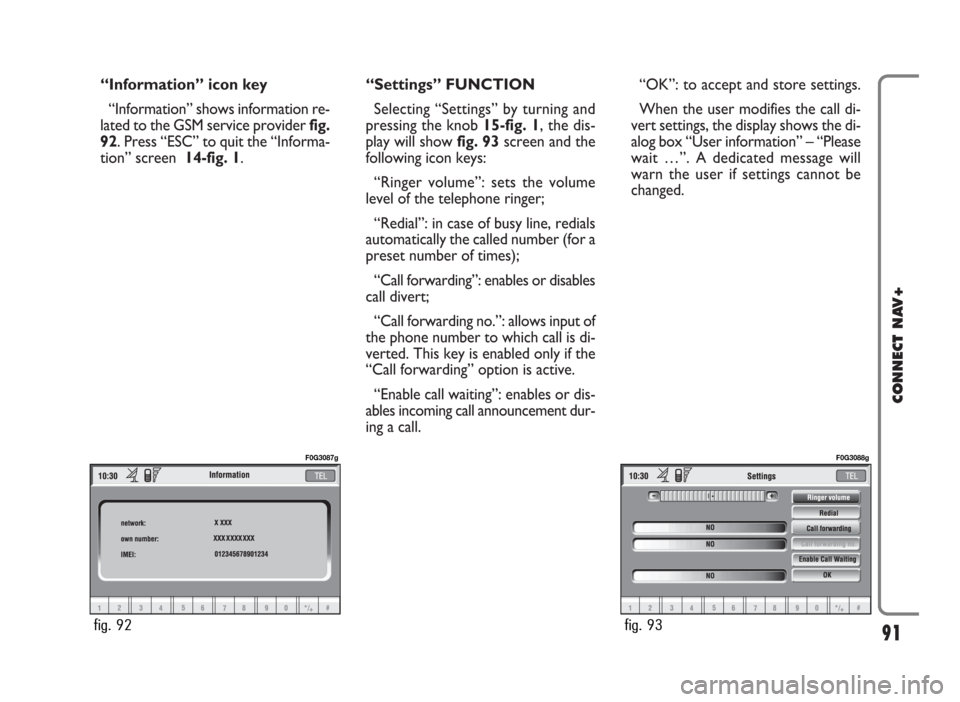
“Information” shows information re-
lated to the GSM service provider fig.
92. Press “ESC” to quit the “Informa-
tion” screen 14-fig. 1.“Settings” FUNCTION
Selecting “Settings” by turning and
pressing the knob 15-fig. 1, the dis-
play will showfig. 93screen and the
following icon keys:
“Ringer volume”: sets the volume
level of the telephone ringer;
“Redial”: in case of busy line, redials
automatically the called number (for a
preset number of times);
“Call forwarding”: enables or disables
call divert;
“Call forwarding no.”: allows input of
the phone number to which call is di-
verted. This key is enabled only if the
“Call forwarding” option is active.
“Enable call waiting”: enables or dis-
ables incoming call announcement dur-
ing a call.“OK”: to accept and store settings.
When the user modifies the call di-
vert settings, the display shows the di-
alog box “User information” – “Please
wait …”. A dedicated message will
warn the user if settings cannot be
changed.
91
CONNECT NAV+
fig. 92
F0G3087g
fig. 93
F0G3088g
Page 94 of 166

IMPORTANT NOTES
– Accurate self-adjustment of the
navigation system requires approx.
100 km of travel the first time and
when tyres are changed; during this
stage the calculated position could be
less accurate.
– Continuous lack of grip at the
wheels (for example skidding on ice),
makes the system temporarily detect
an incorrect position.
The navigation system is completely
managed by the telematic system,
therefore the only operations that
may be required are replacement of
the CD-ROM to set the map of an-
other area or an updated map.
Access to the navigation main func-
tions is gained by short push on “NAV”
key 18-fig. 1 , whereas a long push
(over 2 seconds) on the same key will
activate the NAV RPT function: navi-
gation voice instructions will be un-
available. To switch the function on
again press the “NAV” key 18-fig. 1for
over 2 seconds.When the system is switched on, the
display will, upon the first selection of
the navigating function, show the in-
structions for using the system. The
text will be as follows:
“The FIAT navigation system guides
you in traffic and helps you reach your
destination. Comply with all local traf-
fic regulations, which take precedence
over the manoeuvres indicated by the
navigation system. Full responsibility
for operating the vehicle and observ-
ing all traffic regulations lies with the
driver”.
This page will not be displayed as
long as the ignition key is to ON.SCREEN OPTIONS
AND FUNCTIONS
The main information and functions
provided and managed by the naviga-
tion system are:
– GPS signal symbol which differs in
colour depending on the quality of re-
ception ;
– voice and visual instructions with
indications of distance from the des-
tination and planned arrival time;
– detailed map in different colours
and with different scales to clearly
show the car position, route and des-
tination;
– customisation of the navigation sys-
tem with possibility of entering pre-
memorised destinations;
– automatic memorising of the last
10 destinations;
– name of current street;
93
CONNECT NAV+
Page 95 of 166

– possibility to choose the route ac-
cording to personal preference;
– information on current position;
– information on arrival time.
If the system contains a wrong CD-
ROM, an audio CD or no CD, when-
ever the system asks for the navigation
CD-ROM for route calculation or map
up-date, the insertion prompt will ap-
pear on the display.
Should a CD be inserted in the
wrong side, the display will show the
message “CD ERROR”. In this event,
eject the CD and re-insert it proper-
ly.GRAPHIC INSTRUCTIONS
The operations to be performed will
be displayed by means of arrows or
pictograms on the main page of the
navigating function.
The downward graphic symbol rep-
resents next manoeuvre (turn left,
right, straight on, U-turn) while the up-
ward graphic symbol represents the
next one. The number displayed un-
der the graphic symbol indicates the
car distance from the manoeuvre
point. VOICE INSTRUCTIONS
The voice instructions provided by
the system guide you to your destina-
tion and suggest all manoeuvres to be
carried out in due time: in particular,
the manoeuvres is announced first and
then detailed instructions are given.
Press briefly the “NAV” key 18-fig.
1to repeat the last voice instruction.
To adjust the volume turn the knob
17-fig. 1during voice instruction.
If necessary, press again “NAV ” 18-
fig. 1to repeat the voice instruction
and adjust the volume.
94
CONNECT NAV+
Page 96 of 166
The navigator CD-ROM player 7-fig.
1is located on the CONNECT Nav+
front panel and it is the same used for
the audio CD. Therefore, it is not pos-
sible to use the player for audio and
navigation CD-ROM at the same time:
however, the navigation system can
operate partially even without insert-
ing the navigation CD-ROM.
In this case, when pressing key
˚8-
fig.1to remove the CD-ROM with
navigation function engaged (to then
insert an audio CD), the following two
cases may occur:
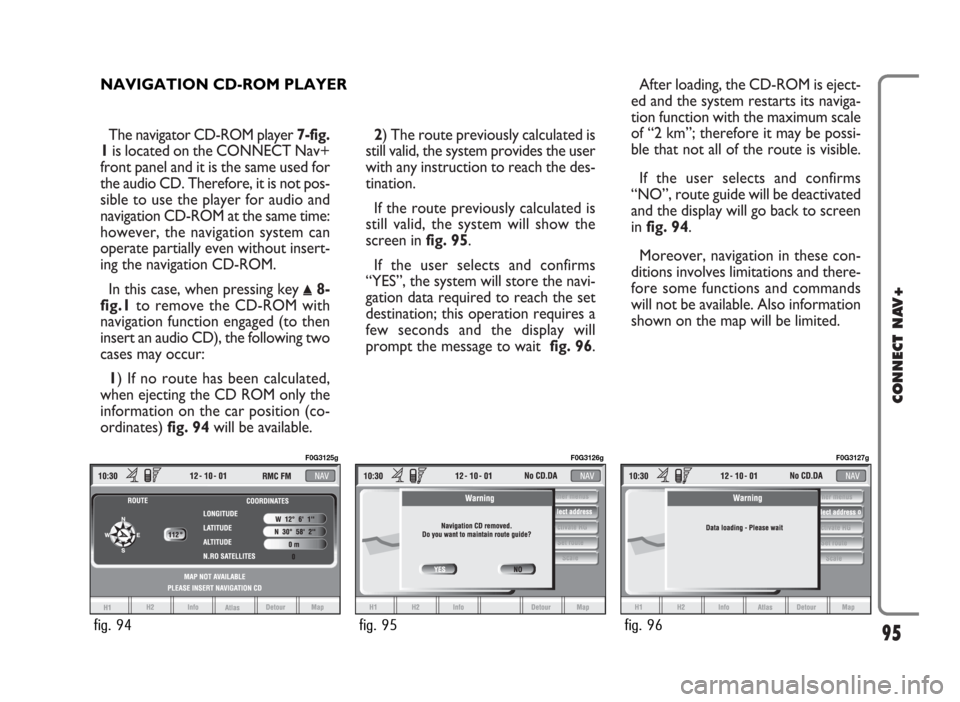
1) If no route has been calculated,
when ejecting the CD ROM only the
information on the car position (co-
ordinates) fig. 94will be available.2) The route previously calculated is
still valid, the system provides the user
with any instruction to reach the des-
tination.
If the route previously calculated is
still valid, the system will show the
screen in fig. 95.
If the user selects and confirms
“YES”, the system will store the navi-
gation data required to reach the set
destination; this operation requires a
few seconds and the display will
prompt the message to wait fig. 96.After loading, the CD-ROM is eject-
ed and the system restarts its naviga-
tion function with the maximum scale
of “2 km”; therefore it may be possi-
ble that not all of the route is visible.
If the user selects and confirms
“NO”, route guide will be deactivated
and the display will go back to screen
in fig. 94.
Moreover, navigation in these con-
ditions involves limitations and there-
fore some functions and commands
will not be available. Also information
shown on the map will be limited.
95
CONNECT NAV+
NAVIGATION CD-ROM PLAYER
fig. 94
F0G3125g
fig. 95
F0G3126g
fig. 96
F0G3127g
Page 97 of 166

MAIN SCREEN
Main navigator screen fig. 98shows
the following information:
– Time.
– GPS and GSM signal strengths.
– Date.
– Audio info.
– Active mode (NAV).
– Car position on the map (icon).
– Map scale.At the bottom of the screen are dis-
played the following options, that can
be activated by the corresponding
multifunction keys 16-fig. 1:
H1and H2(Home 1 and Home 2):
start route calculation towards one of
the two predefine or frequently used
destinations. If no point has been de-
fined as “Home 1” or “Home 2”, a
warning reminds the user that the
function is not available.
Info: displays info on car position and
destination. When the navigation system is no
longer able to continue destination
guidance or the car is now out of the
loaded map section, the system
prompts for inserting the navigation
CD-ROM fig. 97. If the user does not
insert the CD-ROM, the system re-
turns to the status shown in fig. 94.
IMPORTANT
The driver is always responsible
for compliance with the enforced
traffic regulations: any indication
based on wrong map data leading
to unauthorised driving manoeu-
vres MUST NOT be followed.
96
CONNECT NAV+
fig. 97
F0G3128g
fig. 98
F0G3129g
fig. 99
F0G3130g
Page 98 of 166

The display will show the following
information fig. 99:
– compass representation indicating
the car position (in degrees) with ref-
erence to the North;
– longitude, latitude and height;
– visible satellites number;
– destination (available only with nav-
igation on);
– time of arrival and distance to des-
tination (available only with navigation
on).
Pressing “ESC” 14-fig. 1or “NAV”
18-fig. 1takes back to the main nav-
igation screen.
Atlas: enables map drawing in atlas
mode (for further details see section
“ATLAS” on the following pages).
Detour: allows the user to choose
(if possible) an alternative route to
reach the selected destination, avoid-
ing a specified portion of the current-
ly calculated route.
97
CONNECT NAV+
To activate this function, select the
route portion to be avoided fig. 100
by turning the knob 15-fig. 1and
pressing it to confirm.
The display will then show the new
distance and the time necessary to
reach the destination fig. 101.
Selecting and confirming “YES” or
“NO” by turning and pressing the knob
15-fig. 1, the user can accept or reject
the new route.
If there is no alternative route, then
the display shows “No alternative
route” fig. 102.Map: activates the map mode. The
display shows map, route (if present),
car position (town and street names),
icons of next two crosses (only if
route is present) fig. 103.
To modify the map scale, proceed as
follows:
– turn the knob 15-fig. 1and select
the required scale;
– press the knob 15-fig. 1to con-
firm.
When you approach a crossroads,
the map will be replaced with an en-
largement of the surrounding area fig.
104a(crossroads zoom function, if ac-
tuated in “map preference”).
fig. 100
F0G3131g
fig. 101
F0G3132g
Page 110 of 166

109
CONNECT NAV+
SET ROUTE
“Set route” allows to define the
route calculation parameters.
When selecting this function by ro-
tating the knob 15-fig. 1and pressing
it to confirm, the display shows the fol-
lowing options fig. 125:Route type
Selecting and confirming “Route
type” by rotating and pressing the
knob 15-fig. 1, makes it possible to
set the route calculation criteria ac-
cording to two different modes:
“Shortest time” or “Shortest dis-
tance”.Highway
Select and confirm “Highway” by ro-
tating and pressing the knob 15-fig.
1to define if route can include high-
way segments or not.
To activate set calculation parame-
ters, select icon “OK” turning the
knob 15-fig. 1and pressing it to con-
firm.
fig. 125
F0G3161g
Page 117 of 166
116
CONNECT NAV+
GENERAL INFORMATION
The on-board computer provides a
series of helpful data relevant to cur-
rent travel (e.g.: times, distances,
speed, fuel consumption). Certain in-
formation is only available with navi-
gation function on and depends on set
navigation route.
IMPORTANTCertain informa-
tion/operations hereafter described
are available/possible only with ignition
key turned to ON.
TRIP menu allows to set the desired
distance and fuel consumption mea-
sure unit.
TRIP menu also allows to input a
number of events (e.g. Tyre replace-
ment..., Birthday…) that can be trig-
gered both on set date or mileage.To display on-board computer
screen, press “TRIP” key 4-fig. 1.
To perform new settings or to have
information about TRIP settings, press
keypad16-fig. 1buttons: “TRIP”,
“TRIP B”, “SPEED”, “MY CAR”, “IN-
FO” or “RESET”.“GENERAL TRIP”
and “TRIP B” FUNCTION
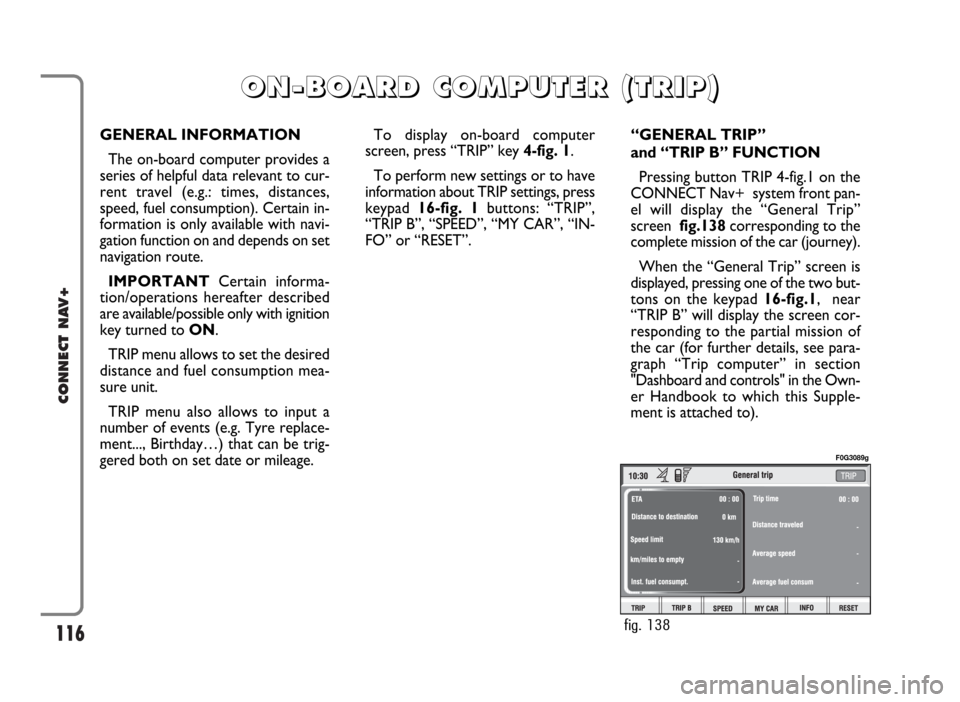
Pressing button TRIP 4-fig.1 on the
CONNECT Nav+ system front pan-
el will display the “General Trip”
screen fig.138corresponding to the
complete mission of the car (journey).
When the “General Trip” screen is
displayed, pressing one of the two but-
tons on the keypad 16-fig.1, near
“TRIP B” will display the screen cor-
responding to the partial mission of
the car (for further details, see para-
graph “Trip computer” in section
"Dashboard and controls" in the Own-
er Handbook to which this Supple-
ment is attached to).
O O
N N
- -
B B
O O
A A
R R
D D
C C
O O
M M
P P
U U
T T
E E
R R
( (
T T
R R
I I
P P
) )
fig. 138
F0G3089g