Page 118 of 166

117
CONNECT NAV+
Information displayed on “General
Trip” fig. 138and “Trip B” fig. 139
screen are the following:
– ETA (Estimated Time of Arrival)
– Distance to destination
– Speed limit
– km/miles to empty
– Inst. fuel consumpt.
(instantaneous fuel consumption)
– Trip time (*)
– Distance traveled (*)
– Average speed (*)
– Average fuel consum (*)
Information marked with (*) are re-
settable (refer to paragraph “TRIP: Re-
set”).“ETA”
(Estimated Time of Arrival)
This information is present only
when the navigation function is on and
indicates the expected time of arrival
to destination. Time is expressed in
“hh:mm” (hours and minutes).
“Distance to destination”
This information is present only
when the navigation function is on and
indicates the distance between current
position and the destination set. Dis-
tance value is expressed in “km” (kilo-
metres) unless otherwise set by the
user (see paragraph “MY CAR”).“Speed limit”
This function is used to set car speed
limit; if this is exceeded the driver is
warn by a buzzer and a display warn-
ing message on the instrument panel.
“km/miles to empty”
This shows the distance that the car
can still cover before needing fuel. This
value is the same for both “General
Trip” and “Trip B”. Value is expressed
in “km” (kilometres) unless otherwise
set by the user (see paragraph “TRIP:
MY CAR”).
fig. 139
F0G3090g
Page 119 of 166
118
CONNECT NAV+
“Inst. fuel consumpt.”
This shows the fuel consumption of
the car while driving and is therefore
helpful for learning the fuel consump-
tion in relation to the driving style
adopted. This value is the same for
both “General Trip” and “Trip B”. The
value is expressed in “l/100 km” (litres
per 100 kilometres) unless otherwise
set by the user (see paragraph “TRIP:
MY CAR”).
“Trip time”
This shows the time elapsed (travel
time) since the last manual reset of the
on-board computer (“TRIP: RESET”
function). The value is expressed in
“hh:mm” (hours and minutes).“Distance traveled”
This shows the distance traveled by
the car from the last manual reset of
the on-board computer (“TRIP: RE-
SET” function). The value is expressed
in “km” (kilometres) unless otherwise
set by the user (see paragraph “TRIP:
MY CAR”).
“Average speed”
This shows the average speed of the
car calculated from the last manual re-
set of the on-board computer (“TRIP:
RESET” function). The value is ex-
pressed in “km/h” (kilometres per
hour) unless otherwise set by the user
(see paragraph “TRIP: MY CAR”).
“Average fuel consum”
This shows the average consumption
of the car calculated from the last
manual reset of the on-board com-
puter (“TRIP: RESET” function). The
value is expressed in “l/100 km” (litres
per 100 kilometres) unless otherwise
set by the user (see paragraph “TRIP:
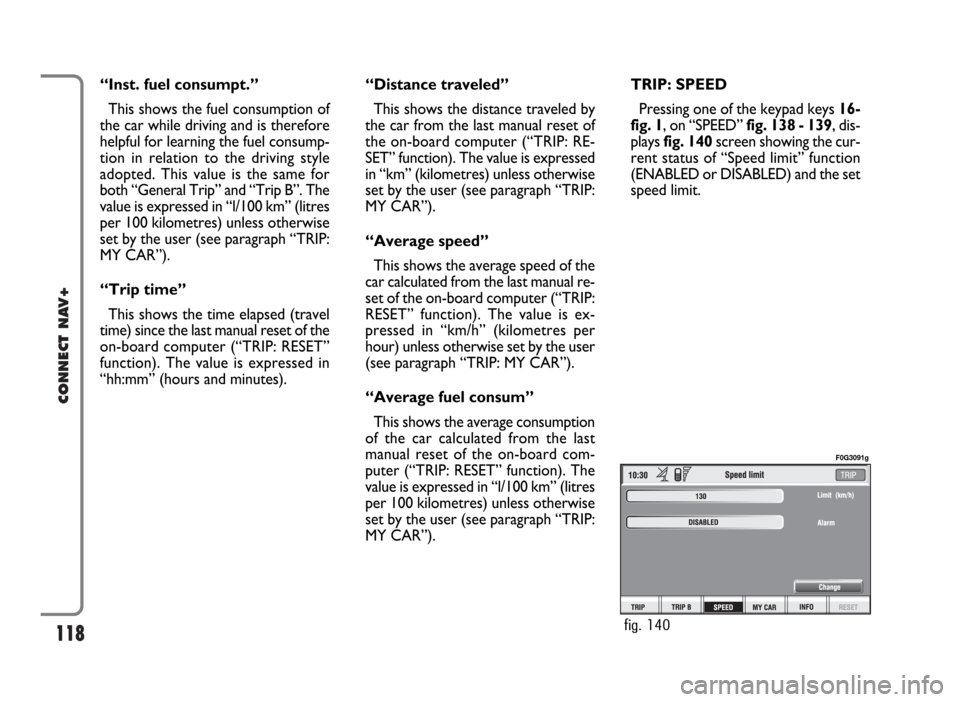
MY CAR”).TRIP: SPEED
Pressing one of the keypad keys 16-
fig. 1, on “SPEED” fig. 138 - 139, dis-
plays fig. 140screen showing the cur-
rent status of “Speed limit” function
(ENABLED or DISABLED) and the set
speed limit.
fig. 140
F0G3091g
Page 124 of 166
123
CONNECT NAV+
Then select “OK” and press the
knob 15-fig. 1to confirm.
“Delete” clears off the new entry.TRIP: RESET
“RESET” function resets on-board
computer data (trip time, distance
traveled, average speed and average
fuel consumption).
Press one of the two keys on the
keypad 16-fig. 1, on “RESET”.
If “Trip B” window fig. 139is active,
only “Trip B” data are reset.
If “General Trip” window fig. 138
is active, both “General Trip” and
“Trip B” data are reset.IMPORTANTTrip computer data
reset is only possible with ignition key
to ON.
Page 125 of 166

124
CONNECT NAV+
The MY CAR mode enables to set
different car and CONNECT Nav+
system operating modes and parame-
ters.
Parameters and operating modes
have been grouped in the following
four areas:
– LANGUAGE
– DATE & TIME
– VEHICLE
– CONNECT.
Every above area is then divided in
different sub-areas. Read carefully
through this chapter to learn any fea-
tures offered by CONNECT Nav+
system.
To enter the MY CAR mode, press
the “TRIP” key 4-fig. 1on the front
panel, then press one of the two keys
set under the “MY CAR” icon key.
Screen in fig. 148will be displayed.IMPORTANTIf the ignition key is
at OFFcertain MY CAR informa-
tion/operations will only be accessible
for reference.
Any new setting on the CONNECT
Nav+, will be operative only after
check performed by car check com-
ponents; otherwise the warning mes-
sage “Setup change failed” will be dis-
played.
IMPORTANTTo be sure that any
new setting is positively received by
car check components, it is strictly
necessary that ignition key is at ON.
For each item on the display, symbol
“✓” indicates whether the item is set.On the right side of the display “Text
Language” shows which language for
written text is active, “VR language”
(Voice Recognition language) shows
which language is used by the system
for voice commands.
M M
Y Y
C C
A A
R R
fig. 148
F0G3111g
Page 126 of 166

125
CONNECT NAV+
IMPORTANTSetting (whatever)
language will start the updating pro-
cedure for both the written text and
for voice commands and instructions.
The written text (strings) will be up-
dated immediately upon selecting the
language. To update voice command
and message language the Setup CD
shall be inserted. if the Setup CD is not
inserted when requested, the required
voice command and message language
will not be updated.
To change parameters and operating
modes, press keypad keys 16-fig. 1
under LANGUAGE, DATE & TIME,
VEHICLE or CONNECT.
This operation will display the spe-
cific screen thus allowing the desired
operations.LANGUAGE
To display the relevant screen page,
press one of the keypad keys 16-
fig. 1under LANGUAGE fig. 149.
IMPORTANTBefore starting lan-
guage upgrading procedure, be sure
that the provided Setup CD is avail-
able and ready to be used.
Selecting icon “LANGUAGE”, by
turning the knob 15-fig. 1and press-
ing it to confirm, the user can set the
required language, available languages
are: Italian, English, French, German,
Spanish and Portuguese.Selected language will be valid for
both the written text (“Text Lan-
guage”) and voice recognition (“VR
language”) and for any voice instruc-
tion coming from the system.
To select the required language, ro-
tate the knob 15-fig. 1and press it to
confirm.
As concerns the written text, the
new language is active after selecting
“OK” with the knob 15-fig. 1and
pressing it.
For setting voice recognition, the
user will be requested to input the
Setup CD.
IMPORTANTIf the Setup CD is
not inserted, the new set language will
be operative for written text only.
Voice recognition (and instruction
coming from the system) language will
be the default or the preset one.
fig. 149
F0G3112g
Page 127 of 166

126
CONNECT NAV+
The display will show the following
string:
“Insert Setup CD to change language
of messages and voice commands.
Press ESC to cancel”.
If the Setup CD is inserted the fol-
lowing message will be permanently
displayed:
“System will be unavailable for a few
seconds and calls in progress will be
terminated. Press ENTER to continue
or ESC to cancel”.
If the knob 15-fig. 1has been
pressed, the following message will be
displayed permanently:
“Message and voice command lan-
guage change in progress. Do not turn
off system. Please wait”.
The end of the procedure is indicat-
ed by the following message:
“Message and voice command lan-
guage change concluded correctly”.If some errors occur during language
updating, the following message will be
displayed:
“Language change failed. Please re-
peat procedure”.
This message asks the user to repeat
the above procedure.
Whenever the system is switched on
turning the ignition key to ON, the
language module is checked and if the
system finds a fault the following mes-
sage is displayed:
“Voice commands and messages not
available. Please change the language”.
This message asks the user to repeat
language change procedure.
The user shall set again the desired
language in the SETUP menu and then
follow the above procedure.DATE & TIME
To open the relevant screen page,
press one of the keypad keys 16-
fig. 1under DATE fig. 150.
IMPORTANTAny adjustment can
only be performed with ignition key at
ON. Otherwise setting is rejected and
the warning message “Setup change
failed” will be displayed.
Time displaying can be set accord-
ing to two modes: 12h or 24h.
150
F0G3113g
Page 128 of 166

127
CONNECT NAV+
To set a new Date/Time (only with
ignition key at ON), select the “Date
& time” icon and then press the knob
15-fig. 1.
To set day, month, year, hours, min-
utes, mode (12h /24h), rotate the
knob 15-fig. 1to the required setting
and then press the knob 15-fig. 1,
each field will be activated in sequence.
Setting “GG”: selectday rotating
the knob 15-fig. 1and press it to con-
firm.
Setting “MMM”: select month rotat-
ing the knob 15-fig. 1and press it to
confirm.Setting AAAA: select year rotating
the knob 15-fig. 1and press it to con-
firm.
Setting HH: select hour rotating the
knob 15-fig. 1and press it to confirm.
Setting MM: select minutes rotating
the knob 15-fig. 1and press it to con-
firm.
Setting MODO (12h / 24h): select
12h or 24h mode rotating the knob
15-fig. 1and press it to confirm.
To activate the required settings, se-
lect and confirm “OK” by turning and
pressing the knob 15-fig. 1.IMPORTANTDuring setting,
hours (HH) are always displayed with
24h mode, regardless of set mode.
IMPORTANTIf set mode is 24h,
the display shows time using digits be-
tween 0 and 23; if set mode is 12h, the
display shows time using digits be-
tween 1 and 12.
Page 133 of 166
132
CONNECT NAV+
VIDEO
Selecting and confirming the “Video”
icon by rotating and pressing the knob
15-fig. 1will allow the following set-
tings fig. 156:Daytime brightness: enables to
adjust CONNECT Nav+ screen
brightness in day mode, if colour mode
is active: DAY or Automatic with lights
off (see paragraph Color). To perform
the adjustment, select and confirm the
relevant icon rotating and pressing the
knob 15-fig. 1. Rotate the knob 15-
fig. 1clockwise to increase brightness
and counterclockwise to decrease it.Nighttime brightness: enables to
adjust CONNECT Nav+ screen
brightness in night mode, if colour
mode is active: NIGHT or Automatic
with lights on (see paragraph Color).
To perform the adjustment, select and
confirm the relevant icon rotating and
pressing the knob 15-fig. 1. Rotate
the knob 15-fig. 1clockwise to in-
crease brightness and counterclock-
wise to decrease it.
fig. 156
F0G3122g