Page 134 of 464
Interior Lights
The interior lights come on when a door is opened.
The interior lights will automatically turn off in about 15
minutes if a door is left open or the dimmer control is left
in the Dome light position. Turn the ignition switch ON
to restore the interior light operation.
Multi-Function Lever
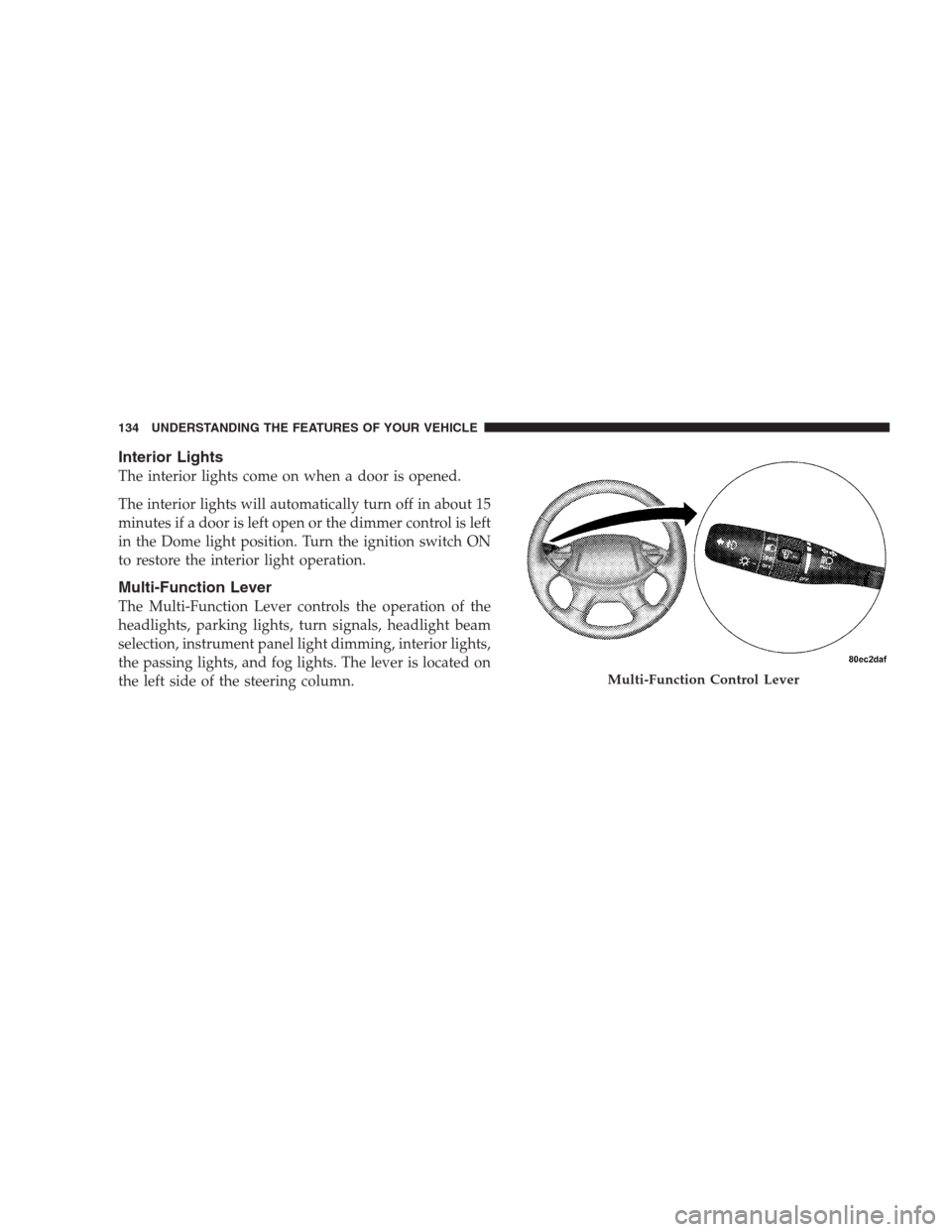
The Multi-Function Lever controls the operation of the
headlights, parking lights, turn signals, headlight beam
selection, instrument panel light dimming, interior lights,
the passing lights, and fog lights. The lever is located on
the left side of the steering column.
Multi-Function Control Lever
134 UNDERSTANDING THE FEATURES OF YOUR VEHICLE
Page 137 of 464
To activate the delay feature, turn off the ignition switch
while the headlights are still on. Then turn off the
headlights within 45 seconds. The 90 second delay inter-
val begins when headlight switch is turned off. If the
headlights or park lights are turned back on or the
ignition switch is turned on, the delay will be cancelled.
If the headlights are turned off before the ignition, they
will turn off in the normal manner.
NOTE:The lights must be turned off within 45 seconds
of turning the ignition off to activate this feature
Fog Lights — If Equipped
The front fog light switch is on the Multi-Function
Lever. To activate the front fog lights, turn on the
parking lights or the low beam headlights and pull
out the end of the Multi-Function Lever.NOTE:The fog lights will only operate with the head-
lights on low beam. Selecting high beam headlights will
turn off the fog lights.
Turn Signals
Move the Multi-Function Lever up or down and the
arrows on each side of the instrument cluster flash to
show proper operation of the front and rear turn signal
lights. You can signal a lane change by moving the lever
partially up or down without moving beyond the detent.
If either light has a very fast flash rate, check for a
defective outside light bulb. If an indicator fails to light
when the lever is moved, it would suggest that the fuse
or indicator bulb is defective.
UNDERSTANDING THE FEATURES OF YOUR VEHICLE 137
3
Page 138 of 464
Highbeam/Lowbeam Select Switch
Pull the Multi-Function Lever towards you to switch the
headlights to HIGH beam. Pull the Lever a second time
to switch the headlights to LOW beam.
Passing Light
You can signal another vehicle with your headlights by
lightly pulling the Multi-Function Lever toward you.
This will cause the headlights to turn on at high beam
and remain on until the lever is released.
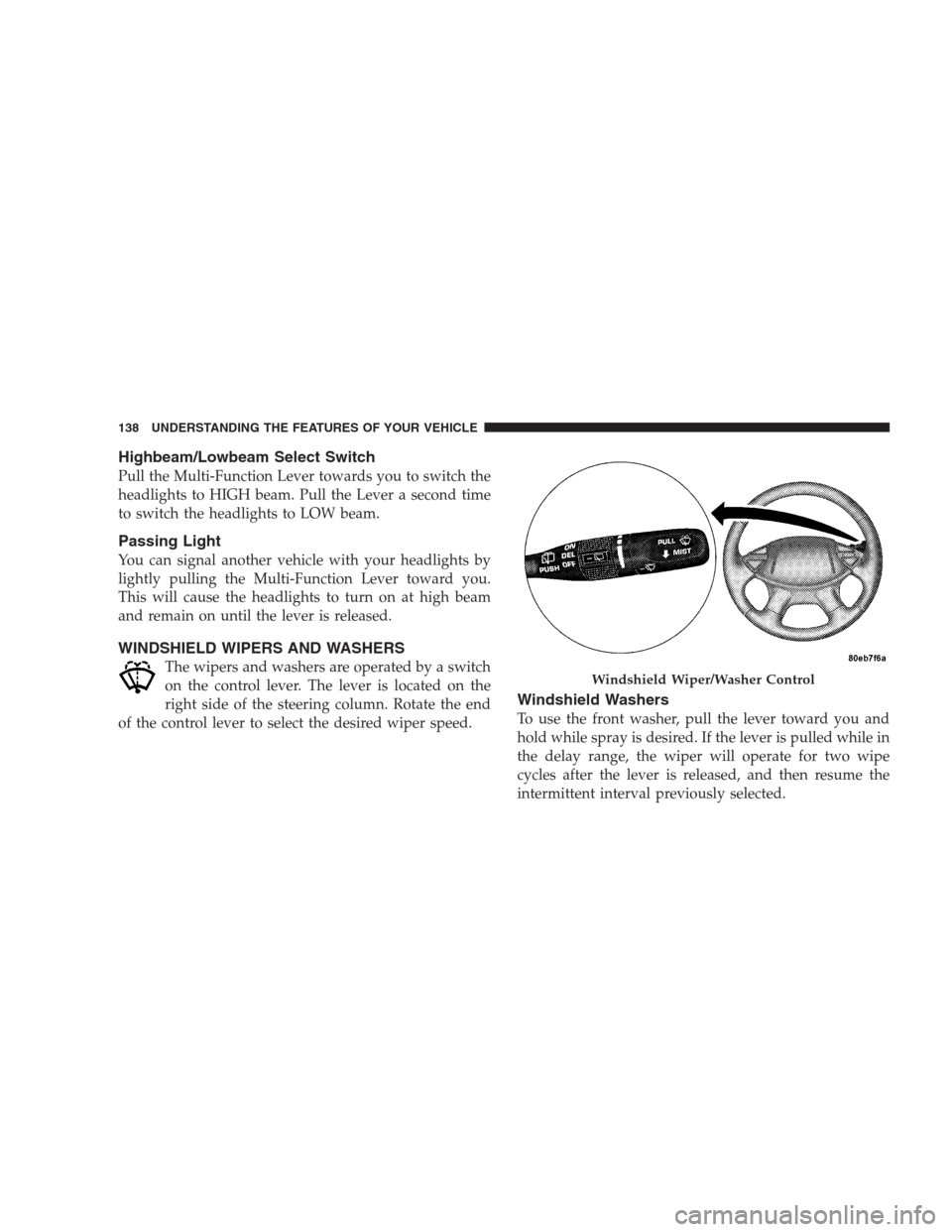
WINDSHIELD WIPERS AND WASHERS
The wipers and washers are operated by a switch
on the control lever. The lever is located on the
right side of the steering column. Rotate the end
of the control lever to select the desired wiper speed.
Windshield Washers
To use the front washer, pull the lever toward you and
hold while spray is desired. If the lever is pulled while in
the delay range, the wiper will operate for two wipe
cycles after the lever is released, and then resume the
intermittent interval previously selected.
Windshield Wiper/Washer Control
138 UNDERSTANDING THE FEATURES OF YOUR VEHICLE
Page 141 of 464
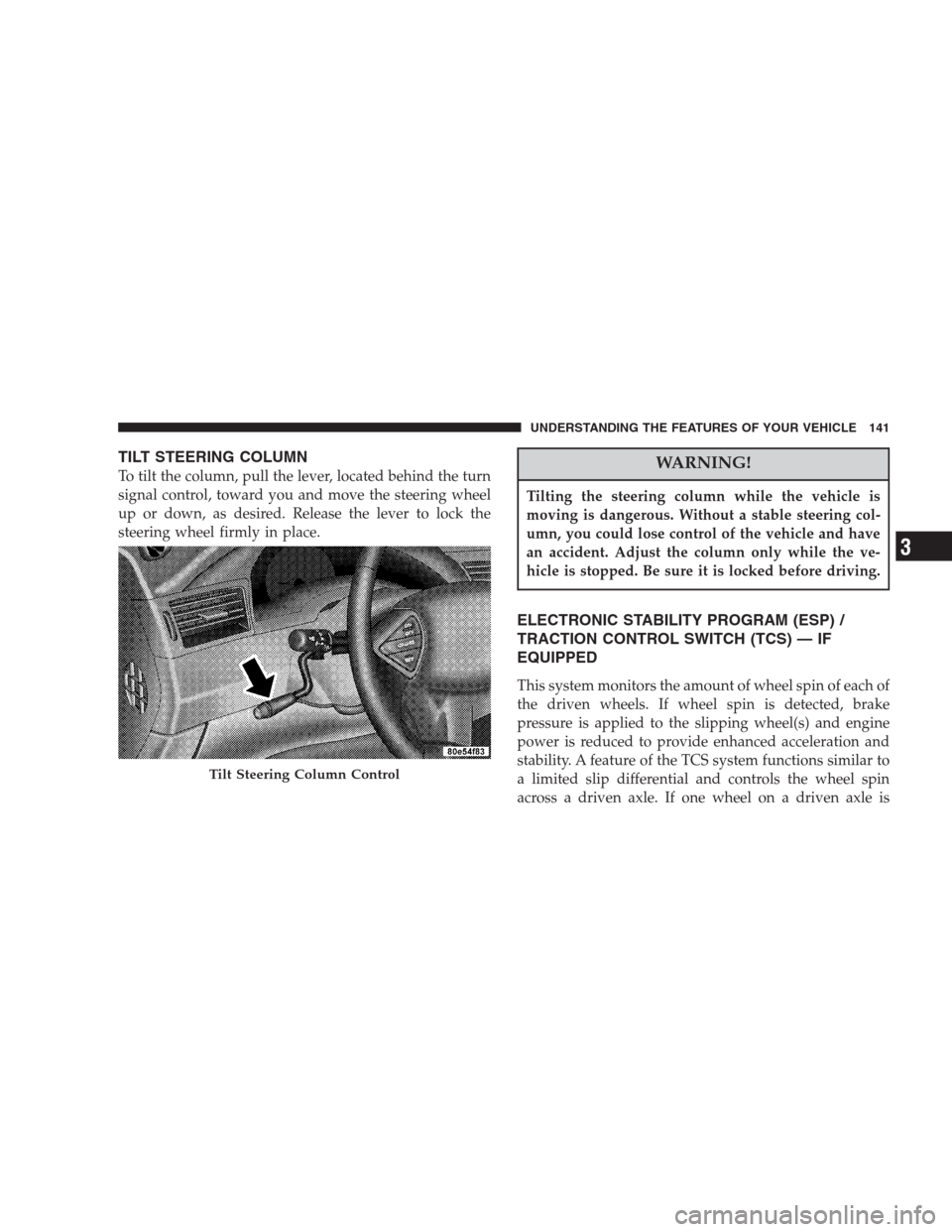
TILT STEERING COLUMN
To tilt the column, pull the lever, located behind the turn
signal control, toward you and move the steering wheel
up or down, as desired. Release the lever to lock the
steering wheel firmly in place.WARNING!
Tilting the steering column while the vehicle is
moving is dangerous. Without a stable steering col-
umn, you could lose control of the vehicle and have
an accident. Adjust the column only while the ve-
hicle is stopped. Be sure it is locked before driving.
ELECTRONIC STABILITY PROGRAM (ESP) /
TRACTION CONTROL SWITCH (TCS) — IF
EQUIPPED
This system monitors the amount of wheel spin of each of
the driven wheels. If wheel spin is detected, brake
pressure is applied to the slipping wheel(s) and engine
power is reduced to provide enhanced acceleration and
stability. A feature of the TCS system functions similar to
a limited slip differential and controls the wheel spin
across a driven axle. If one wheel on a driven axle is
Tilt Steering Column Control
UNDERSTANDING THE FEATURES OF YOUR VEHICLE 141
3
Page 155 of 464
WARNING!
Vehicle exhaust contains carbon monoxide, a danger-
ous gas. Do not run the vehicle’s exhaust while
training the transceiver. Exhaust gas can cause seri-
ous injury or death.
WARNING!
Your motorized door or gate will open and close
while you are training the Universal Transceiver. Do
not train the transceiver if people or pets are in the
path of the door or gate. A moving door or gate can
cause serious injury or death to people and pets or
damage to objects.
Programming HomeLink
NOTE:When programming a garage door opener, it is
advised to park outside the garage. Some vehicles may
require the ignition switch to be turned to the second (or
�Accessory�) position for programming and/or operation
of HomeLink. It is also recommended that a new battery
be placed in the hand-held transmitter of the device
being programmed to HomeLink for more efficient train-
ing and accurate transmission of the radio-frequency
signal.
The Electronic Vehicle Information Center (EVIC) fea-
tures a driver-interactive display which includes
HomeLink�system messages.
1. Press and hold the two outer HomeLink buttons, and
release only when the indicator light begins to flash or
the EVIC display shows “Channels Cleared” (after 20
seconds).Do nothold the buttons for longer than 30
UNDERSTANDING THE FEATURES OF YOUR VEHICLE 155
3
Page 158 of 464
3. Return to the vehicle and firmlypress, hold for two
seconds and releasethe programmed HomeLink button.
Repeat the�press/hold/release�sequence a second time,
and, depending on the brand of the garage door opener
(or other rolling code equipped device), repeat this
sequence a third time to complete the programming.
HomeLink should now activate your rolling code
equipped device.
NOTE:To program the remaining two HomeLink but-
tons, begin with�Programming�Step Two. Do not repeat
Step One. For questions or comments, please contact
HomeLink atwww.homelink.com or 1-800-355-3515.
Canadian Programming/Gate Programming
Canadian radio-frequency laws require transmitter sig-
nals to�time-out�(or quit) after several seconds of
transmission which may not be long enough for
HomeLink to pick up the signal during programming.Similar to this Canadian law, some U.S. gate operators are
designed to�time-out�in the same manner.
If you live in Canada or you are having difficulties
programming a gate operator by using the�Program-
ming�procedures (regardless of where you live),replace
�Programming HomeLink�Step Threewith the follow-
ing:
NOTE:If programming a garage door opener or gate
operator, it is advised to unplug the device during the
�cycling�process to prevent possible overheating.
3. Continue to press and hold the HomeLink button
while youpress and release every two seconds(�cycle�)
your hand-held transmitter until the frequency signal has
successfully been accepted by HomeLink. The indicator
light will flash slowly and then rapidly and the EVIC
display will show “Channel X Trained” (where X is
Channel 1, 2, or 3). Proceed with�Programming�Step
Four to complete.
158 UNDERSTANDING THE FEATURES OF YOUR VEHICLE
Page 181 of 464

WARNING!
A hot engine cooling system is dangerous. You or
others could be badly burned by steam or boiling
coolant. You may want to call a service center if your
vehicle overheats. If you decide to look under the
hood yourself, see Section 7 of this manual. Follow
the warnings under the Cooling System Pressure
Cap paragraph.
3. Fuel Gauge
The pointer shows the level of fuel in the fuel tank when
the ignition switch is in the ON position.
The Low Fuel Light will turn on when the fuel level
reaches approximately 2 to 4 gallons (7 to 15 liters)
this light will remain on until fuel is added.4. Turn Signal Indicators
The arrow will flash with the exterior turn signal
when the turn signal lever is operated.
If the vehicle electronics sense that the vehicle has
traveled about one mile with the turn signals on, a chime
will sound to alert you to turn the signals off. If either
indicator flashes at a rapid rate, check for a defective
outside light bulb.
5. Speedometer
Indicates vehicle speed.
6. Anti-Lock Light
This light monitors the Anti-Lock Brake Sys-
tem. The light will turn on when the ignition
switch is turned to the ON position and may
stay on for as long as four seconds.
If the ABS light remains on or turns on while driving, it
indicates that the Anti-Lock portion of the brake system
UNDERSTANDING YOUR INSTRUMENT PANEL 181
4
Page 191 of 464

ELECTRONIC VEHICLE INFORMATION CENTER
(EVIC) — IF EQUIPPED
The Electronic Vehicle Information Center (EVIC) con-
sists of the following:
•Vehicle information warning message displays
•Tire Pressure Monitor System — If Equipped
•Customer programmable features
•Compass display
•Mini-Trip functions
Pressing the MENU button will change the displayed
programming features. Pressing the STEP button will
display the available choices. Pressing the MENU button
a second time accepts a selected choice.
When the appropriate conditions exist, the Electronic
Vehicle Information Center (EVIC) displays the following
messages.
•LEFT/RIGHT TURN SIGNAL ON (with a continuous
warning chime)
•INVALID KEY & FOB (with a single chime)
•PARK ASSIST DISABLED
•SERVICE PARK ASSIST SYSTEM
•SERVICE IMMOBILIZER (with a single chime)
•KEY FOB BATTERY LOW (with a single chime)
•KEY & FOB PROGRAMMED (with a single chime)
•PROGRAM KEY & FOB
•MEMORY #1/#2 POSITION SET (with a single chime)
•MEMORY #1/#2 POS SELECTED
•MEMORY SYSTEM DISABLED VEHICLE NOT IN
PARK (with a single chime)
UNDERSTANDING YOUR INSTRUMENT PANEL 191
4