Page 195 of 464

Sound Horn On Lock?
When this feature is selected a short horn sound will
occur when the remote keyless entry “Lock” button is
pressed. This feature may be selected with or without the
flash lights on lock/unlock feature. Pressing the STEP
button when in this display will select “Yes” or “No.”
Flash Lights On Lock/Unlock?
When this feature is selected, the front and rear turn
signals will flash when the doors are locked or unlocked
using the remote keyless entry transmitter. This feature
may be selected with or without the sound horn on lock
feature selected. Pressing the STEP button when in this
display will select “Yes” or “No.”
Headlamp Delay
When this feature is selected the driver can choose, when
exiting the vehicle, to have the headlamps remain on for
30, 60, or 90 seconds, or not remain on. Pressing the STEP
button when in this display will select 30, 60, 90, or OFF.
Headlamp On With Wipers? (Available with Auto
Headlights Only)
When this feature is selected and the headlight switch
has at least once been moved to the AUTO position, the
headlights will turn on in approximately 10 seconds
when the wipers are turned on. The headlights will also
turn off when the wipers are turned off if they were
turned on in this way. Pressing the STEP button when in
this display will select “Yes” or “No.”
NOTE:Turning the headlights on during the daytime
causes the instrument panel lights to dim. To increase the
brightness, refer to “Lights” in this section.
Service Interval
When this feature is selected a service interval between
2,000 miles (3 200 km) and 6, 000 miles (10 000 km) in 500
mile (800 km) increments may be selected. Pressing the
STEP button when in this display will select distances
between 2,000 miles (3 200 km) and 6, 000 miles (10 000
km) in 500 mile (800 km) increments.
UNDERSTANDING YOUR INSTRUMENT PANEL 195
4
Page 200 of 464
ELECTRONIC DIGITAL CLOCK
The clock and radio each use the display panel built into
the radio. A digital readout shows the time in hours and
minutes whenever the ignition switch is in the ON or
ACC position and the time button is pressed.
When the ignition switch is in the OFF position, or when
the radio frequency is being displayed, time keeping is
accurately maintained.
Clock Setting Procedure
1. Turn the ignition switch to the ON or ACC position
and press the time button. Using the tip of a ballpoint pen
or similar object, press either the hour (H) or minute (M)
buttons on the radio.
2. Press the H button to set hours or the M button to set
minutes. The time setting will increase each time you
press a button.
RADIO GENERAL INFORMATION
Radio Broadcast Signals
Your new radio will provide excellent reception under
most operating conditions. Like any system, however, car
radios have performance limitations, due to mobile op-
eration and natural phenomena, which might lead you to
believe your sound system is malfunctioning. To help
you understand and save you concern about these “ap-
parent” malfunctions, you must understand a point or
two about the transmission and reception of radio sig-
nals.
Two Types of Signals
There are two basic types of radio signals... AM or
Amplitude Modulation, in which the transmitted sound
causes the amplitude, or height, of the radio waves to
vary... and FM or Frequency Modulation, in which the
frequency of the wave is varied to carry the sound.
200 UNDERSTANDING YOUR INSTRUMENT PANEL
Page 201 of 464
Electrical Disturbances
Radio waves may pick up electrical disturbances during
transmission. They mainly affect the wave amplitude,
and thus remain a part of the AM reception. They
interfere very little with the frequency variations that
carry the FM signal.
AM Reception
AM sound is based on wave amplitude, so AM reception
can be disrupted by such things as lightning, power lines
and neon signs.
FM Reception
Because FM transmission is based on frequency varia-
tions, interference that consists of amplitude variations
can be filtered out, leaving the reception relatively clear,
which is the major feature of FM radio.
NOTE:The radio, steering wheel radio controls (if
equipped), and 6 disc CD/DVD changer (if equipped)
will remain active for up to 10 minutes after the ignition
switch has been turned off. Opening a vehicle front door
will cancel this feature.
UNDERSTANDING YOUR INSTRUMENT PANEL 201
4
Page 230 of 464
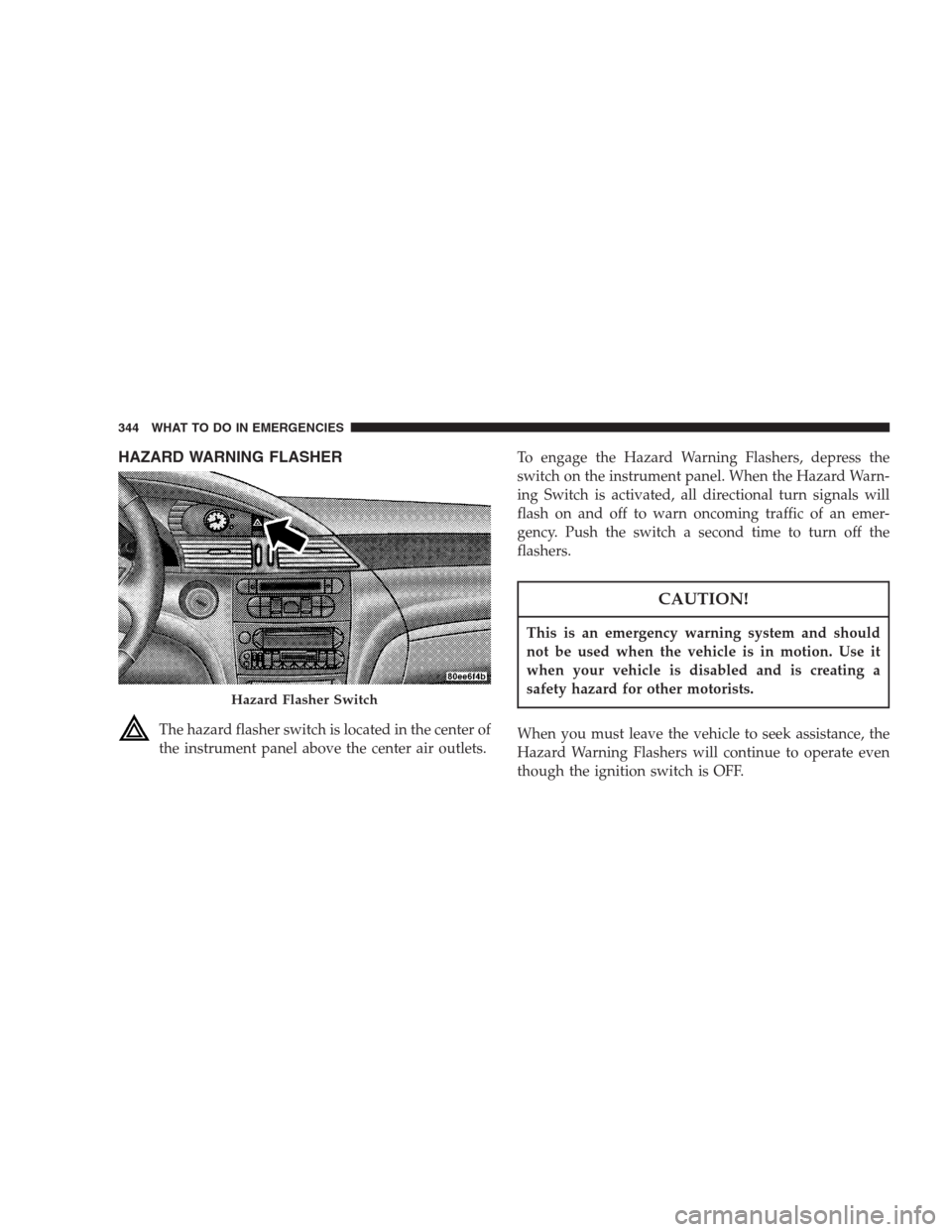
Operating Instructions — Headphones
1. Power Button
2. Volume Control
3. Power Indicator
Power Button
Pressing the power button will turn the headphones
ON/OFF. An indicator light will illuminate on the head-
phone earpiece to indicate the headphones are ON.
NOTE:
•The headphones will turn off automatically in ap-
proximately 3 minutes if they lose the signal form the
system or when the radio or rear audio/video system
is turned off.
Volume Control
Rotate the volume control to adjust the volume to the
desired listening level.
Rear Headphones
230 UNDERSTANDING YOUR INSTRUMENT PANEL
Page 339 of 464

Trailer brakes are recommended for trailers over 1,000
lbs (454 kg) and required for trailers in excess of 2,000
lbs (907 kg).
CAUTION!
If the trailer weighs more than 1,000 lbs (454 kg)
loaded, it should have its own brakes and they
should be of adequate capacity. Failure to do this
could lead to accelerated brake lining wear, higher
brake pedal effort, and longer stopping distances.
WARNING!
Do not connect trailer brakes to your vehicle’s hy-
draulic brake lines. It can overload your brake sys-
tem and cause it to fail. You might not have brakes
when you need them and could have an accident.
Towing any trailer will increase your stopping dis-
tance. When towing you should allow for additional
space between your vehicle and the vehicle in front
of you. Failure to do so could result in an accident.
Towing Requirements — Trailer Lights & Wiring
Whenever you pull a trailer, regardless of the trailer size,
stop lights and turn signals on the trailer are required for
motoring safety.
The Trailer Tow Package may includea4and7pin
wiring harness. Use a factory approved trailer harness
and connector.
STARTING AND OPERATING 339
5
Page 344 of 464
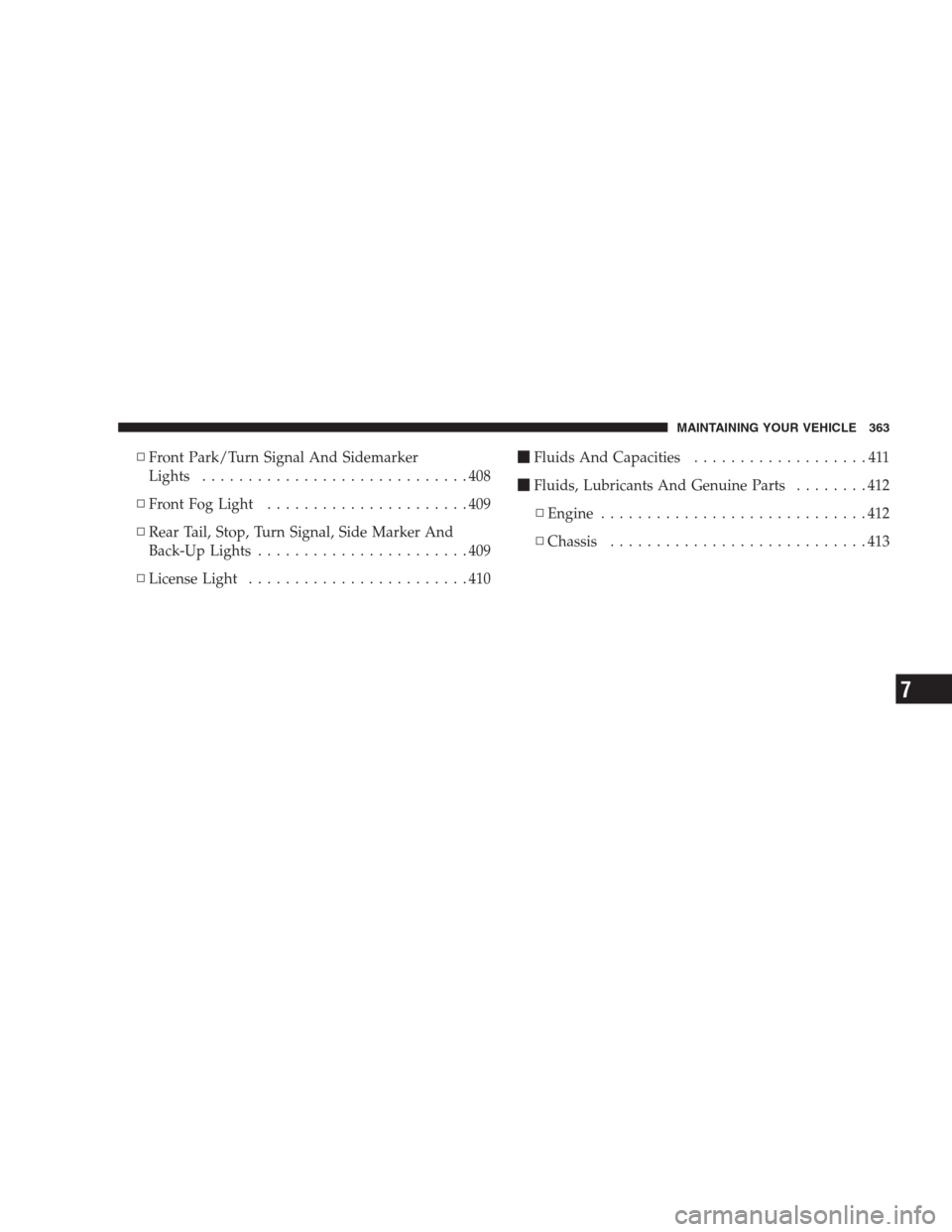
HAZARD WARNING FLASHER
The hazard flasher switch is located in the center of
the instrument panel above the center air outlets.To engage the Hazard Warning Flashers, depress the
switch on the instrument panel. When the Hazard Warn-
ing Switch is activated, all directional turn signals will
flash on and off to warn oncoming traffic of an emer-
gency. Push the switch a second time to turn off the
flashers.
CAUTION!
This is an emergency warning system and should
not be used when the vehicle is in motion. Use it
when your vehicle is disabled and is creating a
safety hazard for other motorists.
When you must leave the vehicle to seek assistance, the
Hazard Warning Flashers will continue to operate even
though the ignition switch is OFF.
Hazard Flasher Switch
344 WHAT TO DO IN EMERGENCIES
Page 363 of 464
▫Front Park/Turn Signal And Sidemarker
Lights.............................408
▫Front Fog Light......................409
▫Rear Tail, Stop, Turn Signal, Side Marker And
Back-Up Lights.......................409
▫License Light........................410�Fluids And Capacities...................411
�Fluids, Lubricants And Genuine Parts........412
▫Engine.............................412
▫Chassis............................413
MAINTAINING YOUR VEHICLE 363
7
Page 406 of 464
REPLACEMENT LIGHT BULBS
LIGHT BULBS — Interior Bulb Number
Center & Rear Reading Lights............... 578
Front Door Courtesy Light.................. 578
Liftgate Light(s).......................... 578
Overhead Console Reading Lights...........212–2
Visor Vanity Lights.....................V26377
NOTE:For lighted switches, see your dealer for replace-
ment instructions.
All of the interior bulbs are glass wedge base or glass
cartridge types. Aluminum base bulbs are not approved
and should not be used for replacement.LIGHT BULBS — Exterior Bulb Number
Back-up............................... 921
Rear Stop, Turn Signal....................3157
Rear Sidemarker......................... 168
Fog Light.............................9145
Front Turn Signal.......................3157A
Front Sidemarker......................... 194
Standard Headlight...................... H13
License................................ 168
BULB REPLACEMENT
Standard Quad Headlights
1. Remove the two screws securing the headlight mod-
ule to the vehicle and pull the headlight module forward
away from the vehicle, disengaging the assembly from
the lower attachment clip.
406 MAINTAINING YOUR VEHICLE