Page 20 of 464

ILLUMINATED ENTRY SYSTEM
The courtesy lights will turn on when you use the keyless
entry transmitter or open the doors.
The lights will fade to off after about 30 seconds or they
will immediately fade to off once the ignition switch is
turned on.
NOTE:
•The front courtesy overhead console, door courtesy
and liftgate lights do not turn on if the dimmer control
is in the interior lights ON position (extreme top
position).
•The illuminated entry system will not operate if the
dimmer control is in the “defeat” position (extreme
downward position).
REMOTE KEYLESS ENTRY
This system allows you to lock or unlock the doors and
liftgate, and activate the panic alarm from distances up to
about 23 feet (7 meters) using a hand held radio trans-
mitter. The transmitter need not be pointed at the vehicle
to activate the system.
NOTE:Inserting the key into the ignition switch dis-
ables all buttons on that transmitter; however, the but-
tons on the remaining transmitters will continue to work.
Shifting the vehicle out of PARK disables all transmitter
buttons for all keys.
20 THINGS TO KNOW BEFORE STARTING YOUR VEHICLE
Page 22 of 464

•On non EVIC – equipped vehicles perform the follow-
ing steps:
1. Perform this operation while standing outside the
vehicle.
2. Press and hold the UNLOCK button on your key fob.
3. Continue to hold the UNLOCK button, wait at least 4
seconds, but no longer than 10 seconds, then press and
hold the LOCK button. Release both buttons at the same
time.
4. This will allow you to unlock all doors on the first
press of the UNLOCK button.
5. To reactivate the feature, repeat this procedure.
6. If the programming procedure was unsuccessful see
your authorized dealer for programming assistance.To lock the doors and liftgate:
Press and release the LOCK button on the transmitter to
lock all doors. If the ignition is OFF, when the doors are
locked, the parking lights will flash on once and the horn
will chirp once.
Sound Horn On Lock
Press and release the LOCK button on the transmitter to
lock all doors. The turn signal lights will flash and the
horn will chip once to acknowledge the lock signal. If
desired, the “Sound Horn On Lock” feature can be
turned on or off by using the following procedure:
•On electronic vehicle information center (EVIC)
equipped vehicles refer to “Sound Horn On Lock?”
under “Use Factory Settings?” in the EVIC section of
this manual.
22 THINGS TO KNOW BEFORE STARTING YOUR VEHICLE
Page 23 of 464

•On non EVIC – equipped vehicles perform the follow-
ing steps:
1. Perform this operation while standing outside the
vehicle.
2. Press and hold the LOCK button on your key fob.
3. Continue to hold the LOCK button, wait at least 4
seconds, but no longer than 10 seconds, then press and
hold the PANIC button. Release both buttons at the same
time.
4. To reactivate the feature, repeat this procedure.
5. If the programming procedure was unsuccessful see
your authorized dealer for programming assistance.To Open/Close Power Liftgate — If Equipped
Press the LIFTGATE button twice within five seconds to
open/close the power liftgate. The liftgate will beep for 2
seconds and then open/close. If the button is pushed
while the liftgate is being power closed, the liftgate will
reverse to the full open position.
If the liftgate is locked and is not equipped with a
powered liftgate, pressing the button will result in the
liftgate becoming unlocked for 30 seconds allowing you
to manually access the liftgate area. The liftgate will
re-lock automatically within 10 seconds once the liftgate
is closed.
Flash Lights On Lock/Unlock
The Flash Lights With Lock or Unlock feature can be
turned on or off.
THINGS TO KNOW BEFORE STARTING YOUR VEHICLE 23
2
Page 24 of 464

•On electronic vehicle information center (EVIC)
equipped vehicles refer to “Flash Lights On Lock/
Unlock?” under “Use Factory Settings?” in the EVIC
section of this manual.
•On non EVIC - equipped vehicles perform the follow-
ing steps:
1. Perform this operation while standing outside the
vehicle.
2. Press and hold the LOCK button on your key fob.
3. Continue to hold the LOCK button, wait at least 4
seconds, but no longer than 10 seconds, then press and
hold the UNLOCK button. Release both buttons at the
same time.
4. To reactivate the feature, repeat this procedure.
5. If the programming procedure was unsuccessful see
your authorized dealer for programming assistance.
Using The Panic Alarm:
To activate the Panic mode while the ignition is OFF press
and release the PANIC button on the transmitter once.
When the Panic mode is activated, the interior lights will
illuminate, the headlamps and parking lights will flash,
and the horn will sound.
To cancel the Panic mode press and release the PANIC
button on the transmitter a second time. Panic mode will
automatically cancel after 3 minutes or if the vehicle is
started and exceeds 15 mph. During the Panic Mode, the
door locks and remote keyless entry systems will func-
tion normally. Panic mode will not disarm the security
system on vehicles so equipped.
NOTE:When you turn off the panic alarm by pressing
the PANIC button a second time, you may have to be
closer to the vehicle due to the radio frequency noises of
the system.
24 THINGS TO KNOW BEFORE STARTING YOUR VEHICLE
Page 25 of 464
Programming Additional Transmitters
Refer to SENTRY KEY “Customer Key Programming.”
NOTE:If you do not have a programmed transmitter,
contact your authorized dealer for assistance.
Battery Replacement
The recommended replacement battery is CR2032 bat-
tery.
NOTE:Do not touch the battery terminals that are on
the back housing or the printed circuit board.
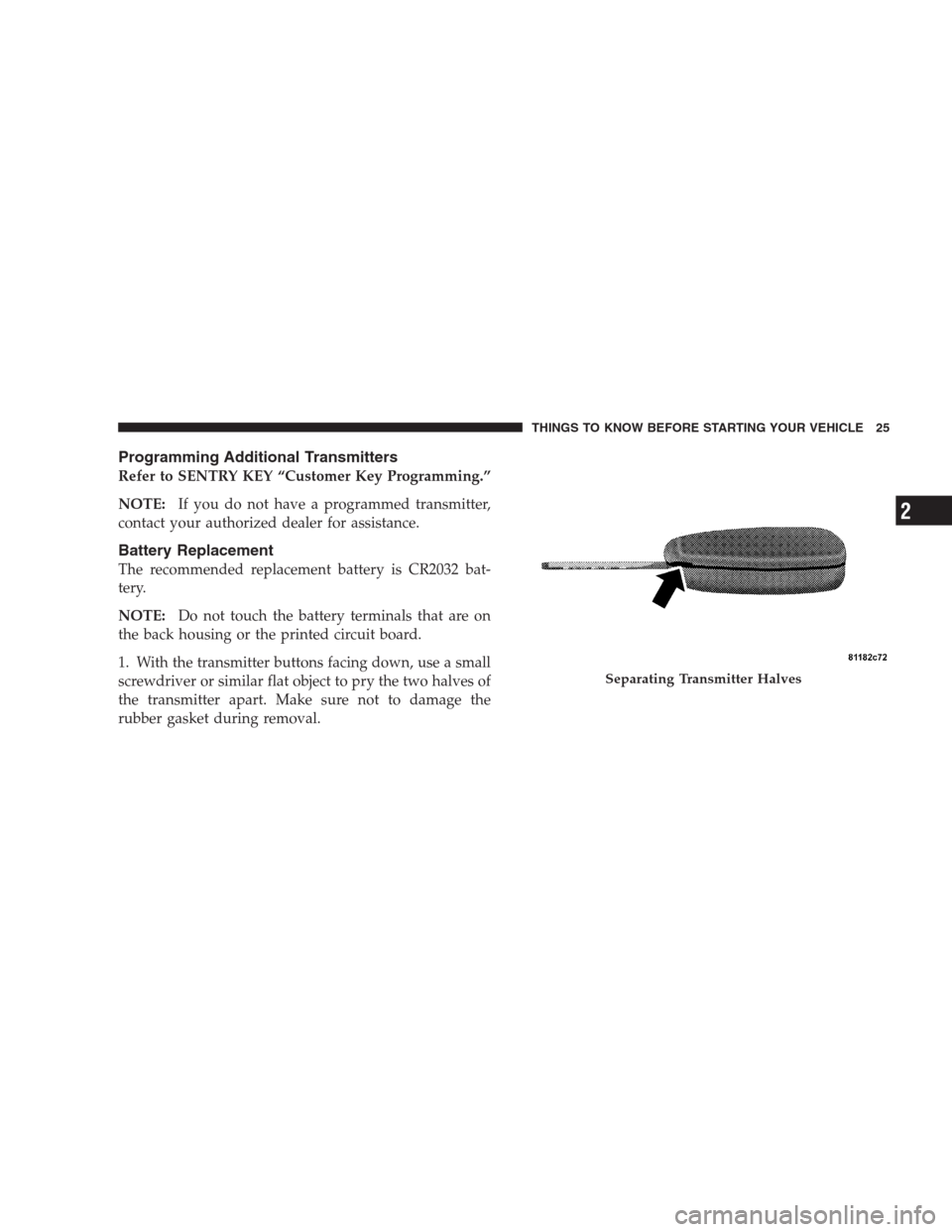
1. With the transmitter buttons facing down, use a small
screwdriver or similar flat object to pry the two halves of
the transmitter apart. Make sure not to damage the
rubber gasket during removal.
Separating Transmitter Halves
THINGS TO KNOW BEFORE STARTING YOUR VEHICLE 25
2
Page 38 of 464
When the remote button is pressed the “Lamp Flash”
feature is enabled the tail lights will flash to signal that
the liftgate is opening or closing. A beeping signal will
sound two seconds before the liftgate starts to open or
close.
WARNING!
During power operation, personal injury or cargo
damage may occur. Ensure the liftgate travel path is
clear. Make sure the liftgate is closed and latched
before driving away.
NOTE:
•If anything obstructs the power liftgate while it is
closing or opening, the liftgate will automatically
reverse to the closed or open position, provided it
meets sufficient resistance.
•There are also pinch sensors attached to the side of the
liftgate. Light pressure anywhere along these strips
will cause the liftgate to return to the open position.
•The power liftgate must be in the full open position for
any of the close buttons to operate. If the liftgate is not
fully open, press the open button to fully open the
liftgate and then press close.
•If the liftgate release switch is activated while the
power liftgate is closing, the liftgate will reverse to the
full open position.
38 THINGS TO KNOW BEFORE STARTING YOUR VEHICLE
Page 86 of 464
▫To Resume Speed.....................151
▫To Vary The Speed Setting...............151
▫To Accelerate For Passing...............152
�Overhead Console — If Equipped...........153
▫Courtesy/Reading Lights................153
▫Sunglasses Storage....................153
�Garage Door Opener — If Equipped.........154
▫Programming HomeLink................155
▫Canadian Programming/Gate Programming . . 158
▫Using HomeLink.....................159
▫Erasing HomeLink Buttons..............159
▫Reprogramming a Single HomeLink Button . . . 159▫Security............................160
�Power Sunroof — If Equipped.............160
▫Express Open Feature..................161
▫Wind Buffeting.......................163
▫Sunroof Maintenance...................163
�Electrical Power Outlets..................163
▫Electrical Outlet Use With Engine Off.......164
�Cupholders...........................165
▫Front Seat Cupholders..................165
▫Second Row Seat Cupholders.............165
▫Third Row Seat Cupholders — If Equipped . . . 166
86 UNDERSTANDING THE FEATURES OF YOUR VEHICLE
Page 92 of 464

UConnect™ allows you to transfer calls between the
system and your cellular phone as you enter or exit your
vehicle, and enables you to mute the system’s micro-
phone for private conversation.
The UConnect™ phonebook enables you to store up to 32
names and four numbers per name. Each language has a
separate 32-name phonebook accessible only in that
language. This system is driven through your Blue-
tooth™ Hands-Free profile cellular phone. UConnect™
features Bluetooth™ technology - the global standard
that enables different electronic devices to connect to
each other without wires or a docking station, so UCon-
nect works no matter where you stow your cellular
phone (be it your purse, pocket, or briefcase), as long as
your phone is turned on and has been paired to the
vehicle’s UConnect™ system. The UConnect™ system
allows up to seven cellular phones to be linked to system.
Only one linked (or paired) cellular phone can be usedwith the system at a time. The system is available in
English, Spanish, or French languages (as equipped).
The rearview mirror contains the microphone for the
system and the control buttons that will enable you to
access the system.
UConnect™ Switches
92 UNDERSTANDING THE FEATURES OF YOUR VEHICLE