2007 CHEVROLET TRAIL BLAZER steering
[x] Cancel search: steeringPage 224 of 574
Customization Button
4
(Customization):Press the customization
button to access the VEHICLE SETTINGS
menu and customize the settings to your vehicle.
SeeDIC Vehicle Customization on page 231
for more information.
Select Button
r
(Select):Press the select button to reset
certain DIC functions, turn off or acknowledge
messages on the DIC display, and set your
customization settings. For example, this button
will allow you to reset the trip odometers, turn
off the FUEL LEVEL LOW message, and enables
you to scroll through and select the language
in which the DIC information will appear.
DIC Warnings and Messages
Messages are displayed on the DIC to notify the
driver that the status of the vehicle has changed
and that some action may be needed to correct
the condition. Multiple messages may appear
one after another.
Some messages may not require immediate
action. Press any of the DIC buttons on the
steering wheel or the trip odometer reset stem
on the instrument panel cluster to acknowledge
that you received the messages and to clear
them from the display.
Some messages cannot be cleared from the
display because they are more urgent. These
messages require action before they can be
removed from the DIC display. Take any
messages that appear on the display seriously
and remember that clearing the messages will
only make the messages disappear, not correct
the problem.
The following are the possible messages that can
be displayed and some information about them.
224
Page 238 of 574
Audio System(s)
Determine which radio your vehicle has and then
read the pages following to familiarize yourself
with its features.
Driving without distraction is a necessity for a
safer driving experience. SeeDefensive Driving
on page 306. By taking a few moments to read
this manual and get familiar with your vehicle’s
audio system, you can use it with less effort,
as well as take advantage of its features.
While your vehicle is parked, set up your audio
system by presetting your favorite radio stations,
setting the tone and adjusting the speakers.
Then, when driving conditions permit, you
can tune to your favorite stations using the
presets and steering wheel controls if the
vehicle has them.{CAUTION:
This system provides you with a far greater
access to audio stations and song listings.
Giving extended attention to entertainment
tasks while driving can cause a crash and
you or others can be injured or killed.
Always keep your eyes on the road and
your mind on the drive — avoid engaging
in extended searching while driving.
Keeping your mind on the drive is important for
safe driving. Here are some ways in which you
can help avoid distraction while driving.
While your vehicle is parked:
Familiarize yourself with all of its controls.
Familiarize yourself with its operation.
Set up your audio system by presetting your
favorite radio stations, setting the tone, and
adjusting the speakers. Then, when driving
conditions permit, you can tune to your favorite
radio stations using the presets and steering
wheel controls if the vehicle has them.
238
Page 300 of 574
Theft-Deterrent Feature
THEFTLOCK®is designed to discourage theft
of your vehicle’s radio. The feature works
automatically by learning a portion of the
Vehicle Identication Number (VIN). If the
radio is moved to a different vehicle, it does
not operate and LOCKED displays.
When the radio and vehicle are turned off, the
blinking red light indicates that THEFTLOCK
®
is armed.
With THEFTLOCK
®activated, the radio does
not operate if stolen.
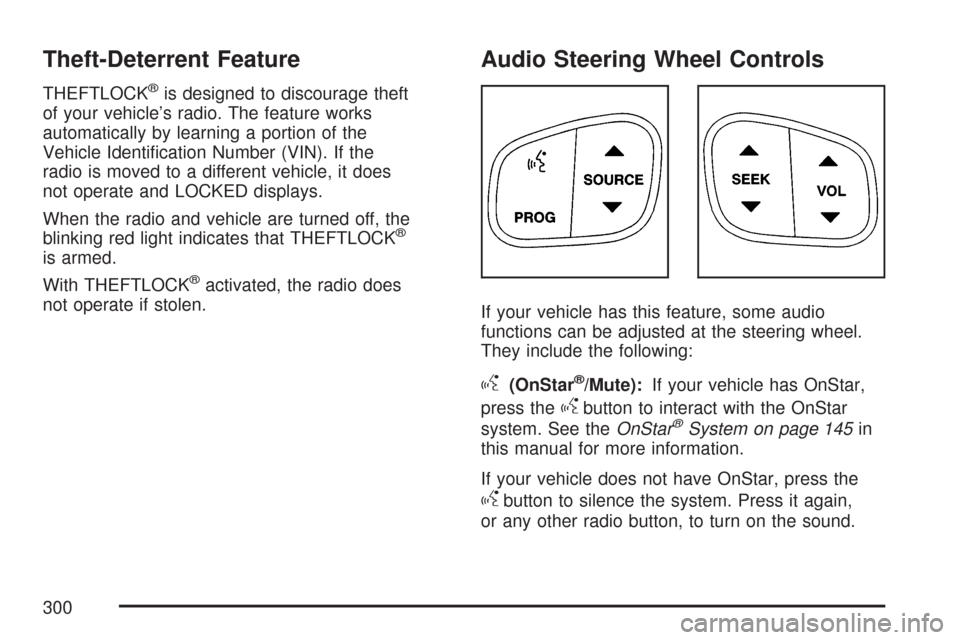
Audio Steering Wheel Controls
If your vehicle has this feature, some audio
functions can be adjusted at the steering wheel.
They include the following:
g(OnStar®/Mute):If your vehicle has OnStar,
press the
gbutton to interact with the OnStar
system. See theOnStar®System on page 145in
this manual for more information.
If your vehicle does not have OnStar, press the
gbutton to silence the system. Press it again,
or any other radio button, to turn on the sound.
300
Page 305 of 574
Your Driving, the Road, and Your Vehicle. 306
Defensive Driving...................................... 306
Drunken Driving........................................ 307
Control of a Vehicle.................................. 310
Braking...................................................... 310
Anti-Lock Brake System (ABS).................. 311
Braking in Emergencies............................. 313
Locking Rear Axle..................................... 313
StabiliTrak
®System................................... 313
All-Wheel Drive (AWD) System
(TrailBlazer SS)...................................... 318
Steering.................................................... 318
Off-Road Recovery.................................... 320
Passing..................................................... 321
Loss of Control.......................................... 322
Competitive Driving................................... 323
Off-Road Driving (Except SS).................... 323
Driving at Night......................................... 339
Driving in Rain and on Wet Roads............ 340City Driving............................................... 344
Freeway Driving........................................ 345
Before Leaving on a Long Trip.................. 346
Highway Hypnosis..................................... 347
Hill and Mountain Roads........................... 348
Winter Driving........................................... 350
If Your Vehicle is Stuck in Sand,
Mud, Ice, or Snow................................. 354
Rocking Your Vehicle to Get It Out........... 354
Recovery Hooks........................................ 355
Loading Your Vehicle................................ 356
Adding a Snow Plow or Similar
Equipment.............................................. 362
Towing........................................................ 362
Towing Your Vehicle................................. 362
Recreational Vehicle Towing...................... 362
Electronically Controlled Air
Suspension System................................ 367
Towing a Trailer........................................ 368
Section 4 Driving Your Vehicle
305
Page 310 of 574
Control of a Vehicle
You have three systems that make your vehicle go
where you want it to go. They are the brakes, the
steering, and the accelerator. All three systems
have to do their work at the places where the tires
meet the road.
Sometimes, as when you are driving on snow or
ice, it is easy to ask more of those control systems
than the tires and road can provide. That means
you can lose control of your vehicle.
Adding non-GM accessories can affect your
vehicle’s performance. SeeAccessories and
Modications on page 386.
Braking
SeeBrake System Warning Light on page 208.
Braking action involves perception time and
reaction time.
First, you have to decide to push on the brake
pedal. That is perception time. Then you have to
bring up your foot and do it. That is reaction time.Average reaction time is about three-fourths of a
second. But that is only an average. It might be less
with one driver and as long as two or three seconds
or more with another. Age, physical condition,
alertness, coordination, and eyesight all play a part.
So do alcohol, drugs, and frustration. But even in
three-fourths of a second, a vehicle moving at
60 mph (100 km/h) travels 66 feet (20 m). That
could be a lot of distance in an emergency, so
keeping enough space between your vehicle and
others is important.
And, of course, actual stopping distances vary
greatly with the surface of the road, whether it is
pavement or gravel; the condition of the road,
whether it is wet, dry, or icy; tire tread; the
condition of the brakes; the weight of the vehicle;
and the amount of brake force applied.
Avoid needless heavy braking. Some people drive
in spurts — heavy acceleration followed by heavy
braking — rather than keeping pace with traffic.
This is a mistake. The brakes may not have time
to cool between hard stops. The brakes will wear
out much faster if you do a lot of heavy braking.
310
Page 313 of 574
Remember: ABS does not change the time you
need to get your foot up to the brake pedal or
always decrease stopping distance. If you get too
close to the vehicle in front of you, you will not have
time to apply the brakes if that vehicle suddenly
slows or stops. Always leave enough room up
ahead to stop, even though you have ABS.
Using ABS
Do not pump the brakes. Just hold the brake
pedal down rmly and let anti-lock work for you.
You might feel the brakes vibrate or notice
some noise, but this is normal.
Braking in Emergencies
With ABS, you can steer and brake at the same
time. In many emergencies, steering can help you
more than even the very best braking.
Locking Rear Axle
If your vehicle has this feature, your locking rear
axle can give you additional traction on snow, mud,
ice, sand or gravel. It works like a standard axle
most of the time, but when one of the rear wheels
has no traction and the other does, this feature will
allow the wheel with traction to move the vehicle.
StabiliTrak®System
Your vehicle is equipped with StabiliTrak®,
Electronic Stability Control (ESC) which combines
antilock brake, traction and stability control
systems and helps the driver maintain directional
control of the vehicle in most driving conditions.
Traction control activates when the controller
senses wheel spin. StabiliTrak
®will selectively
apply the brakes and reduce engine torque to
help regain traction.
Stability control activates when the controller
senses a discrepancy between your intended
path and the direction the vehicle is travelling.
StabiliTrak
®selectively applies braking pressure
at any one of the vehicle’s brakes to help guide the
vehicle in the direction which you are steering.
When you rst start your vehicle and begin to drive
away, the system performs several diagnostic
checks to insure there are no problems. You may
hear or feel the system working. This is normal
and does not mean there is a problem with
your vehicle. If driving conditions delay system
initialization, the STABILITRAK NOT READY
message may be displayed. If this is the case,
your vehicle does not need servicing.
313
Page 318 of 574
StabiliTrak®will turn off automatically if a problem is
detected in the system. The StabiliTrak®light will
come on and SERVICE STABILITRAK will be
displayed on the DIC. For vehicles without a DIC,
the StabiliTrak
®light and the StabiliTrak®service
light will both come on. If the SERVICE
STABILITRAK message (or StabiliTrak
®service
light) does not clear itself after restarting the
vehicle, you should see your dealer for service.
Adding non-GM accessories can affect your
vehicle’s performance. SeeAccessories and
Modications on page 386for more information.
All-Wheel Drive (AWD) System
(TrailBlazer SS)
If your vehicle has this feature, engine power is
sent to all four wheels all the time.
This is like four-wheel drive, but there is no
separate lever or switch to engage or disengage
the front axle. It is fully automatic, and adjusts itself
as needed for road conditions.
Steering
Power Steering
If you lose power steering assist because the
engine stops or the system is not functioning,
you can steer but it will take much more effort.
Steering Tips
It is important to take curves at a reasonable speed.
A lot of the “driver lost control” accidents mentioned
on the news happen on curves. Here is why:
Experienced driver or beginner, each of us is
subject to the same laws of physics when driving on
curves. The traction of the tires against the road
surface makes it possible for the vehicle to change
its path when you turn the front wheels. If there is
no traction, inertia will keep the vehicle going in the
same direction. If you have ever tried to steer a
vehicle on wet ice, you will understand this.
The traction you can get in a curve depends on
the condition of the tires and the road surface, the
angle at which the curve is banked, and your
speed. While you are in a curve, speed is the
one factor you can control.
318
Page 319 of 574
Suppose you are steering through a sharp curve.
Then you suddenly accelerate. Both control
systems — steering and acceleration — have to
do their work where the tires meet the road.
Adding the sudden acceleration can demand too
much of those places. You can lose control.
What should you do if this ever happens? Ease up
on the accelerator pedal, steer the vehicle the
way you want it to go, and slow down.
Speed limit signs near curves warn that you
should adjust your speed. Of course, the posted
speeds are based on good weather and road
conditions. Under less favorable conditions you will
want to go slower.
If you need to reduce your speed as you approach
a curve, do it before you enter the curve, while
the front wheels are straight ahead.
Try to adjust your speed so you can “drive”
through the curve. Maintain a reasonable, steady
speed. Wait to accelerate until you are out of
the curve, and then accelerate gently into
the straightaway.
Adding non-dealer/non-retailer accessories can
affect your vehicle’s performance. SeeAccessories
and Modications on page 386.Steering in Emergencies
There are times when steering can be more
effective than braking. For example, you come
over a hill and nd a truck stopped in your lane, or
a car suddenly pulls out from nowhere, or a
child darts out from between parked cars and
stops right in front of you. You can avoid these
problems by braking — if you can stop in time. But
sometimes you cannot; there is not room. That
is the time for evasive action — steering around
the problem.
Your vehicle can perform very well in emergencies
like these. First apply the brakes. SeeBraking
on page 310. It is better to remove as much speed
as you can from a possible collision. Then steer
around the problem, to the left or right depending
on the space available.
319