2007 CHEVROLET SUBURBAN buttons
[x] Cancel search: buttonsPage 189 of 634
Using Universal Home Remote
Press and hold the appropriate button for at least
half of a second. The indicator light will come
on while the signal is being transmitted.
Reprogramming Universal Home
Remote Buttons
You can reprogram any of the three buttons by
repeating the instructions.
Erasing Universal Home Remote
Buttons
You should erase the programmed buttons when
you sell or terminate your lease.To erase either Rolling Code or Fixed Code on the
Universal Home Remote device, do the following:
1. Press and hold the two outside buttons at the
same time for approximately 20 seconds, until
the indicator lights, located directly above
the buttons, begin to blink rapidly.
2. Once the indicator lights begin to blink,
release both buttons. The codes from all
buttons will be erased.
For help or information on the Universal Home
Remote System, call the customer assistance
phone number underCustomer Assistance Offices
on page 602.
189
Page 200 of 634

Warning Lights, Gages, and Indicators..... 242
Instrument Panel Cluster........................... 243
Speedometer and Odometer...................... 244
Trip Odometer........................................... 244
Tachometer............................................... 244
Safety Belt Reminder Light........................ 244
Passenger Safety Belt Reminder Light....... 245
Airbag Readiness Light............................. 245
Passenger Airbag Status Indicator............. 246
Charging System Light.............................. 248
Voltmeter Gage......................................... 249
Brake System Warning Light..................... 249
Anti-Lock Brake System Warning Light...... 251
StabiliTrak
®Indicator Light......................... 252
Engine Coolant Temperature Gage............ 252
Tire Pressure Light.................................... 253
Malfunction Indicator Lamp........................ 253
Oil Pressure Gage..................................... 256Oil Pressure Light..................................... 257
Security Light............................................ 258
Fog Lamp Light......................................... 258
Cruise Control Light.................................. 258
Highbeam On Light................................... 259
Tow/Haul Mode Light................................ 259
Fuel Gage................................................. 259
Low Fuel Warning Light............................ 260
Driver Information Center (DIC).................. 260
DIC Operation and Displays
(With DIC Buttons)................................. 261
DIC Operation and Displays
(Without DIC Buttons)............................ 267
DIC Warnings and Messages.................... 270
DIC Vehicle Customization
(With DIC Buttons)................................. 280
Section 3 Instrument Panel
200
Page 203 of 634
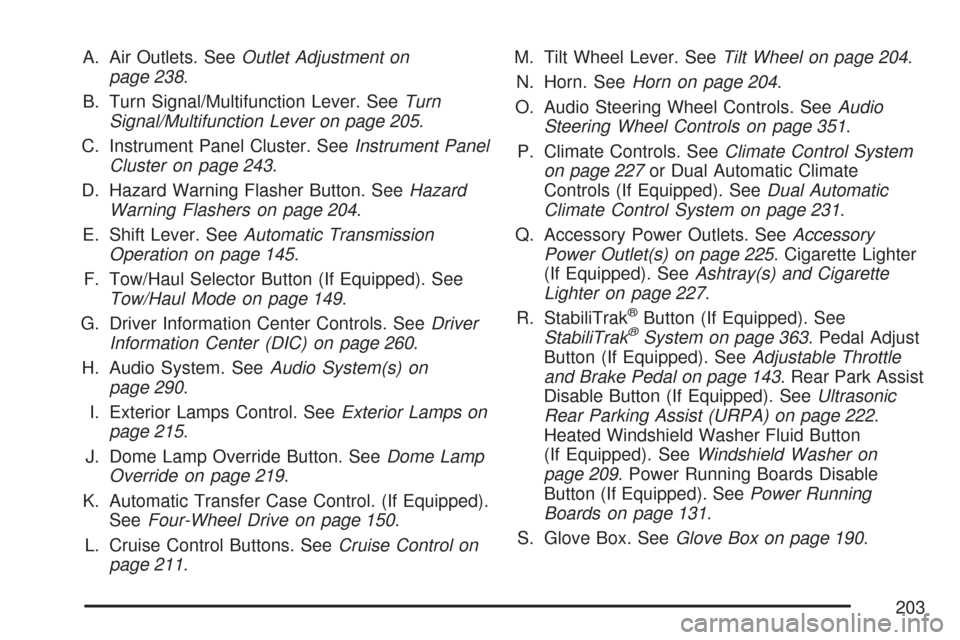
A. Air Outlets. SeeOutlet Adjustment on
page 238.
B. Turn Signal/Multifunction Lever. SeeTurn
Signal/Multifunction Lever on page 205.
C. Instrument Panel Cluster. SeeInstrument Panel
Cluster on page 243.
D. Hazard Warning Flasher Button. SeeHazard
Warning Flashers on page 204.
E. Shift Lever. SeeAutomatic Transmission
Operation on page 145.
F. Tow/Haul Selector Button (If Equipped). See
Tow/Haul Mode on page 149.
G. Driver Information Center Controls. SeeDriver
Information Center (DIC) on page 260.
H. Audio System. SeeAudio System(s) on
page 290.
I. Exterior Lamps Control. SeeExterior Lamps on
page 215.
J. Dome Lamp Override Button. SeeDome Lamp
Override on page 219.
K. Automatic Transfer Case Control. (If Equipped).
SeeFour-Wheel Drive on page 150.
L. Cruise Control Buttons. SeeCruise Control on
page 211.M. Tilt Wheel Lever. SeeTilt Wheel on page 204.
N. Horn. SeeHorn on page 204.
O. Audio Steering Wheel Controls. SeeAudio
Steering Wheel Controls on page 351.
P. Climate Controls. SeeClimate Control System
on page 227or Dual Automatic Climate
Controls (If Equipped). SeeDual Automatic
Climate Control System on page 231.
Q. Accessory Power Outlets. SeeAccessory
Power Outlet(s) on page 225. Cigarette Lighter
(If Equipped). SeeAshtray(s) and Cigarette
Lighter on page 227.
R. StabiliTrak
®Button (If Equipped). See
StabiliTrak®System on page 363. Pedal Adjust
Button (If Equipped). SeeAdjustable Throttle
and Brake Pedal on page 143. Rear Park Assist
Disable Button (If Equipped). SeeUltrasonic
Rear Parking Assist (URPA) on page 222.
Heated Windshield Washer Fluid Button
(If Equipped). SeeWindshield Washer on
page 209. Power Running Boards Disable
Button (If Equipped). SeePower Running
Boards on page 131.
S. Glove Box. SeeGlove Box on page 190.
203
Page 212 of 634
If your vehicle has the StabiliTrak®system and
begins to limit wheel spin while you are using cruise
control, the cruise control will automatically
disengage. SeeStabiliTrak
®System on page 363.
When road conditions allow you to safely use it
again, you may turn the cruise control back on.
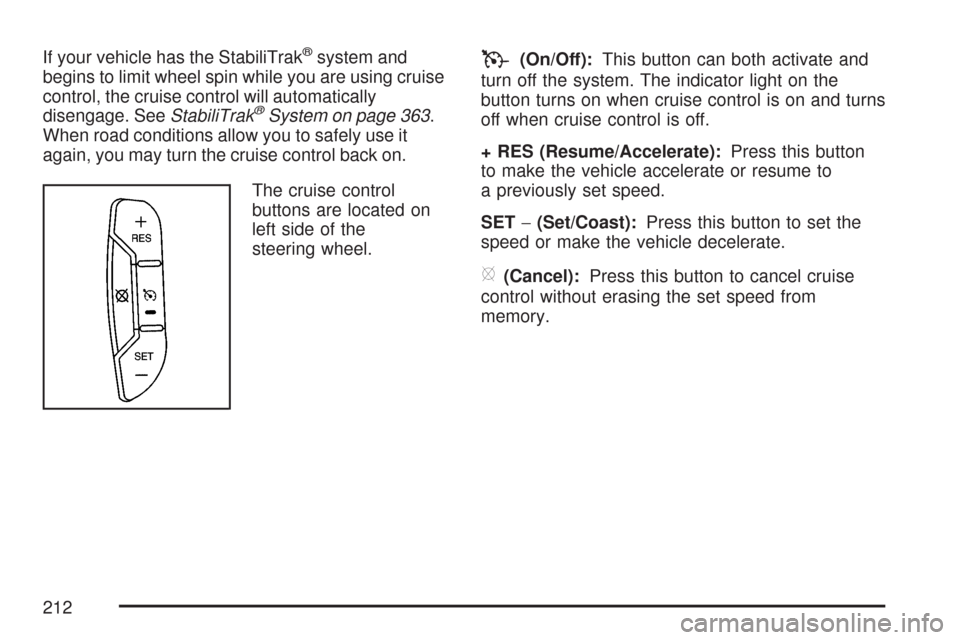
The cruise control
buttons are located on
left side of the
steering wheel.
T(On/Off):This button can both activate and
turn off the system. The indicator light on the
button turns on when cruise control is on and turns
off when cruise control is off.
+ RES (Resume/Accelerate):Press this button
to make the vehicle accelerate or resume to
a previously set speed.
SET−(Set/Coast):Press this button to set the
speed or make the vehicle decelerate.
[(Cancel):Press this button to cancel cruise
control without erasing the set speed from
memory.
212
Page 217 of 634
Automatic Headlamp System
When it is dark enough outside, the automatic
headlamp system will turn on the headlamps at the
normal brightness, along with the taillamps,
sidemarker, parking lamps, and the instrument
panel lights. The radio lights will also be dim.
To turn off the automatic headlamp system, turn
the exterior lamps switch to the off position
and then release. For vehicles rst sold in Canada,
the transaxle must be in the PARK (P) position,
before the automatic headlamp system can
be turned off.
The vehicle has a light sensor located on the top
of the instrument panel in the defroster grille
that regulates when the automatic headlamps turn
on. Be sure it is not covered, or the headlamps
will come on whenever the ignition is on.
The system may also turn on the headlamps when
driving through a parking garage, heavy overcast
weather, or a tunnel. This is normal.There is a delay in the transition between the
daytime and nighttime operation of the Daytime
Running Lamps (DRL) and the automatic headlamp
systems so that driving under bridges or bright
overhead street lights does not affect the system.
The DRL and automatic headlamp system will only
be affected when the light sensor detects a change
in lighting lasting longer than the delay.
If you start your vehicle in a dark garage, the
automatic headlamp system will come on
immediately. Once you leave the garage, it will
take approximately one minute for the automatic
headlamp system to change to DRL if it is
bright enough outside. During that delay, your
instrument panel cluster may not be as bright as
usual. Make sure your instrument panel brightness
control is in the full bright position. SeeInstrument
Panel Brightness on page 219.
Your headlamps will also stay on after you exit the
vehicle. You can program this feature using the
Driver Information Center (DIC). SeeDIC Vehicle
Customization (With DIC Buttons) on page 280.
As with any vehicle, you should turn on the regular
headlamp system when needed.
217
Page 231 of 634
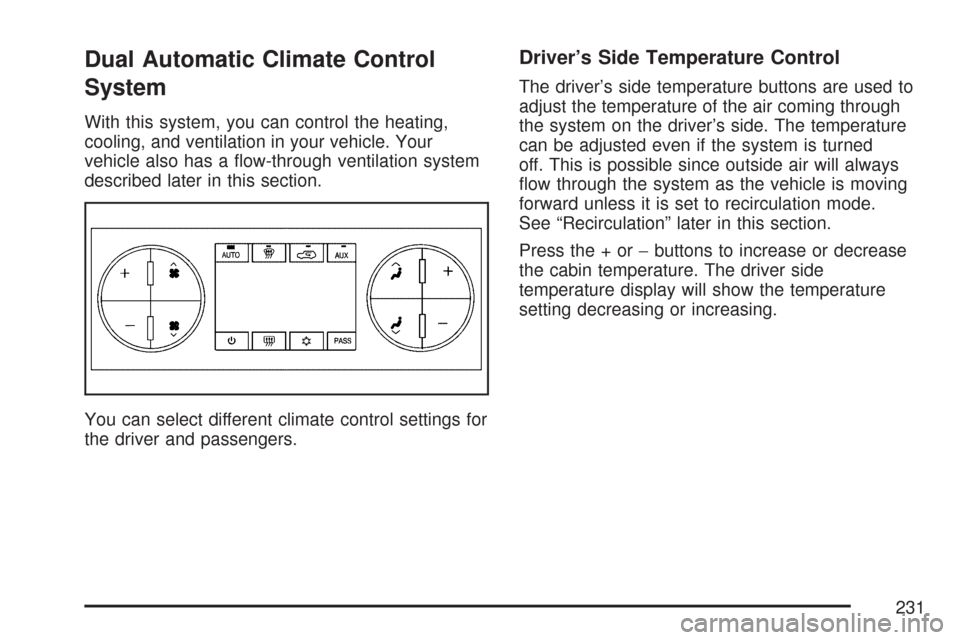
Dual Automatic Climate Control
System
With this system, you can control the heating,
cooling, and ventilation in your vehicle. Your
vehicle also has a ow-through ventilation system
described later in this section.
You can select different climate control settings for
the driver and passengers.
Driver’s Side Temperature Control
The driver’s side temperature buttons are used to
adjust the temperature of the air coming through
the system on the driver’s side. The temperature
can be adjusted even if the system is turned
off. This is possible since outside air will always
ow through the system as the vehicle is moving
forward unless it is set to recirculation mode.
See “Recirculation” later in this section.
Press the + or−buttons to increase or decrease
the cabin temperature. The driver side
temperature display will show the temperature
setting decreasing or increasing.
231
Page 232 of 634
Passenger’s Side Temperature Control
The passenger’s temperature buttons can be used
to change the temperature of the air coming
through the system on the passenger’s side of the
vehicle. The temperature can be adjusted even
if the system is turned off. This is possible
since outside air will always ow through the
system as the vehicle is moving forward unless it
is set to recirculation mode. See “Recirculation”
later in this section.
Press the + or−buttons to increase or decrease
the cabin temperature. The passenger side
display will show the temperature setting
decreasing or increasing.
The passenger’s temperature setting can be set to
match the driver’s temperature setting by pressing
the PASS button and turning off the PASS indicator.
When the passenger’s temperature setting is set
different than the driver’s setting, the indicator on
the PASS button will illuminate and both the driver’s
side and passenger’s side temperature displays will
be shown.
Automatic Operation
AUTO (Automatic):When automatic operation is
active the system will control the inside
temperature, the air delivery, and the fan speed.
Use the steps below to place the entire system in
automatic mode:
1. Press the AUTO button.
When AUTO is selected, the display will
change to show the current temperature(s)
and AUTO will be lit on the display. The
current delivery mode and fan speed will also
be displayed for approximately 5 seconds.
When AUTO is selected, the air conditioning
operation and air inlet will be automatically
controlled. The air conditioning compressor will
run when the outside temperature is over
about 40°F (4°C). The air inlet will normally be
set to outside air. If it is hot outside, the air
inlet may automatically switch to recirculate
inside air to help quickly cool down your
vehicle. The light on the button will illuminate
in recirculation.
232
Page 233 of 634
2. Set the driver’s and passenger’s temperature.
To nd your comfort setting, start with a 74°F
(23°C) temperature setting and allow about
20 minutes for the system to regulate. Use the
driver’s or passenger’s temperature buttons to
adjust the temperature setting as necessary. If
you choose the temperature setting of 60°F
(15°C), the system will remain at the maximum
cooling setting. If you choose the temperature
setting of 90°F (32°C), the system will remain
at the maximum heat setting. Choosing either
maximum setting will not cause the vehicle to
heat or cool any faster.
Be careful not to cover the solar sensor located on
the top of the instrument panel near the
windshield. This sensor regulates air temperature
based on sun load and also turns on your
headlamps. For more information on the solar
sensor, see “Sensors” later in this section.To avoid blowing cold air in cold weather, the
system will delay turning on the fan until warm air
is available. The length of delay depends on
the engine coolant temperature. Pressing the fan
switch will override this delay and change the
fan to a selected speed.
O(On/Off):Press this button to turn off the
climate control system. Outside air will still enter
the vehicle, and will be directed to the oor.
This direction can be changed by pressing the
mode button. Recirculation can be selected once
you have selected vent or bi-level mode. The
temperature can also be adjusted using either
temperature button. If you adjust the air delivery
mode or temperature settings with the system
off, the display will illuminate briey to show you
the settings and then return off. Press the
on/off button or the up down arrows on the fan
switch, the defrost button, AUTO button, or the air
conditioning button to turn the system on when
it is off.
233