2007 CHEVROLET SUBURBAN buttons
[x] Cancel search: buttonsPage 120 of 634

/(Remote Start):Press and release the lock
button and then press and hold the remote
start button to start the vehicle.
To start the vehicle using the remote start feature,
do the following:
1. Aim the transmitter at the vehicle.
2. Press and release the transmitter’s lock
button, then immediately press and hold
the transmitter’s remote start button until the
turn signal lights ash. If you cannot see
the vehicle’s lights, press and hold the remote
start button for at least four seconds. The
vehicle’s doors will lock. Pressing the remote
start button again after the vehicle has
started will turn off the ignition.
When the vehicle starts, the parking lamps will
turn on and remain on while the vehicle is
running.
3. If it is the rst remote start since the vehicle
has been driven, repeat these steps, while
the engine is still running, to extend the engine
running time by 10 minutes. Remote start
can be extended one time.
After entering the vehicle during a remote start,
insert and turn the key to RUN to drive the vehicle.If the vehicle is left running it will automatically
shut off after 10 minutes unless a time extension
has been done.
To manually shut off a remote start, do any of the
following:
Aim the RKE transmitter at the vehicle and
press the remote start button until the
parking lamps turn off.
Turn on the hazard warning ashers.
Turn the ignition switch on and then off.
The vehicle can be remote started two separate
times between driving sequences. The engine will
run for 10 minutes after each remote start.
Or, you can extend the engine run time by another
10 minutes within the rst 10 minute remote
start time frame, and before the engine stops.
For example, if the lock button and then the remote
start buttons are pressed again after the vehicle has
been running for ve minutes, 10 minutes are
added, allowing the engine to run for 15 minutes.
The additional ten minutes are considered a
second remote vehicle start.
120
Page 121 of 634

Once two remote starts, or a single remote start
with one time extension has been done, the
vehicle must be started with the key.
After the key is removed from the ignition, the
vehicle can be remote started again.
The vehicle cannot be remote started if the key is
in the ignition, the hood is not closed, or if
there is an emission control system malfunction.
Also, the engine will turn off during a remote
vehicle start if the coolant temperature gets too
high or if the oil pressure gets low.
Vehicles that have the remote vehicle start feature
are shipped from the factory with the remote
vehicle start system enabled. The system may be
enabled or disabled through the DIC. See
“REMOTE START” underDIC Vehicle
Customization (With DIC Buttons) on page 280for
additional information. If your vehicle does not
have DIC buttons, see your dealer to enable
or disable the remote vehicle start system.″Remote Start Ready
If your vehicle does not have the remote vehicle
start feature, it may have the remote start
ready feature. This feature allows your dealer to
add the manufacturer’s remote vehicle start
feature.
If your vehicle has the remote start ready feature,
the RKE transmitter will have an extended
range that allows locking or unlocking of the
vehicle from approximately 197 feet (60 m) away.
See your dealer if you would like to add the
manufacturer’s remote vehicle start feature to your
vehicle.
121
Page 123 of 634
Power Door Locks
The power door lock switches are located on the
armrest on the front doors.
K(Unlock):Press the side of the switch with the
unlock symbol to unlock the doors.
Q(Lock):Press the side of the switch with the
lock symbol to lock the doors.
Delayed Locking
When locking the doors with the power lock switch
or the remote keyless entry (RKE) transmitter
and a door or the liftgate is open, the doors will
lock ve seconds after the last door is closed. You
will hear three chimes to signal that the delayed
locking feature is in use.
Pressing the power lock switch or the lock button
on the RKE transmitter twice will override the
delayed locking feature and immediately lock all
the doors.This feature will not operate if the key is in the
ignition.
You can program this feature using the Driver
Information Center (DIC). See DELAY DOOR
LOCK underDIC Vehicle Customization
(With DIC Buttons) on page 280.
Programmable Automatic Door
Locks
Vehicles with an automatic lock/unlock feature
enable you to program the vehicle’s power
door locks. You can program this feature through
the Driver Information Center (DIC). SeeDIC
Vehicle Customization (With DIC Buttons)
on page 280for more information on DIC
programming.
123
Page 145 of 634

Active Fuel Management™
Your vehicle’s V8 engine may have Active Fuel
Management™. This system allows the engine to
operate on either all or half of its cylinders,
depending on the driving conditions.
When less power is required, such as cruising at a
constant vehicle speed, the system will operate
in the half cylinder mode, allowing your vehicle to
achieve better fuel economy. When greater
power demands are required, such as accelerating
from a stop, passing, or merging onto a freeway,
the system will maintain full-cylinder operation.
Your vehicle has an Active Fuel Management™
indicator. For more information on using this
display seeDIC Operation and Displays (With DIC
Buttons) on page 261orDIC Operation and
Displays (Without DIC Buttons) on page 267.
Automatic Transmission Operation
There are several different positions for the
shift lever.
Your vehicle has an automatic transmission with
an electronic shift position indicator within the
instrument panel cluster. This display will show the
position anytime the shift lever is moved out of
PARK (P).
145
Page 162 of 634
{CAUTION:
Four-wheel drive vehicles with the transfer
case in NEUTRAL will allow the vehicle to
roll, even if the shift lever is in PARK (P).
So, be sure the transfer case is in a drive
gear — not in NEUTRAL. Always set the
parking brake.
Follow the proper steps to be sure your vehicle
will not move. SeeShifting Into Park (P) on
page 157.
If you are pulling a trailer, seeTowing a Trailer on
page 422.
Mirrors
Automatic Dimming Rearview Mirror
with OnStar
®, Compass and
Temperature Display
Your vehicle may have this feature. When on, the
automatic dimming mirror dims to the proper level
to minimize glare from lights behind you after dark.
The mirror has a dual display in the upper right
corner of the mirror face that shows the compass
reading and the outside temperature.
Control buttons for the OnStar
®system are at the
bottom of the mirror. SeeOnStar®System on
page 173for more information about the services
OnStar
®provides.
P(On/Off):This is the on/off button.
162
Page 176 of 634
How OnStar®Service Works
In order to provide you with OnStar®services, your
vehicle’s OnStar®system has the capability of
recording and transmitting vehicle information. This
information is automatically sent to an OnStar
®Call
Center at the time of an OnStar®button press,
Emergency button press or if your airbags or AACN
system deploys. The vehicle information usually
includes your GPS location and, in the event of a
crash, additional information regarding the accident
that your vehicle has been involved in (e.g. the
direction from which your vehicle was hit). When
you use the Virtual Advisor feature of OnStar
®
Hands-Free Calling, your vehicle also sends
OnStar®your GPS location so that we can provide
you with location-based services.
OnStar
®service cannot work unless your vehicle is
in a place where OnStar®has an agreement with a
wireless service provider for service in that area.
OnStar
®service also cannot work unless you are in
a place where the wireless service provider
OnStar
®has hired for that area has coverage,
network capacity and reception when the service is
needed, and technology that is compatible with the
OnStar
®service.Not all services are available everywhere,
particularly in remote or enclosed areas, or at
all times.
OnStar
®service that involves location information
about your vehicle cannot work unless GPS
satellite signals are unobstructed and available in
that place as well.
Your vehicle must have a working electrical system
(including adequate battery power) for the OnStar
®
equipment to operate. There are other problems
OnStar®cannot control that may prevent OnStar®
from providing OnStar®service to you at any
particular time or place. Some examples are
damage to important parts of your vehicle in an
accident, hills, tall buildings, tunnels, weather or
wireless phone network congestion.
Your Responsibility
You may need to increase the volume of your radio
to hear the OnStar®advisor. If the light next to the
OnStar®buttons is red, this means that your system
is not functioning properly and should be checked
by your dealer/retailer. If the light appears clear (no
light is appearing), your OnStar
®subscription has
expired. You can always press the OnStar®button
to conrm that your OnStar®equipment is active.
176
Page 177 of 634
Universal Home Remote
System
System Identication
Your vehicle may have a Universal Home Remote
System.
Determine which Universal Home Remote your
vehicle has and then read the pages following for
instructions on programming your specic system.
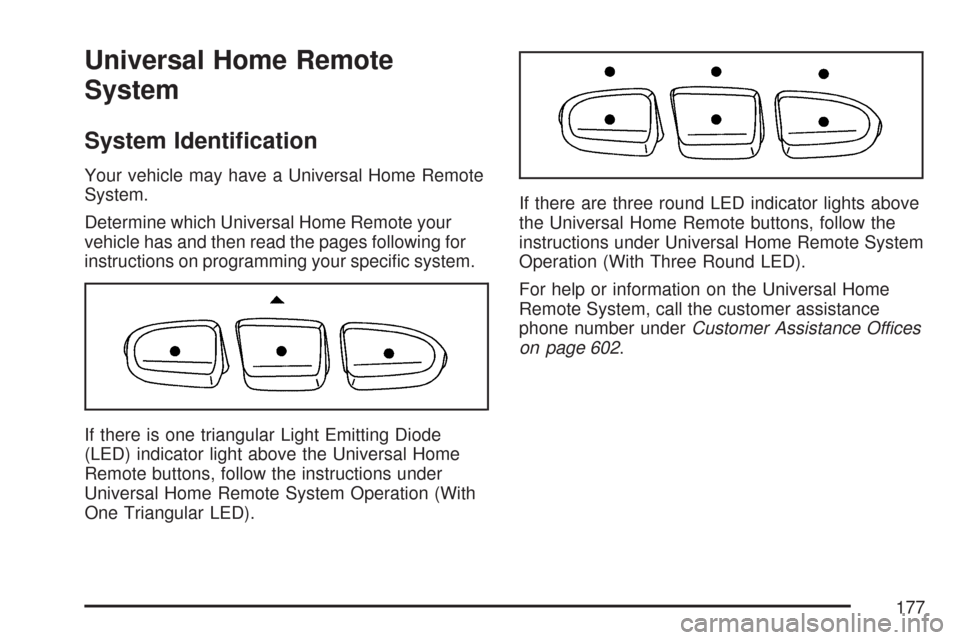
If there is one triangular Light Emitting Diode
(LED) indicator light above the Universal Home
Remote buttons, follow the instructions under
Universal Home Remote System Operation (With
One Triangular LED).If there are three round LED indicator lights above
the Universal Home Remote buttons, follow the
instructions under Universal Home Remote System
Operation (With Three Round LED).
For help or information on the Universal Home
Remote System, call the customer assistance
phone number underCustomer Assistance Offices
on page 602.
177
Page 178 of 634

Universal Home Remote System
The Universal Home Remote System provides a
way to replace up to three hand-held
Radio-Frequency (RF) transmitters used to
activate devices such as garage door openers,
security systems, and home lighting.
This device complies with Part 15 of the FCC
Rules. Operation is subject to the following
two conditions:
1. This device may not cause harmful
interference.
2. This device must accept any interference
received, including interference that may
cause undesired operation.
This device complies with RSS-210 of Industry
Canada. Operation is subject to the following
two conditions:
1. This device may not cause interference.
2. This device must accept any interference
received, including interference that may
cause undesired operation of the device.
Changes or modications to this system by other
than an authorized service facility could void
authorization to use this equipment.
Universal Home Remote System
Operation (With One Triangular LED)
If there is one triangular Light Emitting Diode
(LED) indicator light above the Universal Home
Remote buttons, follow the instructions below.
Do not use the Universal Home Remote with any
garage door opener that does not have the
stop and reverse feature. This includes any garage
door opener model manufactured before April 1,
1982. If you have a newer garage door opener
with rolling codes, please be sure to follow Steps
6 through 8 to complete the programming of
your Universal Home Remote Transmitter.
Read the instructions completely before attempting
to program the Universal Home Remote.
Because of the steps involved, it may be helpful to
have another person available to assist you in
the programming steps
178