2007 CHEVROLET AVALANCHE four wheel drive
[x] Cancel search: four wheel drivePage 137 of 618

6. Turn the transfer case dial clockwise to
NEUTRAL till it stops and hold it for
10 seconds. Then slowly release the dial to
the four low position. The NEUTRAL light will
come on when the transfer case shift to
NEUTRAL is complete.
7. If the engine is running, verify that the
transmission is in NEUTRAL (N) by shifting
the transmission to REVERSE (R) for
one second, then shift the transmission to
DRIVE (D) for one second.
8. Turn the ignition to ACCESSORY, which will
turn the engine off.
9. Place the transmission shift lever in PARK (P).
10. Release the parking brake prior to moving
the vehicle.
11. Turn the ignition to LOCK.
Shifting Out of NEUTRAL
To shift out of NEUTRAL do the following:
1. Set the parking brake and apply the regular
brake pedal.
2. Shift the transmission to NEUTRAL (N) and
turn the ignition to RUN with the engine off.3. Turn the transfer case dial to the desired
transfer case shift position (Two-Wheel
Drive High, Four-Wheel Drive High, AUTO).
After the transfer case has shifted out of
NEUTRAL the NEUTRAL light will go out.
4. Release the parking brake prior to moving
the vehicle.
Notice:Shifting the transmission into gear
before the Four-Wheel Drive Low indicator
light has stopped ashing could damage the
transfer case. To help avoid damaging
your vehicle, always wait for the Four-Wheel
Drive Low indicator light to stop ashing
before shifting the transmission into gear.
5. Start the engine and shift the transmission to
the desired position.
Excessively shifting the transfer case into or out
of the different modes may cause the transfer
case to enter the shift protection mode. This will
protect the transfer case from possible damage
and will only allow the transfer case to respond
to one shift per 10 seconds. The transfer case
may stay in this mode for up to three minutes.
137
Page 139 of 618

If the ignition is on when the parking brake is
released, the brake system warning light will go off.
Notice:Driving with the parking brake on can
overheat the brake system and cause
premature wear or damage to brake system
parts. Verify that the parking brake is fully
released and the brake warning light is
off before driving.
If you are towing a trailer and are parking on any
hill, seeTowing a Trailer on page 414.
Shifting Into Park (P)
{CAUTION:
It can be dangerous to get out of your
vehicle if the shift lever is not fully in
PARK (P) with the parking brake rmly
set. Your vehicle can roll. If you have left
the engine running, the vehicle can move
suddenly. You or others could be injured.
CAUTION: (Continued)
CAUTION: (Continued)
To be sure your vehicle will not move,
even when you are on fairly level ground,
use the steps that follow. With four-wheel
drive, if your transfer case is in NEUTRAL,
your vehicle will be free to roll, even if
your shift lever is in PARK (P). So, be
sure the transfer case is in a drive
gear — not in NEUTRAL. If you are pulling
a trailer, seeTowing a Trailer on page 414.
1. Hold the brake pedal down with your right
foot and set the parking brake.
2. Move the shift lever into the PARK (P)
position by pulling the shift lever toward
you and moving it up as far as it will go.
3. Be sure the transfer case is in a drive
gear — not in NEUTRAL (N).
4. Turn the ignition key to LOCK.
5. Remove the key and take it with you. If you
can leave your vehicle with the ignition key in
your hand, your vehicle is in PARK (P).
139
Page 140 of 618
Leaving Your Vehicle With the
Engine Running
{CAUTION:
It can be dangerous to leave your vehicle
with the engine running. Your vehicle
could move suddenly if the shift lever is
not fully in PARK (P) with the parking
brake rmly set.
If you have four-wheel drive and your
transfer case is in NEUTRAL, your vehicle
will be free to roll, even if your shift lever
is in PARK (P). So be sure the transfer
case is in a drive gear — not in NEUTRAL.
CAUTION: (Continued)
CAUTION: (Continued)
And, if you leave the vehicle with the
engine running, it could overheat and
even catch re. You or others could be
injured. Do not leave your vehicle with
the engine running unless you have to.
If you have to leave your vehicle with the engine
running, be sure your vehicle is in PARK (P)
and the parking brake is rmly set before
you leave it. After you move the shift lever into
PARK (P), hold the regular brake pedal down.
Then, see if you can move the shift lever away
from PARK (P) without rst pulling it toward you.
If you can, it means that the shift lever was
not fully locked into PARK (P).
140
Page 145 of 618

{CAUTION:
Four-wheel drive vehicles with the transfer
case in NEUTRAL will allow the vehicle to
roll, even if your shift lever is in PARK (P).
So, be sure the transfer case is in a drive
gear — not in NEUTRAL. Always set your
parking brake.
Follow the proper steps to be sure your vehicle
will not move. SeeShifting Into Park (P) on
page 139.
If you are pulling a trailer, seeTowing a Trailer
on page 414.
Mirrors
Automatic Dimming Rearview Mirror
with OnStar
®, Compass and
Temperature Display
Your vehicle may have this feature. When on, the
automatic dimming mirror dims to the proper level
to minimize glare from lights behind you after dark.
The mirror has a dual display in the upper right
corner of the mirror face that shows the compass
reading and the outside temperature.
Control buttons for the OnStar
®system, if
equipped, are at the bottom of the mirror.
SeeOnStar
®System on page 156for more
information about the services OnStar®provides.
P(On/Off):This is the on/off button.
145
Page 205 of 618
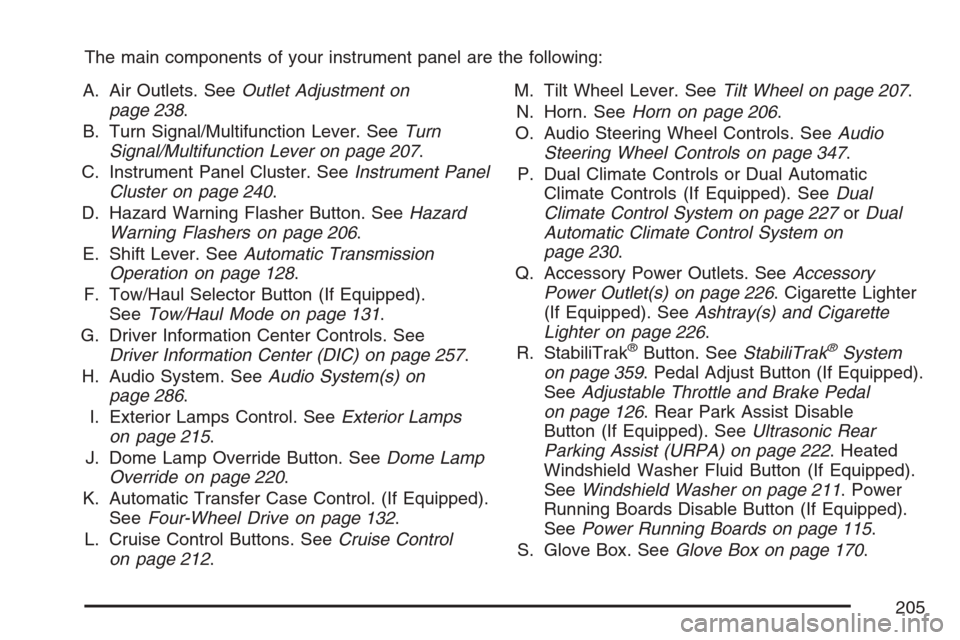
The main components of your instrument panel are the following:
A. Air Outlets. SeeOutlet Adjustment on
page 238.
B. Turn Signal/Multifunction Lever. SeeTurn
Signal/Multifunction Lever on page 207.
C. Instrument Panel Cluster. SeeInstrument Panel
Cluster on page 240.
D. Hazard Warning Flasher Button. SeeHazard
Warning Flashers on page 206.
E. Shift Lever. SeeAutomatic Transmission
Operation on page 128.
F. Tow/Haul Selector Button (If Equipped).
SeeTow/Haul Mode on page 131.
G. Driver Information Center Controls. See
Driver Information Center (DIC) on page 257.
H. Audio System. SeeAudio System(s) on
page 286.
I. Exterior Lamps Control. SeeExterior Lamps
on page 215.
J. Dome Lamp Override Button. SeeDome Lamp
Override on page 220.
K. Automatic Transfer Case Control. (If Equipped).
SeeFour-Wheel Drive on page 132.
L. Cruise Control Buttons. SeeCruise Control
on page 212.M. Tilt Wheel Lever. SeeTilt Wheel on page 207.
N. Horn. SeeHorn on page 206.
O. Audio Steering Wheel Controls. SeeAudio
Steering Wheel Controls on page 347.
P. Dual Climate Controls or Dual Automatic
Climate Controls (If Equipped). SeeDual
Climate Control System on page 227orDual
Automatic Climate Control System on
page 230.
Q. Accessory Power Outlets. SeeAccessory
Power Outlet(s) on page 226. Cigarette Lighter
(If Equipped). SeeAshtray(s) and Cigarette
Lighter on page 226.
R. StabiliTrak
®Button. SeeStabiliTrak®System
on page 359. Pedal Adjust Button (If Equipped).
SeeAdjustable Throttle and Brake Pedal
on page 126. Rear Park Assist Disable
Button (If Equipped). SeeUltrasonic Rear
Parking Assist (URPA) on page 222. Heated
Windshield Washer Fluid Button (If Equipped).
SeeWindshield Washer on page 211. Power
Running Boards Disable Button (If Equipped).
SeePower Running Boards on page 115.
S. Glove Box. SeeGlove Box on page 170.
205
Page 215 of 618

Exterior Lamps
The exterior lamps
control is located on
the instrument panel
to the left of the
steering wheel.
It controls the following systems:
Headlamps
Taillamps
Parking Lamps
License Plate Lamps
Instrument Panel Lights
The exterior lamps control has four positions:
9(Off):Turn the control to this position to
turn off the automatic headlamps and daytime
running lamps (DRL). Turning the headlamp
control to the off position again will turn the
automatic headlamps or DRL back on.For vehicles rst sold in Canada, the off position
will only work for vehicles that are shifted into
the parked (P) position.
AUTO (Automatic):Turn the control to this
position to automatically turn on the headlamps
at normal brightness, together with the following:
Parking Lamps
Instrument Panel Lights
Taillamps
License Plate Lamps
When the vehicle is turned off and the
headlamps are in AUTO, the headlamps
may automatically remain on for a set time.
You can change this delay time using the DIC.
SeeDriver Information Center (DIC) on page 257.
;(Parking Lamps):Turn the control to this
position to turn on the parking lamps together
with the following:
Instrument Panel Lights
Taillamps
License Plate Lamps
215
Page 272 of 618

REMOTE KEY LEARNING ACTIVE
This message displays while you are matching
a Remote Keyless Entry (RKE) transmitter to your
vehicle. See “Matching Transmitter(s) to Your
Vehicle” underRemote Keyless Entry (RKE)
System Operation on page 95andDIC Operation
and Displays (With DIC Buttons) on page 258
orDIC Operation and Displays (Without DIC
Buttons) on page 264for more information.
REPLACE BATTERY IN REMOTE KEY
This message displays if a Remote Keyless
Entry (RKE) transmitter battery is low. The battery
needs to be replaced in the transmitter. See
“Battery Replacement” underRemote Keyless
Entry (RKE) System Operation on page 95.
RIGHT REAR DOOR OPEN
This message displays and a chime sounds if the
passenger’s side rear door is not fully closed
and the vehicle is in a drive gear. Stop and turn
off the vehicle, check the door for obstructions,
and close the door again. Check to see if the
message still appears on the DIC.
SERVICE 4 WHEEL DRIVE
This message displays if a problem occurs with
the four-wheel-drive system. If this message
appears, stop as soon as possible and turn off
the vehicle. Restart the vehicle and check for
the message on the DIC display. If the message
is still displayed or appears again when you
begin driving, the four-wheel-drive system needs
service. See your dealer.
SERVICE AIR BAG
This message displays if there is a problem with
the airbag system. Have your dealer inspect
the system for problems. SeeAirbag Readiness
Light on page 242andAirbag System on page 72
for more information.
272
Page 274 of 618

SERVICE STABILITRAK
If your vehicle has StabiliTrak®and this message
displays, it means there may be a problem
with the StabiliTrak
®system. If you see this
message, try to reset the system. Stop; turn off
the engine for at least 15 seconds; then start
the engine again. If this message still comes on,
it means there is a problem. You should see
your dealer for service. The vehicle is safe to
drive, however, you do not have the benet
of StabiliTrak
®, so reduce your speed and drive
accordingly.
SERVICE SUSPENSION SYSTEM
If your vehicle has the Autoride®suspension
system, this message displays when the Autoride®
suspension system is not operating properly.
Have your vehicle serviced by your dealer.
SERVICE THEFT DETERRENT SYSTEM
This message displays when there is a problem
with the theft-deterrent system. The vehicle
may or may not restart so you may want to take
the vehicle to your dealer before turning off
the engine. SeePASS-Key
®III+ Operation on
page 121for more information.
SERVICE TIRE MONITOR SYSTEM
If your vehicle has the Tire Pressure Monitor (TPM)
system, this message displays if a part on the
system is not working properly. If you drive your
vehicle while any of the four sensors are missing
or inoperable, the warning comes on in about
20 minutes. A sensor would be missing, for
example, if you put different wheels on your
vehicle without transferring the sensors. If the
warning comes on and stays on, there may be
a problem with the TPM. See your dealer.
274