2007 BMW M5 SEDAN navigation system
[x] Cancel search: navigation systemPage 217 of 256
Mobility
215Reference
At a glance
Controls
Driving tips
Communications
Navigation
Entertainment
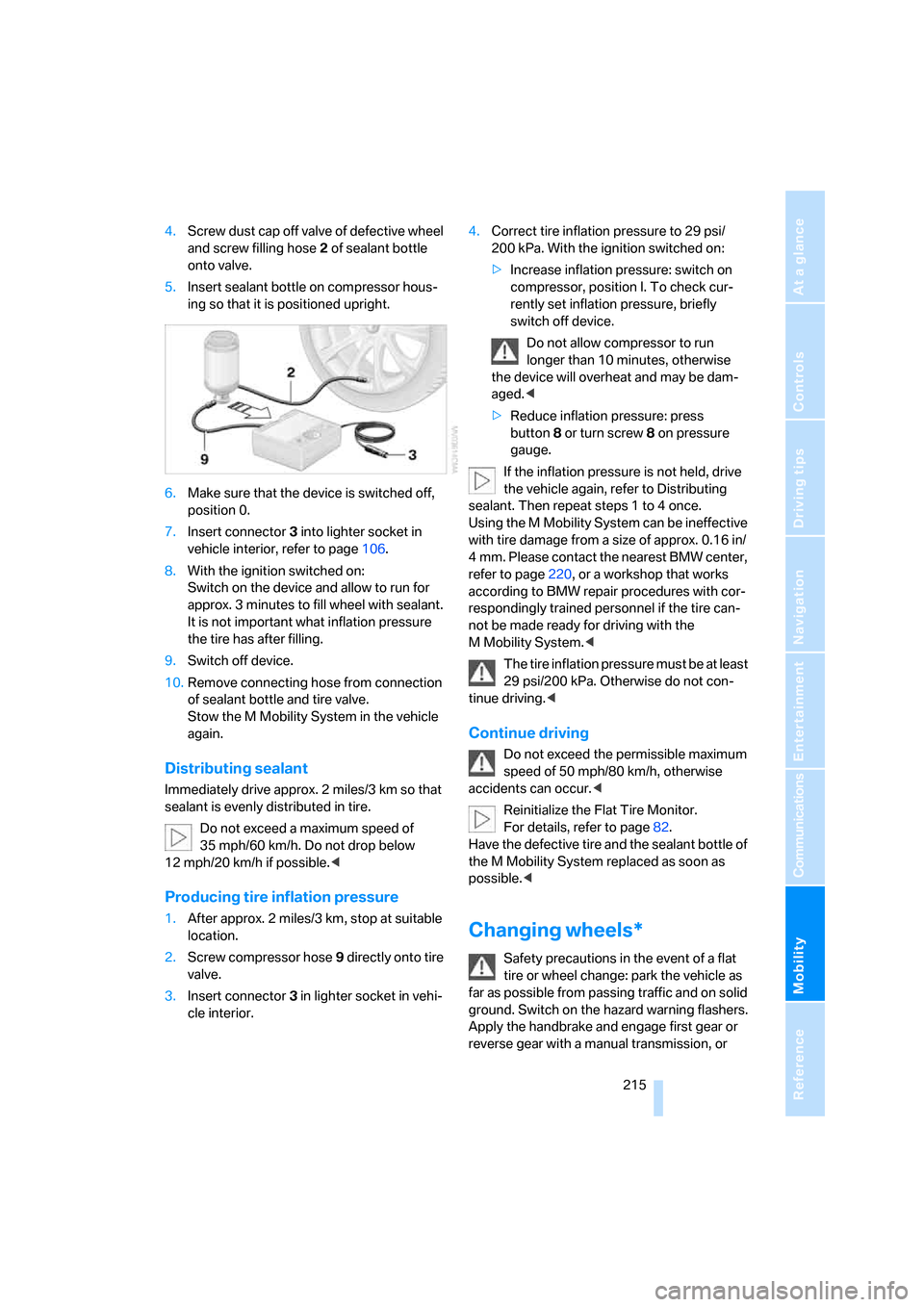
4.Screw dust cap off valve of defective wheel
and screw filling hose2 of sealant bottle
onto valve.
5.Insert sealant bottle on compressor hous-
ing so that it is positioned upright.
6.Make sure that the device is switched off,
position 0.
7.Insert connector3 into lighter socket in
vehicle interior, refer to page106.
8.With the ignition switched on:
Switch on the device and allow to run for
approx. 3 minutes to fill wheel with sealant.
It is not important what inflation pressure
the tire has after filling.
9.Switch off device.
10.Remove connecting hose from connection
of sealant bottle and tire valve.
Stow the M Mobility System in the vehicle
again.
Distributing sealant
Immediately drive approx. 2 miles/3 km so that
sealant is evenly distributed in tire.
Do not exceed a maximum speed of
35 mph/60 km/h. Do not drop below
12 mph/20 km/h if possible.<
Producing tire inflation pressure
1.After approx. 2 miles/3 km, stop at suitable
location.
2.Screw compressor hose9 directly onto tire
valve.
3.Insert connector 3 in lighter socket in vehi-
cle interior.4.Correct tire inflation pressure to 29 psi/
200 kPa. With the ignition switched on:
>Increase inflation pressure: switch on
compressor, position I. To check cur-
rently set inflation pressure, briefly
switch off device.
Do not allow compressor to run
longer than 10 minutes, otherwise
the device will overheat and may be dam-
aged.<
>Reduce inflation pressure: press
button8 or turn screw8 on pressure
gauge.
If the inflation pressure is not held, drive
the vehicle again, refer to Distributing
sealant. Then repeat steps 1 to 4 once.
Using the M Mobility System can be ineffective
with tire damage from a size of approx. 0.16 in/
4 mm. Please contact the nearest BMW center,
refer to page220, or a workshop that works
according to BMW repair procedures with cor-
respondingly trained personnel if the tire can-
not be made ready for driving with the
M Mobility System.<
The tire inflation pressure must be at least
29 psi/200 kPa. Otherwise do not con-
tinue driving.<
Continue driving
Do not exceed the permissible maximum
speed of 50 mph/80 km/h, otherwise
accidents can occur.<
Reinitialize the Flat Tire Monitor.
For details, refer to page82.
Have the defective tire and the sealant bottle of
the M Mobility System replaced as soon as
possible.<
Changing wheels*
Safety precautions in the event of a flat
tire or wheel change: park the vehicle as
far as possible from passing traffic and on solid
ground. Switch on the hazard warning flashers.
Apply the handbrake and engage first gear or
reverse gear with a manual transmission, or
ba8_m5us.book Seite 215 Montag, 5. Februar 2007 12:03 12
Page 220 of 256

Replacing components
218
Vehicle battery
Battery care
The battery is 100 % maintenance-free, i.e., the
electrolyte will last for the life of the battery
when the vehicle is operated in a temperate cli-
ma te. Your BM W center will be glad to advise in
all matters concerning the battery.
Charging battery
Only charge the battery in the vehicle via the
terminals in the engine compartment with the
engine switched off. Connections, refer to
Jump starting on page220.
Disposal
Have old batteries disposed of by your
BMW center or hand them in to a recy-
cling center. Maintain the battery in an upright
position for transport and storage. Always
restrain the battery to prevent it from tipping
over during transport.<
Power failure
After a temporary power loss, the functioning of
some equipment may be limited and require
reinitialization. Individual settings are also lost
and must be updated:
>Seat, mirror and steering wheel memory
The positions must be stored again, refer to
page43.
>Time and Date
The values must be updated, refer to
page74.
>Radio
Stations must be stored again if necessary,
refer to page152.
>Navigation system
Wait until the system starts, refer to
page120.
Fuses
Never attempt to repair a blown fuse and
do not replace a defective fuse with a sub-
stitute of another color or amperage rating, as
this could lead to a circuit overload, ultimately
resulting in a fire in the vehicle.<
Spare fuses, plastic tweezers and fuse alloca-
tion diagram are located in the compartment for
the onboard tool kit, refer to page210.
In glove compartment
1.Release both quick-release fasteners.
2.Fold the cover forward or remove.
in cargo bay
1.Lift up floor mat.
2.Release the quick-release fastener of the
right side panel and pull out the panel.
ba8_m5us.book Seite 218 Montag, 5. Februar 2007 12:03 12
Page 221 of 256

Mobility
219Reference
At a glance
Controls
Driving tips
Communications
Navigation
Entertainment
Giving and receiving assistance
Emergency call
Conditions for an emergency call:
>Full preparation package mobile phone.
With this equipment, an emergency call is
still possible when no mobile phone is
paired in the vehicle.
>BMW Assist is activated. Activating
BMW Assist, refer to page192.
>Radio readiness is activated.
>The BMW Assist system is logged on to a
mobile phone network.
>The emergency call system is operable.
Once your service contract for BMW Assist
expires, the BMW Assist system can be deacti-
vated by a BMW center without you having to
visit a workshop. Once the BMW Assist system
has been deactivated, emergency calls are not
possible. The BMW Assist system be reacti-
vated by a BMW center after signing a new con-
tract.
Initiating an emergency call
1.Briefly press protective cover to open.
Depending on the vehicle's equipment, the
arrangement of the switches and indicator
lamps may differ somewhat.
2.Press the button for at least 2 seconds.
The LED in the button lights up. As soon as the
voice connection to the BMW Assist Response
Center has been established, the LED flashes.Even if you are unable to answer, the BMW
Assist Response Center can take further steps
to help you under certain conditions.
If conditions allow, remain in the vehicle until
the connection has been established. You will
then be able to provide a detailed description of
the situation.
If the current position of your vehicle can be
determined, it will be transmitted to the BMW
Assist Response Center.
If the LED is flashing but the BMW Assist
Response Center cannot be heard over the
hands-free system, it is possible that the
hands-free system is malfunctioning. You may
still be heard by the BMW Assist Response
Center, however.
Under certain conditions, an emergency call is
automatically initiated immediately after a
severe accident. The automatic emergency call
is not affected by the button being pressed.
For technical reasons, the emergency call
cannot be guaranteed under unfavorable
conditions.<
You can also use other services of
BMW Assist with this button, refer to
page187.<
Warning triangle*
The warning triangle is located in the luggage
compartment lid.
Loosen the wing nut to open.
ba8_m5us.book Seite 219 Montag, 5. Februar 2007 12:03 12
Page 231 of 256
Reference 229
At a glance
Controls
Driving tips
Communications
Navigation
Entertainment
Mobility
Short commands of voice command
system
With short commands you can run certain func-
tions directly, regardless of which menu item is selected. Here are the important short com-
mands for the voice command system.
Assistance window
Communication
*
FunctionCommand
To open the assistance window20{Assistance window}
To select the display in the assistance window20{Assistance window map facing north},
{Assistance window map direction of travel},
{Assistance window arrow display},
{Assistance window perspective},
{Assistance window current position},
{Assistance window trip computer} or
{Assistance window onboard info}
To change scale in assistance window120{Assistance window scale ... feet} or
{Assistance window scale ... miles}
FunctionCommand
To open phone173{Phone}
To dial phone number179{Dial number}
To display phone book180{A to Z}
To select from the phone book180{Call ...} or
{Dial name}
To display "Top 8"181{Top 8}
To redial180{Redial}
To display "Received calls"181{Received calls}
To display "Missed calls"181{Missed calls}
To display "Bluetooth"176{Bluetooth}
To open BMW Assist188{BMW Assist}
To open BMW Service, Services187{BMW service}
To open "BMW Contact"181{BMW Contact}
To open "BMW Contact Numbers"181{BMW Contact numbers}
To open "Roadside Assistance"188{Roadside Assistance}
ba8_m5us.book Seite 229 Montag, 5. Februar 2007 12:03 12
Page 232 of 256

Short commands of voice command system
230
Navigation
Onboard info
FunctionCommand
To open navigation system120{Navigation}
To open "Enter address"{Enter address}
To open "New destination"{New destination}
To display "Input map"{Input map}
To display destination list{Destination list}
To display address book{Address book}
To display route criteria{Route preference}
To start destination guidance{Start guidance}
To end destination guidance{Stop guidance}
To display arrow display{Arrow display}
To display map display{Map}, {Map facing north},
{Map direction of travel} or
{Perspective}
To change scale{Scale ... miles} or
{Scale ... feet}
To display roads or towns/cities along route{Route list}
To switch on voice instructions{Navigation info on}
To switch off voice instructions{Navigation info off}
To repeat voice instructions{Repeat navigation info}
To open route {Route menu}
To open "New route"{New route}
To display current position{Current position}
FunctionCommand
To open "Car Data"67{Car data}
To display computer67{Onboard info}
To display trip computer68{Trip computer}
To open stopwatch73{Stopwatch}
To open speed limit72{Limit}
To activate speed limit73{Limit on}
To deactivate speed limit73{Limit off}
ba8_m5us.book Seite 230 Montag, 5. Februar 2007 12:03 12
Page 236 of 256

Everything from A to Z
234
Everything from A to Z
Index
"..." Identifies Control Display
texts used to select
individual functions, and
indicates where to find them
in the text.
A
ABS Antilock Brake
System78
– indicator/warning lamp80
Accepted calls180
Accessories6
Accident, refer to Emergency
call219
Acoustic signal, refer to Check
Control70
Activated-charcoal filter for
automatic climate control99
"Activation time" for parked-
car ventilation100
Active seat ventilation47
Adapter for spare key28
Adaptive brake lamps, refer to
Brake force display85
Adaptive Head Light93
"Add digits" for mobile
phone180
Additives
– coolant206
– engine oil, refer to Approved
engine oils206
"Address book" for navigation
system130
Address for navigation
– deleting131
– entering122,125
– selecting130
– storing130
– storing current position130
"Add to address book"129"Add to destination
list"125,127
Adjusting active backrest
width43
Adjusting interior
temperature96
Adjusting the tone during
audio operation, refer to
Tone control147
Adjusting thigh support42
Adjustment in audio mode
– front/rear balance148
– right/left balance148
"After door opened"44
"After unlocking"44
Airbags86
– indicator/warning lamp87
– indicator lamp for front
passenger airbags87
– sitting safely41
Air distribution
– automatic96
– manual97
Airing, refer to Ventilation99
Air recirculation
– AUC Automatic
recirculated-air control
98
– recirculated-air mode98
"Air recirculation on / off"50
Air supply, automatic climate
control95
Air volume97
AKI, refer to Fuel quality197
Alarm system35
– avoiding unintentional
alarms35
– interior motion sensor35
– switching off alarm35
– switching off tilt alarm
sensor and interior motion
sensor36
– tilt alarm sensor35"All channels"157
"All doors"31
All-season tires, refer to
Winter tires202
"All stations", calling up with
radio150,154
Alterations, technical, refer to
For your own safety5
Altering stretch of road138
"AM", reception
range146,150
Antenna, refer to Caring for
your vehicle brochure
Antenna for mobile phone172
Antifreeze
– coolant206
– washer fluid63
Antilock Brake System
ABS78
– indicator/warning lamp80
Anti-theft alarm system, refer
to Alarm system35
Anti-theft system, refer to
Central locking system30
Approved axle loads, refer to
Weights228
Approved engine oils206
Approved gross vehicle
weight, refer to Weights228
Armrest, refer to Center
armrest, rear107
Around the center console14
Around the steering wheel10
Arrival time
– refer to Computer67
– refer to Starting destination
guidance134
"Arrow display" for navigation
system135
Artificial leather, refer to
Caring for your vehicle
brochure
ba8_m5us.book Seite 234 Montag, 5. Februar 2007 12:03 12
Page 237 of 256
Reference 235
At a glance
Controls
Driving tips
Communications
Navigation
Entertainment
Mobility
Ashtray
– front106
– rear106
Assist, refer to
BMW Assist187
Assistance systems, refer to
Driving stability control
systems78
Assistance window20
"Assist. window off"21
AUC Automatic recirculated-
air control98
"Audio"147,149,154
Audio146
– controls146
– switching on/off146
– tone control147
– volume147
Audio device, external105
Automatic
– air distribution96
– air volume96
– headlamp control91
– service notification189
– steering wheel
adjustment43
– storing stations152
Automatic car washes114
– also refer to Caring for your
vehicle brochure
Automatic climate control95
– automatic air distribution96
– parked car ventilation99
– switching on and off99
– ventilation in rear99
Automatic closing of doors,
refer to Automatic soft
closing33
Automatic curb monitor48
Automatic lighting
– refer to Automatic headlamp
control91
– refer to Daytime running
lamps92
– refer to Interior lamps94
– refer to Pathway lighting92
– refer to Welcome lamps91"Automatic programs"96
Automatic soft closing33
Automatic station search151
"Automatic ventilation"100
AUTO program for automatic
climate control96
"Autostore" on the
radio150,152
"AUX"146
,165,167
AUX-In connection105,165
Average fuel consumption67
– setting units75
Average speed, refer to
Computer66
"Avoid ferries" for navigation
system133
"Avoid highways" for
navigation system132
Avoiding freeways for
navigation132
Avoiding unintentional
alarms35
"Avoid tollroads" for
navigation system133
Axle loads, refer to
Weights228
"A - Z"180
B
"Backrest:"51
Backrest contour, refer to
Lumbar support42
Backrests, refer to Seats42
Backrest width42
Back seats, refer to Rear seats
Backup lamps, replacing
bulbs212
"Balance", refer to Tone
control148
Band-aids, refer to First-aid
kit220
Bass, refer to Tone
control147
"Bass", tone control148
Battery, refer to Vehicle
battery218
– jump starting220Battery replacement, remote
control for comfort
access37
BC button, refer to
Computer66
Being towed222
Belts, refer to Safety belts45
Beverage holder, refer to Cup
holders105
Blind, refer to Sun blinds103
Blower, refer to Air volume97
"Bluetooth"174
"BMW Assist"188
BMW Assist187
– activating192
– breakdown assistance188
– contacting BMW Customer
Relations190
– displaying vehicle data193
– information service190
– services offered187
– TeleService189
– updating191
"BMW Contact"182
"BMW Contact
Numbers"182
BMW homepage4
BMW maintenance
system208
"BMW Service settings"191
BMW website4
Bottle holder, refer to Cup
holders105
Bracket for telephone or
mobile phone, refer to Snap-
in adapter185
Brake assistant79
Brake force display85
Brake lamps
– replacing bulbs212
– two-stage85
Brake rotors
– breaking-in112
– refer to Braking safely113
ba8_m5us.book Seite 235 Montag, 5. Februar 2007 12:03 12
Page 239 of 256

Reference 237
At a glance
Controls
Driving tips
Communications
Navigation
Entertainment
Mobility
Center armrest
– front104
– rear107
Center brake lamp212
Center console14
"Central locking"30
Central locking
– from inside32
– from outside30
Central locking system30
– comfort access36
Changes, technical
– refer to For your own
safety5
– refer to Parts and
accessories6
Changing language on
Control Display76
Changing scale for
navigation136
Changing units of measure on
Control Display75
Changing wheels201,215
CHECK button71
Check Control70
"Check Control
messages"72
Check Gas Cap196
Checking the air pressure,
refer to Tire inflation
pressure198
Child restraint fixing system
LATCH53
Child restraint systems52
Child-safety lock54
Child seats, refer to
Transporting children
safely52
Chime, refer to Check
Control70
Chock216
Chrome parts, refer to Caring
for your vehicle brochure
Cigarette lighter106
Cigarette lighter socket, refer
to Connecting electrical
devices107
Cleaning, refer to Caring for
your vehicle brochure"Climate"47,96
Clock66
– 12h/24h mode74
– hour signal74
– setting time and date74
Closing
– from inside32
– from outside30
Closing fuel filler cap196
Clothes hooks105
Cockpit
10
Cold start, refer to Starting
engine56
Comfort access36
– replacing battery, remote
control37
Comfort area, refer to Around
the center console14
Comfort operation
– glass sunroof31
– windows31
– windows with comfort
access36
– with comfort access36
"Comfort" with EDC81
"Communication"178,188
Compact Disc
– refer to CD changer159
– refer to CD player159
Compartment for remote
control, refer to Ignition
lock55
Compartments, refer to
Storage compartments105
Compressed audio files159
Computer66
– clock66
– displays on Control
Display67
– hour signal74
"Concert hall", refer to Tone
control149
"Concierge"190
Condensation, refer to When
vehicle is parked114
Condition Based Service
CBS208
"Confirmation"31Confirmation signals for
locking and unlocking31
Connecting car vacuum
cleaner, refer to Connecting
electrical devices107
Consumption, refer to
Average fuel
consumption67
Consumption statistics, refer
to Average fuel
consumption67
"Continue guidance to
destination?"135
Control Center, refer to
iDrive16
Control Display, refer to
iDrive16
– setting brightness75
– switching off/on21
Controller, refer to iDrive16
Controls, refer to Cockpit10
Coolant206
– checking level206
– temperature
65
Cooling, maximum98
Cooling fluid, refer to
Coolant206
Cooling function, automatic
climate control98
Cooling system, refer to
Coolant206
Copyright2
Cornering Brake Control
CBC78
Country of destination for
navigation123
Courtesy lamps94
Cradle for telephone or mobile
phone104
Cruise control63
Cruising range67
Cup holders105
Curb weight, refer to
Weights228
"Current position"142
Current position
– displaying142
– entering130
– storing130
ba8_m5us.book Seite 237 Montag, 5. Februar 2007 12:03 12