2007 AUDI R8 lock
[x] Cancel search: lockPage 46 of 210

Doors and windows 44open one of the doors or the luggage lid within 30 seconds after
unlocking the car. This function prevents the vehicle from remaining
unlocked if the unlocking button is pressed by mistake.
On vehicles with the security central locking feature, you can unlock
just the driver's door by pressing button once, or the whole
vehicle by pressing the button twice.
The turn signals flash once when the vehicle is locked to confirm
that the doors and luggage lid are properly locked.
WARNING
•
Do not leave anyone (especially childr e n ) i n t h e c a r i f i t i s l o c k e d
from the outside and the deadlock mechanism is activated: the
doors and windows cannot then be opened from the inside.
Locked doors could delay assistance in an emergency, potentially
putting lives at risk.
•
Take care when closing the windows. Careless use of the
windows can cause injuries.
•
For safety reasons, you should only use the remote control
open and close functions within about 2 metres of the vehicle. To
avoid injuries, always keep an eye on the windows when pressing
the button to close them. The windows stop moving as soon as
the button is released.Note
•
The remote control should only be used when the doors and the
front lid are closed.
•
The remote control should not be used when the vehicle is out of
sight.
•
The anti-theft alarm can be accidentally activated and the vehicle
locked if you press the locking button
on the remote control inside
the vehicle before inserting the key in the ignition. If this should
happen by mistake, press the unlocking button
.
•
The convenience open/close function for the windows only
works when the “Convenience open” function is activated in the
menu display ⇒page 24.
Locking and unlocking the vehicle using the key
If the central locking system should fail to operate, the
vehicle can still be locked and unlocked by turning the key
in the lock.Unlocking
– Turn the key in the driver's door lock to position
⇒fig. 36.
Locking
– Turn the key in the driver's door lock once to position
⇒.
– If you turn the key to position in the driver's door lock
a second time within 2 seconds, this will lock the vehicle
without activating the deadlock mechanism.
AA
Fig. 36 Lock on
driver's door
AA
AB
AB
document_0900452a816e6cc9.book Seite 44 Mittwoch, 21. Februar 2007 1:32 13
Page 47 of 210

Doors and windows45
Controls
Safety
Driving tips
General maintenance
Self-help
Technical data
WARNING
Do not leave anyone (especially children) in the car if it is locked
from the outside and the deadlock mechanism is activated: the
doors and windows cannot then be opened from the inside.
Locked doors could delay assistance in an emergency, potentially
putting lives at risk.
Note
•
The deadlock mechanism and the anti-theft alarm cannot be acti-
vated if the central locking is not functioning.
•
However, please note that when you unlock the vehicle with the
key, this only unlocks the mechanical lock on the doors set in the
menu display ⇒page 24.
•
Both doors are automatically locked when you lock the vehicle.
Central locking switch
The central locking system can be activated using the
central locking switch on the driver's door.Locking the vehicle
– Press the upper switch
⇒fig. 37 ⇒.Unlocking the vehicle
– Press the lower switch
.
Please note the following when you use the central locking switch
to lock your vehicle:•
It is not possible to open the doors from the outside (for safety
reasons, e.g. when stopped at traffic lights).
•
The LED in the central locking switch lights up when all the doors
and the luggage lid are closed and locked.
•
You can open the doors individually from the inside by pulling
the inside door handle.
•
When the driver's door is open, it cannot be locked by pressing
the central locking switch and then closing the door. This helps to
prevent you from being locked out of the vehicle. The door has to be
locked separately after it has been closed.
•
In the event of an accident in which the airbags inflate, doors
locked from the inside will be automatically unlocked to facilitate
access and assistance.
WARNING
The central locking switch is still operative when the ignition is
switched off. You can use it to lock both doors automatically.
However, since this makes it difficult to enter the car from the
outside, you should never leave children unattended in the vehicle.
Locked doors could delay assistance in an emergency, potentially
putting lives at risk.
Note
The central locking switch inside the vehicle will not be operative if
the deadlock mechanism has been activated.
Fig. 37 Detail of the
driver's door: Central
locking switch
document_0900452a816e6cc9.book Seite 45 Mittwoch, 21. Februar 2007 1:32 13
Page 48 of 210
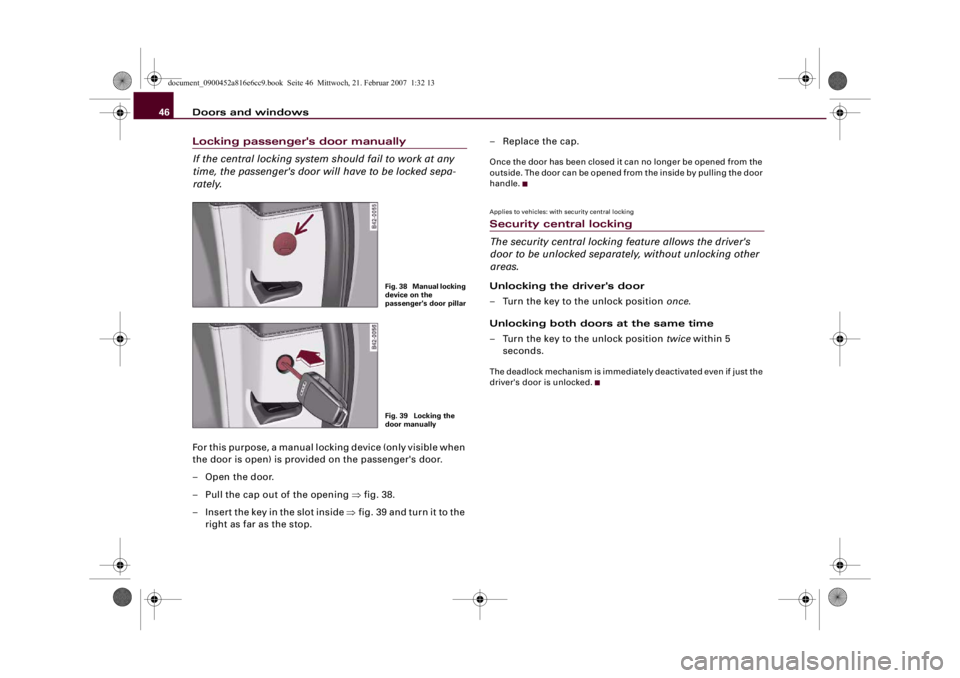
Doors and windows 46Locking passenger's door manually
If the central locking system should fail to work at any
time, the passenger's door will have to be locked sepa-
rately.For this purpose, a manual locking device (only visible when
the door is open) is provided on the passenger's door.
–Open the door.
– Pull the cap out of the opening ⇒fig. 38.
– Insert the key in the slot inside ⇒fig. 39 and turn it to the
right as far as the stop.–Replace the cap.
Once the door has been closed it can no longer be opened from the
outside. The door can be opened from the inside by pulling the door
handle.Applies to vehicles: with security central lockingSecurity central locking
The security central locking feature allows the driver's
door to be unlocked separately, without unlocking other
areas.Unlocking the driver's door
– Turn the key to the unlock position once.
Unlocking both doors at the same time
– Turn the key to the unlock position twice within 5
seconds.The deadlock mechanism is immediately deactivated even if just the
driver's door is unlocked.
Fig. 38 Manual locking
device on the
passenger's door pillarFig. 39 Locking the
door manually
document_0900452a816e6cc9.book Seite 46 Mittwoch, 21. Februar 2007 1:32 13
Page 49 of 210

Doors and windows47
Controls
Safety
Driving tips
General maintenance
Self-help
Technical data
Luggage lidOpening and closing the luggage lidThe windscreen wipers must be switched off and the wiper
arms must be in contact with the windscreen when the
luggage lid is opened. Otherwise the paint may get
damaged.
Opening luggage lid
– Press the centre button on the remote control key, or
– Press the unlock switch on the driver's door ⇒fig. 40.– Pull the release lever ⇒fig. 41 in the direction indicated
(arrow). This will release the arrester hook.
– Pull the luggage lid up.
Closing luggage lid
– To close the luggage lid, pull it down to overcome the
spring pressure.
– Close the luggage lid.
– Press down the luggage lid carefully with both hands
until you hear it engage ⇒.
WARNING
•
For safety reasons the luggage lid must always be completely
closed when the vehicle is moving. After closing it always check
that it is properly secured. The luggage lid must be flush with the
adjacent body panels.
•
Should you notice that the luggage lid is not safely secured
when the vehicle is moving, stop the vehicle immediately and
close the luggage lid properly, otherwise it could cause an acci-
dent.Caution
Make sure that no objects protrude beyond the edges of the storage
well otherwise the luggage lid could be damaged.
Note
The door catches/luggage lid warning symbol lights up in the instru-
ment cluster if the luggage lid is not properly closed when the igni-
tion is switched on.
Fig. 40 Driver's door:
Unlocking the luggage
lidFig. 41 Luggage lid
unlocked: Release lever
document_0900452a816e6cc9.book Seite 47 Mittwoch, 21. Februar 2007 1:32 13
Page 50 of 210

Doors and windows 48Manual release of the luggage lid
The luggage lid can be released manually if it will not
open in the normal way.– Fold out the foot rest in the passenger's footwell
⇒page 190.
– Pull the plastic cord towards you ⇒fig. 42.Anti-theft alarm systemDescription
The anti-theft alarm triggers an alarm if anyone attempts
to break into the vehicle.The anti-theft alarm helps to prevent the vehicle being broken into
or stolen. If the system senses interference with the vehicle it trig-
gers an audible and visible alarm.
How is the system switched on (armed)?
The anti-theft alarm system switches on automatically when the
vehicle is locked with the remote control or by turning the key in the
driver's door (if the door is closed). The system becomes active
about 30 seconds after the vehicle is locked.If you turn the key twice to the lock position within one second, the
anti-theft warning system is not activated.
How is the system switched off?
The anti-theft alarm is only switched off when the vehicle is
unlocked using the remote control. The vehicle will lock itself again
automatically if none of the doors is opened within 60 seconds after
pressing the remote control button.
If the vehicle is opened with the key on the driver side door, the
passenger side door remains locked. The anti-theft alarm is only
switched off if the key is inserted into the ignition lock within 15
seconds and the ignition is switched on. Otherwise the system trig-
gers the alarm. On some export versions the alarm is already trig-
gered as soon as the driver's door is unlocked with the key and
opened.
When does the system trigger an alarm?
The anti-theft alarm monitors and protects the following parts of
the car:
•
Engine compartment (engine lid)
•
Luggage compartment
•
Doors
•
Ignition
•
Interior ⇒page 49
If any of the named areas are entered or tampered with, the alarm
will sound.
How is the alarm switched off?
The alarm can be switched off by unlocking the vehicle using the
remote control, or by switching on the ignition with the key and thus
“disarming” the system. The alarm will also switch itself off when it
comes to the end of its cycle.
Fig. 42 Detail: Manual
release
document_0900452a816e6cc9.book Seite 48 Mittwoch, 21. Februar 2007 1:32 13
Page 51 of 210

Doors and windows49
Controls
Safety
Driving tips
General maintenance
Self-help
Technical data Turn signals
The turn signals flash briefly when the vehicle is locked to confirm
that the doors, the engine lid and the luggage lid are properly
closed and locked.
If the turn signals do not flash, check the doors, engine lid and
luggage lid to make sure they are properly closed. The turn signals
will flash briefly if one of the doors, the luggage lid or the engine lid
is closed after the system has been switched on.
Note
•
To make sure that the alarm is fully operative when leaving the
vehicle, briefly check that all the doors and windows are closed.
•
If the vehicle is unlocked at the driver's door using the key, the
central locking switch only becomes fully functional after the igni-
tion is switched on.
•
The alarm is triggered immediately if one of the battery cables is
disconnected while the alarm system is active.
Interior monitor
The interior monitor triggers an alarm if it detects move-
ment inside the vehicle.
You should deactivate the interior monitor if there is a
possibility that the alarm could be set off, for instance, by a
pet or by an object moving about inside the car ⇒. The
tow-away protection function* should be deactivated if the
car is being towed or transported (for instance by rail or
ship).
Deactivating interior monitor
– Press the switch on the door ⇒fig. 43.
– Then lock the vehicle.
Deactivating the tow-away protection*
– Press the switch on the door.
– Then lock the vehicle.The diode in the switch
or
will light up when the interior
monitor / tow-away protection* function is deactivated. In addition,
the diode on the dashboard will light up for about 3 seconds. The
diode on the dashboard will flash rapidly for about 3 seconds after
the vehicle is locked. There then follows an interval of about 30
seconds before the diode starts flashing slowly.
The interior monitor / tow-away protection* function is automati-
cally switched on again next time the vehicle is locked.
WARNING
Do not leave anyone (especially children) in the car if it is locked
from the outside and the deadlock mechanism is activated: the
doors and windows cannot then be opened from the inside.
Locked doors could delay assistance in an emergency, potentially
putting lives at risk.
Fig. 43 Switches for
the interior monitor in
the door trim (only
visible when the
driver's door is open)
AAAB
document_0900452a816e6cc9.book Seite 49 Mittwoch, 21. Februar 2007 1:32 13
Page 52 of 210

Doors and windows 50Electric windowsControls
The driver can operate all the electric windows in the
vehicle.The electric windows are controlled by two-stage switches:
Opening the windows
– Press the switch as far as the first stop and hold it until
the window has moved to the desired position.
– Press the switch briefly to the second stop: the window
will automatically open all the way.Closing the windows
– Pull the switch as far as the first stop and hold it until the
window has moved to the desired position.
– Pull the switch briefly to the second stop: the window will
automatically close all the way.
WARNING
•
Always take the key with you when leaving the vehicle - even if
you only intend to be gone for a short time. This is especially
important if children are left in the car. They might otherwise be
able to start the engine or use power-operated equipment such as
the electric windows - this could lead to injuries. The window
switches are only deactivated when the driver's door or the front
passenger's door is opened.
•
Always be careful when closing the windows. Careless use of
the electric windows can cause severe injuries.
•
When locking the vehicle from the outside, make sure that
nobody is inside the vehicle, as the windows cannot be opened
from the inside in an emergency.Note
•
When the doors are opened the windows will automatically
come down approximately 10 mm.
•
You can also open the windows using the remote control key
⇒page 43.
Possible malfunctionsThe one-touch open and close function will not work if the battery
has been temporarily disconnected. The function can be restored as
follows:
Fig. 44 Detail of the
driver's door: ControlsFig. 45 Switch on front
passenger's door
document_0900452a816e6cc9.book Seite 50 Mittwoch, 21. Februar 2007 1:32 13
Page 54 of 210

Lights and vision 52Lights and visionLightsSwitching lights on and off
Switching on the side lights
– Turn the light switch ⇒fig. 46 to position
. The indi-
cator lamp
lights up when the side lights are on.
Switching on the dipped or main beam
headlights
– Turn the light switch to position
.
– Press the main beam lever forward ⇒page 56.
Switching off the lights
– Turn the light switch to position O.
The dipped beam headlights will only work with the ignition on. The
headlights are switched to side lights while the engine is being
started and after the ignition has been switched off.The daytime running lights are activated when you switch on the
ignition if the light switch is in position 0 or AUTO, provided that the
daytime running lights function has been activated in the menu
display ⇒page 24.
Note
•
If the lights are left on after the key has been taken out of the
ignition lock, a buzzer sounds when the driver's door is opened.
•
The use of the lighting described here is subject to the relevant
statutory requirements.
•
The headlights and rear lights may mist up temporarily on the
inside in cool or damp weather.
−This is due to the difference in temperature on the inside and
the outside of the headlight glass.
−When the headlights are switched on the surface heated by
the light will soon be demisted, however the glass may still be
misted up inside, around the edges.
−This phenomenon has no influence on the life expectancy of
the vehicle lights.
•
Switch on the headlights when the ambient light starts to fade
or in conditions of poor visibility.
Fig. 46 Detail of the
dashboard: Light
switch
document_0900452a816e6cc9.book Seite 52 Mittwoch, 21. Februar 2007 1:32 13