2006 SUZUKI SX4 Can
[x] Cancel search: CanPage 894 of 1556

Downloaded from www.Manualslib.com manuals search engine 6C-14 Power Assisted Steering System:
DLC and Its Communication Check (No communication to P/S Control Module)S6RW0D6304009
Wiring Diagram
Troubleshooting
[A]
123
4567
8
9 11
10 12 13
141516
17 18 1920
1
2
[B]
10 9 8 7654 3 21
16 15 14 13 12 11
26 25 24 2322 21 20 19 18 17
32 31 30 29 28 27
[C]
LT GRN/BLKE11-1
E11-11
E13-1 GRN
GRN
WHT
8
13
318
19
20
5
6 17
4
12
712V
E13-2BLK
9
G241-31
+BB
BLU/
WHTE04-9
10
11
RED/BLK
G241-25E11-5GRY
L313-312
BLKBLK/
ORN
16
16
15
14[D]
I6RW0D630002-01
[A]: P/S control module connector No.1 “E11” (viewed from harness side) 5. Combination meter 13. Individual circuit fuse box No.1
[B]: P/S control module connector No2 “E13” (viewed from harness side) 6. “EPS” warning light 14. Serial data circuit
[C]: Combination meter connector “G241” (viewed from harness side) 7. Data link connector (DLC) 15. DLC power supply circuit
[D]: Junction block without BCM model (Taiwan model) 8. P/S control module 16. DLC ground circuit
1. Main fuse box 9. BCM 17. “IGN” fuse
2. Ignition switch 10. To HVAC control module 18. “P/S” fuse
3. Junction block assembly 11. To ABS control module 19. “IG1 SIG” fuse
4. Main fuse 12. To SDM 20. “MTR” fuse
Step Action Yes No
1“EPS” warning light check
1) Turn ignition switch to ON position.
Does “EPS” warning light turn on?Go to step 2. Go to ““EPS” Warning
Light Does Not Come
ON with Ignition Switch
Turned ON before
Engine Starts”.
2Scan tool condition check
1) Make sure that SUZUKI scan tool is as follows.
• Correct PCMCIA card (software) is used.
• There are no deformation and wear for DLC cable
terminals.
• Connection for DLC cable terminals is in good
condition.
Are they OK?Go to step 3. Repair or replace
defective part.
Page 895 of 1556

Downloaded from www.Manualslib.com manuals search engine Power Assisted Steering System: 6C-15
3Communication check
1) Check DLC terminal for deformation and wear.
2) If it is in good condition, connect SUZUKI scan tool to
DLC with ignition switch tuned OFF.
3) Check if communication is possible by making
communication with other control modules (BCM, ABS,
HVAC control module or SDM).
Is it possible to communicate with the other control
modules?Go to Step 4. Go to Step 6.
4Serial communication circuit check
1) With ignition switch turned OFF, disconnect “E11”
connector from P/S control module and check for proper
connection at P/S control module connector terminal.
2) If connections are OK, check that “Serial data circuit” is
as follows.
• Wiring resistance of “Serial data circuit” wire between
DLC connector and P/S control module connector is
less than 1 Ω.
Is it resistance less than 1
Ω?Go to Step 5. “Serial data circuit” is
open or high resistance.
5P/S control module power and ground circuit check
1) Check power supply circuit and ground circuit for P/S
control module referring to “P/S Control Module Power
Supply and Ground Circuit Check”.
Is check result in good condition?Substitute a known-
good P/S control
module and recheck.Repair or replace
defective circuit.
6DLC power and ground circuit check
1) Check power supply circuit and ground circuit for DLC
connector as follows.
• Voltage of “DLC connector power supply circuit”
between DLC connector terminal and vehicle body
ground is 10 –14 V with ignition switch turned ON.
• Wire resistance of each “DLC connector ground
circuit” between DLC connector terminal and vehicle
body ground is less than 1 Ω.
Is check result in good condition?Go to Step 7. Repair or replace
defective circuit.
7Serial communication circuit check
1) With ignition switch turned OFF, disconnect “E11”
connector from P/S control module and check for
terminal to P/S control module connector.
2) If connections are OK, check that “Serial data circuit” is
as follows.
• Insulation resistance of “Serial data circuit” wire is
infinity between its terminal and other terminals at P/S
control module connector.
• Insulation resistance of “Serial data circuit” wire is
infinity between its terminal and vehicle body ground.
Is circuit in good condition?Go to Step 8. Repair or replace
defective circuit. Step Action Yes No
Page 896 of 1556

Downloaded from www.Manualslib.com manuals search engine 6C-16 Power Assisted Steering System:
“EPS” Warning Light Does Not Come ON with Ignition Switch Turned ON before Engine StartsS6RW0D6304010
Wiring Diagram8Scan tool operation check
1) Check if communication is possible by making
communication with other vehicles.
Is it possible to communicate with the other vehicle?Scan tool is in good
condition, check
intermittent trouble
referring to “Intermittent
and Poor Connection
Inspection in Section
00”.Recheck PCMCIA card
and DLC cable for faulty
condition. If they are
OK, scan tool is faulty. Step Action Yes No
[A]
123
4567
8
9 11
10 12 13
141516
17 18 1920
1
2
[B]
10 9 8 7654 3 21
16 15 14 13 12 11
26 25 24 2322 21 20 19 18 17
32 31 30 29 28 27
[C]
LT GRN/BLKE11-1E13-1 GRNGRN
WHT
7
8
311
12
13
5
6 10
4 12
12V
E13-2BLK
G241-31
RED/BLK
G241-25E11-5GRY
9
I6RW0C630003-01
[A]: P/S control module connector No.1 “E11” (viewed from harness side) 4. Main fuse 10. “IGN” fuse
[B]: P/S control module connector No.2 “E13” (viewed from harness side) 5. Combination meter 11. “P/S” fuse
[C]: Combination meter connector “G241” (viewed from harness side) 6. “EPS” warning light 12. “IG1 SIG” fuse
1. Main fuse box 7. P/S control module 13. “MTR” fuse
2. Ignition switch 8. Individual circuit fuse box No.1
3. Junction block assembly 9. “EPS” warning light circuit
Page 898 of 1556
Downloaded from www.Manualslib.com manuals search engine 6C-18 Power Assisted Steering System:
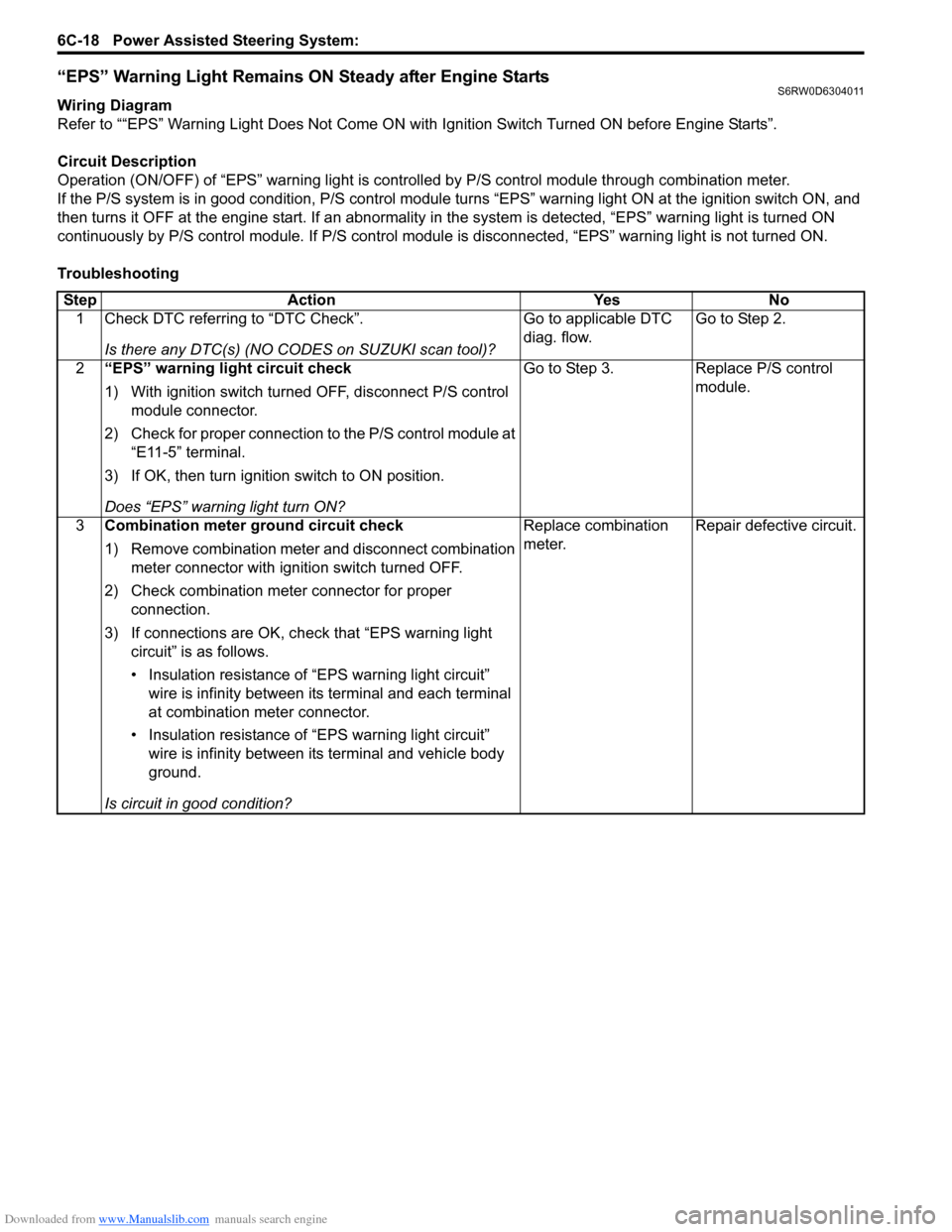
“EPS” Warning Light Remains ON Steady after Engine StartsS6RW0D6304011
Wiring Diagram
Refer to ““EPS” Warning Light Does Not Come ON with Ignition Switch Turned ON before Engine Starts”.
Circuit Description
Operation (ON/OFF) of “EPS” warning light is controlled by P/S control module through combination meter.
If the P/S system is in good condition, P/S control module turns “EPS” warning light ON at the ignition switch ON, and
then turns it OFF at the engine start. If an abnormality in the system is detected, “EPS” warning light is turned ON
continuously by P/S control module. If P/S control module is disconnected, “EPS” warning light is not turned ON.
Troubleshooting
Step Action Yes No
1 Check DTC referring to “DTC Check”.
Is there any DTC(s) (NO CODES on SUZUKI scan tool)?Go to applicable DTC
diag. flow.Go to Step 2.
2“EPS” warning light circuit check
1) With ignition switch turned OFF, disconnect P/S control
module connector.
2) Check for proper connection to the P/S control module at
“E11-5” terminal.
3) If OK, then turn ignition switch to ON position.
Does “EPS” warning light turn ON?Go to Step 3. Replace P/S control
module.
3Combination meter ground circuit check
1) Remove combination meter and disconnect combination
meter connector with ignition switch turned OFF.
2) Check combination meter connector for proper
connection.
3) If connections are OK, check that “EPS warning light
circuit” is as follows.
• Insulation resistance of “EPS warning light circuit”
wire is infinity between its terminal and each terminal
at combination meter connector.
• Insulation resistance of “EPS warning light circuit”
wire is infinity between its terminal and vehicle body
ground.
Is circuit in good condition?Replace combination
meter.Repair defective circuit.
Page 903 of 1556

Downloaded from www.Manualslib.com manuals search engine Power Assisted Steering System: 6C-23
DTC Detecting Condition and Trouble Area
DTC TroubleshootingDTC detecting condition Trouble area
DTC C1121:
Vehicle speed signal is 0 km/h even though engine speed
is more than 4000 rpm for more than 60 seconds
continuously (before elapse of 5 min from engine start)
or
Vehicle speed signal is 0 km/h even though engine speed
is more than 2500 rpm for more than 60 seconds
continuously (after elapse of 5 min for engine start).
(1 driving cycle detection logic but “EPS” warning light
does not light up)
DTC C1123:
Vehicle speed signal is 0 km/h with continuously more
than 3 driving cycles even though engine speed is more
than 4000 rpm for more than 30 seconds continuously
(before elapse of 5 min from engine start)
or
Vehicle speed signal is 0 km/h with continuously more
than 3 driving cycles even though engine speed is more
than 2500 rpm for more than 30 seconds continuously
(after elapse of 5 min for engine start).
(3 driving cycle detection logic)
DTC C1124:
Vehicle speed signal is less than 5 km/h for more than 5
seconds continuously with more than specified
deceleration speed (–20 m/s
2) from over 20 km/h.
(1 driving cycle detection logic but “EPS” warning light
does not light up)• Vehicle speed signal circuit
•BCM
•ECM
• TCM (A/T model)
• ABS control module (M/T model)
• P/S control module
• CAN communication line circuit
Step Action Yes No
1Was “EPS System Check” performed?Go to Step 2. Go to “EPS System
Check”.
2DTC check
1) DTC check for ECM referring to “DTC Check in Section
1A”.
Is there any DTC detected?Go to applicable DTC
diag. flow.Go to Step 3.
3Vehicle spec check
Is vehicle equipped with A/T?Go to Step 4 Go to Step 5
4DTC check
1) Check TCM for DTC referring to “DTC Check in Section
5A”.
Is there any DTC detected?Go to applicable DTC
diag. flow.Go to Step 6.
5DTC check
1) Check ABS control module and BCM for DTC referring
to “DTC Check in Section 4E” and “DTC Check in
Section 10B”.
Is there any DTC detected?Go to applicable DTC
diag. flow.Go to Step 6.
Page 910 of 1556

Downloaded from www.Manualslib.com manuals search engine 6C-30 Power Assisted Steering System:
Inspection of P/S Control Module and Its CircuitsS6RW0D6304020
The P/S control module and its circuits can be checked at the P/S control module wiring couplers by measuring
voltage and resistance.
CAUTION!
P/S control module cannot be checked by itself. It is strictly prohibited to connect voltmeter or
ohmmeter to the P/S control module with connectors disconnected from the P/S control module.
Voltage Check
1) Remove console box.
2) Check for voltage at each terminal with connectors connected to the P/S control module.
NOTE
As each terminal voltage is affected by the battery voltage, confirm if the battery voltage is 11 V or
more when ignition switch is ON.
[C]
[A]
123
4567
8
9 11
10 12 13
141516
17 18 1920
1
2
[B]
1
2
I7RW01632020-01
[A]: P/S control module connector No.1 “E11” (viewed from harness side)
[B]: P/S control module connector No.2 “E13” (viewed from harness side)
[C]: P/S control module connector No.3 “E12” (viewed from harness side)
Page 918 of 1556

Downloaded from www.Manualslib.com manuals search engine 6C-38 Power Assisted Steering System:
2) Install steering gear case to vehicle, and then install
front suspension frame referring to “Front
Suspension Frame, Stabilizer Bar and/or Bushing
Removal and Installation in Section 2B”.
3) Install steering gear case to suspension frame (3) as
follows.
a) Set member bracket (2) to steering gear case
(1).
b) Install all steering gear case mounting bolts by
hand.
c) Tighten steering mounting bolts in numerical
order and specified torque.
Tightening torque
Steering gear case mounting bolt (a): 70 N·m (
7.0 kgf-m, 51.0 lb-ft)
4) Connect torque sensor connector and P/S motor
connector to steering gear case.
5) Be sure that steering wheel and brake discs (right &
left) are all straight-ahead position and then insert
steering lower shaft (5) into steering pinion shaft (3)
with matching marks (4).
6) Tighten steering shaft joint lower bolt (1) and upper
bolt (2) to specified torque (tighten lower side first
and then tighten upper side).
Tightening torque
Steering lower shaft assembly upper joint bolt
(a): 25 N·m (2.5 kgf-m, 18.5 lb-ft)
Steering lower shaft assembly lower joint bolt
(b): 25 N·m (2.5 kgf-m, 18.5 lb-ft)
7) Install steering joint cover.Steering Rack Boot InspectionS6RW0D6306007
Hoist vehicle.
Inspect each boot for tear. A torn boot allows entry of
dust and water which can cause wear to steering rack
and pinion to produce noise as well as rust to result in
malfunction of steering system.
Even if boot tear is small, replace with new one.
Also, check each boot for dent. If there is a dent, keep
boot in most compressed state for some seconds to
correct dent.
Boots should be visually inspected for any damage, dent
and tear during every periodical inspection at specified
intervals and whenever vehicle is hoisted for any other
purpose.
Tie-Rod / Rack Boot Removal and InstallationS6RW0D6306008
Removal
1) Remove steering gear case assembly referring to
“Steering Gear Case Assembly Removal and
Installation”.
2) Remove member bracket from steering gear case
assembly.
3) For ease of adjustment after installation, make
marking (1) of tie-rod end lock nut position of tie-rod
thread.
4) Loosen tie-rod end lock nut and remove tie-rod end.
5) Remove boot band (2) and clip (1).
6) Remove boot from tie-rod.I7RW01632009-01
5
4 1, (b)
3
2, (a)
1, (b)5
I5RW0A630020-01
I2RH01630012-01
I4RS0A630044-01
IYSQ01630034-01
Page 921 of 1556

Downloaded from www.Manualslib.com manuals search engine Power Assisted Steering System: 6C-41
P/S Control Module Removal and InstallationS6RW0D6306011
Removal
1) Disconnect negative cable at battery.
2) Remove console box.
3) Disconnect connectors (1) from P/S control module.
4) Remove P/S control module and bracket (2) from
floor panel.
5) Separate P/S control module and bracket.
Installation
Reverse removal procedure.
Torque Sensor and Its Circuit InspectionS6RW0D6306012
1) Check that torque sensor circuit is in good condition
referring to Step 2 to 3 of “DTC C1111 / C1113 /
C1115: Torque Sensor Circuit Failure”. If check result
is not satisfactory, repair torque sensor circuit.
2) Remove console box.
3) With ignition switch turned OFF, connect scan tool to
DLC or connect voltage tester between “E11-18” –
“E11-9” (main sensor) or “E11-10” – “E11-9” (sub
sensor) with connected connector to P/S control
module.
4) Set torque wrench to steering wheel referring to
“Steering Force Check” for checking steering force.
1
2
I5RW0A630027-01
[A]: Main sensor [B]: Sub sensor
E11
1818
E11
10
[A]
[B]
9 9
I7RW01632021-01
I3RM0A630022-01