2006 SUZUKI SX4 PPL
[x] Cancel search: PPLPage 870 of 1556

Downloaded from www.Manualslib.com manuals search engine 6B-1 Steering Wheel and Column:
Ste eri ng
Steering Wheel and Column
Precautions
Service Precautions of Steering Wheel and ColumnS6RW0D6200001
For service precautions, refer to “Precautions on Service and Diagnosis of Air Bag System in Section 8B”.
Service and Diagnosis
For diagnosis and servicing, refer to “Precautions on Service and Diagnosis of Air Bag System in Section 8B”.
Disabling Air Bag System
For disabling air bag system, refer to “Disabling Air Bag System in Section 8B”.
Enabling Air Bag System
For enabling air bag system, refer to “Enabling Air Bag System in Section 8B”.
Handling and Storage
For handling and storage, refer to “Precautions on Handling and Storage of Air Bag System Components in Section
8B”.
Disposal
For disposal, refer to “Precautions on Disposal of Air Bag and Seat Belt Pretensioner in Section 8B”.
General Description
Steering Wheel and Column ConstructionS6RW0D6201001
This double tube type steering column has the following three important features in addition to the steering function:
• The column is energy absorbing, designed to compress in a front-end collision.
• The ignition switch and lock are mounted conveniently on this column.
• With the column mounted lock, the ignition and steering operations can be locked to inhibit theft of the vehicle.
To insure the energy absorbing action, it is important that only the specified screws, bolts and nuts be used as
designated, and that they are tightened to the specified torque. When the column assembly is removed from the
vehicle, special care must be taken in handling it. Use of a steering wheel puller other than the recommended puller in
this manual or a sharp blow on the end of the steering shaft, leaning on the assembly, or dropping the assembly could
shear the plastic shear pins which maintain column length and position.
The driver air bag (inflator) module is one of the supplemental restraint (air bag) system components and is mounted
to the center of the steering wheel. During certain frontal crashes, the air bag system supplements the restraint of the
driver’s and passenger’s seat belts by deploying the air bags. The air bag (inflator) module should be handled with
care to prevent accidental deployment. When servicing, be sure to observe “Precautions on Service and Diagnosis of
Air Bag System in Section 8B”.
Page 874 of 1556

Downloaded from www.Manualslib.com manuals search engine 6B-5 Steering Wheel and Column:
4) Connect horn connector and audio control switch
connector, if necessary.
5) Install driver air bag (inflator) module to steering
wheel. Refer to “Driver Air Bag (Inflator) Module
Removal and Installation in Section 8B”.
6) Connect negative (–) cable to battery.
7) Enable air bag system referring to “Enabling Air Bag
System in Section 8B”.
Contact Coil Cable Assembly Removal and
Installation
S6RW0D6206003
CAUTION!
Do not turn contact coil more than allowable
number of turns (about two and a half turns
from the center position clockwise or
counterclockwise respectively), or coil will
break.
Removal
1) Disconnect negative (–) cable at battery.
2) Disable air bag system referring to “Disabling Air
Bag System in Section 8B”.
3) Remove steering wheel from steering column
referring to “Steering Wheel Removal and
Installation”.
4) Remove steering column hole cover.
5) Remove steering column lower cover (2) and upper
cover (1).6) Remove contact coil cable assembly (1) from
steering column.
Installation
1) Check to make sure that vehicle’s front tires are set
at straight-ahead position and then ignition switch is
at LOCK position.
2) Install contact coil cable assembly to steering
column securely.
NOTE
New contact coil cable assembly is supplied
with contact coil set and held at its center
position with a lock pin (1). Remove this lock
pin after installing contact coil cable
assembly to steering column.
2
1
I6RW0B620005-01
1I6RW0B620009-02
I4RS0A620010-01
Page 884 of 1556
![SUZUKI SX4 2006 1.G Service Workshop Manual Downloaded from www.Manualslib.com manuals search engine 6C-4 Power Assisted Steering System:
Schematic and Routing Diagram
EPS System Wiring Circuit DiagramS6RW0D6302001
[A]
123
45
3 21
4
567
8
9 11](/manual-img/20/7612/w960_7612-883.png "SUZUKI SX4 2006 1.G Service Workshop Manual Downloaded from www.Manualslib.com manuals search engine 6C-4 Power Assisted Steering System:
Schematic and Routing Diagram
EPS System Wiring Circuit DiagramS6RW0D6302001
[A]
123
45
3 21
4
567
8
9 11")
Downloaded from www.Manualslib.com manuals search engine 6C-4 Power Assisted Steering System:
Schematic and Routing Diagram
EPS System Wiring Circuit DiagramS6RW0D6302001
[A]
123
45
3 21
4
567
8
9 11
10 12 13
141516
17 18 19201
2
[B]
1
2
[C] [D]
10 9 8 7654 3 21
16 15 14 13 12 11
26 25 24 2322 21 20 19 18 17
32 31 30 29 28 27
[F][E]
12
BRN RED/
BLU GRY LT GRN/
BLK
BLK
RED
WHT GRN
BLK
E11-1
E11-5
E11-14
E11-12
[J]:E01-44E01-4
[J]:E01-27E01-26
E12-1
E12-2
E11-10E11-8
E11-9
E11-19
E13-1 GRN
GRY
GRN
WHT
G241-25G241-31
RED/BLK
11
12
1314 3 18
20
21
7 19
4 12
22
12V
E13-2BLK
9V
REDE11-20
12V
12V
E61-2
E61-1
610
55
5V
8
E11-115V
PPL
E11-4
9
23
+BB
BLU/
WHTE04-9
1524YELE11-18E31-5
E31-2
E31-39V
3V
E31-4
E31-1IG11617
C07-25
[H]
[G]
G04-15
[I]:G04-22
25L313-3
[I]
I6RW0D630001-01
[A]: P/S control module connector No.1 “E11” (viewed from harness side) 3. Junction block assembly 15. BCM
[B]: P/S control module connector No.2 “E13” (viewed from harness side) 4. Main fuse 16. Output shaft speed sensor
[C]: P/S control module connector No.3 “E12” (viewed from harness side) 5. Front (left/right) wheel speed sensor 17. TCM
[D]: Combination meter connector “G241” (viewed from harness side) 6. ABS control module 18. Individual circuit fuse box No.1
[E]: Torque sensor connector “E31” (viewed from harness side) 7. Combination meter 19. “IGN” fuse
[F]: Motor connector “E61” (viewed from harness side) 8. “EPS” warning light 20. “P/S” fuse
[G]: M/T model 9. Data link connector (DLC) 21. “IG1 SIG” fuse
[H]: A/T model 10. ECM 22. “MTR” fuse
[I]: Junction block without BCM model (Taiwan model) 11. P/S control module 23. To ABS control module
[J]: M15A engine with 4A/T equipped with slip control model (Hong Kong
model)12. P/S motor 24. To HVAC control module
1. Main fuse box 13. Shield 25. To SDM
2. Ignition switch 14. Torque sensor (built into steering gear case)
Page 885 of 1556

Downloaded from www.Manualslib.com manuals search engine Power Assisted Steering System: 6C-5
Terminal Arrangement of P/S Control Module Coupler (Viewed from Harness Side)
Diagnostic Information and Procedures
EPS System CheckS6RW0D6304001
WARNING!
Carry out test drive in light traffic area to prevent an accident.
Refer to the following items for the details of each step.Terminal Circuit Terminal Circuit
E11-1Ignition switch signal for P/S control
moduleE11-13 —
E11-2 — E11-14 P/S active signal (idle up signal)
E11-3 — E11-15 —
E11-4 Vehicle speed signal E11-16 —
E11-5 “EPS” warning Light E11-17 —
E11-6 — E11-18 Torque sensor signal (Main)
E11-7 — E11-19 Ground for shield wire
E11-8 9 V power supply for torque sensor E11-20Reference sensor power supply for
torque sensor
E11-9 Ground for torque sensors E12-1 Motor output 1
E11-10 Torque sensor signal (Sub) E12-2 Motor output 2
E11-11Serial communication circuit for data
link connectorE13-1Main power supply for internal
memory and EPS motor
E11-12 Engine speed signal E13-2 Ground for P/S control module
Step Action Yes No
1) Customer complaint analysis
1) Perform customer complaint analysis referring to
“Customer Complaint Analysis”.
Was customer complaint analysis performed?Go to Step 2. Perform customer
complaint analysis.
2) DTC check, record and clearance
1) Check for DTC (including pending DTC) referring to
“DTC Check, Record and Clearance”.
Is there any DTC(s)?Print DTC or write them
down and clear them by
referring to “DTC
Clearance”, and go to
St ep 3 .Go to Step 4.
3) Visual inspection
1) Perform visual inspection referring to “Visual Inspection”.
Is there any faulty condition?Repair or replace
malfunction part, and go
to Step 11.Go to Step 5.
4) Visual inspection
1) Perform visual inspection referring to “Visual Inspection”.
Is there any faulty condition?Repair or replace
malfunction part, and go
to Step 11.Go to Step 8.
5) Trouble symptom confirmation
1) Confirm trouble symptom referring to “Trouble Symptom
Confirmation”.
Is trouble symptom identified?Go to Step 6. Go to Step 7.
6) Rechecking and record of DTC
1) Recheck for DTC referring to “DTC Check”.
Is there any DTC(s)?Go to Step 9. Go to Step 8.
7) Rechecking and record of DTC
1) Recheck for DTC referring to “DTC Check”.
Is there any DTC(s)?Go to Step 9. Go to Step 10.
Page 886 of 1556

Downloaded from www.Manualslib.com manuals search engine 6C-6 Power Assisted Steering System:
NOTE
• As execution of “DTC Clearance” will clear all DTCs, be sure to record all DTCs before service.
• DTC C1122 is indicated when ignition switch is at ON position and engine is not running, it means
that nothing is abnormal.
• Current DTC and history DTC can be identified by condition of the “EPS” warning light.
“EPS” warning light operates as follows.
8) Steering symptom diagnosis and P/S system
symptom diagnosis
1) Check and repair according to “Steering Symptom
Diagnosis in Section 6A” and “P/S System Symptom
Diagnosis”.
Are check and repair complete?Go to Step 11. Check and repair
malfunction part(s), and
go to Step 11.
9) Troubleshooting for DTC
1) Check and repair according to applicable DTC diag. flow.
Are check and repair complete?Go to Step 11. Check and repair
malfunction part(s), and
go to Step 11.
10) Intermittent problems check
1) Check for intermittent problems referring to “Intermittent
Problems Check”.
Is there any faulty condition?Repair or replace
malfunction part(s), and
go to Step 11.Go to Step 11.
11) Final confirmation test
1) Clear DTC if any.
2) Perform final confirmation test referring to “Final
Confirmation Test”.
Is there any problem symptom, DTC or abnormal condition?Go to Step 6. End. Step Action Yes No
Current DTC is set.
(Abnormality exists at
present.)Only history DTC is set.
(Faulty condition occurred once
in the past, but normal condition
is detected at present.)Current and history DTC
exist.
“EPS” warning light
after engine startedRemains ON. Turns OFF. Remains ON.
Page 888 of 1556

Downloaded from www.Manualslib.com manuals search engine 6C-8 Power Assisted Steering System:
Step 8: Steering Symptom Diagnosis and P/S
System Symptom Diagnosis
Perform basic steering system check according to
“Steering Symptom Diagnosis in Section 6A” first. When
the end of the flow has been reached, check the parts of
the system suspected as a possible cause referring to
“P/S System Symptom Diagnosis” and based on
symptoms appearing on the vehicle (symptoms obtained
through steps of customer complaint analysis, trouble
symptom confirmation and/or basic P/S system check)
and repair or replace faulty parts, if any.
Step 9: Troubleshooting for DTC (See each DTC
Diag. Flow)
Based on the DTC indicated in Step 6 or 7 and referring
to the applicable DTC diag. flow, locate the cause of the
trouble, namely in a sensor, switch, wire harness,
connector, actuator, P/S control module or other part and
repair or replace faulty parts.
Step 10: Intermittent Problems Check
Check parts where an intermittent trouble is easy to
occur (e.g., wire harness, connector, etc.), referring to
“Intermittent and Poor Connection Inspection in Section
00” and related circuit of DTC recorded in Step 2.
Step 11: Final Confirmation Test
Confirm that the problem symptom has gone and the P/
S system is free from any abnormal conditions. If what
has been repaired is related to the DTC, clear the DTC
once, perform DTC confirmation procedure and confirm
that no DTC is indicated.
“EPS” Warning Light CheckS6RW0D6304002
1) Turn ignition switch to ON position (but without
running engine) and check if the “EPS” warning light
(1) lights up. If the light dose not light up, go to
““EPS” Warning Light Does Not Come ON with
Ignition Switch Turned ON before Engine Starts” of
the diagnostic flows.
2) Start engine and check that “EPS” warning light turns
OFF. If light remains ON and no DTC is stored in P/S
control module, go to ““EPS” Warning Light Remains
ON Steady after Engine Starts” for troubleshooting.
DTC CheckS6RW0D6304003
1) Turn ignition switch to OFF position.
2) Connect SUZUKI scan tool to data link connector
(DLC) (1) located on underside of instrument panel
at driver’s seat side.
Special tool
(A): SUZUKI scan tool
3) Start engine.
4) Read DTC according to the instructions displayed on
SUZUKI scan tool. For further details, refer to
operator’s manual for SUZUKI scan tool.
NOTE
• If communication between SUZUKI scan
tool and the vehicle can not be
established, perform “DLC and Its
Communication Check (No communication
to P/S Control Module)”.
• DTC C1122 (engine speed signal failure) is
indicated when ignition switch is at ON
position and engine is not running, but it
means there is nothing abnormal if
indication changes to a normal one when
engine is started.
5) After completing the check, turn ignition switch to
OFF position and disconnect SUZUKI scan tool from
DLC.
1
I7RW01632002-01
(A)
1I5RW0A630004-01
Page 889 of 1556

Downloaded from www.Manualslib.com manuals search engine Power Assisted Steering System: 6C-9
DTC ClearanceS6RW0D6304004
1) Turn ignition switch to OFF position.
2) Connect SUZUKI scan tool to data link connector
(DLC) (1) located on underside of instrument panel
at driver’s seat side.
Special tool
(A): SUZUKI scan tool3) Turn ignition switch to ON position.
4) Erase DTC according to the instructions displayed
on SUZUKI scan tool. For further details, refer to
operator’s manual for SUZUKI scan tool.
5) After completing the clearance, turn ignition switch to
OFF position and disconnect SUZUKI scan tool from
DLC.
DTC TableS6RW0D6304005
CAUTION!
Be sure to perform the “EPS System Check” before starting troubleshooting corresponding to each
DTC.
(A)
1I5RW0A630004-01
DTC No. Detecting itemDetecting condition
(DTC will set when detecting)Trouble area DTC“EPS”
warning
light
No
CODESNormal — — — —
) C1111Steering torque sensor
(Main) circuit voltageCircuit voltage of sensor main is
more than 4.5 V or less than 0.5
V
• Torque sensor signal
circuit
• Torque sensor
• P/S control module1 driving
cycle1 driving
cycle
)
C1113Steering torque sensor
(Main and Sub) circuit
correlationDifference between steering
torque calculated based on
sensor main signal and steering
torque calculated based on
sensor sub signal is more than
4.9 N⋅m
or
Difference between
instantaneous value and average
value of steering torque
calculated based on sensor main
signal and steering torque
calculated based on sensor sub
signal is more than 2.94 N⋅m1 driving
cycle1 driving
cycle
)
C1115Steering torque sensor
(Sub) circuit voltageCircuit voltage of sensor sub
signal is more than 4.5 V or less
than 0.5 V1 driving
cycle1 driving
cycle
)
C1116Steering torque sensor
power supply circuit Circuit voltage of torque sensor 9
V power supply is less than 7 V• Torque sensor 9 V
power supply circuit
• Torque sensor
• P/S control module1 driving
cycle1 driving
cycle
Page 891 of 1556
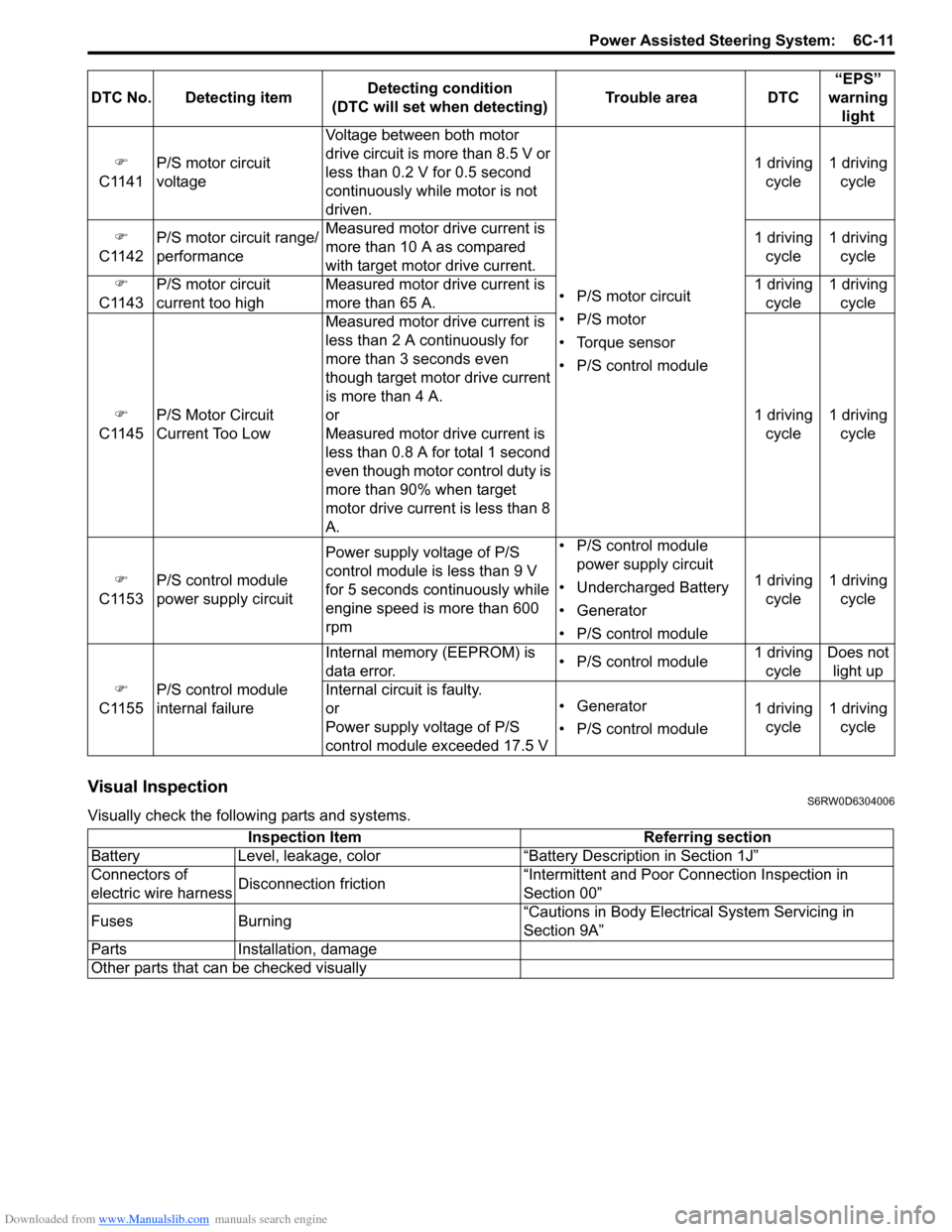
Downloaded from www.Manualslib.com manuals search engine Power Assisted Steering System: 6C-11
Visual InspectionS6RW0D6304006
Visually check the following parts and systems.)
C1141P/S motor circuit
voltageVoltage between both motor
drive circuit is more than 8.5 V or
less than 0.2 V for 0.5 second
continuously while motor is not
driven.
• P/S motor circuit
• P/S motor
• Torque sensor
• P/S control module1 driving
cycle1 driving
cycle
)
C1142P/S motor circuit range/
performanceMeasured motor drive current is
more than 10 A as compared
with target motor drive current.1 driving
cycle1 driving
cycle
)
C1143P/S motor circuit
current too highMeasured motor drive current is
more than 65 A.1 driving
cycle1 driving
cycle
)
C1145P/S Motor Circuit
Current Too Low Measured motor drive current is
less than 2 A continuously for
more than 3 seconds even
though target motor drive current
is more than 4 A.
or
Measured motor drive current is
less than 0.8 A for total 1 second
even though motor control duty is
more than 90% when target
motor drive current is less than 8
A.1 driving
cycle1 driving
cycle
)
C1153P/S control module
power supply circuitPower supply voltage of P/S
control module is less than 9 V
for 5 seconds continuously while
engine speed is more than 600
rpm• P/S control module
power supply circuit
• Undercharged Battery
• Generator
• P/S control module1 driving
cycle1 driving
cycle
)
C1155P/S control module
internal failureInternal memory (EEPROM) is
data error.• P/S control module1 driving
cycleDoes not
light up
Internal circuit is faulty.
or
Power supply voltage of P/S
control module exceeded 17.5 V• Generator
• P/S control module1 driving
cycle1 driving
cycle DTC No. Detecting itemDetecting condition
(DTC will set when detecting)Trouble area DTC“EPS”
warning
light
Inspection Item Referring section
Battery Level, leakage, color “Battery Description in Section 1J”
Connectors of
electric wire harnessDisconnection friction“Intermittent and Poor Connection Inspection in
Section 00”
Fuses Burning“Cautions in Body Electrical System Servicing in
Section 9A”
Parts Installation, damage
Other parts that can be checked visually