2006 MERCEDES-BENZ SPRINTER ECU
[x] Cancel search: ECUPage 324 of 2305

²Four Wheel Speed Sensors/Tone Wheel assem-
blies
²ABS warning indicator
²TCS (ASR) event indicator
²TCS (ASR) warning indicator
²Steering Angle Sensor
²Lateral Acceleration/Yaw Rate Sensor
²Brake Pressure Sensor
²ESP event indicator
²Brake Fluid Level switch
²Brake Switch (BS)
²Brake Lamp Switch (BLS)
²TCS Switch (TCSS)
²K - ABS
²CAN C Bus
²Fuses, grounds, and wiring
3.7.1 ABS AND TCS (ASR) INDICATORS
This system is equipped with an ABS warning
indicator, TCS (ASR) warning indicator, and TCS
(ASR) event indicator to alert the driver of a
malfunction/event it has detected. The CAB can
request the illumination of the ABS warning indi-
cator, TCS (ASR) warning indicator, and TCS (ASR)
event indicator via CAN C BUS. The CAB controls
the ABS warning indicator by:
²Light steady during an initial test at the begin-
ning of an ignition cycle to function as a bulb
check
²Light steady when a system malfunction exists
(DTC)
²Light steady - If you have not met the speed
required to reset/retest the ABS components
The Instrument Cluster (IC) controls the indica-
tors. The Instrument Cluster transmits a message
over the CAN C Bus relating to diagnostics and
current lamp status for the ABS and TCS (ASR)
indicators. The CAB can control the operation of
TCS warning and TCS event indicators by:
²Both light steady with engine off and both go out
with engine running
²TCS warning indicator lights steady when a TCS
malfunction exists
²TCS event indicator will flash when TCS is in an
active event
3.7.2 CONTROLLER ANTILOCK BRAKE
(CAB)
The CAB is mounted directly to the Hydraulic
Control Unit (HCU) that includes a microprocessor
and twelve solenoids that control valves that con-trol brake pressure during antilock braking or trac-
tion control events. The CAB also has circuits that
monitor the following:
²Double brake switch outputs are monitored to
determine whether or not to prepare for possible
ABS braking
²Wheel Speed Sensors are monitored to determine
when a wheel is tending to lock up. The CAB will
operate the valves in the HCU to control braking
pressure during ABS braking
²Detect ABS system related problems and take
diagnostic action
²Able to execute self-tests and output control com-
mands
When equipped with Electronic Stability (ESP),
the CAB also monitors the following:
²The ESP looks at the Steering Angle Sensor value
and monitors the speed of the inner and outer
wheels to ensure that the values are plausible.
The Steering Angle Sensor also monitors the
speed that the steering wheel is turned.
²The Lateral Acceleration/Yaw Rate Sensor is con-
tained in one unit. The sensor measures side to
side (lateral) motion and rotational motion (how
fast the vehicle is turning).
²The ESP uses data from the Brake Pressure
Sensor to analyze how hard and fast that the
driver wants to brake.
3.7.3 HYDRAULIC CONTROL UNIT (HCU)
The HCU on the Bosch 5.7 has an integral valve
body for controlling the front and rear brakes.
Within the HCU are inlet, outlet, and shuttle
valves, to release brake pressure as required to
avoid wheel lockup, keeping the wheels rolling, and
maintain optimum deceleration with stability. The
Pump Motor is attached to the HCU which works
with the ABS and TCS and is controlled by the
CAB. The primary function is to provide extra
amount of fluid when needed.
3.7.4 SWITCHES/SENSORS
BRAKE SWITCH (BS):This switch prepares the
CAB for a possible antilock event. The CAB uses an
output state voltage from the BS when the brake
pedal is either released/depressed. The Fused Igni-
tion Switch Output circuit supplies 12 volts to the
BS. A released brake pedal will close the BS circuit
and the BS Output circuit supplies 12 volts to the
CAB. When the driver depresses the brake pedal,
the BS Output circuit voltage drops to 0 volts and
the CAB senses the brake pedal state. This tells the
CAB what position the brake pedal is currently in to
make an ABS event possible. When using the
DRBIIItin Inputs/Outputs, the BS and BLS will
3
GENERAL INFORMATION
Page 400 of 2305

Verification Tests
ABS VERIFICATION TEST - VER 1 APPLICABILITY
1. Turn the ignition off.
2. Connect all previously disconnected components and connectors.
3. Ensure all accessories are turned off and the battery is fully charged.
4. Ensure that the Ignition is on, and with the DRBIII, erase all Diagnostic Trouble Codes from
ALL modules. Start the engine and allow it to run for 2 minutes and fully operate the system
that was malfunctioning.
5. Turn the ignition off and wait 5 seconds. Turn the ignition on and using the DRBIII, read
DTC's from ALL modules.
6. If any Diagnostic Trouble Codes are present, return to Symptom list and troubleshoot new
or recurring symptom.
7. NOTE: If the CAB/HCU was replaced, ensure the CAB has been initialized
8. NOTE: If the SKREEM or ECM was replaced, refer to the service information for
proper programming procedures.
9. NOTE: For Sensor Circuit/Signal and Pump Motor faults, the CAB must sense all 4
wheels at 12 km/h (8 mph) before it will extinguish the ABS Indicator.
10. If there are no DTC's present after turning ignition on, road test the vehicle for at least 5
minutes. Perform several antilock braking stops.
11. CAUTION: Ensure braking capability is available before road testing.
12. Again, with the DRBIIItread DTC's. If any DTC's are present, return to Symptom list.
13. If there are no Diagnostic Trouble Codes (DTC's) present, and the customer's concern can
no longer be duplicated, the repair is complete.
Are any DTC's present or is the original concern still present?All
Ye s!Repair is not complete, refer to appropriate symptom.
No!Repair is complete.
79
VERIFICATION TESTS
Page 704 of 2305

GROUP TAB LOCATOR
Introduction
0Lubrication & Maintenance
2Suspension
3Differential & Driveline
5Brakes
7Cooling
8AAudio/Video
8BChime/Buzzer
8EElectronic Control Modules
8FEngine Systems
8GHeated Systems
8HHorn
8IIgnition Control
8JInstrument Cluster
8LLamps
8NPower Systems
8ORestraints
8PSpeed Control
8QVehicle Theft Security
8RWipers/Washers
8WWiring
9Engine
11Exhaust System
13Frame & Bumpers
14Fuel System
19Steering
21Transmission
22Tires/Wheels
23Body
24Heating & Air Conditioning
25Emissions Control
Component and System Index
Service Manual Comment Forms (Rear of Manual)
Page 720 of 2305
Do not blend other specific fuel additives with die-
sel fuel. They only result in unnecessary cost, and
may be harmful to the engine operation.
POWER STEERING FLUID
No fluid service required. Filled with Power Steer-
ing Fluid approved to MB 236.3, such as Mobil
ATF-D (Exxon Mobil Corporation) or equivalent.
OPERATION - AUTOMATIC TRANSMISSION
FLUID
The automatic transmission fluid is selected based
upon several qualities. The fluid must provide a high
level of protection for the internal components by
providing a lubricating film between adjacent metal
components. The fluid must also be thermally stable
so that it can maintain a consistent viscosity through
a large temperature range. If the viscosity stays con-
stant through the temperature range of operation,
transmission operation and shift feel will remain con-
sistent. Transmission fluid must also be a good con-
ductor of heat. The fluid must absorb heat from the
internal transmission components and transfer that
heat to the transmission case.
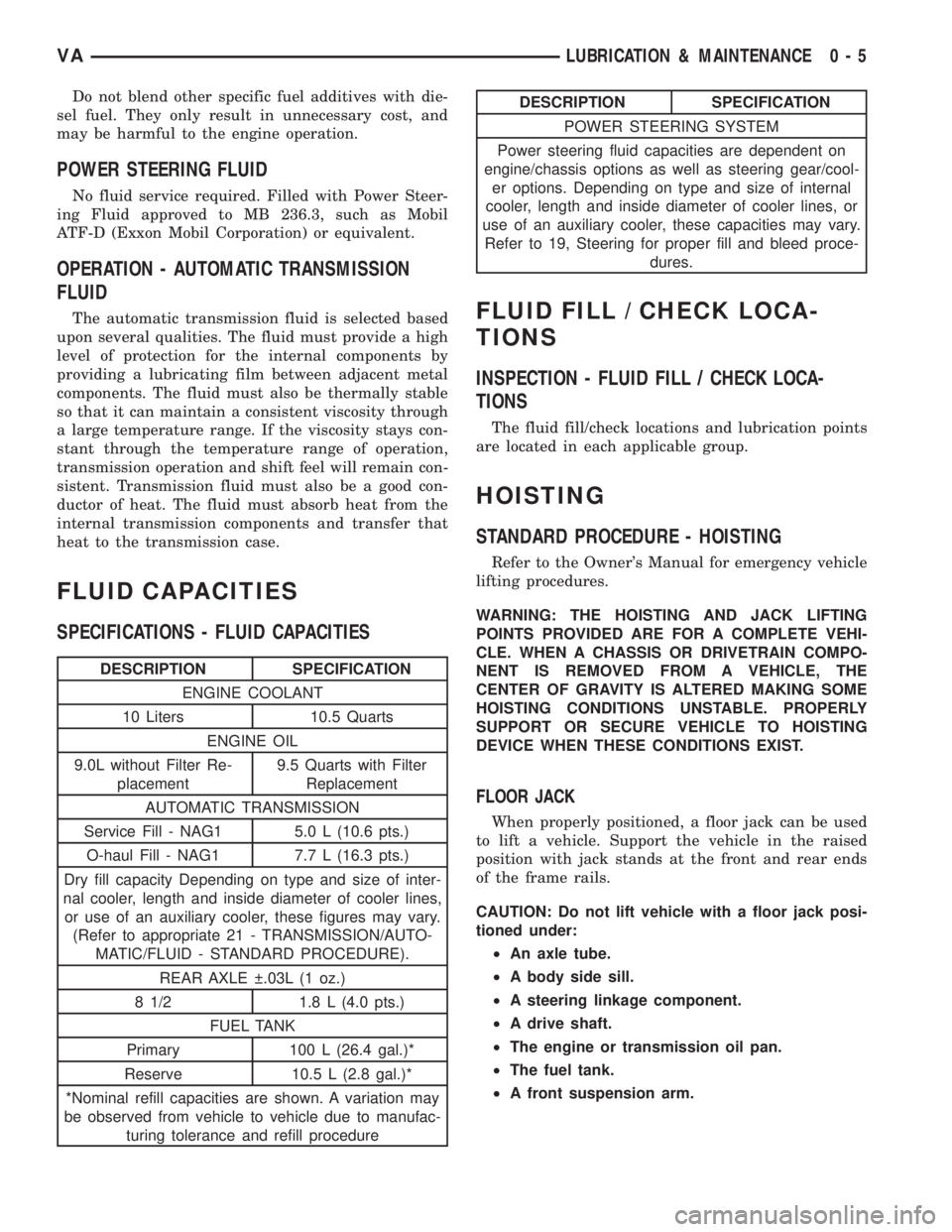
FLUID CAPACITIES
SPECIFICATIONS - FLUID CAPACITIES
DESCRIPTION SPECIFICATION
ENGINE COOLANT
10 Liters 10.5 Quarts
ENGINE OIL
9.0L without Filter Re-
placement9.5 Quarts with Filter
Replacement
AUTOMATIC TRANSMISSION
Service Fill - NAG1 5.0 L (10.6 pts.)
O-haul Fill - NAG1 7.7 L (16.3 pts.)
Dry fill capacity Depending on type and size of inter-
nal cooler, length and inside diameter of cooler lines,
or use of an auxiliary cooler, these figures may vary.
(Refer to appropriate 21 - TRANSMISSION/AUTO-
MATIC/FLUID - STANDARD PROCEDURE).
REAR AXLE .03L (1 oz.)
8 1/2 1.8 L (4.0 pts.)
FUEL TANK
Primary 100 L (26.4 gal.)*
Reserve 10.5 L (2.8 gal.)*
*Nominal refill capacities are shown. A variation may
be observed from vehicle to vehicle due to manufac-
turing tolerance and refill procedure
DESCRIPTION SPECIFICATION
POWER STEERING SYSTEM
Power steering fluid capacities are dependent on
engine/chassis options as well as steering gear/cool-
er options. Depending on type and size of internal
cooler, length and inside diameter of cooler lines, or
use of an auxiliary cooler, these capacities may vary.
Refer to 19, Steering for proper fill and bleed proce-
dures.
FLUID FILL / CHECK LOCA-
TIONS
INSPECTION - FLUID FILL / CHECK LOCA-
TIONS
The fluid fill/check locations and lubrication points
are located in each applicable group.
HOISTING
STANDARD PROCEDURE - HOISTING
Refer to the Owner's Manual for emergency vehicle
lifting procedures.
WARNING: THE HOISTING AND JACK LIFTING
POINTS PROVIDED ARE FOR A COMPLETE VEHI-
CLE. WHEN A CHASSIS OR DRIVETRAIN COMPO-
NENT IS REMOVED FROM A VEHICLE, THE
CENTER OF GRAVITY IS ALTERED MAKING SOME
HOISTING CONDITIONS UNSTABLE. PROPERLY
SUPPORT OR SECURE VEHICLE TO HOISTING
DEVICE WHEN THESE CONDITIONS EXIST.
FLOOR JACK
When properly positioned, a floor jack can be used
to lift a vehicle. Support the vehicle in the raised
position with jack stands at the front and rear ends
of the frame rails.
CAUTION: Do not lift vehicle with a floor jack posi-
tioned under:
²An axle tube.
²A body side sill.
²A steering linkage component.
²A drive shaft.
²The engine or transmission oil pan.
²The fuel tank.
²A front suspension arm.
VALUBRICATION & MAINTENANCE 0 - 5
Page 722 of 2305
(6) Start the engine in the vehicle which has the
booster battery, let the engine idle a few minutes,
then start the engine in the vehicle with the dis-
charged battery.
CAUTION: Do not crank starter motor on disabled
vehicle for more than 15 seconds, starter will over-
heat and could fail.
(7) Allow battery in disabled vehicle to charge to
at least 12.4 volts (75% charge) before attempting to
start engine. If engine does not start within 15 sec-
onds, stop cranking engine and allow starter to cool
(15 min.), before cranking again.
DISCONNECT CABLE CLAMPS AS FOLLOWS:
²Disconnect BLACK cable clamp from engine
ground on disabled vehicle.
²When using a Booster vehicle, disconnect
BLACK cable clamp from battery negative terminal.
Disconnect RED cable clamp from battery positive
terminal.
²Disconnect RED cable clamp from battery posi-
tive terminal on disabled vehicle.
TOWING
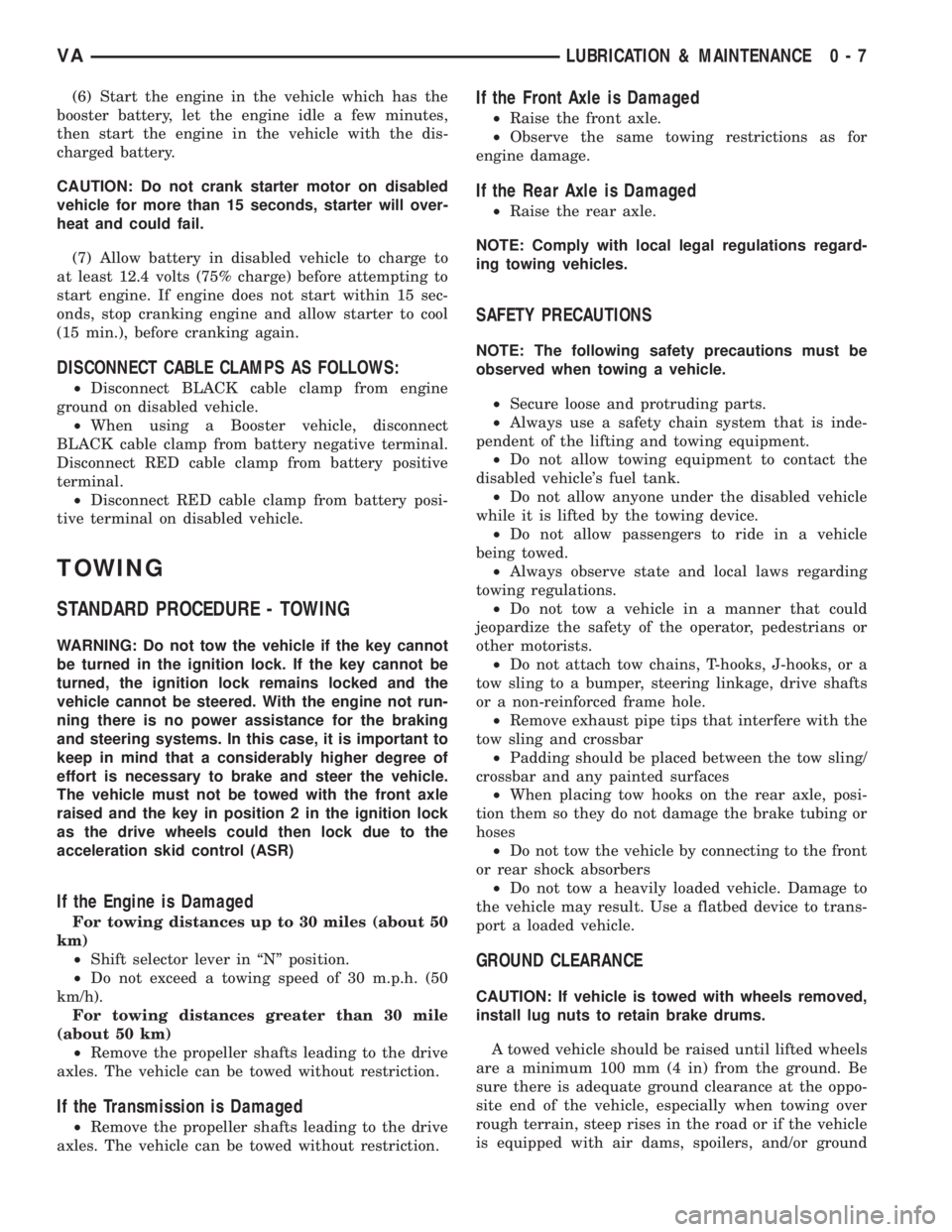
STANDARD PROCEDURE - TOWING
WARNING: Do not tow the vehicle if the key cannot
be turned in the ignition lock. If the key cannot be
turned, the ignition lock remains locked and the
vehicle cannot be steered. With the engine not run-
ning there is no power assistance for the braking
and steering systems. In this case, it is important to
keep in mind that a considerably higher degree of
effort is necessary to brake and steer the vehicle.
The vehicle must not be towed with the front axle
raised and the key in position 2 in the ignition lock
as the drive wheels could then lock due to the
acceleration skid control (ASR)
If the Engine is Damaged
For towing distances up to 30 miles (about 50
km)
²Shift selector lever in ªNº position.
²Do not exceed a towing speed of 30 m.p.h. (50
km/h).
For towing distances greater than 30 mile
(about 50 km)
²Remove the propeller shafts leading to the drive
axles. The vehicle can be towed without restriction.
If the Transmission is Damaged
²Remove the propeller shafts leading to the drive
axles. The vehicle can be towed without restriction.
If the Front Axle is Damaged
²Raise the front axle.
²Observe the same towing restrictions as for
engine damage.
If the Rear Axle is Damaged
²Raise the rear axle.
NOTE: Comply with local legal regulations regard-
ing towing vehicles.
SAFETY PRECAUTIONS
NOTE: The following safety precautions must be
observed when towing a vehicle.
²Secure loose and protruding parts.
²Always use a safety chain system that is inde-
pendent of the lifting and towing equipment.
²Do not allow towing equipment to contact the
disabled vehicle's fuel tank.
²Do not allow anyone under the disabled vehicle
while it is lifted by the towing device.
²Do not allow passengers to ride in a vehicle
being towed.
²Always observe state and local laws regarding
towing regulations.
²Do not tow a vehicle in a manner that could
jeopardize the safety of the operator, pedestrians or
other motorists.
²Do not attach tow chains, T-hooks, J-hooks, or a
tow sling to a bumper, steering linkage, drive shafts
or a non-reinforced frame hole.
²Remove exhaust pipe tips that interfere with the
tow sling and crossbar
²Padding should be placed between the tow sling/
crossbar and any painted surfaces
²When placing tow hooks on the rear axle, posi-
tion them so they do not damage the brake tubing or
hoses
²Do not tow the vehicle by connecting to the front
or rear shock absorbers
²Do not tow a heavily loaded vehicle. Damage to
the vehicle may result. Use a flatbed device to trans-
port a loaded vehicle.
GROUND CLEARANCE
CAUTION: If vehicle is towed with wheels removed,
install lug nuts to retain brake drums.
A towed vehicle should be raised until lifted wheels
are a minimum 100 mm (4 in) from the ground. Be
sure there is adequate ground clearance at the oppo-
site end of the vehicle, especially when towing over
rough terrain, steep rises in the road or if the vehicle
is equipped with air dams, spoilers, and/or ground
VALUBRICATION & MAINTENANCE 0 - 7
Page 743 of 2305
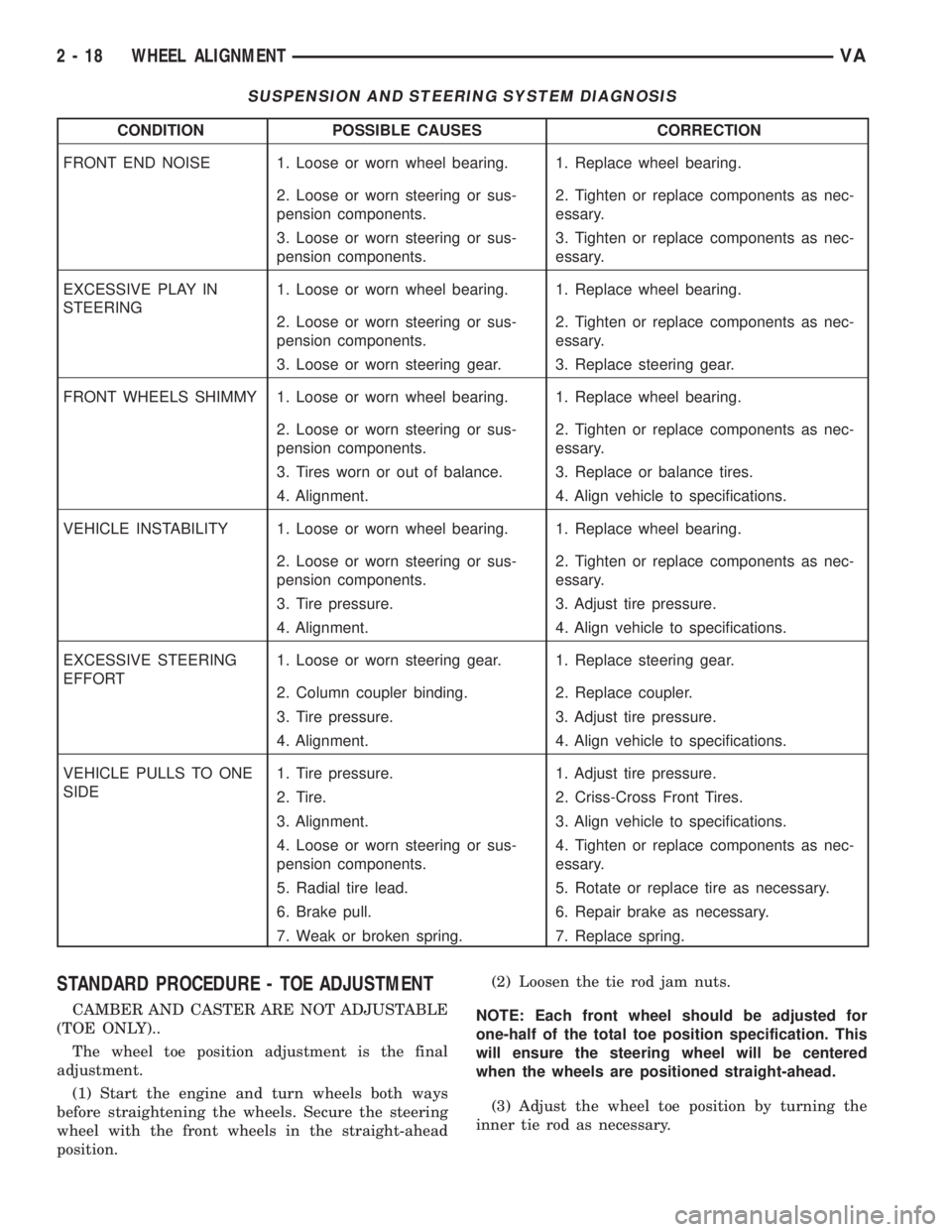
SUSPENSION AND STEERING SYSTEM DIAGNOSIS
CONDITION POSSIBLE CAUSES CORRECTION
FRONT END NOISE 1. Loose or worn wheel bearing. 1. Replace wheel bearing.
2. Loose or worn steering or sus-
pension components.2. Tighten or replace components as nec-
essary.
3. Loose or worn steering or sus-
pension components.3. Tighten or replace components as nec-
essary.
EXCESSIVE PLAY IN
STEERING1. Loose or worn wheel bearing. 1. Replace wheel bearing.
2. Loose or worn steering or sus-
pension components.2. Tighten or replace components as nec-
essary.
3. Loose or worn steering gear. 3. Replace steering gear.
FRONT WHEELS SHIMMY 1. Loose or worn wheel bearing. 1. Replace wheel bearing.
2. Loose or worn steering or sus-
pension components.2. Tighten or replace components as nec-
essary.
3. Tires worn or out of balance. 3. Replace or balance tires.
4. Alignment. 4. Align vehicle to specifications.
VEHICLE INSTABILITY 1. Loose or worn wheel bearing. 1. Replace wheel bearing.
2. Loose or worn steering or sus-
pension components.2. Tighten or replace components as nec-
essary.
3. Tire pressure. 3. Adjust tire pressure.
4. Alignment. 4. Align vehicle to specifications.
EXCESSIVE STEERING
EFFORT1. Loose or worn steering gear. 1. Replace steering gear.
2. Column coupler binding. 2. Replace coupler.
3. Tire pressure. 3. Adjust tire pressure.
4. Alignment. 4. Align vehicle to specifications.
VEHICLE PULLS TO ONE
SIDE1. Tire pressure. 1. Adjust tire pressure.
2. Tire. 2. Criss-Cross Front Tires.
3. Alignment. 3. Align vehicle to specifications.
4. Loose or worn steering or sus-
pension components.4. Tighten or replace components as nec-
essary.
5. Radial tire lead. 5. Rotate or replace tire as necessary.
6. Brake pull. 6. Repair brake as necessary.
7. Weak or broken spring. 7. Replace spring.
STANDARD PROCEDURE - TOE ADJUSTMENT
CAMBER AND CASTER ARE NOT ADJUSTABLE
(TOE ONLY)..
The wheel toe position adjustment is the final
adjustment.
(1) Start the engine and turn wheels both ways
before straightening the wheels. Secure the steering
wheel with the front wheels in the straight-ahead
position.(2) Loosen the tie rod jam nuts.
NOTE: Each front wheel should be adjusted for
one-half of the total toe position specification. This
will ensure the steering wheel will be centered
when the wheels are positioned straight-ahead.
(3) Adjust the wheel toe position by turning the
inner tie rod as necessary.
2 - 18 WHEEL ALIGNMENTVA
Page 752 of 2305
PROPELLER SHAFT
REMOVAL
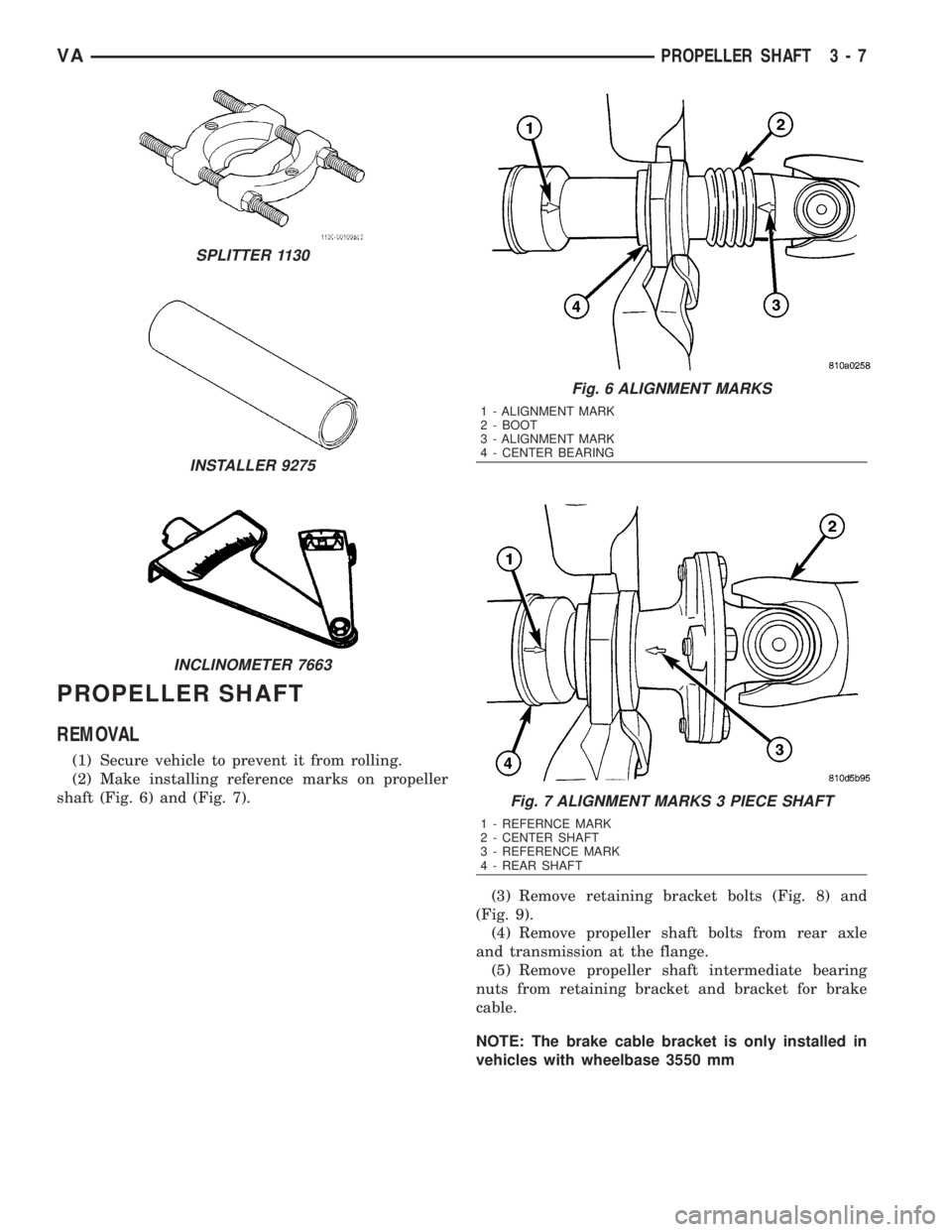
(1) Secure vehicle to prevent it from rolling.
(2) Make installing reference marks on propeller
shaft (Fig. 6) and (Fig. 7).
(3) Remove retaining bracket bolts (Fig. 8) and
(Fig. 9).
(4) Remove propeller shaft bolts from rear axle
and transmission at the flange.
(5) Remove propeller shaft intermediate bearing
nuts from retaining bracket and bracket for brake
cable.
NOTE: The brake cable bracket is only installed in
vehicles with wheelbase 3550 mm
SPLITTER 1130
INSTALLER 9275
INCLINOMETER 7663
Fig. 6 ALIGNMENT MARKS
1 - ALIGNMENT MARK
2 - BOOT
3 - ALIGNMENT MARK
4 - CENTER BEARING
Fig. 7 ALIGNMENT MARKS 3 PIECE SHAFT
1 - REFERNCE MARK
2 - CENTER SHAFT
3 - REFERENCE MARK
4 - REAR SHAFT
VAPROPELLER SHAFT 3 - 7
Page 760 of 2305

(1) Raise and support the vehicle.
(2) Position a suitable lifting device under the axle
and secure axle to device.
(3) Remove wheels and tires.
(4) Unplug wear indicator cable (Fig. 2) and (Fig.
3).
(5) Detach cable connector for brake pad wear
indicator.
(6) Remove ABS sensor and clamp bushing from
mounting bore.
NOTE: The right-hand ABS sensor cable is labeled
at the factory with a white tag.
(7) Remove cable ties from the park brake cables.
Release connection cable of brake pad wear indicator
and ABS sensor cable up to the relay unit of the
parking brake.
(8) Remove brake cables.
(9) Remove hand brake cable at relay unit.(10) Remove bracket for brake cables at rear axle
tube.
(11) Remove stabilizer bar from axle brackets.
(12) Remove shock absorber bolts from rear axle.
(13) Remove ALB lever from rear axle bracket.
(14) Pull vent line of rear axle out of frame.
(15) Remove propeller shaft.
(16) Remove brake calipers.
(17) Remove U-brackets and plates (Fig. 2) and
(Fig. 3).
(18) Remove axle from the vehicle.
Fig. 3 DUAL REAR WHEEL AXLE
1 - SPRING 12 - BRAKE HOSE
2 - SPRING SHACKLE 13 - LUG NUT
3 - PLATE 14 - NUT
4 - COLLAR NUT 15 - WASHER
5 - BRAKE CABLE 16 - BOLT
6 - REAR AXLE 17 - SHOCK ABSORBER
7 - ALB LEVER 18 - PROPELLER SHAFT
8 - NUT 19 - BOLT
9 - BOLT 20 - ABS SENSOR
10 - WEAR INDICATOR CABLE 21 - SENSOR BUSHING
11 - WEAR INDICATOR CONNECTOR
VAREAR AXLE 3 - 15