Page 326 of 2305

ver: 2.14
date: 26 Jul93
file: key_iff.cc
date: Jul 26 1993
line: 548
err: 0x1
User-Requested COLD Boot
Press MORE to switch between this display
and the application screen.
Press F4 when done noting information.
3.9.1 DRBIIITDOES NOT POWER UP
(BLANK SCREEN)
If the LED's do not light or no sound is emitted at
start up, check for loose cable connections or a bad
cable. Check the vehicle battery voltage (data link
16-way connector cavity 16). A minimum of 11 volts
is required to adequately power the DRBIIIt. Also
check for a good ground at DLC.
If all connections are proper between the
DRBIIItand the vehicle or other devices, and the
vehicle battery is fully charged, an inoperative
DRBIIItmay be the result or a faulty cable or
vehicle wiring.
3.9.2 DISPLAY IS NOT VISIBLE
Low temperatures will affect the visibility of the
display. Adjust the contrast to compensate for this
condition.
4.0 DISCLAIMERS, SAFETY,
WARNINGS
4.1 DISCLAIMERS
All information, illustrations, and specifications
contained in this manual are based on the latestinformation available at the time of publication.
The right is reserved to make changes at any time
without notice.
4.2 SAFETY
4.2.1 TECHNICIAN SAFETY INFORMATION
WARNING: ENGINES PRODUCE CARBON
MONOXIDE THAT IS ODORLESS, CAUSES
SLOWER REACTION TIME, AND CAN LEAD
TO SERIOUS INJURY. WHEN THE ENGINE IS
OPERATING, KEEP SERVICE AREAS WELL
VENTILATED OR ATTACH THE VEHICLE
EXHAUST SYSTEM TO THE SHOP EXHAUST
REMOVAL SYSTEM.
Set the parking brake and block the wheels before
testing or repairing the vehicle. It is especially
important to block the wheels on front-wheel drive
vehicles; the parking brake does not hold the front
drive wheels.
When servicing a vehicle, always wear eye pro-
tection, and remove any metal jewelry such as
watchbands or bracelets that might make an inad-
vertent electrical contact.
When diagnosing an antilock brake or adjustable
pedals system problem, it is important to follow
approved procedures where applicable. These pro-
cedures can be found in the service manual. Follow-
ing these procedures is very important to safety of
individuals performing diagnostic tests.
4.2.2 VEHICLE PREPARATION FOR
TESTING
Make sure the vehicle being tested has a fully
charged battery. If it does not, false diagnostic codes
or error messages may occur.
4.2.3 SERVICING SUB-ASSEMBLIES
Some components of the antilock brake and trac-
tion control are intended to be serviced in assembly
only. Attempting to remove or repair certain sub-
components may result in personal injury and/or
improper system operation. Only those components
with approved repair and installation procedures in
the service manual should be serviced.
5
GENERAL INFORMATION
Page 337 of 2305

TEST ACTION APPLICABILITY
4 Turn the ignition off.
Disconnect the Brake Pressure Sensor harness connector.
Disconnect the CAB harness connector.
Measure the resistance of the Brake Pressure Sensor signal circuit.
Measure the resistance of the Brake Pressure Sensor ground circuit.
Measure the resistance of the Brake Pressure Sensor 5 volt supply circuit.
Is the resistance above 5.0 ohms for any of the circuits?All
Ye s!Repair the Brake Pressure Sensor circuit(s) for an open
No!Go To 5
5 Turn the ignition off.
Disconnect the Brake Pressure Sensor harness connector.
Inspect the harness and connectors related to this circuit. If any problems are found,
repair as necessary.
If no problems are found, replace the Brake Pressure Sensor in accordance with the
Service Information.
With the DRBIIIt, clear DTCs.
Road test the vehicle and perform several braking maneuvers.
With the DRBIIIt, read DTCs.
Does this DTC reset?All
Ye s!Replace the CAB in accordance with the Service Information.
No!Test Complete.
6 The condition that set this DTC is not present at this time.
Monitor the DRBIIItwhile wiggle testing the related harness and connectors. Look
for any related parameters to change or for the DTC to reset.
Inspect the related harness and connectors.
Look for any chafed, pierced, pinched, or partially broken wires.
Look for broken, bent, pushed out, or corroded terminals.
Were any problems found?All
Ye s!Repair as necessary.
No!Test Complete.
16
BRAKES (CAB)
BRAKE PRESSURE SENSOR CIRCUIT ÐContinued
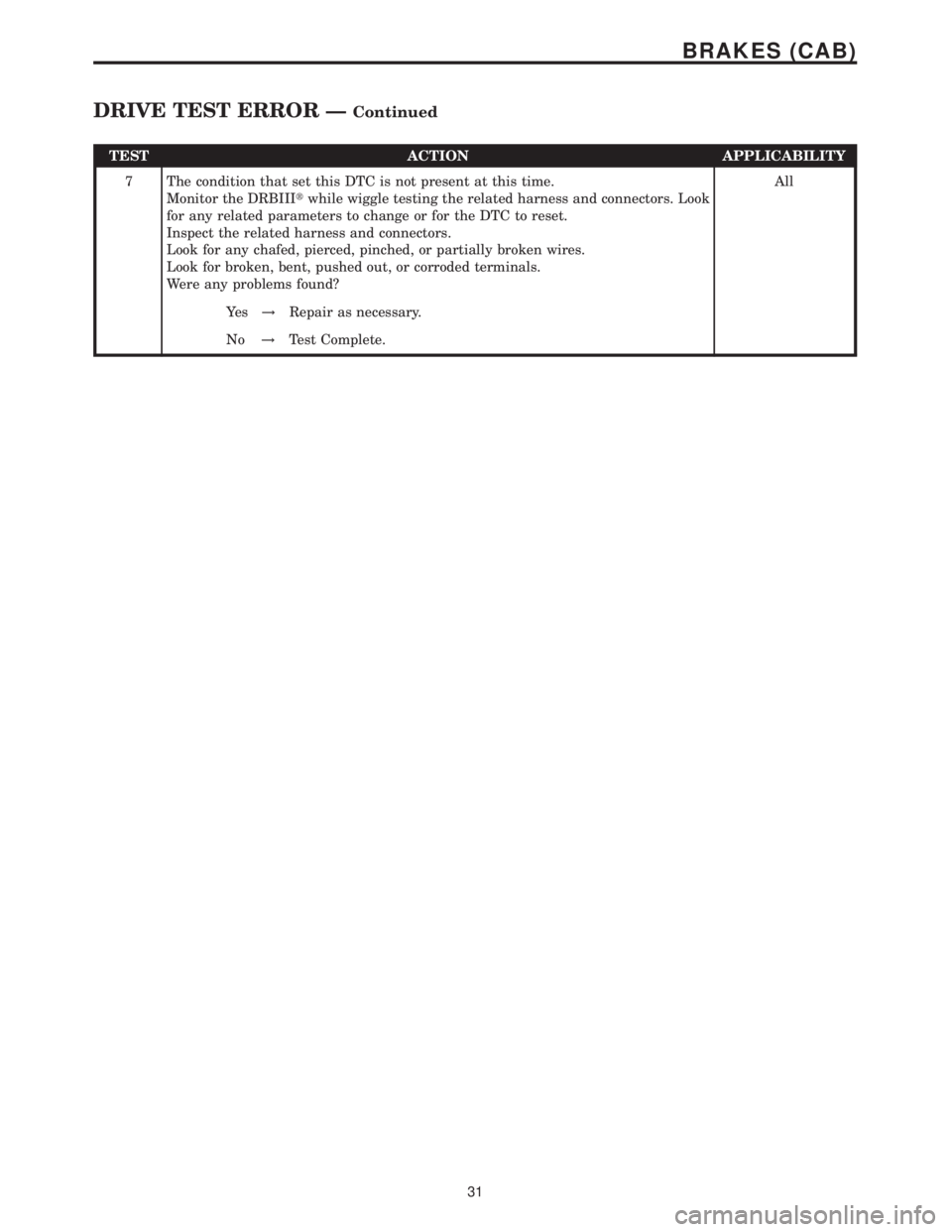
Page 352 of 2305
TEST ACTION APPLICABILITY
7 The condition that set this DTC is not present at this time.
Monitor the DRBIIItwhile wiggle testing the related harness and connectors. Look
for any related parameters to change or for the DTC to reset.
Inspect the related harness and connectors.
Look for any chafed, pierced, pinched, or partially broken wires.
Look for broken, bent, pushed out, or corroded terminals.
Were any problems found?All
Ye s!Repair as necessary.
No!Test Complete.
31
BRAKES (CAB)
DRIVE TEST ERROR ÐContinued
Page 359 of 2305
TEST ACTION APPLICABILITY
7 The condition that set this DTC is not present at this time.
Monitor the DRBIIItwhile wiggle testing the related harness and connectors. Look
for any related parameters to change or for the DTC to reset.
Inspect the related harness and connectors.
Look for any chafed, pierced, pinched, or partially broken wires.
Look for broken, bent, pushed out, or corroded terminals.
Were any problems found?All
Ye s!Repair as necessary.
No!Test Complete.
38
BRAKES (CAB)
LATERAL ACCELERATION SENSOR CIRCUIT ÐContinued
Page 360 of 2305

Symptom:
LATERAL ACCELERATION SENSOR INTERNAL FAULT
POSSIBLE CAUSES
LATERAL ACCELERATION SENSOR CIRCUIT INTERMITTENT DTC
LATERAL ACCELERATION SENSOR
TEST ACTION APPLICABILITY
1 Turn the ignition off.
Turn the ignition on.
With the DRBIIIt, read DTCs. Record DTC information.
NOTE: If a system undervoltage or overvoltage DTC is set along with this
DTC, diagnose the system voltage DTC first.
NOTE: Electromagnetic (radio) interference can cause an intermittent
system malfunction by interrupting communication between the sensor
and the CAB.
With the DRBIIIt, erase DTCs.
Road test the vehicle and perform several steering and braking maneuvers.
With the DRBIIIt, perform the road test procedure.
With the DRBIIIt, read DTCs.
Does this DTC reset?All
Ye s!Replace the Lateral Acceleration Sensor in accordance with the
Service Information.
No!Go To 2
2 The condition that set this DTC is not present at this time.
Monitor the DRBIIItwhile wiggle testing the related harness and connectors. Look
for any related parameters to change or for the DTC to reset.
Inspect the related harness and connectors.
Look for any chafed, pierced, pinched, or partially broken wires.
Look for broken, bent, pushed out, or corroded terminals.
Were any problems found?All
Ye s!Repair as necessary.
No!Test Complete.
39
BRAKES (CAB)
Page 387 of 2305

Symptom:
STEERING ANGLE SENSOR GREATER THAN 720 DEGREES
POSSIBLE CAUSES
STEERING ANGLE SENSOR INTERMITTENT DTC
STEERING COMPONENT INSPECTION
STEERING ANGLE SENSOR
TEST ACTION APPLICABILITY
1NOTE: If a system undervoltage or overvoltage DTC is set along with this
DTC, diagnose the system voltage DTC first.
NOTE: Electromagnetic (radio) interference can cause an intermittent
system malfunction by interrupting communication between the sensor
and the CAB.
NOTE: The Steering Angle Sensor is very sensitive to changes due to
alignment problems. The sensor must be recalculated using the DRBIIItif
alignment has been changed by more than 5 degrees.
Turn the ignition on.
With the DRBIIIt, erase DTCs.
Move the Steering Wheel from stop to stop several times.
With the DRBIIIt, read DTCs.
Does this DTC reset?All
Ye s!Go To 2
No!Go To 3
2NOTE: When the vehicle is in a turn, the ESP compares the Steering Angle
Sensor value and the speed of the inner and outer wheels to determine if the
values are plausible.
Inspect the front end and steering components for damage or misalignment.
Inspect the steering column and Steering Angle Sensor for correct mounting and
installation.
Inspect the tires and wheels to make sure that they are the correct size. All tires must
be the same size.
Were any problems found?All
Ye s!Repair or replace components as necessary in accordance with the
Service Information.
No!Replace the Steering Angle Sensor in accordance with the Service
Information.
66
BRAKES (CAB)
Page 388 of 2305
TEST ACTION APPLICABILITY
3 The condition that set this DTC is not present at this time.
Monitor the DRBIIItwhile wiggle testing the related harness and connectors. Look
for any related parameters to change or for the DTC to reset.
Inspect the related harness and connectors.
Look for any chafed, pierced, pinched, or partially broken wires.
Look for broken, bent, pushed out, or corroded terminals.
Inspect the tires and wheels to make sure that they are the correct size. All tires must
be the same size.
Inspect the steering column and Steering Angle Sensor for correct mounting and
installation.
Inspect the front end and steering components for damage or misalignment.
Were any problems found?All
Ye s!Repair as necessary.
No!Test Complete.
67
BRAKES (CAB)
STEERING ANGLE SENSOR GREATER THAN 720 DEGREES ÐContinued
Page 390 of 2305

TEST ACTION APPLICABILITY
3 Turn the ignition off.
Disconnect the Steering Angle Sensor harness connector.
Inspect the harness and connectors related to this circuit. If any problems are found,
repair as necessary.
If no problems are found, replace the Steering Angle Sensor in accordance with the
Service Information.
Turn the ignition on.
With the DRBIIIt, clear DTCs.
Using the DRBIIIt, perform the road test procedure.
With the DRBIIIt, read DTCs.
Does this DTC reset?All
Ye s!Replace the CAB in accordance with the Service Information.
No!Test Complete.
4 The condition that set this DTC is not present at this time.
Monitor the DRBIIItwhile wiggle testing the related harness and connectors. Look
for any related parameters to change or for the DTC to reset.
Inspect the related harness and connectors.
Look for any chafed, pierced, pinched, or partially broken wires.
Look for broken, bent, pushed out, or corroded terminals.
Were any problems found?All
Ye s!Repair as necessary.
No!Test Complete.
69
BRAKES (CAB)
STEERING ANGLE SENSOR IMPLAUSIBLE CAN SIGNAL ÐContinued