2006 MERCEDES-BENZ SPRINTER Dash
[x] Cancel search: DashPage 998 of 2305

(1) Begin the cleanup by using a vacuum cleaner
to remove any residual powder from the vehicle inte-
rior. Clean from outside the vehicle and work your
way inside, so that you avoid kneeling or sitting on a
non-cleaned area.
(2) Be certain to vacuum the heater and air condi-
tioning outlets as well (Fig. 4). Run the heater and
air conditioner blower on the lowest speed setting
and vacuum any powder expelled from the outlets.
CAUTION: All damaged, faulty, or non-deployed
supplemental restraints which are replaced on vehi-
cles are to be handled and disposed of properly. If
an airbag unit or seat belt tensioner unit is faulty or
damaged and non-deployed, refer to the Hazardous
Substance Control System for proper disposal. Be
certain to dispose of all non-deployed and deployed
supplemental restraints in a manner consistent with
state, provincial, local and federal regulations.
(3) Next, remove the deployed supplemental
restraints from the vehicle. Refer to the appropriate
service removal procedures.
(4) You may need to vacuum the interior of the
vehicle a second time to recover all of the powder.
STANDARD PROCEDURE - VERIFICATION TEST
The following procedure should be performed using
a diagnostic scan tool to verify proper supplemental
restraint system operation following the service or
replacement of any supplemental restraint system
component.
WARNING: To avoid personal injury or death, on
vehicles equipped with airbags, disable the supple-
mental restraint system before attempting any
steering wheel, steering column, airbag, seat belt
tensioner, impact sensor, or instrument panel com-
ponent diagnosis or service. Disconnect and isolate
the battery negative (ground) cable, then wait two
minutes for the system capacitor to dischargebefore performing further diagnosis or service. This
is the only sure way to disable the supplemental
restraint system. Failure to take the proper precau-
tions could result in accidental airbag deployment.
(1) During the following test, the battery negative
cable remains disconnected and isolated, as it was
during the supplemental restraint system component
removal and installation procedures.
(2) Be certain that the diagnostic scan tool con-
tains the latest version of the proper diagnostic soft-
ware. Connect the diagnostic to the 16-way Data
Link Connector (DLC). The DLC is located on the
dash panel beneath the driver side lower edge of the
instrument panel, outboard of the steering column
(Fig. 5).
(3) Turn the ignition switch to the On position and
exit the vehicle with the diagnostic scan tool.
(4) Check to be certain that nobody is in the vehi-
cle, then reconnect the battery negative cable.
(5) Using the diagnostic, read and record the
active (current) Diagnostic Trouble Code (DTC) data.
(6) Next, use the diagnostic to read and record any
stored (historical) DTC data.
(7) If any DTC is found in Step 5 or Step 6, refer
to the appropriate diagnostic information.
(8) Use the diagnostic to erase the stored DTC
data. If any problems remain, the stored DTC data
will not erase. Refer to the appropriate diagnostic
information to diagnose any stored DTC that will not
erase. If the stored DTC information is successfully
erased, go to Step 9.
(9) Turn the ignition switch to the Off position for
about fifteen seconds, and then back to the On posi-
tion. Observe the airbag indicator in the instrument
cluster. It should illuminate for four seconds, and
then go out. This indicates that the supplemental
Fig. 4 Vacuum Heater and A/C Outlets - Typical
Fig. 5 16-Way Data Link Connector
1 - BOTTOM OF INSTRUMENT PANEL
2 - CONNECTOR COVER
3 - 16-WAY DATA LINK CONNECTOR
4 - DASH PANEL
5 - INSIDE HOOD RELEASE LEVER
VARESTRAINTS 8O - 7
Page 1000 of 2305

Communication Interface (SCI) data bus line for sup-
plemental restraint system programming or diagno-
sis and testing through the 16-way Data Link
Connector (DLC) located on the dash panel below the
driver side end of the instrument panel. A hard wired
output from the ACM is used for control of the airbag
indicator in the ElectroMechanical Instrument Clus-
ter (EMIC). (Refer to 8 - ELECTRICAL/INSTRU-
MENT CLUSTER/AIRBAG INDICATOR -
OPERATION).
The ACM microprocessor continuously monitors all
of the supplemental restraint system electrical cir-
cuits to determine the system readiness. If the ACM
detects a monitored system fault, it sets an appropri-
ate Diagnostic Trouble Code (DTC) and sends an out-
put to the EMIC to turn on the airbag indicator. The
ACM illuminates the indicator for about four seconds
each time the ignition switch is turned to the On
position as a bulb test. If the indicator remains illu-
minated for about ten seconds after the ignition
switch is turned to the On position, the ACM has
detected a non-critical fault that poses no danger to
the vehicle occupants. If the airbag indicator illumi-
nates solid (not flashing) while driving or stays on
longer than ten seconds following the bulb test, the
ACM has detected a critical fault that may cause the
airbags not to deploy when required or to deploy
when not required. An active fault only remains for
the duration of the fault, or in some cases, for the
duration of the current ignition switch cycle, while a
stored fault causes a DTC to be stored in memory by
the ACM.
The ACM receives battery current through a fused
ignition switch output circuit. The ACM receives
ground through a ground circuit and take out of the
vehicle wire harness. This take out has an eyelet ter-
minal connector secured by a nut to a ground stud on
the floor panel directly below the ACM within the
driver side seat riser. A case ground is also provided
for the ACM through a ground circuit and eyelet ter-
minal connector secured under the left rear ACM
mounting screw. These connections allow the ACM to
be operational whenever the ignition switch is in the
On position.
The ACM also contains an energy-storage capaci-
tor. When the ignition switch is in the On position,
this capacitor is continually being charged with
enough electrical energy to deploy the supplemental
restraint components for up to one second following a
battery disconnect or failure. The purpose of the
capacitor is to provide backup supplemental restraint
system protection in case there is a loss of battery
current supply to the ACM during an impact.
Two sensors are contained within the ACM, an
electronic impact sensor and a safing sensor. These
electronic sensors are accelerometers that sense the
rate of vehicle deceleration, which provide verifica-
tion of the direction and severity of an impact. Onmodels equipped with optional side curtain airbags,
the ACM also monitors inputs from two remote side
impact sensors located within the left and right front
door step wells to control deployment of the side cur-
tain airbag units.
The safing sensor is an electronic accelerometer
sensor within the ACM that provides an additional
logic input to the ACM microprocessor. The safing
sensor is used to verify the need for a supplemental
restraint deployment by detecting impact energy of a
lesser magnitude than that of the primary electronic
impact sensors, and must exceed a safing threshold
in order for the airbags to deploy. Vehicles equipped
with optional side curtain airbags feature a second
safing sensor within the ACM to provide confirma-
tion to the ACM microprocessor of side impact forces.
This second safing sensor is a bi-directional unit that
detects impact forces from either side of the vehicle.
Pre-programmed decision algorithms in the ACM
microprocessor determine when the deceleration rate
as signaled by the impact sensors and the safing sen-
sors indicate an impact that is severe enough to
require supplemental restraint system protection.
When the programmed conditions are met, the ACM
sends the proper electrical signals to deploy the front
airbags and seat belt tensioners and, if the vehicle is
so equipped, either side curtain airbag unit.
The ACM also provides a hard wired electrical
crash signal output following a supplemental
restraint deployment event. This output is used to
signal other electronic modules in the vehicle to pro-
vide their enhanced accident response features,
which include automatically disabling the engine
from running and unlocking all of the doors. How-
ever, these responses are each dependent upon the
circuits, components, and modules controlling these
features remaining intact from collateral damage
incurred during the vehicle impact.
A single ACM is used for all variations of the sup-
plemental restraint system available in this vehicle.
This ACM is programmable and in order to function
properly it must be programmed for the correct vehi-
cle supplemental restraint system equipment using
an initialization procedure. The initialization proce-
dure requires the use of a diagnostic scan tool. Refer
to the appropriate diagnostic information. The hard
wired inputs and outputs for the ACM may be diag-
nosed and tested using conventional diagnostic tools
and procedures. However, conventional diagnostic
methods will not prove conclusive in the diagnosis of
the ACM or the supplemental restraint system. The
most reliable, efficient, and accurate means to diag-
nose the ACM or the supplemental restraint system
requires the use of a diagnostic scan tool. Refer to
the appropriate diagnostic information.
VARESTRAINTS 8O - 9
Page 1064 of 2305
WASHER RESERVOIR
DESCRIPTION
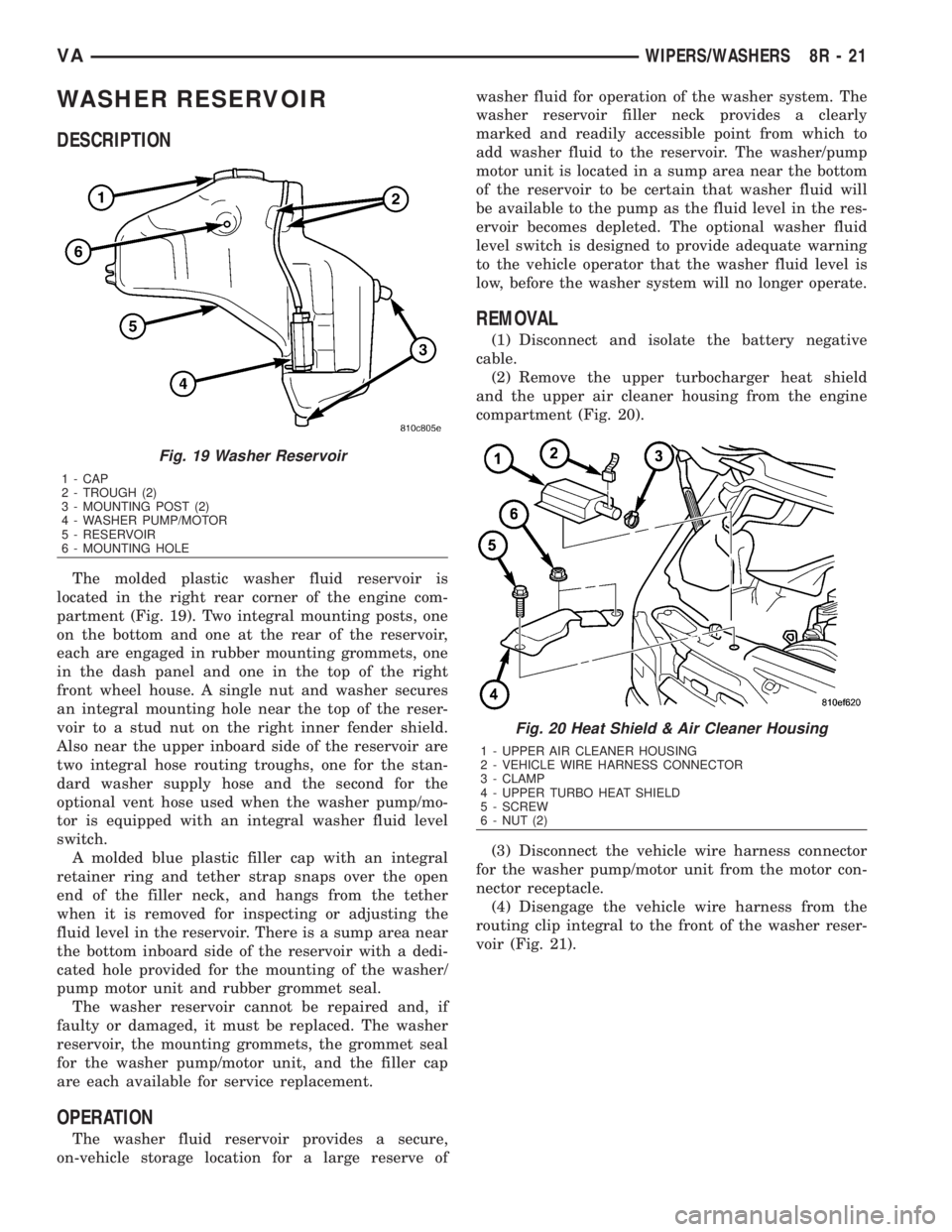
The molded plastic washer fluid reservoir is
located in the right rear corner of the engine com-
partment (Fig. 19). Two integral mounting posts, one
on the bottom and one at the rear of the reservoir,
each are engaged in rubber mounting grommets, one
in the dash panel and one in the top of the right
front wheel house. A single nut and washer secures
an integral mounting hole near the top of the reser-
voir to a stud nut on the right inner fender shield.
Also near the upper inboard side of the reservoir are
two integral hose routing troughs, one for the stan-
dard washer supply hose and the second for the
optional vent hose used when the washer pump/mo-
tor is equipped with an integral washer fluid level
switch.
A molded blue plastic filler cap with an integral
retainer ring and tether strap snaps over the open
end of the filler neck, and hangs from the tether
when it is removed for inspecting or adjusting the
fluid level in the reservoir. There is a sump area near
the bottom inboard side of the reservoir with a dedi-
cated hole provided for the mounting of the washer/
pump motor unit and rubber grommet seal.
The washer reservoir cannot be repaired and, if
faulty or damaged, it must be replaced. The washer
reservoir, the mounting grommets, the grommet seal
for the washer pump/motor unit, and the filler cap
are each available for service replacement.
OPERATION
The washer fluid reservoir provides a secure,
on-vehicle storage location for a large reserve ofwasher fluid for operation of the washer system. The
washer reservoir filler neck provides a clearly
marked and readily accessible point from which to
add washer fluid to the reservoir. The washer/pump
motor unit is located in a sump area near the bottom
of the reservoir to be certain that washer fluid will
be available to the pump as the fluid level in the res-
ervoir becomes depleted. The optional washer fluid
level switch is designed to provide adequate warning
to the vehicle operator that the washer fluid level is
low, before the washer system will no longer operate.
REMOVAL
(1) Disconnect and isolate the battery negative
cable.
(2) Remove the upper turbocharger heat shield
and the upper air cleaner housing from the engine
compartment (Fig. 20).
(3) Disconnect the vehicle wire harness connector
for the washer pump/motor unit from the motor con-
nector receptacle.
(4) Disengage the vehicle wire harness from the
routing clip integral to the front of the washer reser-
voir (Fig. 21).
Fig. 19 Washer Reservoir
1 - CAP
2 - TROUGH (2)
3 - MOUNTING POST (2)
4 - WASHER PUMP/MOTOR
5 - RESERVOIR
6 - MOUNTING HOLE
Fig. 20 Heat Shield & Air Cleaner Housing
1 - UPPER AIR CLEANER HOUSING
2 - VEHICLE WIRE HARNESS CONNECTOR
3 - CLAMP
4 - UPPER TURBO HEAT SHIELD
5 - SCREW
6 - NUT (2)
VAWIPERS/WASHERS 8R - 21
Page 1065 of 2305
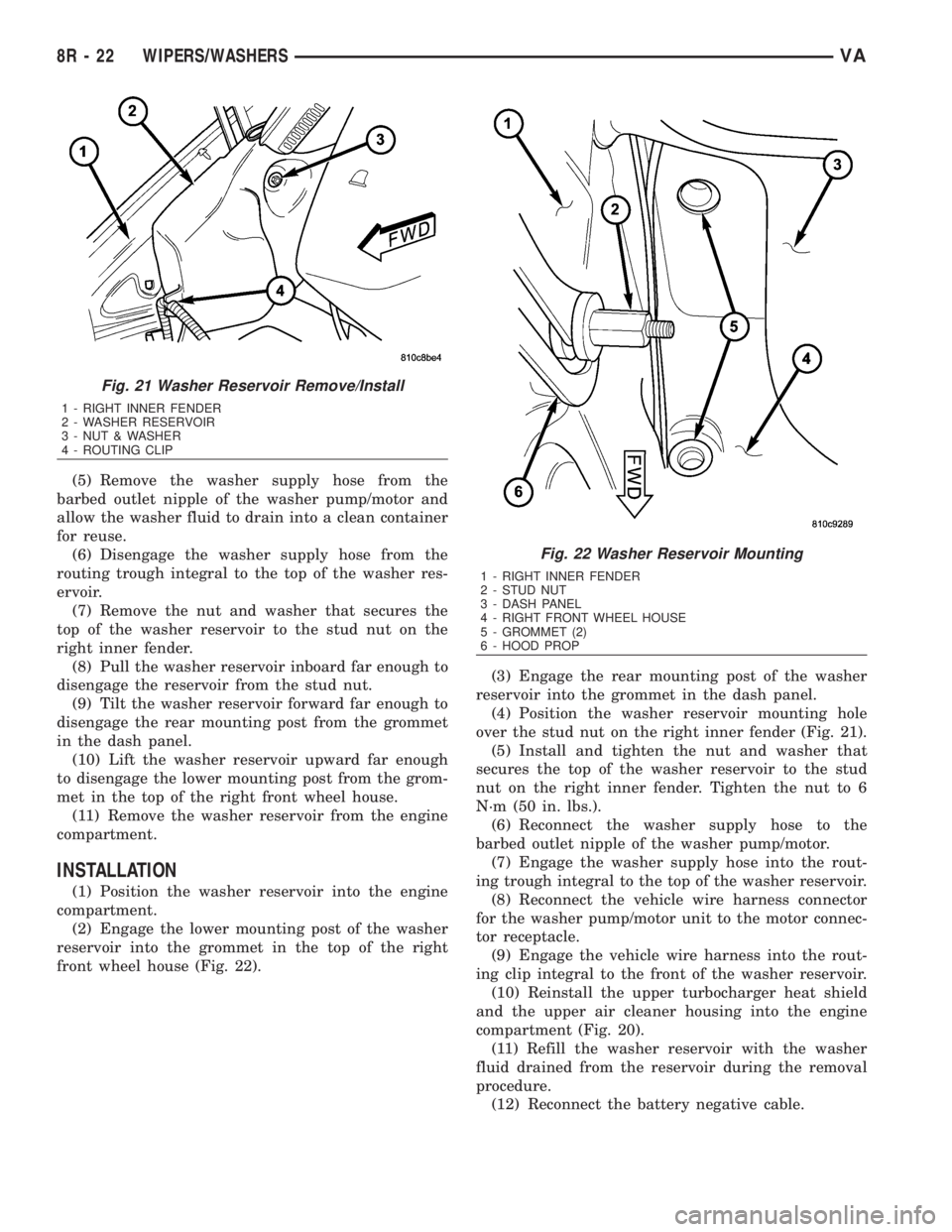
(5) Remove the washer supply hose from the
barbed outlet nipple of the washer pump/motor and
allow the washer fluid to drain into a clean container
for reuse.
(6) Disengage the washer supply hose from the
routing trough integral to the top of the washer res-
ervoir.
(7) Remove the nut and washer that secures the
top of the washer reservoir to the stud nut on the
right inner fender.
(8) Pull the washer reservoir inboard far enough to
disengage the reservoir from the stud nut.
(9) Tilt the washer reservoir forward far enough to
disengage the rear mounting post from the grommet
in the dash panel.
(10) Lift the washer reservoir upward far enough
to disengage the lower mounting post from the grom-
met in the top of the right front wheel house.
(11) Remove the washer reservoir from the engine
compartment.
INSTALLATION
(1) Position the washer reservoir into the engine
compartment.
(2) Engage the lower mounting post of the washer
reservoir into the grommet in the top of the right
front wheel house (Fig. 22).(3) Engage the rear mounting post of the washer
reservoir into the grommet in the dash panel.
(4) Position the washer reservoir mounting hole
over the stud nut on the right inner fender (Fig. 21).
(5) Install and tighten the nut and washer that
secures the top of the washer reservoir to the stud
nut on the right inner fender. Tighten the nut to 6
N´m (50 in. lbs.).
(6) Reconnect the washer supply hose to the
barbed outlet nipple of the washer pump/motor.
(7) Engage the washer supply hose into the rout-
ing trough integral to the top of the washer reservoir.
(8) Reconnect the vehicle wire harness connector
for the washer pump/motor unit to the motor connec-
tor receptacle.
(9) Engage the vehicle wire harness into the rout-
ing clip integral to the front of the washer reservoir.
(10) Reinstall the upper turbocharger heat shield
and the upper air cleaner housing into the engine
compartment (Fig. 20).
(11) Refill the washer reservoir with the washer
fluid drained from the reservoir during the removal
procedure.
(12) Reconnect the battery negative cable.
Fig. 21 Washer Reservoir Remove/Install
1 - RIGHT INNER FENDER
2 - WASHER RESERVOIR
3 - NUT & WASHER
4 - ROUTING CLIP
Fig. 22 Washer Reservoir Mounting
1 - RIGHT INNER FENDER
2 - STUD NUT
3 - DASH PANEL
4 - RIGHT FRONT WHEEL HOUSE
5 - GROMMET (2)
6 - HOOD PROP
8R - 22 WIPERS/WASHERSVA
Page 1072 of 2305

(2) Remove the wiper arms from the wiper pivots.
(Refer to 8 - ELECTRICAL/WIPERS/WASHERS/
WIPER ARM - REMOVAL).
(3) Remove the five nuts that secure the ventila-
tion housing to the dash panel and the underside of
the cowl top panel (Fig. 29).
VAWIPERS/WASHERS 8R - 29
Page 1073 of 2305
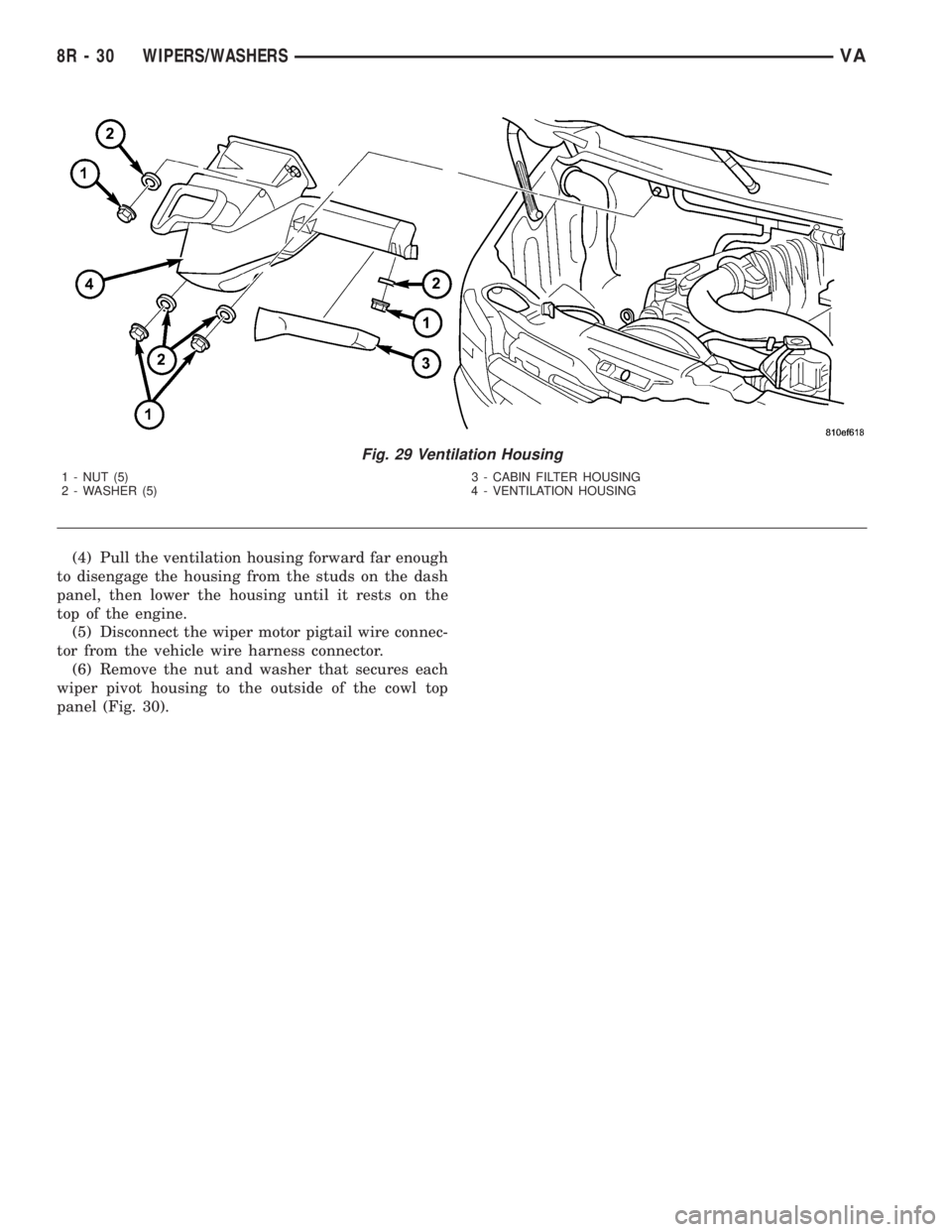
(4) Pull the ventilation housing forward far enough
to disengage the housing from the studs on the dash
panel, then lower the housing until it rests on the
top of the engine.
(5) Disconnect the wiper motor pigtail wire connec-
tor from the vehicle wire harness connector.
(6) Remove the nut and washer that secures each
wiper pivot housing to the outside of the cowl top
panel (Fig. 30).
Fig. 29 Ventilation Housing
1 - NUT (5) 3 - CABIN FILTER HOUSING
2 - WASHER (5) 4 - VENTILATION HOUSING
8R - 30 WIPERS/WASHERSVA
Page 1074 of 2305
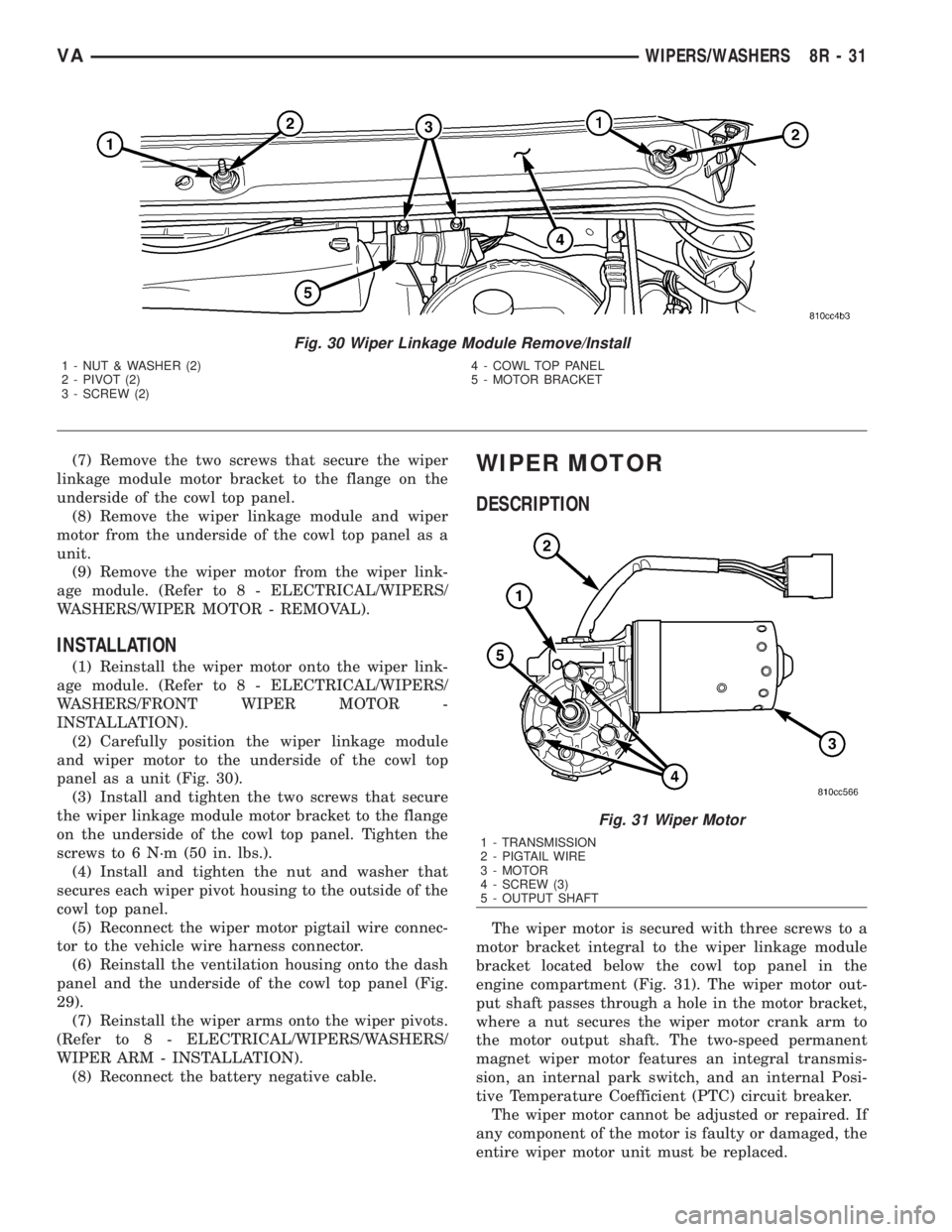
(7) Remove the two screws that secure the wiper
linkage module motor bracket to the flange on the
underside of the cowl top panel.
(8) Remove the wiper linkage module and wiper
motor from the underside of the cowl top panel as a
unit.
(9) Remove the wiper motor from the wiper link-
age module. (Refer to 8 - ELECTRICAL/WIPERS/
WASHERS/WIPER MOTOR - REMOVAL).
INSTALLATION
(1) Reinstall the wiper motor onto the wiper link-
age module. (Refer to 8 - ELECTRICAL/WIPERS/
WASHERS/FRONT WIPER MOTOR -
INSTALLATION).
(2) Carefully position the wiper linkage module
and wiper motor to the underside of the cowl top
panel as a unit (Fig. 30).
(3) Install and tighten the two screws that secure
the wiper linkage module motor bracket to the flange
on the underside of the cowl top panel. Tighten the
screws to 6 N´m (50 in. lbs.).
(4) Install and tighten the nut and washer that
secures each wiper pivot housing to the outside of the
cowl top panel.
(5) Reconnect the wiper motor pigtail wire connec-
tor to the vehicle wire harness connector.
(6) Reinstall the ventilation housing onto the dash
panel and the underside of the cowl top panel (Fig.
29).
(7) Reinstall the wiper arms onto the wiper pivots.
(Refer to 8 - ELECTRICAL/WIPERS/WASHERS/
WIPER ARM - INSTALLATION).
(8) Reconnect the battery negative cable.
WIPER MOTOR
DESCRIPTION
The wiper motor is secured with three screws to a
motor bracket integral to the wiper linkage module
bracket located below the cowl top panel in the
engine compartment (Fig. 31). The wiper motor out-
put shaft passes through a hole in the motor bracket,
where a nut secures the wiper motor crank arm to
the motor output shaft. The two-speed permanent
magnet wiper motor features an integral transmis-
sion, an internal park switch, and an internal Posi-
tive Temperature Coefficient (PTC) circuit breaker.
The wiper motor cannot be adjusted or repaired. If
any component of the motor is faulty or damaged, the
entire wiper motor unit must be replaced.
Fig. 30 Wiper Linkage Module Remove/Install
1 - NUT & WASHER (2) 4 - COWL TOP PANEL
2 - PIVOT (2) 5 - MOTOR BRACKET
3 - SCREW (2)
Fig. 31 Wiper Motor
1 - TRANSMISSION
2 - PIGTAIL WIRE
3 - MOTOR
4 - SCREW (3)
5 - OUTPUT SHAFT
VAWIPERS/WASHERS 8R - 31
Page 1082 of 2305
8W-01 WIRING DIAGRAM INFORMATION
TABLE OF CONTENTS
page page
WIRING DIAGRAM INFORMATION
DESCRIPTION
HOW TO USE WIRING DIAGRAMS.........1
CIRCUIT INFORMATION.................5
SECTION IDENTIFICATION AND
INFORMATION........................5
CONNECTOR, GROUND, AND SPLICE
INFORMATION........................5
WARNINGS - GENERAL...................6
DIAGNOSIS AND TESTING
WIRING HARNESS.....................6
STANDARD PROCEDURE
ELECTROSTATIC DISCHARGE (ESD)
SENSITIVE DEVICES...................7
TESTING FOR VOLTAGE POTENTIAL.......7
TESTING FOR CONTINUITY..............7
TESTING FOR A SHORT TO GROUND......8TESTING COMPONENTS FOR A SHORT TO
GROUND ON A FUSE POWERING
SEVERAL LOADS......................8
TESTING FOR A VOLTAGE DROP.........8
CONNECTOR
REMOVAL.............................9
INSTALLATION..........................9
DIODE
REMOVAL.............................9
INSTALLATION..........................9
TERMINAL
REMOVAL.............................10
INSTALLATION.........................10
WIRE
STANDARD PROCEDURE
WIRE SPLICING......................10
WIRING DIAGRAM INFORMA-
TION
DESCRIPTION
HOW TO USE WIRING DIAGRAMS
DaimlerChrysler Corporation wiring diagrams are
designed to provide information regarding the vehi-
cles wiring content. In order to effectively use the
wiring diagrams to diagnose and repair
DaimlerChrysler Corporation vehicles, it is important
to understand all of their features and characteris-
tics.
Diagrams are arranged such that the power (B+)
side of the circuit is placed near the top of the page,
and the ground (B-) side of the circuit is placed near
the bottom of the page (Fig. 1).
All switches, components, and modules are shown
in the at rest position with the doors closed and the
key removed from the ignition (Fig. 2).Components are shown two ways. A solid line
around a component indicates that the component is
complete. A dashed line around the component indi-
cates that the component is being shown is not com-
plete. Incomplete components have a reference
number to indicate the page where the component is
shown complete.
It is important to realize that no attempt is made
on the diagrams to represent components and wiring
as they appear on the vehicle. For example, a short
piece of wire is treated the same as a long one. In
addition, switches and other components are shown
as simply as possible, with regard to function only.
SYMBOLS
International symbols are used throughout the wir-
ing diagrams. These symbols are consistent with
those being used around the world (Fig. 3).
VA8W-01 WIRING DIAGRAM INFORMATION 8W - 01 - 1