Page 261 of 493
AUDIO
239
21X563
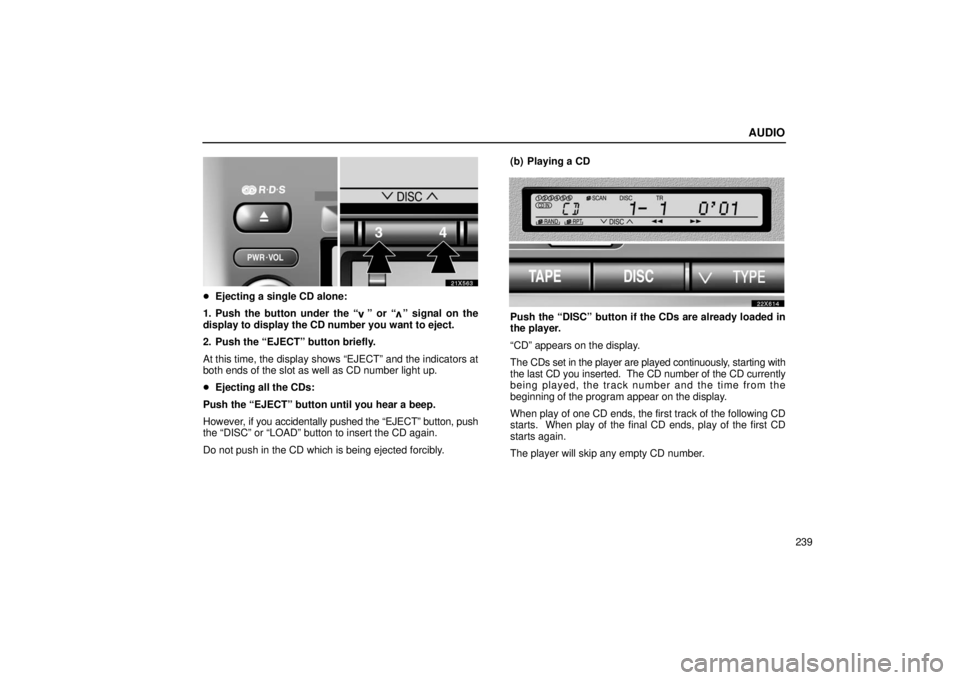
�Ejecting a single CD alone:
1. Push the button under the “
” or “” signal on the
display to display the CD number you want to eject.
2. Push the “EJECT” button briefly.
At this time, the display shows “EJECT” and the indicators at
both ends of the slot as well as CD number light up.
� Ejecting all the CDs:
Push the “EJECT” button until you hear a beep.
However, if you accidentally pushed the “EJECT” button, push
the “DISC” or “LOAD” button to insert the CD again.
Do not push in the CD which is being ejected forcibly. (b) Playing a CD
22X614
Push the “DISC” button if the CDs are already loaded in
the player.
“CD” appears on the display.
The CDs set in the player are played continuously
, starting with
the last CD you inserted. The CD number of the CD currently
being played, the track number and the time from the
beginning of the program appear on the display.
When play of one CD ends, the first track of the following CD
starts. When play of the final CD ends, play of the first CD
starts again.
The player will skip any empty CD number.
Page 265 of 493

AUDIO
243
(i) If the player malfunctions
If the player or another unit equipped with the player
malfunctions,
your audio system will display the following error
messages.
If “WAIT” appears on the display: It indicates that the inside
of the player unit may be too hot due to the very high ambient
temperature. Remove the CD from the player and allow the
player to cool down.
If “ERROR 1” appears on the display: It indicates that the
CD is dirty, damaged, or it was inserted upside down. Clean
the CD or insert it correctly.
If “ERROR 3” or “ERROR 4” appears on the display: It
indicates there is trouble inside the system. Eject the CD.
If the malfunction is not rectified: Take your vehicle to your
Lexus dealer.
Audio remote controls (steering switches)
21x570
The switches are installed on the left side of the steering wheel.
“MODE” switch: Use this switch to change the mode. If a tape
or CD is not inserted, the “TAPE” or “CD” mode is skipped.
When you push the switch with the audio system turned off, the
audio system turns on.
“
” switches: Use these switches to adjust the volume.
Push “+” to increase the volu me and “–” to decrease the
volume. The volume continues to increase or decrease while
the switch is being pressed.
Page 270 of 493
AUDIO
248Caring for your cassette player and tapes
For the best performance for your cassette player and tapes:
Clean the tape head and other parts regularly.
�
A dirty tape head or tape path can decrease sound quality
and tangle your cassette tapes. The easiest way to clean
them is by using a cleaning tape. (A wet type is
recommended.)
Use high− quality cassettes:
� Low −quality cassette tapes can cause many problems,
including poor sound, inconsistent playing speed, and
constant auto− reversing. They can also get stuck or
tangled in the cassette player.
� Do not use a cassette if it has been damaged or tangled or
if its label is peeling off.
� Do not leave a cassette in the player if you are not listening
to it, especially if it is hot outside.
� Store cassettes in their cases and out of direct sunlight.
� Avoid using cassettes with a total playing time longer than
100 minutes (50 minutes per side). The tape used in these
cassettes is thin and could get stuck or tangled in the
cassette player. Caring for your CD player and CDs
�
Your CD player is intended for use with 12 cm (4.7 in.) CDs
only.
� Extremely high temperature can keep your CD player from
working. On hot days, use air conditioning to cool the
vehicle interior before you listen to a CD.
� Bumpy roads or other vibrations may make your CD player
skip.
� If moisture gets into your CD player, you may not hear any
sound even though your CD player appears to be working.
Remove the CD from the player and wait until it dries.
CAUTION
CD players use an invisible laser beam which could
cause hazardous radiation exposure if directed outside
the unit. Be sure to operate the player correctly.
Page 271 of 493
AUDIO
249
20L037
�Use only CDs marked as s hown above. The following
products may not be playable on your CD player.
Copy− protected CD
CD− R (CD− Recordable)
CD−RW (CD− Re−writable)
CD−ROM
22sv01
� Special shaped CDs
21z017
�Transparent/translucent CDs
Page 272 of 493
AUDIO
250
22sv02
�Low quality CDs
22sv03
�Labeled CDs
NOTICE
Do not use special shaped, transparent/translucent, low
quality or labeled CDs such as those shown in the
illustrations. The use of such CDs may damage the
player or changer, or it may be impossible to eject the
CD.
Page 276 of 493

STARTING AND DRIVING
254
THREEWAY CATALYTICCONVERTERS
31X001f
Threeway catalytic converters are emission control
devices installed in the exhaust system.
The purpose is to reduce pollutants in the exhaust gas.
CAUTION
�Keep people and combustible materials away from
the exhaust pipe while the engine is running. The
exhaust gas is very hot.
� Do not drive, idle or park your vehicle over anything
that might burn easily such as grass, leaves, paper or
rags.
NOTICE
A large amount of unburned gases flowing into the
threeway catalytic converter may cause it to overheat
and create a fire hazard. To prevent this and other
damage, observe the following precautions:
� Use only unleaded gasoline.
� Do not drive with an extremely low fuel level; running
out of fuel could cause the engine to misfire, creating
an excessive load on the threeway catalytic
converter.
� Do not allow the engine to run at idle speed for more
than 20 minutes.
� Avoid racing the engine.
� Do not pushstart or pullstart your vehicle.
� Do not turn off the ignition while the vehicle is
moving.
� Keep your engine in good running order.
Malfunctions in the engine electrical system, electric
ignition system or fuel system could cause an
extremely high threeway catalytic converter
temperature.
� If the engine becomes difficult to start or stalls
frequently, take your vehicle in for a checkup as
soon as possible. Remember, your Lexus dealer
knows your vehicle and its threeway catalytic
converter system best.
Page 277 of 493

STARTING AND DRIVING
255
�
To ensure that the threeway catalytic converter and
the entire emission control system operate properly,
your vehicle must receive the periodic inspections
required by the Lexus Maintenance Schedule. For
scheduled maintenance information, refer to the
“Owner’s Manual Supplement / Scheduled
Maintenance”.
ENGINE EXHAUST CAUTION
CAUTION
�Avoid inhaling the engine exhaust. It contains
carbon monoxide, which is a colorless and odorless
gas. It can cause unconsciousness or even death.
� Make sure the exhaust system has no holes or loose
connections. The system should be checked from
time to time. If you hit something, or notice a change
in the sound of the exhaust, have the system checked
immediately.
� Do not run the engine in a garage or enclosed area
except for the time needed to drive the vehicle in or
out. The exhaust gases cannot escape, making this
a particularly dangerous situation.
� Do not remain for a long time in a parked vehicle with
the engine running. If it is unavoidable, however, do
so only in an unconfined area and adjust the heating
or cooling system to force outside air into the vehicle.
�Keep the back door closed while driving. An open or
unsealed back door may cause exhaust gases to be
drawn into the vehicle.
� To allow proper operation of your vehicle’s
ventilation system, keep the inlet grilles in front of the
windshield clear of snow, leaves, or other
obstructions.
� If you smell exhaust fumes in the vehicle, open the
windows and close the back door to ensure plenty of
fresh air enters the vehicle. If you can smell exhaust
fumes even though there are no other vehicles in the
surrounding area, have your vehicle checked by your
Lexus dealer. Continued inhalation of exhaust fumes
can lead to death by gas poisoning.
Page 280 of 493

STARTING AND DRIVING
258
PARKING BRAKE
31X065
1To set: Pull up the lever. For better holding power,
first depress the brake pedal and hold it while setting
the parking brake.
2 To release: Pull up the lever slightly (1), press the
lock release button (2), and lower the lever (3).
Before leaving your vehicle, firmly apply the parking brake. For
better holding power, first depress the brake pedal and hold it
while setting the parking brake.
CAUTION
Before driving, make sure the parking brake is fully
released and that the parking brake reminder light is off.
HOW TO START THE ENGINE
Cranking hold function
Once you turn the ignition key to “START” position and release
it, the cranking hold function continues to crank the engine in
“ON” position until it starts.
The function stops cranking the engine after about 25 seconds
maximum if the engine has not started yet. When you crank
the engine again, wait a few seconds and restart it.
If you hold the key in “START” position, the function will keep
cranking for about 30 seconds maximum.
Before cranking
1. Apply the parking brake firmly.
2. Turn off unnecessary lights and accessories.
3. Put the selector lever in “P”. If you need to restart the engine
while the vehicle is moving, put the selector lever in “N”. A
starter safety device will prevent the starter from operating if
the selector lever is in any drive position.
4. Depress the brake pedal and hold it to the floor until driving
off.

