Page 143 of 316

�µ�´
If your vehicle’s battery is
disconnected or goes dead, you will
need to set the clock.
Press and hold the CLOCK (SCAN/
RPT) button. Change the hours by
pressing the H (preset 4) button
until the numbers advance to the
desired time. Change the minutes by
pressing the M (preset 5) button
until the numbers advance to the
desired time. When you are f inished,
release the CLOCK button. You can quickly set the time to the
nearest hour. If the displayed time is
bef ore the half hour, pressing and
holding the clock button, then
pressing the RESET (preset 6)
buttonsetstheclockbacktothe
previous hour. If the displayed time
is af ter the half hour, the clock sets
f orward to the beginning of the next
hour.
For example: 1:06 will reset to 1:00
1:52 will reset to 2:00 Thedisplayshowsthetimewhenthe
ignition is in the ACCESSORY (I) or
the ON (II) position.
Press and hold the SET (TUNE)
button until the numbers f lash.
Change the hours by pressing the
H ( ) button until the numbers
advance to the desired time. Change
the minutes by pressing the M ( )
button until the numbers advance to
the desired time. When you are
finished, press the SET button again.
Ref er to the Navigation system
manual f or how to adjust the time.
On models with Navigation System
EX and EX-L models
LX models
Setting the Clock
Features
141
Page 145 of 316

Your vehicle is equipped with a rear
entertainment system that includes a
DVD player f or the enjoyment of the
rear passengers.
With this system, the rear
passengers can enjoy a dif f erent
entertainment source (AM/FM
radio, XM radio, CD changer, or
DVD player) than the f ront seat
occupants. The audio is broadcast
through the supplied wireless
headphones.
The ignition switch must be in the
ACCESSORY (I) or the ON (II)
position to operate the rear
entertainment system.Press the REAR PWR button. To
turn on the rear controls (ceiling
panel/remote control), press the RR
CTRL knob. The system’s icon
shows in the upper display. Your
passengers can then operate the rear
system with the control panel in the
ceiling. The rear control panel can be
used as a remote control when it is
detached f rom the ceiling unit. Press
the RR CTRL knob again to turn the
rear controls of f . You will see the
RearControlsOff iconintheupper
display.
Whenyouturnonthesystem,the
rear speakers are automatically
turned of f if the rear system selects
a dif f erent entertainment source
than the front system. You will see
the Rear Speakers Of f icon in the
upper display. The sound f or the rear
system is sent to the wireless
headphones.
The rear speakers are
connected to the f ront system, so
they will always play the source that
the f ront system is set to. If youwanttoturntherearspeakers
on again, press and hold the REAR
PWR button until the Rear Speakers
Of f icon goes of f .
The rear system selects the source it
waslastsetto.Ifthatsourcehas
been removed (the DVD has been
ejected f rom the player, f or example),
you will see ‘‘DVD EJECT’’ in the
display. You must select another
source. To Turn On the System Rear Speakers
Rear Entertainment System
Features
143
NOTE:
Page 179 of 316

The direction and center position
icons come on when you turn the
ignition switch to the ON (II)
position. The system then begins to
check the vehicle direction and
illuminates the appropriate icon(s).The compass can be af f ected by
driving near power lines or stations,
across bridges, through tunnels,
over railroad crossings, past large
vehicles, or driving near large
objects that cause magnetic
interference. It can also be affected
by accessories such as antennas and
roof racks that are mounted by
magnets.
Your vehicle has a compass in the
rear view mirror. The compass
indicates the vehicle direction with
illuminated letters; N (north), S
(south), W (west), and E (east). The
center blue icon in the compass is
always on. It serves as a ref erence
point.
To turn the compass on or of f , press
the compass button on the back of
the rear view mirror.The compass mirror has a light
sensor behind the right side of the
rear view mirror. Make sure the
extended sun visor or an accessory is
not covering the sensor.
If equipped
Compass Function
Compass
Features
177
COMPASS
BUTTON
CENTER ICON
REAR VIEW MIRROR
Page 186 of 316
�Ý�Û
When in reverse, the touch screen
and Navi ‘‘hard’’ buttons are locked
out, except the ‘‘ZOOM’’ button.
Touching the ‘‘ ’’ or ‘‘ ’’ button
allows you to adjust the brightness of
the rear view camera image.
Since the rear view camera display
area is limited, you should always
back up slowly and caref ully, and
look behind you f or obstacles.
Whenever you shif t to R (reverse)
with the ignition switch in the ON
(II) position, the rear view is shown
on the navigation system screen.
For the best picture, always keep the
rear view camera clean, and do not
cover the camera lens.
On EX-L models with navigation system
Rear View Camera and Monitor
184
The camera brightness cannot be
adjusted by voice control.
Page 201 of 316

Apply the parking brake.
In cold weather, turn of f all
electrical accessories to reduce
the drain on the battery.
Make sure the shif t lever is in
Park. Press on the brake pedal.
Without touching the accelerator
pedal, turn the ignition key to the
START (III) position. Do not hold
the key in the START (III)
position f or more than 15 seconds
at a time. If the engine does not
start right away, pause for at least
10 seconds bef ore trying again.If the engine does not start within
15 seconds, or starts but stalls
right away, repeat step 4 with the
accelerator pedal pressed halfway
down. If the engine starts, release
pressure on the accelerator pedal
so the engine does not race.
If the engine fails to start, press
the accelerator pedal all the way
down, and hold it there while
starting to clear flooding. If the
engine still does not start, return
to step 5.
5.
6.
1.
2.
3.
4.
79
Starting the Engine
Driving
199
T he immobilizer system protects your
vehicle f rom thef t. If an improperly-
coded key (or other device) is used, the
engine’s f uel system is disabled. For
more inf ormation, see page .
The engine is harder to start in cold
weather. Also, the thinner air f ound at
altitudes above 8,000 f eet (2,400
meters) adds to this problem.
Page 202 of 316
If the malf unction indicator lamp
comes on along with the ‘‘D’’
indicator, there is a problem in the
automatic transmission control
system. Avoid rapid acceleration, and
have the transmission checked by
your dealer as soon as possible.
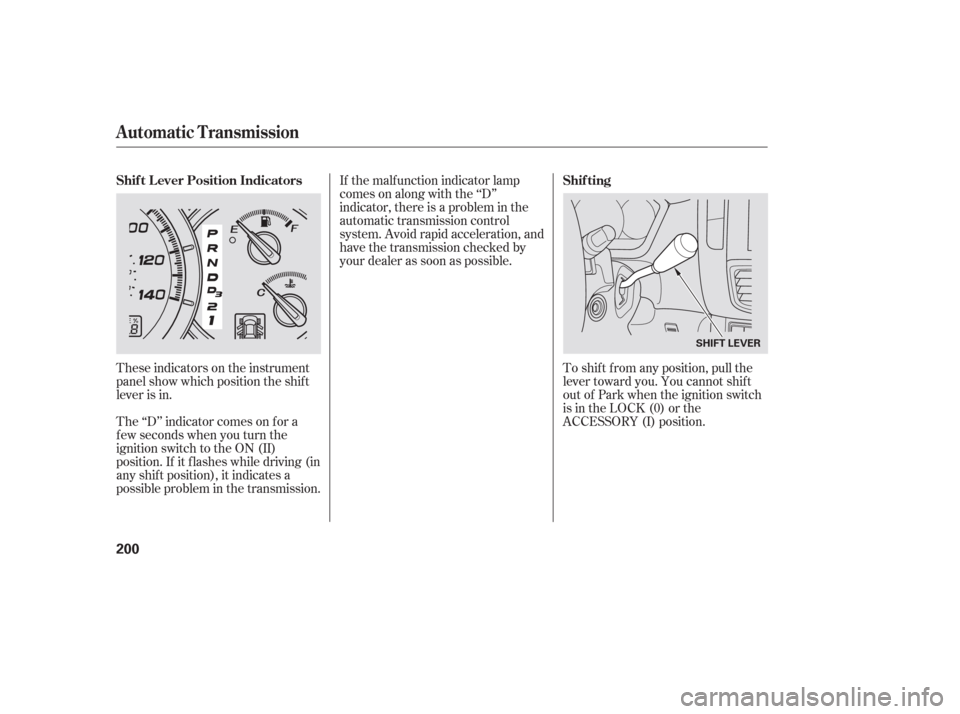
These indicators on the instrument
panel show which position the shif t
lever is in.
The ‘‘D’’ indicator comes on f or a
f ew seconds when you turn the
ignition switch to the ON (II)
position. If it f lashes while driving (in
any shif t position), it indicates a
possible problem in the transmission. To shif t f rom any position, pull the
lever toward you. You cannot shif t
out of Park when the ignition switch
is in the LOCK (0) or the
ACCESSORY (I) position.
Automatic Transmission
Shif t L ever Position Indicators
Shif ting
200
SHIFT LEVER
Page 203 of 316

�µ�µ �µ
�µTo shift from: PtoR
RtoP
NtoR
Dto2 2to1
1to2
2toD
DtoD DtoN
DtoD NtoDRtoN Do this:
Press the brake pedal and
pull the shift lever towards
you.
Pull the shift lever towards
you.
Move the shift lever.
3
3
3
3
This position mechani-
cally locks the transmission. Use
Park whenever you are turning of f or
starting the engine. To shif t out of
Park, you must press on the brake
pedal and have your f oot of f the
accelerator pedal.
If you have done all of the above and
still cannot move the lever out of
Park, see on
page .
To avoid transmission damage, come
to a complete stop bef ore shif ting
into Park. The shif t lever must be in
Park bef ore you can remove the key
from the ignition switch.
Press the brake
pedal and pull the shif t lever towards
you to shif t f rom Park to reverse. To
shif t f rom reverse to neutral, come
to a complete stop and then shift. Use neutral if you
need to restart a stalled engine, or if
it is necessary to stop brief ly with
the engine idling. Shif t to the Park
position if you need to leave your
vehicle for any reason. Press on the
brake pedal when you are moving
the shift lever from neutral to
another gear.
Use this position f or
your normal driving. The
transmission automatically selects a
suitable gear for the vehicle speed
and acceleration. You may notice the
transmission shif ting up at higher
speeds when the engine is cold. This
helps the engine warm up f aster.
203
CONT INUED
Park (P)
Shif t L ock Release
Reverse (R) Neutral (N)
Drive (D)
Automatic Transmission
Driving
201
Page 205 of 316
Do this if pushing on the brake pedal
and pulling the shif t lever does not
shif t the transmission out of Park:Set the parking brake. Push down on the key while you
pull the shif t lever towards you
and move it out of Park to neutral.
Put a cloth on the edge of the shif t
lock release slot cover next to the
shif t lever. Use a small f lat-tipped
screwdriverorfingernailfileto
remove the cover. Caref ully pry
of f the edge of the cover.
Remove the key from the ignition
switch.
Insert the key in the shift lock
release slot.Remove the key from the shift
lock release slot, then install the
cover. Press the brake pedal, and
restart the engine.
If you need to use the shif t lock
release, it means your vehicle is
developing a problem. Have the
vehicle checked by your dealer.
3.
4. 5.
6.
1.
2. Shif t L ock Release
Automatic Transmission
Driving
203