2006 CADILLAC STS service reset
[x] Cancel search: service resetPage 249 of 480

XM™ Radio Messages
Radio Display
MessageCondition Action Required
XL (Explicit Language
Channels)XL on the radio display,
after the channel name,
indicates content with
explicit language.These channels, or any others, can be blocked at a
customer’s request, by calling 1-800-852-XMXM (9696).
XM Updating Updating
encryption codeThe encryption code in the receiver is being updated, and
no action is required. This process should take no longer
than 30 seconds.
No XM Signal Loss of signal The system is functioning correctly, but the vehicle is in a
location that is blocking the XM signal. When the vehicle is
moved into an open area, the signal should return.
Loading XM Acquiring channel audio
(after 4 second delay)The audio system is acquiring and processing audio and
text data. No action is needed. This message should
disappear shortly.
Channel Off Air Channel not in service This channel is not currently in service. Tune in to
another channel.
Channel Unavail Channel no longer
availableThis previously assigned channel is no longer assigned.
Tune to another station. If this station was one of the
presets, choose another station for that preset button.
No Artist Info Artist Name/Feature
not availableNo artist information is available at this time on this channel.
The system is working properly.
3-103
Page 263 of 480

H/A (Home/Away) PRESETS:This menu item allows
you to switch back and forth between your home
and away preset radio stations. See “Presets
Home/Away” underRadio with CD on page 3-96for
more information.
AUTOSTORE PRESETS:This menu item allows you to
automatically store radio stations with the strongest
signals as presets. See “Autostore Presets” underRadio
with CD on page 3-96for more information.
CAT (Category):This menu item allows you to select
radio stations based on preset categories. See
“Activating Program Type (PTY) Stations” underRadio
with CD on page 3-96for more information.
TA (Traffic Announcement):This menu item
allows you to turn the TA feature on and off. See
“TA (Traffic Announcement)” underRadio with CD on
page 3-96for more information.
RECALL RDS MESSAGE:This menu item allows you
to view an RDS radio station message broadcast by
a radio station. See “MSG (Message)” underRadio with
CD on page 3-96for more information.
AF (Alternate Frequency):This menu item allows you
to turn the AF feature on and off. See “Activating
Program Type (PTY) Stations (RDS and XM™)” under
Radio with CD on page 3-96for more information.ASEEK LOCAL/DISTANT:This feature instructs the
audio system to seek only local radio stations with the
strongest signal or to seek all radio stations with a strong
signal in a large area. Use LOCAL when you are in urban
areas where there are several strong radio station signals
and you want to limit the number of stations to those with
the strongest signals only. Use DISTANT when you are in
rural areas where there are fewer radio station signals
available.
See “Local/Distant Selection” underRadio with CD on
page 3-96for more information.
8SET CLOCK:Use this menu item to set the time.
SeeSetting the Time on page 3-95for more information.
BSET DATE:Use this menu item to set the date.
SeeSetting the Time on page 3-95for more information.
4(Information):This menu item is used to display
XM™ satellite radio service and CD MP3 playback
information. See “
4(Information)”underRadio with CD
on page 3-96for more information.
3-117
Page 336 of 480

Engine Oil Life System
When to Change Engine Oil
Your vehicle has a computer system that lets you
know when to change the engine oil and lter. This is
based on engine revolutions and engine temperature,
and not on mileage. Based on driving conditions,
the mileage at which an oil change will be indicated
can vary considerably. For the oil life system to
work properly, you must reset the system every time
the oil is changed.
Notice:If your vehicle is an STS-V model, the engine
uses a special oil lter. The use of any other engine
oil lter could lead to lter failure and result in severe
engine damage. Damage caused by use of the wrong
engine oil lter would not be covered by your new
vehicle warranty.When the system has calculated that oil life has been
diminished, it will indicate that an oil change is necessary.
A CHANGE ENGINE OIL SOON message in the DIC
will come on. SeeDIC Warnings and Messages on
page 3-79. Change your oil as soon as possible within
the next 600 miles (1 000 km). It is possible that, if you
are driving under the best conditions, the oil life system
may not indicate that an oil change is necessary for over
a year. However, your engine oil and lter must be
changed at least once a year and at this time the system
must be reset. Your dealer has GM-trained service
people who will perform this work using genuine
GM parts and reset the system. It is also important to
check your oil regularly and keep it at the proper level.
If the system is ever reset accidentally, you must change
your oil at 3,000 miles (5 000 km) since your last oil
change. Remember to reset the oil life system whenever
the oil is changed.
5-22
Page 337 of 480

How to Reset the Engine Oil Life
System
The Engine Oil Life System calculates when to change
your engine oil and lter based on vehicle use. Anytime
your oil is changed, reset the system so it can calculate
when the next oil change is required. If a situation occurs
where you change your oil prior to a CHANGE ENGINE
OIL SOON message in the DIC being turned on, reset
the system.
After the oil has been changed, the CHANGE ENGINE
OIL SOON message must be reset. To reset the
message use the following procedure:
1. Press the up or down arrow to scroll the DIC to
show OIL LIFE.
2. Once the XXX% ENGINE OIL LIFE menu item is
highlighted, press and hold the RESET button until
the percentage shows 100%.
If the percentage does not return to 100% or if the
CHANGE ENGINE OIL SOON message comes
back on when you start your vehicle, the engine oil
life system has not reset. Repeat the procedure.
What to Do with Used Oil
Used engine oil contains certain elements that may be
unhealthy for your skin and could even cause cancer.
Do not let used oil stay on your skin for very long. Clean
your skin and nails with soap and water, or a good
hand cleaner. Wash or properly dispose of clothing or
rags containing used engine oil. See the manufacturer’s
warnings about the use and disposal of oil products.
Used oil can be a threat to the environment. If you
change your own oil, be sure to drain all the oil from the
lter before disposal. Never dispose of oil by putting it in
the trash, pouring it on the ground, into sewers, or into
streams or bodies of water. Instead, recycle it by taking it
to a place that collects used oil. If you have a problem
properly disposing of your used oil, ask your dealer, a
service station, or a local recycling center for help.
5-23
Page 436 of 480

Scheduled Maintenance
When the CHANGE ENGINE OIL SOON message in
the Driver Information Center (DIC) comes on, it means
that service is required for your vehicle. Have your
vehicle serviced as soon as possible within the next
600 miles (1 000 km). It is possible that, if you are
driving under the best conditions, the engine oil life
system may not indicate that vehicle service is
necessary for over a year. However, your engine oil
and lter must be changed at least once a year
and at this time the system must be reset. Your
GM Goodwrench
®dealer has GM-trained service
technicians who will perform this work using genuine
GM parts and reset the system.
If the engine oil life system is ever reset accidentally,
you must service your vehicle within 3,000 miles
(5 000 km) since your last service. Remember to reset
the oil life system whenever the oil is changed. See
Engine Oil Life System on page 5-22for information on
the Engine Oil Life System and resetting the system.When the CHANGE ENGINE OIL SOON message
appears, certain services, checks, and inspections
are required. Required services are described in the
following for “MaintenanceI” and “MaintenanceII.”
Generally, it is recommended that your rst service be
MaintenanceI, your second service be MaintenanceII,
and that you alternate MaintenanceIand MaintenanceII
thereafter. However, in some cases, MaintenanceII
may be required more often.
MaintenanceI— Use MaintenanceIif the
CHANGE ENGINE OIL SOON message comes on
within 10 months since the vehicle was purchased or
MaintenanceIIwas performed.
MaintenanceII— Use MaintenanceIIif the previous
service performed was MaintenanceI. Always use
MaintenanceIIwhenever the message comes on
10 months or more since the last service or if the
message has not come on at all for one year.
6-4
Page 437 of 480
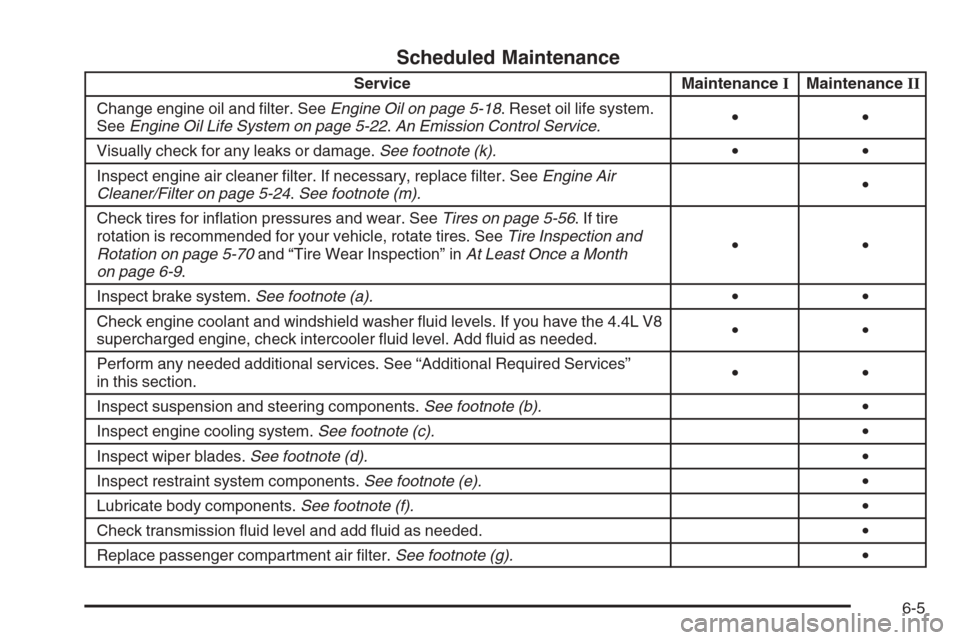
Scheduled Maintenance
Service MaintenanceIMaintenanceII
Change engine oil and lter. SeeEngine Oil on page 5-18. Reset oil life system.
SeeEngine Oil Life System on page 5-22.An Emission Control Service.••
Visually check for any leaks or damage.See footnote (k).••
Inspect engine air cleaner lter. If necessary, replace lter. SeeEngine Air
Cleaner/Filter on page 5-24.See footnote (m).•
Check tires for ination pressures and wear. SeeTires on page 5-56. If tire
rotation is recommended for your vehicle, rotate tires. SeeTire Inspection and
Rotation on page 5-70and “Tire Wear Inspection” inAt Least Once a Month
on page 6-9.••
Inspect brake system.See footnote (a).••
Check engine coolant and windshield washer uid levels. If you have the 4.4L V8
supercharged engine, check intercooler uid level. Add uid as needed.••
Perform any needed additional services. See “Additional Required Services”
in this section.••
Inspect suspension and steering components.See footnote (b).•
Inspect engine cooling system.See footnote (c).•
Inspect wiper blades.See footnote (d).•
Inspect restraint system components.See footnote (e).•
Lubricate body components.See footnote (f).•
Check transmission uid level and add uid as needed.•
Replace passenger compartment air lter.See footnote (g).•
6-5