2005 NISSAN NAVARA light
[x] Cancel search: lightPage 2089 of 3171

LT-6
HEADLAMP -CONVENTIONAL TYPE-
lto combination meter terminal 16.
Ground is supplied at all times
lto BCM terminal 55 and
lto combination meter terminal 23
lthrough grounds M21, M80 and M83,
lto IPDM E/R terminals 38 and 59
lthrough grounds E21, E41 and E61.
Low Beam Operation
With the lighting switch in 2ND position, the BCM receives input requesting the headlamps to illuminate. This
input is communicated to the IPDM E/R through the CAN communication. The CPU of the IPDM E/R controls
the headlamp low relay coil. When energized, this relay directs power
lthrough 15A fuse (No. 41, located in IPDM E/R)
lthrough IPDM E/R terminal 54
lto front combination lamp RH terminal 1,
lthrough 15A fuse (No. 40, located in IPDM E/R)
lthrough IPDM E/R terminal 52
lto front combination lamp LH terminal 1.
Ground is supplied
lto front combination lamp RH and LH terminals 3
lthrough grounds E21, E41 and E61.
With power and ground supplied, low beam headlamps illuminate.
High Beam Operation/Flash-to-Pass Operation
With the lighting switch in 2ND position and placed in HIGH or PASS position, the BCM receives input request-
ing the headlamp high beams to illuminate. This input is communicated to the IPDM E/R through the CAN
communication. The CPU of the IPDM E/R controls the headlamp high relay coil. When energized, this relay
directs power
lthrough 10A fuse (No. 34, located in IPDM E/R)
lthrough IPDM E/R terminal 56
lto front combination lamp RH terminal 2,
lthrough 10A fuse (No. 35, located in IPDM E/R)
lthrough IPDM E/R terminal 55
lto front combination lamp LH terminal 2.
Ground is supplied
lto front combination lamp RH and LH terminals 3
lthrough grounds E21, E41 and E61.
With power and ground supplied, the high beam headlamps illuminate.
Combination meter that received high beam request signal by BCM through the CAN communication makes a
high beam indicator lamp turn on in combination meter.
FRIENDLY LIGHTING FUNCTION
This function starts timer function of BCM by operating passing switch, and illuminates headlamps (LOW
beam) for a given length of time.
Headlamps (LOW beam) stay ON for a given length of time by operating passing switch when ignition switch is
OFF and lighting switch is OFF.
Headlamps (LOW beam) stays ON for two minutes at a maximum by operating passing switch repeatedly.
CONSULT-II is capable of setting a lighting time. Refer toLT- 1 6 , "
WORK SUPPORT".
CAN Communication System DescriptionEKS00P7J
Refer toLAN-23, "CAN COMMUNICATION".
Page 2095 of 3171
LT-12
HEADLAMP -CONVENTIONAL TYPE-
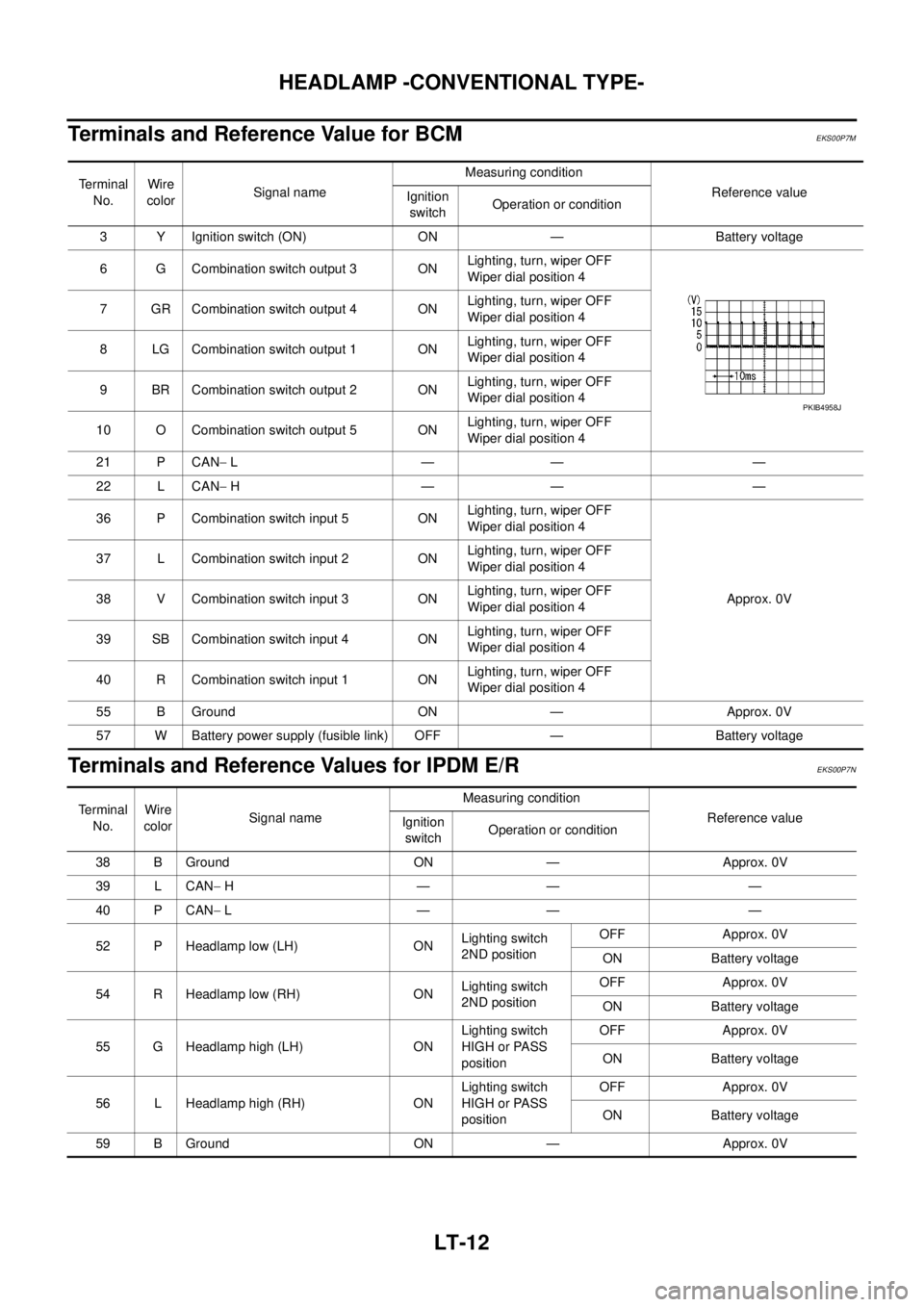
Terminals and Reference Value for BCM
EKS00P7M
Terminals and Reference Values for IPDM E/REKS00P7N
Terminal
No.Wire
colorSignal nameMeasuring condition
Reference value
Ignition
switchOperation or condition
3 Y Ignition switch (ON) ON — Battery voltage
6 G Combination switch output 3 ONLighting, turn, wiper OFF
Wiper dial position 4
7 GR Combination switch output 4 ONLighting, turn, wiper OFF
Wiper dial position 4
8 LG Combination switch output 1 ONLighting, turn, wiper OFF
Wiper dial position 4
9 BR Combination switch output 2 ONLighting, turn, wiper OFF
Wiper dial position 4
10 O Combination switch output 5 ONLighting, turn, wiper OFF
Wiper dial position 4
21 P CAN-L—— —
22 L CAN-H—— —
36 P Combination switch input 5 ONLighting, turn, wiper OFF
Wiper dial position 4
Approx. 0V 37 L Combination switch input 2 ONLighting, turn, wiper OFF
Wiper dial position 4
38 V Combination switch input 3 ONLighting, turn, wiper OFF
Wiper dial position 4
39 SB Combination switch input 4 ONLighting, turn, wiper OFF
Wiper dial position 4
40 R Combination switch input 1 ONLighting, turn, wiper OFF
Wiper dial position 4
55 B Ground ON — Approx. 0V
57 W Battery power supply (fusible link) OFF — Battery voltage
PKIB4958J
Te r m i n a l
No.Wire
colorSignal nameMeasuring condition
Reference value
Ignition
switchOperation or condition
38 B Ground ON — Approx. 0V
39 L CAN-H—— —
40 P CAN-L—— —
52 P Headlamp low (LH) ONLighting switch
2ND positionOFF Approx. 0V
ON Battery voltage
54 R Headlamp low (RH) ONLighting switch
2ND positionOFF Approx. 0V
ON Battery voltage
55 G Headlamp high (LH) ONLighting switch
HIGH or PASS
positionOFF Approx. 0V
ON Battery voltage
56 L Headlamp high (RH) ONLighting switch
HIGH or PASS
positionOFF Approx. 0V
ON Battery voltage
59 B Ground ON — Approx. 0V
Page 2099 of 3171
LT-16
HEADLAMP -CONVENTIONAL TYPE-
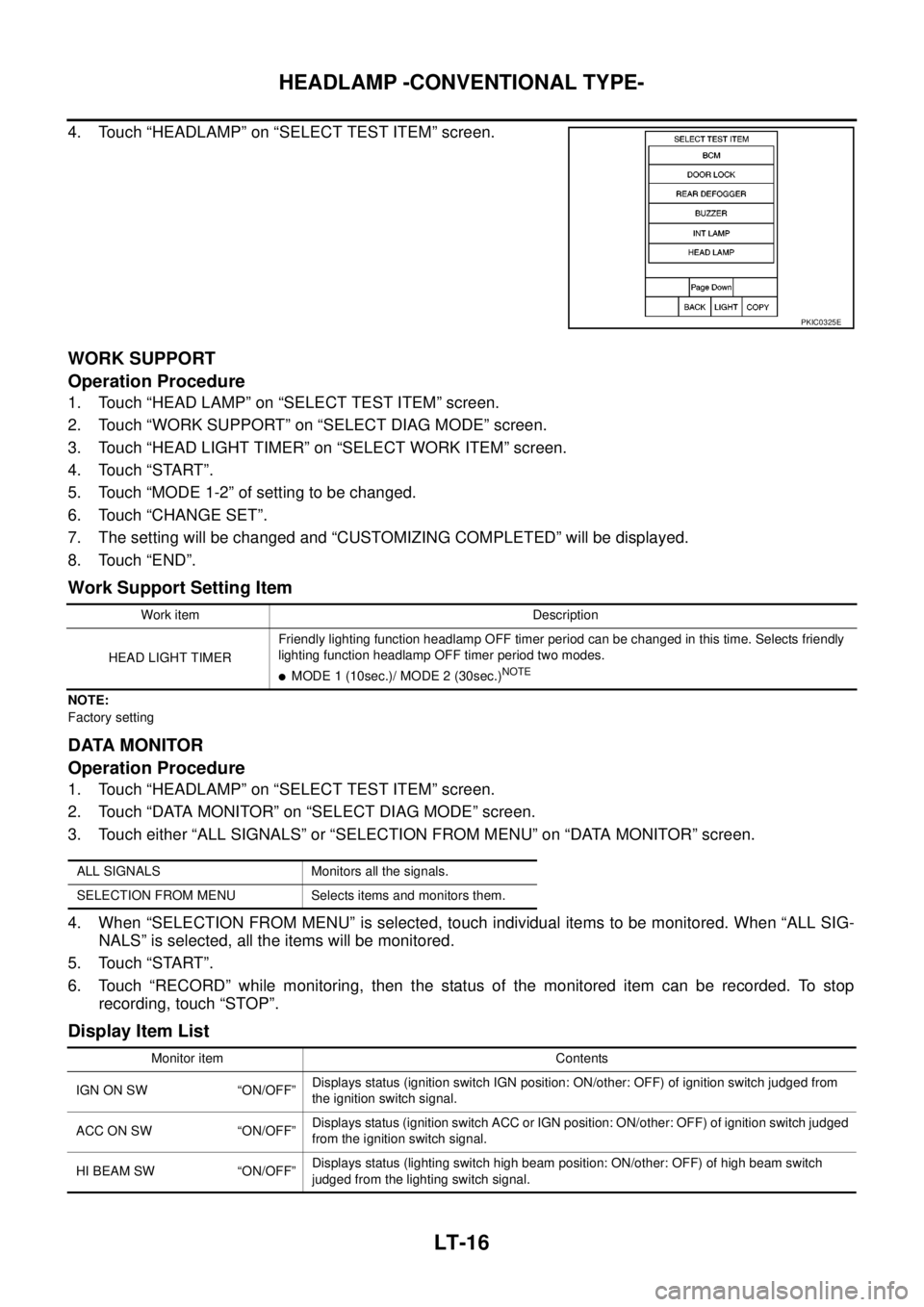
4. Touch “HEADLAMP” on “SELECT TEST ITEM” screen.
WORK SUPPORT
Operation Procedure
1. Touch “HEAD LAMP” on “SELECT TEST ITEM” screen.
2. Touch “WORK SUPPORT” on “SELECT DIAG MODE” screen.
3. Touch “HEAD LIGHT TIMER” on “SELECT WORK ITEM” screen.
4. Touch “START”.
5. Touch “MODE 1-2” of setting to be changed.
6. Touch “CHANGE SET”.
7. The setting will be changed and “CUSTOMIZING COMPLETED” will be displayed.
8. Touch “END”.
Work Support Setting Item
NOTE:
Factory setting
DATA MONITOR
Operation Procedure
1. Touch “HEADLAMP” on “SELECT TEST ITEM” screen.
2. Touch “DATA MONITOR” on “SELECT DIAG MODE” screen.
3. Touch either “ALL SIGNALS” or “SELECTION FROM MENU” on “DATA MONITOR” screen.
4. When “SELECTION FROM MENU” is selected, touch individual items to be monitored. When “ALL SIG-
NALS” is selected, all the items will be monitored.
5. Touch “START”.
6. Touch “RECORD” while monitoring, then the status of the monitored item can be recorded. To stop
recording, touch “STOP”.
Display Item List
PKIC0325E
Work item Description
HEAD LIGHT TIMERFriendly lighting function headlamp OFF timer period can be changed in this time. Selects friendly
lighting function headlamp OFF timer period two modes.
lMODE 1 (10sec.)/ MODE 2 (30sec.)NOTE
ALL SIGNALS Monitors all the signals.
SELECTION FROM MENU Selects items and monitors them.
Monitor item Contents
IGN ON SW “ON/OFF”Displays status (ignition switch IGN position: ON/other: OFF) of ignition switch judged from
the ignition switch signal.
ACCONSW “ON/OFF”Displays status (ignition switch ACC or IGN position: ON/other: OFF) of ignition switch judged
from the ignition switch signal.
HI BEAM SW “ON/OFF”Displays status (lighting switch high beam position: ON/other: OFF) of high beam switch
judged from the lighting switch signal.
Page 2100 of 3171
HEADLAMP -CONVENTIONAL TYPE-
LT-17
C
D
E
F
G
H
I
J
L
MA
B
LT
NOTE:
This item is displayed, but cannot be monitored.
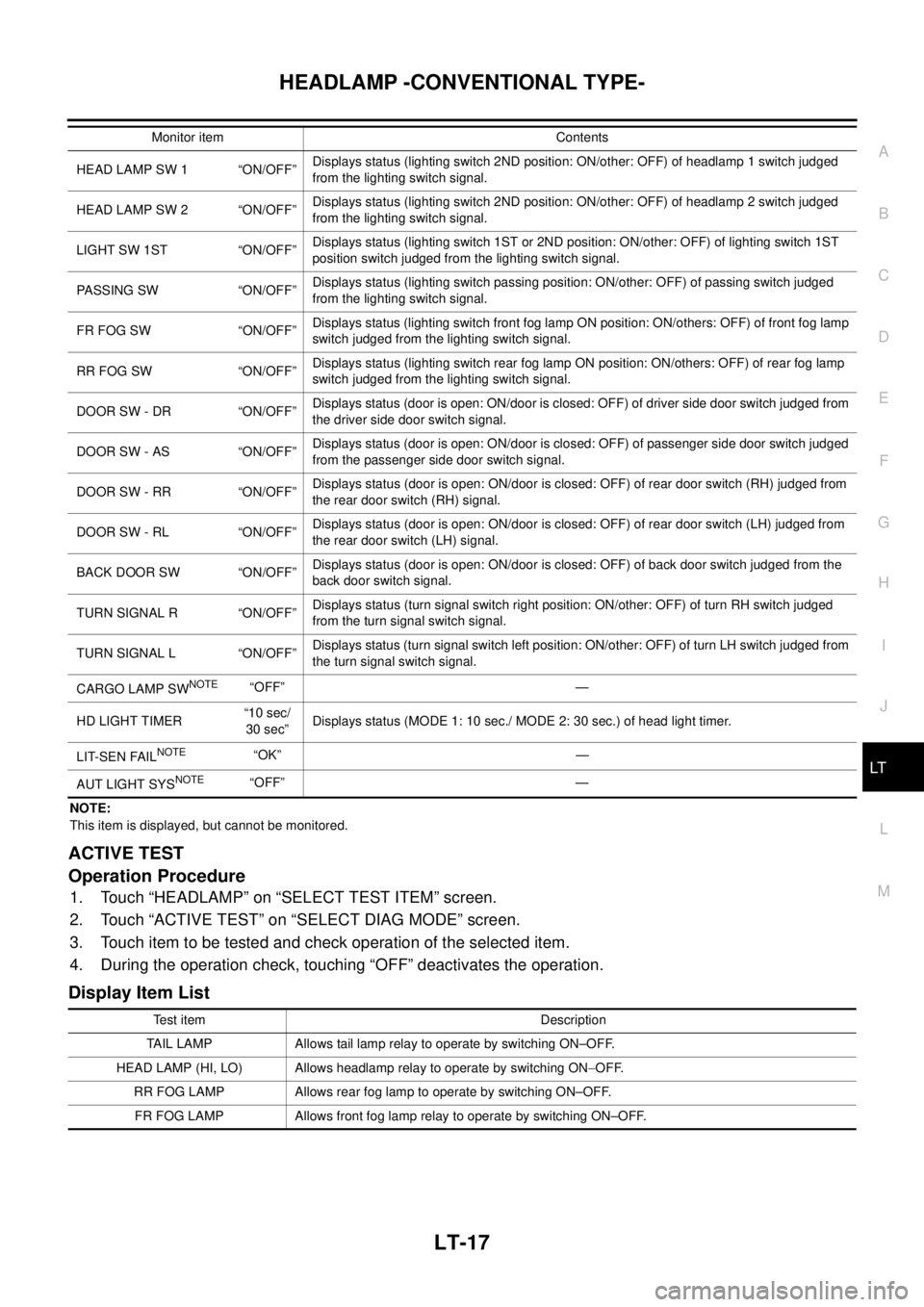
ACTIVE TEST
Operation Procedure
1. Touch “HEADLAMP” on “SELECT TEST ITEM” screen.
2. Touch “ACTIVE TEST” on “SELECT DIAG MODE” screen.
3. Touch item to be tested and check operation of the selected item.
4. During the operation check, touching “OFF” deactivates the operation.
Display Item List
HEAD LAMP SW 1 “ON/OFF”Displays status (lighting switch 2ND position: ON/other: OFF) of headlamp 1 switch judged
from the lighting switch signal.
HEAD LAMP SW 2 “ON/OFF”Displays status (lighting switch 2ND position: ON/other: OFF) of headlamp 2 switch judged
from the lighting switch signal.
LIGHT SW 1ST “ON/OFF”Displays status (lighting switch 1ST or 2ND position: ON/other: OFF) of lighting switch 1ST
position switch judged from the lighting switch signal.
PASSING SW “ON/OFF”Displays status (lighting switch passing position: ON/other: OFF) of passing switch judged
from the lighting switch signal.
FR FOG SW “ON/OFF”Displays status (lighting switch front fog lamp ON position: ON/others: OFF) of front fog lamp
switch judged from the lighting switch signal.
RR FOG SW “ON/OFF”Displays status (lighting switch rear fog lamp ON position: ON/others: OFF) of rear fog lamp
switch judged from the lighting switch signal.
DOOR SW - DR “ON/OFF”Displays status (door is open: ON/door is closed: OFF) of driver side door switch judged from
the driver side door switch signal.
DOOR SW - AS “ON/OFF”Displays status (door is open: ON/door is closed: OFF) of passenger side door switch judged
from the passenger side door switch signal.
DOOR SW - RR “ON/OFF”Displays status (door is open: ON/door is closed: OFF) of rear door switch (RH) judged from
the rear door switch (RH) signal.
DOOR SW - RL “ON/OFF”Displays status (door is open: ON/door is closed: OFF) of rear door switch (LH) judged from
the rear door switch (LH) signal.
BACK DOOR SW “ON/OFF”Displays status (door is open: ON/door is closed: OFF) of back door switch judged from the
back door switch signal.
TURN SIGNAL R “ON/OFF”Displays status (turn signal switch right position: ON/other: OFF) of turn RH switch judged
from the turn signal switch signal.
TURN SIGNAL L “ON/OFF”Displays status (turn signal switch left position: ON/other: OFF) of turn LH switch judged from
the turn signal switch signal.
CARGO LAMP SW
NOTE“OFF” —
HD LIGHT TIMER“10 sec/
30 sec”Displays status (MODE 1: 10 sec./ MODE 2: 30 sec.) of head light timer.
LIT-SEN FAIL
NOTE“OK” —
AUT LIGHT SYS
NOTE“OFF” — Monitor item Contents
Test item Description
TAIL LAMP Allows tail lamp relay to operate by switching ON–OFF.
HEAD LAMP (HI, LO) Allows headlamp relay to operate by switching ON-OFF.
RR FOG LAMP Allows rear fog lamp to operate by switching ON–OFF.
FR FOG LAMP Allows front fog lamp relay to operate by switching ON–OFF.
Page 2102 of 3171
HEADLAMP -CONVENTIONAL TYPE-
LT-19
C
D
E
F
G
H
I
J
L
MA
B
LT
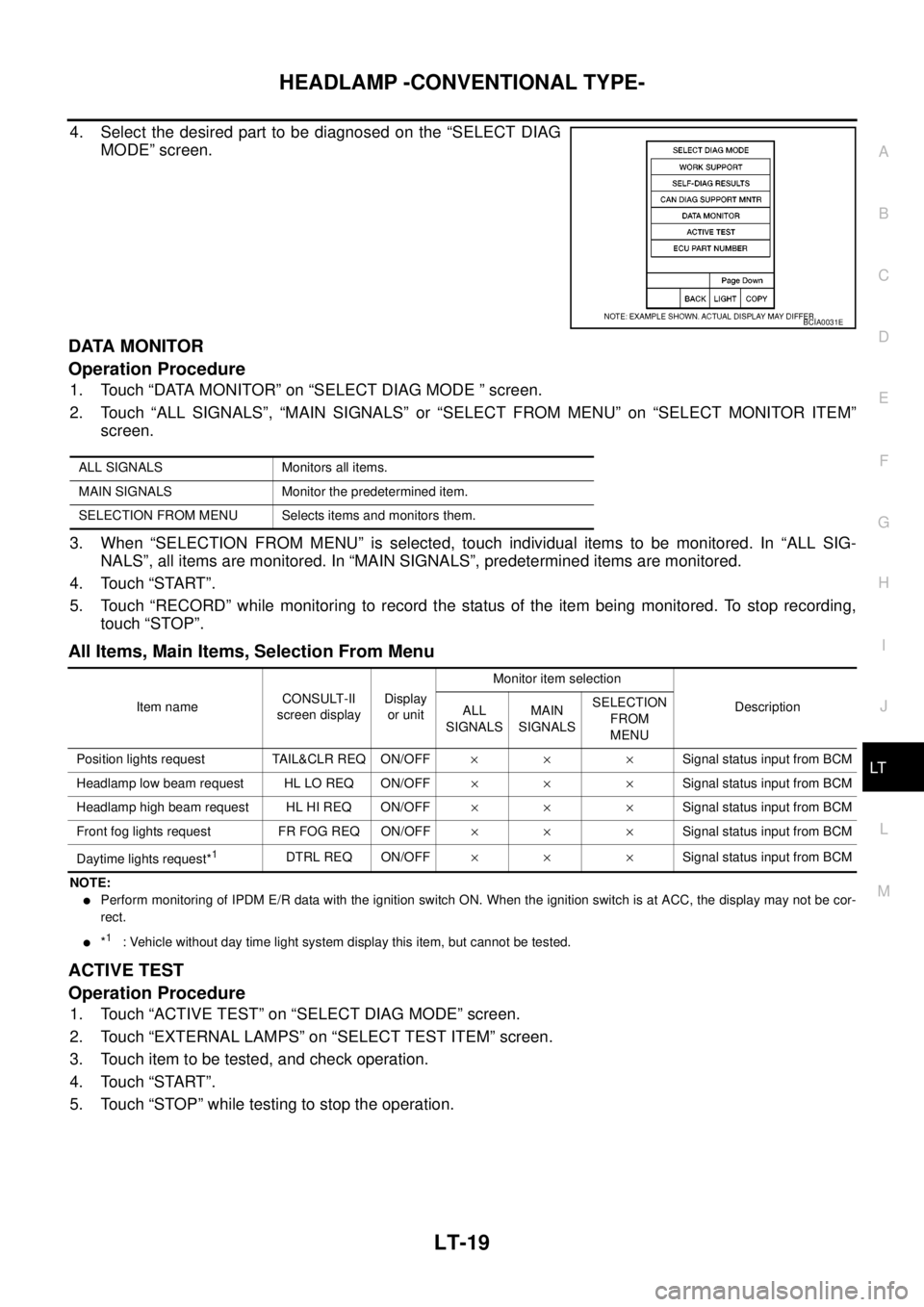
4. Select the desired part to be diagnosed on the “SELECT DIAG
MODE” screen.
DATA MONITOR
Operation Procedure
1. Touch “DATA MONITOR” on “SELECT DIAG MODE ” screen.
2. Touch “ALL SIGNALS”, “MAIN SIGNALS” or “SELECT FROM MENU” on “SELECT MONITOR ITEM”
screen.
3. When “SELECTION FROM MENU” is selected, touch individual items to be monitored. In “ALL SIG-
NALS”, all items are monitored. In “MAIN SIGNALS”, predetermined items are monitored.
4. Touch “START”.
5. Touch “RECORD” while monitoring to record the status of the item being monitored. To stop recording,
touch “STOP”.
All Items, Main Items, Selection From Menu
NOTE:
lPerform monitoring of IPDM E/R data with the ignition switch ON. When the ignition switch is at ACC, the display may not be cor-
rect.
l*1: Vehicle without day time light system display this item, but cannot be tested.
ACTIVE TEST
Operation Procedure
1. Touch “ACTIVE TEST” on “SELECT DIAG MODE” screen.
2. Touch “EXTERNAL LAMPS” on “SELECT TEST ITEM” screen.
3. Touch item to be tested, and check operation.
4. Touch “START”.
5. Touch “STOP” while testing to stop the operation.
BCIA0031E
ALL SIGNALS Monitors all items.
MAIN SIGNALS Monitor the predetermined item.
SELECTION FROM MENU Selects items and monitors them.
Item nameCONSULT-II
screen displayDisplay
or unitMonitor item selection
Description
ALL
SIGNALSMAIN
SIGNALSSELECTION
FROM
MENU
Position lights request TAIL&CLR REQ ON/OFF´´ ´Signal status input from BCM
Headlamp low beam request HL LO REQ ON/OFF´´ ´Signal status input from BCM
Headlamp high beam request HL HI REQ ON/OFF´´ ´Signal status input from BCM
Front fog lights request FR FOG REQ ON/OFF´´ ´Signal status input from BCM
Daytime lights request*
1DTRL REQ ON/OFF´´ ´Signal status input from BCM
Page 2103 of 3171
LT-20
HEADLAMP -CONVENTIONAL TYPE-
Headlamp High Beam Does Not Illuminate (Both Sides)
EKS00P7S
1.CHECK COMBINATION SWITCH INPUT SIGNAL
With CONSULT-II
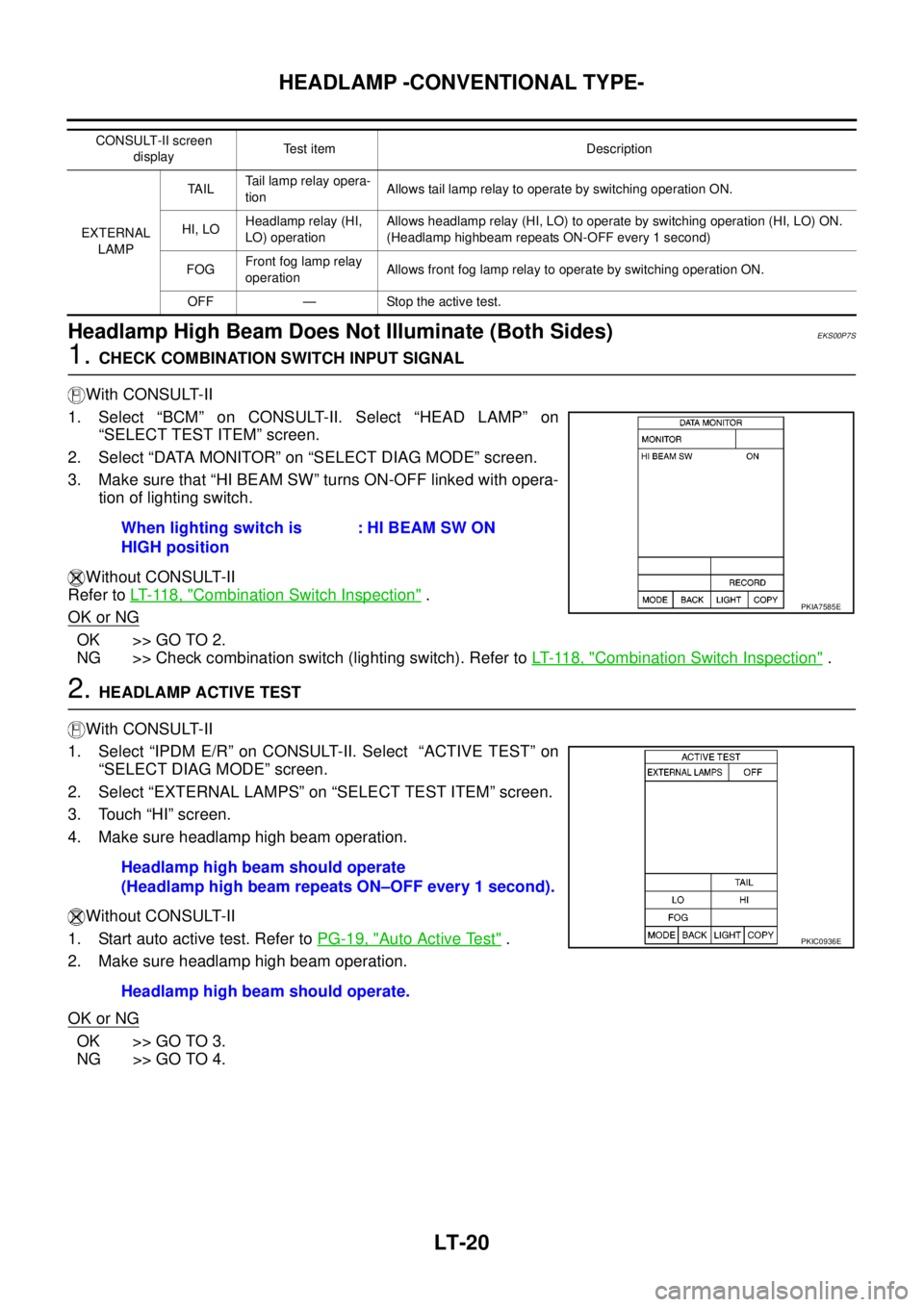
1. Select “BCM” on CONSULT-II. Select “HEAD LAMP” on
“SELECT TEST ITEM” screen.
2. Select “DATA MONITOR” on “SELECT DIAG MODE” screen.
3. Make sure that “HI BEAM SW” turns ON-OFF linked with opera-
tion of lighting switch.
Without CONSULT-II
Refer toLT- 11 8 , "
Combination Switch Inspection".
OK or NG
OK >> GO TO 2.
NG >> Check combination switch (lighting switch). Refer toLT- 11 8 , "
Combination Switch Inspection".
2.HEADLAMP ACTIVE TEST
With CONSULT-II
1. Select “IPDM E/R” on CONSULT-II. Select “ACTIVE TEST” on
“SELECT DIAG MODE” screen.
2. Select “EXTERNAL LAMPS” on “SELECT TEST ITEM” screen.
3. Touch “HI” screen.
4. Make sure headlamp high beam operation.
Without CONSULT-II
1. Start auto active test. Refer toPG-19, "
Auto Active Test".
2. Make sure headlamp high beam operation.
OK or NG
OK >> GO TO 3.
NG >> GO TO 4.
CONSULT-II screen
displayTest item Description
EXTERNAL
LAMPTA I LTail lamp relay opera-
tionAllows tail lamp relay to operate by switching operation ON.
HI, LOHeadlamp relay (HI,
LO) operationAllows headlamp relay (HI, LO) to operate by switching operation (HI, LO) ON.
(Headlamp highbeam repeats ON-OFF every 1 second)
FOGFront fog lamp relay
operationAllows front fog lamp relay to operate by switching operation ON.
OFF — Stop the active test.
When lighting switch is
HIGH position: HI BEAM SW ON
PKIA7585E
Headlamp high beam should operate
(Headlamp high beam repeats ON–OFF every 1 second).
Headlamp high beam should operate.
PKIC0936E
Page 2104 of 3171
HEADLAMP -CONVENTIONAL TYPE-
LT-21
C
D
E
F
G
H
I
J
L
MA
B
LT
3.CHECK IPDM E/R
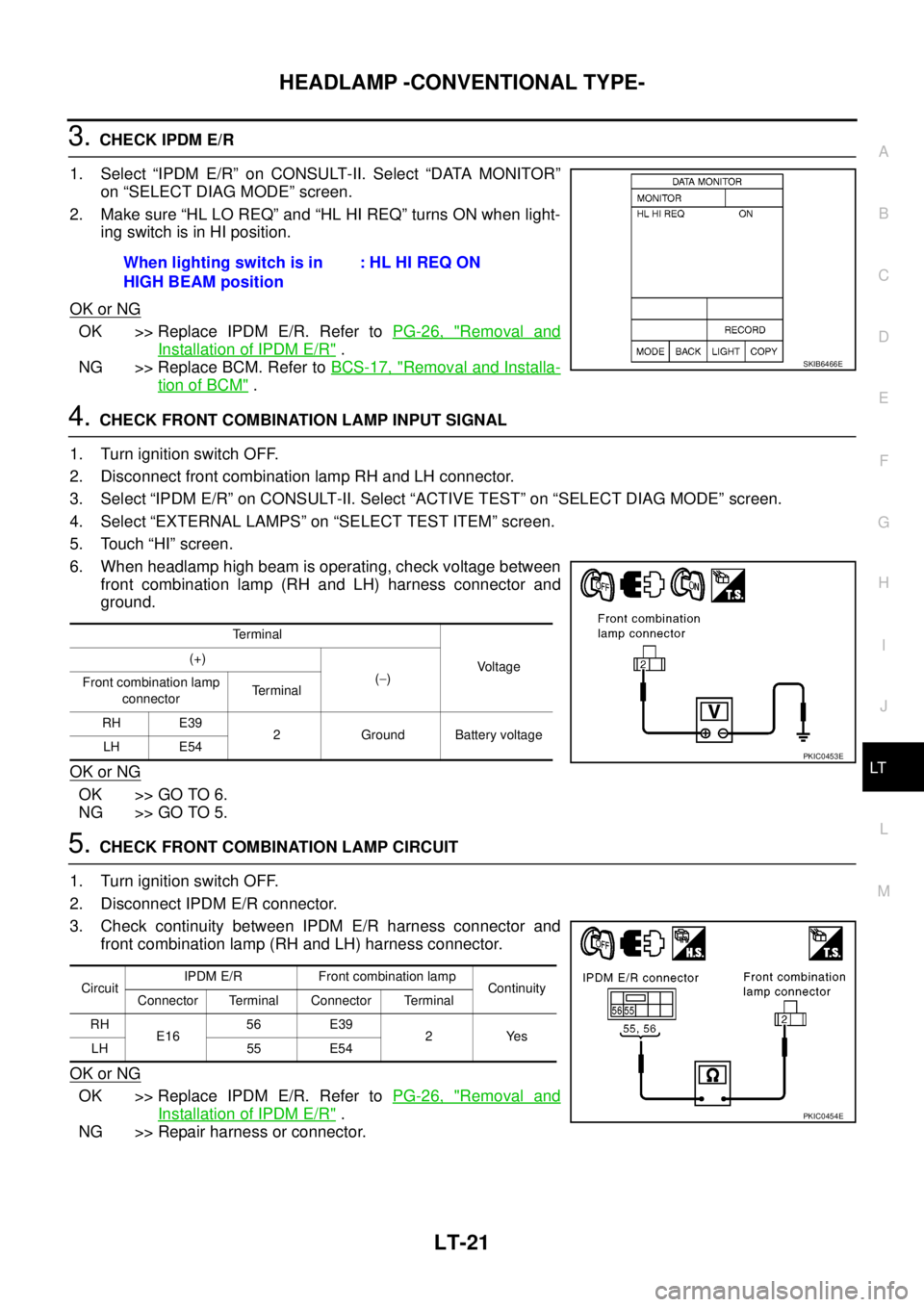
1. Select “IPDM E/R” on CONSULT-II. Select “DATA MONITOR”
on “SELECT DIAG MODE” screen.
2. Make sure “HL LO REQ” and “HL HI REQ” turns ON when light-
ingswitchisinHIposition.
OK or NG
OK >> Replace IPDM E/R. Refer toPG-26, "Removal and
Installation of IPDM E/R".
NG >> Replace BCM. Refer toBCS-17, "
Removal and Installa-
tion of BCM".
4.CHECK FRONT COMBINATION LAMP INPUT SIGNAL
1. Turn ignition switch OFF.
2. Disconnect front combination lamp RH and LH connector.
3. Select “IPDM E/R” on CONSULT-II. Select “ACTIVE TEST” on “SELECT DIAG MODE” screen.
4. Select “EXTERNAL LAMPS” on “SELECT TEST ITEM” screen.
5. Touch “HI” screen.
6. When headlamp high beam is operating, check voltage between
front combination lamp (RH and LH) harness connector and
ground.
OK or NG
OK >> GO TO 6.
NG >> GO TO 5.
5.CHECK FRONT COMBINATION LAMP CIRCUIT
1. Turn ignition switch OFF.
2. Disconnect IPDM E/R connector.
3. Check continuity between IPDM E/R harness connector and
front combination lamp (RH and LH) harness connector.
OK or NG
OK >> Replace IPDM E/R. Refer toPG-26, "Removal and
Installation of IPDM E/R".
NG >> Repair harness or connector.When lighting switch is in
HIGH BEAM position:HLHIREQON
SKIB6466E
Terminal
Voltage (+)
(-)
Front combination lamp
connectorTerminal
RH E39
2 Ground Battery voltage
LH E54
PKIC0453E
CircuitIPDM E/R Front combination lamp
Continuity
Connector Terminal Connector Terminal
RH
E1656 E39
2Yes
LH 55 E54
PKIC0454E
Page 2105 of 3171
LT-22
HEADLAMP -CONVENTIONAL TYPE-
6.CHECK FRONT COMBINATION LAMP GROUND
1. Turn ignition switch OFF.
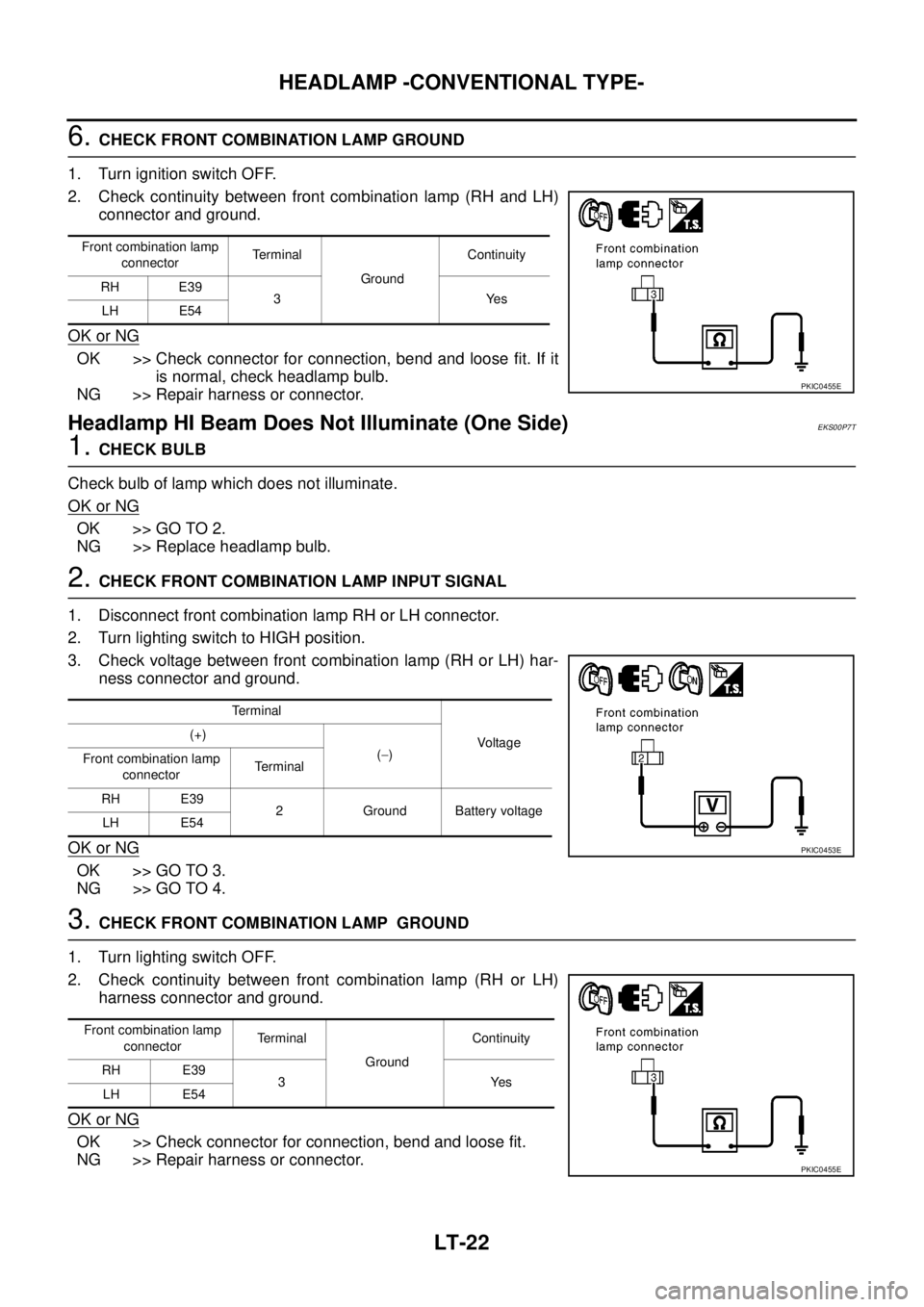
2. Check continuity between front combination lamp (RH and LH)
connector and ground.
OK or NG
OK >> Check connector for connection, bend and loose fit. If it
is normal, check headlamp bulb.
NG >> Repair harness or connector.
Headlamp HI Beam Does Not Illuminate (One Side)EKS00P7T
1.CHECK BULB
Check bulb of lamp which does not illuminate.
OK or NG
OK >> GO TO 2.
NG >> Replace headlamp bulb.
2.CHECK FRONT COMBINATION LAMP INPUT SIGNAL
1. Disconnect front combination lamp RH or LH connector.
2. Turn lighting switch to HIGH position.
3. Check voltage between front combination lamp (RH or LH) har-
ness connector and ground.
OK or NG
OK >> GO TO 3.
NG >> GO TO 4.
3.CHECK FRONT COMBINATION LAMP GROUND
1. Turn lighting switch OFF.
2. Check continuity between front combination lamp (RH or LH)
harness connector and ground.
OK or NG
OK >> Check connector for connection, bend and loose fit.
NG >> Repair harness or connector.
Front combination lamp
connectorTerminal
GroundContinuity
RH E39
3Yes
LH E54
PKIC0455E
Terminal
Voltag e (+)
(-)
Front combination lamp
connectorTerminal
RH E39
2 Ground Battery voltage
LH E54
PKIC0453E
Front combination lamp
connectorTe r m i n a l
GroundContinuity
RH E39
3Yes
LH E54
PKIC0455E