Page 13 of 1500

SWS DIAGNOSIS
SIMPLIFIED WIRING SYSTEM (SWS)54B-13
When the SWS communication line is monitored,
you can determine whether the problem lies in the
input or output signal circuit system by checking
whether communication data is correct:
If the switch condition does not meet the service
data display, the input signal is defective.
If the switch condition meets the service data dis-
play, the output signal system is defective.
Refer to circuit diagrams GROUP-90
Refer to configuration diagrams GROUP-80NOTE: In addition to the function-specific diag-
nostic menu, a service data menu is available for
SWS monitor service data to check all items for
each ECU.
6. Check the input signal circuit system
Check the relevant switch, sensor, input
signal-side ECU and their wiring harness and
connector.
7. Check the output signal circuit system
Check an output signal-side ECU, electrical load
components and their wiring harness and
connector.
HOW TO CONNECT SWS MONITORM1549014800706
Required Special Tools:
MB991958: DIAGNOSTIC TOOL (MUT-III Sub Assembly)
MB991824: Vehicle Communication Interface (V.C.I.)
MB991827: MUT-III USB Cable
MB991910: MUT-III Main Harness A
MB991813: SWS Monitor Kit
MB991806: SWS Monitor Cartridge
MB991812: SWS Monitor Harness (For Column-ECU)
MB991822: Probe Harness
To prevent damage to diagnostic tool MB991958, always
turn the ignition switch to the "LOCK" (OFF) position
before connecting or disconnecting diagnostic tool
MB991958. Connect the main harness A MB991910 before
connecting the SWS monitor harness (for column-ECU)
MB991812. Be sure to connect SWS monitor cartridge
MB991806 after turning on the V.C.I. MB991924.
1. Ensure that the ignition switch is at the "LOCK" (OFF)
position.
2. Start up the personal computer.
3. Connect special tool MB991827 to special tool MB991824
and the personal computer.
4. Connect special tool MB991910 to special tool MB991824.
5. Connect special tool MB991910 to the data link connector.
Page 900 of 1500
00-1
GROUP 00
GENERAL
CONTENTS
GENERAL . . . . . . . . . . . . . . . . . . . . . . . . . . . . . . . . . . . . . . . . . .00
GENERAL . . . . . . . . . . . . . . . . . . . . . . . . . . . .00E
Page 902 of 1500
00E-1
GROUP 00E
GENERAL
CONTENTS
HARNESS CONNECTOR
INSPECTION . . . . . . . . . . . . . . . . . . .00E-2
HOW TO DIAGNOSE . . . . . . . . . . . . .00E-2
HOW TO DIAGNOSE . . . . . . . . . . . . . . . . . 00E-2
TROUBLESHOOTING STEPS . . . . . . . . . . 00E-3
INFORMATION FOR DIAGNOSIS . . . . . . . 00E-3
INSPECTION . . . . . . . . . . . . . . . . . . . . . . . 00E-4INSPECTION INSTRUMENTS . . . . . . . . . . 00E-5
CHECKING FUSES . . . . . . . . . . . . . . . . . . . 00E-6
CHECKING SWITCHES . . . . . . . . . . . . . . . 00E-7
CHECKING RELAYS . . . . . . . . . . . . . . . . . 00E-8
CABLES AND WIRES CHECK . . . . . . . . . . 00E-9
BATTERY HANDLING . . . . . . . . . . . . . . . . 00E-9
GENERAL ELECTRICAL SYSTEM CHECK00E-9
Page 903 of 1500

HARNESS CONNECTOR INSPECTION
GENERAL 00E-2
HARNESS CONNECTOR INSPECTIONM1001003900201
CONNECTOR CONTINUITY AND VOLTAGE TEST
Required Special Tools:
MB991219: Test Harness Set
MD998459: Test Harness
Follow the steps below to avoid causing poor connector contact
and/or reduced waterproof performance of connectors when
checking continuity and/or voltage at waterproof connectors.
Never backtest probe a waterproof connector. Backprob-
ing a connector may cause the terminals to corrode, dete-
riorating circuit performance.
1. If the circuit to be checked is a closed state, use a special
tool like MD998459.
Forcing the test probe into the terminal may open the ter-
minal, causing intermittent or poor contact and creating an
open circuit.
2. If the connector is disconnected for checking and the facing
part is the female pin side, use an appropriate male terminal
for checking the contact pressure of connector pins (like
MB991219).
Do not simultaneously contact more than one terminal
with the test probe. Contacting two or more terminals at
the same time may damage a circuit, possibly to the point
of starting an electrical fire.
3. If the facing part is the male pin side, either carefully touch
the test probe to the pin so it does not accidently contact
other pins, or use an appropriate female terminal.
HOW TO DIAGNOSE
HOW TO DIAGNOSEM1001004300086
The most important point in troubleshooting is to
determine "Probable Cause." Once the probable
causes are determined, parts to be checked can be
limited to those associated with such probable
causes. The determination of the probable causes
must be based on a theory and be supported by facts
and must not be based on intuition only.
Page 904 of 1500

HOW TO DIAGNOSE
GENERAL 00E-3
TROUBLESHOOTING STEPSM1001004400049
If an attempt is made to solve a problem without going through correct steps for troubleshooting, the symp-
toms could become more complicated, resulting in failure to determine the causes correctly and making
incorrect repairs. The four steps below should be followed in troubleshooting.
INFORMATION FOR DIAGNOSISM1001004500132
This manual contains the harness diagrams as well as the individual circuit drawings, operational explana-
tions, and troubleshooting hints for each component. The information is presented in the following manner:
1. Connector diagrams show the connector
positions, etc., on the actual vehicle as well as the
harness path.
2. Circuit diagrams show the configuration of the
circuit with all switches in their normal positions.
3. Operational explanations include circuit drawings
of current flow when the switch is operated and
how the component reacts.4. Troubleshooting hints include numerous
examples of problems which might occur, traced
backward in a common-sense manner to the
origin of the trouble. Problems whose origins may
not be found in this manner are pursued through
the various system circuits.
NOTE: Components of MPI, ETACS, etc. with ECU do not include 3 and 4 above. For this information, refer
to a relevant group which includes details of these components.
Page 905 of 1500
HOW TO DIAGNOSE
GENERAL 00E-4
INSPECTIONM1001004600139
1. Sight and sound checks
Check relay operation, blower motor rotation, light
illumination, etc. Listen for a "click" when some relay covers
are pushed down.
2. Simple checks
For example, if a headlight does not come on and a faulty
fuse or poor grounding is suspected, replace the fuse with a
new one. Or use a jumper wire to ground the light to the
body. Determine which part(s) is/are responsible for the
problem.
3. Checking with instruments
Use an appropriate instrument in an adequate range and
read the indication correctly.
Page 906 of 1500
HOW TO DIAGNOSE
GENERAL 00E-5
INSPECTION INSTRUMENTSM1001004700040
For inspection, use the following instruments:
Never use a test light for checking ECU-related circuits or
ECUs.
1. Test light
A test light consists of a 12V bulb and lead wires. It is used
to check voltages or short circuits.
2. Self-powered test light
A self-powered test light consists of a bulb, battery and lead
wires connected in series. It is used to check continuity or
grounding.
Never use a jumper wire to connect a power supply
directly to a load.
3. Jumper wire
A jumper wire is used to close an open circuit.
4. Voltmeter
A voltmeter is used to measure the circuit voltage. Normally,
the positive (red lead) test probe is applied to the point of
voltage measurement and the negative (black lead) test
probe to the body ground. Use a digital voltmeter to check
for voltage drop before or after a component.
Page 907 of 1500
HOW TO DIAGNOSE
GENERAL 00E-6
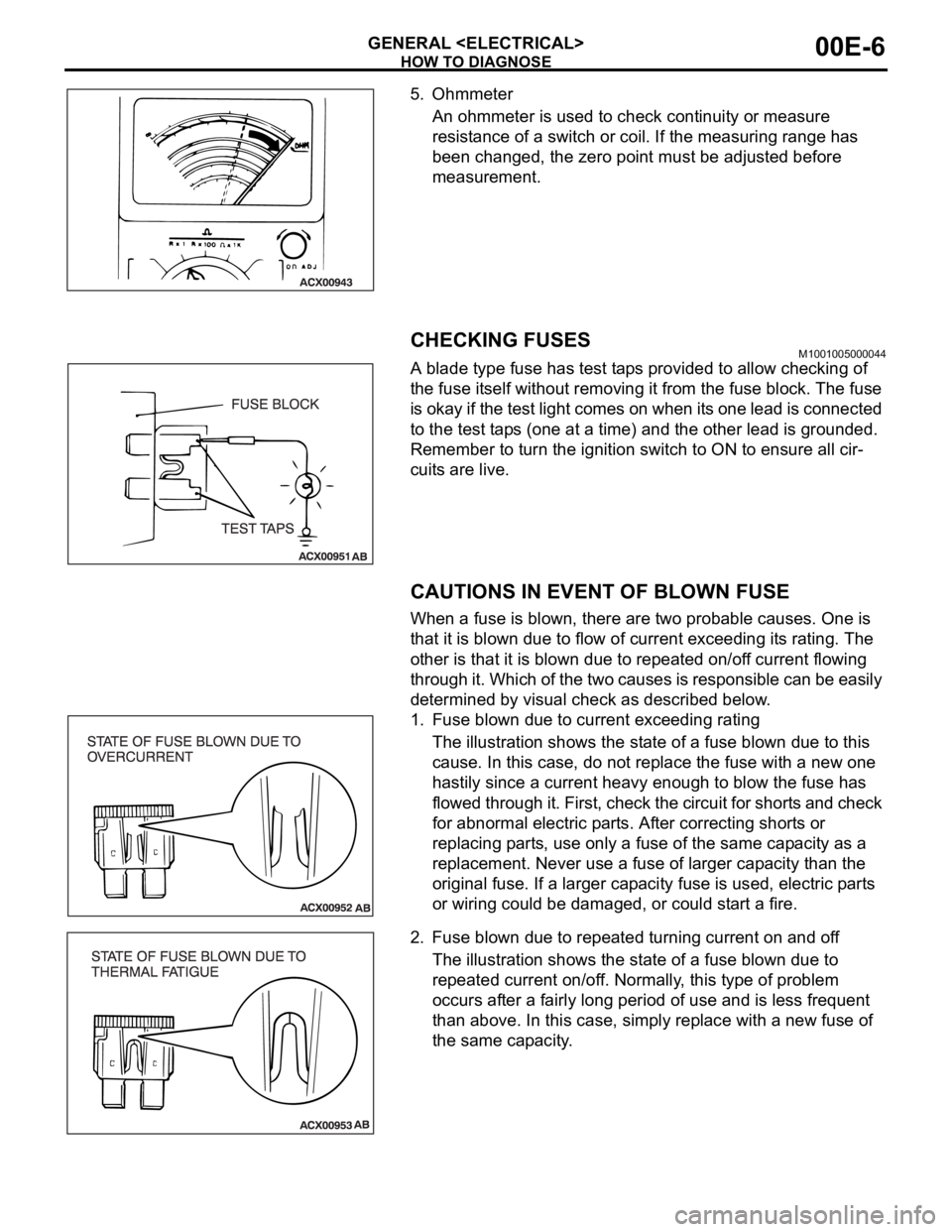
5. Ohmmeter
An ohmmeter is used to check continuity or measure
resistance of a switch or coil. If the measuring range has
been changed, the zero point must be adjusted before
measurement.
CHECKING FUSESM1001005000044
A blade type fuse has test taps provided to allow checking of
the fuse itself without removing it from the fuse block. The fuse
is okay if the test light comes on when its one lead is connected
to the test taps (one at a time) and the other lead is grounded.
Remember to turn the ignition switch to ON to ensure all cir-
cuits are live.
CAUTIONS IN EVENT OF BLOWN FUSE
When a fuse is blown, there are two probable causes. One is
that it is blown due to flow of current exceeding its rating. The
other is that it is blown due to repeated on/off current flowing
through it. Which of the two causes is responsible can be easily
determined by visual check as described below.
1. Fuse blown due to current exceeding rating
The illustration shows the state of a fuse blown due to this
cause. In this case, do not replace the fuse with a new one
hastily since a current heavy enough to blow the fuse has
flowed through it. First, check the circuit for shorts and check
for abnormal electric parts. After correcting shorts or
replacing parts, use only a fuse of the same capacity as a
replacement. Never use a fuse of larger capacity than the
original fuse. If a larger capacity fuse is used, electric parts
or wiring could be damaged, or could start a fire.
2. Fuse blown due to repeated turning current on and off
The illustration shows the state of a fuse blown due to
repeated current on/off. Normally, this type of problem
occurs after a fairly long period of use and is less frequent
than above. In this case, simply replace with a new fuse of
the same capacity.


