Page 311 of 4731
AT-228
TROUBLE DIAGNOSIS FOR SYMPTOMS
Revision: 2005 July 2005 FX
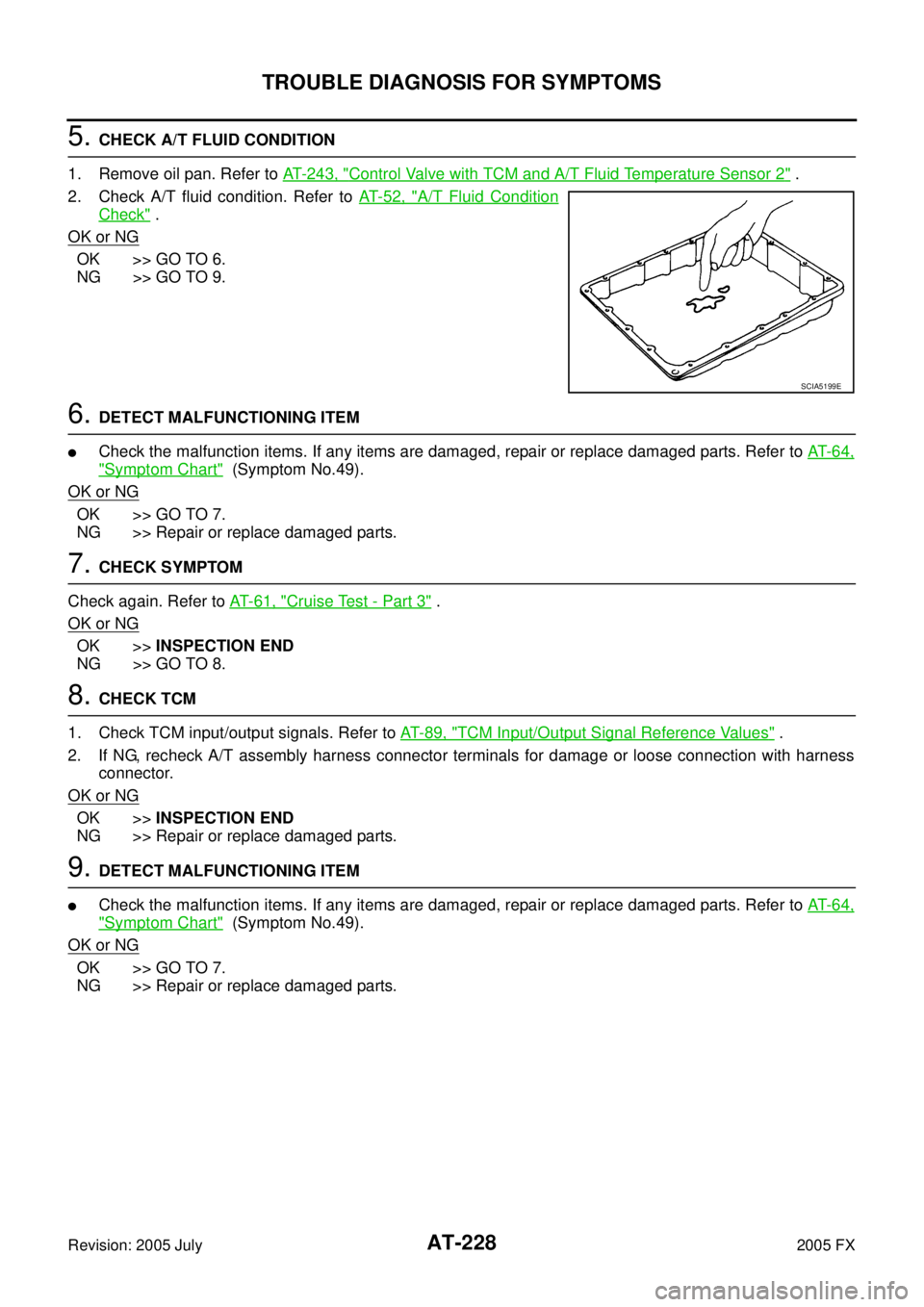
5. CHECK A/T FLUID CONDITION
1. Remove oil pan. Refer to AT- 2 4 3 , "
Control Valve with TCM and A/T Fluid Temperature Sensor 2" .
2. Check A/T fluid condition. Refer to AT- 5 2 , "
A/T Fluid Condition
Check" .
OK or NG
OK >> GO TO 6.
NG >> GO TO 9.
6. DETECT MALFUNCTIONING ITEM
�Check the malfunction items. If any items are damaged, repair or replace damaged parts. Refer to AT- 6 4 ,
"Symptom Chart" (Symptom No.49).
OK or NG
OK >> GO TO 7.
NG >> Repair or replace damaged parts.
7. CHECK SYMPTOM
Check again. Refer to AT- 6 1 , "
Cruise Test - Part 3" .
OK or NG
OK >> INSPECTION END
NG >> GO TO 8.
8. CHECK TCM
1. Check TCM input/output signals. Refer to AT- 8 9 , "
TCM Input/Output Signal Reference Values" .
2. If NG, recheck A/T assembly harness connector terminals for damage or loose connection with harness connector.
OK or NG
OK >> INSPECTION END
NG >> Repair or replace damaged parts.
9. DETECT MALFUNCTIONING ITEM
�Check the malfunction items. If any items are damaged, repair or replace damaged parts. Refer to AT- 6 4 ,
"Symptom Chart" (Symptom No.49).
OK or NG
OK >> GO TO 7.
NG >> Repair or replace damaged parts.
SCIA5199E
Page 313 of 4731
AT-230
TROUBLE DIAGNOSIS FOR SYMPTOMS
Revision: 2005 July 2005 FX
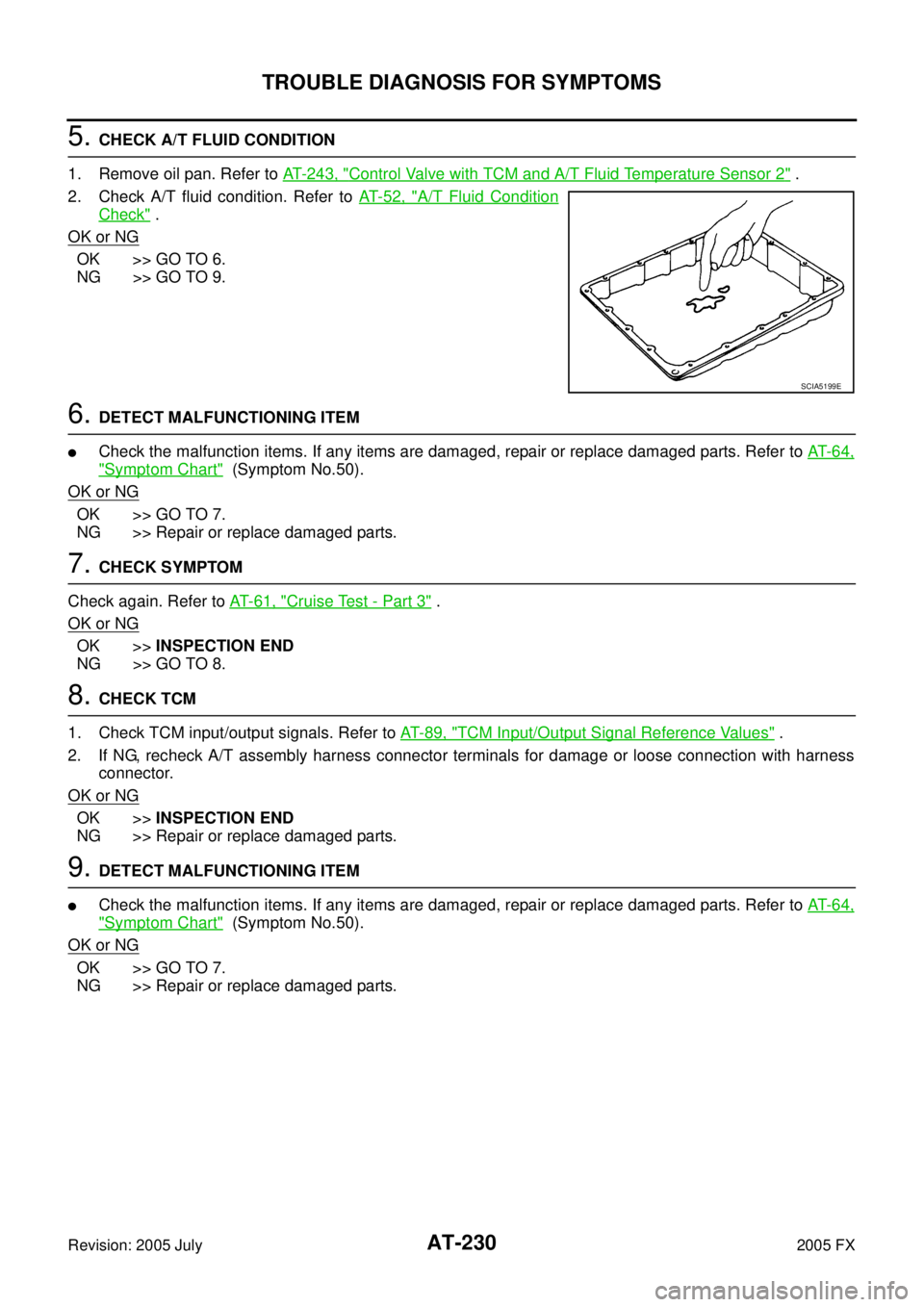
5. CHECK A/T FLUID CONDITION
1. Remove oil pan. Refer to AT- 2 4 3 , "
Control Valve with TCM and A/T Fluid Temperature Sensor 2" .
2. Check A/T fluid condition. Refer to AT- 5 2 , "
A/T Fluid Condition
Check" .
OK or NG
OK >> GO TO 6.
NG >> GO TO 9.
6. DETECT MALFUNCTIONING ITEM
�Check the malfunction items. If any items are damaged, repair or replace damaged parts. Refer to AT- 6 4 ,
"Symptom Chart" (Symptom No.50).
OK or NG
OK >> GO TO 7.
NG >> Repair or replace damaged parts.
7. CHECK SYMPTOM
Check again. Refer to AT- 6 1 , "
Cruise Test - Part 3" .
OK or NG
OK >> INSPECTION END
NG >> GO TO 8.
8. CHECK TCM
1. Check TCM input/output signals. Refer to AT- 8 9 , "
TCM Input/Output Signal Reference Values" .
2. If NG, recheck A/T assembly harness connector terminals for damage or loose connection with harness connector.
OK or NG
OK >> INSPECTION END
NG >> Repair or replace damaged parts.
9. DETECT MALFUNCTIONING ITEM
�Check the malfunction items. If any items are damaged, repair or replace damaged parts. Refer to AT- 6 4 ,
"Symptom Chart" (Symptom No.50).
OK or NG
OK >> GO TO 7.
NG >> Repair or replace damaged parts.
SCIA5199E
Page 315 of 4731
AT-232
TROUBLE DIAGNOSIS FOR SYMPTOMS
Revision: 2005 July 2005 FX
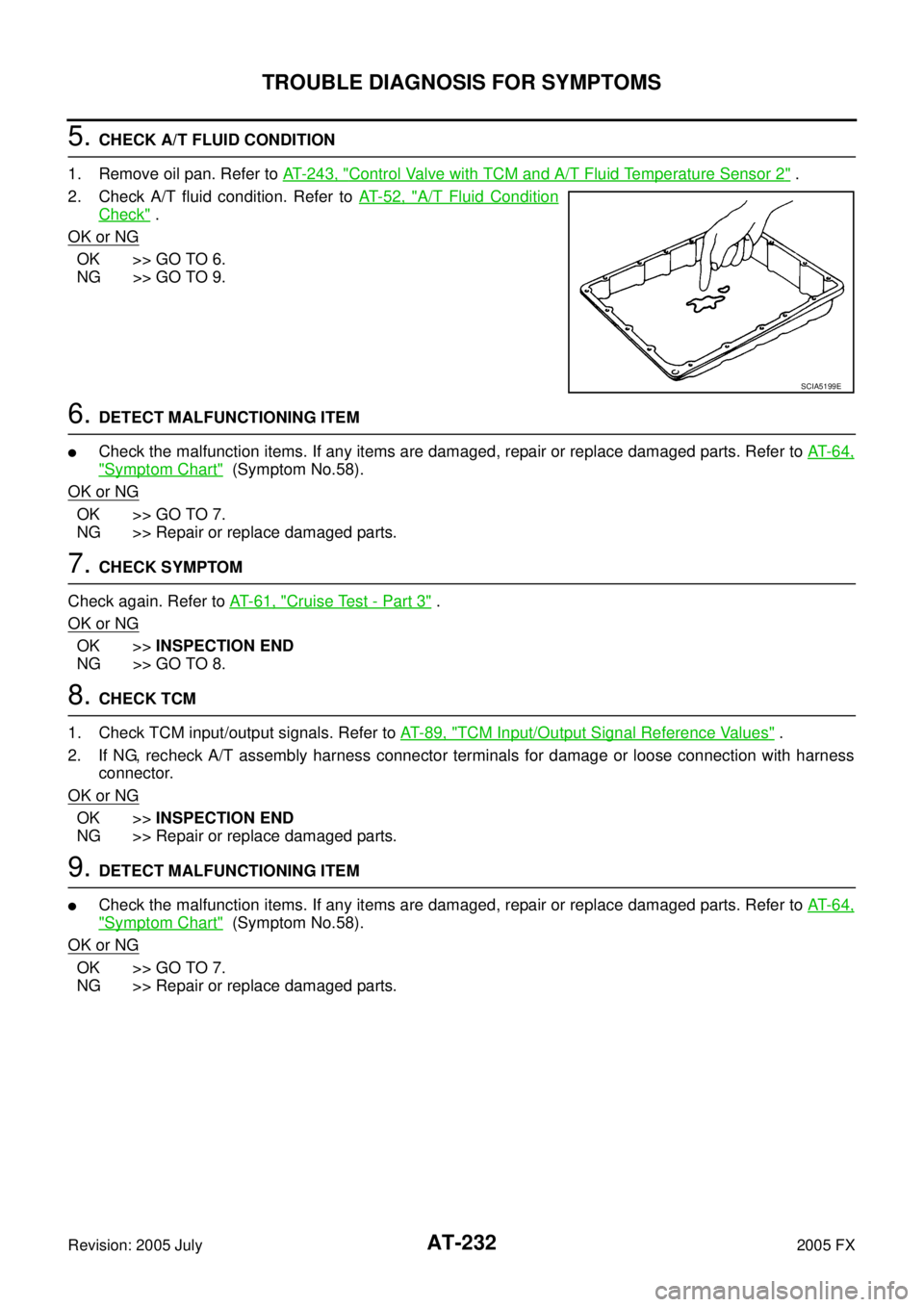
5. CHECK A/T FLUID CONDITION
1. Remove oil pan. Refer to AT- 2 4 3 , "
Control Valve with TCM and A/T Fluid Temperature Sensor 2" .
2. Check A/T fluid condition. Refer to AT- 5 2 , "
A/T Fluid Condition
Check" .
OK or NG
OK >> GO TO 6.
NG >> GO TO 9.
6. DETECT MALFUNCTIONING ITEM
�Check the malfunction items. If any items are damaged, repair or replace damaged parts. Refer to AT- 6 4 ,
"Symptom Chart" (Symptom No.58).
OK or NG
OK >> GO TO 7.
NG >> Repair or replace damaged parts.
7. CHECK SYMPTOM
Check again. Refer to AT- 6 1 , "
Cruise Test - Part 3" .
OK or NG
OK >> INSPECTION END
NG >> GO TO 8.
8. CHECK TCM
1. Check TCM input/output signals. Refer to AT- 8 9 , "
TCM Input/Output Signal Reference Values" .
2. If NG, recheck A/T assembly harness connector terminals for damage or loose connection with harness connector.
OK or NG
OK >> INSPECTION END
NG >> Repair or replace damaged parts.
9. DETECT MALFUNCTIONING ITEM
�Check the malfunction items. If any items are damaged, repair or replace damaged parts. Refer to AT- 6 4 ,
"Symptom Chart" (Symptom No.58).
OK or NG
OK >> GO TO 7.
NG >> Repair or replace damaged parts.
SCIA5199E
Page 327 of 4731
AT-244
ON-VEHICLE SERVICE
Revision: 2005 July 2005 FX
6. Remove snap ring from A/T assembly harness connector.
7. Push A/T assembly harness connector.
CAUTION:
Be careful not to damage connector.
8. Remove oil pan and oil pan gasket.
9. Check foreign materials in oil pan to help determine causes of malfunction. If the ATF is very dark, smells burned, or contains
foreign particles, the frictional material (clutches, band) may
need replacement. A tacky film that will not wipe clean indicates
varnish build up. Varnish can cause valves, servo, and clutches
to stick and can inhibit pump pressure.
�If frictional material is detected, perform A/T fluid cooler
cleaning. Refer to AT- 1 5 , "
A/T Fluid Cooler Cleaning" .
10. Remove magnets from oil pan.
SCIA5021E
SCIA5022E
SCIA2308E
SCIA5199E
SCIA5200E
Page 335 of 4731
AT-252
ON-VEHICLE SERVICE
Revision: 2005 July 2005 FX
6. Check foreign materials in oil pan to help determine causes of
malfunction. If the ATF is very dark, smells burned, or contains
foreign particles, the frictional material (clutches, band) may
need replacement. A tacky film that will not wipe clean indicates
varnish build up. Varnish can cause valves, servo, and clutches
to stick and can inhibit pump pressure.
�If frictional material is detected, perform A/T fluid cooler
cleaning. Refer to AT- 1 5 , "
A/T Fluid Cooler Cleaning" .
7. Disconnect A/T fluid temperature sensor 2 connector. CAUTION:
Be careful not to damage connector.
8. Straighten terminal clip to free A/T fluid temperature sensor 2 harness.
9. Remove A/T fluid temperature sensor 2 with bracket from con- trol valve with TCM.
10. Remove bracket from A/T fluid temperature sensor 2.
SCIA5199E
SCIA5023E
SCIA5146E
SCIA5302E
SCIA5264E
Page 345 of 4731
AT-262
ON-VEHICLE SERVICE
Revision: 2005 July 2005 FX
Rear Oil SealACS0081G
REMOVAL
1. Remove center muffler with power tool. Refer to EX-3, "Removal
and Installation" .
2. Remove rear propeller shaft. Refer to PR-9, "
Removal and
Installation" .
3. Remove transfer assembly from transmission assembly (AWD models). Refer to TF-44, "
Removal and Installation" .
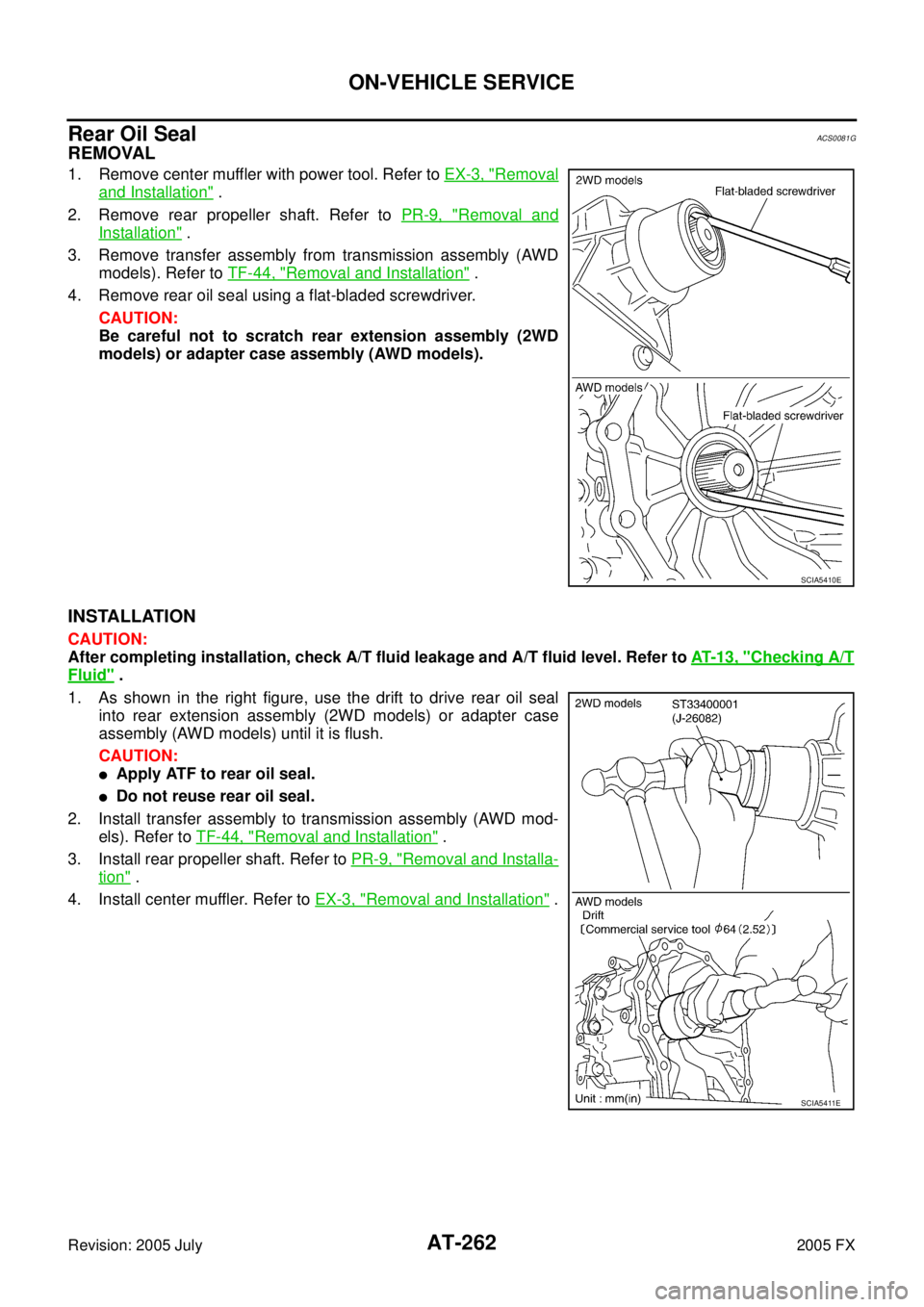
4. Remove rear oil seal using a flat-bladed screwdriver.
CAUTION:
Be careful not to scratch rear extension assembly (2WD
models) or adapter case assembly (AWD models).
INSTALLATION
CAUTION:
After completing installation, check A/T fluid leakage and A/T fluid level. Refer to AT- 1 3 , "
Checking A/T
Fluid" .
1. As shown in the right figure, use the drift to drive rear oil seal into rear extension assembly (2WD models) or adapter case
assembly (AWD models) until it is flush.
CAUTION:
�Apply ATF to rear oil seal.
�Do not reuse rear oil seal.
2. Install transfer assembly to transmission assembly (AWD mod- els). Refer to TF-44, "
Removal and Installation" .
3. Install rear propeller shaft. Refer to PR-9, "
Removal and Installa-
tion" .
4. Install center muffler. Refer to EX-3, "
Removal and Installation" .
SCIA5410E
SCIA5411E
Page 347 of 4731
AT-264
ON-VEHICLE SERVICE
Revision: 2005 July 2005 FX
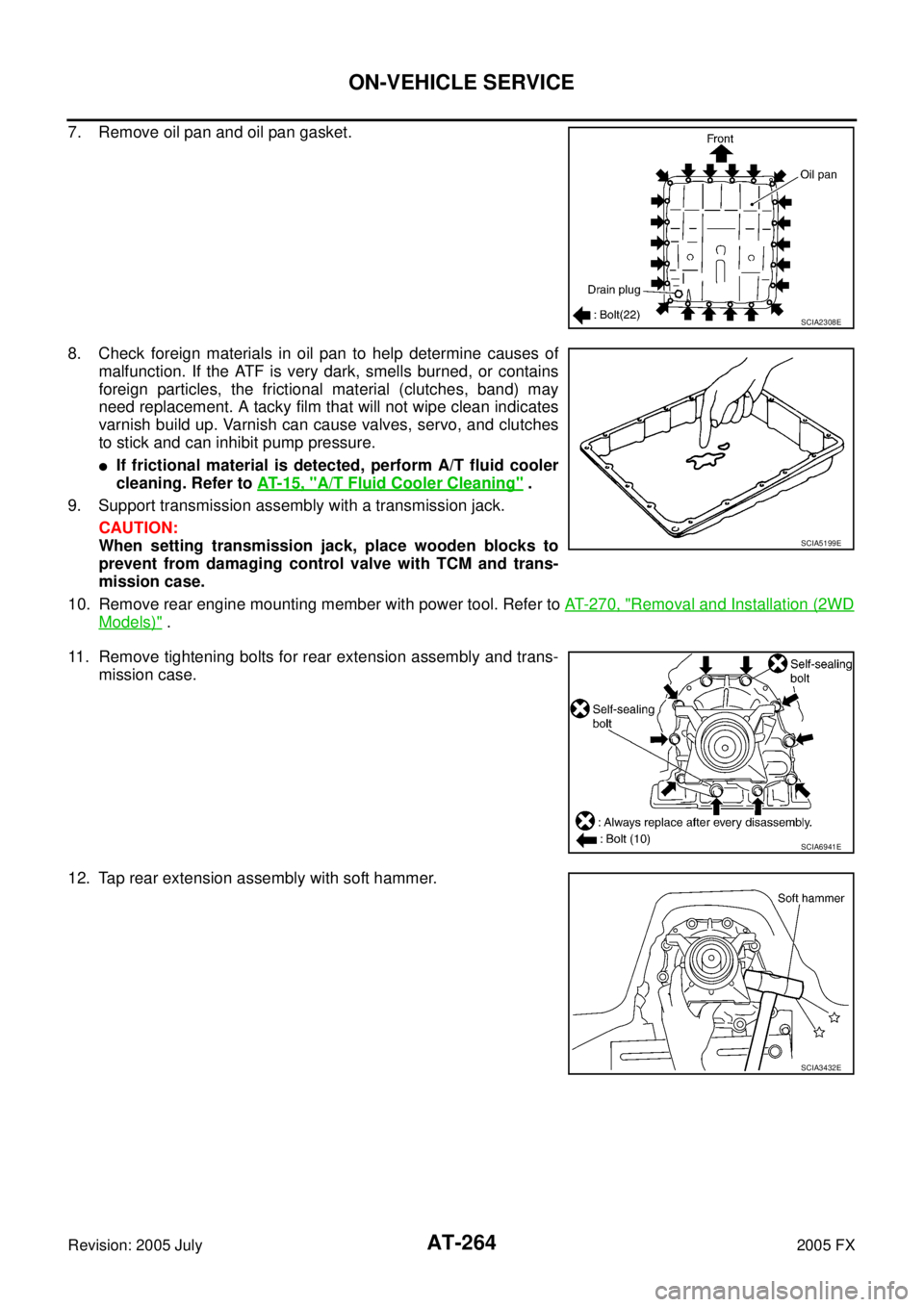
7. Remove oil pan and oil pan gasket.
8. Check foreign materials in oil pan to help determine causes of
malfunction. If the ATF is very dark, smells burned, or contains
foreign particles, the frictional material (clutches, band) may
need replacement. A tacky film that will not wipe clean indicates
varnish build up. Varnish can cause valves, servo, and clutches
to stick and can inhibit pump pressure.
�If frictional material is detected, perform A/T fluid cooler
cleaning. Refer to AT- 1 5 , "
A/T Fluid Cooler Cleaning" .
9. Support transmission assembly with a transmission jack. CAUTION:
When setting transmission jack, place wooden blocks to
prevent from damaging control valve with TCM and trans-
mission case.
10. Remove rear engine mounting member with power tool. Refer to AT- 2 7 0 , "
Removal and Installation (2WD
Models)" .
11. Remove tightening bolts for rear extension assembly and trans- mission case.
12. Tap rear extension assembly with soft hammer.
SCIA2308E
SCIA5199E
SCIA6941E
SCIA3432E
Page 379 of 4731
AT-296
DISASSEMBLY
Revision: 2005 July 2005 FX
28. Remove oil pan and oil pan gasket.
29. Check foreign materials in oil pan to help determine causes of malfunction. If the A/T fluid is very dark, smells burned, or con-
tains foreign particles, the frictional material (clutches, band)
may need replacement. A tacky film that will not wipe clean indi-
cates varnish build up. Varnish can cause valves, servo, and
clutches to stick and can inhibit pump pressure.
�If frictional material is detected, perform A/T fluid cooler
cleaning. Refer to AT- 1 5 , "
A/T Fluid Cooler Cleaning" .
30. Remove magnets from oil pan.
31. Disconnect A/T fluid temperature sensor 2 connector. CAUTION:
Be careful not to damage connector.
32. Straighten terminal clips to free terminal cord assembly and A/T fluid temperature sensor 2 harness.
SCIA2308E
SCIA5199E
SCIA5200E
SCIA5023E
SCIA5446E


