Page 85 of 273
�µ
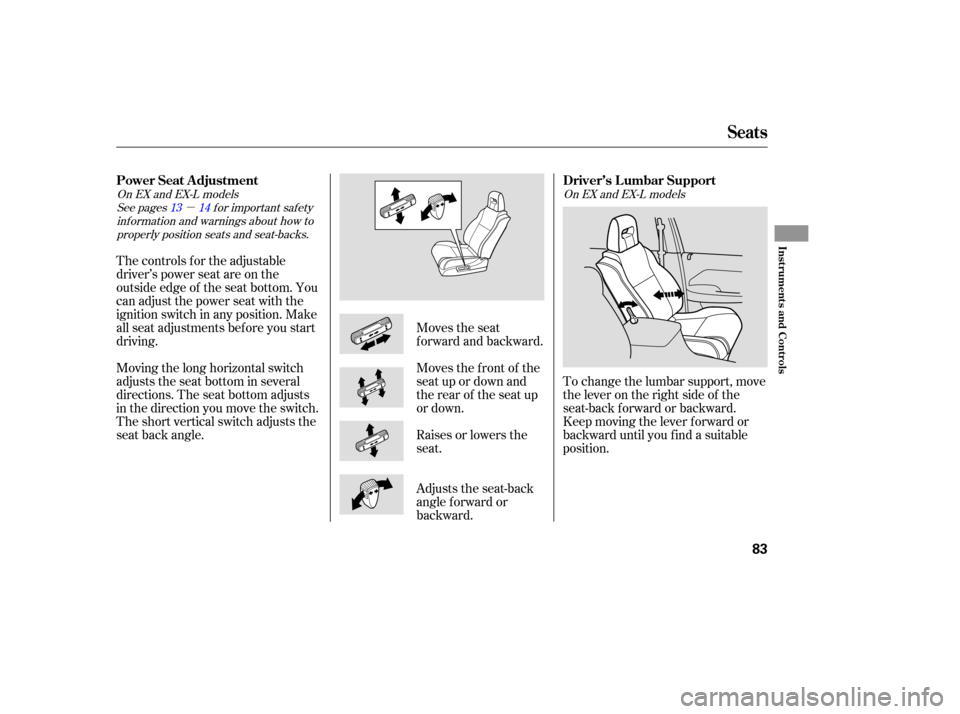
To change the lumbar support, move
the lever on the right side of the
seat-back forward or backward.
Keep moving the lever f orward or
backward until you f ind a suitable
position.
The controls f or the adjustable
driver’s power seat are on the
outside edge of the seat bottom. You
can adjust the power seat with the
ignition switch in any position. Make
all seat adjustments bef ore you start
driving.
Moving the long horizontal switch
adjusts the seat bottom in several
directions. The seat bottom adjusts
in the direction you move the switch.
The short vertical switch adjusts the
seat back angle.
Adjusts the seat-back
angle f orward or
backward. Raises or lowers the
seat. Moves the f ront of the
seat up or down and
the rear of the seat up
or down. Moves the seat
f orward and backward.
See pages f or important saf etyinf ormation and warnings about how toproperly position seats and seat-backs. 13 14
On EX and EX-L models
On EX and EX-L models
Driver’s L umbar Support
Power Seat A djustment
Seats
Inst rument s and Cont rols
83
Page 87 of 273

To change the angle of the seats in
the second row seat-backs, pull up
the handle on the seat-back. Moving
the short vertical switch f orward or
backward adjusts the seat back in
those directions.The left and right halves can be
f olded separately.
Push the whole seat backwards until
f ully latches. Make sure the seat is
locked and secured bef ore driving.
If you are f olding the lef t half of
the seat, use the ignition key to
release the center seat belt from
thedetachableanchor(seepage
).
Lower the head restraint f ully.
Pull up the handle on the outside
of the seat-back.
Fold the seat-back forward.
Reverse this procedure to return the
seat to its upright position. Make
sure the seat is locked and secured
bef ore driving. To get into the third row seats, pull
up the lever on the outside of the
passenger’s side second row seat-
back. The seat-back will tilt f orward,
and the seat will slide f orward.
To adjust the seats forward and
backward, pull up on the lever under
the seat cushion. Af ter moving the
seat, make sure it is locked into
position. 2.
3. 1.
4.
88
A djusting the Second Row Seats Folding the Second Row Seats T hird Seat A ccess
Seats
Inst rument s and Cont rols
85
SECOND
ROW SEAT
RELEASE LEVER
Page 88 of 273

Remove the head restraints by
pushing the release buttons and
pulling the restraints out.
Store the head restraints under
the cargo area floor. Insert the
shafts into the holes in the sides of
the storage compartment.Use the ignition key to release the
seat belt from the detachable
anchor. See page .
Unlock the seat-back by pulling
the handle. Push the seat-back
forward.
Make sure you clip the small latch
plate of each outer shoulder belt to
the seat belt webbing whenever the
third seat is f olded.
Pull the handle on the back of the
seat, move the seat-back to the
desired position and release the
handle. Let the seat-back latch into
the new position. Make sure all items in the cargo area
are secured. Loose items can f ly
f orward and cause injury if you have
to brake hard. See
on page . Reinstall the head restraints,
reconnect the seat belts, and make
sure the seats are secured bef ore
driving. Reverse this procedure to return the
seat to its upright position.
1.
2. 3.
4.
88
153
A djusting the T hird Row Seat Folding the T hird Row Seat
Carrying Cargo
Seats
86
THIRD ROW
SEATHANDLE
Page 91 of 273
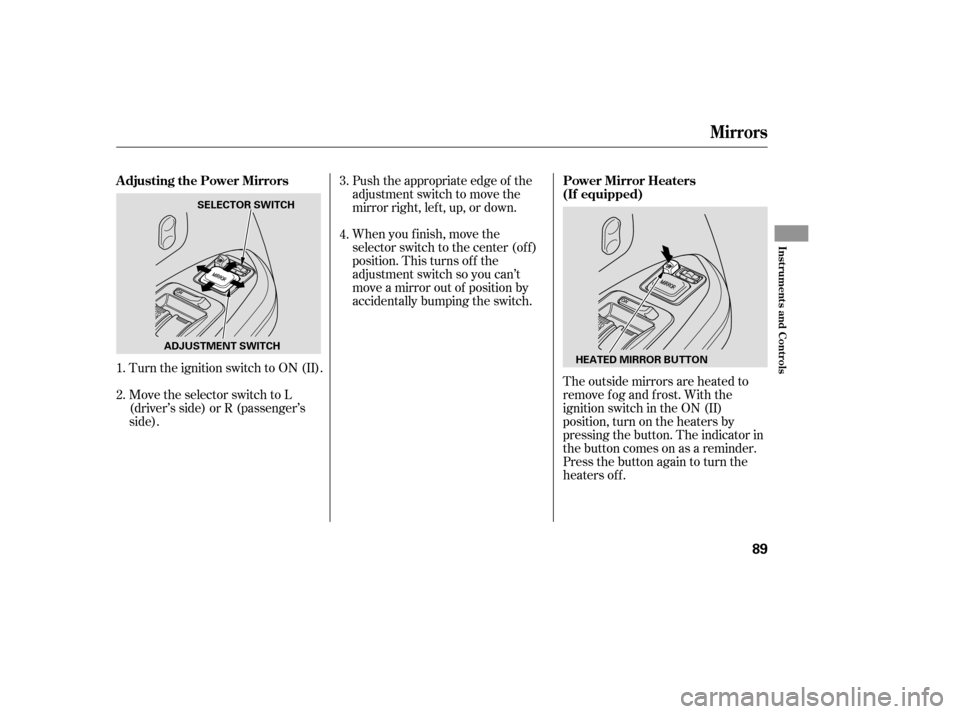
The outside mirrors are heated to
remove fog and frost. With the
ignition switch in the ON (II)
position, turn on the heaters by
pressing the button. The indicator in
the button comes on as a reminder.
Press the button again to turn the
heaters off.
Turn the ignition switch to ON (II).
Move the selector switch to L
(driver’s side) or R (passenger’s
side). Push the appropriate edge of the
adjustment switch to move the
mirrorright,left,up,ordown.
When you f inish, move the
selector switch to the center (off)
position. This turns of f the
adjustment switch so you can’t
move a mirror out of position by
accidentally bumping the switch.
1.
2. 3.
4.
PowerMirrorHeaters
(If equipped)
Adjusting the Power Mirrors
Mirrors
Inst rument s and Cont rols
89
HEATED MIRROR BUTTON
ADJUSTMENT SWITCH SELECTOR SWITCH
Page 92 of 273
�µ
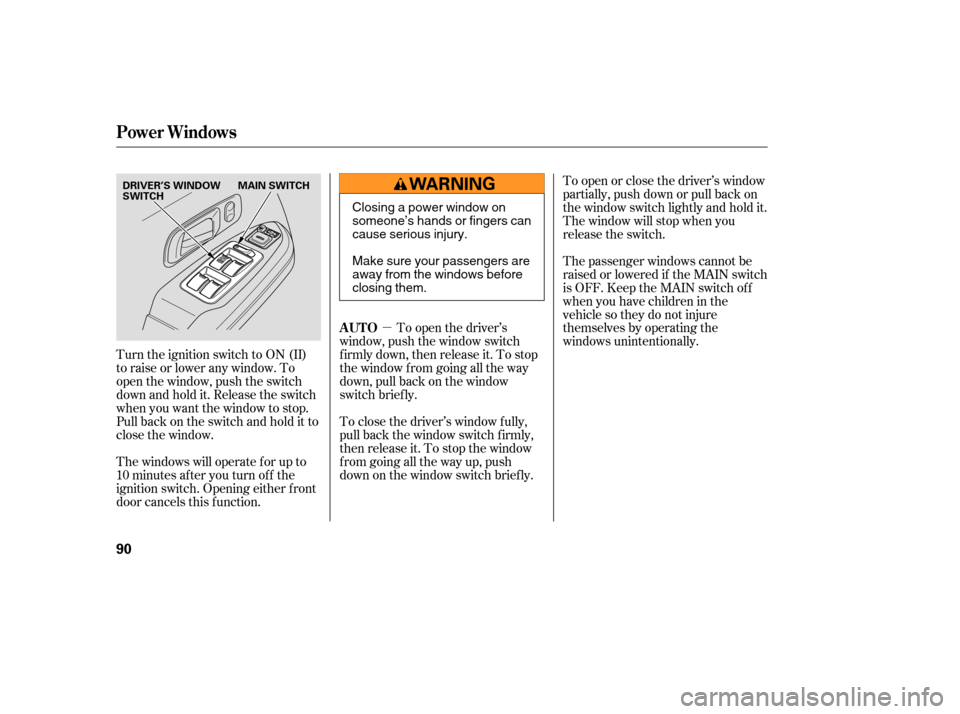
Turn the ignition switch to ON (II)
toraiseorloweranywindow.To
open the window, push the switch
downandholdit.Releasetheswitch
when you want the window to stop.
Pull back on the switch and hold it to
close the window.
The windows will operate f or up to
10 minutes af ter you turn of f the
ignition switch. Opening either f ront
door cancels this f unction. To open or close the driver’s window
partially, push down or pull back on
the window switch lightly and hold it.
The window will stop when you
release the switch.
The passenger windows cannot be
raised or lowered if the MAIN switch
is OFF. Keep the MAIN switch off
whenyouhavechildreninthe
vehicle so they do not injure
themselves by operating the
windows unintentionally.
To open the driver’s
window, push the window switch
f irmly down, then release it. To stop
the window f rom going all the way
down, pull back on the window
switch brief ly.
To close the driver’s window f ully,
pull back the window switch f irmly,
then release it. To stop the window
f rom going all the way up, push
down on the window switch brief ly.
Power Windows
AUTO
90
DRIVER’S WINDOW
SWITCH MAIN SWITCH
Closing a power window on
someone’s hands or fingers can
cause serious injury.
Make sure your passengers are
away from the windows before
closing them.
Page 94 of 273

The moonroof has two positions: it
can be tilted up in the back f or
ventilation, or it can be slid back into
the roof . Use the switch under the
lef t dashboard vent to operate the
moonroof . The ignition switch must
be in the ON (II) position.To tilt up the back of the moonroof ,
press and hold the center button
( ). To close the moonroof ,
press and hold the upper button
( ). To open the moonroof ,
press and hold the lower button
( ). Release the button when
the moonroof gets to the desired
position. Make sure everyone’s
hands are away f rom the moonroof
bef ore opening or closing it.
The moonroof has a key-of f delay
f unction. You can still open and close
the moonroof f or up to 10 minutes
after you turn off the ignition switch.
The key-of f delay f unction cancels as
soon as you open either f ront door.
You must then turn the ignition
switch to ON (II) to operate the
moonroof .
If equipped
Moonroof
92
CLOSE BUTTON
OPEN BUTTON
TILT-UP
BUTTON
Opening or closing the
moonroof on someone’s hands
or fingers can cause serious
injury.
Make sure all hands and fingers
are clear of the moonroof
before opening or closing it. If you try to open the moonroof in
below-f reezing temperatures, or when
it is covered with snow or ice, you can
damage the moonroof panel or motor.
Page 100 of 273
Turn on the f ront and second row
individual map lights by pushing the
lens. Push the lens again to turn it
off. You can also operate these lights
with the light control switch (see
page ).
The light in the tailgate has an on-of f
switch to control if the light comes
on when the tailgate is opened.
The courtesy lights in the f ront
doors and around the ignition switch
come on when you open any door.
Af ter you close the door, the ignition
switch light stays on f or several
seconds.97
Lights
Individual Map L ights
Tailgate Light
Individual Interior L ights
98
Page 109 of 273

�µ�µ�´
�µ �µ
�µ
The ignition switch must be in the
ACCESSORY (I) or ON (II) position.
Turn the system on by pushing the
PWR/VOL knob or the AM/FM
button. Adjust the volume by turning
the PWR/VOL knob.
The SEEK f unction
searches up and down f rom the
current f requency to f ind a station
with a strong signal. To activate it,
press the /( ) or /( )
side of the bar, then release it.
The SCAN f unction
samples all stations with strong
signals on the selected band. To
activate it, press the SCAN button,
then release it. You will see SCAN in
the display. The system will scan f or
a station with a strong signal. When
it f inds one, it will stop and play that
station f or about f ive seconds.
If you do nothing, the system will
then scan f or the next strong station
and play it for five seconds. When it
plays a station you want to listen to,
press the SCAN button again. Each preset button can
store one f requency on AM, and two
f requencies on FM.
Select the desired band, AM or
FM. FM1 and FM2 let you store
two f requencies with each preset
button.
UsetheTUNE,SEEK,orSCAN
function to tune the radio to a
desired station.
Pickapresetbutton,andholdit
until you hear a beep.
Repeat steps 1 through 3 to store a
total of six stations on AM and
twelve stations on FM.
The preset f requencies will be lost if
your vehicle’s battery goes dead, is
disconnected, or the radio f use is
removed.
The band and f requency that the
radio was last tuned to is displayed.
To change bands, press the AM/FM
button. On the FM band, ST will be
displayed if the station is broadcast-
ing in stereo. Stereo reproduction on
AM is not available.
Use the TUNE knob to
tune the radio to a desired f requency.
Turn the knob right to tune to a
higher f requency, or lef t to tune to a
lower f requency. You can use any of f ive methods to
find radio station on the selected
band: , , , the
preset buttons, and 1.
2.
3.
4.
CONT INUED
Playing the Radio
To Play the Radio
SEEK
SCANPreset
TUNE To Select a Station T UNE SEEK SCA N AUTO SELECT.
Features
107