Page 63 of 273

This indicator normally comes on f or
a f ew seconds when you turn the
ignition to ON (II).
This indicator normally comes on f or
a f ew seconds when you turn the
ignition to ON (II).
If it comes on while driving, it
indicates that one or more of your
vehicle’s tires are extremely low on
pressure.
If this happens, pull to the side of the
road when it is saf e, check which tire
has lost the pressure on the tire
pressure monitor, and determine the
cause. If it is because of a f lat tire,
replace the flat tire with the compact
spare (see page ), and have the
f lat tire repaired as soon as possible.
If two or more tires are underinf lated,
call a prof essional towing service
(see page ). Ref er to page
f or more inf ormation. The appropriate tire indicator will
come on along with the low tire
pressure indicator if a tire is
extremely under inf lated or has
suddenly lost pressure. See
for what to
do if this indicator comes on. If this indicator comes on and stays
on at any other time, or it does not
come on when you turn the ignition
switch to ON (II), there is a problem
with the TPMS. With this indicator
on, the low tire pressure indicator
and the tire pressure monitor will not
come on when a tire loses pressure.
Take the vehicle to your dealer to
have the system checked.
224
237
165 Tire Pressure Monitoring
System (T PMS) Indicator
Low Tire Pressure
Indicator T ire Pressure Monitor
Low
Tire Pressure Indicator
Instrument Panel Indicators
Inst rument s and Cont rols
61
Page 64 of 273

The lef t or right turn signal indicator
blinks when you signal a lane change
or turn. If the indicators do not blink
or blink rapidly, it usually means one
of the turn signal bulbs is burned out
(see page ). Replace the bulb as
soon as possible, since other drivers
cannot see that you are signaling.If a brake light does not work, the
indicator comes on
when you push the brake pedal with
the ignition switch in the ON (II)
position.
A burned out brake light is a hazard
when drivers behind you cannot tell
you are braking. Have your brake
lights repaired right away. All the indicators in the monitor
come on f or a f ew seconds when you
turn the ignition switch to ON (II).
When you push the Hazard Warning
button, both turn signal indicators
blink. All turn signals on the outside
of the vehicle should f lash. The appropriate indicator comes on
in this monitor if the trunk or either
door is not closed tightly.
209 Turn Signal and
Hazard Warning
Indicators
Brake L amp Indicator Door and Tailgate Open Monitor
Instrument Panel
62
BRAKE LAMP
Page 65 of 273
Canadian models onlyCanadian models only
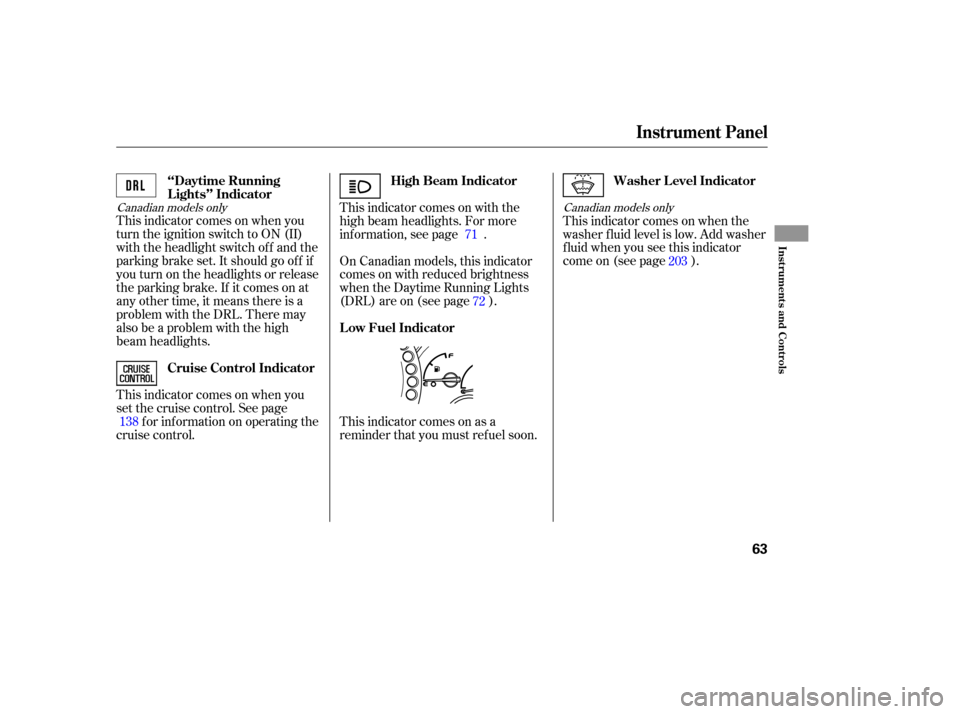
This indicator comes on when you
turn the ignition switch to ON (II)
with the headlight switch off and the
parking brake set. It should go of f if
youturnontheheadlightsorrelease
the parking brake. If it comes on at
any other time, it means there is a
problem with the DRL. There may
also be a problem with the high
beam headlights.
This indicator comes on when you
set the cruise control. See page
f or inf ormation on operating the
cruise control. This indicator comes on as a
reminder that you must ref uel soon.This indicator comes on when the
washer f luid level is low. Add washer
fluidwhenyouseethisindicator
come on (see page ).
This indicator comes on with the
high beam headlights. For more
inf ormation, see page .
On Canadian models, this indicator
comes on with reduced brightness
when the Daytime Running Lights
(DRL) are on (see page ).
138 71
72 203
High Beam Indicator
‘‘Daytime Running
Lights’’ Indicator
Cruise Control Indicator Washer Level Indicator
Low Fuel Indicator
Instrument Panel
Inst rument s and Cont rols
63
Page 66 of 273

If the indicator blinks while driving,
pull to the side of the road when it is
saf e, shif t to Park, and let the engine
idle until the indicator goes out.
This indicator monitors the
temperature of the automatic
transmission f luid. The indicator
should come on f or a f ew seconds
when you turn the ignition switch to
ON (II). If it comes on while driving,
it indicates the transmission f luid
temperature is too high. Pull to the
side of the road when it is saf e, shif t
to Park, and let the engine idle until
the indicator goes out.
This indicator normally comes on f or
a f ew seconds when you turn the
ignition switch to ON (II). If this
indicator comes on at any other time,
there is a problem in the 4WD
system. Take the vehicle to your
dealer to have it checked.
A/T Temperature
Indicator
VTM-4 Indicator
Instrument Panel
64
Continuing to drive with the A/T
Temperature indicator on may cause
serious damage to the transmission.Continuing to drive with the VTM-4
indicator blinking may cause serious
damage to the system.
Page 67 of 273

For the f irst 6,000 miles (9,600 km)
af ter the Maintenance Required
Indicator is reset, it will come on f or
two seconds when you turn the
ignition switch to ON (II).
Ref er to the Maintenance Schedules
f or Normal and Severe Driving
Conditions on pages and . This indicator reminds you that it is
time to take your vehicle in for
scheduled maintenance. If you exceed 7,500 miles (12,000
km) without having the scheduled
maintenance perf ormed, this
indicator will remain on as a constant
reminder.Your dealer will reset this indicator
af ter completing the scheduled
maintenance. If this maintenance is
done by someone other than your
dealer, reset the indicator as f ollows.
Between 6,000 miles (9,600 km) and
7,500 miles (12,000 km) this
indicator will light f or 2 seconds
when you first turn the ignition
switch to ON (II), and then flash for
10 seconds. Turn of f the engine.
Press and hold the Select/Reset
button on the instrument panel,
then turn the ignition switch ON
(II).
Hold the button for about 10
seconds until the indicator goes
of f .
1.
2.
3.
192 193
Instrument Panel
Maintenance Required Indicator
Inst rument s and Cont rols
65
MAINTENANCE REQUIRED INDICATOR SELECT/RESET BUTTON
Page 68 of 273

Each trip meter works independently,
so you can keep track of two
dif f erent distances.The odometer shows the total
distance your vehicle has been
driven. It measures miles in U.S.
models and kilometers in Canadian
models.
It is illegal under U.S. f ederal law and
Canadian provincial regulations to
disconnect, reset, or alter the
odometer with the intent to change
the number of miles or kilometers
indicated.
To reset a trip meter, display it, and
then press and hold the Select/Reset
button until the number resets to
‘‘0.0.’’ Both trip meters will reset if
the vehicle’s battery goes dead or is
disconnected.
This meter shows the number of
miles (U.S.) or kilometers (Canada)
driven since you last reset it.
There are two trip meters: Trip A
and Trip B. Switch between these
displays and the outside temperature
display (except LX model)by
pressing the Select/Reset button
repeatedly. This shows how much f uel you have.
It may show slightly more or less
than the actual amount. The needle
returns to the bottom after you turn
of f the ignition.
Trip Meter Odometer
Fuel Gauge
Gauges
66
TACHOMETER
SPEEDOMETER FUEL GAUGE TEMPERATURE
GAUGE
TRIP METER
SELECT/RESET
BUTTON
TRIP METER ODOMETER/OUTSIDE TEMPERATURE/
CHECK FUEL CAP INDICATOR
Avoid driving with an extremely low
f uel level. Running out of f uel could
cause the engine to misf ire, damaging
the catalytic converter.
Page 73 of 273
�µ
�µ
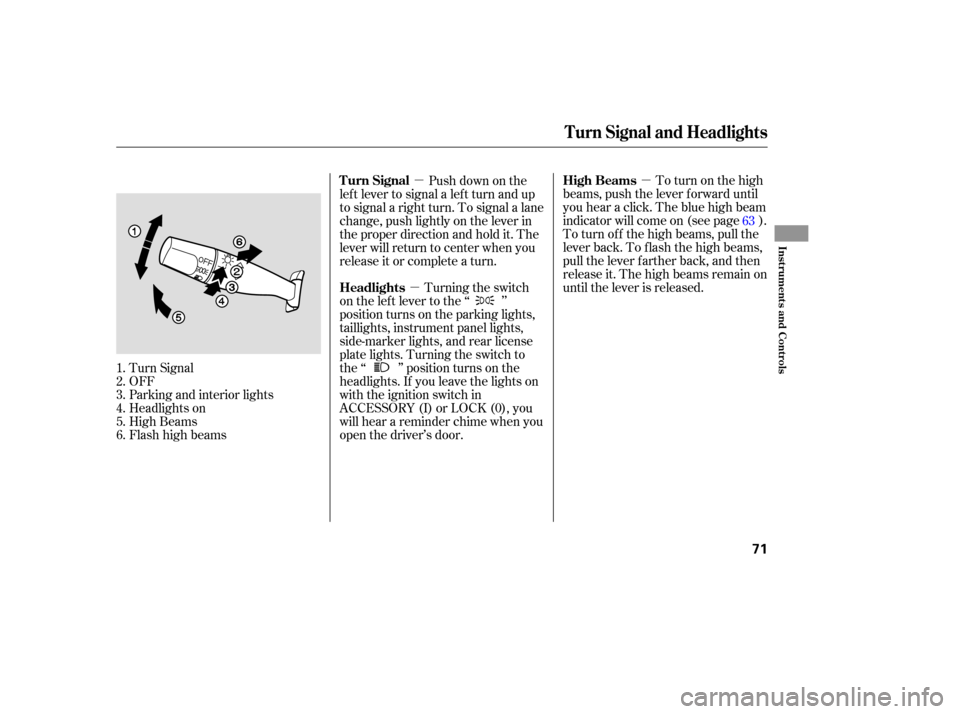
�µ To turn on the high
beams, push the lever f orward until
you hear a click. The blue high beam
indicator will come on (see page ).
To turn of f the high beams, pull the
lever back. To flash the high beams,
pull the lever f arther back, and then
release it. The high beams remain on
until the lever is released.
Turn Signal
OFF
Parking and interior lights
Headlights on
High Beams
Flashhighbeams Push down on the
lef t lever to signal a lef t turn and up
to signal a right turn. To signal a lane
change, push lightly on the lever in
the proper direction and hold it. The
lever will return to center when you
release it or complete a turn.
Turning the switch
on the lef t lever to the ‘‘ ’’
position turns on the parking lights,
taillights, instrument panel lights,
side-marker lights, and rear license
plate lights. Turning the switch to
the ‘‘ ’’ position turns on the
headlights. If you leave the lights on
with the ignition switch in
ACCESSORY (I) or LOCK (0), you
will hear a reminder chime when you
open the driver’s door.
1.
2.
3.
4.
5.
6. 63
Turn Signal and Headlights
High Beams
Turn Signal
Headlights
Inst rument s and Cont rols
71
Page 74 of 273

The knob on the instrument panel
controls the brightness of the instru-
ment panel lights. Turn the knob to
adjust the brightness.
The lights will turn on again when
you unlock or open the driver’s door.
With the headlight switch off, the
high beam headlights come on with
reduced brightness when you turn
the ignition switch to ON (II) and
release the parking brake. They
remain on until you turn the ignition
switch of f , even if you set the
parking brake.
The headlights revert to normal
operation when you turn the switch
to the ‘‘ ’’ position. If you unlock the door, but do not
open it within 15 seconds, the lights
will go off. With the driver’s door
open, you will hear a lights-on
reminder chime.
This f eature turns of f the headlights,
parking lights, taillights, side marker
lights, license plate lights, and
instrument panel lights within 15
seconds of removing the key f rom
the ignition switch and closing the
driver’s door.
This feature activates if you leave
the headlight switch in the ‘‘ ’’
or ‘‘ ’’ position, remove the key,
then open and close the driver’s door.
If you remove the key f rom the
ignition switch with the headlight
switch on, but do not open the door
and get out, the lights will turn of f
af ter 10 minutes.
On EX and EX-L model
Instrument Panel Brightness
Daytime Running L ights
(Canadian Models)
Automatic Lighting Of f Feature
Headlights, Instrument Panel Brightness
72
INSTRUMENT PANEL BRIGHTNESS
CONTROL KNOB