2005 FORD EXPEDITION radio
[x] Cancel search: radioPage 48 of 368
Remote control
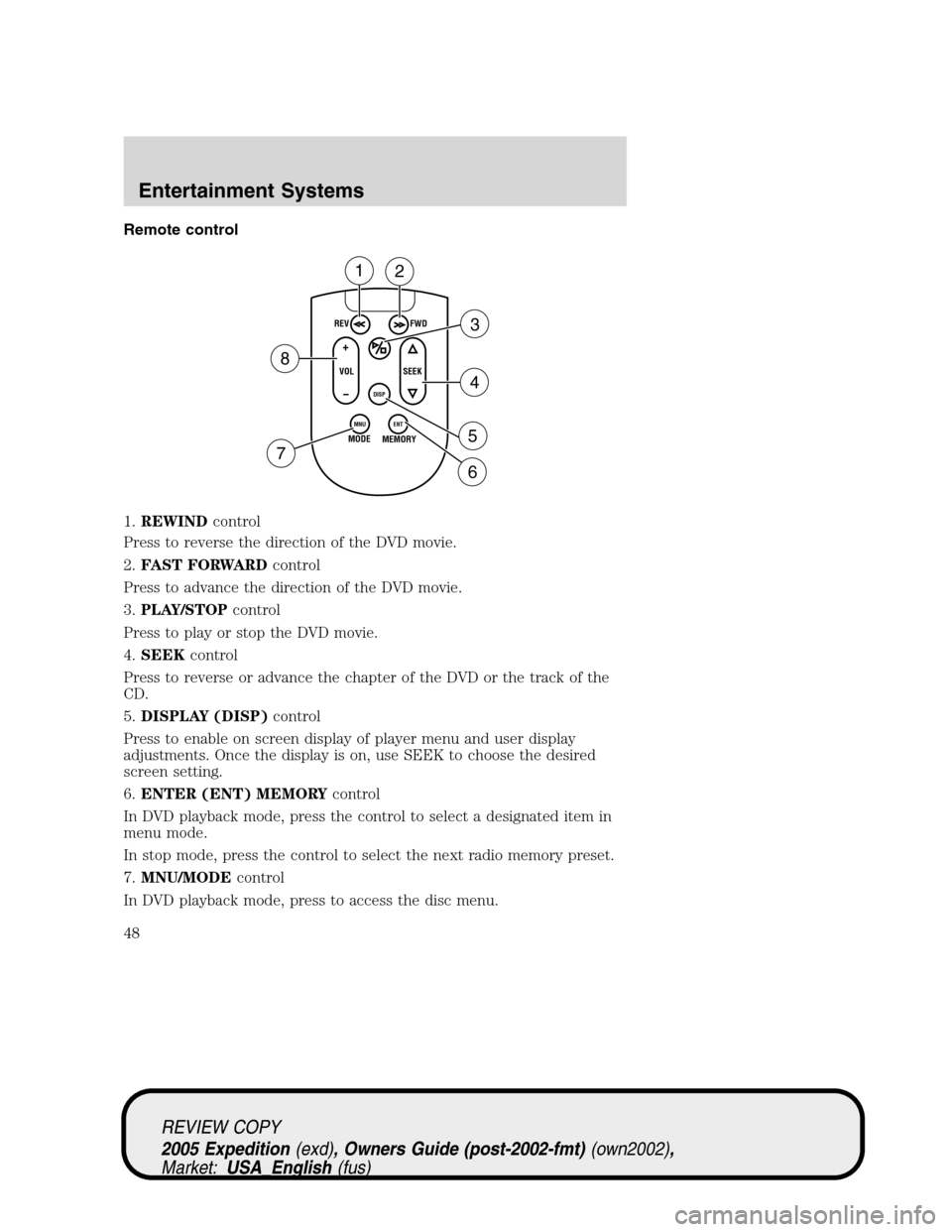
1.REWINDcontrol
Press to reverse the direction of the DVD movie.
2.FAST FORWARDcontrol
Press to advance the direction of the DVD movie.
3.PLAY/STOPcontrol
Press to play or stop the DVD movie.
4.SEEKcontrol
Press to reverse or advance the chapter of the DVD or the track of the
CD.
5.DISPLAY (DISP)control
Press to enable on screen display of player menu and user display
adjustments. Once the display is on, use SEEK to choose the desired
screen setting.
6.ENTER (ENT) MEMORYcontrol
In DVD playback mode, press the control to select a designated item in
menu mode.
In stop mode, press the control to select the next radio memory preset.
7.MNU/MODEcontrol
In DVD playback mode, press to access the disc menu.
REV
FWD
SEEK VOL
MODE
MEMORY
+
DISP
MNU
ENT-
12
3
4
5
6 7
8
REVIEW COPY
2005 Expedition(exd), Owners Guide (post-2002-fmt)(own2002),
Market:USA_English(fus)
Entertainment Systems
48
Page 49 of 368
In stop mode, press to change to a different playing media (e.g. AM, FM,
CD...)
8.VOLUMEcontrol
Press to increase (+) or decrease (-) volume level.
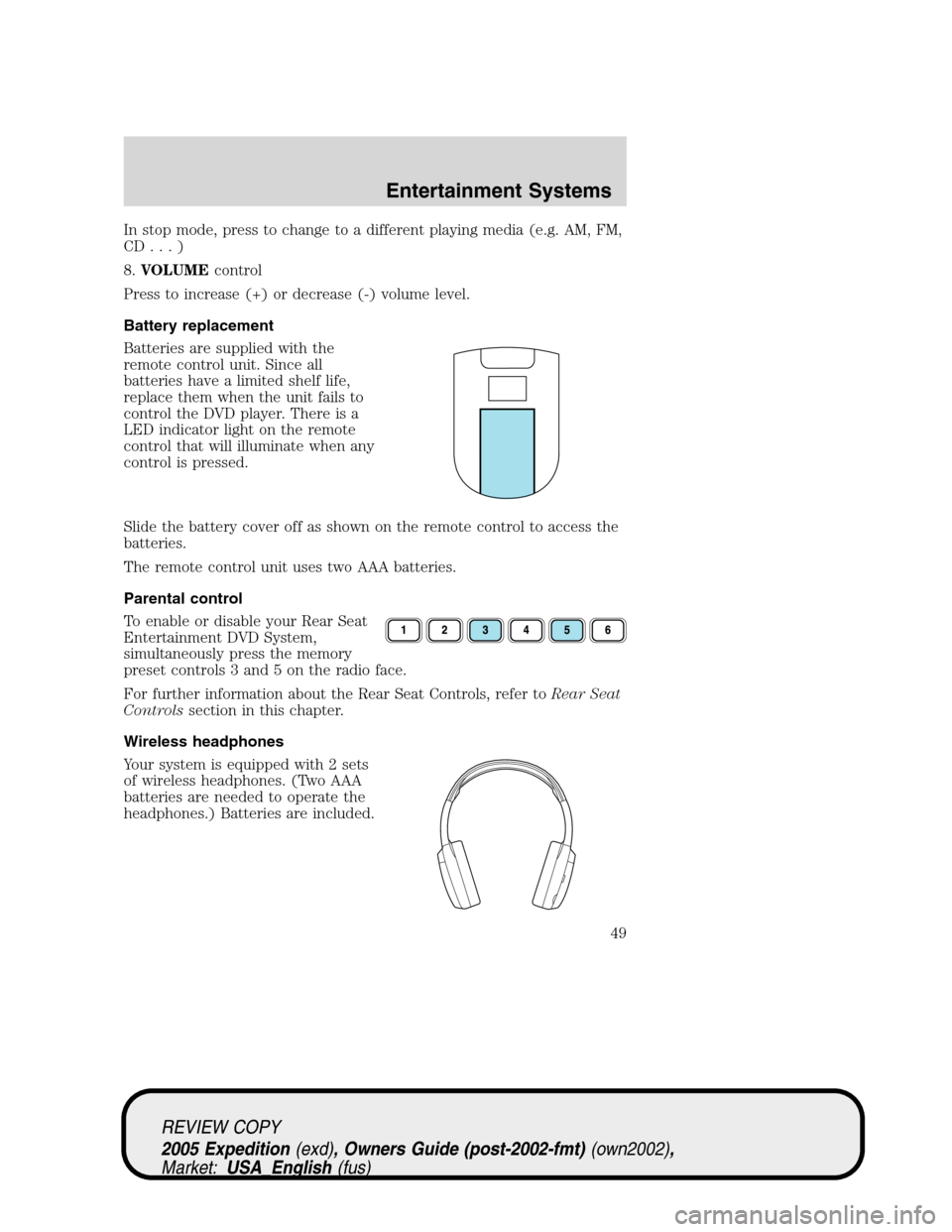
Battery replacement
Batteries are supplied with the
remote control unit. Since all
batteries have a limited shelf life,
replace them when the unit fails to
control the DVD player. There is a
LED indicator light on the remote
control that will illuminate when any
control is pressed.
Slide the battery cover off as shown on the remote control to access the
batteries.
The remote control unit uses two AAA batteries.
Parental control
To enable or disable your Rear Seat
Entertainment DVD System,
simultaneously press the memory
preset controls 3 and 5 on the radio face.
For further information about the Rear Seat Controls, refer toRear Seat
Controlssection in this chapter.
Wireless headphones
Your system is equipped with 2 sets
of wireless headphones. (Two AAA
batteries are needed to operate the
headphones.) Batteries are included.
REVIEW COPY
2005 Expedition(exd), Owners Guide (post-2002-fmt)(own2002),
Market:USA_English(fus)
Entertainment Systems
49
Page 52 of 368

•When the temperature of the DVD player becomes too hot, the high
temperature sensor circuit stops machine operation. DVD/CD HOT will
illuminate in the radio display.
•The DVD player will remain inactive until it cools to a normal
operating temperature. Length of time to cool will vary depending on
conditions.
General operating tips
•When the engine is not running, use the system sparingly. Otherwise,
it will run the battery down.
•When the ignition is turned to OFF, the Rear Seat Entertainment DVD
System is also turned OFF. When the ignition is turned ON, the
system will begin playback from the last selected media source when
the play control is pressed.
•To disable the DVD player, simultaneously press the 3 and 5 memory
presets on the radio face. To enable the DVD player again, press the 3
and 5 presets simultaneously.
•The DVD player is only capable of reading the bottom side of a disc.
When inserting a single sided disc, the label should be up. For a
multi-sided disc, the desired play side should be down when the disc
is inserted into the player.
•The DVD player is capable of playback of DVDs, DVDR/RW, CDs,
CDR/RW and MP3s.
•DVDs are formatted by regions. This DVD system can only play region
1 DVDs (DVDs manufactured for U.S. and Canada).
This unit is designed to play commercially pressed 4.75 (12 cm)
audio compact discs and DVDs only. Due to technical
incompatibility, certain recordable and re-recordable compact
discs may not function correctly when used in Ford DVD/CD
players. Irregular shaped discs, discs with a scratch protection
film attached, and discs with homemade paper (adhesive) labels
should not be inserted into the player. The label may peel and
cause the disc to become jammed. It is recommended that
homemade discs be identified with permanent felt tip marker
rather than adhesive labels. Ball point pens may damage discs.
Please contact your dealer for further information.
Inserting a CD/DVD
Partially insert the CD/DVD into the slot and the system will fully pull in
the disc. Inserting the disc too far could cause the disc to jam in the
system.
REVIEW COPY
2005 Expedition(exd), Owners Guide (post-2002-fmt)(own2002),
Market:USA_English(fus)
Entertainment Systems
52
Page 53 of 368
Inserting a CD/DVD into the DVD player automatically turns the power
ON and playback should begin.
The counter is automatically reset to 0:00:00.
Removing a CD/DVD
1. Press the STOP/EJECT control to stop playback.
2. Press the STOP/EJECT control again to eject the CD/DVD.
If the CD/DVD is not removed within the allotted time, the system will
pull the CD/DVD back into the system for safety purposes. If the
CD/DVD will not eject from the system, press and hold the EJECT
control for approximately 2 seconds. The disc should eject whether the
vehicle ignition is ON or OFF.
Playing a video game/auxiliary device
1. Connect the video line from your video game device to the YELLOW
auxiliary input jack.
2. Connect the left and right audio lines to the WHITE and RED auxiliary
input jacks respectively.
3. Press the MODE control until DVD/CD AUX (no disc in player) or
DVD/CD play (disc in player) illuminates in the radio display. If a disc is
in the system, playback should begin. To enable the aux inputs, press the
STOP control or press the AUX control on the DVD player.
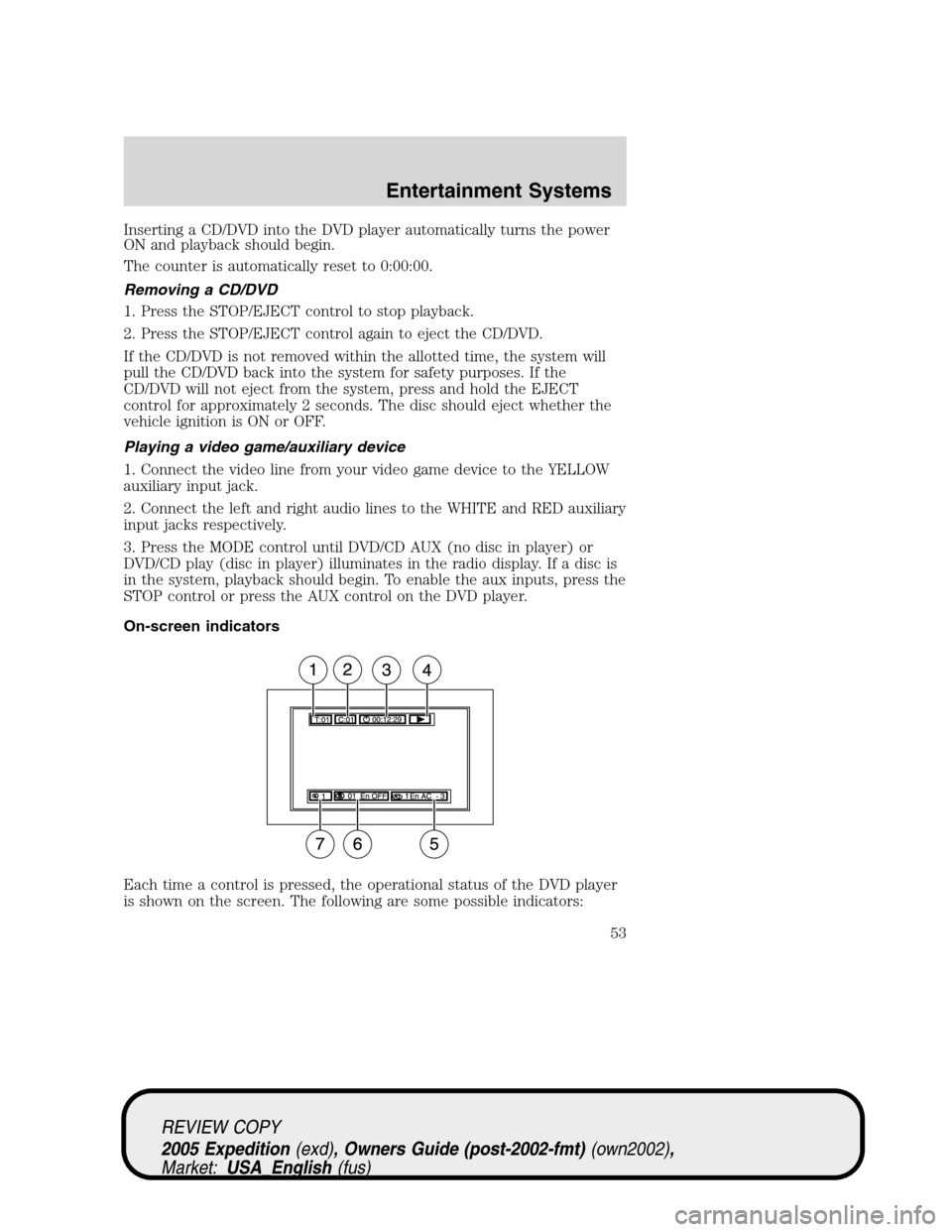
On-screen indicators
Each time a control is pressed, the operational status of the DVD player
is shown on the screen. The following are some possible indicators:
REVIEW COPY
2005 Expedition(exd), Owners Guide (post-2002-fmt)(own2002),
Market:USA_English(fus)
Entertainment Systems
53
Page 55 of 368
Whenever a warning is received, the radio volume will be lowered
to a volume that will allow the tones to be heard. The radio
volume will return to the previous level after the warning goes
away.
Federal Communication Commission (FCC) Compliance
Changes or modifications not approved by Ford Motor Company could
void user’s authority to operate the equipment. This equipment has been
tested and found to comply with the limits for a Class B digital device,
pursuant to Part 15 of the FCC Rules. These limits are designed to
provide reasonable protection against harmful interference in a
residential installation. This equipment generates, uses and can radiate
radio frequency energy and, if not installed and used in accordance with
the instructions, may cause harmful interference with radio
communications.
However, there is no guarantee that interference will not occur in a
particular installation. If this equipment does cause harmful interference
to radio or television reception, which can be determined by turning the
equipment off and on, the user is encouraged to consult the dealer or an
experienced radio/TV technician for help.
Care and service of the DVD player
Environmental extremes
DVD players that are subjected to harsh environmental conditions may
be damaged or perform at less than maximum capability. To avoid these
outcomes, whenever possible avoid exposing your DVD player to:
•extremely hot or cold temperatures.
•direct sunlight.
•high humidity.
•a dusty environment.
•locations where strong magnetic fields are generated.
Temperature extremes
When the vehicle is parked under direct sunlight or in an extremely cold
place for a long period of time, wait until the cabin temperature of the
vehicle is at normal temperature before operating the system.
Humidity and moisture condensation
Moisture in the air will condense in the DVD player under extremely
humid conditions or when moving from a cold place to a warm one. If
REVIEW COPY
2005 Expedition(exd), Owners Guide (post-2002-fmt)(own2002),
Market:USA_English(fus)
Entertainment Systems
55
Page 56 of 368
moisture condensation occurs, do not insert a CD or DVD into the
player. If one is already in the player, remove it. Turn the DVD player ON
to dry the moisture before inserting a DVD. This could take an hour or
more.
Cleaning the liquid crystal display (LCD) flip-down screen
Clean the display screen by applying a small amount of water or any
ammonia-based household glass cleaner directly to a soft cloth. Rub the
screen gently until the dust, dirt or fingerprints are removed. Do not
spray the screen directly with water or glass cleaning solvents. Overspray
from these fluids could drip down into the internal electronics of the
screen and cause damage. Do not apply excessive pressure while
cleaning the screen.
Foreign substances
Exercise care to prevent dirt and foreign objects from entering the DVD
player compartment. If liquid is accidentally spilled onto the system,
immediately turn the system OFF and consult a qualified service
technician.
Cleaning CDs and DVDs
Inspect all discs for contamination before playing. If necessary, clean
discs only with an approved CD cleaner and wipe from the center out to
the edge. Do not use circular motion.
Cleaning the DVD player exterior
Clean the exterior of the DVD player with a damp cloth. Do not use CD
cleaning kits or CDs intended to clean the interior of your DVD player.
Use of these products may damage your system.
VEHICLE NAVIGATION RADIO (VNR IF EQUIPPED)
Your vehicle may be equipped with a Vehicle Navigation Radio (VNR)
which allows you to listen to the radio, play CDs and also navigate the
vehicle using navigation CDs.
Your Vehicle Navigation Radio is equipped with many different features
and controls. The labeled controls on the front face of the system (which
are called out below) are known as hard keys. The five blank controls
located under the MENU control are called soft keys. These controls are
labeled on the screen and can change functionality depending on which
screen is activated in the display. The hard keys will be explained further
below and the soft keys will be described as needed.
REVIEW COPY
2005 Expedition(exd), Owners Guide (post-2002-fmt)(own2002),
Market:USA_English(fus)
Entertainment Systems
56
Page 59 of 368
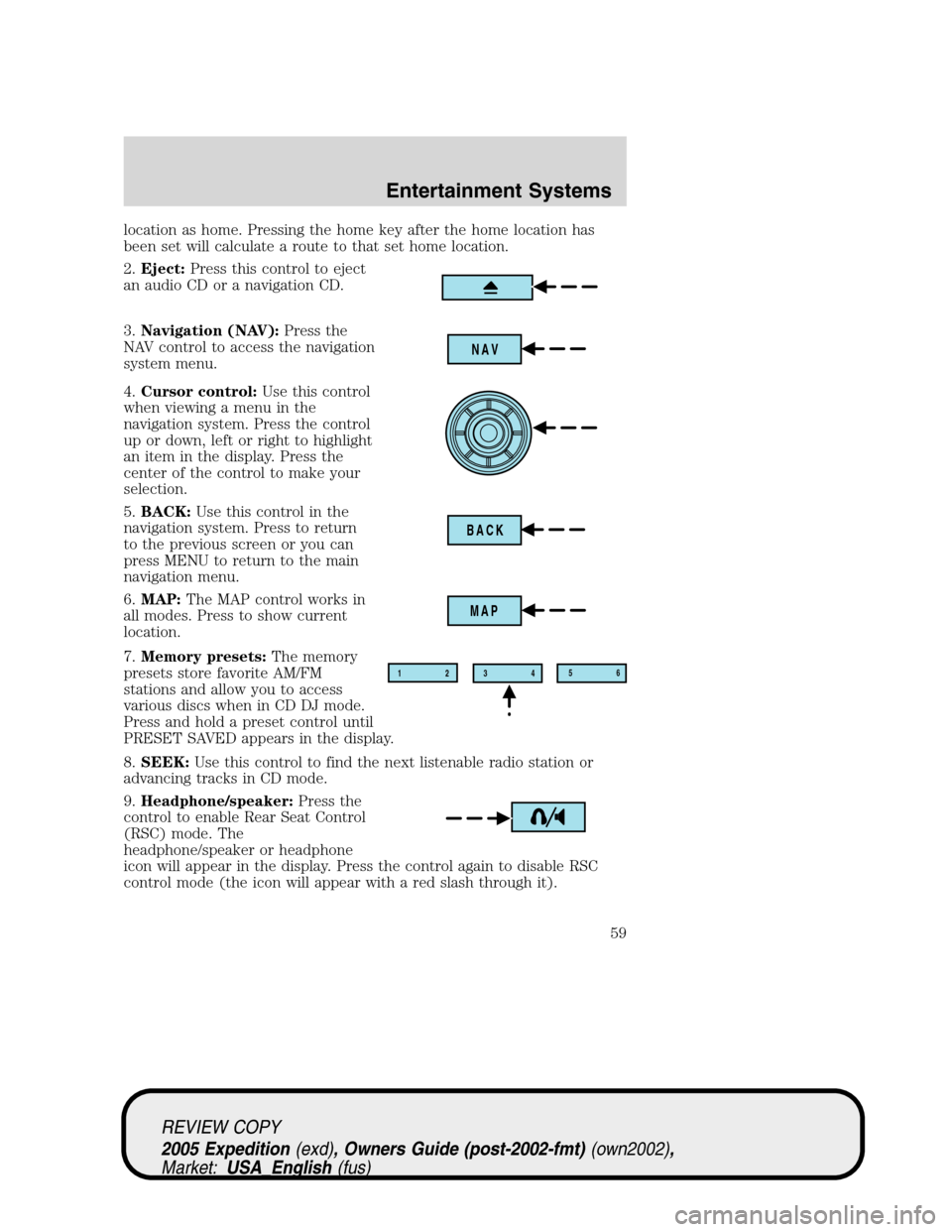
location as home. Pressing the home key after the home location has
been set will calculate a route to that set home location.
2.Eject:Press this control to eject
an audio CD or a navigation CD.
3.Navigation (NAV):Press the
NAV control to access the navigation
system menu.
4.Cursor control:Use this control
when viewing a menu in the
navigation system. Press the control
up or down, left or right to highlight
an item in the display. Press the
center of the control to make your
selection.
5.BACK:Use this control in the
navigation system. Press to return
to the previous screen or you can
press MENU to return to the main
navigation menu.
6.MAP:The MAP control works in
all modes. Press to show current
location.
7.Memory presets:The memory
presets store favorite AM/FM
stations and allow you to access
various discs when in CD DJ mode.
Press and hold a preset control until
PRESET SAVED appears in the display.
8.SEEK:Use this control to find the next listenable radio station or
advancing tracks in CD mode.
9.Headphone/speaker:Press the
control to enable Rear Seat Control
(RSC) mode. The
headphone/speaker or headphone
icon will appear in the display. Press the control again to disable RSC
control mode (the icon will appear with a red slash through it).
NAV
BACK
MAP
12
3456
REVIEW COPY
2005 Expedition(exd), Owners Guide (post-2002-fmt)(own2002),
Market:USA_English(fus)
Entertainment Systems
59
Page 60 of 368
When in RSC mode, Dual Play mode can be enabled and disabled by the
RSC, or by pressing Preset 2 and 4 simultaneously on the Navigation
radio system. The system is in Dual Play mode if both the Headphone
and Speaker icons are present, and in just RSC mode if only the
Headphone icon is present.
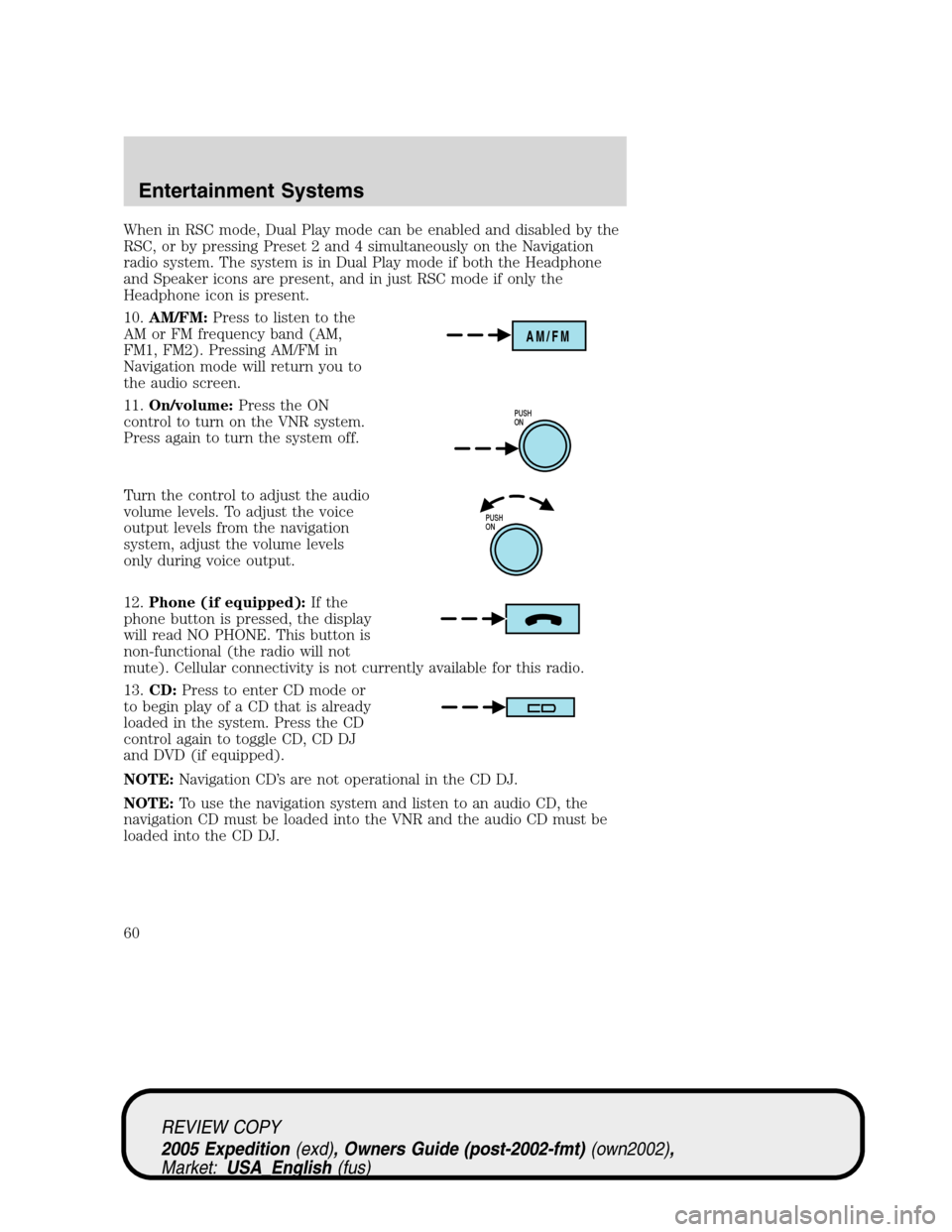
10.AM/FM:Press to listen to the
AM or FM frequency band (AM,
FM1, FM2). Pressing AM/FM in
Navigation mode will return you to
the audio screen.
11.On/volume:Press the ON
control to turn on the VNR system.
Press again to turn the system off.
Turn the control to adjust the audio
volume levels. To adjust the voice
output levels from the navigation
system, adjust the volume levels
only during voice output.
12.Phone (if equipped):If the
phone button is pressed, the display
will read NO PHONE. This button is
non-functional (the radio will not
mute). Cellular connectivity is not currently available for this radio.
13.CD:Press to enter CD mode or
to begin play of a CD that is already
loaded in the system. Press the CD
control again to toggle CD, CD DJ
and DVD (if equipped).
NOTE:Navigation CD’s are not operational in the CD DJ.
NOTE:To use the navigation system and listen to an audio CD, the
navigation CD must be loaded into the VNR and the audio CD must be
loaded into the CD DJ.
AM/FM
PUSH
ON
PUSH
ON
REVIEW COPY
2005 Expedition(exd), Owners Guide (post-2002-fmt)(own2002),
Market:USA_English(fus)
Entertainment Systems
60