2005 FORD EXPEDITION radio
[x] Cancel search: radioPage 27 of 368
Speed sensitive volume:Radio volume changes automatically and
slightly with vehicle speed to compensate for road and wind noise.
Recommended level is 1–3. Level 0 turns the feature off and level 7 is
the maximum setting.
Press and hold the volume control for five seconds. Then press SEL to
increase (
) or decrease () the volume setting. The level will
appear in the display.
14.Load:Press to load a CD. Press
and hold to load up to six discs.
15.CD AUX:Press to access CD or
AUX mode.
CD units are designed to play
commercially pressed 4.75 in (12 cm) audio compact discs only.
Due to technical incompatibility, certain recordable and
re-recordable compact discs may not function correctly when
used in Ford CD players. Irregular shaped CDs, CDs with a
scratch protection film attached, and CDs with homemade paper
(adhesive) labels should not be inserted into the CD player. The
label may peel and cause the CD to become jammed. It is
recommended that homemade CDs be identified with permanent
felt tip marker rather than adhesive labels. Ballpoint pens may
damage CDs. Please contact your dealer for further information.
SHUF (Shuffle):If equipped with
a Premium system, press to play
tracks in random order. Press again
to deactivate random play.
16.Scan:Press SCAN to hear a
brief sampling of radio stations, SAT
channels or CD tracks. Press again
to stop.
17.Disc/Tune:Press
orto
manually tune down/up the radio
frequency band, or to listen to the
previous/next track on the CD.
CAT:CAT is only available when equipped with Satellite Radio. Your
Audiophile radio comes equipped with Satellite ready capability. The kit
to enable Satellite reception is available through your Ford dealer.
Detailed Satellite instructions are included with the dealer installed kit.
REVIEW COPY
2005 Expedition(exd), Owners Guide (post-2002-fmt)(own2002),
Market:USA_English(fus)
Entertainment Systems
27
Page 28 of 368
Press to scroll through a list of categories, (i.e., Pop, Rock, Country, Hip
Hop, R&B, Dance, Jazz/Standards, Classical, Variety, News, Sports and
Entertainment).
Dealer installed satellite kit only available in the continental United
States.
For information regarding SIRIUS Satellite Radio, please call toll-free
888-539-SIRIUS (888-539-7474) or visit the SIRIUS website at
www.siriusradio.com
PREMIUM SATELLITE COMPATIBLE AM/FM
STEREO/CASSETTE/SINGLE CD/MP3 RADIO (IF EQUIPPED)
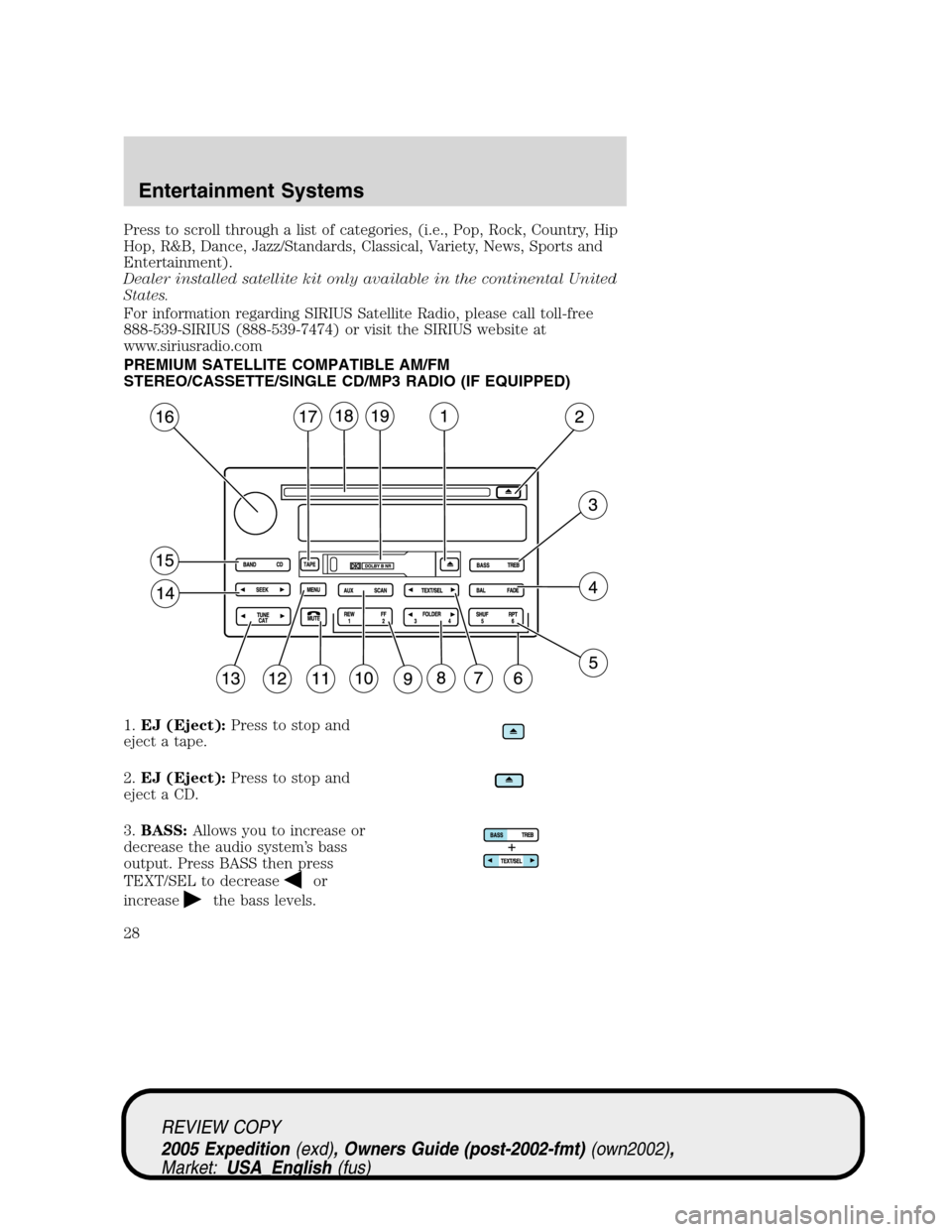
1.EJ (Eject):Press to stop and
eject a tape.
2.EJ (Eject):Press to stop and
eject a CD.
3.BASS:Allows you to increase or
decrease the audio system’s bass
output. Press BASS then press
TEXT/SEL to decrease
or
increase
the bass levels.
REVIEW COPY
2005 Expedition(exd), Owners Guide (post-2002-fmt)(own2002),
Market:USA_English(fus)
Entertainment Systems
28
Page 29 of 368
TREB (Treble):Allows you to
increase or decrease the audio
system’s treble output. Press TREB
then press TEXT/SEL to
decrease
or increasethe treble levels.
4.BAL (Balance):Allows you to
shift speaker sound between the
right and left speakers. Press BAL
then press TEXT/SEL to shift sound
to the left
or right.
FADE:Allows you to shift speaker
sound between the front and rear
speakers. Press FADE then press
TEXT/SEL to shift the sound to the
rear
or the front.
5.SHUF (Shuffle):Press to play
CD/MP3 tracks in random order.
Press again to deactivate random
play.
RPT (Repeat):Press to repeat the
current CD/MP3 track.
6.Memory preset stations:To set a memory preset station, tune the
radio to the desired station, then press and hold the memory preset
control until the sound returns.
7.TEXT/SEL:Select: Use to adjust
bass, treble, balance and fade levels.
TEXT:TEXT is available when equipped with Satellite radio. Your radio
comes equipped with Satellite ready capability. The kit to enable Satellite
reception is available through your dealer. Detailed Satellite instructions
are included with the dealer installed kit. TEXT is also available with ID3
tags on MP3 files.Dealer installed satellite kit only available in the
continental United States.
8.Folder:Press to reverse (
)or
advance (
) MP3 folders.
RPTSHUF
56
RPTSHUF
56
REVIEW COPY
2005 Expedition(exd), Owners Guide (post-2002-fmt)(own2002),
Market:USA_English(fus)
Entertainment Systems
29
Page 30 of 368
9.REW (Rewind):Works in tape
and CD modes.
In tape mode, radio play continues
until rewind is stopped (by pressing REW again) or the beginning of the
tape is reached.
In CD mode, REW control reverses the CD within the current track.
FF (Fast Forward):Works in tape
and CD modes.
In the tape mode, tape direction
automatically reverses when the end of the tape is reached. Fast forward
is stopped by pressing FF again.
In CD mode, FF advances the CD within the current track.
10.AUX:Press to toggle between
the current playing media and DVD
(if equipped).
SCAN:Press for a brief sampling of
radio stations, tape selections or CD
tracks. Press again to deactivate
scan mode.
11.Phone/MUTE:Press to mute
the playing media. Press again to
return to the playing media.
12.MENU:Press to access the
following options:
•AUTOSET:Press MENU until AUTOSET is displayed. Press
TEXT/SEL to turn this function on or off. AUTOSET allows you to set
the strongest local radio stations without losing your original manually
set preset stations for AM/FM1/FM2. If there are less than six strong
stations available on the frequency band, the remaining memory
preset controls will all store the last strong station available.
•Setting the clock:Press MENU until SELECT HOUR or SELECT
MINS is displayed. Press SEL to increase (
) or decrease ().
•Speed sensitive volume(if equipped): Radio volume changes
automatically and slightly with vehicle speed to compensate for road
and wind noise. Recommended level is 1–3. Level 0 turns the feature
off and level 7 is the maximum setting. To engage the speed sensitive
volume feature, press MENU until speed VOL X appears in the display.
REVIEW COPY
2005 Expedition(exd), Owners Guide (post-2002-fmt)(own2002),
Market:USA_English(fus)
Entertainment Systems
30
Page 31 of 368
Press TEXT/SEL to increase/decreasevolume compensation
levels. The selected level will appear in the display.
•Compression:In CD/MP3 modes, select to bring loud and soft
passages together for a more consistent listening level.
•Folder/Track mode:In MP3 mode, press MENU until MODE appears
in teh display. Use SEL to toggle between FOLDER (only tracks within
selected folder are accessible) or TRACK (all tracks on disc are
accessible).
13.TUNE/CAT:In radio mode,
press to manually advance up/down
the frequency band. In satellite
radio mode, press CAT for a listing of available music categories.
CAT:CAT is only available when equipped with Satellite Radio. Your
radio comes equipped with Satellite ready capability. The kit to enable
Satellite reception is available through your dealer. Detailed Satellite
instructions are included with the dealer installed kit.Dealer installed
satellite kit only available in the continental United States.
For information regarding SIRIUS Satellite Radio, please call toll-free
888-539-SIRIUS (888-539-7474) or visit the SIRIUS website at
www.siriusradio.com
14.SEEK:Works in radio, tape and
CD modes. Press to access the
previous
or nextlistenable
radio station, tape selection or CD track.
15.BAND:Press to toggle between
AM/FM1/FM2 frequency bands.
Press while in tape or CD mode to
return to radio mode.
CD:Press CD to enter CD mode
and to play a CD already in the
system.
16.Power/volume:Press to turn
the system on/off. Turn to
raise/lower the volume.
If the volume is set above a certain
level and the ignition is turned off,
the volume will come back on at a
REVIEW COPY
2005 Expedition(exd), Owners Guide (post-2002-fmt)(own2002),
Market:USA_English(fus)
Entertainment Systems
31
Page 33 of 368
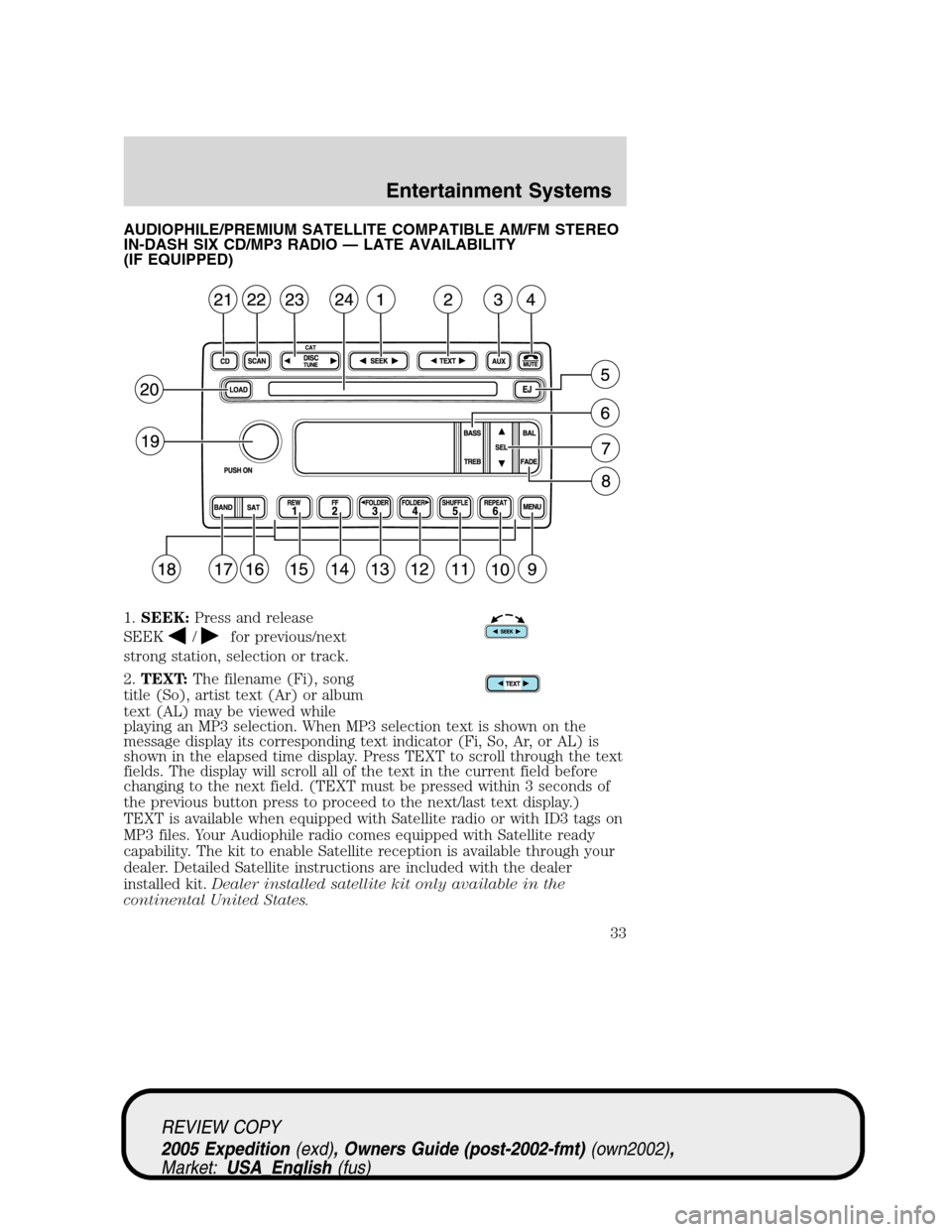
AUDIOPHILE/PREMIUM SATELLITE COMPATIBLE AM/FM STEREO
IN-DASH SIX CD/MP3 RADIO — LATE AVAILABILITY
(IF EQUIPPED)
1.SEEK:Press and release
SEEK
/for previous/next
strong station, selection or track.
2.TEXT:The filename (Fi), song
title (So), artist text (Ar) or album
text (AL) may be viewed while
playing an MP3 selection. When MP3 selection text is shown on the
message display its corresponding text indicator (Fi, So, Ar, or AL) is
shown in the elapsed time display. Press TEXT to scroll through the text
fields. The display will scroll all of the text in the current field before
changing to the next field. (TEXT must be pressed within 3 seconds of
the previous button press to proceed to the next/last text display.)
TEXT is available when equipped with Satellite radio or with ID3 tags on
MP3 files. Your Audiophile radio comes equipped with Satellite ready
capability. The kit to enable Satellite reception is available through your
dealer. Detailed Satellite instructions are included with the dealer
installed kit.Dealer installed satellite kit only available in the
continental United States.
REVIEW COPY
2005 Expedition(exd), Owners Guide (post-2002-fmt)(own2002),
Market:USA_English(fus)
Entertainment Systems
33
Page 34 of 368
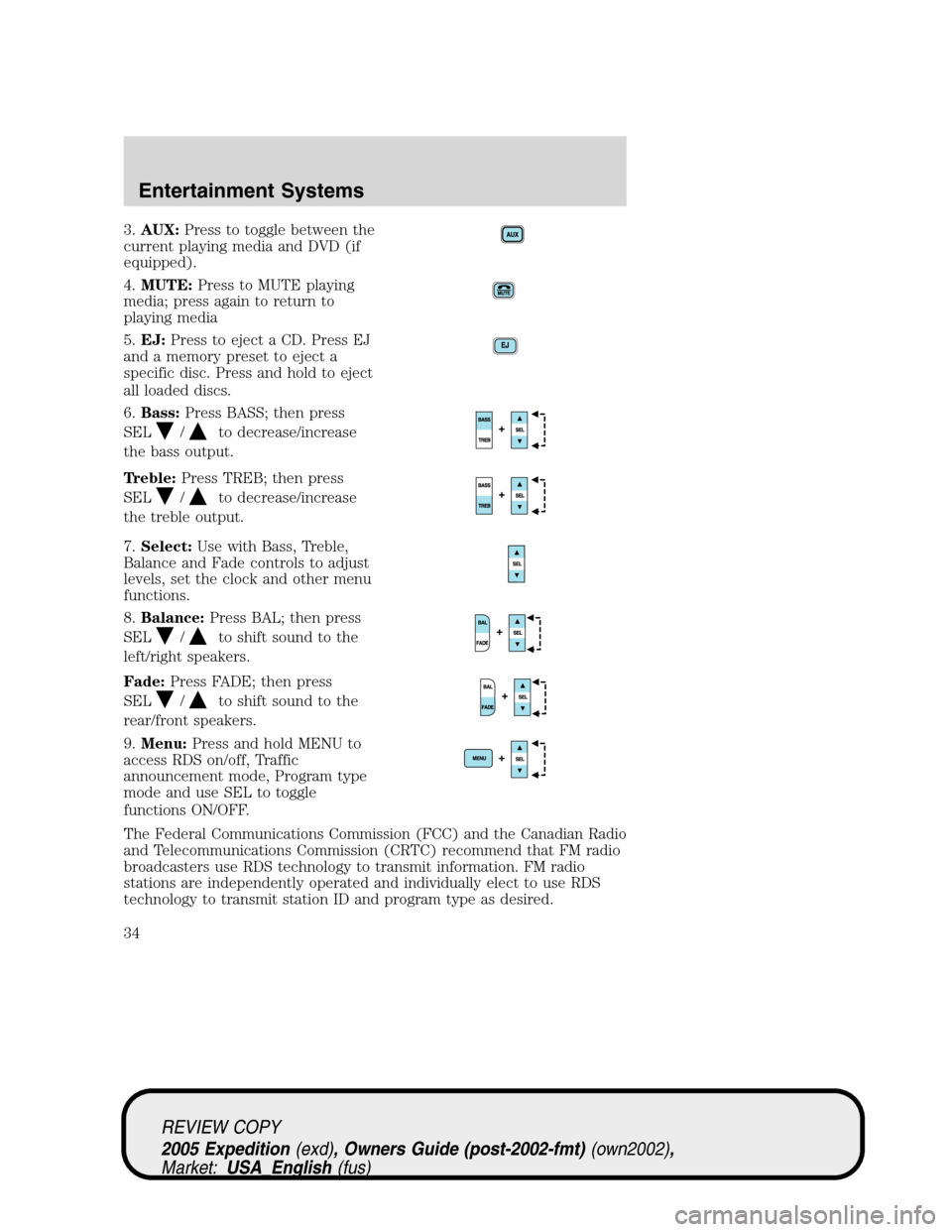
3.AUX:Press to toggle between the
current playing media and DVD (if
equipped).
4.MUTE:Press to MUTE playing
media; press again to return to
playing media
5.EJ:Press to eject a CD. Press EJ
and a memory preset to eject a
specific disc. Press and hold to eject
all loaded discs.
6.Bass:Press BASS; then press
SEL
/to decrease/increase
the bass output.
Treble:Press TREB; then press
SEL
/to decrease/increase
the treble output.
7.Select:Use with Bass, Treble,
Balance and Fade controls to adjust
levels, set the clock and other menu
functions.
8.Balance:Press BAL; then press
SEL
/to shift sound to the
left/right speakers.
Fade:Press FADE; then press
SEL
/to shift sound to the
rear/front speakers.
9.Menu:Press and hold MENU to
access RDS on/off, Traffic
announcement mode, Program type
mode and use SEL to toggle
functions ON/OFF.
The Federal Communications Commission (FCC) and the Canadian Radio
and Telecommunications Commission (CRTC) recommend that FM radio
broadcasters use RDS technology to transmit information. FM radio
stations are independently operated and individually elect to use RDS
technology to transmit station ID and program type as desired.
REVIEW COPY
2005 Expedition(exd), Owners Guide (post-2002-fmt)(own2002),
Market:USA_English(fus)
Entertainment Systems
34
Page 35 of 368
Traffic (if equipped):Allows you to hear traffic broadcasts. With the
feature ON, press SEEK or SCAN to find a station broadcasting a traffic
report (if it is broadcasting RDS data).Traffic information is not
available in most U.S. markets.
FIND Program type (if equipped):Allows you to search
RDS-equipped stations for a certain category of music format: Classic,
Country, Info, Jazz, Oldies, R&B, Religious, Rock, Soft, Top 40.
Show TYPE (if equipped):Displays the station’s call letters and
format.
Compression:Brings soft and loud CD passages together for a more
consistent listening level when in CD mode. Press MENU until
compression status is displayed. Press the SEL control to enable the
compression feature when COMPRESS OFF is displayed. Press the SEL
control again to disable the feature when COMPRESS ON is displayed.
Occupancy mode (if equipped):Press SEL to select ALL, DRIVER or
REAR SEAT occupancy mode.
Folder/Track Mode:In MP3 mode, press MENU until MODE appears in
the display. Use SEL to toggle between FOLDER (only tracks within
selected folder are accessible) or TRACK (all tracks on the disc are
accessible).
Autoset:Allows you to set the strongest local radio stations without
losing your original manually set preset stations for AM/FM1/FM2 . Press
MENU until AUTOSET appears in the display. Press SEL to toggle
ON/OFF. When the six strongest stations are filled, the station stored in
preset 1 will begin playing. If there are less than six strong stations, the
system will store the last one in the remaining presets. Press again to
disengage.
Speed sensitive volume:Radio volume changes automatically and
slightly with vehicle speed to compensate for road and wind noise.
Recommended level is 1–3. Level 0 turns the feature off and level 7 is
the maximum setting.
Press MENU until SPEED VOL X appears in the display. Then press SEL
to increase (
) or decrease () the volume setting. The level will
appear in the display.
Setting the clock:Press MENU until SELECT HOUR or SELECT
MINUTE is displayed. Use SEL to manually increase (
) or decrease
(
) the hours/minutes. Press MENU again to disengage clock mode.
REVIEW COPY
2005 Expedition(exd), Owners Guide (post-2002-fmt)(own2002),
Market:USA_English(fus)
Entertainment Systems
35