Page 1317 of 4449
DI-74
WARNING CHIME
Revision: 2004 November 2004 FX35/FX45
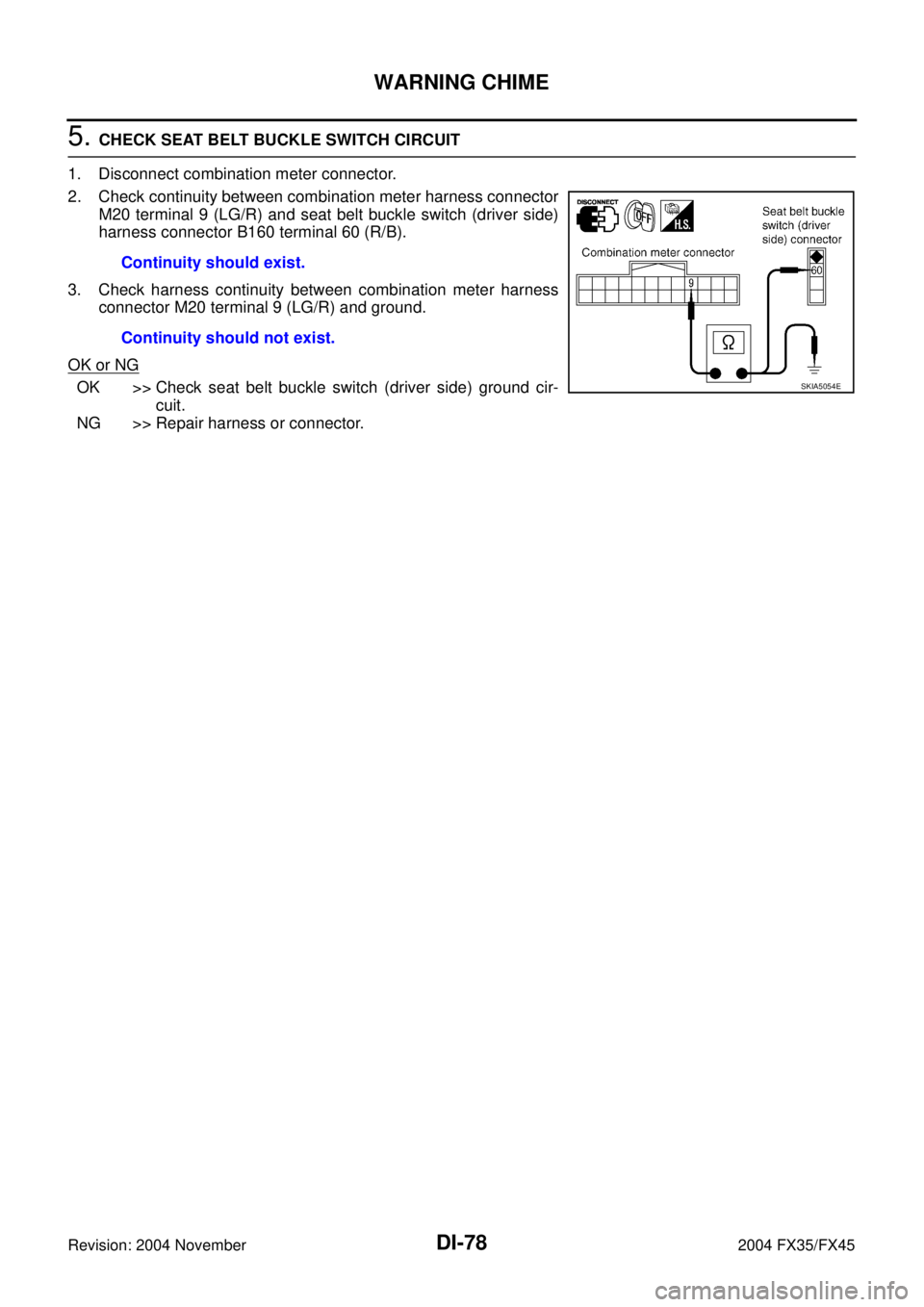
6. CHECK KEY SWITCH CIRCUIT
1. Disconnect BCM connector.
2. Check continuity between BCM harness connector M3 terminal
37 (B/W) and key switch and ignition knob switch harness con-
nector M22 terminal 4 (B/W).
3. Check continuity between BCM harness connector M3 terminal
37 (B/W) and ground.
OK or NG
OK >> Replace BCM. Refer to BCS-15, "Removal and Installa-
tion of BCM" .
NG >> Repair harness or connector.
Key Warning Chime Does Not Operate (With Intelligent Key, When Intelligent
Key Is Carried With The Driver)
AKS0079V
1. CHECK WARNING CHIME OPERATION
Check the chime under conditions in exception of key warning chime (when Intelligent Key is carried with the
driver) operation.
Does warning chime sound?
YES >> GO TO 2.
NO >> Go to DI-68, "
All Warnings Are Not Operated" or DI-69, "Key Warning Chime and Light Warning
Chime Does Not Operate (Seat Belt Warning Chime Does Operate)" .
2. CHECK INTELLIGENT KEY UNIT SELF-DIAGNOSTIC
Perform the Intelligent Key unit self-diagnosis. Refer to BL-114, "
CONSULT-II Functions" .
OK or NG
OK >> GO TO 3.
NG >> Check the applicable parts.Continuity should exist.
Continuity should not exist.
SKIA5062E
Page 1318 of 4449
WARNING CHIME
DI-75
C
D
E
F
G
H
I
J
L
MA
B
DI
Revision: 2004 November 2004 FX35/FX45
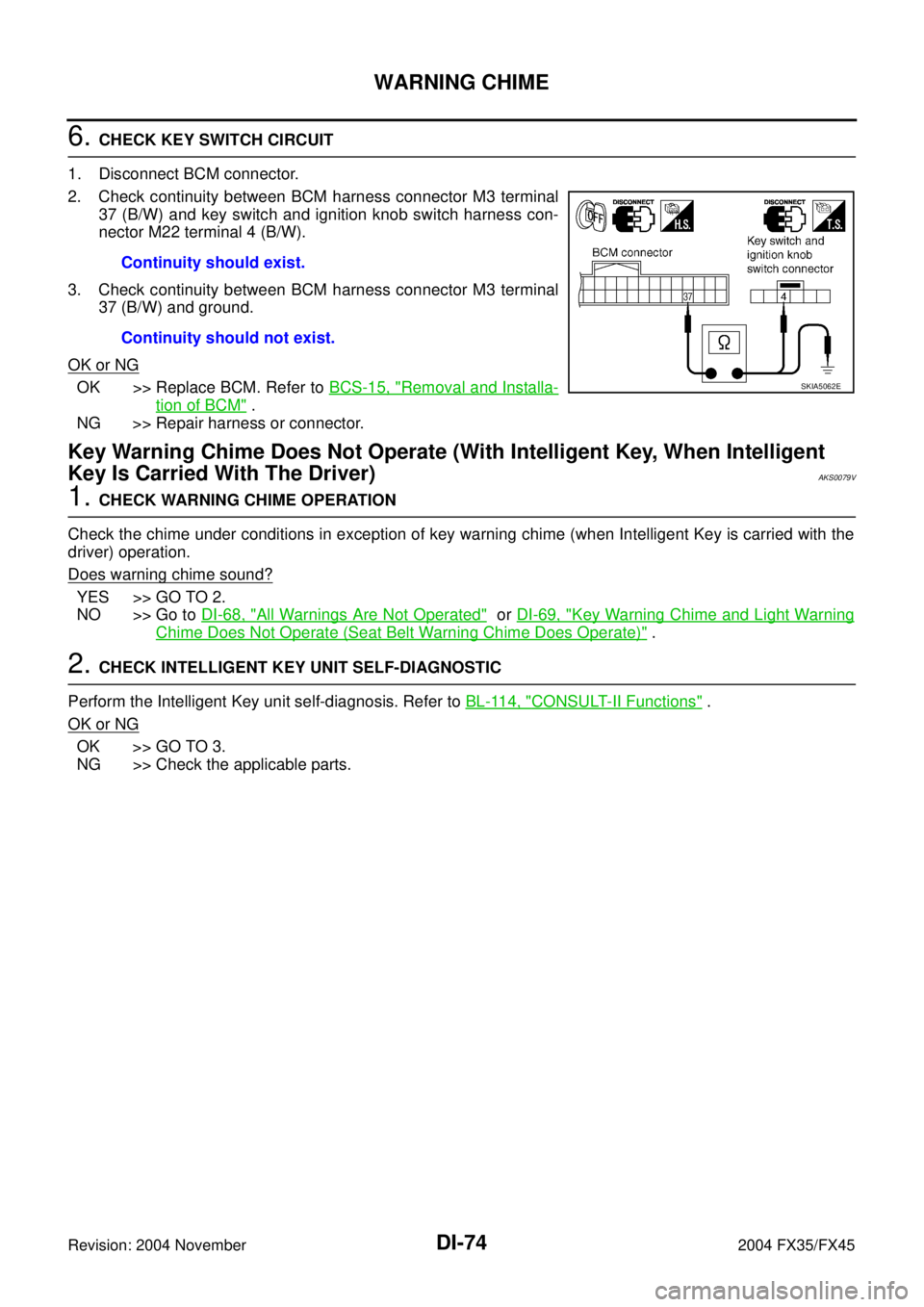
3. CHECK INTELLIGENT KEY UNIT INPUT SIGNAL
With CONSULT-ll
1. Select “INTELLIGENT KEY”.
2. With “DATA MONITOR”, confirm “PUSH SW” when the ignition
knob switch is operated. Refer to BL-114, "
CONSULT-II Func-
tions" .
Without CONSULT-ll
Check voltage between Intelligent Key unit harness connector M34
terminal 27 (L/W) and ground.
OK or NG
OK >> Replace Intelligent Key unit. Refer to BL-146, "Removal
and Installation of Intelligent Key Unit" .
NG >> GO TO 4.
4. CHECK IGNITION KNOB SWITCH POWER SUPPLY CIRCUIT
1. Disconnect key switch and ignition knob switch.
2. Check voltage between key switch and ignition knob switch har-
ness connector M22 terminal 1 (L/R) and ground.
OK or NG
OK >> GO TO 5.
NG >> Check harness for open or short between key switch
and ignition knob switch and fuse.
5. CHECK IGNITION KNOB SWITCH
Check continuity between key switch and ignition knob switch con-
nector M22 terminals 1 and 2.
OK or NG
OK >> GO TO 6.
NG >> Replace key switch and ignition knob switch.When ignition knob switch
is pushed: PUSH SW ON
When ignition knob switch
is withdrawn: PUSH SW OFF
SKIA5064E
When ignition knob switch
is pushed: Approx. 12V
When ignition knob switch
is withdrawn: Approx. 0V
SKIA5065E
Battery voltage should exist.
SKIA5068E
When ignition knob
switch is pushed: Continuity should exist.
When ignition knob
switch is withdrawn: Continuity should not exist.
SKIA5066E
Page 1319 of 4449
DI-76
WARNING CHIME
Revision: 2004 November 2004 FX35/FX45
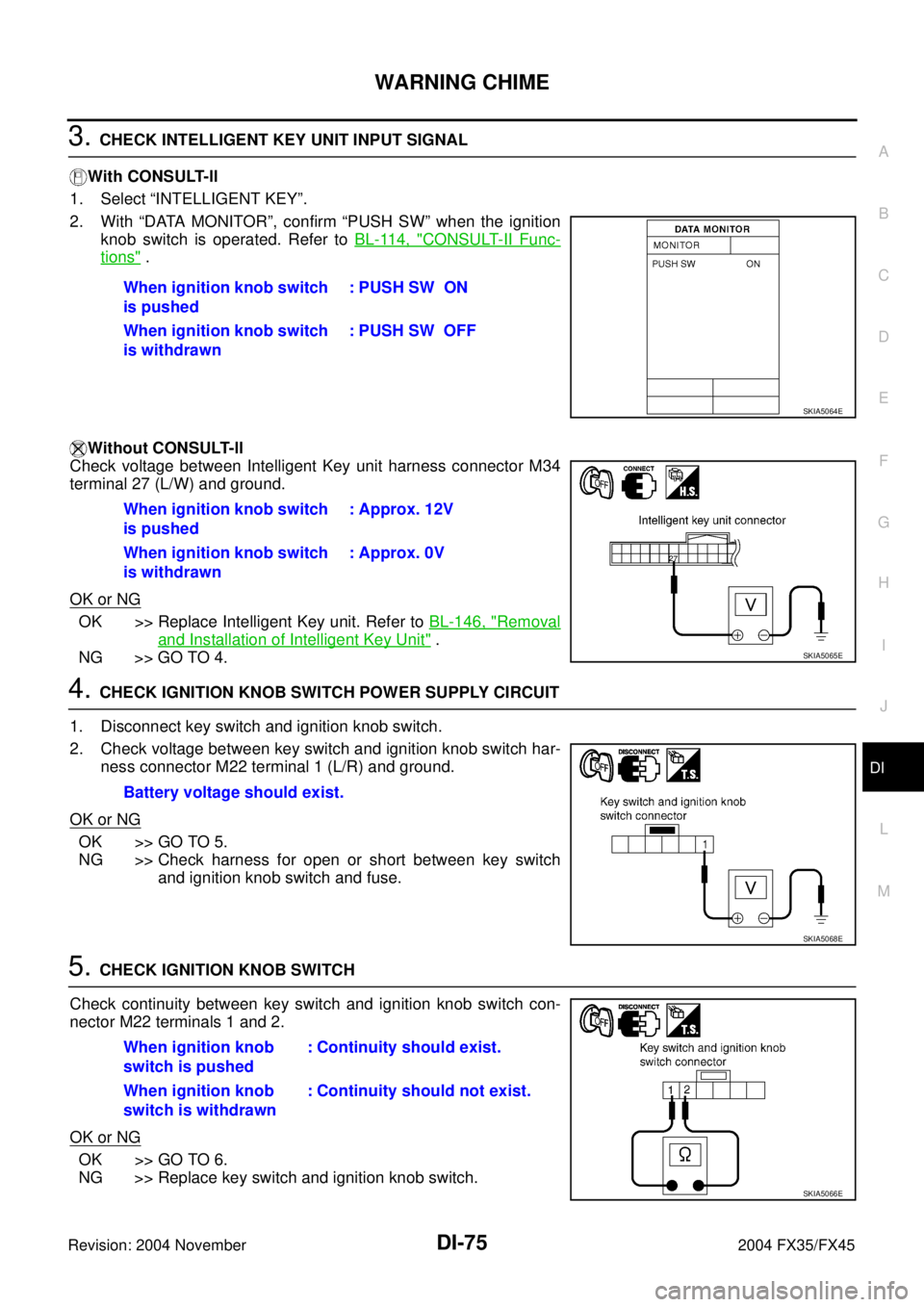
6. CHECK IGNITION KNOB SWITCH CIRCUIT
1. Disconnect Intelligent Key unit connector.
2. Check continuity between Intelligent Key unit harness connector
M34 terminal 27 (L/W) and key switch and ignition knob switch
harness connector M22 terminal 2 (L/W).
3. Check continuity between Intelligent Key unit harness connector
M34 terminal 27 (L/W) and ground.
OK or NG
OK >> Replace Intelligent Key unit. Refer to BL-146, "Removal
and Installation of Intelligent Key Unit" .
NG >> Repair harness or connector.
Light Warning Chime Does Not OperateAKS007OJ
1. CHECK WARNING CHIME OPERATION
Check the chime under conditions in exception of light warning chime operation.
Dose warning chime sound?
YES >> GO TO 2.
NO >> Go to DI-68, "
All Warnings Are Not Operated" .
2. CHECK BCM INPUT SIGNAL
1. Select “BCM”.
2. With “DATA MONITOR” of “BUZZER”, confirm “TAIL LAMP SW”
when the lighting switch is operated.
OK or NG
OK >> Replace BCM. Refer to BCS-15, "Removal and Installa-
tion of BCM" .
NG >> Check the lighting switch. Refer to LT- 1 0 8 , "
Removal
and Installation" . Continuity should exist.
Continuity should not exist.
SKIA5067E
Lighting switch ON (1st
position): TAIL LAMP SW ON
Lighting switch OFF : TAIL LAMP SW OFF
SKIA2081E
Page 1320 of 4449
WARNING CHIME
DI-77
C
D
E
F
G
H
I
J
L
MA
B
DI
Revision: 2004 November 2004 FX35/FX45
Seat Belt Warning Chime Does Not OperateAKS005NX
1. CHECK WARNING CHIME OPERATION
Check the chime under conditions in exception of seat belt warning chime operation.
Does warning chime sound?
YES >> GO TO 2.
NO >> Go to DI-68, "
All Warnings Are Not Operated" .
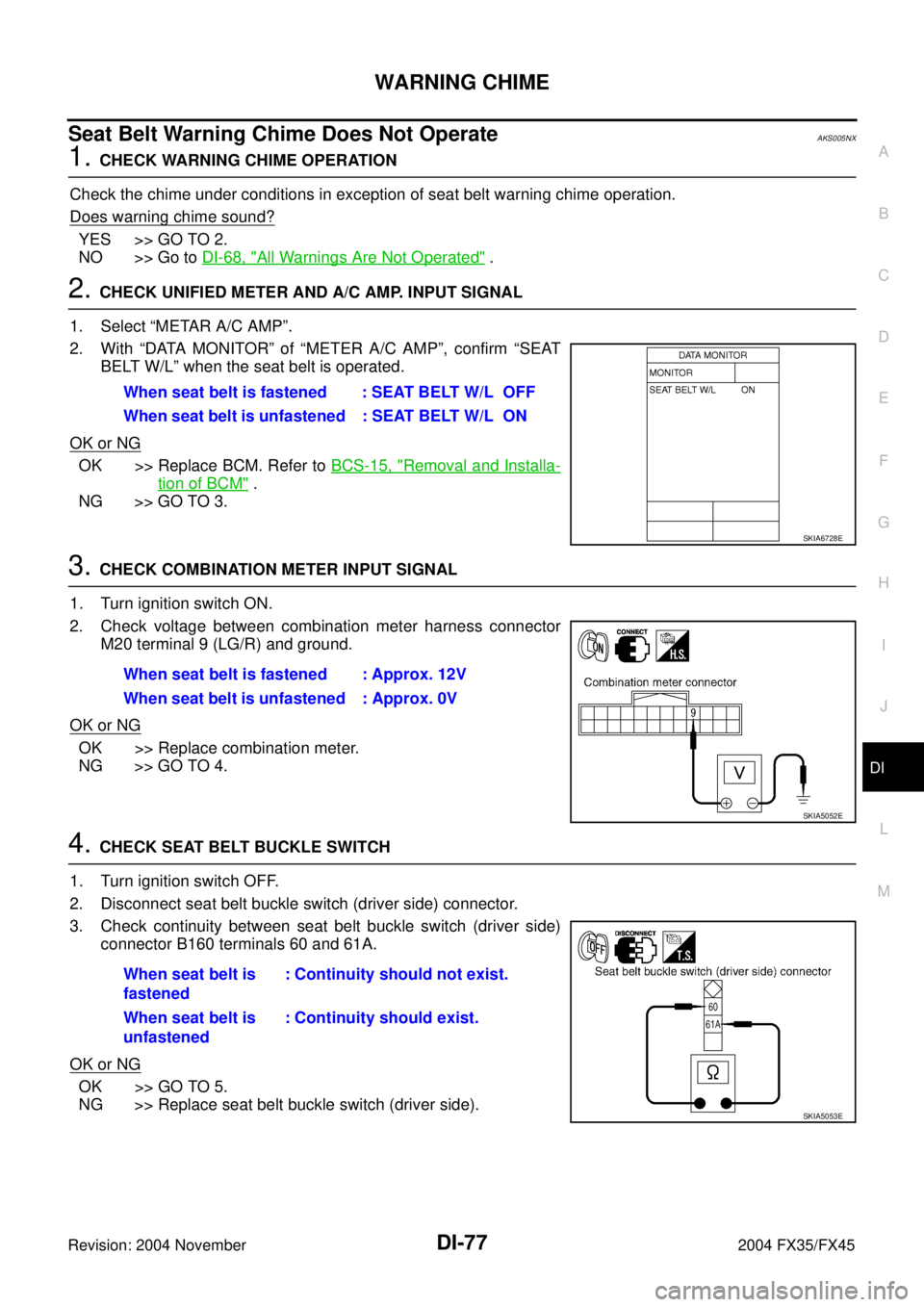
2. CHECK UNIFIED METER AND A/C AMP. INPUT SIGNAL
1. Select “METAR A/C AMP”.
2. With “DATA MONITOR” of “METER A/C AMP”, confirm “SEAT
BELT W/L” when the seat belt is operated.
OK or NG
OK >> Replace BCM. Refer to BCS-15, "Removal and Installa-
tion of BCM" .
NG >> GO TO 3.
3. CHECK COMBINATION METER INPUT SIGNAL
1. Turn ignition switch ON.
2. Check voltage between combination meter harness connector
M20 terminal 9 (LG/R) and ground.
OK or NG
OK >> Replace combination meter.
NG >> GO TO 4.
4. CHECK SEAT BELT BUCKLE SWITCH
1. Turn ignition switch OFF.
2. Disconnect seat belt buckle switch (driver side) connector.
3. Check continuity between seat belt buckle switch (driver side)
connector B160 terminals 60 and 61A.
OK or NG
OK >> GO TO 5.
NG >> Replace seat belt buckle switch (driver side).When seat belt is fastened : SEAT BELT W/L OFF
When seat belt is unfastened : SEAT BELT W/L ON
SKIA6728E
When seat belt is fastened : Approx. 12V
When seat belt is unfastened : Approx. 0V
SKIA5052E
When seat belt is
fastened: Continuity should not exist.
When seat belt is
unfastened: Continuity should exist.
SKIA5053E
Page 1321 of 4449
DI-78
WARNING CHIME
Revision: 2004 November 2004 FX35/FX45
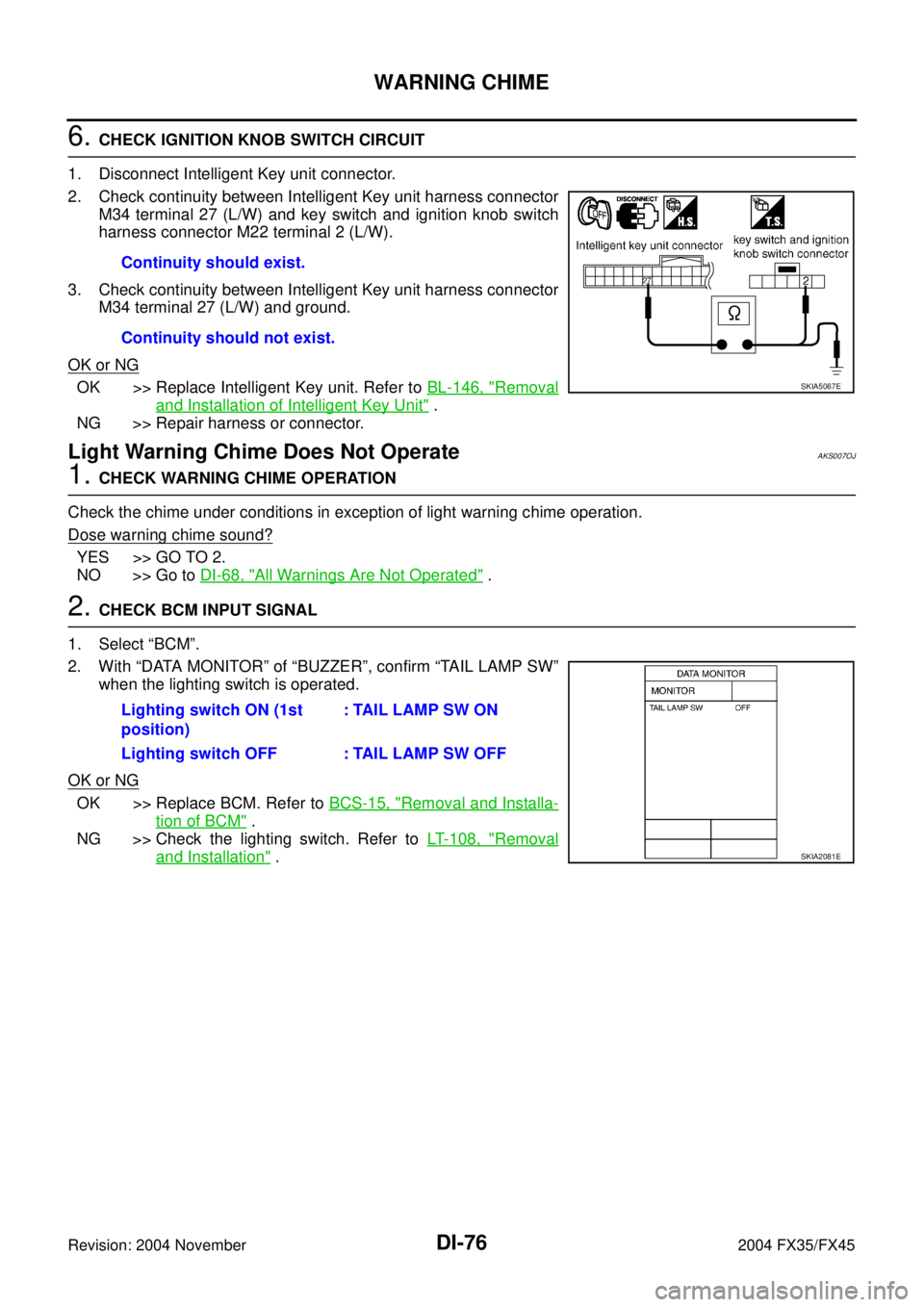
5. CHECK SEAT BELT BUCKLE SWITCH CIRCUIT
1. Disconnect combination meter connector.
2. Check continuity between combination meter harness connector
M20 terminal 9 (LG/R) and seat belt buckle switch (driver side)
harness connector B160 terminal 60 (R/B).
3. Check harness continuity between combination meter harness
connector M20 terminal 9 (LG/R) and ground.
OK or NG
OK >> Check seat belt buckle switch (driver side) ground cir-
cuit.
NG >> Repair harness or connector.Continuity should exist.
Continuity should not exist.SKIA5054E
Page 1324 of 4449

REAR VIEW MONITOR
DI-81
C
D
E
F
G
H
I
J
L
MA
B
DI
Revision: 2004 November 2004 FX35/FX45
REAR VIEW MONITORPFP:28260
System DescriptionAKS0068D
�The rear view monitor is equipped to check the rearward of the vehicle with display when A/T selector
lever is in reverse position.
�The lines of vehicle sides and the distance from the rear end of the vehicle are provided on display as a
guide. It allows the driver to know the distance between the vehicle and a rearward object, and the width
of the vehicle much easier.
POWER SUPPLY AND GROUND
Power is supplied at all time
�through 10A fuse [No. 19, located in fuse block (J/B)]
�to rear view camera control unit terminal 1.
When ignition switch is in ACC or ON position, power is supplied
�through 10A fuse [No. 6, located in fuse block (J/B)]
�to rear view camera control unit terminal 2.
When ignition switch is in ON or START position, power is supplied
�through 10A fuse (No. 83, located in IPDM E/R)
�to back-up lamp relay terminals 2 and 3.
Ground is supplied
�to rear view camera control unit terminal 3
�through grounds M35, M45 and M85.
AV COMMUNICATION LINE
Rear view camera control unit is connected to the following units with AV communication line. Each unit trans-
mits/receives data with AV communication line.
�NAVI control unit
�Display
�Display control unit
�A/C and AV switch
REAR VIEW CAMERA OPERATION
When A/T selector lever is reverse position, power is supplied
�through back-up lamp relay terminal 1
�to TCM terminal 7.
Then back-up lamp relay is energized,
�from back-up lamp relay terminal 5
�to rear view camera control unit terminal 4.
Then, rear view camera control unit is sent camera ON signal
�through rear view camera control unit terminal 8
�to rear view camera terminal 1.
An image taken by rear view camera is sent
�through rear view camera terminals 3 and 4
�to rear view camera control unit terminals 10 and 9.
Then an image is sent
�through rear view camera control unit terminals 12 and 14
�to the display terminals 15 and 16.
An image of rear view will be projected on the display.
Side Distance Guideline
When A/T selector lever is in reverse position, rear view camera control unit is sent rear view camera guideline
image
�through rear view camera control unit terminals 12 and 14
Page 1330 of 4449
REAR VIEW MONITOR
DI-87
C
D
E
F
G
H
I
J
L
MA
B
DI
Revision: 2004 November 2004 FX35/FX45
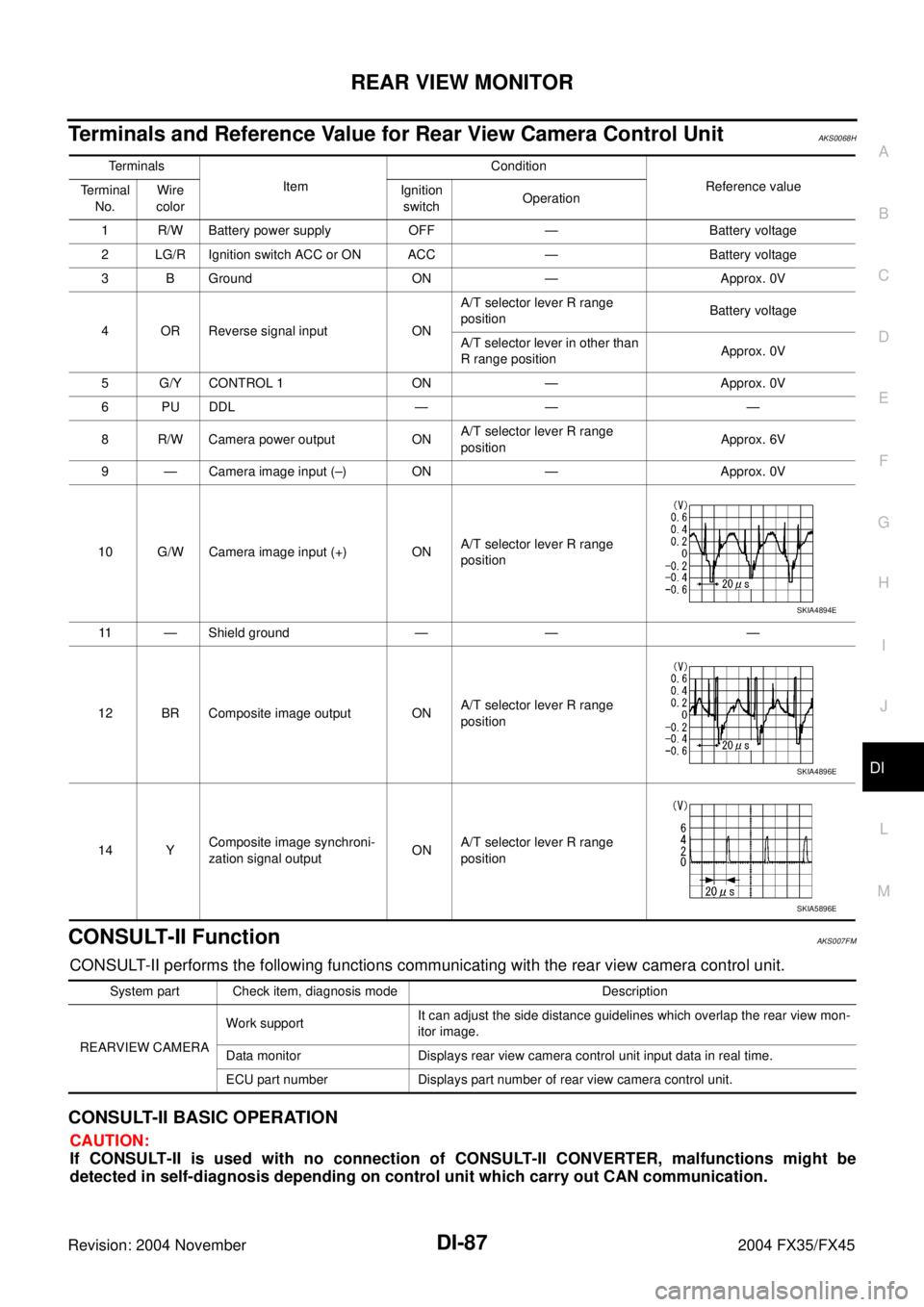
Terminals and Reference Value for Rear View Camera Control UnitAKS0068H
CONSULT-II FunctionAKS007FM
CONSULT-II performs the following functions communicating with the rear view camera control unit.
CONSULT-II BASIC OPERATION
CAUTION:
If CONSULT-II is used with no connection of CONSULT-II CONVERTER, malfunctions might be
detected in self-diagnosis depending on control unit which carry out CAN communication.
Te r m i n a l s
ItemCondition
Reference value
Terminal
No.Wire
colorIgnition
switchOperation
1 R/W Battery power supply OFF — Battery voltage
2 LG/R Ignition switch ACC or ON ACC — Battery voltage
3 B Ground ON — Approx. 0V
4 OR Reverse signal input ONA/T selector lever R range
positionBattery voltage
A/T selector lever in other than
R range positionApprox. 0V
5 G/Y CONTROL 1 ON — Approx. 0V
6 PU DDL — — —
8 R/W Camera power output ONA/T selector lever R range
positionApprox. 6V
9 — Camera image input (–) ON — Approx. 0V
10 G/W Camera image input (+) ONA/T selector lever R range
position
11 — Shield ground — — —
12 BR Composite image output ONA/T selector lever R range
position
14 YComposite image synchroni-
zation signal outputONA/T selector lever R range
position
SKIA4894E
SKIA4896E
SKIA5896E
System part Check item, diagnosis mode Description
REARVIEW CAMERA Work supportIt can adjust the side distance guidelines which overlap the rear view mon-
itor image.
Data monitor Displays rear view camera control unit input data in real time.
ECU part number Displays part number of rear view camera control unit.
Page 1334 of 4449
REAR VIEW MONITOR
DI-91
C
D
E
F
G
H
I
J
L
MA
B
DI
Revision: 2004 November 2004 FX35/FX45
Power Supply and Ground Circuit InspectionAKS0068M
1. CHECK FUSE
Make sure the fuses for rear view camera control unit is blown.
OK or NG
OK >> GO TO 2.
NG >> If fuse is blown, be sure to eliminate cause of malfunction before installing new fuse. Refer to PG-
3, "POWER SUPPLY ROUTING CIRCUIT" .
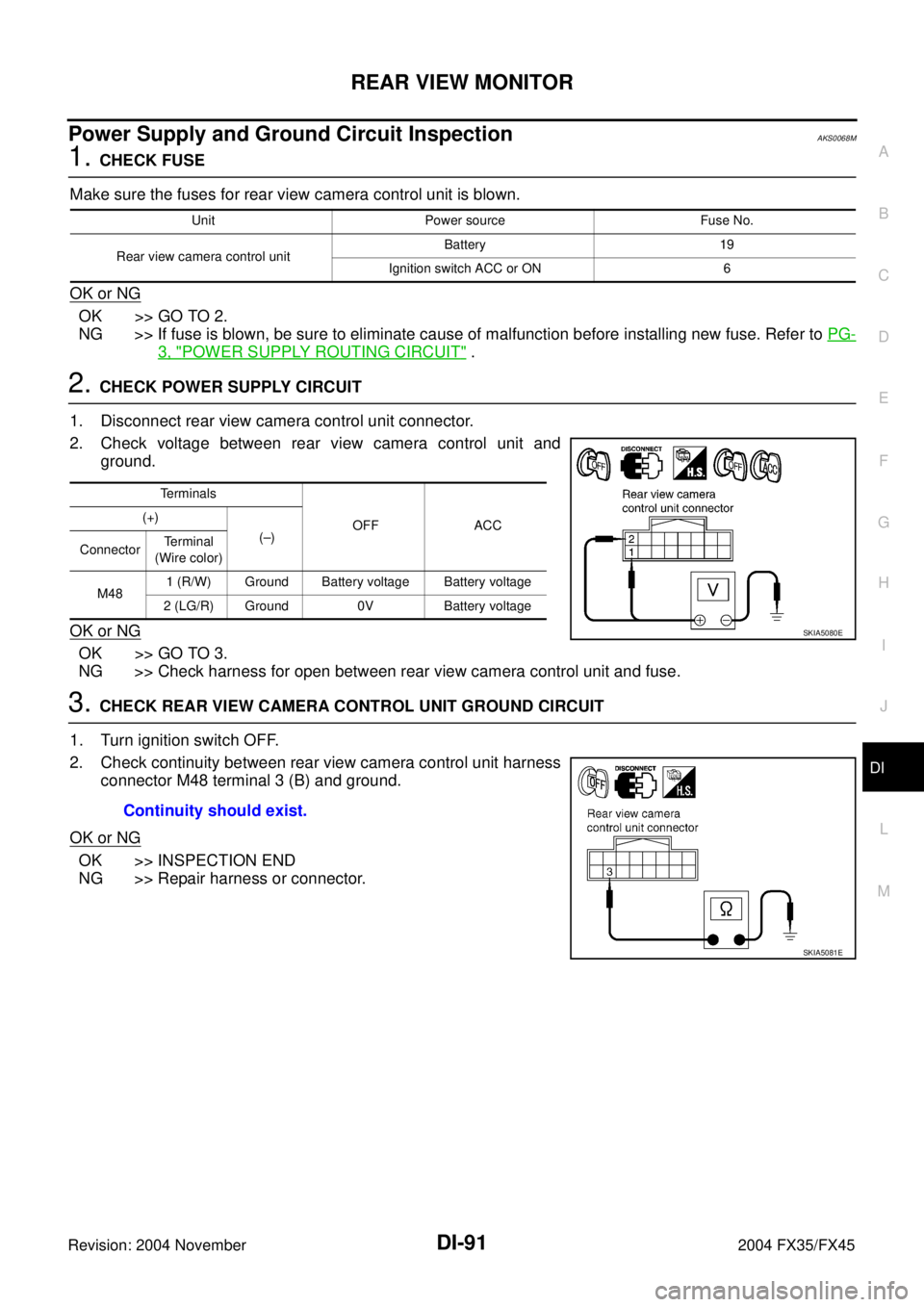
2. CHECK POWER SUPPLY CIRCUIT
1. Disconnect rear view camera control unit connector.
2. Check voltage between rear view camera control unit and
ground.
OK or NG
OK >> GO TO 3.
NG >> Check harness for open between rear view camera control unit and fuse.
3. CHECK REAR VIEW CAMERA CONTROL UNIT GROUND CIRCUIT
1. Turn ignition switch OFF.
2. Check continuity between rear view camera control unit harness
connector M48 terminal 3 (B) and ground.
OK or NG
OK >> INSPECTION END
NG >> Repair harness or connector.
Unit Power source Fuse No.
Rear view camera control unitBattery 19
Ignition switch ACC or ON 6
Terminals
OFF ACC (+)
(–)
ConnectorTerminal
(Wire color)
M481 (R/W) Ground Battery voltage Battery voltage
2 (LG/R) Ground 0V Battery voltage
SKIA5080E
Continuity should exist.
SKIA5081E