Page 1007 of 4449
BL-200
VEHICLE SECURITY (THEFT WARNING) SYSTEM
Revision: 2004 November 2004 FX35/FX45
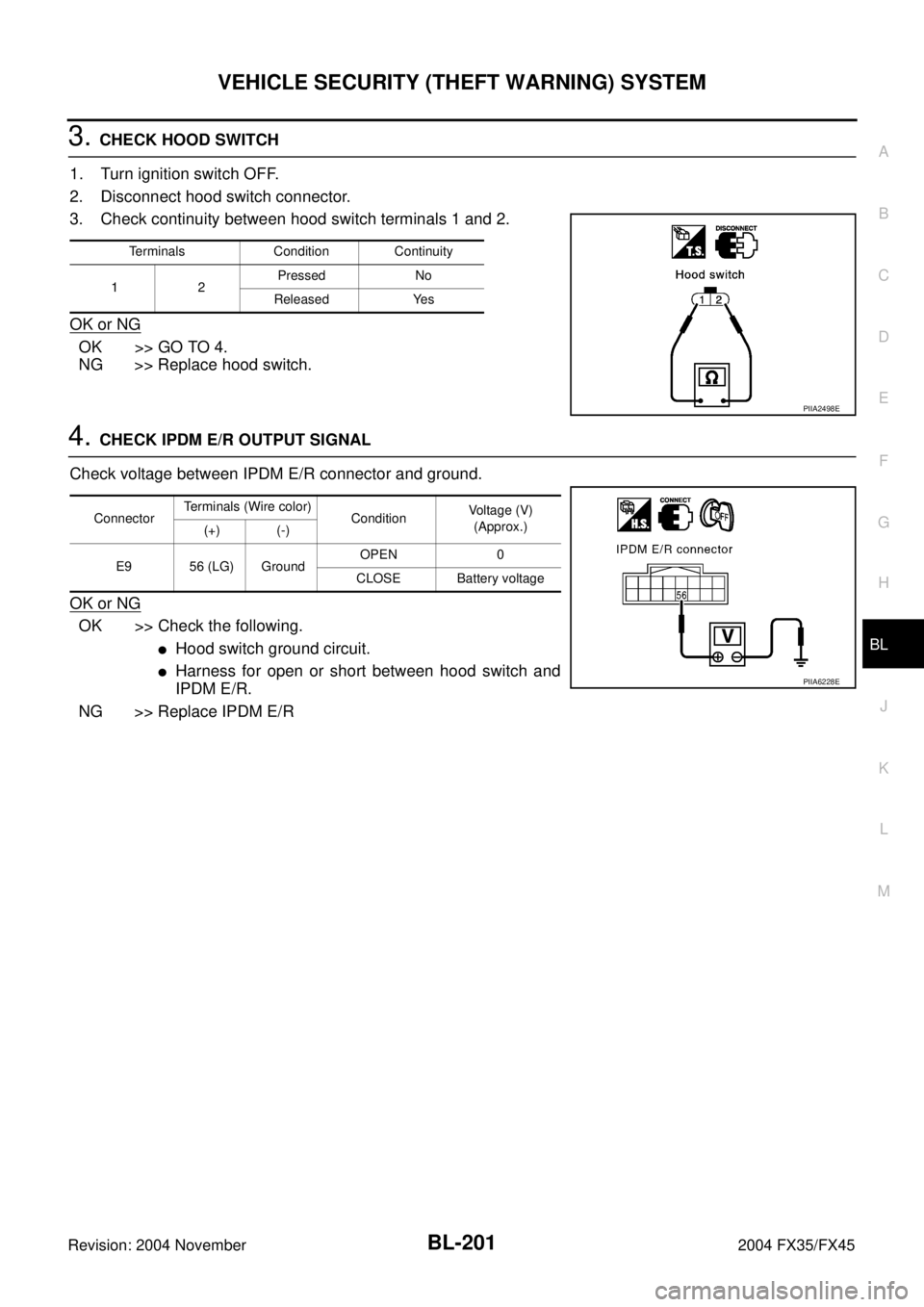
4. CHECK BCM OUTPUT SIGNAL
1. Connect BCM connector.
2. Check voltage between BCM connector M3, B14 terminals 12,
13, 62, 63 and ground.
OK or NG
OK >> Check condition of harness and connector.
NG >> Replace BCM.
1 – 2 HOOD SWITCH CHECK
1. CHECK HOOD SWITCH
Check hood switch and hood fitting condition.
OK or NG
OK >> GO TO 2.
NG >> Adjust installation of hood switch.
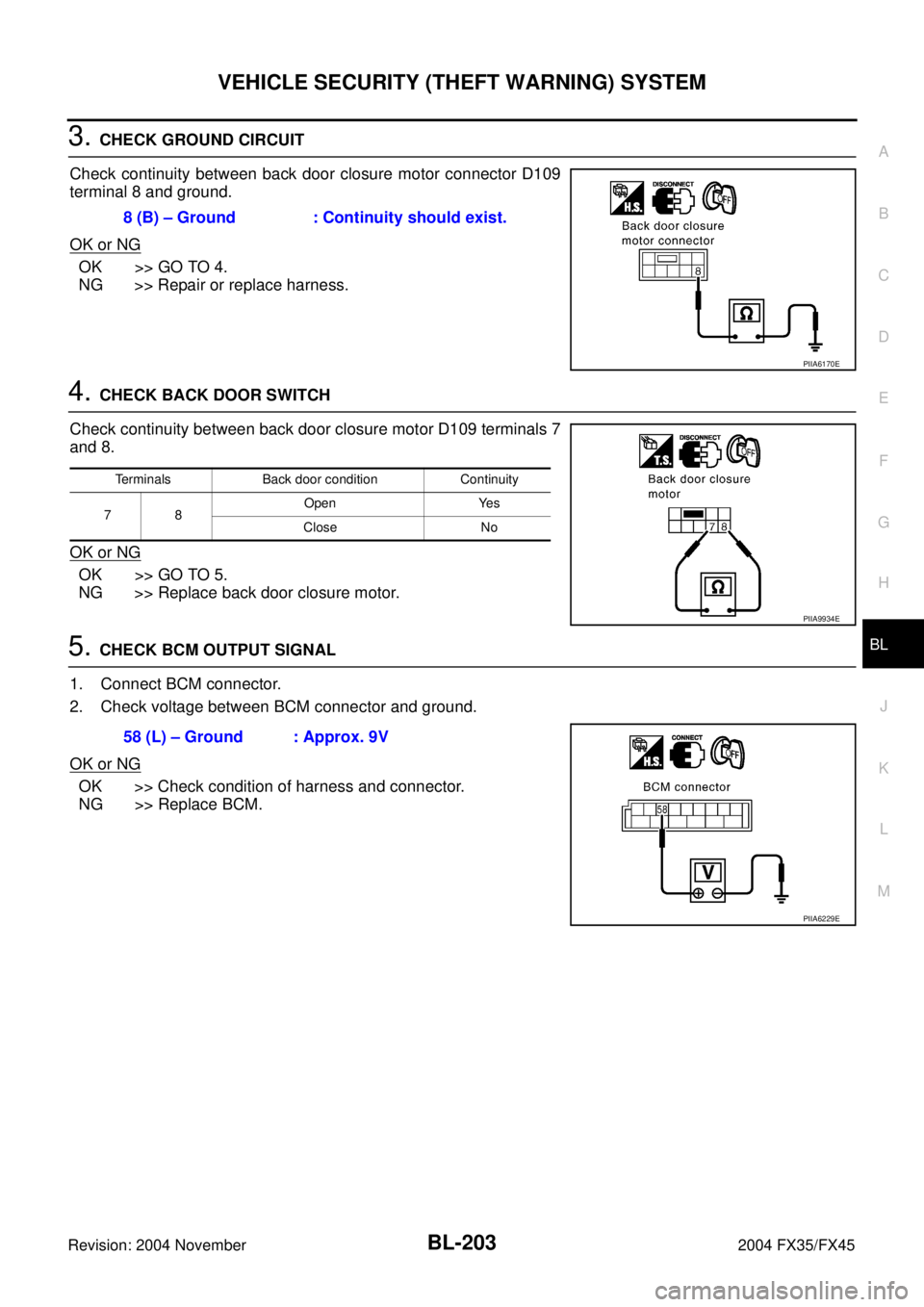
2. CHECK HOOD SWITCH INPUT SIGNAL
With CONSULT-II
Check (“HOOD SW”) in “DATA MONITOR” mode with CONSULT-II.
Without CONSULT-II
Check voltage between IPDM E/R connector and ground.
OK or NG
OK >> Hood switch is OK, and go to BL-202, "1 – 3 BACK
DOOR SWITCH CHECK" .
NG >> GO TO 3.12 (P/B) – Ground : Battery voltage
13 (P/L) – Ground : Battery voltage
62 (W) – Ground : Battery voltage
63 (P) – Ground : Battery voltage
PIIA6223E
Monitor item Condition
HOOD SWOPEN : ON
CLOSE : OFF
PIIA7006E
ConnectorTerminals (Wire color)
ConditionVoltage (V)
(Approx.)
(+) (-)
E9 56 (LG) GroundOPEN 0
CLOSE Battery voltage
PIIA6228E
Page 1008 of 4449
VEHICLE SECURITY (THEFT WARNING) SYSTEM
BL-201
C
D
E
F
G
H
J
K
L
MA
B
BL
Revision: 2004 November 2004 FX35/FX45
3. CHECK HOOD SWITCH
1. Turn ignition switch OFF.
2. Disconnect hood switch connector.
3. Check continuity between hood switch terminals 1 and 2.
OK or NG
OK >> GO TO 4.
NG >> Replace hood switch.
4. CHECK IPDM E/R OUTPUT SIGNAL
Check voltage between IPDM E/R connector and ground.
OK or NG
OK >> Check the following.
�Hood switch ground circuit.
�Harness for open or short between hood switch and
IPDM E/R.
NG >> Replace IPDM E/R
Terminals Condition Continuity
1 2Pressed No
Released Yes
PIIA2498E
ConnectorTerminals (Wire color)
ConditionVoltage (V)
(Approx.)
(+) (-)
E9 56 (LG) GroundOPEN 0
CLOSE Battery voltage
PIIA6228E
Page 1009 of 4449
BL-202
VEHICLE SECURITY (THEFT WARNING) SYSTEM
Revision: 2004 November 2004 FX35/FX45
1 – 3 BACK DOOR SWITCH CHECK
1. CHECK BACK DOOR SWITCH INPUT SIGNAL
With CONSULT-II
Check (“BACK DOOR SW”) in “DATA MONITOR” mode with CONSULT-II.
Without CONSULT-II
Check voltage between BCM connector and ground.
OK or NG
OK >> Back door switch circuit is OK.
NG >> GO TO 2.
2. CHECK HARNESS CONTINUITY
1. Turn ignition switch OFF.
2. Disconnect BCM and back door closure motor connector.
3. Check continuity between BCM connector B14 terminal 58 and
back door closure motor connector D109 terminal 7.
4. Check continuity between BCM connector B14 terminal 58 and
ground.
OK or NG
OK >> GO TO 3.
NG >> Repair or replace harness.
Monitor item Condition
BACK DOOR SWOPEN : ON
CLOSE : OFF
PIIA2488E
ConnectorTerminals (Wire color)
ConditionVoltage (V)
(Approx.)
(+) (–)
B14 58 (L) GroundOPEN 0
CLOSE 9
PIIA6229E
58 (L) – 7 (L) : Continuity should exist.
58 (L) – Ground : Continuity should not exist.
PIIA6226E
Page 1010 of 4449
VEHICLE SECURITY (THEFT WARNING) SYSTEM
BL-203
C
D
E
F
G
H
J
K
L
MA
B
BL
Revision: 2004 November 2004 FX35/FX45
3. CHECK GROUND CIRCUIT
Check continuity between back door closure motor connector D109
terminal 8 and ground.
OK or NG
OK >> GO TO 4.
NG >> Repair or replace harness.
4. CHECK BACK DOOR SWITCH
Check continuity between back door closure motor D109 terminals 7
and 8.
OK or NG
OK >> GO TO 5.
NG >> Replace back door closure motor.
5. CHECK BCM OUTPUT SIGNAL
1. Connect BCM connector.
2. Check voltage between BCM connector and ground.
OK or NG
OK >> Check condition of harness and connector.
NG >> Replace BCM.8 (B) – Ground : Continuity should exist.
PIIA6170E
Terminals Back door condition Continuity
78Open Yes
Close No
PIIA9934E
58 (L) – Ground : Approx. 9V
PIIA6229E
Page 1011 of 4449
BL-204
VEHICLE SECURITY (THEFT WARNING) SYSTEM
Revision: 2004 November 2004 FX35/FX45
Diagnostic Procedure 2AIS004P5
SECURITY INDICATOR LAMP CHECK
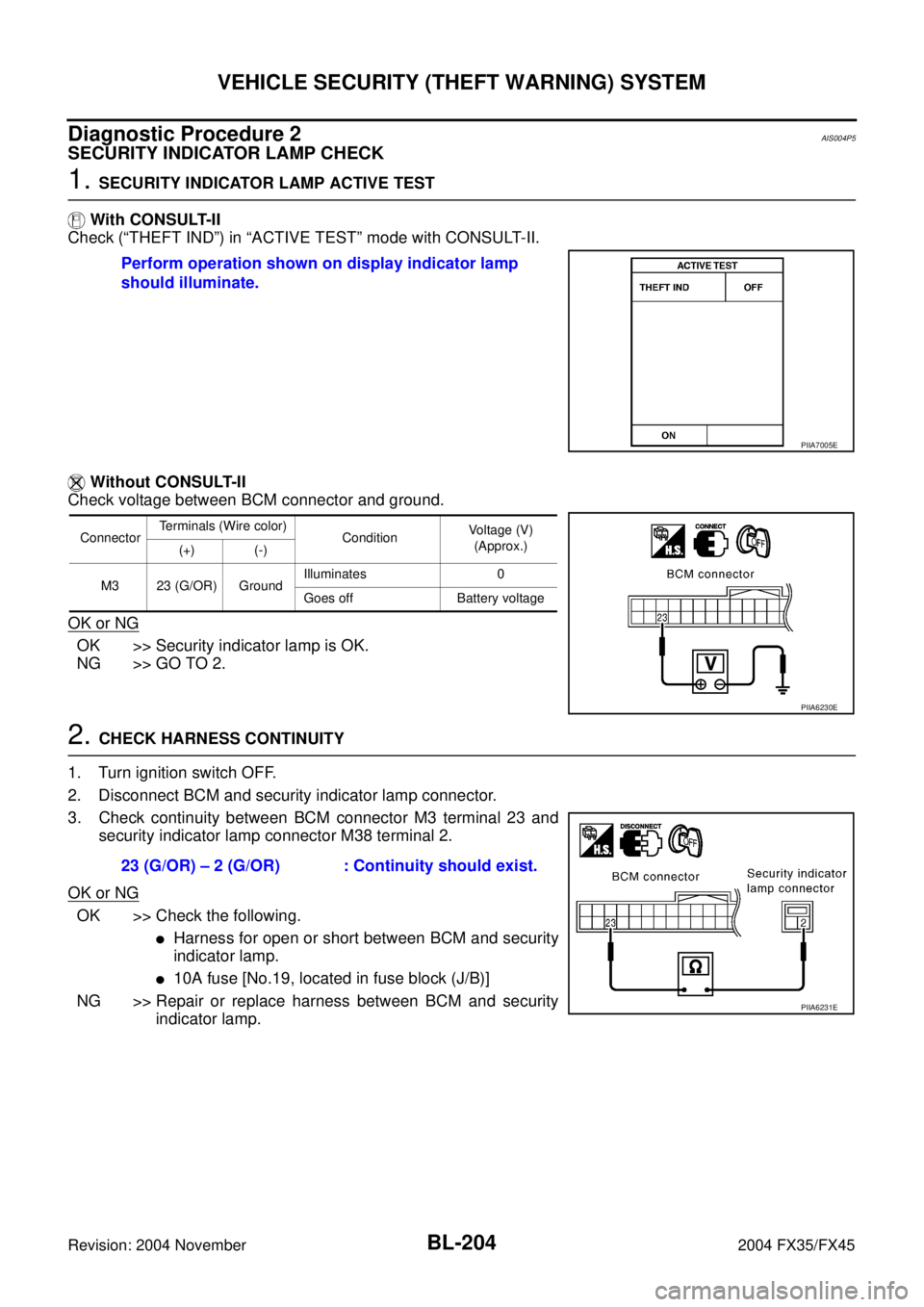
1. SECURITY INDICATOR LAMP ACTIVE TEST
With CONSULT-II
Check (“THEFT IND”) in “ACTIVE TEST” mode with CONSULT-II.
Without CONSULT-II
Check voltage between BCM connector and ground.
OK or NG
OK >> Security indicator lamp is OK.
NG >> GO TO 2.
2. CHECK HARNESS CONTINUITY
1. Turn ignition switch OFF.
2. Disconnect BCM and security indicator lamp connector.
3. Check continuity between BCM connector M3 terminal 23 and
security indicator lamp connector M38 terminal 2.
OK or NG
OK >> Check the following.
�Harness for open or short between BCM and security
indicator lamp.
�10A fuse [No.19, located in fuse block (J/B)]
NG >> Repair or replace harness between BCM and security
indicator lamp. Perform operation shown on display indicator lamp
should illuminate.
PIIA7005E
ConnectorTerminals (Wire color)
ConditionVoltage (V)
(Approx.)
(+) (-)
M3 23 (G/OR) GroundIlluminates 0
Goes off Battery voltage
PIIA6230E
23 (G/OR) – 2 (G/OR) : Continuity should exist.
PIIA6231E
Page 1012 of 4449
VEHICLE SECURITY (THEFT WARNING) SYSTEM
BL-205
C
D
E
F
G
H
J
K
L
MA
B
BL
Revision: 2004 November 2004 FX35/FX45
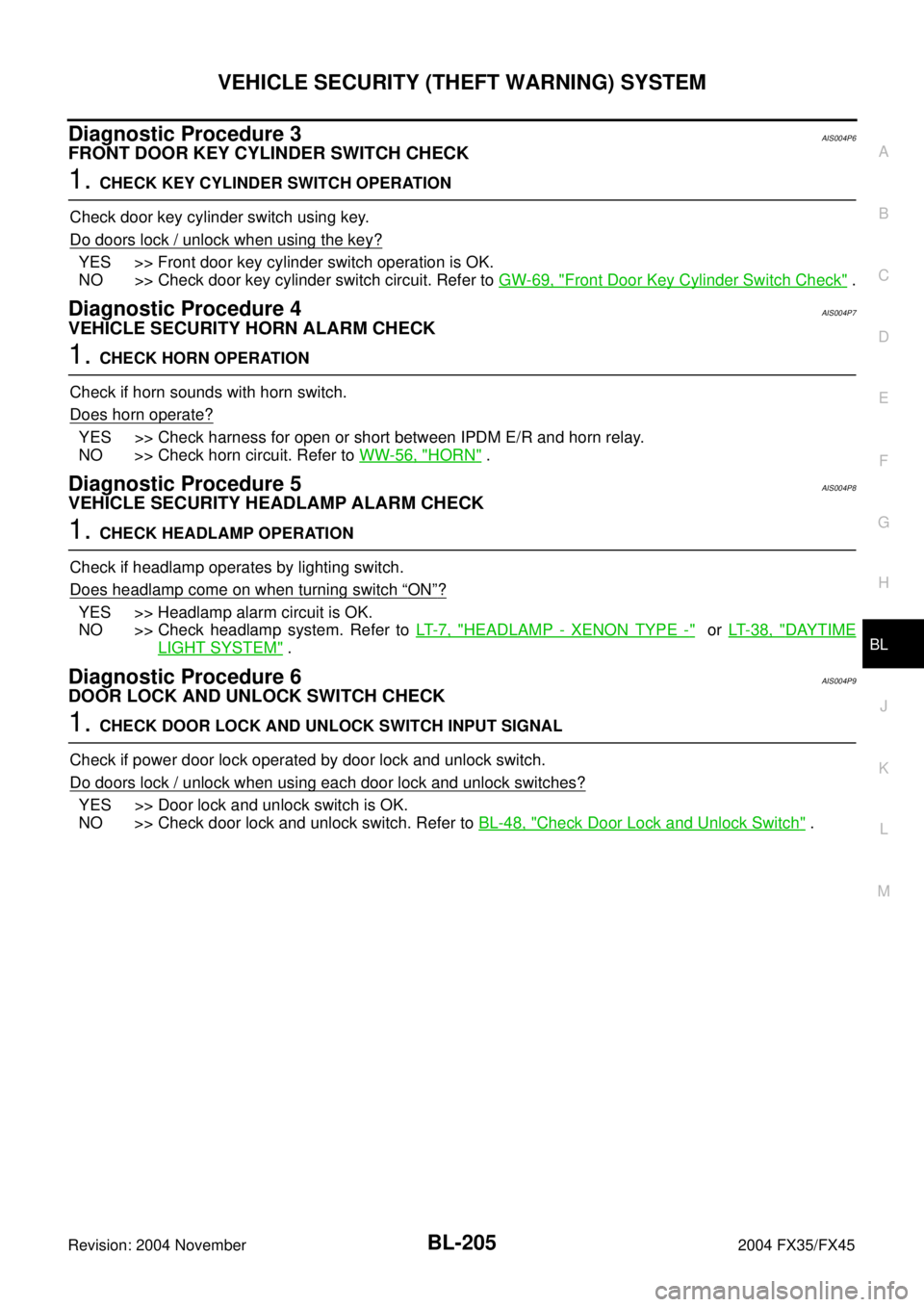
Diagnostic Procedure 3AIS004P6
FRONT DOOR KEY CYLINDER SWITCH CHECK
1. CHECK KEY CYLINDER SWITCH OPERATION
Check door key cylinder switch using key.
Do doors lock / unlock when using the key?
YES >> Front door key cylinder switch operation is OK.
NO >> Check door key cylinder switch circuit. Refer to GW-69, "
Front Door Key Cylinder Switch Check" .
Diagnostic Procedure 4AIS004P7
VEHICLE SECURITY HORN ALARM CHECK
1. CHECK HORN OPERATION
Check if horn sounds with horn switch.
Does horn operate?
YES >> Check harness for open or short between IPDM E/R and horn relay.
NO >> Check horn circuit. Refer to WW-56, "
HORN" .
Diagnostic Procedure 5AIS004P8
VEHICLE SECURITY HEADLAMP ALARM CHECK
1. CHECK HEADLAMP OPERATION
Check if headlamp operates by lighting switch.
Does headlamp come on when turning switch
“ON”?
YES >> Headlamp alarm circuit is OK.
NO >> Check headlamp system. Refer to LT- 7 , "
HEADLAMP - XENON TYPE -" or LT- 3 8 , "DAYTIME
LIGHT SYSTEM" .
Diagnostic Procedure 6AIS004P9
DOOR LOCK AND UNLOCK SWITCH CHECK
1. CHECK DOOR LOCK AND UNLOCK SWITCH INPUT SIGNAL
Check if power door lock operated by door lock and unlock switch.
Do doors lock / unlock when using each door lock and unlock switches?
YES >> Door lock and unlock switch is OK.
NO >> Check door lock and unlock switch. Refer to BL-48, "
Check Door Lock and Unlock Switch" .
Page 1068 of 4449
BODY REPAIR
BL-261
C
D
E
F
G
H
J
K
L
MA
B
BL
Revision: 2004 November2004 FX35/FX45
Replacement OperationsAIS0062A
DESCRIPTION
This section is prepared for technicians who have attained a high level of skill and experience in repairing col-
lision-damaged vehicles and also use modern service tools and equipment. Persons unfamiliar with body
repair techniques should not attempt to repair collision-damaged vehicles by using this section.
Technicians are also encouraged to read Body Repair Manual (Fundamentals) in order to ensure that the orig-
inal functions and quality of the vehicle can be maintained. The Body Repair Manual (Fundamentals) contains
additional information, including cautions and warning, that are not including in this manual. Technicians
should refer to both manuals to ensure proper repairs.
Please note that these information are prepared for worldwide usage, and as such, certain procedures might
not apply in some regions or countries.
Page 1096 of 4449
PRECAUTIONS
BR-3
C
D
E
G
H
I
J
K
L
MA
B
BR
Revision: 2004 November 2004 FX35/FX45
PRECAUTIONSPFP:00001
Precautions for Supplemental Restraint System (SRS) “AIR BAG” and “SEAT
BELT PRE-TENSIONER”
AFS0028A
The Supplemental Restraint System such as “AIR BAG” and “SEAT BELT PRE-TENSIONER”, used along
with a front seat belt, helps to reduce the risk or severity of injury to the driver and front passenger for certain
types of collision. This system includes seat belt switch inputs and dual stage front air bag modules. The SRS
system uses the seat belt switches to determine the front air bag deployment, and may only deploy one front
air bag, depending on the severity of a collision and whether the front occupants are belted or unbelted.
Information necessary to service the system safely is included in the SRS and SB section of this Service Man-
ual.
WARNING:
�To avoid rendering the SRS inoperative, which could increase the risk of personal injury or death
in the event of a collision which would result in air bag inflation, all maintenance must be per-
formed by an authorized NISSAN/INFINITI dealer.
�Improper maintenance, including incorrect removal and installation of the SRS, can lead to per-
sonal injury caused by unintentional activation of the system. For removal of Spiral Cable and Air
Bag Module, see the SRS section.
�Do not use electrical test equipment on any circuit related to the SRS unless instructed to in this
Service Manual. SRS wiring harnesses can be identified by yellow and/or orange harnesses or
harness connectors.
Precautions for Brake SystemAFS001MQ
�Recommended fluid is brake fluid “DOT 3”.
�Do not reuse drained brake fluid.
�Be careful not to splash brake fluid on painted areas.
�To clean or wash all parts of master cylinder, disc brake caliper and wheel cylinder, use clean brake fluid.
�Do not use mineral oils such as gasoline or kerosene. They will ruin rubber parts of the hydraulic system.
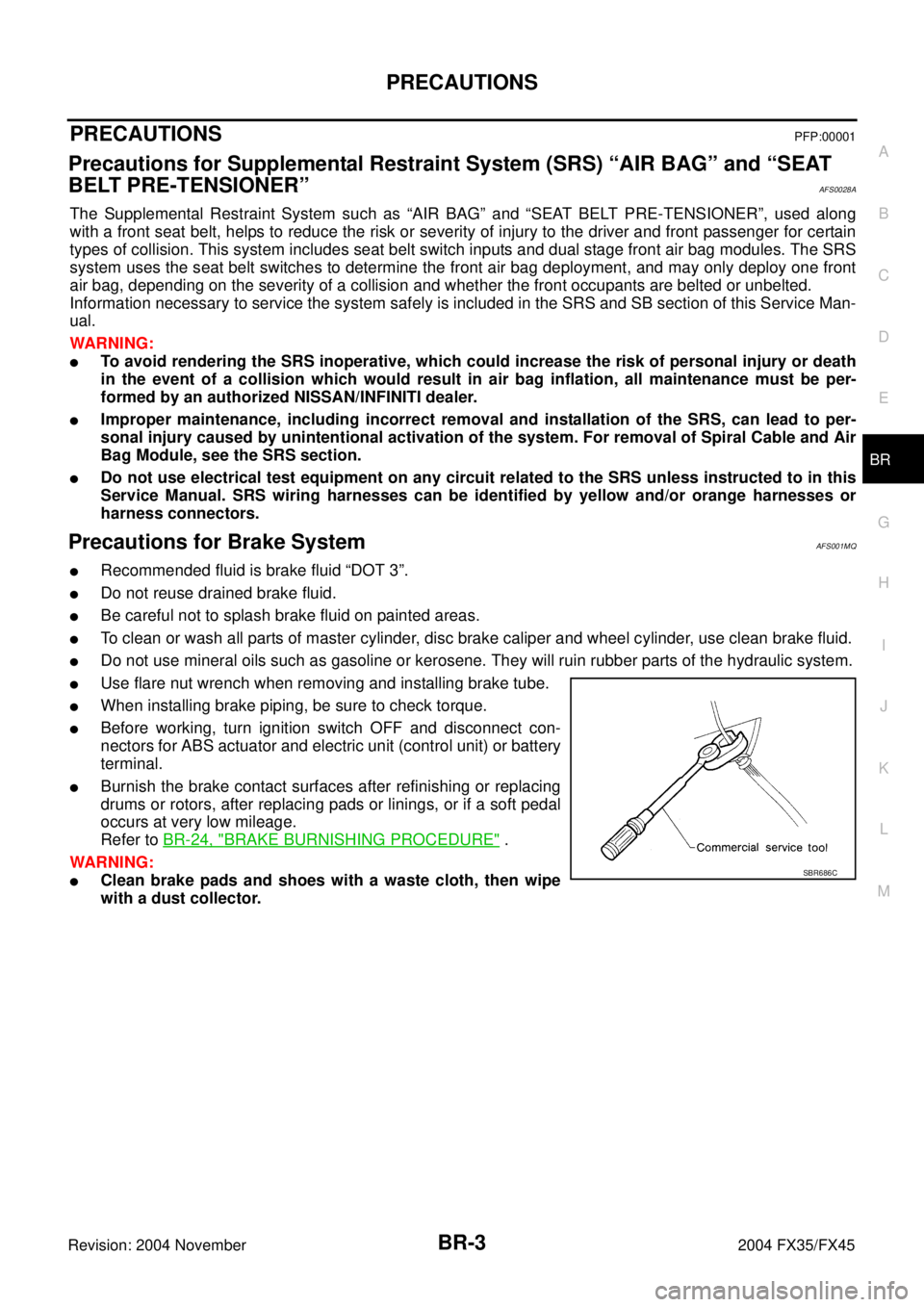
�Use flare nut wrench when removing and installing brake tube.
�When installing brake piping, be sure to check torque.
�Before working, turn ignition switch OFF and disconnect con-
nectors for ABS actuator and electric unit (control unit) or battery
terminal.
�Burnish the brake contact surfaces after refinishing or replacing
drums or rotors, after replacing pads or linings, or if a soft pedal
occurs at very low mileage.
Refer to BR-24, "
BRAKE BURNISHING PROCEDURE" .
WARNING:
�Clean brake pads and shoes with a waste cloth, then wipe
with a dust collector.SBR686C