Page 171 of 296

Help assure your vehicle’s f uture
reliability and perf ormance by paying
extra attention to how you drive
during the f irst 600 miles (1,000 km).
During this period:Avoid full throttle starts and rapid
acceleration.
Avoidhardbrakingforthefirst
200 miles (300 km).
Do not change the oil until the
scheduled maintenance time.
We also recommend that you should
not tow a trailer during the f irst 500
miles (800 km). Your Honda is designed to operate
on unleaded gasoline with a pump
octane number of 86 or higher. Use
of a lower octane gasoline can cause
a persistent, heavy, metallic rapping
noise in the engine that can lead to
mechanical f ailure.
We recommend gasolines containing
detergent additives that help prevent
f uel system and engine deposits.
Using gasoline containing lead will
damage your vehicle’s emissions
controls. This contributes to air
pollution.
Use of gasoline with these additives
may adversely af f ect perf ormance,
and cause the Malfunction Indicator
Lamp on your instrument panel to
come on. If this happens, contact
your authorized Honda dealer f or
service.
Some gasoline today is blended with
oxygenates such as ethanol or
MTBE. Your vehicle is designed to
operate on oxygenated gasoline
containing up to 10 percent ethanol
by volume and up to 15 percent
MTBE by volume. Do not use
gasoline containing methanol.
In addition, in order to maintain good
perf ormance, f uel economy, and
emissions control, we strongly
recommend, in areas where it is
available, the use of gasoline that
does NOT contain manganese-based
f uel additives such as MMT.
You should also f ollow these same
recommendations with an
overhauled or exchanged engine, or
when the brakes are replaced.
If you notice any undesirable
operating symptoms, try another
service station or switch to another
brand of gasoline.
For f urther important f uel-related
inf ormation, please ref er to your
.
Break-in Period, Gasoline T ype
Bef ore Driving
Break-in Period Gasoline Type
Quick Start Guide
168
Page 176 of 296
Always maintain your vehicle
according to the maintenance
schedule. See(see page
).
an underinf lated tire
causes more ‘‘rolling resistance,’’
which uses f uel.
The build-up of snow or mud on
your vehicle’s underside adds
weight and rolling resistance.
Frequent cleaning helps your f uel
mileage and reduces the chance of
corrosion.
Drive moderately. Rapid
acceleration, abrupt cornering,
and hard braking use more f uel.
Always drive in the highest gear
possible. Try to maintain a constant speed.
Everytimeyouslowdownand
speed up, your vehicle uses extra
fuel.Usethecruisecontrolwhen
appropriate.
Combine several short trips into
one.
The air conditioning puts an extra
load on the engine which makes it
usemorefuel.Usethefresh-air
ventilation when possible.
204
For example,
Fuel Economy
Bef ore Driving
Improving Fuel Economy
Owner’s
Maintenance Checks
173
Page 179 of 296
�Î
�Î �Î
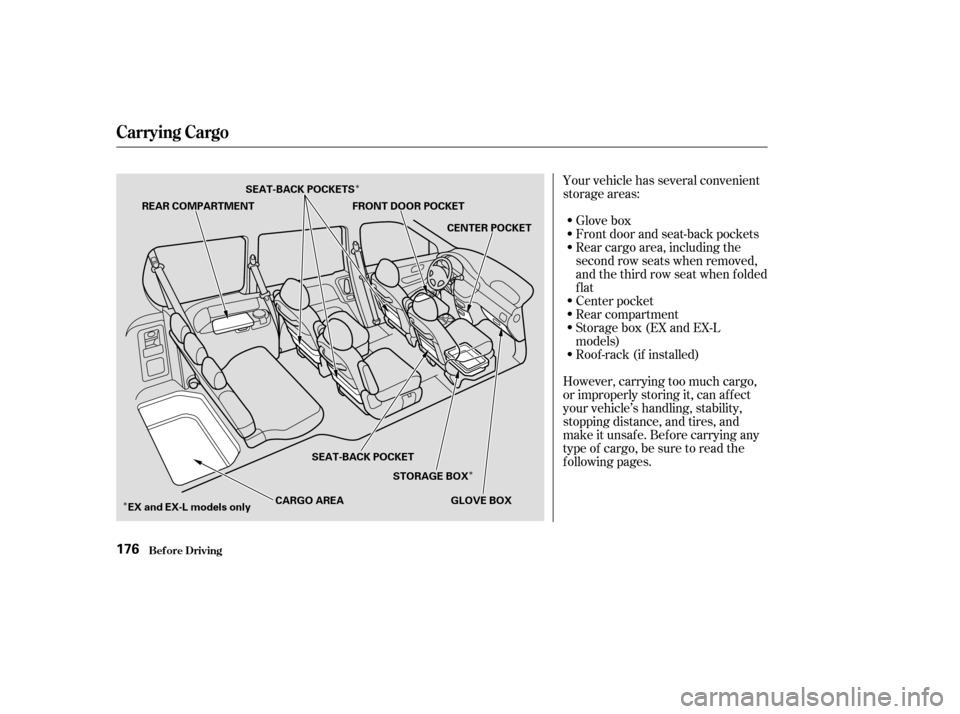
Your vehicle has several convenient
storage areas:
Glove box
Front door and seat-back pockets
Rear cargo area, including the
second row seats when removed,
andthethirdrowseatwhenfolded
flat
Center pocket
Rear compartment
Storage box (EX and EX-L
models)
Roof -rack (if installed)
However, carrying too much cargo,
or improperly storing it, can af f ect
your vehicle’s handling, stability,
stopping distance, and tires, and
make it unsaf e. Bef ore carrying any
type of cargo, be sure to read the
f ollowing pages.
Carrying Cargo
Bef ore Driving176
REAR COMPARTMENT FRONT DOOR POCKET
CENTER POCKET
GLOVE BOX
STORAGE BOX
SEAT-BACK POCKET
EX and EX-L models only CARGO AREA
SEAT-BACK POCKETS
Page 186 of 296

Apply the parking brake.
In cold weather, turn of f all
electrical accessories to reduce
the drain on the battery.
Make sure the shif t lever is in
Park. Press on the brake pedal.
Without touching the accelerator
pedal, turn the ignition key to the
START (III) position. Do not hold
the key in START for more than
15 seconds at a time. If the engine
does not start right away, pause
f or at least 10 seconds bef ore
trying again.
If the engine does not start within
15 seconds, or starts but stalls
right away, repeat step 4 with the
accelerator pedal pressed halfway
down. If the engine starts, release
pressure on the accelerator pedal
so the engine does not race.If the engine fails to start, press
the accelerator pedal all the way
downandholdittherewhile
starting to clear flooding. If the
engine still does not start, return
to step 5.
5. 6.
1.
2.
3.
4.
Starting the Engine
Driving183
NOTICE: The engine is harder to start
in cold weather. Also, the thinner air
f ound at altitudes above 8,000 f eet
(2,400 meters) adds to this problem.
Page 187 of 296

These indicators on the instrument
panel show which position the shif t
lever is in.
The ‘‘D’’ indicator comes on f or a
f ew seconds when you turn the
ignition switch to ON (II). If it
f lashes while driving (in any shif t
position), it indicates a possible
problem in the transmission.If the malf unction indicator lamp
comes on along with the ‘‘D’’
indicator, there is a problem in the
automatic transmission control
system. Avoid rapid acceleration and
havethetransmissioncheckedbya
Honda dealer as soon as possible.
To shif t f rom any position, press
f irmly on the brake pedal and pull
the lever towards you. You cannot
shif t out of Park when the ignitionswitch is in the LOCK (0) or
ACCESSORY (I) position.
To shift from:
PtoR
RtoP
NtoR
Dto2 2to1
1to2
2toD
DtoD DtoN
DtoD NtoDRtoN Do this:
Press the brake pedal and
pull the shift lever towards
you.
Pull the shift lever towards
you.
Move the lever.
3
3
3
3
Automatic Transmission
Driving
Shif t L ever Position Indicators
Shif ting
184
SHIFT LEVER
Page 188 of 296

�µ�µ�µ
�µ �µ
�µ
This position mechani-
cally locks the transmission. Use
Park whenever you are turning of f or
starting the engine. To shif t out of
Park, you must press on the brake
pedal and have your f oot of f the
accelerator pedal. Pull the shif t lever
towards you, then move it out of
Park.
If you have done all of the above and
still cannot move the lever out of
Park, see Shif t Lock Release on page .
You must also pull the shif t lever
towards you to shift into Park. To
avoid transmission damage, come to
a complete stop bef ore shif ting into
Park. The shif t lever must be in Park
bef ore you can remove the key f rom
the ignition switch. Press the brake
pedal and pull the shif t lever towards
you to shift from Park to Reverse. To
shif t f rom Reverse to Natural, come
to a complete stop and then shift.
Use Neutral if you
need to restart a stalled engine, or if
it is necessary to stop brief ly with
the engine idling. Shif t to the Park
position if you need to leave your
vehicle for any reason. Press on the
brake pedal when you are moving
the shift lever from Neutral to
another gear.
Use this position f or
normal driving. The transmission
automatically selects a suitable gear
f or your speed and acceleration. You
may notice the transmission shif ting
up at higher speeds when the engine
is cold. This helps the engine warm
up f aster. This position is similar
to D, except only the first three
gears are selected instead of all f ive.
Use D when towing a trailer in hilly
terrain, or to provide engine braking
when going down a steep hill. D can
also keep the transmission f rom
cycling between third and f ourth
gears in stop-and-go driving.
This position locks
the transmission in second gear. It
does not downshif t to f irst gear
when you come to a stop.
Use Second gear: For more power when climbing.
To increase engine braking when
going down steep hills.
For starting out on a slippery
surf ace or in deep snow.
When driving downhill with a
trailer.
186
3
3
CONT INUED
Automatic Transmission
Driving
Park (P) Reverse (R)
Neutral (N)
Drive (D) Drive (D )
Second (2)3
185
Page 189 of 296
�µTo shif t f rom Second to
First, pull the shift lever towards you,
then shift to the lower gear. With the
lever in this position, the
transmission locks in First gear. By
upshif ting and downshif ting through
1, 2, D , and D, you can operate the
transmission much like a manual
transmission without a clutch pedal. If you exceed the maximum speed
f or the gear you are in, the engine
speed will enter into the tachometer’s
red zone. If this occurs, you may f eel
the engine cut in and out. This is
caused by a limiter in the engine’s
computer controls. The engine will
run normally when you reduce the
RPM below the red zone.This allows you to move the shif t
lever out of Park if the normal
method of pushing on the brake
pedal and pulling the shif t lever does
not work.
Set the Parking brake.
Remove the key from the ignition
switch.
1.
2.
3
Automatic Transmission
Driving
First (1)
Engine Speed Limiter Shift Lock Release
186
Page 196 of 296

This switch is under the side vent. It
letsyouturntheTractionControl
System on and of f . You cannot turn
of f the TCS while the TCS indicator
is f lashing.
Deactivate the system by pressing
the TCS On/Off switch. The TCS
indicator comes on as a reminder.
Pressing the switch again turns the
system back on.The Traction Control System turns
on every time you start the engine,
even if you turned it of f the last time
you drove the vehicle.
The TCS indicator comes on or
f lashes under the f ollowing condi-
tions:
When you turn the ignition switch
to ON (II).
When you manually turn of f TCS.
It f lashes when TCS is regulating
wheelspin.
If the system’s diagnostics senses
a problem with TCS, the indicator
will come on and stay on.
If the brakes overheat, the
indicator will come on. If the TCS indicator comes on and
stays on for more than 10 minutes
while driving, pull to the side of the
road when it is saf e and turn of f the
engine. Reset the system by
restarting the engine, and watch the
TCS indicator. If the indicator
remains on, or comes back on while
driving, have the system inspected
by your Honda dealer. You can still
drive the vehicle without TCS.
This indicator will come on along
with the ABS indicator if there is a
problem in the anti-lock brake
system (see
on page
).
The TCS indicator may occasionally
come on f or one or two seconds and
then go out. This is normal. 190
TCS ON/OFF Switch
TCS Indicator
ABS Indicator
Traction Control System (TCS)
Driving193
TCS ON/OFF SWITCH