2004 CHEVROLET CORVETTE ignition
[x] Cancel search: ignitionPage 170 of 384
Auto Lock
Press the OPTIONS button until AUTO LOCK appears
on the display, then use the RESET button to page
through the following choices:
•AUTO LOCK ON
•AUTO LOCK OFF
If you choose AUTO LOCK ON, both doors will
automatically lock when the vehicle exceeds 10 mph
(16 km/h) in a manual transmission. In a vehicle with an
automatic transmission, both doors will automatically
lock when you move the shift lever out of PARK (P).
Choose AUTO LOCK OFF to turn this option off.
Auto Unlock
The AUTO UNLOCK will be available only if AUTO
LOCK is set to ON as described previously.
Press the OPTIONS button until AUTO UNLOCK
appears on the display, then use the RESET button to
page through the following choices:
•AUTO UNLOCK DRIVER
•AUTO UNLOCK BOTH
•AUTO UNLOCK OFF
If you choose AUTO UNLOCK DRIVER, the driver’s
door will automatically unlock when you turn the vehicle
off and pull the key out of the ignition.Choose AUTO UNLOCK BOTH, and both doors will
automatically unlock when you turn the vehicle off and
pull the key out of the ignition.
AUTO UNLOCK OFF turns off this option.
Easy Entry
The easy entry feature will only be available if the
vehicle is equipped with the memory option.
Press the OPTIONS button until SEAT EASY ENTRY
appears on the display, then use the RESET button
to page through the following choices:
•SEAT EASY ENTRY ON
•SEAT EASY ENTRY OFF
If you choose SEAT EASY ENTRY ON, when you turn
the ignition off and remove the key, the seat will
automatically move back and the telescopic steering
wheel (if equipped) will return to its full-forward position
for an easy exit or an easy entrance when returning
to the vehicle.
The seat will only return to the forward position if you
unlock the door with the keyless entry transmitter
or press the appropriate MEMORY button.
SEAT EASY ENTRY OFF turns off this option.
3-56
Page 177 of 384
{CAUTION:
When the LOW TIRE PRESSURE or FLAT TIRE
message is displayed on the Driver Information
Center, your vehicle’s handling capabilities will
be reduced during severe maneuvers. If you
drive too fast, you could lose control of your
vehicle. You or others could be injured. Don’t
drive over 55 mph (90 km/h) when the LOW
TIRE PRESSURE or FLAT TIRE message is
displayed. Drive cautiously and check your tire
pressures as soon as you can.MAXIMUM SPEED 80 MPH (129 km/h):You will hear
four chimes when this message is displayed. To
acknowledge the warning, press RESET. After you
press RESET, a message will reappear every
10 minutes until this condition changes.
This message indicates that a malfunction is present in
the selective real time damping system. The vehicle
speed will be limited to 80 mph (129 km/h) when
the shock absorber system has failed and the shocks
are in their full soft mode. Have your vehicle serviced as
soon as possible.
PULL KEY – WAIT 10 SEC (Manual Transmission
Only):If this message comes on, the steering column
lock system has detected a problem while disengaging
the steering column lock. This message may occur when
the ignition key is removed and reinserted before the
steering column lock system fully locks or unlocks
the steering column. To acknowledge that you have read
this message, and to clear it from the display, remove
the ignition key and wait 10 seconds before reinserting
the key into the ignition. If you attempt to operate
your vehicle without removing the key for 10 seconds,
the vehicle’s fuel system will shut off when you
reach 1.5 mph (2.4 km/h). If the message stays on after
removing the key and waiting 10 seconds, have your
vehicle taken to an authorized dealer as soon as
possible for diagnosis and repair.
3-63
Page 178 of 384

REDUCED ENGINE POWER:You will hear chimes
continuously when this message is displayed. To
acknowledge that you have read the message and to
remove it from the display, press RESET. The message
will reappear every 15 seconds until this condition
changes.
If the Driver Information Center (DIC) displays the
REDUCED ENGINE POWER message and the CHECK
ENGINE light comes on, a noticeable reduction in the
vehicle’s performance may occur. If the REDUCED
ENGINE POWER message is displayed but there is no
reduction in performance, proceed to your destination.
The performance may be reduced the next time
the vehicle is driven.
The vehicle may be driven at a reduced speed while the
REDUCED ENGINE POWER message is displayed,
but acceleration and speed may be reduced. Anytime
the CHECK ENGINE light stays on, the vehicle
should be taken to an authorized dealer as soon as
possible for diagnosis and repair.
Also, refer toMalfunction Indicator Lamp on page 3-41.
If the REDUCED ENGINE POWER message is
displayed in combination with the COOLANT OVER
TEMP message, seeEngine Overheating on page 5-26.REDUCE ENGINE RPM:You will hear four chimes
when this message is displayed. To acknowledge
the warning, press the RESET button. After you press
the RESET button, a message will be displayed and you
will hear a chime every minute until this condition
changes. If you do not press RESET, the message will
remain on the digital display until the condition
changes.
If the engine oil temperature exceeds 320°F (160°C),
this message is displayed. You should check the engine
coolant temperature and engine oil level. If your
engine is too hot, seeEngine Overheating on page 5-26.
Your vehicle may need service, so see your dealer.
You can monitor the oil temperature with the GAGES
button on the DIC.
SERVICE ABS (Anti-Lock Brake System):If the
SERVICE ABS message is displayed when you
are driving, stop as soon as possible and turn the
ignition off. Then start the engine again to reset the
system. If the message stays on, or comes back
on again while you are driving, your vehicle is in need
of service. If the regular brake system warning light
is not on, you still have brakes, but do not have anti-lock
brakes. If the regular brake system light is also on,
you do not have anti-lock brakes and there is a problem
with your brakes. SeeBrake System Warning Light
on page 3-38.
3-64
Page 183 of 384
Audio System(s)
Notice:Before adding any sound equipment to
your vehicle, like a tape player, CB radio, mobile
telephone, or two-way radio, make sure that it can
be added by checking with your dealer. Also,
check federal rules covering mobile radio and
telephone units. If sound equipment can be added,
it is very important to do it properly. Added
sound equipment may interfere with the operation
of your vehicle’s engine, radio, or other systems,
and even damage them. Your vehicle’s systems may
interfere with the operation of sound equipment
that has been added improperly.Figure out which audio system is in your vehicle, find
out what your audio system can do, and how to operate
all of its controls.
Your vehicle may have a feature called Retained
Accessory Power (RAP). With RAP, the audio system
can be played even after the ignition is turned off.
See “Retained Accessory Power (RAP)” underIgnition
Positions on page 2-20.
Setting the Time
Press and hold HR until the correct hour appears on the
display. Press and hold MN until the correct minute
appears on the display.
3-69
Page 184 of 384
Radio with Cassette
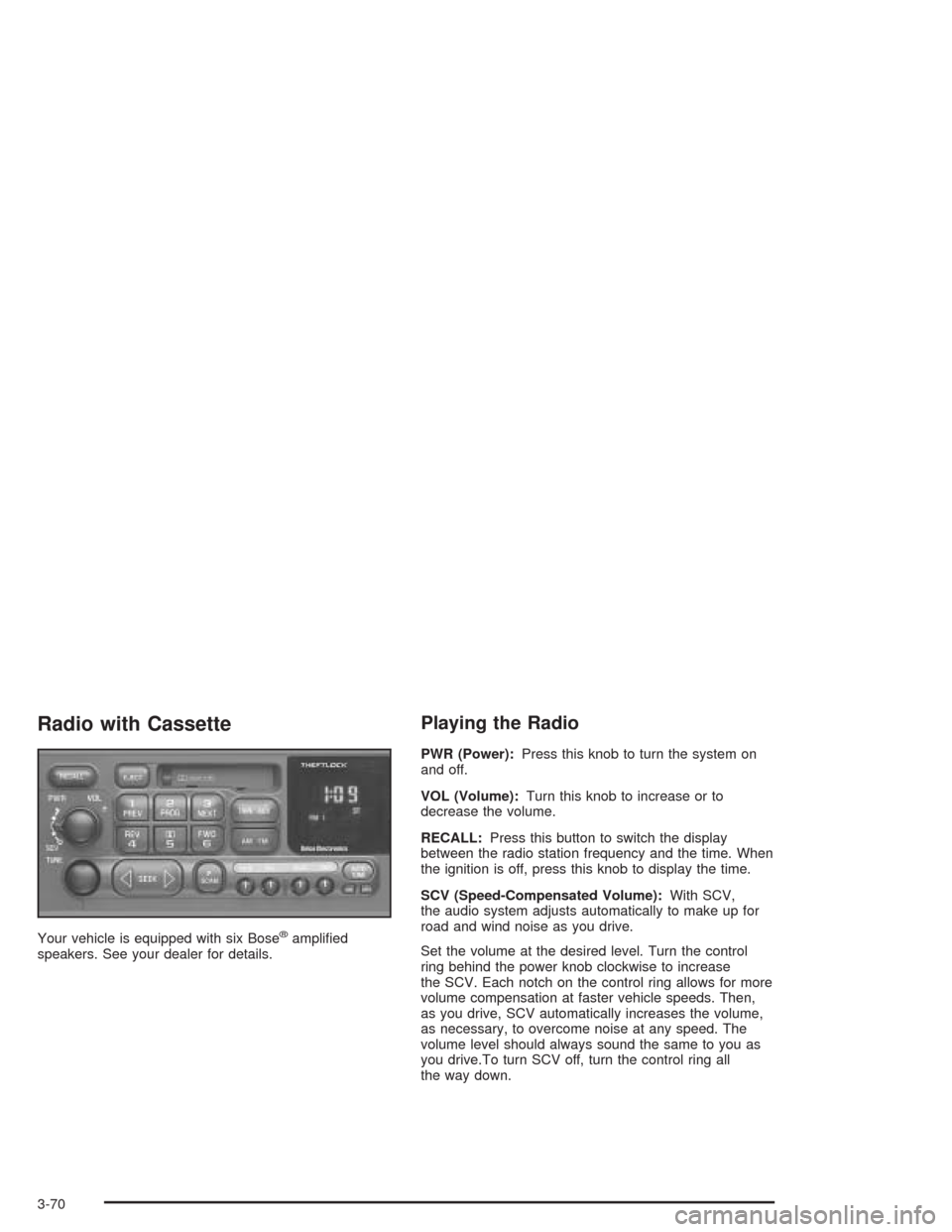
Your vehicle is equipped with six Bose®amplified
speakers. See your dealer for details.
Playing the Radio
PWR (Power):Press this knob to turn the system on
and off.
VOL (Volume):Turn this knob to increase or to
decrease the volume.
RECALL:Press this button to switch the display
between the radio station frequency and the time. When
the ignition is off, press this knob to display the time.
SCV (Speed-Compensated Volume):With SCV,
the audio system adjusts automatically to make up for
road and wind noise as you drive.
Set the volume at the desired level. Turn the control
ring behind the power knob clockwise to increase
the SCV. Each notch on the control ring allows for more
volume compensation at faster vehicle speeds. Then,
as you drive, SCV automatically increases the volume,
as necessary, to overcome noise at any speed. The
volume level should always sound the same to you as
you drive.To turn SCV off, turn the control ring all
the way down.
3-70
Page 187 of 384
Playing a Cassette Tape
The tape player is built to work best with tapes that are
up to 30 to 45 minutes long on each side. Tapes
longer than that are so thin they may not work well in
this player. The longer side of the tape visible should
face to the right. If you hear nothing or hear a garbled
sound, it may not be in squarely. Press EJECT to
remove the tape and start over.
If the ignition and radio are off, press the EJECT button
or the RECALL button to insert and to begin play of
a tape. If the ignition is on and the radio is off, the tape
can be inserted and will begin playing. A tape symbol
will appear on the display when a tape is inserted.
While the tape is playing, use the VOL, AUTO TONE,
BAL, FADE, BASS, and TREB controls just as you
do for the radio. Other controls may have different
functions when a tape is inserted. The tape symbol and
an arrow to show which side of the tape is playing
will appear on the display.Cassette tape adapter kits for portable CD players will
work in the cassette tape player. See “CD Adapter Kits”
later for more information.
The tape bias is set automatically when a metal or
chrome tape is inserted.
If an error appears on the display, see “Cassette Tape
Messages” later in this section.
1 PREV (Previous):The tape must have at least three
seconds of silence between each selection for
previous to work. Press this pushbutton to go to the
previous selection on the tape if the current selection
has been playing for less than eight seconds. If pressed
when the current selection has been playing for more
than eight seconds, it will go to the beginning of
the current selection. If this pushbutton is held or
pressed more than once, the player will continue moving
backward through the tape.
2 PROG (Program):Press this pushbutton to play the
other side of the tape.
3-73
Page 188 of 384
3 NEXT:The tape must have at least three seconds of
silence between each selection for next to work.
Press this pushbutton to go to the next selection on the
tape. If this pushbutton is held or pressed more than
once, the player will continue moving forward through
the tape.
4 REV (Reverse):Press this pushbutton to quickly
reverse the tape. The radio will play while the tape
reverses. Press it again to return to playing speed.
W5 (Dolby®):Press this pushbutton to reduce
background noise. The double-D symbol will appear on
the display.
Dolby
®Noise Reduction is manufactured under a
license from Dolby®Laboratories Licensing Corporation.
Dolby®and the double-D symbol are trademarks of
Dolby®Laboratories Licensing Corporation.
FWD 6 (Forward):Press this pushbutton to quickly
advance the tape. The radio will play while the
tape advances. Press it again to return to playing
speed.
oSEEKp:The tape must have at least three
seconds of silence between each selection for seek to
work. The left arrow is the same as the PREV
pushbutton and the right arrow is the same as the
NEXT pushbutton. If either arrow is held or pressed
more than once, the player will continue moving
backward or forward through the tape.
AM FM:Press this button to listen to the radio when a
cassette tape is playing. The inactive tape will remain
safely inside the radio for future listening.
TAPE AUX (Auxiliary):Press this button to play a
cassette tape when listening to the radio. The tape
symbol with an arrow will appear on the display. If the
audio system is equipped with a remote playback
device, pressing this button a second time will allow the
remote device to play.
EJECT:Press this button to eject the tape. Eject may
be activated with the ignition or radio off. Cassette tapes
can be loaded with the ignition and radio off if this
button is pressed first.
3-74
Page 189 of 384
Cassette Tape Messages
The cassette tape player is able to detect a tight or
broken tape, and will eject the tape. The radio will go
back to playing the last station selected. Try a
known good cassette tape.
CLN (Clean):If this message appears on the display,
the cassette tape player needs to be cleaned. It will
still play tapes, but it should be cleaned as soon
as possible to prevent damage to the tapes and player.
SeeCare of Your Cassette Tape Player on page 3-88.
If the cassette is not playing correctly, for any other
reason, try a known good cassette.
If any error occurs repeatedly or if an error cannot be
corrected, contact your dealer. If the radio displays
an error message, write it down and provide it to your
dealer when reporting the problem.
CD Adapter Kits
It is possible to use a portable CD player adapter kit
with the cassette tape player after activating the bypass
feature on the tape player.
To activate the bypass feature, use the following steps:
1. Turn the ignition on.
2. Turn the radio off.
3. Press and hold the TAPE AUX button for five
seconds. The tape symbol will flash for two
seconds, indicating the feature is active.
4. Insert the adapter into the cassette slot. It will
power up the radio and begin playing.
The override feature will remain active until the EJECT
button is pressed.
3-75