2004 CADILLAC SEVILLE service
[x] Cancel search: servicePage 168 of 410
CHANGE ENGINE OIL – 82:This means that the life
of the engine oil has expired and it should be changed
within 200 miles. After an oil change, the Oil Life
Indicator must be reset. SeeOil Life Indicator on
page 3-74. SeeEngine Oil on page 5-13.
CHANGE TRANS FLUID – 47:This message will
appear when it is time to change the transaxle fluid. See
Scheduled Maintenance on page 6-4for the proper
fluid and change intervals.
CHECK BRAKE FLUID – 37:This message will
display if the ignition is in ON to inform the driver that
the brake fluid level is low. Have the brake system
serviced by a technician as soon as possible. SeeBrake
System Warning and Parking Brake Indicator Light on
page 3-43.
CHECK COOLANT LEVEL – 2:This message will
appear when there is a low level of engine coolant. Have
the cooling system serviced by a technician as soon
as possible. SeeEngine Coolant on page 5-23.
CHECK FUEL GAGE – 50:This message will appear
when the fuel supply is less than 5 gallons (18.9 L)
and the display is turned off. A single chime will also
sound when this message is displayed.CHECK GAS CAP – 61:This message will appear if
the gas cap has not been fully tightened. You should
recheck your gas cap to ensure that it is on properly.
CHECK OIL LEVEL – 36:For correct operation of the
low oil sensing system, your vehicle should be on a
level surface. A false CHECK OIL LEVEL message may
appear if the vehicle is parked on a grade. The oil
level sensing system does not check for actual oil level
if the engine has been off for a short period of time,
and the oil level is never checked while the engine is
running. If the CHECK OIL LEVEL message appears,
and your vehicle has been parked on level ground
with the engine off for at least 30 minutes, the oil level
should be checked by observing the oil dipstick. Prior to
checking the oil level, be sure the engine has been
off for a few minutes and your vehicle is on a level
surface. Then check the dipstick and add oil if
necessary. SeeEngine Oil on page 5-13.
3-56
Page 170 of 410
DRIVE NO. X (1 OR 2):This message will be displayed
with the key in ON and while entering FEATURE
PROGRAMMING, but only if the vehicle is equipped
with memory seats. The message will show which driver
is activating the personalization feature. It will only
stay on for five seconds. This message can be
customized for you by your dealer.
ENGINE COOLANT HOT, IDLE ENGINE – 44:This
message will appear when the engine coolant
temperature is over 262°F (128°C). Stop and allow your
vehicle to idle in PARK (P) until it cools down and the
message is removed. Do not increase engine speed
above a normal idle. If it does not cool down, turn off the
engine and have it serviced before driving it again.
Severe engine damage can result from an overheated
engine. SeeEngine Overheating on page 5-26.
ENGINE HOT–AC OFF – 16:This message displays
when the engine coolant becomes hotter than the normal
operating temperature. To avoid added strain on a hot
engine, the air conditioning compressor is automatically
turned off. When the coolant temperature returns to
normal, the A/C operation will automatically resume. You
can continue to drive your vehicle. If this message
continues to appear, have the system repaired as soon
as possible to avoid compressor damage.ENGINE OVERHEATED, STOP ENGINE – 42:This
message will appear when the engine has overheated.
Stop and turn the engine off immediately to avoid
severe engine damage. SeeEngine Overheating on
page 5-26. A multiple chime will also sound when this
message is displayed.
ENGINE POWER REDUCED – 41:This message
informs you that the vehicle is reducing engine power
because the transaxle is being placed in gear under
conditions that may cause damage to the vehicle’s
engine, transaxle or ability to accelerate.
FUEL LEVEL LOW – 11:This message serves as a
warning that the fuel level in the tank is critically
low. Stop for fuel soon. A single chime will sound when
this message is displayed.
HEADLAMPS SUGGESTED – 23:If it is dark enough
outside and the headlamps and Twilight Sentinel
®
controls are off, this message will display on the DIC.
This message informs the driver that turning on the
exterior lamps is recommended even though the DRL
are still illuminated. It has become dark enough outside
to require the headlamps and/or other exterior lamps.
This message will also appear if the optional
Rainsense™ wiping feature is on and the Twilight
Sentinel
®is off.
3-58
Page 171 of 410
ICE POSSIBLE – 13:This message appears when the
outside air temperature is cold enough to create icy
road conditions.
LEFT REAR DOOR AJAR – 142:The left rear door is
open or ajar when this message appears. The ignition
must be in ON and the transaxle not in PARK (P) for this
message to display. A chime will sound if the vehicle’s
speed is greater than 3 mph (5 km/h).
OIL PRESSURE LOW STOP ENGINE – 35:If this
message appears while the engine is running, stop the
engine and do not operate it until the cause of low
oil pressure is corrected. Severe damage to the engine
can result. A multiple chime will sound when this
message is displayed.
PASSENGER DOOR AJAR – 141:The right front
passenger’s door is open or ajar when this message
appears. The ignition must be in ON and the transaxle
not in PARK (P) for this message to display. A chime
will sound if the vehicle’s speed is greater than
3 mph (5 km/h).
RIGHT REAR DOOR AJAR – 143:The right rear door
is open or ajar when this message appears. The
ignition must be in ON and the transaxle not in PARK (P)
for this message to display. A chime will sound if the
vehicle’s speed is greater than 3 mph (5 km/h).SERVICE AC SYSTEM – 14:This message appears
when the electronic sensors that control the air
conditioning and heating systems are no longer working.
Have the climate control system serviced if you notice
a drop in heating and air conditioning efficiency.
SERVICE AIR BAG – 83:There is a problem with the
air bag system when this message appears. Let
only a qualified technician work on your vehicle. Have
your vehicle serviced by your dealership immediately.
SERVICE CHARGING SYS – 102:This message
will display when a problem with the charging system
has been detected. Have your vehicle serviced at
your dealership.
SERVICE ELECTRICAL SYS – 106:This message will
display if an electrical problem has occurred within
the Powertrain Control Module (PCM) or the ignition
switch. Have your vehicle serviced by your dealership.
SERVICE FUEL SYSTEM – 101:The Powertrain
Control Module (PCM) has detected a problem within
the fuel system when this message appears. Have your
vehicle serviced by your dealership.
SERVICE IDLE CONTROL – 107:A problem with the
idle control has occurred when this message displays.
Have your vehicle serviced by your dealership.
3-59
Page 172 of 410
SERVICE STABILITY SYS – 54:If you ever see the
SERVICE STABILITY SYS message, it means
there may be a problem with your stability enhancement
system. If you see this message, try to reset the
system (stop, turn off the engine, then start the engine
again). If the SERVICE STABILITY SYS message
still comes on, it means there is a problem. You should
see your dealer for service. Reduce your speed and
drive accordingly. A single chime will also sound when
this message is displayed.
SERVICE STEERING – 127:This message is displayed
when a problem has been detected in the magnetic
speed variable assist steering system. If message
comes on, service is required.
SERVICE SUSPENSION SYS – 84:This message is
displayed to indicate that the suspension system is
not operating properly. To correct this problem, have
your vehicle serviced at your dealership.
SERVICE THEFT SYSTEM – 34:This message means
there is a problem with the PASS-Key
®III system. A
fault has been detected in the system which means that
the system is disabled and is not protecting the
vehicle. The vehicle usually restarts, however, you may
want to take your vehicle to your dealer before turning
off the engine.SERVICE TPM SYSTEM – 51:When this message is
displayed, the Tire Pressure Monitor (TPM) system
is not working properly. See your dealer for service.
SERVICE TRANSMISSION – 100:See your dealer
for repair.
SERVICE VEHICLE SOON – 3:This message is
displayed when a non-emissions related powertrain
malfunction occurs. Have your vehicle serviced by
a technician as soon as possible.
SPEED LIMIT TO 90 – 113:A failure in the suspension
control system has occurred when this message
appears. The Powertrain Control Module (PCM)
determines the speed to which your vehicle is limited.
Have your vehicle serviced if this message appears.
STABILITY SYS ENGAGED – 55:You may see
the STABILITY SYS ENGAGED message on the Driver
Information Center. It means that an advanced,
computer-controlled system has come on to help your
vehicle continue to go in the direction in which you
are steering. This stability enhancement system
activates when the computer senses that your vehicle is
just starting to spin, as it might if you hit a patch of
ice or other slippery spot on the road. When the system
is on, you may hear a noise or feel a vibration in the
brake pedal. This is normal.
3-60
Page 173 of 410
When the STABILITY SYS ENGAGED message is on,
you should continue to steer in the direction you
want to go. The system is designed to help you in bad
weather or other difficult driving situations by making
the most of whatever road conditions will permit. If the
STABILITY SYS ENGAGED message comes on,
you will know that something has caused your vehicle to
start to spin, so you should consider slowing down. A
single chime will also sound when this message is
displayed.
STARTING DISABLED REMOVE KEY – 33:This
message will appear when the PASS-Key
®III system
detects that an improper ignition key is being used to try
to start the vehicle. Check the ignition key for damage.
If it is damaged, it may need to be replaced. If it is
not damaged, remove the key and try to start the vehicle
again. If it still does not start, try another ignition key
or see your dealer for service.
THEFT ATTEMPTED – 40:This message is displayed
if the theft system has detected a break-in attempt
while you were away from your vehicle.TOP SPEED FUEL CUT-OFF – 111:This message will
appear when the Powertrain Control Module (PCM)
detects that the maximum speed for your vehicle has
been reached. The speed of your vehicle will surge
as the fuel supply is cut off. Your vehicle’s top speed is
based on the top speed rating of the tires. This
ensures that your vehicle stays in a safe operating
range for the tires.
TRACTION ENGAGED – 91:When your traction
control system is limiting wheel spin, the TRACTION
ENGAGED message will be displayed. Slippery
road conditions may exist if this message is displayed,
so adjust your driving accordingly. This message
will stay on for a few seconds after the traction control
system stops limited wheel spin.
TRACTION OFF – 89:This message will be displayed
after the traction control system has been turned off
using the TRAC ON/OFF button on the center console.
TRACTION READY – 90:This message informs
the driver that the traction control system is available.
Pressing the TRAC ON/OFF button on the center
console once turns the traction control system off;
pressing the button again turns the system back on. This
message will automatically disappear from the display
after five seconds.
3-61
Page 188 of 410
Radio with CD
XM™ Satellite Radio Service
(48 Contiguous US States)
XM™ is a continental U.S. based satellite radio service
that offers 100 coast to coast channels including
music, news, sports, talk, and children’s programming.
XM™ provides digital quality audio and text information,
including song title and artist name. A service fee is
required in order to receive the XM™ service. For more
information, contact XM™ at www.xmradio.com or
call 1-800-852-XMXM (9696).
Playing the Radio
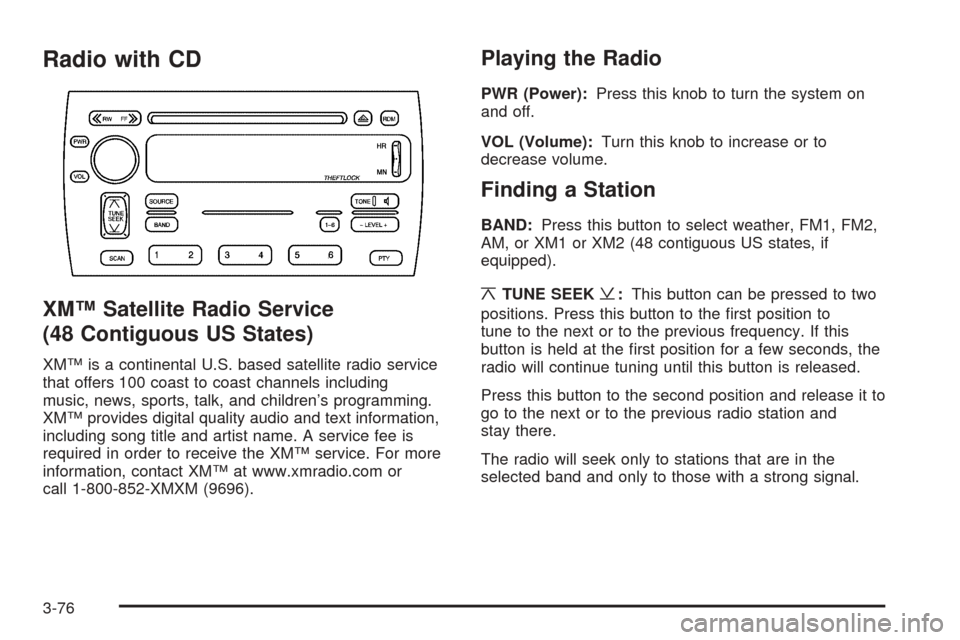
PWR (Power):Press this knob to turn the system on
and off.
VOL (Volume):Turn this knob to increase or to
decrease volume.
Finding a Station
BAND:Press this button to select weather, FM1, FM2,
AM, or XM1 or XM2 (48 contiguous US states, if
equipped).
¦TUNE SEEK¥:This button can be pressed to two
positions. Press this button to the first position to
tune to the next or to the previous frequency. If this
button is held at the first position for a few seconds, the
radio will continue tuning until this button is released.
Press this button to the second position and release it to
go to the next or to the previous radio station and
stay there.
The radio will seek only to stations that are in the
selected band and only to those with a strong signal.
3-76
Page 190 of 410
Adjusting the Speakers (Balance/Fade)
M
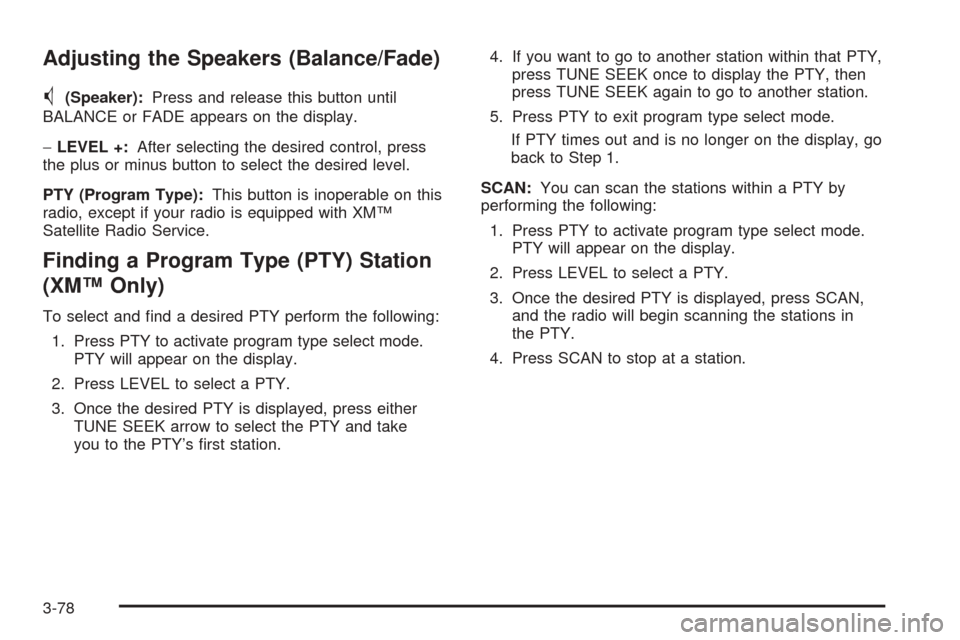
(Speaker):Press and release this button until
BALANCE or FADE appears on the display.
−LEVEL +:After selecting the desired control, press
the plus or minus button to select the desired level.
PTY (Program Type):This button is inoperable on this
radio, except if your radio is equipped with XM™
Satellite Radio Service.
Finding a Program Type (PTY) Station
(XM™ Only)
To select and find a desired PTY perform the following:
1. Press PTY to activate program type select mode.
PTY will appear on the display.
2. Press LEVEL to select a PTY.
3. Once the desired PTY is displayed, press either
TUNE SEEK arrow to select the PTY and take
you to the PTY’s first station.4. If you want to go to another station within that PTY,
press TUNE SEEK once to display the PTY, then
press TUNE SEEK again to go to another station.
5. Press PTY to exit program type select mode.
If PTY times out and is no longer on the display, go
back to Step 1.
SCAN:You can scan the stations within a PTY by
performing the following:
1. Press PTY to activate program type select mode.
PTY will appear on the display.
2. Press LEVEL to select a PTY.
3. Once the desired PTY is displayed, press SCAN,
and the radio will begin scanning the stations in
the PTY.
4. Press SCAN to stop at a station.
3-78
Page 191 of 410
XM™ Radio Messages
Radio Display
Message Condition Action Required
XL (Explicit Language
Channels)XL on the radio display,
after the channel name,
indicates content with
explicit language.These channels, or any others, can be blocked at a
customer’s request, by calling 1-800-852-XMXM (9696).
XM Updating Updating encryption
codeThe encryption code in your receiver is being updated, and
no action is required. This process should take no longer
than 30 seconds.
No XM signal Loss of signal Your system is functioning correctly, but you are in a
location that is blocking the XM signal. When you move
into an open area, the signal should return.
Loading XM Acquiring channel audio
(after 4 second delay)Your radio system is acquiring and processing audio and
text data. No action is needed. This message should
disappear shortly.
Channel Off Air Channel not in service This channel is not currently in service. Tune in to another
channel.
Channel Unavail Channel no longer
availableThis previously assigned channel is no longer assigned.
Tune to another station. If this station was one of your
presets, you may need to choose another station for that
preset button.
No Artist Info Artist Name/Feature not
availableNo artist information is available at this time on this
channel. Your system is working properly.
No Title Info Song/Program Title not
availableNo song title information is available at this time on this
channel. Your system is working properly.
3-79