2003 MITSUBISHI SHOGUN radio
[x] Cancel search: radioPage 10 of 392

Installation of accessories
EB24A-Cb
Before fitting any accessories, please con-
sult your authorized MITSUBISHI dealer.
(1) The installation of accessories, optional
parts, etc., should only be carried out
within the limits prescribed by law in
your country, and in accordance with
the guidelines and warnings con-
tained within the documents accompa-
nying this vehicle.
Only MITSUBISHI approved accesso-
ries should be fitted to your vehicle.
(2) Improper installation of electrical parts
could cause fire, please refer to the
Modifications/Alterations to the electri-
cal or fuel systems section within this
manual.
(3) When using a communication system
such as a cellular phone or a radio set
inside the vehicle, a separate exter-
nal antenna must be fitted. When a cel-
lular phone or a radio set is used by
using an internal antenna alone, it may
interfere with the vehicle’s electrical
system and adversely affect safe
operation of the vehicle.
(4) Tyres and wheels which do not meet
specifications must not be used.
Refer to the“Specifications”section for
information regarding wheel and tyre
sizes.(5) Do not fail to read all relative instruc-
tions before first putting into service and
prior to the attachment or installation of
accessories, parts or other modifica-
tions to the vehicle!
Important points!
Due to the large number of accessory and
replacement parts of different manufactur-
ers in the market, it is not possible, not only
for MITSUBISHI, but also an authorized
MITSUBISHI dealer, to check whether the
attachment or installation of such parts
affects the driving safety of your
MITSUBISHI-vehicle.
Even when such parts are officially autho-
rized, for example by a“general opera-
tors permit”(an appraisal for the part) or
through the execution of the part in an offi-
cially approved manner of construction, or
when a single operation permit following
the attachment or installation of such parts,
it cannot be deduced from that alone, that
the driving safety of your vehicle has not
been affected.Consider also that there basically exists no
liability on the part of the appraiser or the
official. Only in the case of parts
(MITSUBISHI original replacement or
exchange parts as well as MITSUBISHI
accessories) that are recommended and
released by an authorized MITSUBISHI
dealer and that are attached or installed by
an authorized MITSUBISHI dealer can you
assume, that optimal safety has been pro-
vided. The same also pertains to modifi-
cations of MITSUBISHI vehicles with
respect to the production specifications. For
your own safety, in such cases as well, you
should only undertake modifications
according to the recommendations of an
authorized MITSUBISHI dealer.
General information
1-10Div:
Out put date:
Page 20 of 392
NOTE
(1) The confirmation function (this indi-
cates locking or unlocking of the doors
and backdoor with the flash of the turn-
signal lamps) can be deactivated. For
further information, please contact your
authorized MITSUBISHI dealer.
(2) The keyless entry system does not
operate if the key is left in the key cyl-
inder, or any door (including the
backdoor) is open.
(3) If the UNLOCK switch is pressed and
no door is opened within approxi-
mately 30 seconds: relocking will auto-
matically occur.
(4) The remote control switch will oper-
ate within about 4 m from the vehicle.
However, the operating range of the
remote control switch may change if
the vehicle is located near a TV trans-
mitting tower, power station, or radio
broadcasting station.
(5) If the doors cannot be locked or
unlocked after pressing the remote
control switch, the battery inside the
switch may need to be replaced.
Replace the battery at your autho-
rized MITSUBISHI dealer.(6) If your remote control switch is lost,
please contact your authorized MIT-
SUBISHI dealer for a replacement
remote control switch.
(7) If you wish to add a remote control
switch, please contact your autho-
rized MITSUBISHI dealer. A maxi-
mum of 4 remote control switches are
available for your vehicle.
CAUTION
(1) Do not leave the remote con-
trol switch where it may be
exposed to heat caused by the
direct rays of the sun.
(2) The remote control switch is a
precision electronic device.
Therefore, pay attention to the
following:
•Avoid knocking the remote
control switch hard against
other objects or dropping it.
•Keep the remote control switch
dry.
•Do not disassemble the remote
control switch.
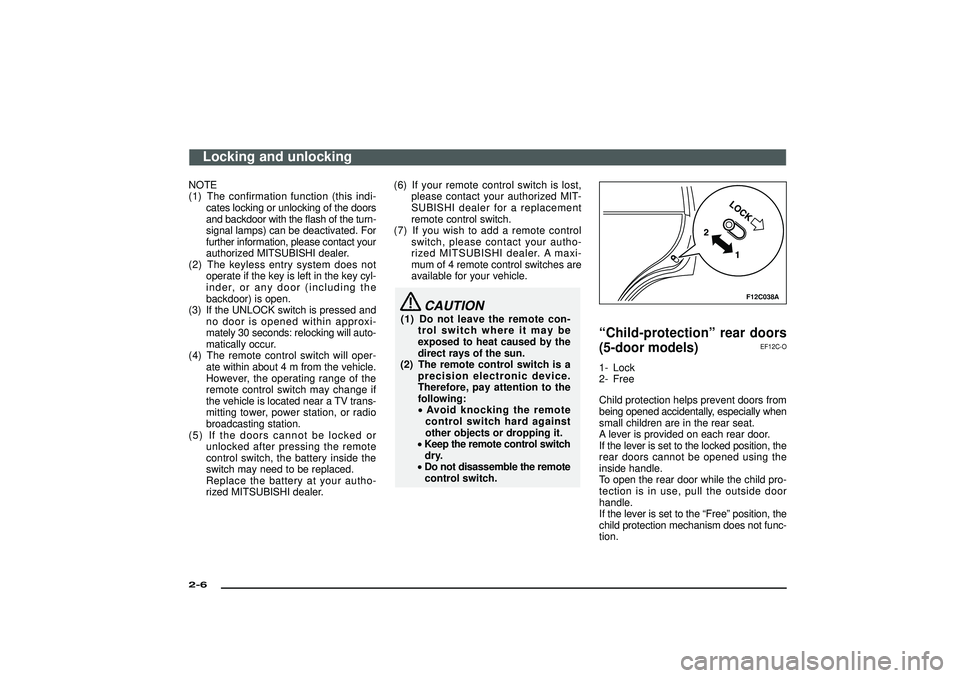
F12C038A
“Child-protection”rear doors
(5-door models)
EF12C-O
1- Lock
2- Free
Child protection helps prevent doors from
being opened accidentally, especially when
small children are in the rear seat.
A lever is provided on each rear door.
If the lever is set to the locked position, the
rear doors cannot be opened using the
inside handle.
To open the rear door while the child pro-
tection is in use, pull the outside door
handle.
If the lever is set to the“Free”position, the
child protection mechanism does not func-
tion.
Locking and unlocking
2-6Div:
Out put date:
Page 169 of 392

I21A005A
12
3
4
Ignition switch
EI21AAZc
1- The engine is stopped and the steer-
ing wheel locked. The key can be
inserted and removed only when the
switch is in this position.
2- The engine is stopped, but the radio,
cigarette lighter and other electrical
devices can be operated.
3- The engine is running, and all the vehi-
cle’s electrical devices can be oper-
ated.
4- The starter motor operates. After the
engine has started, release the key and
it will automatically return to the“ON”
position.
I21A058A
A/TNOTE
(1) For vehicles with a manual transmis-
sion, when removing the key, push the
key at the“ACC”position and keep it
depressed until it is turned to the
“LOCK”position, and remove it.
For vehicles with an automatic trans-
mission, when removing the key, first
set the selector lever to the“P”(PARK)
position, and then turn the key to
“LOCK”and remove it.
I21A057A
M/T(2) This vehicle is equipped with ignition
switch illumination.
The ignition switch illumination comes
on while the driver’s door is opened
and remains on for approximately 30
seconds after the driver door is closed.
However, it will go off even before a
lapse of 30 seconds if the ignition
switch is set to“ON”position.
[Vehicle with keyless entry system]
When you get out of the vehicle and
remove the ignition key, it will be illu-
minated for about 30 seconds.
Starting and driving
5-11
Div:
Out put date:
Page 221 of 392

For pleasant driving
UKW/MW/LW electronic tuning radio
with tape player ............................................................ 6- 2
UKW/MW/LW electronic tuning radio
with CD player .............................................................. 6-17
CD (Compact-Disc) player ................................................ 6-30
How to set CD autochanger ............................................. 6-31
Audio system anti-theft feature ....................................... 6-32
Antenna .............................................................................. 6-35
Ventilators .......................................................................... 6-35
Front heater / Manual air conditioning ........................... 6-36
Front automatic air conditioning ..................................... 6-43
Rear heater/Rear air conditioning ................................... 6-52
Air purifier .......................................................................... 6-55
Sun visors ......................................................................... 6-56
Vanity mirror ...................................................................... 6-58
Cigarette lighter................................................................. 6-59
Ashtray ............................................................................... 6-60
Accessory socket.............................................................. 6-61
Accessory boxes............................................................... 6-62
Glove box .......................................................................... 6-63
Luggage floor box ............................................................. 6-66
Side box ............................................................................ 6-67
Installation position for warning triangle ....................... 6-67
Luggage hooks.................................................................. 6-68
Tonneau cover rail ............................................................ 6-68
Rear shelf ........................................................................... 6-69
Div:
Out put date:
Page 222 of 392

H11A363D
UKW/MW/LW electronic tuning radio with tape
player*
EH30A-Pa
The audio system can be used when the ignition switch is in the
“ON” or “ACC” position.
A-Display window
B-Audio system
C-Multi centre display
D-RV meter
NOTE
(1) A CD player or a CD autochanger can be connected to this
audio system. The CD player or the CD autochanger can be
operated by the switch on the audio body. Refer to
“Connection of a CD player or a CD autochanger” on page
6-15.
(2) To listen to the audio system while the engine is stopped, turn
the ignition switch to the “ACC” position.(3) When a cellular phone is used inside the vehicle, noise may
be produced from the audio equipment. This does not mean
that something is wrong with the audio equipment. In such a
case, use the cellular phone at a place as far as possible from
the audio equipment.
(4) In case of misuse (entry of a foreign object or water, smoke
or odour, etc.), immediately turn off the audio system and have
it checked at an authorized MITSUBISHI dealer. Never try to
repair it by yourself. Avoid continuous usage without inspec-
tion by a qualified person.
(5) The audio system’s control panel can be removed to deter
thieves. For details, refer to section entitled “Audio system
anti-theft feature” on page 6-32.
For pleasant driving
6-2Div:
Out put date:
Page 223 of 392

H11A364D
To listen to the radio
EH30B-Fb
1- PWR (On-off) switch
2- VOL (Volume control)knob
3- U/M/L (UKW/MW/LW selection) button
4- Audio adjust button
5- AUDIO button
6- TUNE/SEEK
(Down-step/Down-seek) button
7- TUNE/SEEK
(Up-step/Up-seek) button
8- Memory select buttons
9- Frequency display window
10- Preset memory number display
11- ST (Stereo) indicator
For pleasant driving
6-3
Div:
Out put date:
Page 224 of 392

1. Press the PWR switch (1) to turn on the
radio.
Press the PWR switch again to switch
it off.
2. Press the U/M/L button (3) to select the
desired band (U1/U2/MW/LW).
3. Press the TUNE/SEEK button (6 or 7)
or one of the Memory select buttons (8)
to tune to a station.
Refer to“How to adjust the tune”or
“How to enter frequencies in the
memory”on page 6-5.How to adjust the volumeVOL (Volume control)-2
Turn the VOL knob clockwise to increase
the volume.
H11A348G
Multi centre display
H30B003A
RV meterHow to adjust the tonePress the AUDIO button (5) to select
BASS→TREBLE→FADER→BALANCE
→Audio adjust mode off.
BASS (Bass tone control)
Press the Audio adjust button (4) either
or
to select the desired bass tone
quality.
TREBLE (Treble tone control)
Press the Audio adjust button (4) either
or
to select the desired treble tone
quality.
FADER (Front/rear balance control)
Press the Audio adjust button (4) either
or
to balance the volume of sound
from the front and the rear speakers.
For pleasant driving
6-4Div:
Out put date:
Page 225 of 392

BALANCE (Left/right balance control)
Press the Audio adjust button (4) either
or
to balance the volume of sound
from the left and the right speakers.
NOTE
The audio adjust mode will be canceled
when radio or CD operation is performed
or no adjustment is performed for more
than 7 seconds.
How to adjust the tuneManual tuning
The frequency changes every time the
TUNE/SEEK button (6 or 7) is pressed.
Press the button to select the desired sta-
tion.
Automatic tuning
After keeping the TUNE/SEEK button (6 or
7) depressed for more than about 1 sec-
ond, release the button, and the selected
station reception will start.
H11A248A
How to enter frequencies in the
memoryManual setting
You can assign to the Memory select but-
tons (8) a maximum of 12 stations in the
UKW band (6 U1 stations and 6 U2
stations), 6 stations in the MW band, and
6 stations in the LW band. (Stations already
assigned to the Memory select buttons are
replaced by any newly assigned stations.)
Follow the steps described below.
1. Press either the TUNE/SEEK button (6
or 7) to tune the frequency to be entered
in the memory.
2. Press one of the Memory select but-
tons (8) for about 2 seconds or longer.
The sound will be momentarily inter-
rupted while the frequency is being
entered into the memory.The number of the button correspond-
ing to the memory entry, and the fre-
quency are displayed.
3. The preset memory setting is retrieved
by pressing the button and then releas-
ing it within 2 seconds.
Automatic setting
With the method, all manually set sta-
tions in the band currently selected for
reception are replaced with stations in the
same band that are automatically selected
in order of signal strength. The radio auto-
matically selects 12 stations in the UKW
band and 6 stations each in the MW and
LW band.
Follow the steps described below.
1. With the radio mode selected, hold down
the U/M/L button (3) until a beep is emit-
ted. The 6 stations with the best signal
strength will automatically be assigned
to the Memory select buttons (8), with
the lowest-frequency station being
assigned to the lowest-number button.
2. When you subsequently press a
Memory select button to select a chan-
nel number, the radio will begin receiv-
ing the station assigned to that number.
For pleasant driving
6-5
Div:
Out put date: