Page 96 of 288
Do not use the speed control in heavy traffic or on roads that
are winding, slippery or unpaved.
Setting speed control
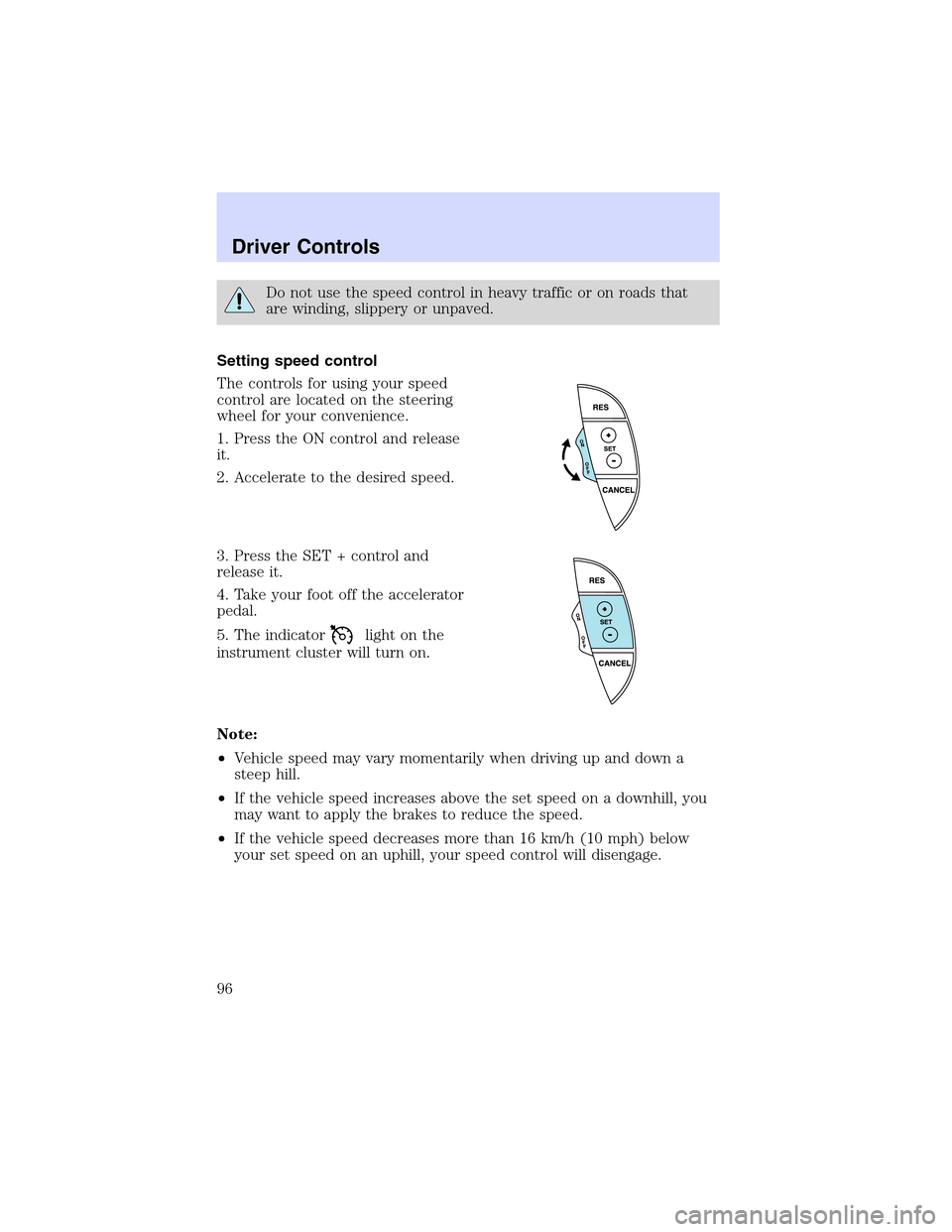
The controls for using your speed
control are located on the steering
wheel for your convenience.
1. Press the ON control and release
it.
2. Accelerate to the desired speed.
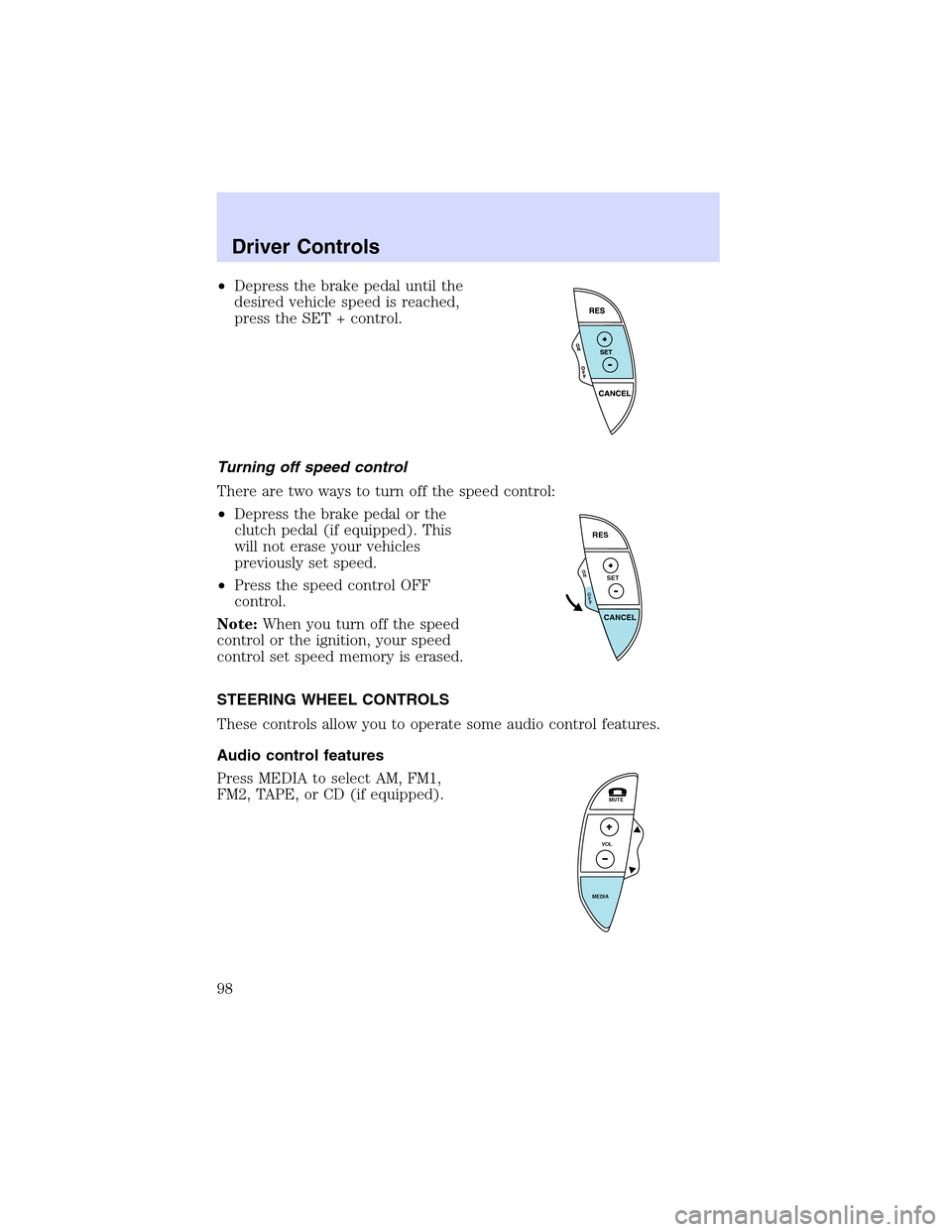
3. Press the SET + control and
release it.
4. Take your foot off the accelerator
pedal.
5. The indicator
light on the
instrument cluster will turn on.
Note:
•Vehicle speed may vary momentarily when driving up and down a
steep hill.
•If the vehicle speed increases above the set speed on a downhill, you
may want to apply the brakes to reduce the speed.
•If the vehicle speed decreases more than 16 km/h (10 mph) below
your set speed on an uphill, your speed control will disengage.
Driver Controls
96
Page 98 of 288
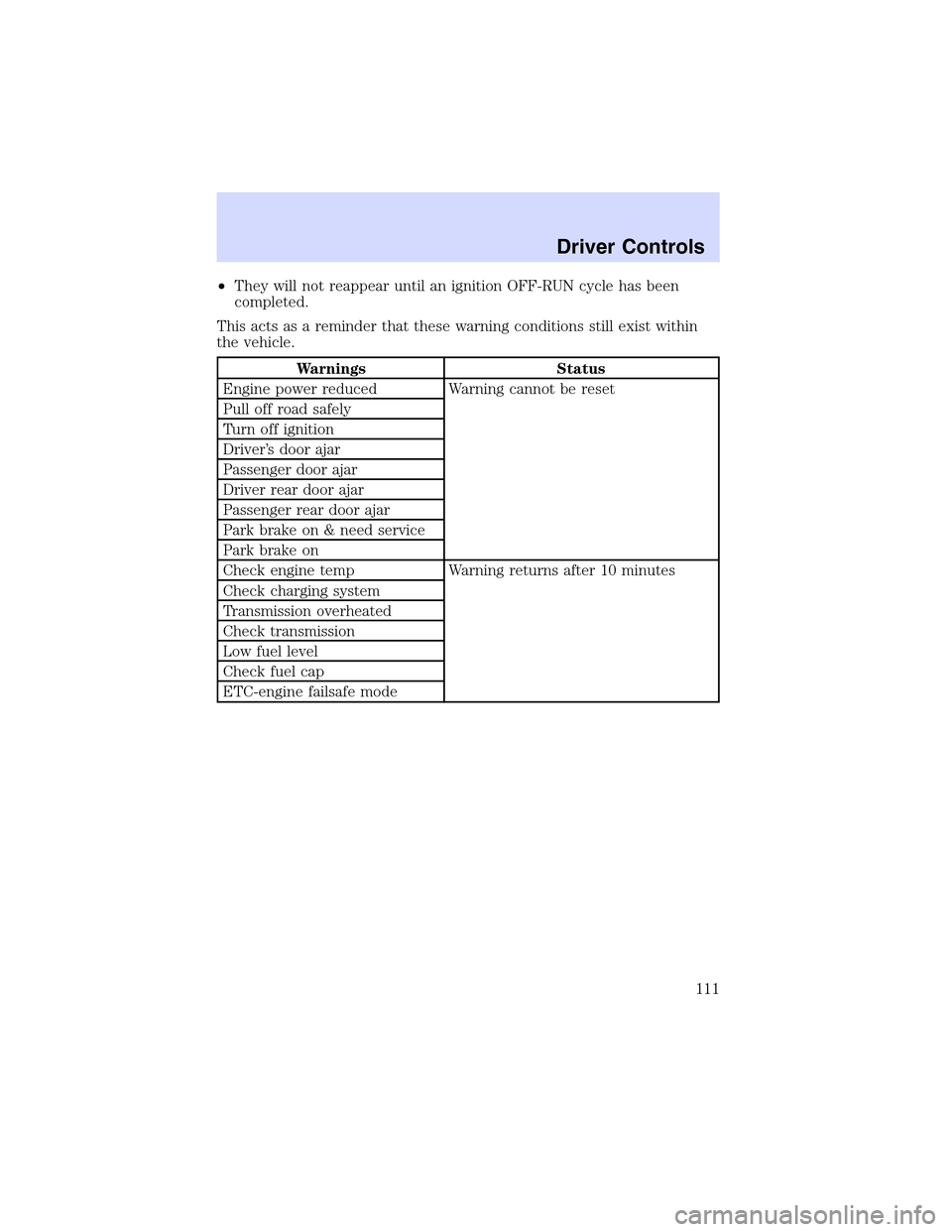
•Depress the brake pedal until the
desired vehicle speed is reached,
press the SET + control.
Turning off speed control
There are two ways to turn off the speed control:
•Depress the brake pedal or the
clutch pedal (if equipped). This
will not erase your vehicles
previously set speed.
•Press the speed control OFF
control.
Note:When you turn off the speed
control or the ignition, your speed
control set speed memory is erased.
STEERING WHEEL CONTROLS
These controls allow you to operate some audio control features.
Audio control features
Press MEDIA to select AM, FM1,
FM2, TAPE, or CD (if equipped).
O
N
O
F
F
RES
SET
CANCEL
MUTE
VOL
MEDIA
Driver Controls
98
Page 107 of 288
RESET
Press this control to select and reset functions shown in the FUEL,
SETUP and STATUS controls.
SETUP
Press this control for the following displays:
•Language
•Units (English/Metric)
•Autolocks
•Easy Entry/Exit (if equipped)
•Lock Chirp (if equipped)
STATUS
Selecting this function from the STATUS control causes the message
center to cycle through each of the systems being monitored. For each
of the monitored systems, the message center will indicate either an OK
message or a warning message for four seconds.
The sequence of the status check report is as follows:
•oil life in XX%
•AC (cabin) filter XX%
•charging system
•engine temperature
•brake fluid level
•washer fluid level
•doors closed (driver and passenger side, front and rear). This message
can only be reset by closing the door(s). If the RESET control is
pressed, PLEASE CLOSE DOOR will be displayed.
•trunk status
•exterior lamps (front and rear turn, brake, tail and side repeater lamp
(if equipped) status)
•Traction Control�or AdvanceTrac�(if equipped)
Driver Controls
107
Page 111 of 288
•They will not reappear until an ignition OFF-RUN cycle has been
completed.
This acts as a reminder that these warning conditions still exist within
the vehicle.
Warnings Status
Engine power reduced Warning cannot be reset
Pull off road safely
Turn off ignition
Driver’s door ajar
Passenger door ajar
Driver rear door ajar
Passenger rear door ajar
Park brake on & need service
Park brake on
Check engine temp Warning returns after 10 minutes
Check charging system
Transmission overheated
Check transmission
Low fuel level
Check fuel cap
ETC-engine failsafe mode
Driver Controls
111
Page 112 of 288
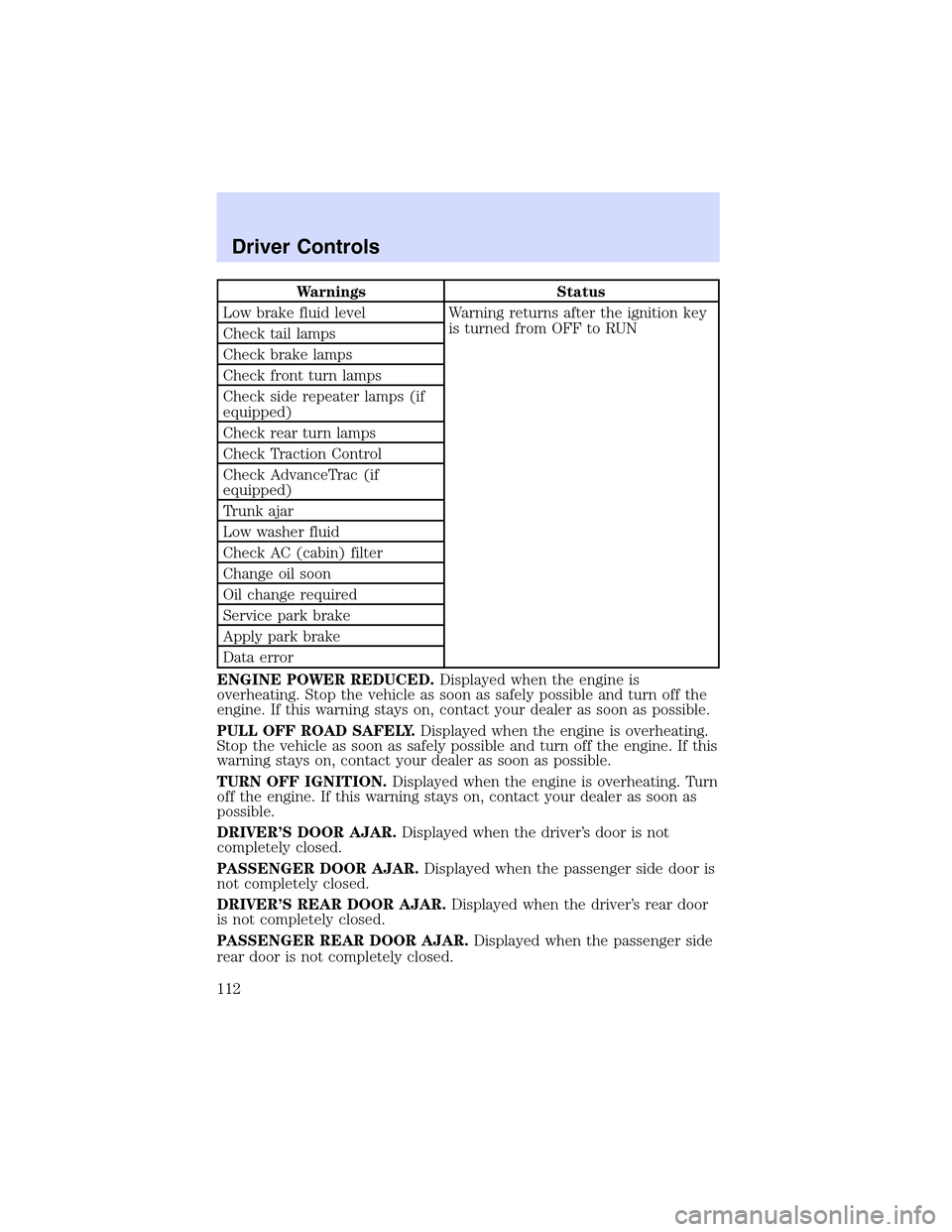
Warnings Status
Low brake fluid level Warning returns after the ignition key
is turned from OFF to RUN
Check tail lamps
Check brake lamps
Check front turn lamps
Check side repeater lamps (if
equipped)
Check rear turn lamps
Check Traction Control
Check AdvanceTrac (if
equipped)
Trunk ajar
Low washer fluid
Check AC (cabin) filter
Change oil soon
Oil change required
Service park brake
Apply park brake
Data error
ENGINE POWER REDUCED.Displayed when the engine is
overheating. Stop the vehicle as soon as safely possible and turn off the
engine. If this warning stays on, contact your dealer as soon as possible.
PULL OFF ROAD SAFELY.Displayed when the engine is overheating.
Stop the vehicle as soon as safely possible and turn off the engine. If this
warning stays on, contact your dealer as soon as possible.
TURN OFF IGNITION.Displayed when the engine is overheating. Turn
off the engine. If this warning stays on, contact your dealer as soon as
possible.
DRIVER’S DOOR AJAR.Displayed when the driver’s door is not
completely closed.
PASSENGER DOOR AJAR.Displayed when the passenger side door is
not completely closed.
DRIVER’S REAR DOOR AJAR.Displayed when the driver’s rear door
is not completely closed.
PASSENGER REAR DOOR AJAR.Displayed when the passenger side
rear door is not completely closed.
Driver Controls
112
Page 113 of 288
PARK BRAKE ON & NEED SERVICE.Displayed when the park brake
is ON and malfunctioning. If the warning stays on or continues to come
on, contact your dealer as soon as possible.
PARK BRAKE ON.Displayed when the park brake is ON. If the
warning stays on after the park brake is off, contact your dealer as soon
as possible.
CHECK ENGINE TEMP.Displayed when the engine coolant is
overheating. Stop the vehicle as soon as safely possible, turn off the
engine and let it cool. Check the coolant and coolant level. Refer to
Engine coolantin theMaintenance and specificationschapter. If the
warning stays on or continues to come on, contact your dealer as soon as
possible.
CHECK CHARGING SYSTEM.Displayed when the electrical system is
not maintaining proper voltage. If you are operating electrical accessories
when the engine is idling at a low speed, turn off as many of the
electrical loads as soon as possible. If the warning stays on or comes on
when the engine is operating at normal speeds, have the electrical
system checked as soon as possible.
TRANSMISSION OVERHEATED.Indicates the transmission is
overheating. This warning may appear when towing heavy loads or when
driving in a low gear at a high speed for an extended period of time.
Stop the vehicle as soon as safely possible, turn off the engine and let it
cool. Check the transmission fluid and level. Refer toTransmission
fluidin theMaintenance and specificationschapter. If the warning
stays on or continues to come on, contact your dealer for transmission
service as soon as possible.
CHECK TRANSMISSION.Indicates the transmission is not operating
properly. If this warning stays on, contact your dealer as soon as
possible.
LOW FUEL LEVEL.Displayed when you have approximately 80 km (50
miles) to empty.
CHECK FUEL CAP.Displayed when the fuel filler cap is not properly
installed. Check the fuel filler cap for proper installation. Refer toFuel
filler capin theMaintenance and specificationschapter.
ETC-ENGINE FAILSAFE MODE.Displayed when the engine has
defaulted to a’limp-home’operation. If the warning stays on or continues
to come on, contact your dealer as soon as possible.
LOW BRAKE FLUID.Indicates the brake fluid level is low and the
brake system should be inspected immediately. Refer toChecking and
adding brake fluidin theMaintenance and specificationschapter.
Driver Controls
113
Page 114 of 288
CHECK TAIL LAMPS.Displayed when the tail lamps are activated and
at least one is burned out. Check the lamps as soon as safely possible
and have the burned out lamp replaced.
CHECK BRAKE LAMPS.Displayed when the brake lamps are
activated and at least one is burned out. Check the lamps as soon as
safely possible and have the burned out lamp replaced. The center
high-mount brakelamp is not monitored.
CHECK FRT TURN LAMPS.Displayed when the turn signals are
activated and at least one is burned out. Check the lamps as soon as
safely possible and have the burned out lamp replaced.
CHECK SIDE REPEATER LAMPS (if equipped).Displayed when
the turn signals are activated and at least one is burned out. Check the
lamps as soon as possible and have the burned out lamp replaced.
CHECK REAR TURN LAMPS.Displayed when the turn signals are
activated and at least one is burned out. Check the lamps as soon as
possible and have the burned out lamp replaced.
CHECK TRACTION CONTROL.Displayed when the Traction
Control�system is not operating properly. If this message is displayed
on the message centerandthe amber T/C OFF light in the Traction
Control�on/off switch isnotilluminated, the Traction Control�system
will be partially operable. If this warning stays on, contact your dealer for
service as soon as possible. For further information, refer toTraction
control�in theDrivingchapter.
CHECK ADVANCETRAC (if equipped).Displayed when the
AdvanceTrac�system is not operating properly. If this message is
displayed on the message center the AdvanceTrac�system will be
partially operable. If this warning stays on while the engine is running,
contact your dealer for service as soon as possible. For further
information, refer toAdvanceTrac�stability enhancement systemin
theDrivingchapter.
TRUNK AJAR.Displayed when the trunk is not completely closed.
LOW WASHER FLUID.Indicates the washer fluid reservoir is less than
one quarter full. Check the washer fluid level. Refer toChecking and
adding washer fluidin theMaintenance and specificationschapter.
CHECK A/C (cabin) FILTER.Displayed when the A/C cabin filter life
remaining is 5 percent or less. When A/C filter life left is between 5%
and 0%, the CHANGE A/C FILTER SOON message will be displayed.
When A/C filter life left reaches 0%, the A/C FILTER CHANGE
REQUIRED message will be displayed.
Driver Controls
114
Page 116 of 288

3.Aftera successful reset, the
message center will display OIL
LIFE SET TO 100%.
To reset the oil monitoring system to your personalized oil life %:
1. Press the STATUS control to
access the System Check function.
Press RESET to reset oil %.
2. Press RESET and SETUP
controls at the same time to activate
a service mode which will display
OIL LIFE XX% RESET TO ALTER.
3. Press RESET until you find your
personalized OIL LIFE XX%.
SERVICE PARK BRAKE.Displayed when the park brake needs
servicing. If the warning stays on or continues to come on, contact your
dealer as soon as possible.
APPLY PARK BRAKE.Displayed when the park brake needs to be
applied. If the warning stays on or continues to come on, contact your
dealer as soon as possible.
DATA ERROR.These messages indicate improper operation of the
vehicle network communication between electronic modules.
•Fuel computer
•Engine sensor
•Gear selection
•Door sensor
•Trunk sensor
•Exterior lamps
•Traction Control�and AdvanceTrac�(if equipped)
Contact your dealer as soon as possible if these messages occur on a
regular basis.
Driver Controls
116