Page 9 of 288
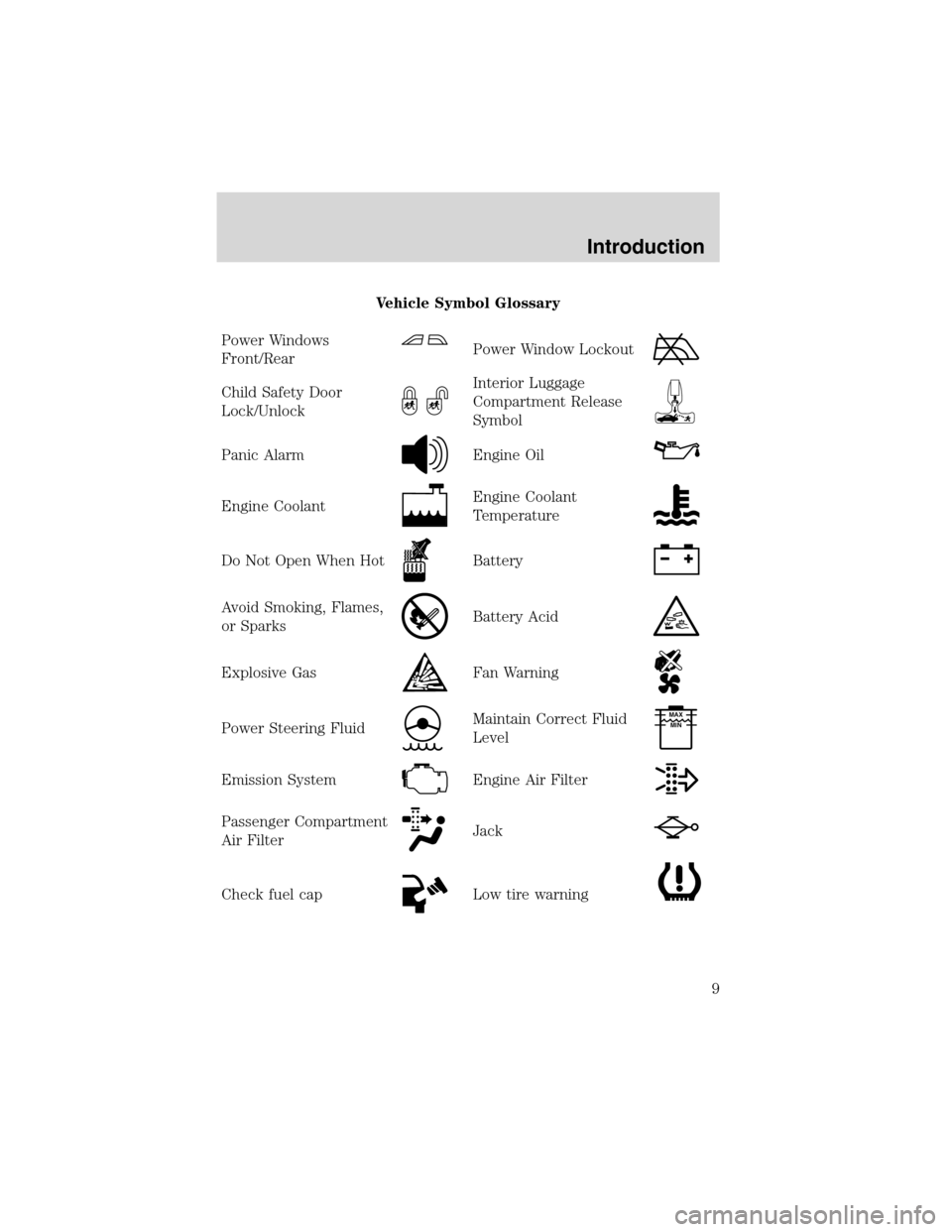
Vehicle Symbol Glossary
Power Windows
Front/Rear
Power Window Lockout
Child Safety Door
Lock/UnlockInterior Luggage
Compartment Release
Symbol
Panic AlarmEngine Oil
Engine CoolantEngine Coolant
Temperature
Do Not Open When HotBattery
Avoid Smoking, Flames,
or SparksBattery Acid
Explosive GasFan Warning
Power Steering FluidMaintain Correct Fluid
LevelMAX
MIN
Emission SystemEngine Air Filter
Passenger Compartment
Air FilterJack
Check fuel capLow tire warning
Introduction
9
Page 14 of 288
Key-in-ignition warning chime:Sounds when the key is left in the
ignition in the OFF/LOCK or ACC position and the driver’s door is
opened.
Headlamps on warning chime:Sounds when the headlamps or parking
lamps are on, the ignition is off (and the key is not in the ignition) and
the driver’s door is opened.
GAUGES
Speedometer:Indicates the
current vehicle speed.
Engine coolant temperature
gauge:Indicates engine coolant
temperature. At normal operating
temperature, the needle will be in
the normal range (between“H”and
“C”).If it enters the red section,
the engine is overheating. Stop
the vehicle as soon as safely possible, switch off the engine and
let the engine cool.
Never remove the coolant reservoir cap while the engine is
running or hot.
Instrument Cluster
14
Page 88 of 288

4. Attach the new wiper to the
wiper arm and reposition the clip
until it locks.
Repeat for driver’s side wiper arm.
POWER TILT/TELESCOPE STEERING COLUMN
The steering column can be
adjusted manually by moving the
four-way rocker adjustment control
located below the turn signal/wiper
control stalk. Hold the control to
adjust.
The telescope function is adjusted
by moving the control toward the
driver to telescope out and toward
the instrument panel to telescope
in.
The tilt function is adjusted by moving the control up or down.
Easy entry/exit feature
When you remove the key, the column will move, if this feature is
activated through the Message Center, to the full in and up position,
refer to theMessage Centerin theDriver Controlschapter. When the
key is inserted into the ignition, the column will return to the previous
setting.
Memory feature
The steering column positions are saved when doing a memory set
function and can be recalled along with the vehicle personality features
when a memory position is selected through the remote entry
transmitter, keyless entry keypad or memory switch on the driver’s door
(if equipped with memory feature). Refer toMemory seats/steering
column/mirrors/adjustable pedalsin theSeating and Safety
Restraintschapter.
If the steering column adjustment control is pressed during memory
recall it will cancel the automatic operation and the column will respond
to manual adjustment of the control.
Driver Controls
88
Page 89 of 288
Never adjust the steering wheel when the vehicle is moving.
STEERING COLUMN LOCK (IF EQUIPPED)
The steering column will automatically lock when the key is removed
from the ignition. When the vehicle key is inserted into the ignition, the
steering column will automatically unlock.
ILLUMINATED VISOR MIRROR
To turn on the visor mirror lamps,
lift the mirror cover. Adjust the
amount of light by sliding the
control.
OVERHEAD CONSOLE
The appearance of your vehicle’s overhead console will vary according to
your option package.
Storage compartment
Press to open the storage
compartment. The door will open
slightly and can be moved to full
open.
The storage compartment may be
used to secure sunglasses or a
similar object.
AUXILIARY POWER POINT
Power outlets are designed for accessory plugs only. Do not hang
any type of accessory or accessory bracket from the plug.
Improper use of the power outlet can cause damage not covered
by your warranty.
Driver Controls
89
Page 102 of 288
•To close from the vent, intermediate and full open positions, push the
rear portion of the control forward.
Do not let children play with the moon roof. They may seriously
hurt themselves.
When closing the moon roof, you should verify they are free of
obstructions and ensure that children and/or pets are not in the
proximity of the window openings.
Bounce Back
When an obstacle has been detected in the moon roof opening as the
moon roof is closing, the moon roof will automatically open and stop at a
prescribed position.
Bounce Back Override
To override Bounce Back, within 2 seconds after reaching Bounce Back
position, if the switch is moved from the Neutral to the auto close
positionthe moon roof will close with no bounce back protection.
If the switch is released before the moon roof reaches fully closed
position, the moon roof will stop. For example: Bounce Back Override
can be used to overcome the resistance of ice on the moon roof or seals.
HOMELINK�UNIVERSAL TRANSCEIVER (IF EQUIPPED)
The HomeLink�Universal Transceiver, located on the driver’s visor,
provides a convenient way to replace up to three hand-held transmitters
with a single built-in device. This feature will learn the radio frequency
codes of most current transmitters to operate garage doors, entry gate
operators, security systems, entry door locks, and home or office lighting.
When programming your HomeLink�Universal Transceiver to a
garage door or gate, be sure that people and objects are out of
the way to prevent potential harm or damage.
Do not use the HomeLink�Universal Transceiver with any garage door
opener that lacks safety stop and reverse features as required by U.S.
federal safety standards (this includes any garage door opener model
manufactured before April 1, 1982). A garage door which cannot detect
an object, signaling the door to stop and reverse, does not meet current
U.S. federal safety standards. For more information, contact HomeLink�
at:www.homelink.comor1–800–355–3515.
Driver Controls
102
Page 105 of 288
seconds(“cycle”) your hand-held transmitter until the frequency
signal has been accepted by the HomeLink�. The red indicator light
will flash slowly and then rapidly after HomeLink�accepts the radio
frequency signal.
•Proceed with step 4 in the“Programming”section.
Operating the HomeLink�Universal Transceiver
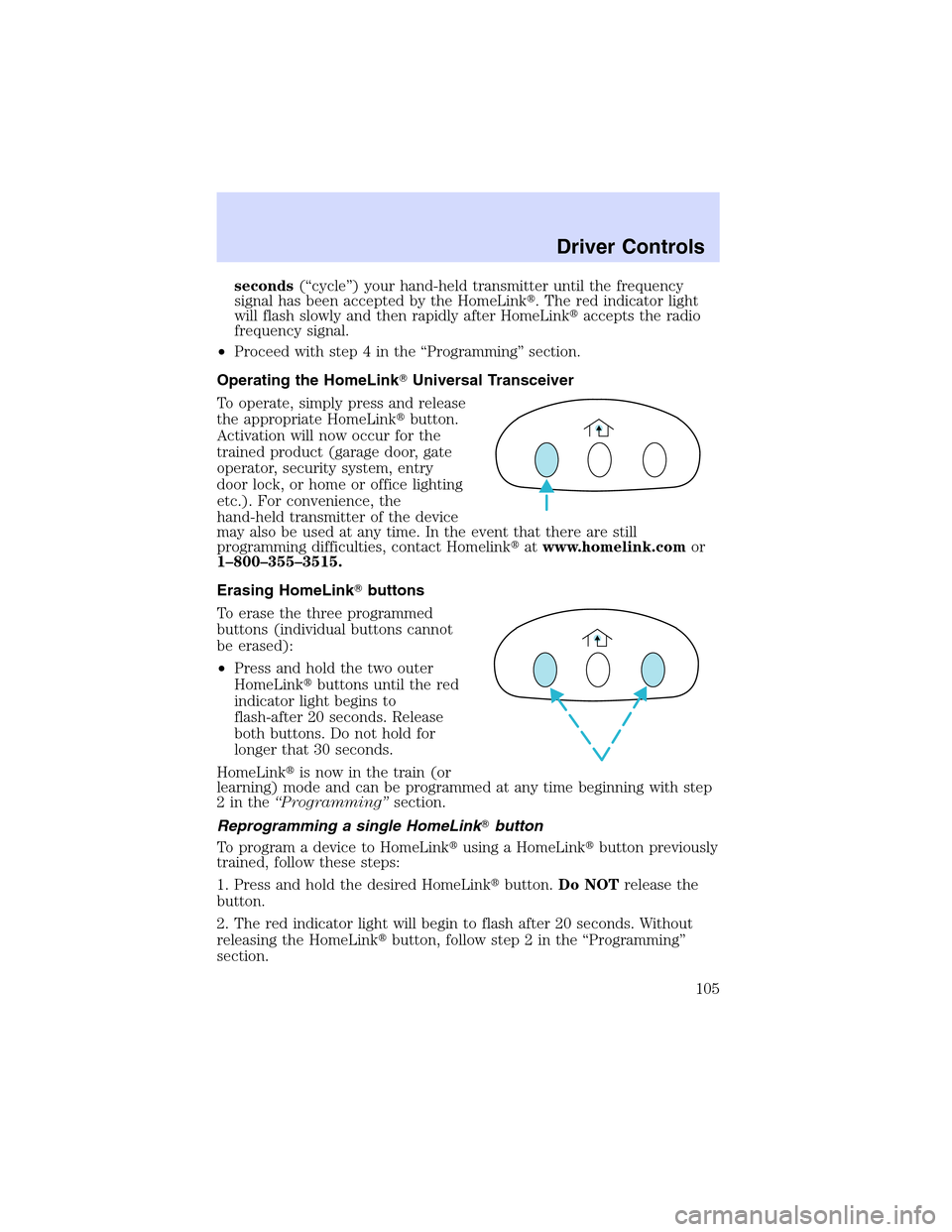
To operate, simply press and release
the appropriate HomeLink�button.
Activation will now occur for the
trained product (garage door, gate
operator, security system, entry
door lock, or home or office lighting
etc.). For convenience, the
hand-held transmitter of the device
may also be used at any time. In the event that there are still
programming difficulties, contact Homelink�atwww.homelink.comor
1–800–355–3515.
Erasing HomeLink�buttons
To erase the three programmed
buttons (individual buttons cannot
be erased):
•Press and hold the two outer
HomeLink�buttons until the red
indicator light begins to
flash-after 20 seconds. Release
both buttons. Do not hold for
longer that 30 seconds.
HomeLink�is now in the train (or
learning) mode and can be programmed at any time beginning with step
2inthe“Programming”section.
Reprogramming a single HomeLink�button
To program a device to HomeLink�using a HomeLink�button previously
trained, follow these steps:
1. Press and hold the desired HomeLink�button.Do NOTrelease the
button.
2. The red indicator light will begin to flash after 20 seconds. Without
releasing the HomeLink�button, follow step 2 in the“Programming”
section.
Driver Controls
105
Page 107 of 288
RESET
Press this control to select and reset functions shown in the FUEL,
SETUP and STATUS controls.
SETUP
Press this control for the following displays:
•Language
•Units (English/Metric)
•Autolocks
•Easy Entry/Exit (if equipped)
•Lock Chirp (if equipped)
STATUS
Selecting this function from the STATUS control causes the message
center to cycle through each of the systems being monitored. For each
of the monitored systems, the message center will indicate either an OK
message or a warning message for four seconds.
The sequence of the status check report is as follows:
•oil life in XX%
•AC (cabin) filter XX%
•charging system
•engine temperature
•brake fluid level
•washer fluid level
•doors closed (driver and passenger side, front and rear). This message
can only be reset by closing the door(s). If the RESET control is
pressed, PLEASE CLOSE DOOR will be displayed.
•trunk status
•exterior lamps (front and rear turn, brake, tail and side repeater lamp
(if equipped) status)
•Traction Control�or AdvanceTrac�(if equipped)
Driver Controls
107
Page 117 of 288
INTERIORTRUNKCONTROL
Press the remote trunk release
control on the instrument panel to
open the trunk.
You can render the switch
inoperable by locking the button
with your master key. Do this and
also lock your glove box before you
give your vehicle to the valet
personnel(do not give them the
master key or remote entry keyfob, only the gray valet key).
The remote trunk release control and power door locks will be disabled
when the vehicle perimeter alarm system is armed. This control will not
work until the vehicle perimeter alarm system is disarmed. Refer to
Perimeter Alarm Systemin theLocks and Securitychapter.
FUEL DOOR RELEASE
Press the remote fuel door release
control on the instrument panel to
open the fuel door.
The fuel door has a manual override
release located in the trunk. Pull the
tab to open the fuel door.
Driver Controls
117