2003 FORD SUPER DUTY brake
[x] Cancel search: brakePage 104 of 256
Using ABS
When hard braking is required, applycontinuous force on the brake
pedal; do not pump the brake pedal since this will reduce the
effectiveness of the ABS and will increase your vehicle’s stopping
distance. The ABS will be activated immediately, allowing y ou to retain
full steering control during hard braking and on slipperysurfaces.
However, the ABS does not decrease stopping distance.
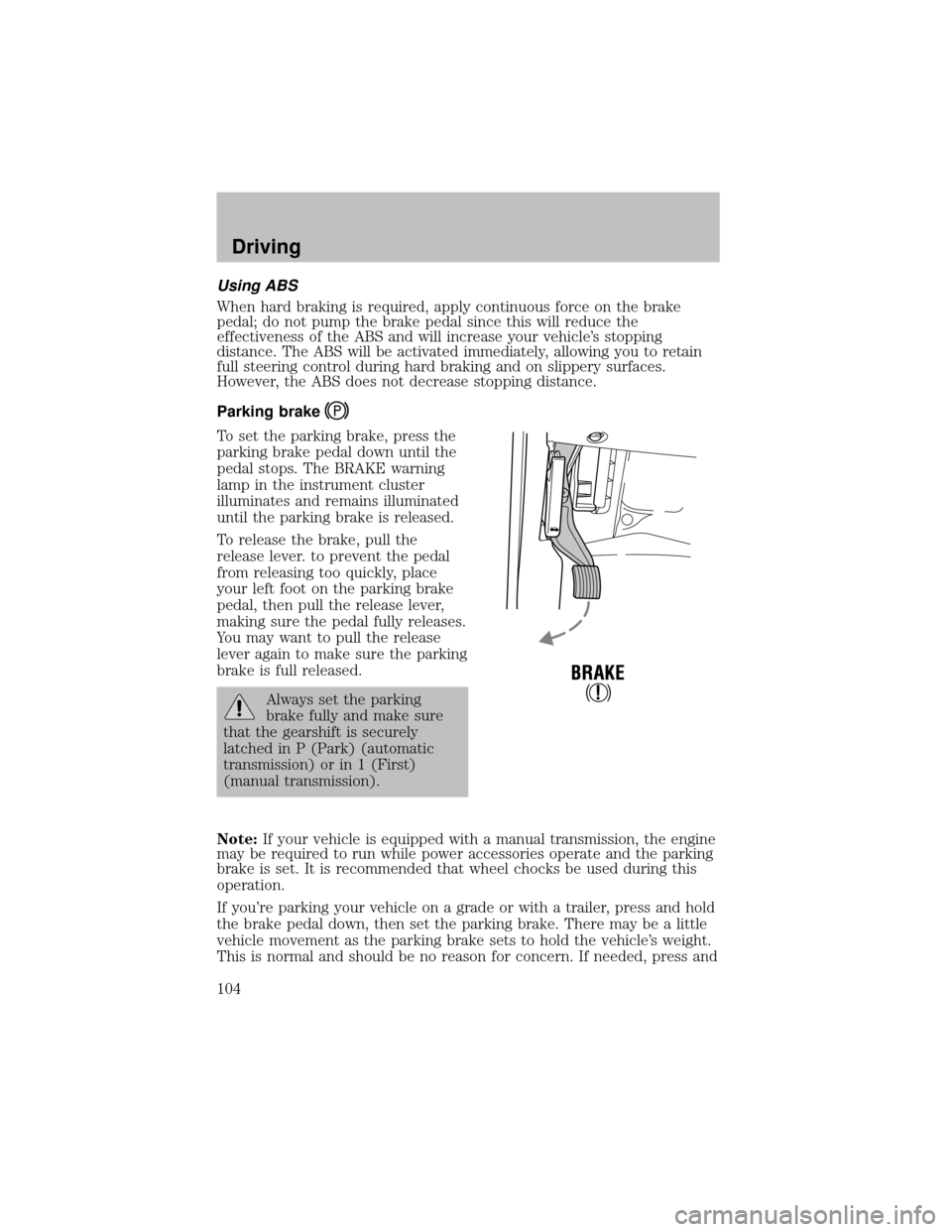
Parking brake
To set the parking brake, press the
parking brake pedal down until the
pedal stops. The BRAKE warning
lamp in the instrument cluster
illuminates and remains illuminated
until the parking brake is released.
To release the brake, pull the
release lever. to prevent the pedal
from releasing too quickly, place
your left foot on the parking brake
pedal, then pull the release lever,
making sure the pedal fullyreleases.
You maywant to pull the release
lever again to make sure the parking
brake is full released.
Always set the parking
brake fullyand make sure
that the gearshift is securely
latched in P (Park) (automatic
transmission) or in 1 (First)
(manual transmission).
Note:If your vehicle is equipped with a manual transmission, the engine
maybe required to run while power accessories operate and the parking
brake is set. It is recommended that wheel chocks be used during this
operation.
If you’re parking your vehicle on a grade or with a trailer, press and hold
the brake pedal down, then set the parking brake. There maybe a little
vehicle movement as the parking brake sets to hold the vehicle’s weight.
This is normal and should be no reason for concern. If needed, press and
Driving
104
Page 105 of 256

hold the brake pedal down, release the parking brake, then trypushing
the parking brake pedal further down. Chock the wheels if required. If
the parking brake cannot hold the weight of the vehicle, the parking
brake mayneed to be serviced.
STEERING
To prevent damage to the power steering system:
•Never hold the steering wheel at its furthest turning points (until it
stops) for more than a few seconds when the engine is running.
•Do not operate the vehicle with a low power steering pump fluid level
(below the MIN mark on the reservoir).
If the power steering system breaks down (or if the engine is turned
off), you can steer the vehicle manually, but it takes more effort.
If the steering wanders or pulls, check for:
•an underinflated tire
•uneven tire wear
•loose or worn suspension components
•loose or worn steering components
•improper steering alignment
TRACTION-LOK AXLE (IF EQUIPPED)
This axle provides added traction on slipperysurfaces, particularlywhen
one wheel is on a poor traction surface. Under normal conditions, the
Traction-Lok axle functions like a standard rear axle.
To reduce the risk of injury, never run the engine with one wheel
off the ground, such as when changing a tire.
PREPARING TO DRIVE YOUR VEHICLE
Utilityvehicles have a significantlyhigher rollover rate than
other types of vehicles.
In a rollover crash, an unbelted person is significantlymore likely
to die than a person wearing a safetybelt.
Your vehicle has larger tires and increased ground clearance, giving the
vehicle a higher center of gravitythan a passenger car.
Driving
105
Page 106 of 256
Vehicles with a higher center of gravitysuch as utilityand
four-wheel drive vehicles handle differentlythan vehicles with a
lower center of gravity. Utility and four-wheel drive vehicles arenot
designed for cornering at speeds as high as passenger cars anymore
than low-slung sports cars are designed to perform satisfactorilyunder
off-road conditions. Avoid sharp turns, excessive speed and abrupt
maneuvers in these vehicles. Failure to drive cautiouslycould result in
an increased risk of loss of vehicle control, vehicle rollover, personal
injuryand death.
Loaded vehicles, with a higher center of gravity, may handle
differentlythan unloaded vehicles. Extra precautions, such as
slower speeds and increased stopping distance, should be taken when
driving a heavilyloaded vehicle.
AUTOMATIC TRANSMISSION OPERATION (IF EQUIPPED)
Brake-shift interlock
This vehicle is equipped with a brake-shift interlock feature that prevents
the gearshift lever from being moved from P (Park) when the ignition is
in the ON position unless brake pedal is depressed.
If you cannot move the gearshift lever out of P (Park) with ignition in
the ON position and the brake pedal depressed:
1. Applythe parking brake, turn ignition keyto LOCK, then remove the
key.
2. Insert the keyand turn it to OFF.Apply the brake pedal and shift
to N (Neutral).
In the ignition OFF position, the automatic transmission shift
lever can be moved from the P (Park) position without the brake
pedal depressed. To avoid unwanted vehicle movement, always set the
parking brake.
3. Start the vehicle.
If it is necessaryto use the above procedure to move the gearshift lever,
it is possible that a fuse has blown or the vehicle’s brakelamps are not
operating properly. Refer toFuses and relaysin theRoadside
emergencieschapter.
Driving
106
Page 107 of 256
Do not drive your vehicle until you verify that the brakelamps
are working.
Always set the parking brake fully and make sure the gearshift is
latched in P (Park). Turn the ignition to the LOCK position and
remove the key whenever you leave your vehicle.
If the parking brake is fullyreleased, but the brake warning lamp
remains illuminated, the brakes maynot be working properly.
See your dealer or a qualified service technician.
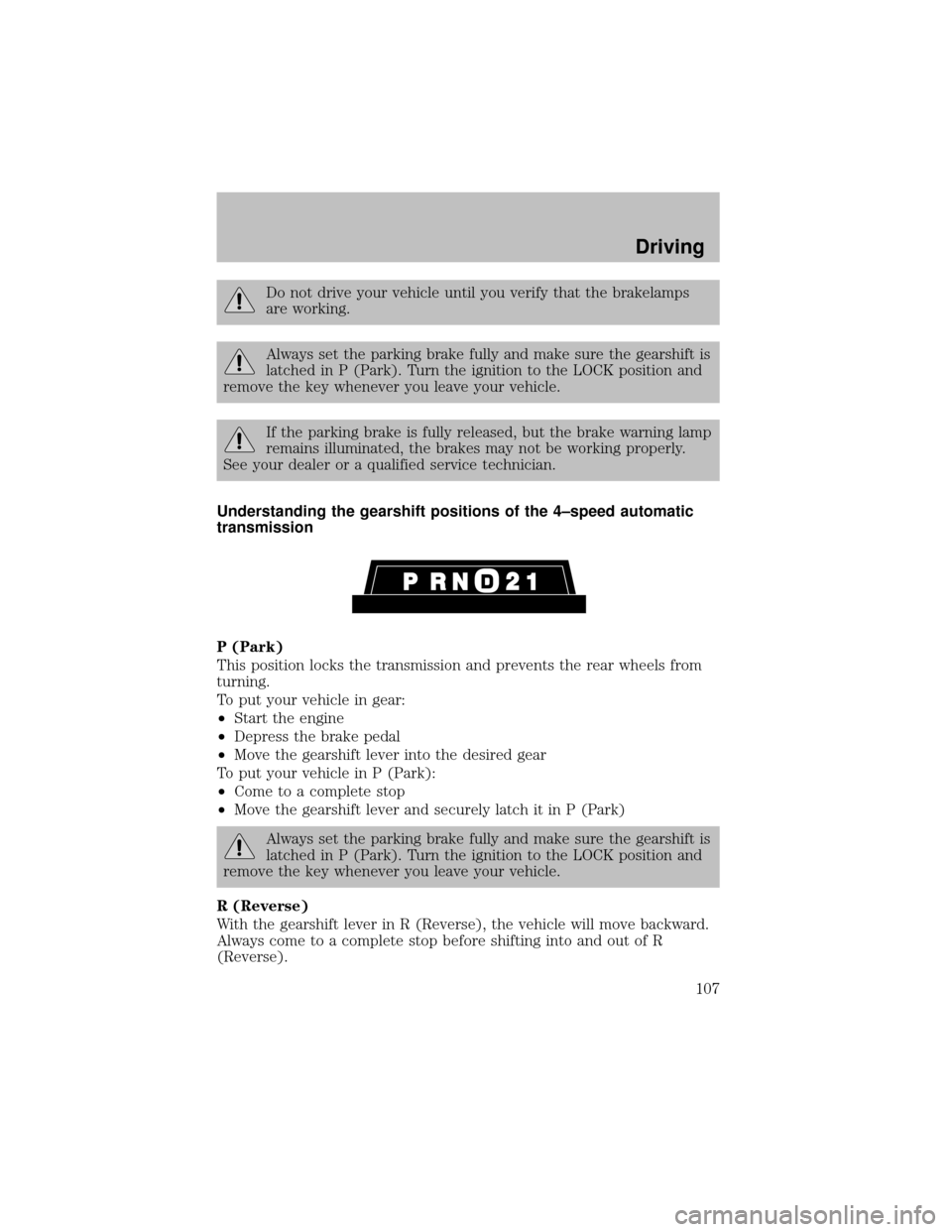
Understanding the gearshift positions of the 4–speed automatic
transmission
P (Park)
This position locks the transmission and prevents the rear wheels from
turning.
To put your vehicle in gear:
•Start the engine
•Depress the brake pedal
•Move the gearshift lever into the desired gear
To put your vehicle in P (Park):
•Come to a complete stop
•Move the gearshift lever and securelylatch it in P (Park)
Always set the parking brake fully and make sure the gearshift is
latched in P (Park). Turn the ignition to the LOCK position and
remove the key whenever you leave your vehicle.
R (Reverse)
With the gearshift lever in R (Reverse), the vehicle will move backward.
Always come to a complete stop before shifting into and out of R
(Reverse).
Driving
107
Page 108 of 256

N (Neutral)
With the gearshift lever in N (Neutral), the vehicle can be started and is
free to roll. Hold the brake pedal down while in this position.
(Overdrive)
The normal driving position for the best fuel economy. Transmission
operates in gears one through four.
(Overdrive) can be deactivated
bypressing the transmission control switch on the end of the gearshift
lever. This will illuminate the O/D OFF lamp and activate Drive.
Drive (not shown)
Drive is activated when the transmission control switch is pressed.
•This position allows for all forward gears except overdrive.
•O/D OFF lamp is illuminated.
•Provides engine braking.
•Use when driving conditions cause excessive shifting from O/D to
other gears. Examples: citytraffic, hillyterrain, heavyloads, trailer
towing and when engine braking is required.
•To return to O/D (overdrive mode), press the transmission control
switch. The O/D OFF lamp will not be illuminated.
•O/D (Overdrive) is automaticallyreturned each time the keyis turned
off.
2 (Second)
This position allows for second gear only.
•Provides engine braking.
•Use to start-up on slipperyroads.
•To return to
(Overdrive), move the gearshift lever into the
(Overdrive) position.
•Selecting 2 (Second) at higher speeds will cause the transmission to
downshift to second gear at the appropriate vehicle speed.
1 (First)
•Provides maximum engine braking.
•Allows upshifts bymoving gearshift lever.
•Will not downshift into 1 (First) at high speeds; allows for 1 (First)
when vehicle reaches slower speeds.
Forced downshifts
•Allowed in
(Overdrive) or Drive.
Driving
108
Page 109 of 256

•Depress the accelerator to the floor.
•Allows transmission to select an appropriate gear.
Shift strategy (4R100 automatic transmission)
To account for customer driving habits and conditions, your 4R100
automatic transmission electronicallycontrols the shift qualitybyusing
an adaptive learning strategy. The adaptive learning strategy is
maintained bypower from the battery. When the batteryis disconnected
or a new batteryis installed, the transmission must relearn its adaptive
strategy. Optimal shifting will resume within a few hundred kilometers
(miles) of operation.
If the shift quality does not improve within a few hundred
kilometers (miles) of operation, or if the downshifts and other
throttle conditions do not function normally, see your dealer or a
qualified service technician as soon as possible.
If your vehicle gets stuck in mud or snow
If your vehicle gets stuck in mud or snow, it may be rocked out by
shifting from forward and reverse gears, stopping between shifts in a
steadypattern. Press lightlyon the accelerator in each gear.
Do not rock the vehicle if the engine is not at normal operating
temperature or damage to the transmission may occur.
Do not rock the vehicle for more than a minute or damage to the
transmission and tires may occur, or the engine may overheat.
MANUAL TRANSMISSION OPERATION (IF EQUIPPED)
Using the clutch
The manual transmission has a starter interlock that prevents cranking
the engine unless the clutch pedal is fullydepressed.
To start the vehicle:
1. Make sure the parking brake is fullyset.
2. Press the clutch pedal to the floor, then put the gearshift lever in the
neutral position.
1
24 R
L3D
Driving
109
Page 110 of 256
3. Start the engine, then press the brake pedal and release the parking
brake.
4. Move the gearshift lever to the desired gear, then slowlyrelease the
clutch pedal while slowlypressing on the accelerator.
Do not drive with your foot resting on the clutch pedal or use the clutch
pedal to hold your vehicle at a standstill while waiting on a hill. These
actions will reduce the life of the clutch.
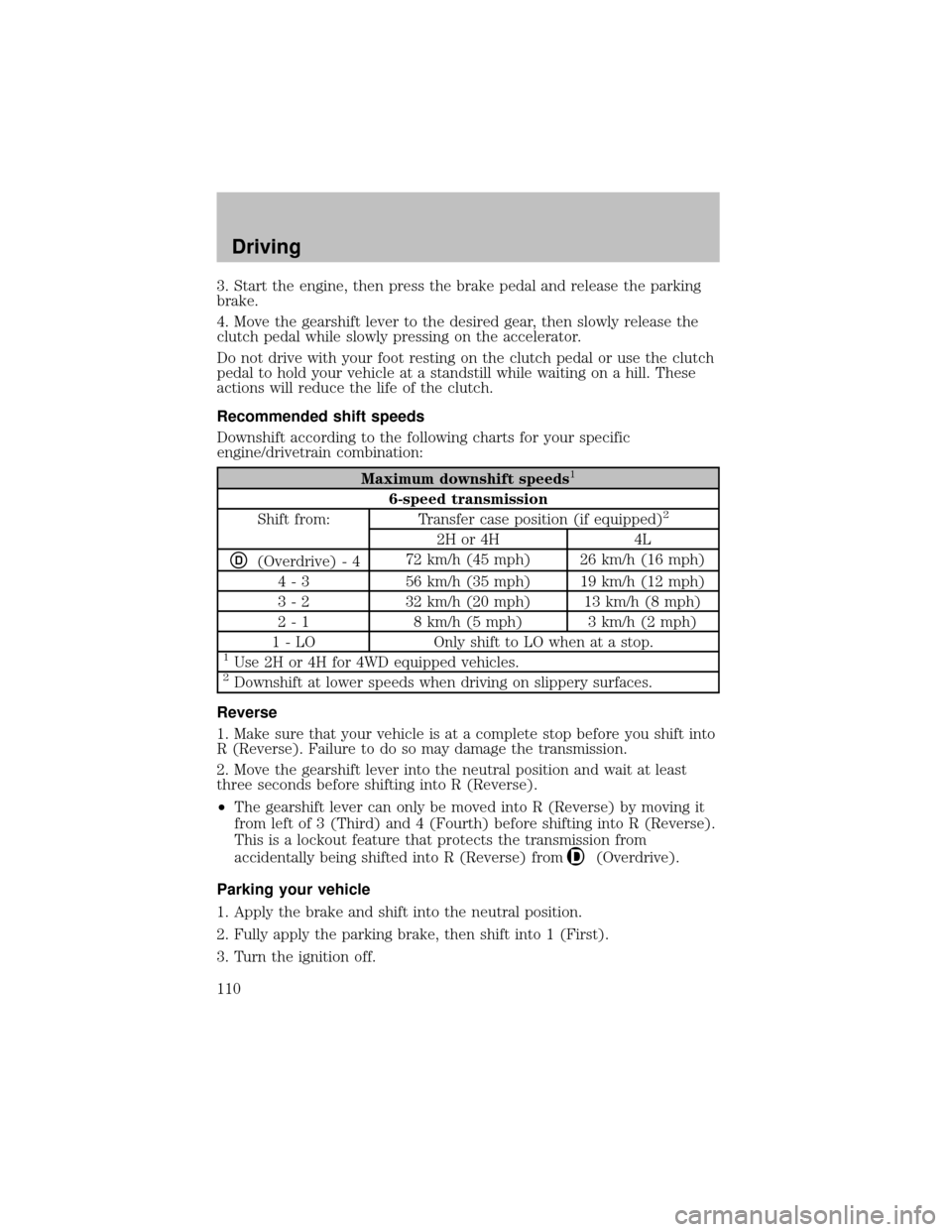
Recommended shift speeds
Downshift according to the following charts for your specific
engine/drivetrain combination:
Maximum downshift speeds1
6-speed transmission
Shift from: Transfer case position (if equipped)2
2H or 4H 4L
D(Overdrive) - 472 km/h (45 mph) 26 km/h (16 mph)
4 - 3 56 km/h (35 mph) 19 km/h (12 mph)
3 - 2 32 km/h (20 mph) 13 km/h (8 mph)
2 - 1 8 km/h (5 mph) 3 km/h (2 mph)
1 - LO Onlyshift to LO when at a stop.
1Use 2H or 4H for 4WD equipped vehicles.2Downshift at lower speeds when driving on slipperysurfaces.
Reverse
1. Make sure that your vehicle is at a complete stop before you shift into
R (Reverse). Failure to do so maydamage the transmission.
2. Move the gearshift lever into the neutral position and wait at least
three seconds before shifting into R (Reverse).
•The gearshift lever can onlybe moved into R (Reverse) bymoving it
from left of 3 (Third) and 4 (Fourth) before shifting into R (Reverse).
This is a lockout feature that protects the transmission from
accidentallybeing shifted into R (Reverse) from
(Overdrive).
Parking your vehicle
1. Applythe brake and shift into the neutral position.
2. Fullyapplythe parking brake, then shift into 1 (First).
3. Turn the ignition off.
Driving
110
Page 111 of 256
Do not park your vehicle in Neutral, it may move unexpectedly
and injure someone. Use 1 (First) gear and set the parking brake
fully.
Removing the key
Turn the ignition off, push the release lever (located above the ignition),
then turn the keytoward you and remove the key.
REVERSE SENSING SYSTEM (IF EQUIPPED)
The Reverse Sensing System (RSS) sounds a tone to warn the driver of
obstacles near the rear bumper when the R (Reverse) is selected and the
vehicle is moving at speeds less than 5 km/h (3 mph). The system is not
effective at speeds above 5 km/h (3 mph) and maynot detect certain
angular or moving objects.
To help avoid personal injury, please read and understand the
limitations of the reverse sensing system as contained in this
section. Reverse sensing is onlyan aid for some (generallylarge and
fixed) objects when moving in reverse on a flat surface at “parking
speeds”. Inclement weather mayalso affect the function of the RSS;
this mayinclude reduced performance or a false activation.
To help avoid personal injury, alway s use caution when in
reverse and when using the RSS.
This system is not designed to prevent contact with small or
moving objects. The system is designed to provide a warning to
assist the driver in detecting large stationaryobjects to avoid damaging
the vehicle. The system may not detect smaller objects, particularly
those close to the ground.
Driving
111