2003 DODGE RAM lock
[x] Cancel search: lockPage 2250 of 2895
GEAR CASE
(1) Position park pawl and spring in case and
install park pawl shaft. Verify that end of spring
with 90É bend is hooked to pawl and straight end of
spring is seated against case.
(2) Install pawl shaft retaining bolt. Tighten bolt
to 27 N´m (20 ft. lbs.) torque.
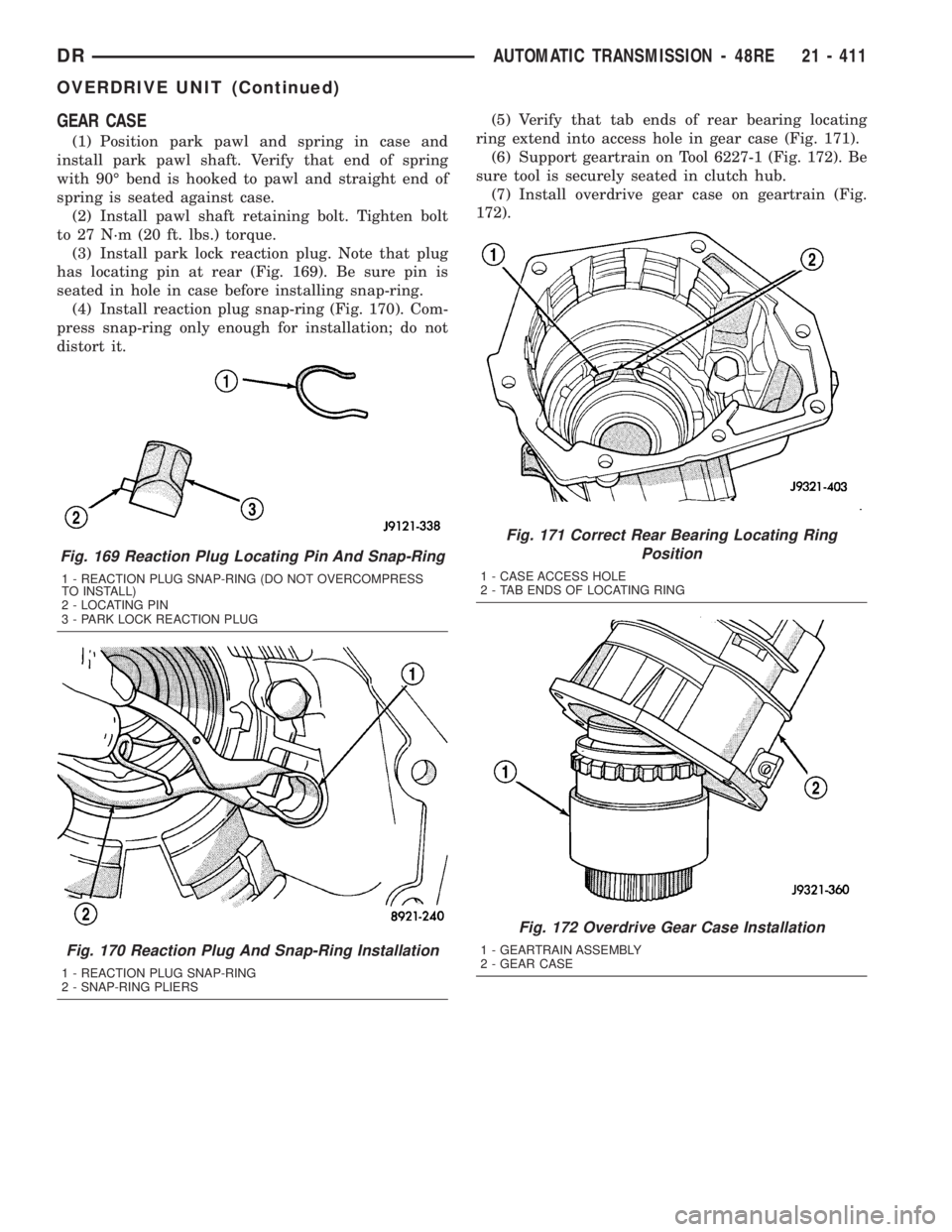
(3) Install park lock reaction plug. Note that plug
has locating pin at rear (Fig. 169). Be sure pin is
seated in hole in case before installing snap-ring.
(4) Install reaction plug snap-ring (Fig. 170). Com-
press snap-ring only enough for installation; do not
distort it.(5) Verify that tab ends of rear bearing locating
ring extend into access hole in gear case (Fig. 171).
(6) Support geartrain on Tool 6227-1 (Fig. 172). Be
sure tool is securely seated in clutch hub.
(7) Install overdrive gear case on geartrain (Fig.
172).
Fig. 169 Reaction Plug Locating Pin And Snap-Ring
1 - REACTION PLUG SNAP-RING (DO NOT OVERCOMPRESS
TO INSTALL)
2 - LOCATING PIN
3 - PARK LOCK REACTION PLUG
Fig. 170 Reaction Plug And Snap-Ring Installation
1 - REACTION PLUG SNAP-RING
2 - SNAP-RING PLIERS
Fig. 171 Correct Rear Bearing Locating Ring
Position
1 - CASE ACCESS HOLE
2 - TAB ENDS OF LOCATING RING
Fig. 172 Overdrive Gear Case Installation
1 - GEARTRAIN ASSEMBLY
2 - GEAR CASE
DRAUTOMATIC TRANSMISSION - 48RE 21 - 411
OVERDRIVE UNIT (Continued)
Page 2251 of 2895
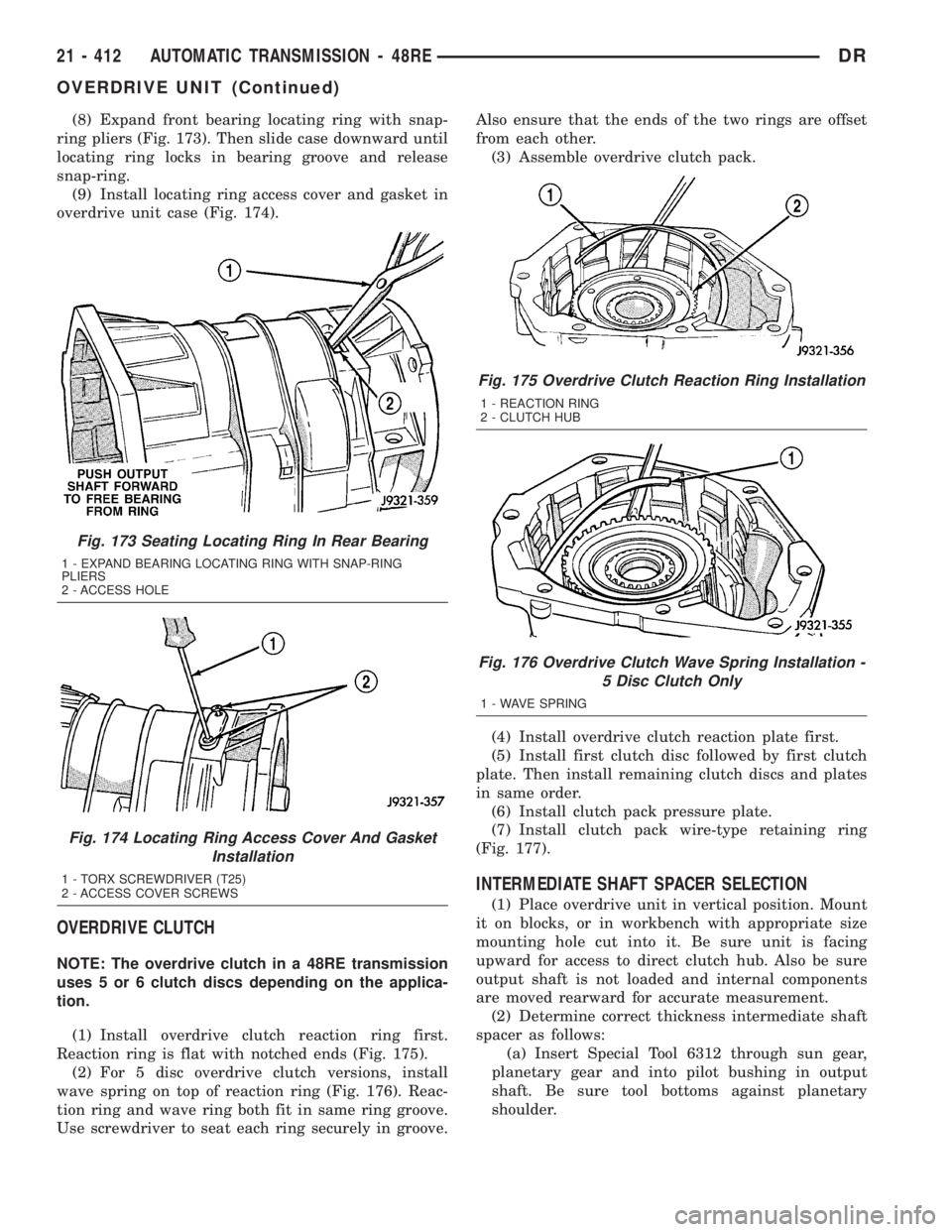
(8) Expand front bearing locating ring with snap-
ring pliers (Fig. 173). Then slide case downward until
locating ring locks in bearing groove and release
snap-ring.
(9) Install locating ring access cover and gasket in
overdrive unit case (Fig. 174).
OVERDRIVE CLUTCH
NOTE: The overdrive clutch in a 48RE transmission
uses 5 or 6 clutch discs depending on the applica-
tion.
(1) Install overdrive clutch reaction ring first.
Reaction ring is flat with notched ends (Fig. 175).
(2) For 5 disc overdrive clutch versions, install
wave spring on top of reaction ring (Fig. 176). Reac-
tion ring and wave ring both fit in same ring groove.
Use screwdriver to seat each ring securely in groove.Also ensure that the ends of the two rings are offset
from each other.
(3) Assemble overdrive clutch pack.
(4) Install overdrive clutch reaction plate first.
(5) Install first clutch disc followed by first clutch
plate. Then install remaining clutch discs and plates
in same order.
(6) Install clutch pack pressure plate.
(7) Install clutch pack wire-type retaining ring
(Fig. 177).
INTERMEDIATE SHAFT SPACER SELECTION
(1) Place overdrive unit in vertical position. Mount
it on blocks, or in workbench with appropriate size
mounting hole cut into it. Be sure unit is facing
upward for access to direct clutch hub. Also be sure
output shaft is not loaded and internal components
are moved rearward for accurate measurement.
(2) Determine correct thickness intermediate shaft
spacer as follows:
(a) Insert Special Tool 6312 through sun gear,
planetary gear and into pilot bushing in output
shaft. Be sure tool bottoms against planetary
shoulder.
Fig. 173 Seating Locating Ring In Rear Bearing
1 - EXPAND BEARING LOCATING RING WITH SNAP-RING
PLIERS
2 - ACCESS HOLE
Fig. 174 Locating Ring Access Cover And Gasket
Installation
1 - TORX SCREWDRIVER (T25)
2 - ACCESS COVER SCREWS
Fig. 175 Overdrive Clutch Reaction Ring Installation
1 - REACTION RING
2 - CLUTCH HUB
Fig. 176 Overdrive Clutch Wave Spring Installation -
5 Disc Clutch Only
1 - WAVE SPRING
21 - 412 AUTOMATIC TRANSMISSION - 48REDR
OVERDRIVE UNIT (Continued)
Page 2252 of 2895
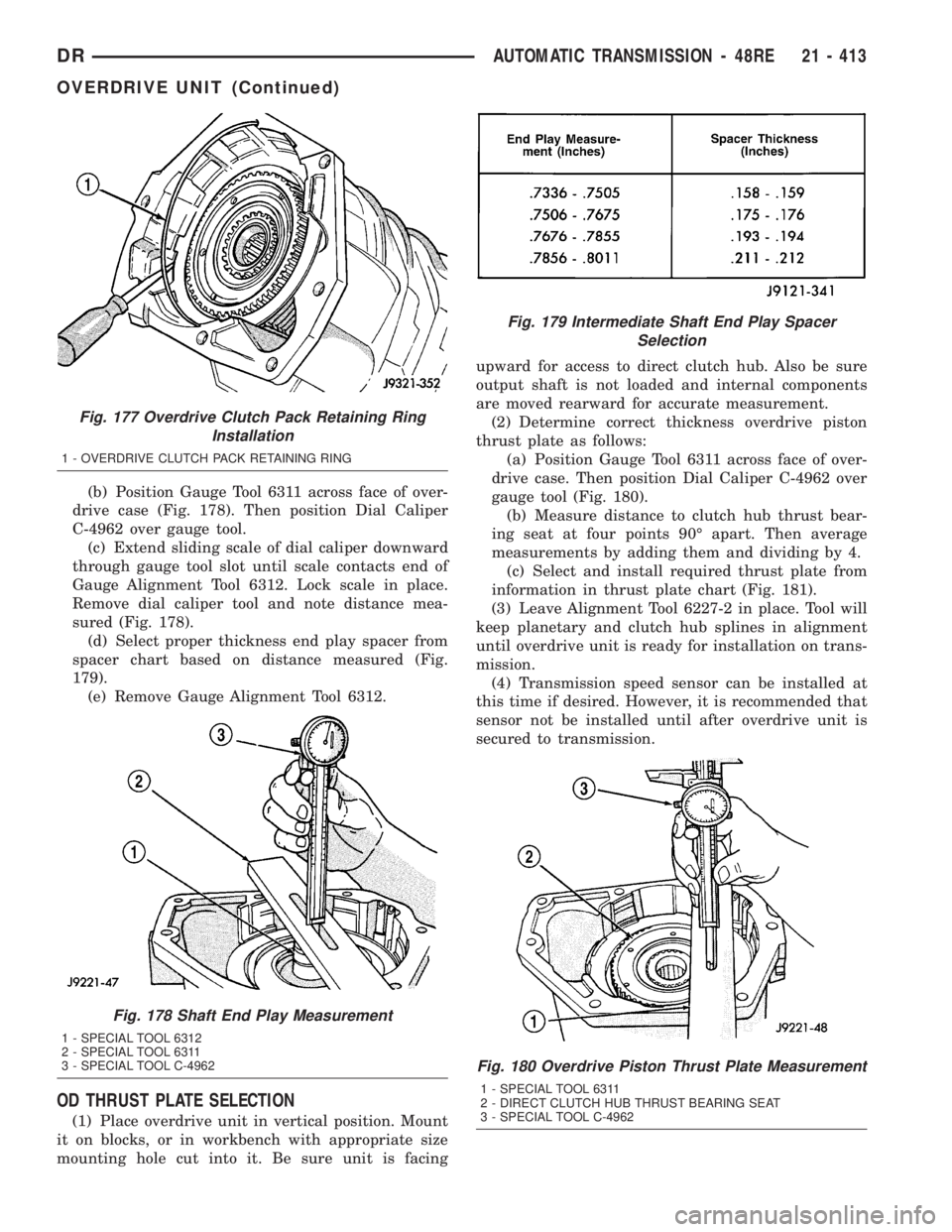
(b) Position Gauge Tool 6311 across face of over-
drive case (Fig. 178). Then position Dial Caliper
C-4962 over gauge tool.
(c) Extend sliding scale of dial caliper downward
through gauge tool slot until scale contacts end of
Gauge Alignment Tool 6312. Lock scale in place.
Remove dial caliper tool and note distance mea-
sured (Fig. 178).
(d) Select proper thickness end play spacer from
spacer chart based on distance measured (Fig.
179).
(e) Remove Gauge Alignment Tool 6312.
OD THRUST PLATE SELECTION
(1) Place overdrive unit in vertical position. Mount
it on blocks, or in workbench with appropriate size
mounting hole cut into it. Be sure unit is facingupward for access to direct clutch hub. Also be sure
output shaft is not loaded and internal components
are moved rearward for accurate measurement.
(2) Determine correct thickness overdrive piston
thrust plate as follows:
(a) Position Gauge Tool 6311 across face of over-
drive case. Then position Dial Caliper C-4962 over
gauge tool (Fig. 180).
(b) Measure distance to clutch hub thrust bear-
ing seat at four points 90É apart. Then average
measurements by adding them and dividing by 4.
(c) Select and install required thrust plate from
information in thrust plate chart (Fig. 181).
(3) Leave Alignment Tool 6227-2 in place. Tool will
keep planetary and clutch hub splines in alignment
until overdrive unit is ready for installation on trans-
mission.
(4) Transmission speed sensor can be installed at
this time if desired. However, it is recommended that
sensor not be installed until after overdrive unit is
secured to transmission.
Fig. 177 Overdrive Clutch Pack Retaining Ring
Installation
1 - OVERDRIVE CLUTCH PACK RETAINING RING
Fig. 178 Shaft End Play Measurement
1 - SPECIAL TOOL 6312
2 - SPECIAL TOOL 6311
3 - SPECIAL TOOL C-4962
Fig. 179 Intermediate Shaft End Play Spacer
Selection
Fig. 180 Overdrive Piston Thrust Plate Measurement
1 - SPECIAL TOOL 6311
2 - DIRECT CLUTCH HUB THRUST BEARING SEAT
3 - SPECIAL TOOL C-4962
DRAUTOMATIC TRANSMISSION - 48RE 21 - 413
OVERDRIVE UNIT (Continued)
Page 2254 of 2895
ment Tool 6227-2. Overdrive unit cannot be installed
if splines are not aligned. If splines have rotated out
of alignment, unit will have to be disassembled to
realign splines.
(9)
Carefully slide Alignment Tool 6227-2 out of over-
drive planetary gear and overrunning clutch splines.
(10) Raise overdrive unit and carefully slide it
straight onto intermediate shaft. Insert park rod into
park lock reaction plug at same time. Avoid tilting
overdrive during installation as this could cause
planetary gear and overrunning clutch splines to
rotate out of alignment. If this occurs, it will be nec-
essary to remove and disassemble overdrive unit to
realign splines.
(11) Work overdrive unit forward on intermediate
shaft until seated against transmission case.
(12) Install bolts attaching overdrive unit to trans-
mission unit. Tighten bolts in diagonal pattern to 34
N´m (25 ft-lbs).
(13) Connect the transmission speed sensor and
overdrive wiring connectors.
(14) Install the transfer case, if equipped.
(15) Align and install rear propeller shaft, if nec-
essary. (Refer to 3 - DIFFERENTIAL & DRIVELINE/
PROPELLER SHAFT/PROPELLER SHAFT -
INSTALLATION)
OVERRUNNING CLUTCH
CAM/OVERDRIVE PISTON
RETAINER
DESCRIPTION
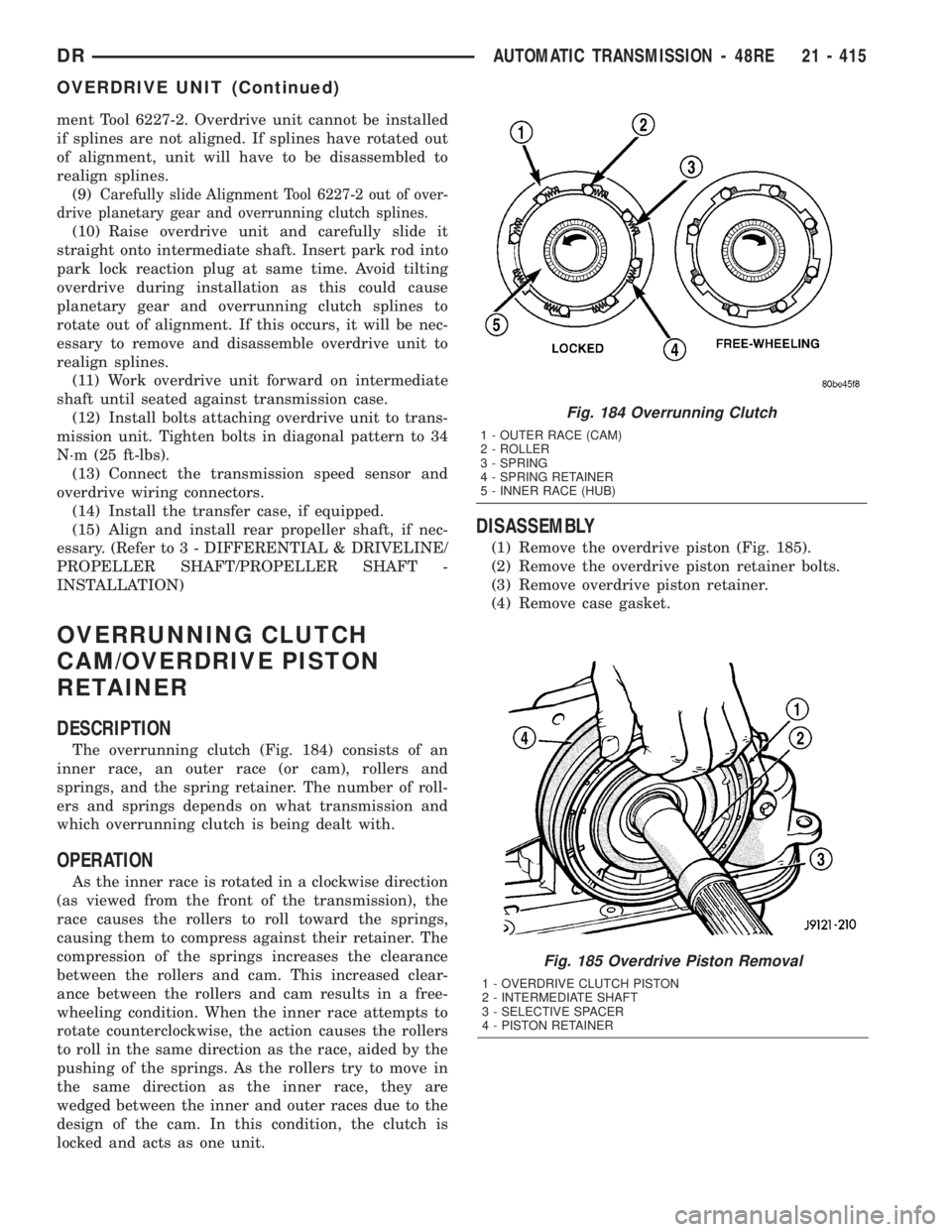
The overrunning clutch (Fig. 184) consists of an
inner race, an outer race (or cam), rollers and
springs, and the spring retainer. The number of roll-
ers and springs depends on what transmission and
which overrunning clutch is being dealt with.
OPERATION
As the inner race is rotated in a clockwise direction
(as viewed from the front of the transmission), the
race causes the rollers to roll toward the springs,
causing them to compress against their retainer. The
compression of the springs increases the clearance
between the rollers and cam. This increased clear-
ance between the rollers and cam results in a free-
wheeling condition. When the inner race attempts to
rotate counterclockwise, the action causes the rollers
to roll in the same direction as the race, aided by the
pushing of the springs. As the rollers try to move in
the same direction as the inner race, they are
wedged between the inner and outer races due to the
design of the cam. In this condition, the clutch is
locked and acts as one unit.
DISASSEMBLY
(1) Remove the overdrive piston (Fig. 185).
(2) Remove the overdrive piston retainer bolts.
(3) Remove overdrive piston retainer.
(4) Remove case gasket.
Fig. 185 Overdrive Piston Removal
1 - OVERDRIVE CLUTCH PISTON
2 - INTERMEDIATE SHAFT
3 - SELECTIVE SPACER
4 - PISTON RETAINER
Fig. 184 Overrunning Clutch
1 - OUTER RACE (CAM)
2 - ROLLER
3 - SPRING
4 - SPRING RETAINER
5 - INNER RACE (HUB)
DRAUTOMATIC TRANSMISSION - 48RE 21 - 415
OVERDRIVE UNIT (Continued)
Page 2258 of 2895
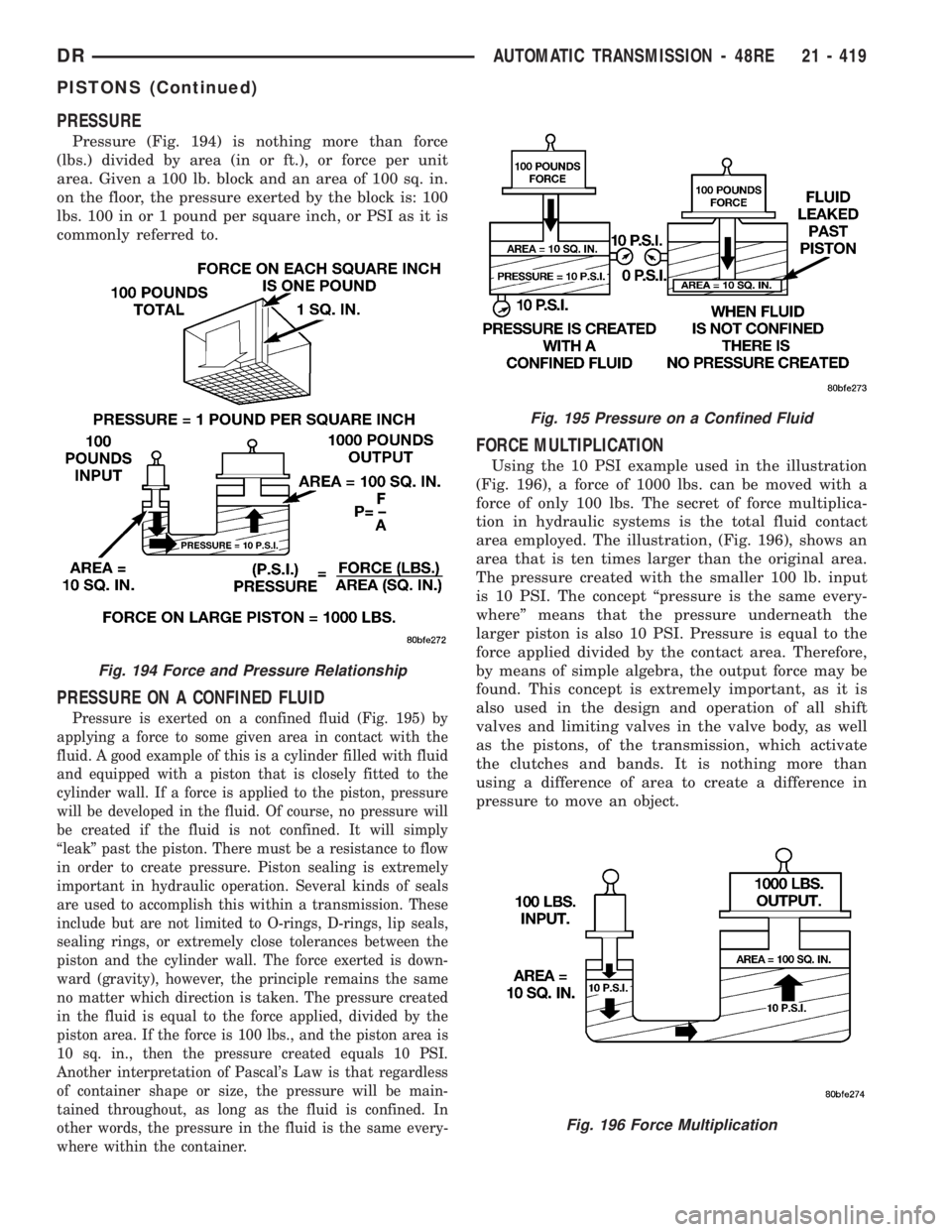
PRESSURE
Pressure (Fig. 194) is nothing more than force
(lbs.) divided by area (in or ft.), or force per unit
area. Given a 100 lb. block and an area of 100 sq. in.
on the floor, the pressure exerted by the block is: 100
lbs. 100 in or 1 pound per square inch, or PSI as it is
commonly referred to.
PRESSURE ON A CONFINED FLUID
Pressure is exerted on a confined fluid (Fig. 195) by
applying a force to some given area in contact with the
fluid. A good example of this is a cylinder filled with fluid
and equipped with a piston that is closely fitted to the
cylinder wall. If a force is applied to the piston, pressure
will be developed in the fluid. Of course, no pressure will
be created if the fluid is not confined. It will simply
ªleakº past the piston. There must be a resistance to flow
in order to create pressure. Piston sealing is extremely
important in hydraulic operation. Several kinds of seals
are used to accomplish this within a transmission. These
include but are not limited to O-rings, D-rings, lip seals,
sealing rings, or extremely close tolerances between the
piston and the cylinder wall. The force exerted is down-
ward (gravity), however, the principle remains the same
no matter which direction is taken. The pressure created
in the fluid is equal to the force applied, divided by the
piston area. If the force is 100 lbs., and the piston area is
10 sq. in., then the pressure created equals 10 PSI.
Another interpretation of Pascal's Law is that regardless
of container shape or size, the pressure will be main-
tained throughout, as long as the fluid is confined. In
other words, the pressure in the fluid is the same every-
where within the container.
FORCE MULTIPLICATION
Using the 10 PSI example used in the illustration
(Fig. 196), a force of 1000 lbs. can be moved with a
force of only 100 lbs. The secret of force multiplica-
tion in hydraulic systems is the total fluid contact
area employed. The illustration, (Fig. 196), shows an
area that is ten times larger than the original area.
The pressure created with the smaller 100 lb. input
is 10 PSI. The concept ªpressure is the same every-
whereº means that the pressure underneath the
larger piston is also 10 PSI. Pressure is equal to the
force applied divided by the contact area. Therefore,
by means of simple algebra, the output force may be
found. This concept is extremely important, as it is
also used in the design and operation of all shift
valves and limiting valves in the valve body, as well
as the pistons, of the transmission, which activate
the clutches and bands. It is nothing more than
using a difference of area to create a difference in
pressure to move an object.
Fig. 194 Force and Pressure Relationship
Fig. 195 Pressure on a Confined Fluid
Fig. 196 Force Multiplication
DRAUTOMATIC TRANSMISSION - 48RE 21 - 419
PISTONS (Continued)
Page 2264 of 2895
slots in face of gear carrier. Use extra petroleum jelly
to hold washer in place if desired.
(11) Install the torlon bushing onto the front plan-
etary carrier hub.
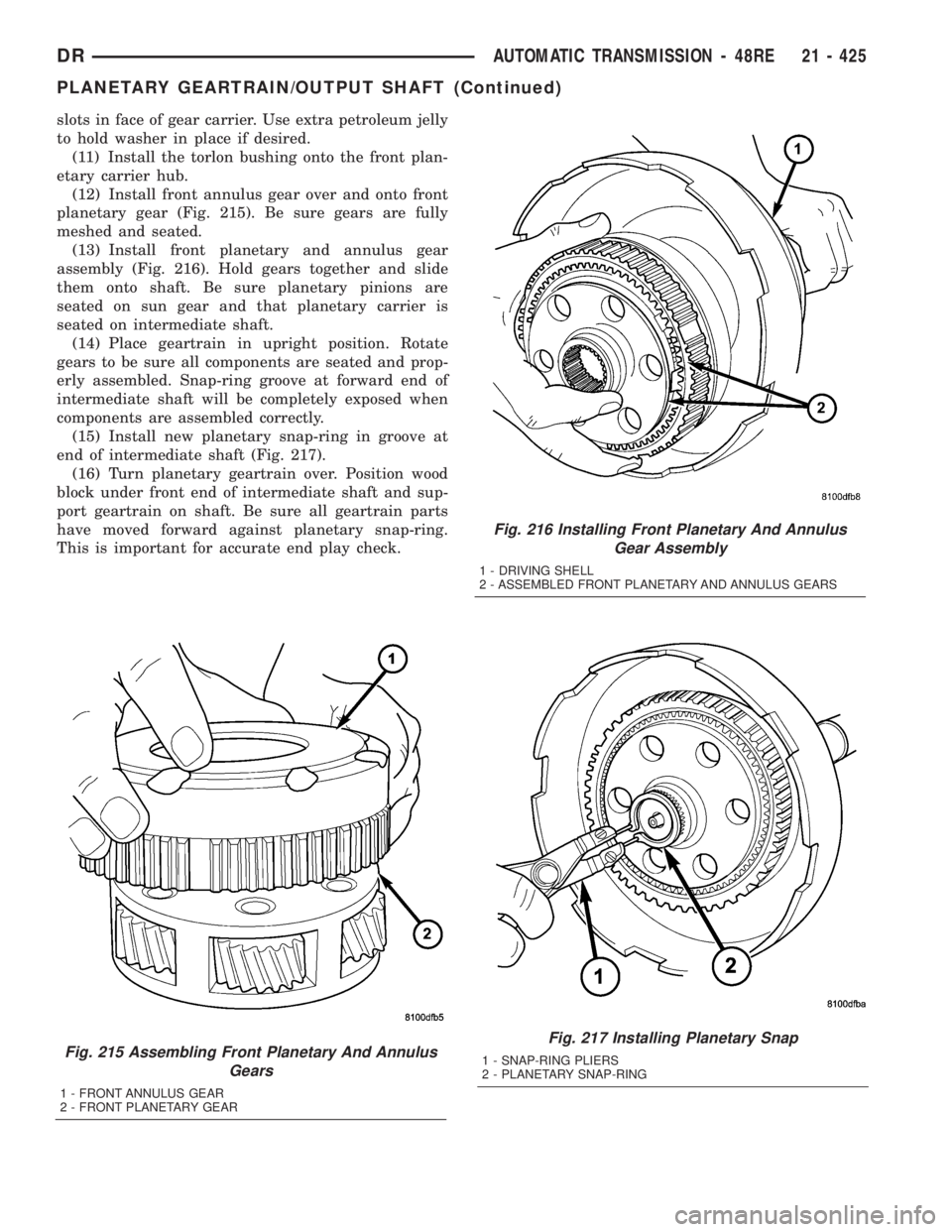
(12) Install front annulus gear over and onto front
planetary gear (Fig. 215). Be sure gears are fully
meshed and seated.
(13) Install front planetary and annulus gear
assembly (Fig. 216). Hold gears together and slide
them onto shaft. Be sure planetary pinions are
seated on sun gear and that planetary carrier is
seated on intermediate shaft.
(14) Place geartrain in upright position. Rotate
gears to be sure all components are seated and prop-
erly assembled. Snap-ring groove at forward end of
intermediate shaft will be completely exposed when
components are assembled correctly.
(15) Install new planetary snap-ring in groove at
end of intermediate shaft (Fig. 217).
(16) Turn planetary geartrain over. Position wood
block under front end of intermediate shaft and sup-
port geartrain on shaft. Be sure all geartrain parts
have moved forward against planetary snap-ring.
This is important for accurate end play check.
Fig. 215 Assembling Front Planetary And Annulus
Gears
1 - FRONT ANNULUS GEAR
2 - FRONT PLANETARY GEAR
Fig. 216 Installing Front Planetary And Annulus
Gear Assembly
1 - DRIVING SHELL
2 - ASSEMBLED FRONT PLANETARY AND ANNULUS GEARS
Fig. 217 Installing Planetary Snap
1 - SNAP-RING PLIERS
2 - PLANETARY SNAP-RING
DRAUTOMATIC TRANSMISSION - 48RE 21 - 425
PLANETARY GEARTRAIN/OUTPUT SHAFT (Continued)
Page 2267 of 2895
CLEANING
Clean the clutch components with solvent and dry
them with compressed air. Do not use rags or shop
towels to dry any of the clutch parts. Lint from such
materials will adhere to component surfaces and
could restrict or block fluid passages after assembly.
INSPECTION
Replace the clutch discs if warped, worn, scored,
burned/charred, the lugs are damaged, or if the fac-
ing is flaking off. Replace the top and bottom pres-
sure plates if scored, warped, or cracked. Be sure the
driving lugs on the pressure and clutch plates are
also in good condition. The lugs must not be bent,
cracked or damaged in any way.
Replace the piston spring and wave spring if either
part is distorted, warped or broken.
Check the lug grooves in the clutch retainer. The
clutch and pressure plates should slide freely in the
slots. Replace the retainer if the grooves are worn or
damaged. Also check action of the check balls in the
retainer and piston. Each check ball must move
freely and not stick.
Replace the retainer bushing if worn, scored, or
doubt exists about bushing condition.
Inspect the piston and retainer seal surfaces for
nicks or scratches. Minor scratches can be removed
with crocus cloth. However, replace the piston and/or
retainer if the seal surfaces are seriously scored.
Check condition of the fiber thrust washer and
metal output shaft thrust washer. Replace either
washer if worn or damaged.
Check condition of the seal rings on the input shaft
and clutch retainer hub. Replace the seal rings only
if worn, distorted, or damaged. The input shaft front
seal ring is teflon with chamfered ends. The rear ring
is metal with interlocking ends.
Check the input shaft for wear, or damage. Replace
the shaft if worn, scored or damaged in any way.
ASSEMBLY
(1) Soak clutch discs in transmission fluid while
assembling other clutch parts.
(2) Install new seal rings on clutch retainer hub
and input shaft if necessary.
(a) Be sure clutch hub seal ring is fully seated in
groove and is not twisted.
(3) Lubricate splined end of input shaft and clutch
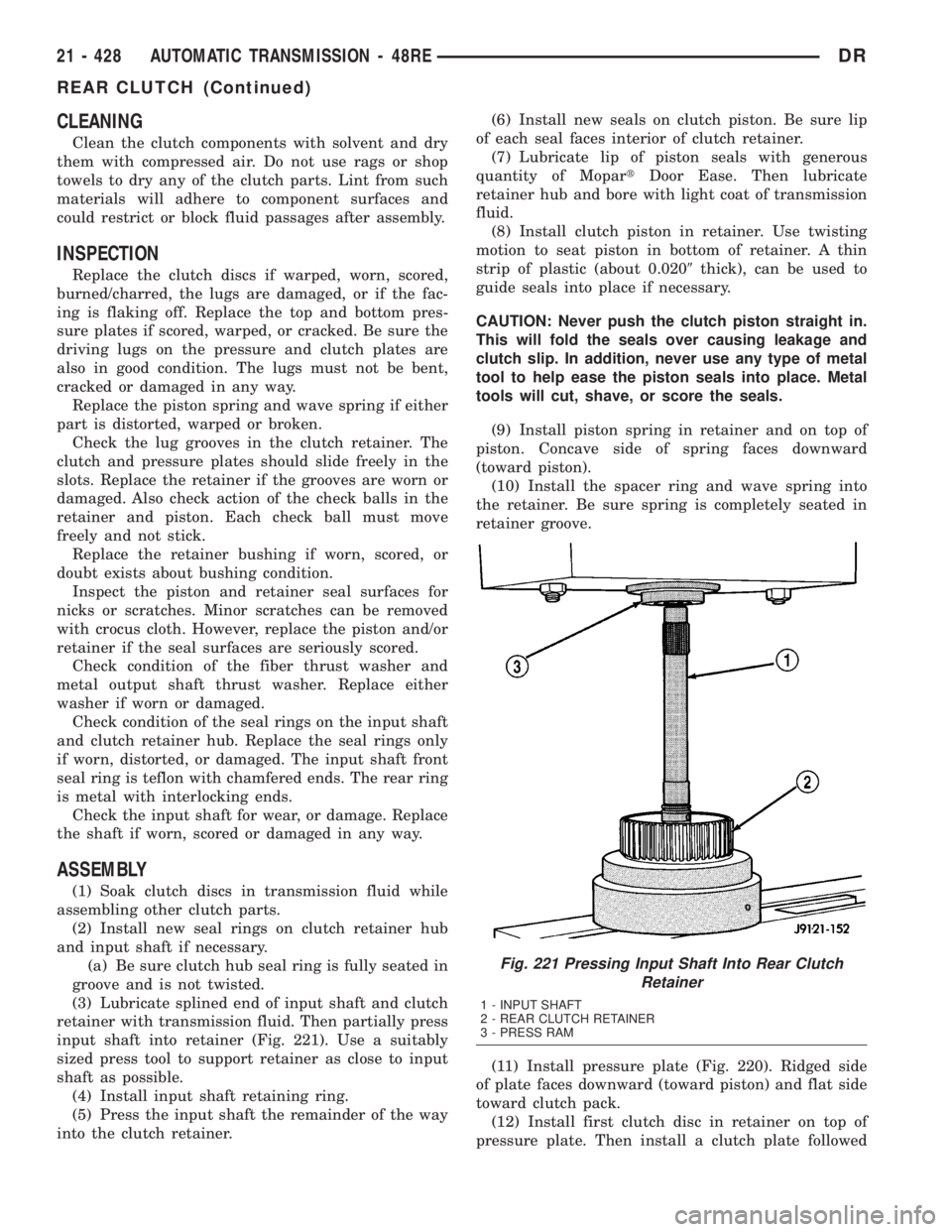
retainer with transmission fluid. Then partially press
input shaft into retainer (Fig. 221). Use a suitably
sized press tool to support retainer as close to input
shaft as possible.
(4) Install input shaft retaining ring.
(5) Press the input shaft the remainder of the way
into the clutch retainer.(6) Install new seals on clutch piston. Be sure lip
of each seal faces interior of clutch retainer.
(7) Lubricate lip of piston seals with generous
quantity of MopartDoor Ease. Then lubricate
retainer hub and bore with light coat of transmission
fluid.
(8) Install clutch piston in retainer. Use twisting
motion to seat piston in bottom of retainer. A thin
strip of plastic (about 0.0209thick), can be used to
guide seals into place if necessary.
CAUTION: Never push the clutch piston straight in.
This will fold the seals over causing leakage and
clutch slip. In addition, never use any type of metal
tool to help ease the piston seals into place. Metal
tools will cut, shave, or score the seals.
(9) Install piston spring in retainer and on top of
piston. Concave side of spring faces downward
(toward piston).
(10) Install the spacer ring and wave spring into
the retainer. Be sure spring is completely seated in
retainer groove.
(11) Install pressure plate (Fig. 220). Ridged side
of plate faces downward (toward piston) and flat side
toward clutch pack.
(12) Install first clutch disc in retainer on top of
pressure plate. Then install a clutch plate followed
Fig. 221 Pressing Input Shaft Into Rear Clutch
Retainer
1 - INPUT SHAFT
2 - REAR CLUTCH RETAINER
3 - PRESS RAM
21 - 428 AUTOMATIC TRANSMISSION - 48REDR
REAR CLUTCH (Continued)
Page 2271 of 2895
THROTTLE VALVE CABLE
DESCRIPTION
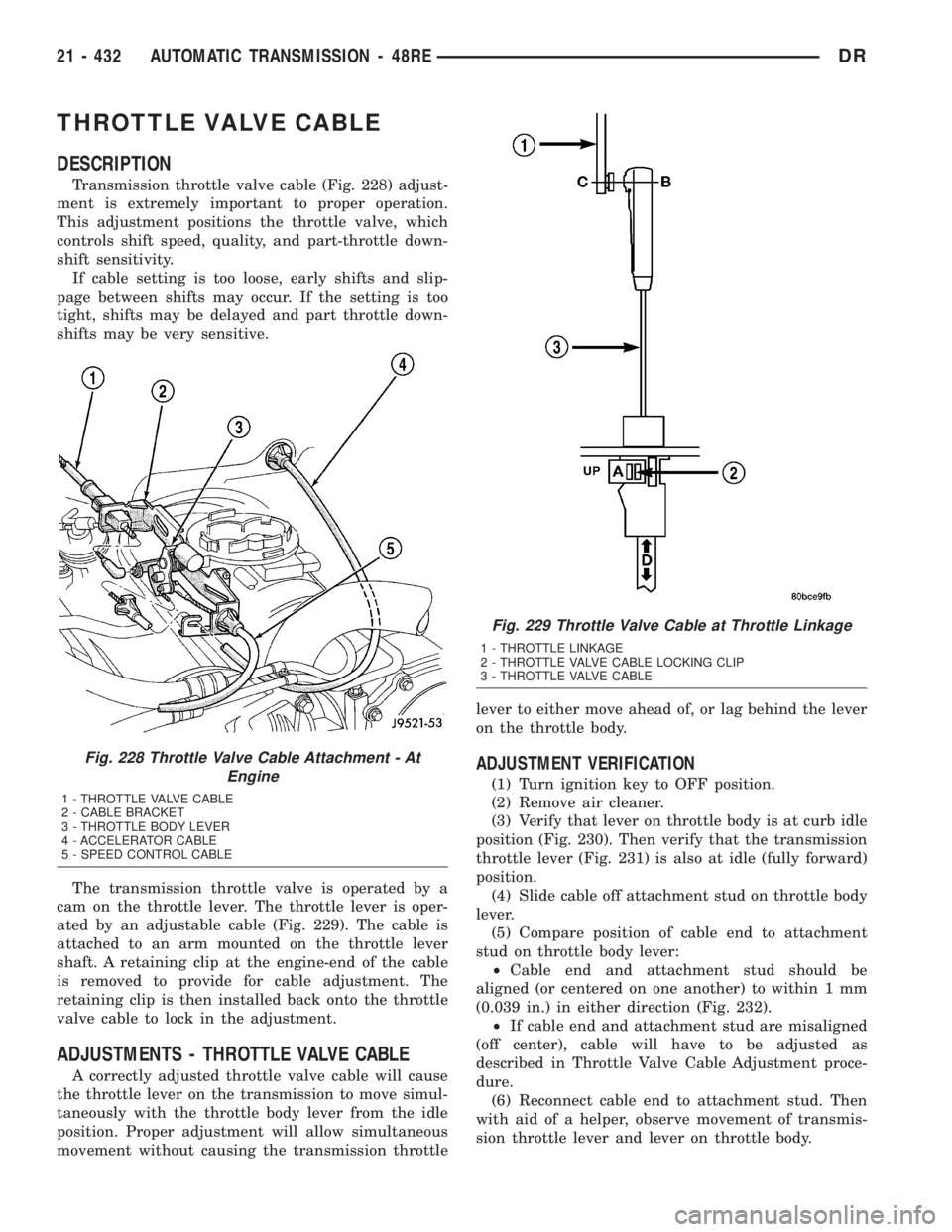
Transmission throttle valve cable (Fig. 228) adjust-
ment is extremely important to proper operation.
This adjustment positions the throttle valve, which
controls shift speed, quality, and part-throttle down-
shift sensitivity.
If cable setting is too loose, early shifts and slip-
page between shifts may occur. If the setting is too
tight, shifts may be delayed and part throttle down-
shifts may be very sensitive.
The transmission throttle valve is operated by a
cam on the throttle lever. The throttle lever is oper-
ated by an adjustable cable (Fig. 229). The cable is
attached to an arm mounted on the throttle lever
shaft. A retaining clip at the engine-end of the cable
is removed to provide for cable adjustment. The
retaining clip is then installed back onto the throttle
valve cable to lock in the adjustment.
ADJUSTMENTS - THROTTLE VALVE CABLE
A correctly adjusted throttle valve cable will cause
the throttle lever on the transmission to move simul-
taneously with the throttle body lever from the idle
position. Proper adjustment will allow simultaneous
movement without causing the transmission throttlelever to either move ahead of, or lag behind the lever
on the throttle body.
ADJUSTMENT VERIFICATION
(1) Turn ignition key to OFF position.
(2) Remove air cleaner.
(3) Verify that lever on throttle body is at curb idle
position (Fig. 230). Then verify that the transmission
throttle lever (Fig. 231) is also at idle (fully forward)
position.
(4) Slide cable off attachment stud on throttle body
lever.
(5) Compare position of cable end to attachment
stud on throttle body lever:
²Cable end and attachment stud should be
aligned (or centered on one another) to within 1 mm
(0.039 in.) in either direction (Fig. 232).
²If cable end and attachment stud are misaligned
(off center), cable will have to be adjusted as
described in Throttle Valve Cable Adjustment proce-
dure.
(6) Reconnect cable end to attachment stud. Then
with aid of a helper, observe movement of transmis-
sion throttle lever and lever on throttle body.
Fig. 228 Throttle Valve Cable Attachment - At
Engine
1 - THROTTLE VALVE CABLE
2 - CABLE BRACKET
3 - THROTTLE BODY LEVER
4 - ACCELERATOR CABLE
5 - SPEED CONTROL CABLE
Fig. 229 Throttle Valve Cable at Throttle Linkage
1 - THROTTLE LINKAGE
2 - THROTTLE VALVE CABLE LOCKING CLIP
3 - THROTTLE VALVE CABLE
21 - 432 AUTOMATIC TRANSMISSION - 48REDR