2003 DODGE RAM high beam
[x] Cancel search: high beamPage 506 of 2895
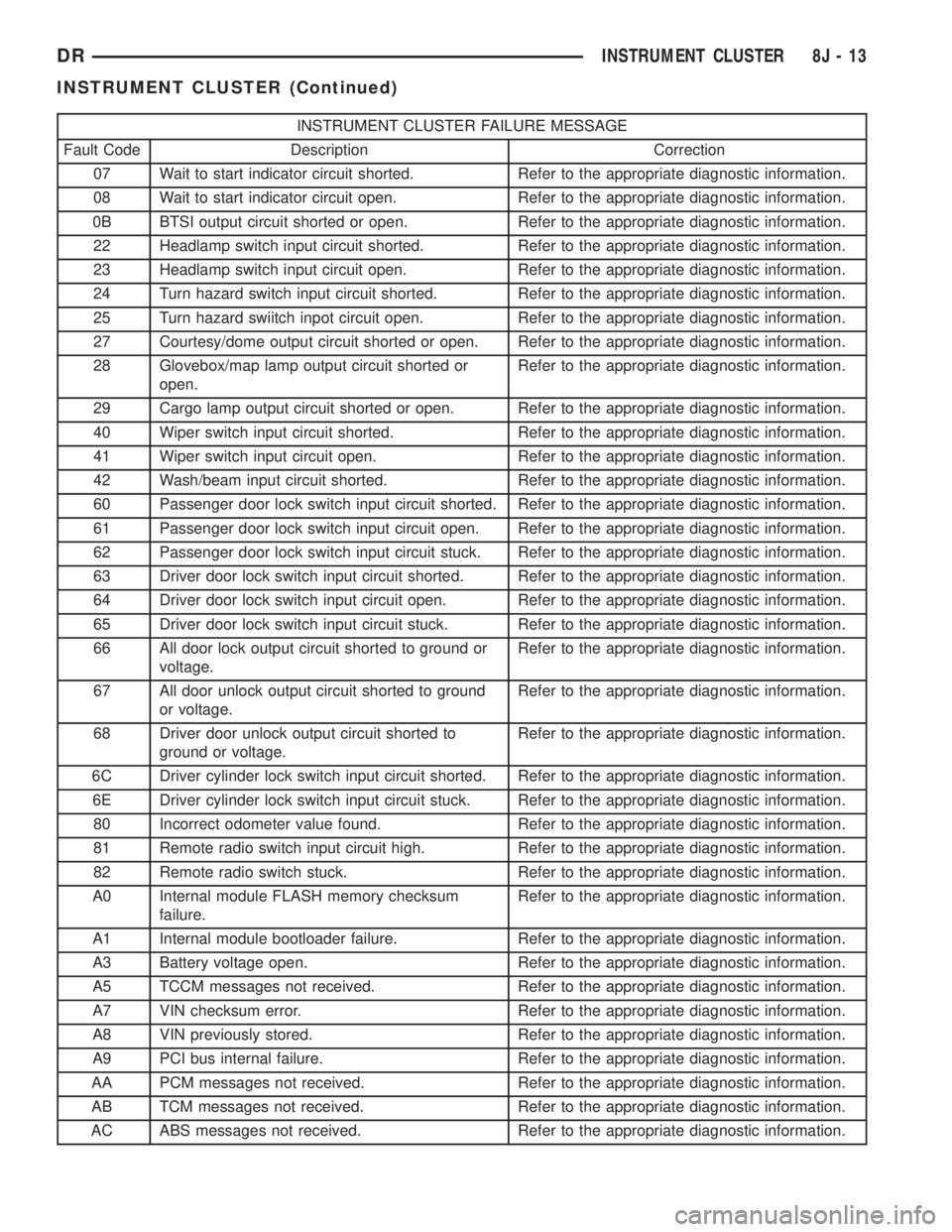
INSTRUMENT CLUSTER FAILURE MESSAGE
Fault Code Description Correction
07 Wait to start indicator circuit shorted. Refer to the appropriate diagnostic information.
08 Wait to start indicator circuit open. Refer to the appropriate diagnostic information.
0B BTSI output circuit shorted or open. Refer to the appropriate diagnostic information.
22 Headlamp switch input circuit shorted. Refer to the appropriate diagnostic information.
23 Headlamp switch input circuit open. Refer to the appropriate diagnostic information.
24 Turn hazard switch input circuit shorted. Refer to the appropriate diagnostic information.
25 Turn hazard swiitch inpot circuit open. Refer to the appropriate diagnostic information.
27 Courtesy/dome output circuit shorted or open. Refer to the appropriate diagnostic information.
28 Glovebox/map lamp output circuit shorted or
open.Refer to the appropriate diagnostic information.
29 Cargo lamp output circuit shorted or open. Refer to the appropriate diagnostic information.
40 Wiper switch input circuit shorted. Refer to the appropriate diagnostic information.
41 Wiper switch input circuit open. Refer to the appropriate diagnostic information.
42 Wash/beam input circuit shorted. Refer to the appropriate diagnostic information.
60 Passenger door lock switch input circuit shorted. Refer to the appropriate diagnostic information.
61 Passenger door lock switch input circuit open. Refer to the appropriate diagnostic information.
62 Passenger door lock switch input circuit stuck. Refer to the appropriate diagnostic information.
63 Driver door lock switch input circuit shorted. Refer to the appropriate diagnostic information.
64 Driver door lock switch input circuit open. Refer to the appropriate diagnostic information.
65 Driver door lock switch input circuit stuck. Refer to the appropriate diagnostic information.
66 All door lock output circuit shorted to ground or
voltage.Refer to the appropriate diagnostic information.
67 All door unlock output circuit shorted to ground
or voltage.Refer to the appropriate diagnostic information.
68 Driver door unlock output circuit shorted to
ground or voltage.Refer to the appropriate diagnostic information.
6C Driver cylinder lock switch input circuit shorted. Refer to the appropriate diagnostic information.
6E Driver cylinder lock switch input circuit stuck. Refer to the appropriate diagnostic information.
80 Incorrect odometer value found. Refer to the appropriate diagnostic information.
81 Remote radio switch input circuit high. Refer to the appropriate diagnostic information.
82 Remote radio switch stuck. Refer to the appropriate diagnostic information.
A0 Internal module FLASH memory checksum
failure.Refer to the appropriate diagnostic information.
A1 Internal module bootloader failure. Refer to the appropriate diagnostic information.
A3 Battery voltage open. Refer to the appropriate diagnostic information.
A5 TCCM messages not received. Refer to the appropriate diagnostic information.
A7 VIN checksum error. Refer to the appropriate diagnostic information.
A8 VIN previously stored. Refer to the appropriate diagnostic information.
A9 PCI bus internal failure. Refer to the appropriate diagnostic information.
AA PCM messages not received. Refer to the appropriate diagnostic information.
AB TCM messages not received. Refer to the appropriate diagnostic information.
AC ABS messages not received. Refer to the appropriate diagnostic information.
DRINSTRUMENT CLUSTER 8J - 13
INSTRUMENT CLUSTER (Continued)
Page 520 of 2895

The gear selector indicator displays the following
characters from left to right: ªP,º ªR,º ªN,º ªD,º ª2,º
and ª1.º Respectively, these characters represent the
park, reverse, neutral, drive, second gear, and first
gear positions of the transmission gear selector lever
on the steering column. The VFD illuminates a rect-
angular box around the character that represents the
currently selected lever position.
The gear selector indicator characters and graphics
appear in the same blue-green color and at the same
lighting level as the odometer/trip odometer informa-
tion when illuminated by the instrument cluster elec-
tronic circuit board. During daylight hours (exterior
lamps Off) the gear selector indicator VFD is illumi-
nated at full brightness for clear visibility. At night
(exterior lamps are On) the VFD lighting level is
adjusted with the other cluster illumination lamps
using the panel lamps dimmer thumbwheel on the
headlamp switch. However, a ªParadeº mode position
of the panel lamps dimmer thumbwheel allows the
VFD to be illuminated at full brightness when the
vehicle is driven in daylight hours with the exterior
lamps turned On. The gear selector indicator VFD is
serviced as a unit with the instrument cluster.
OPERATION
The electronic gear selector indicator gives an indi-
cation to the vehicle operator of the transmission
gear that has been selected with the automatic trans-
mission gear selector lever. This indicator is con-
trolled by the instrument cluster circuit board based
upon cluster programming. The cluster circuitry
automatically configures itself for the proper trans-
mission and automatic transmission model based
upon the hard wired transmission range sensor mux
circuit input to the cluster. The gear selector indica-
tor information is displayed by a dedicated Vacuum
Fluorescent Display (VFD) unit on the instrument
cluster electronic circuit board, and the VFD will not
display the gear selector indicator information after
the ignition switch is turned to the Off position. The
instrument cluster circuitry configures the gear selec-
tor indicator VFD based upon the following inputs
from the transmission range sensor:
²Open Circuit- If the cluster is configured for
an automatic transmission and the transmission
range sensor mux circuit is open, the cluster circuitry
controls the gear selector indicator display based
upon electronic messages received from the electronic
Transmission Control Module (TCM) over the Pro-
grammable Communications Interface (PCI) data
bus. If the transmission range sensor mux circuit is
open and no electronic messages are received from
the TCM within two seconds, the instrument cluster
circuitry will not display any gear selector position
until the condition is resolved or until the ignitionswitch is turned to the Off position, whichever occurs
first.
²Resolved Circuit- If the transmission range
sensor mux circuit is resolved, the cluster circuitry
controls the gear selector indicator display based
upon the resistance value of the hard wired input
from the transmission range sensor. If the cluster is
configured for an automatic transmission with a
transmission range sensor input and detects a short
to ground or an open in the transmission range sen-
sor mux input, the instrument cluster circuitry will
not display any gear selector position in the VFD.
The VFD display for the short-to-ground and open
circuit conditions will continue until the condition is
resolved or until the ignition switch is turned to the
Off position, whichever occurs first.
²Actuator Test- Each time the cluster is put
through the actuator test, the gear selector indicator
VFD will display all of its characters at once during
the VFD portion of the test to confirm the function-
ality of the VFD and the cluster control circuitry.
On models with a TCM, the TCM continually mon-
itors the transmission range sensor, then sends the
proper gear selector indicator position messages to
the instrument cluster. On models without a TCM,
the instrument cluster continually monitors the hard
wired transmission range sensor multiplexed input.
For further diagnosis of the gear selector indicator or
the instrument cluster circuitry that controls this
function, (Refer to 8 - ELECTRICAL/INSTRUMENT
CLUSTER - DIAGNOSIS AND TESTING). For fur-
ther diagnosis of the transmission range sensor on
models without a TCM, (Refer to 21 - TRANSMIS-
SION/TRANSAXLE/AUTOMATIC - 42RE/TRANS-
MISSION RANGE SENSOR - DIAGNOSIS AND
TESTING) or (Refer to 21 - TRANSMISSION/
TRANSAXLE/AUTOMATIC - 46RE/TRANSMISSION
RANGE SENSOR - DIAGNOSIS AND TESTING).
On models with a TCM, for proper diagnosis of the
transmission range sensor, the TCM, the PCI data
bus, or the electronic message inputs to the instru-
ment cluster that control the gear selector indicator,
a DRBIIItscan tool is required. Refer to the appro-
priate diagnostic information.
HIGH BEAM INDICATOR
DESCRIPTION
A high beam indicator is standard equipment on
all instrument clusters. The high beam indicator is
located near the upper edge of the instrument clus-
ter, between the tachometer and the speedometer.
The high beam indicator consists of a stencil-like cut-
out of the International Control and Display Symbol
icon for ªHigh Beamº in the opaque layer of the
DRINSTRUMENT CLUSTER 8J - 27
GEAR SELECTOR INDICATOR (Continued)
Page 521 of 2895
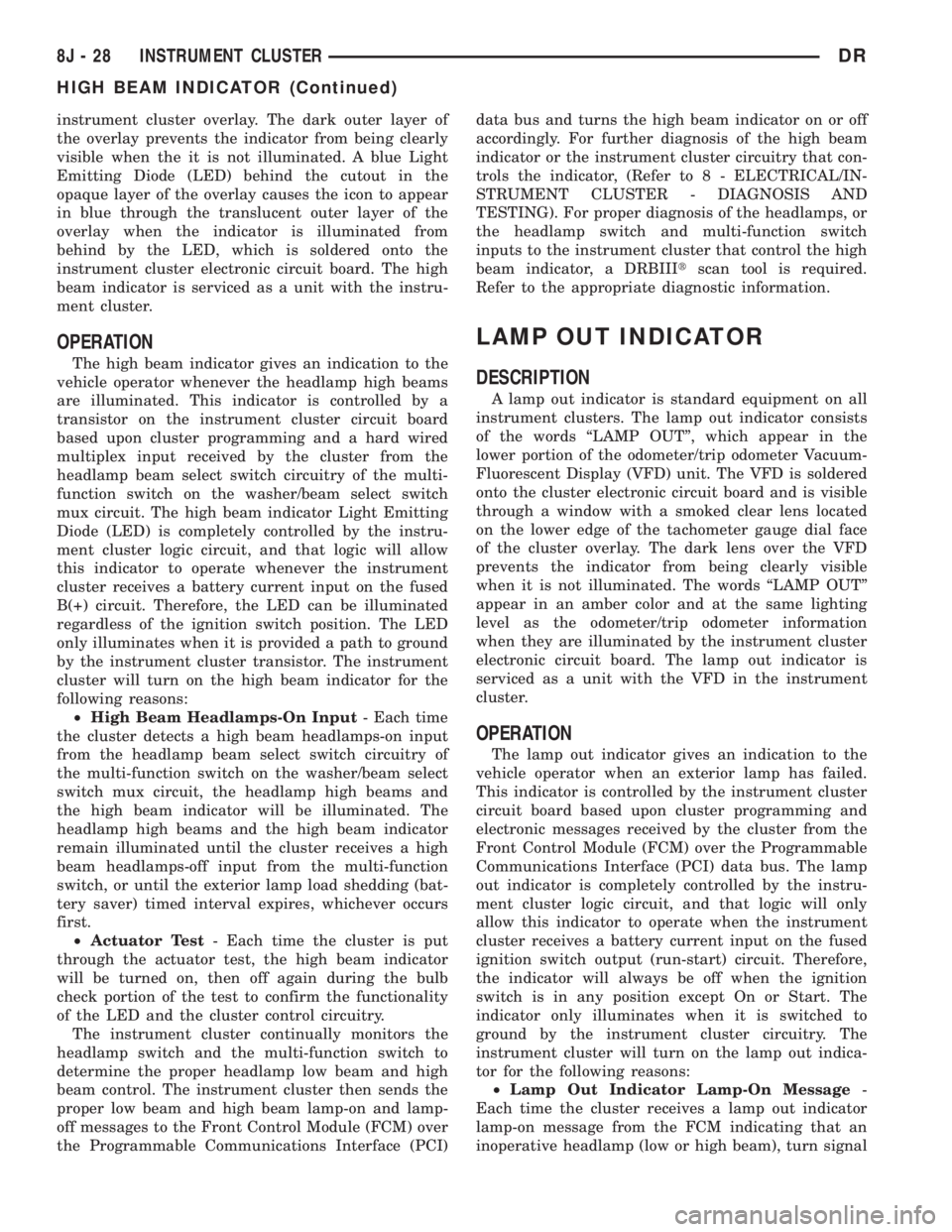
instrument cluster overlay. The dark outer layer of
the overlay prevents the indicator from being clearly
visible when the it is not illuminated. A blue Light
Emitting Diode (LED) behind the cutout in the
opaque layer of the overlay causes the icon to appear
in blue through the translucent outer layer of the
overlay when the indicator is illuminated from
behind by the LED, which is soldered onto the
instrument cluster electronic circuit board. The high
beam indicator is serviced as a unit with the instru-
ment cluster.
OPERATION
The high beam indicator gives an indication to the
vehicle operator whenever the headlamp high beams
are illuminated. This indicator is controlled by a
transistor on the instrument cluster circuit board
based upon cluster programming and a hard wired
multiplex input received by the cluster from the
headlamp beam select switch circuitry of the multi-
function switch on the washer/beam select switch
mux circuit. The high beam indicator Light Emitting
Diode (LED) is completely controlled by the instru-
ment cluster logic circuit, and that logic will allow
this indicator to operate whenever the instrument
cluster receives a battery current input on the fused
B(+) circuit. Therefore, the LED can be illuminated
regardless of the ignition switch position. The LED
only illuminates when it is provided a path to ground
by the instrument cluster transistor. The instrument
cluster will turn on the high beam indicator for the
following reasons:
²High Beam Headlamps-On Input- Each time
the cluster detects a high beam headlamps-on input
from the headlamp beam select switch circuitry of
the multi-function switch on the washer/beam select
switch mux circuit, the headlamp high beams and
the high beam indicator will be illuminated. The
headlamp high beams and the high beam indicator
remain illuminated until the cluster receives a high
beam headlamps-off input from the multi-function
switch, or until the exterior lamp load shedding (bat-
tery saver) timed interval expires, whichever occurs
first.
²Actuator Test- Each time the cluster is put
through the actuator test, the high beam indicator
will be turned on, then off again during the bulb
check portion of the test to confirm the functionality
of the LED and the cluster control circuitry.
The instrument cluster continually monitors the
headlamp switch and the multi-function switch to
determine the proper headlamp low beam and high
beam control. The instrument cluster then sends the
proper low beam and high beam lamp-on and lamp-
off messages to the Front Control Module (FCM) over
the Programmable Communications Interface (PCI)data bus and turns the high beam indicator on or off
accordingly. For further diagnosis of the high beam
indicator or the instrument cluster circuitry that con-
trols the indicator, (Refer to 8 - ELECTRICAL/IN-
STRUMENT CLUSTER - DIAGNOSIS AND
TESTING). For proper diagnosis of the headlamps, or
the headlamp switch and multi-function switch
inputs to the instrument cluster that control the high
beam indicator, a DRBIIItscan tool is required.
Refer to the appropriate diagnostic information.
LAMP OUT INDICATOR
DESCRIPTION
A lamp out indicator is standard equipment on all
instrument clusters. The lamp out indicator consists
of the words ªLAMP OUTº, which appear in the
lower portion of the odometer/trip odometer Vacuum-
Fluorescent Display (VFD) unit. The VFD is soldered
onto the cluster electronic circuit board and is visible
through a window with a smoked clear lens located
on the lower edge of the tachometer gauge dial face
of the cluster overlay. The dark lens over the VFD
prevents the indicator from being clearly visible
when it is not illuminated. The words ªLAMP OUTº
appear in an amber color and at the same lighting
level as the odometer/trip odometer information
when they are illuminated by the instrument cluster
electronic circuit board. The lamp out indicator is
serviced as a unit with the VFD in the instrument
cluster.
OPERATION
The lamp out indicator gives an indication to the
vehicle operator when an exterior lamp has failed.
This indicator is controlled by the instrument cluster
circuit board based upon cluster programming and
electronic messages received by the cluster from the
Front Control Module (FCM) over the Programmable
Communications Interface (PCI) data bus. The lamp
out indicator is completely controlled by the instru-
ment cluster logic circuit, and that logic will only
allow this indicator to operate when the instrument
cluster receives a battery current input on the fused
ignition switch output (run-start) circuit. Therefore,
the indicator will always be off when the ignition
switch is in any position except On or Start. The
indicator only illuminates when it is switched to
ground by the instrument cluster circuitry. The
instrument cluster will turn on the lamp out indica-
tor for the following reasons:
²Lamp Out Indicator Lamp-On Message-
Each time the cluster receives a lamp out indicator
lamp-on message from the FCM indicating that an
inoperative headlamp (low or high beam), turn signal
8J - 28 INSTRUMENT CLUSTERDR
HIGH BEAM INDICATOR (Continued)
Page 539 of 2895
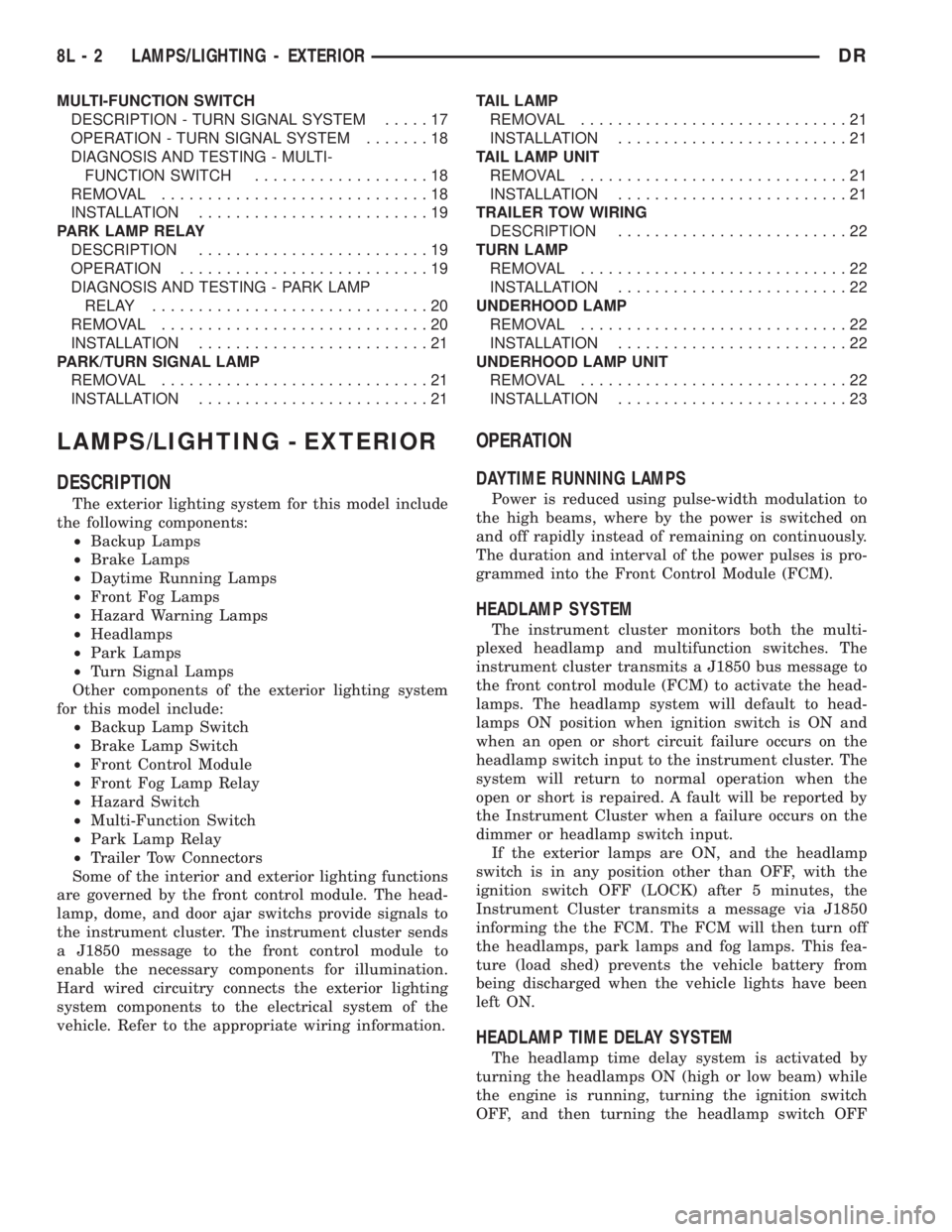
MULTI-FUNCTION SWITCH
DESCRIPTION - TURN SIGNAL SYSTEM.....17
OPERATION - TURN SIGNAL SYSTEM.......18
DIAGNOSIS AND TESTING - MULTI-
FUNCTION SWITCH...................18
REMOVAL.............................18
INSTALLATION.........................19
PARK LAMP RELAY
DESCRIPTION.........................19
OPERATION...........................19
DIAGNOSIS AND TESTING - PARK LAMP
RELAY..............................20
REMOVAL.............................20
INSTALLATION.........................21
PARK/TURN SIGNAL LAMP
REMOVAL.............................21
INSTALLATION.........................21TAIL LAMP
REMOVAL.............................21
INSTALLATION.........................21
TAIL LAMP UNIT
REMOVAL.............................21
INSTALLATION.........................21
TRAILER TOW WIRING
DESCRIPTION.........................22
TURN LAMP
REMOVAL.............................22
INSTALLATION.........................22
UNDERHOOD LAMP
REMOVAL.............................22
INSTALLATION.........................22
UNDERHOOD LAMP UNIT
REMOVAL.............................22
INSTALLATION.........................23
LAMPS/LIGHTING - EXTERIOR
DESCRIPTION
The exterior lighting system for this model include
the following components:
²Backup Lamps
²Brake Lamps
²Daytime Running Lamps
²Front Fog Lamps
²Hazard Warning Lamps
²Headlamps
²Park Lamps
²Turn Signal Lamps
Other components of the exterior lighting system
for this model include:
²Backup Lamp Switch
²Brake Lamp Switch
²Front Control Module
²Front Fog Lamp Relay
²Hazard Switch
²Multi-Function Switch
²Park Lamp Relay
²Trailer Tow Connectors
Some of the interior and exterior lighting functions
are governed by the front control module. The head-
lamp, dome, and door ajar switchs provide signals to
the instrument cluster. The instrument cluster sends
a J1850 message to the front control module to
enable the necessary components for illumination.
Hard wired circuitry connects the exterior lighting
system components to the electrical system of the
vehicle. Refer to the appropriate wiring information.
OPERATION
DAYTIME RUNNING LAMPS
Power is reduced using pulse-width modulation to
the high beams, where by the power is switched on
and off rapidly instead of remaining on continuously.
The duration and interval of the power pulses is pro-
grammed into the Front Control Module (FCM).
HEADLAMP SYSTEM
The instrument cluster monitors both the multi-
plexed headlamp and multifunction switches. The
instrument cluster transmits a J1850 bus message to
the front control module (FCM) to activate the head-
lamps. The headlamp system will default to head-
lamps ON position when ignition switch is ON and
when an open or short circuit failure occurs on the
headlamp switch input to the instrument cluster. The
system will return to normal operation when the
open or short is repaired. A fault will be reported by
the Instrument Cluster when a failure occurs on the
dimmer or headlamp switch input.
If the exterior lamps are ON, and the headlamp
switch is in any position other than OFF, with the
ignition switch OFF (LOCK) after 5 minutes, the
Instrument Cluster transmits a message via J1850
informing the the FCM. The FCM will then turn off
the headlamps, park lamps and fog lamps. This fea-
ture (load shed) prevents the vehicle battery from
being discharged when the vehicle lights have been
left ON.
HEADLAMP TIME DELAY SYSTEM
The headlamp time delay system is activated by
turning the headlamps ON (high or low beam) while
the engine is running, turning the ignition switch
OFF, and then turning the headlamp switch OFF
8L - 2 LAMPS/LIGHTING - EXTERIORDR
Page 540 of 2895
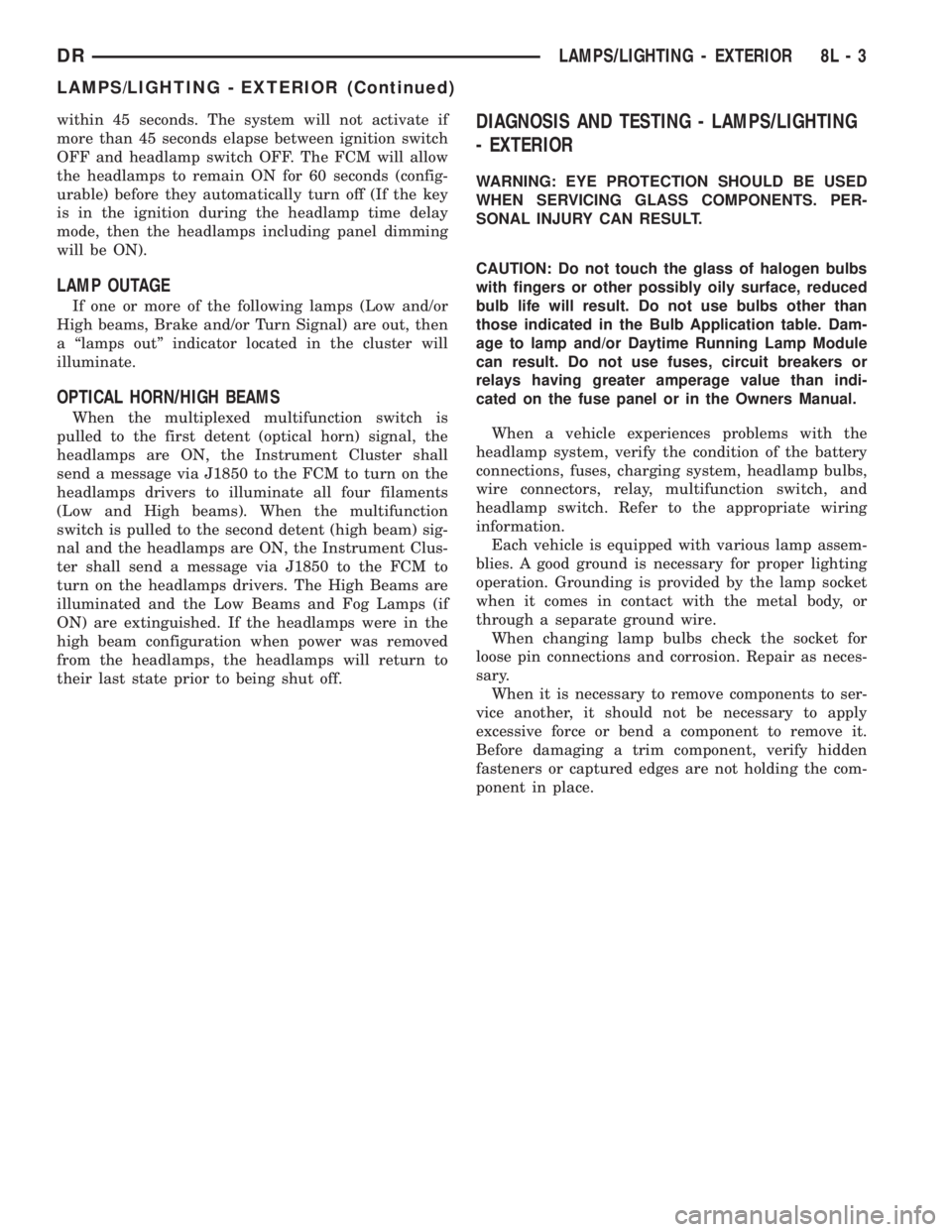
within 45 seconds. The system will not activate if
more than 45 seconds elapse between ignition switch
OFF and headlamp switch OFF. The FCM will allow
the headlamps to remain ON for 60 seconds (config-
urable) before they automatically turn off (If the key
is in the ignition during the headlamp time delay
mode, then the headlamps including panel dimming
will be ON).
LAMP OUTAGE
If one or more of the following lamps (Low and/or
High beams, Brake and/or Turn Signal) are out, then
a ªlamps outº indicator located in the cluster will
illuminate.
OPTICAL HORN/HIGH BEAMS
When the multiplexed multifunction switch is
pulled to the first detent (optical horn) signal, the
headlamps are ON, the Instrument Cluster shall
send a message via J1850 to the FCM to turn on the
headlamps drivers to illuminate all four filaments
(Low and High beams). When the multifunction
switch is pulled to the second detent (high beam) sig-
nal and the headlamps are ON, the Instrument Clus-
ter shall send a message via J1850 to the FCM to
turn on the headlamps drivers. The High Beams are
illuminated and the Low Beams and Fog Lamps (if
ON) are extinguished. If the headlamps were in the
high beam configuration when power was removed
from the headlamps, the headlamps will return to
their last state prior to being shut off.
DIAGNOSIS AND TESTING - LAMPS/LIGHTING
- EXTERIOR
WARNING: EYE PROTECTION SHOULD BE USED
WHEN SERVICING GLASS COMPONENTS. PER-
SONAL INJURY CAN RESULT.
CAUTION: Do not touch the glass of halogen bulbs
with fingers or other possibly oily surface, reduced
bulb life will result. Do not use bulbs other than
those indicated in the Bulb Application table. Dam-
age to lamp and/or Daytime Running Lamp Module
can result. Do not use fuses, circuit breakers or
relays having greater amperage value than indi-
cated on the fuse panel or in the Owners Manual.
When a vehicle experiences problems with the
headlamp system, verify the condition of the battery
connections, fuses, charging system, headlamp bulbs,
wire connectors, relay, multifunction switch, and
headlamp switch. Refer to the appropriate wiring
information.
Each vehicle is equipped with various lamp assem-
blies. A good ground is necessary for proper lighting
operation. Grounding is provided by the lamp socket
when it comes in contact with the metal body, or
through a separate ground wire.
When changing lamp bulbs check the socket for
loose pin connections and corrosion. Repair as neces-
sary.
When it is necessary to remove components to ser-
vice another, it should not be necessary to apply
excessive force or bend a component to remove it.
Before damaging a trim component, verify hidden
fasteners or captured edges are not holding the com-
ponent in place.
DRLAMPS/LIGHTING - EXTERIOR 8L - 3
LAMPS/LIGHTING - EXTERIOR (Continued)
Page 551 of 2895
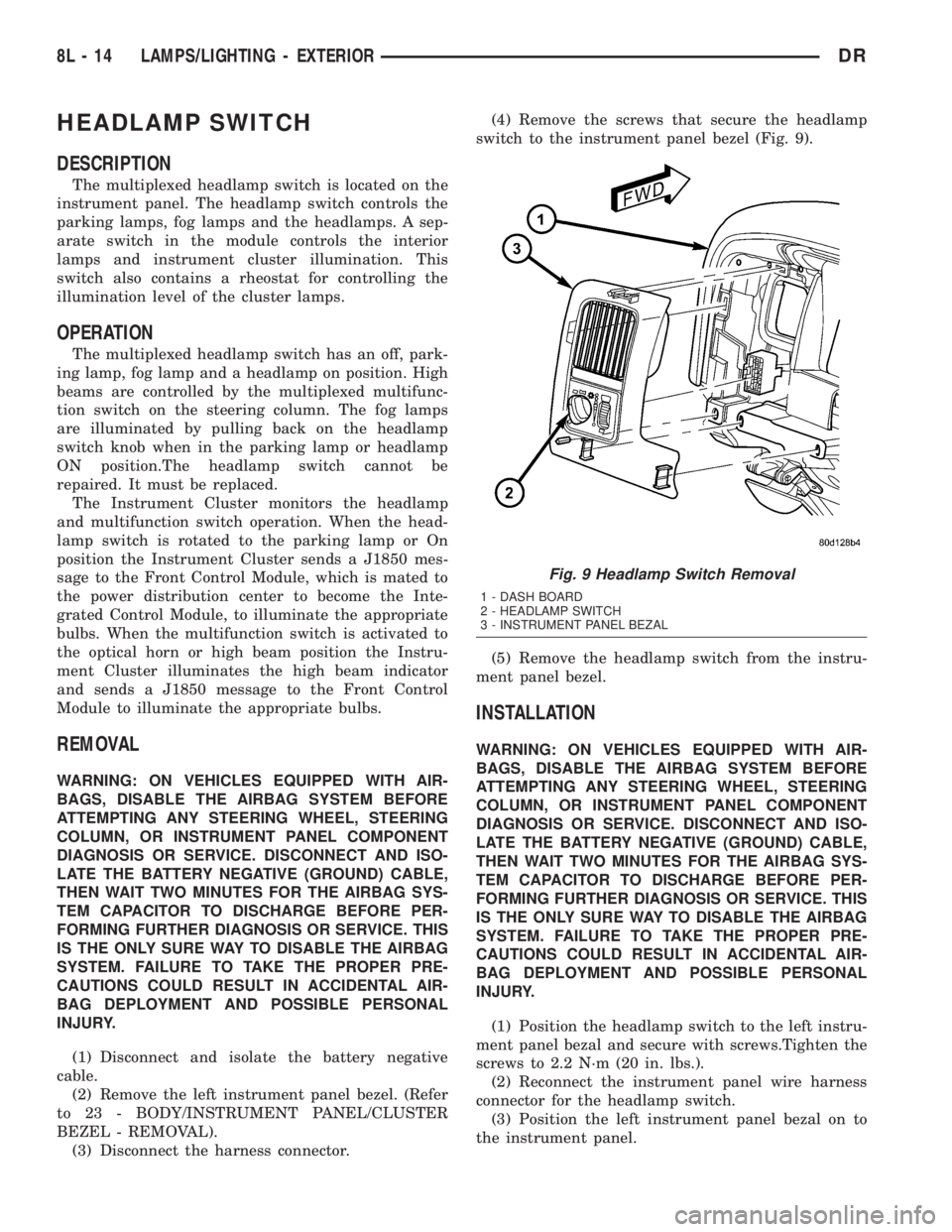
HEADLAMP SWITCH
DESCRIPTION
The multiplexed headlamp switch is located on the
instrument panel. The headlamp switch controls the
parking lamps, fog lamps and the headlamps. A sep-
arate switch in the module controls the interior
lamps and instrument cluster illumination. This
switch also contains a rheostat for controlling the
illumination level of the cluster lamps.
OPERATION
The multiplexed headlamp switch has an off, park-
ing lamp, fog lamp and a headlamp on position. High
beams are controlled by the multiplexed multifunc-
tion switch on the steering column. The fog lamps
are illuminated by pulling back on the headlamp
switch knob when in the parking lamp or headlamp
ON position.The headlamp switch cannot be
repaired. It must be replaced.
The Instrument Cluster monitors the headlamp
and multifunction switch operation. When the head-
lamp switch is rotated to the parking lamp or On
position the Instrument Cluster sends a J1850 mes-
sage to the Front Control Module, which is mated to
the power distribution center to become the Inte-
grated Control Module, to illuminate the appropriate
bulbs. When the multifunction switch is activated to
the optical horn or high beam position the Instru-
ment Cluster illuminates the high beam indicator
and sends a J1850 message to the Front Control
Module to illuminate the appropriate bulbs.
REMOVAL
WARNING: ON VEHICLES EQUIPPED WITH AIR-
BAGS, DISABLE THE AIRBAG SYSTEM BEFORE
ATTEMPTING ANY STEERING WHEEL, STEERING
COLUMN, OR INSTRUMENT PANEL COMPONENT
DIAGNOSIS OR SERVICE. DISCONNECT AND ISO-
LATE THE BATTERY NEGATIVE (GROUND) CABLE,
THEN WAIT TWO MINUTES FOR THE AIRBAG SYS-
TEM CAPACITOR TO DISCHARGE BEFORE PER-
FORMING FURTHER DIAGNOSIS OR SERVICE. THIS
IS THE ONLY SURE WAY TO DISABLE THE AIRBAG
SYSTEM. FAILURE TO TAKE THE PROPER PRE-
CAUTIONS COULD RESULT IN ACCIDENTAL AIR-
BAG DEPLOYMENT AND POSSIBLE PERSONAL
INJURY.
(1) Disconnect and isolate the battery negative
cable.
(2) Remove the left instrument panel bezel. (Refer
to 23 - BODY/INSTRUMENT PANEL/CLUSTER
BEZEL - REMOVAL).
(3) Disconnect the harness connector.(4) Remove the screws that secure the headlamp
switch to the instrument panel bezel (Fig. 9).
(5) Remove the headlamp switch from the instru-
ment panel bezel.
INSTALLATION
WARNING: ON VEHICLES EQUIPPED WITH AIR-
BAGS, DISABLE THE AIRBAG SYSTEM BEFORE
ATTEMPTING ANY STEERING WHEEL, STEERING
COLUMN, OR INSTRUMENT PANEL COMPONENT
DIAGNOSIS OR SERVICE. DISCONNECT AND ISO-
LATE THE BATTERY NEGATIVE (GROUND) CABLE,
THEN WAIT TWO MINUTES FOR THE AIRBAG SYS-
TEM CAPACITOR TO DISCHARGE BEFORE PER-
FORMING FURTHER DIAGNOSIS OR SERVICE. THIS
IS THE ONLY SURE WAY TO DISABLE THE AIRBAG
SYSTEM. FAILURE TO TAKE THE PROPER PRE-
CAUTIONS COULD RESULT IN ACCIDENTAL AIR-
BAG DEPLOYMENT AND POSSIBLE PERSONAL
INJURY.
(1) Position the headlamp switch to the left instru-
ment panel bezal and secure with screws.Tighten the
screws to 2.2 N´m (20 in. lbs.).
(2) Reconnect the instrument panel wire harness
connector for the headlamp switch.
(3) Position the left instrument panel bezal on to
the instrument panel.
Fig. 9 Headlamp Switch Removal
1 - DASH BOARD
2 - HEADLAMP SWITCH
3 - INSTRUMENT PANEL BEZAL
8L - 14 LAMPS/LIGHTING - EXTERIORDR
Page 552 of 2895

(4) Install the cluster bezel onto the instrument
panel (Fig. 9).
(5) Connect the battery negative cable.
HEADLAMP UNIT
REMOVAL
(1) Disconnect and isolate the battery negative
cable.
(2) Remove the push pins attaching the seal to the
fender.
(3) Remove the bolts attaching the headlamp unit
to the fender (Fig. 10).
(4) Remove the bulb sockets from the headlamp
unit
(5) Separate headlamp unit from vehicle.
INSTALLATION
CAUTION: Do not touch the bulb glass with fingers
or other oily surfaces. Reduced bulb life will result.
(1) Install the bulb sockets for the front park/turn
signal and headlamp.
(2) Position headlamp unit in inner fender panel.
(3) Install the bolts attaching headlamp unit to the
fender (Fig. 10).
(4) Align the seal and install the push pins.
(5) Connect the battery negative cable.
ADJUSTMENTS
Headlamps can be aligned using the screen method
provided in this section. Alignment Tool C-4466-A or
equivalent can also be used. Refer to instructions
provided with the tool for proper procedures.
LAMP ALIGNMENT SCREEN PREPARATION
(1) Position vehicle on a level surface perpendicu-
lar to a flat wall 7.62 meters (25 ft) away from front
of headlamp lens (Fig. 11).
(2) If necessary, tape a line on the floor 7.62
meters (25 ft) away from and parallel to the wall.
(3) Up 1.27 meters (5 feet) from the floor, tape a
line on the wall at the centerline of the vehicle. Sight
along the centerline of the vehicle (from rear of vehi-
cle forward) to verify accuracy of the line placement.
(4) Rock vehicle side-to-side three times to allow
suspension to stabilize.
(5) Jounce front suspension three times by pushing
downward on front bumper and releasing.
(6) Measure the distance from the center of head-
lamp lens to the floor. Transfer measurement to the
alignment screen (with tape). Use this line for
up/down adjustment reference.
(7) Measure distance from the centerline of the
vehicle to the center of each headlamp being aligned.
Transfer measurements to screen (with tape) to each
side of vehicle centerline. Use these lines for left/
right adjustment reference.
VEHICLE PREPARATION FOR HEADLAMP
ALIGNMENT
(1) Verify headlamp dimmer switch and high beam
indicator operation.
(2) Correct defective components that could hinder
proper headlamp alignment.
(3) Verify proper tire inflation.
(4) Clean headlamp lenses.
(5) Verify that luggage area is not heavily loaded.
(6) Fuel tank should be FULL. Add 2.94 kg (6.5
lbs.) of weight over the fuel tank for each estimated
gallon of missing fuel.
HEADLAMP ALIGNMENT
A properly aimed low beam headlamp will project
top edge of high intensity pattern on screen from 50
mm (2 in.) above to 50 mm (2 in.) below headlamp
centerline. The side-to-side outboard edge of high
intensity pattern should be from 50 mm (2 in.) left to
50 mm (2 in.) right of headlamp centerline (Fig. 11).
The preferred headlamp alignment is 1(down
for the up/down adjustment and 0 for the left/
right adjustment.The high beam pattern should be
correct when the low beams are aligned properly.
To adjust low beam headlamp, rotate alignment
screws to achieve the specified aim.
Fig. 10 HEADLAMP Ð TYPICAL
1 - SEAL
2 - PUSH PIN
3 - SCREW
4 - HEADLAMP UNIT
DRLAMPS/LIGHTING - EXTERIOR 8L - 15
HEADLAMP SWITCH (Continued)
Page 555 of 2895
lobe, pushing on the cancel actuator, returns the
switch to the OFF position.
OPERATION - TURN SIGNAL SYSTEM
The Instrument Cluster monitors the multiplexed
multifunction switch. In a turning event the Instru-
ment Cluster senses a change in the turn signal
lever and illuminates the appropriate turn signal
indicator. At the same time, the Instrument Cluster
will send a J1850 message on the PCI bus to the
Front Control Module (FCM). The FCM will respond
by activating the appropriate relay in the Power Dis-
tribution Center.
A chime will sound after the turn is completed if
vehicle has traveled a distance of approximately 1.0
mile and a speed of 15 mph, with the turn signal ON.
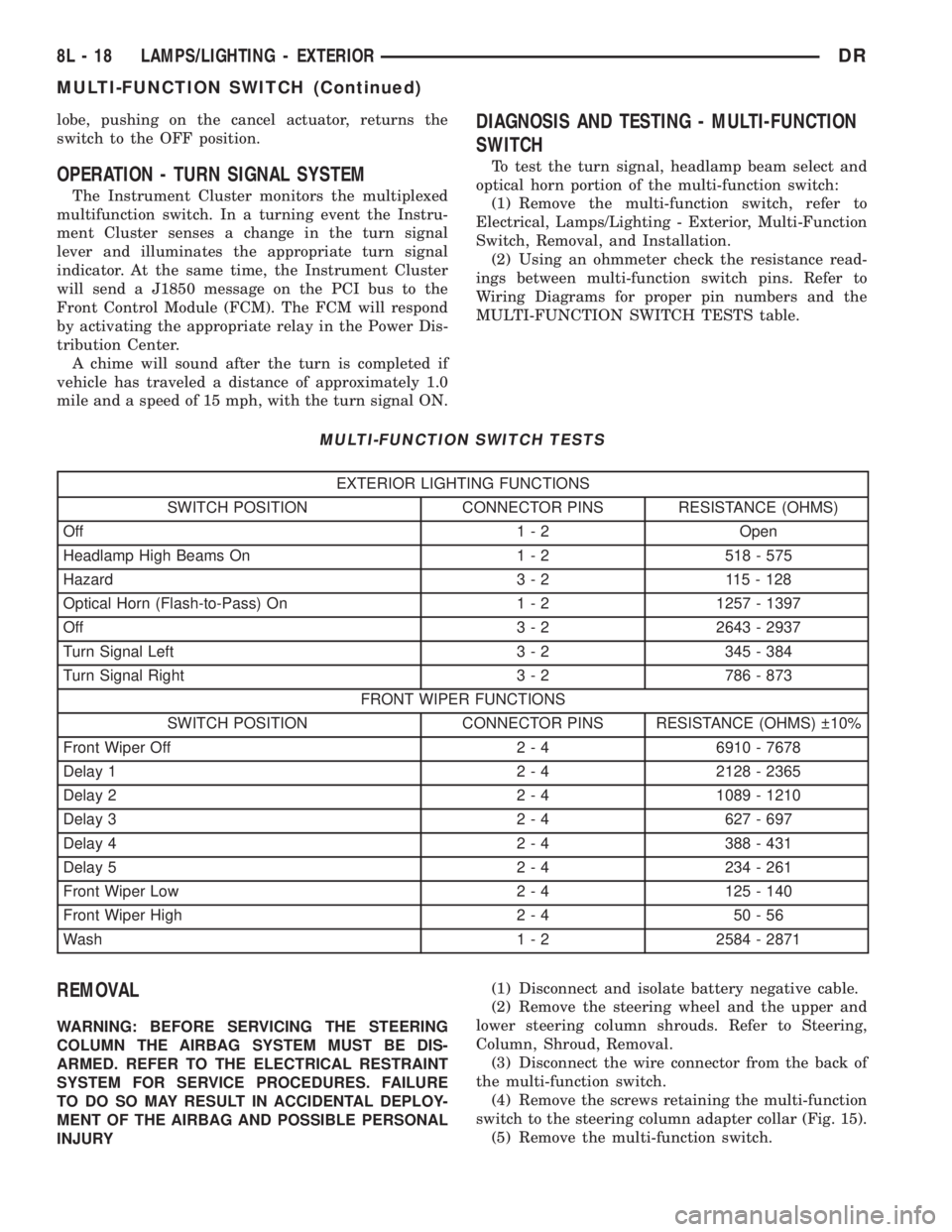
DIAGNOSIS AND TESTING - MULTI-FUNCTION
SWITCH
To test the turn signal, headlamp beam select and
optical horn portion of the multi-function switch:
(1) Remove the multi-function switch, refer to
Electrical, Lamps/Lighting - Exterior, Multi-Function
Switch, Removal, and Installation.
(2) Using an ohmmeter check the resistance read-
ings between multi-function switch pins. Refer to
Wiring Diagrams for proper pin numbers and the
MULTI-FUNCTION SWITCH TESTS table.
MULTI-FUNCTION SWITCH TESTS
EXTERIOR LIGHTING FUNCTIONS
SWITCH POSITION CONNECTOR PINS RESISTANCE (OHMS)
Off 1 - 2 Open
Headlamp High Beams On 1 - 2 518 - 575
Hazard 3 - 2 115 - 128
Optical Horn (Flash-to-Pass) On 1 - 2 1257 - 1397
Off 3 - 2 2643 - 2937
Turn Signal Left 3 - 2 345 - 384
Turn Signal Right 3 - 2 786 - 873
FRONT WIPER FUNCTIONS
SWITCH POSITION CONNECTOR PINS RESISTANCE (OHMS) 10%
Front Wiper Off 2 - 4 6910 - 7678
Delay 1 2 - 4 2128 - 2365
Delay 2 2 - 4 1089 - 1210
Delay 3 2 - 4 627 - 697
Delay 4 2 - 4 388 - 431
Delay 5 2 - 4 234 - 261
Front Wiper Low 2 - 4 125 - 140
Front Wiper High 2 - 4 50 - 56
Wash 1 - 2 2584 - 2871
REMOVAL
WARNING: BEFORE SERVICING THE STEERING
COLUMN THE AIRBAG SYSTEM MUST BE DIS-
ARMED. REFER TO THE ELECTRICAL RESTRAINT
SYSTEM FOR SERVICE PROCEDURES. FAILURE
TO DO SO MAY RESULT IN ACCIDENTAL DEPLOY-
MENT OF THE AIRBAG AND POSSIBLE PERSONAL
INJURY(1) Disconnect and isolate battery negative cable.
(2) Remove the steering wheel and the upper and
lower steering column shrouds. Refer to Steering,
Column, Shroud, Removal.
(3) Disconnect the wire connector from the back of
the multi-function switch.
(4) Remove the screws retaining the multi-function
switch to the steering column adapter collar (Fig. 15).
(5) Remove the multi-function switch.
8L - 18 LAMPS/LIGHTING - EXTERIORDR
MULTI-FUNCTION SWITCH (Continued)