2002 FIAT DUCATO 244 phone
[x] Cancel search: phonePage 198 of 246

CONNECT Nav+
197
Proceed as follows:
– select and confirm this function us-
ing knob 22-fig. 1;
– rotate knob 22-fig. 1clockwise to
increase ringer volume and anti-clock-
wise to reduce it.
At the end, press knob to confirm
setting and continue with the other pa-
rameter settings.
“Redial” Function
This function enables or disables
(YES/NO) the automatic redial option
for a few times, in case the number
called is busy. However, even if this
option is active, it is always possible to
interrupt the call keeping key
ò13-
fig. 1pressed.
“Unknown” function
This function enables or disables
(NO/YES) telephone number identifi-
cation by the receiver, when the user
makes a call. The availability of this
function depends on the network ac-
cess provider.“Call forwarding” Function
The “Call forwarding” function en-
ables or disables (YES/NO) incoming
call forwarding.
Call forwarding is indicated by the
system with some messages informing
that forwarding is in progress and
whether the result is successful or not.
“Call forwarding no.” Function
Selecting this function, it is possible
to enter the “Call forwarding no.”, re-
ceiving the unanswered calls. This
function availability depends on the
network access provider. Use the tele-
phone keypad to enter the call for-
warding number.
“Enable call waiting” Function
This function is used to enable or dis-
able the call waiting message
(YES/NO). “OK”
Selecting and confirming “OK” with
the knob 22-fig. 1settings are stored;
press the “ESC” key 23-fig. 1to re-
turn to the previous screen and re-
store the previous setting.
“INFORMATION”
FUNCTION
The “Information” function allows
displaying the network access provider
name and/or acronym, the entered
SIM card telephone number (own tele-
phone number) as well as the system
telephone module electronic serial
number (IMEI = International Mobile
Equipment Identity).
Not all SIM cards allow you to dis-
play your telephone number; in this
case, to store the number it must be
entered in the telephone directory,
following the instructions given in the
corresponding paragraph.
Page 220 of 246

CONNECT Nav+
219
GENERAL
INFORMATION
With the “Voice recognition” func-
tion the user can control the CON-
NECT Nav+ by voice. By means of
“Voice recognition”, the user can
send commands to the system
through a microphone: short push on
ô14-fig. 1set on the front panel or
on
ô4-fig. 2set on the steering
wheel will enable voice command in-
terpretation. The CONNECT Nav+
system will provide voice help to
guide the user get the required func-
tion.
Press again
ô14-fig. 1or ô4-fig. 2
to stop the procedure.Voice recognition is performed two
ways:
– voice recognition without
voice identification;
– voice recognition with voice
identification.
Commands without voice identi-
ficationactivate the main system
functions (TEL, RADIO, CD etc.).
Commands with voice identifica-
tion makes it possible to enter / recall
names in the phone directory and/or
navigation addresses.
In the first case (voice recognition
without voice identification), the sys-
tem is able to receive the voice com-
mands regardless of the user’s sex and
voice tone and inflexion.No preliminary training phase is re-
quired, just follow the instructions giv-
en by the system each time.
In the second case (voice recognition
with voice identification), the system
is able to recognise the required com-
mand comparing the voice command
pronounced to the corresponding
voice sample previously stored by the
user.
IMPORTANTThe voice recogni-
tion and message store operations are
immediately interrupted in the event
of incoming calls; in this case, at the
end of the call, the whole operation
must be repeated. Conversely, in-
coming SMS text messages do not in-
terrupt the operations.
V V
O O
I I
C C
E E
R R
E E
C C
O O
G G
N N
I I
T T
I I
O O
N N
Page 221 of 246
CONNECT Nav+
220
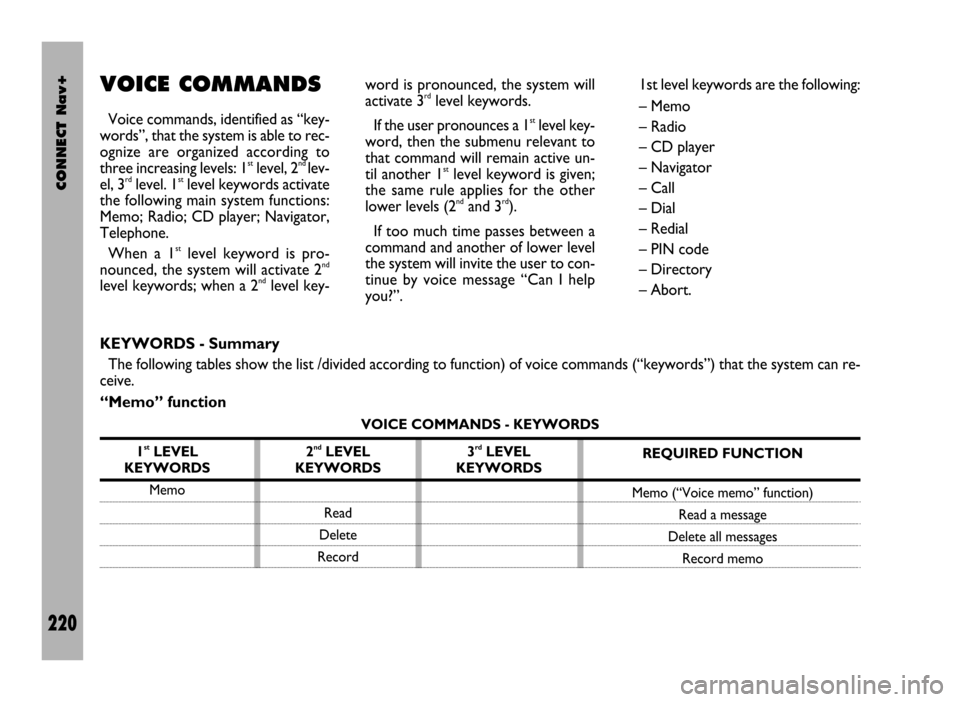
VOICE COMMANDS
Voice commands, identified as “key-
words”, that the system is able to rec-
ognize are organized according to
three increasing levels: 1
stlevel, 2nd lev-
el, 3rdlevel. 1stlevel keywords activate
the following main system functions:
Memo; Radio; CD player; Navigator,
Telephone.
When a 1
stlevel keyword is pro-
nounced, the system will activate 2nd
level keywords; when a 2ndlevel key-word is pronounced, the system will
activate 3
rdlevel keywords.
If the user pronounces a 1
stlevel key-
word, then the submenu relevant to
that command will remain active un-
til another 1
stlevel keyword is given;
the same rule applies for the other
lower levels (2
ndand 3rd).
If too much time passes between a
command and another of lower level
the system will invite the user to con-
tinue by voice message “Can I help
you?”.1st level keywords are the following:
– Memo
– Radio
– CD player
– Navigator
– Call
– Dial
– Redial
– PIN code
– Directory
– Abort.
KEYWORDS - Summary
The following tables show the list /divided according to function) of voice commands (“keywords”) that the system can re-
ceive.
“Memo” function
VOICE COMMANDS - KEYWORDS
1
stLEVEL
KEYWORDS
Memo
REQUIRED FUNCTION
Memo (“Voice memo” function)
Read a message
Delete all messages
Record memo 2ndLEVEL
KEYWORDS
Read
Delete
Record3rdLEVEL
KEYWORDS
Page 225 of 246

CONNECT Nav+
224
“Telephone” function
VOICE COMMANDS - KEYWORDS
1
stLEVEL
KEYWORDS
Call (*)
Dial (**)
Redial
PIN code (***)
Address book
Once a command has been pronounced and executed, second level “keywords” and all first level keywords will remain available for further commands.
(*) After this command the system will ask: “The name, please”. (**) After this command the system will ask: “The number, please”.
(***) After this command the system will ask: “The PIN code, please”.
3rdLEVEL
KEYWORDS
Name (*)
All
2ndLEVEL
KEYWORDS
(0 …. 9)
Plus
Cancel
Delete
Abort
Repeat
Send
(0 …. 9)
Cancel
Delete
Abort
Repeat
Send
Read
Delete
REQUIRED FUNCTION
Call an address book number (only with
“voice identification” mode)
Call a number
Redial
Enter PIN code
Play all the voice samples associated to
the phone book with “voice identification” mode
Delete an entry from the phone book
(only with “voice identification” mode)
Delete all the voice samples associated
to the phone book
Page 228 of 246
![FIAT DUCATO 244 2002 3.G Connect NavPlus Manual CONNECT Nav+
227
Dialling a telephone number
Pronouncing 1st level keyword “Di-
al” opens a dialogue enabling the fol-
lowing keywords:
– [0..9]
– Plus (+)
– Cancel
– Delete
– Abort
–](/manual-img/10/4588/w960_4588-227.png "FIAT DUCATO 244 2002 3.G Connect NavPlus Manual CONNECT Nav+
227
Dialling a telephone number
Pronouncing 1st level keyword “Di-
al” opens a dialogue enabling the fol-
lowing keywords:
– [0..9]
– Plus (+)
– Cancel
– Delete
– Abort
–")
CONNECT Nav+
227
Dialling a telephone number
Pronouncing 1st level keyword “Di-
al” opens a dialogue enabling the fol-
lowing keywords:
– [0..9]
– Plus (+)
– Cancel
– Delete
– Abort
– Repeat
– Send.First example:
User: Dial
CONNECT: The number, please
User: 0-1-1
CONNECT: 0-1-1
User: 1-2-3
CONNECT: 1-2-3
User: 4-5-6
CONNECT: 4-5-6
User: 7-8
CONNECT: 7-8
User: Send
CONNECT: The number
is being dialled.
Second example:
User: Dial
CONNECT: The number, please
User: 0-1-1-1-2-3
CONNECT: 0-1-1-1-2-3
User: 4-5-6-7-8
CONNECT: 4-5-6-7-8
User: Repeat
CONNECT: 0-1-1-1-2-3-4-5-6-7-8
User: Send
CONNECT: The number
is being dialled.Third example:
User: Dial
CONNECT: The number, please
User: 0-1-1-1-2-3
CONNECT: 0-1-1-1-2-3
User: 4-5-6-7-8
CONNECT: 4-5-6-7-7
User: Repeat
CONNECT: 0-1-1-1-2-3-4-5-6-7-7
User: Delete
CONNECT: 0-1-1-1-2-3
User: 4-5-6-7-8
CONNECT: 4-5-6-7-8
User: Send
CONNECT: The number
is being dialled.
Page 230 of 246

CONNECT Nav+
229
Storing an entry in the address
book with voice identification
The user can insert into the tele-
phone book a voice sample associat-
ed to a number (only with “voice
identification” mode).
Recording stage cannot be per-
formed through voice commands (for
further details see section “Cellular
telephone with voice commands” at
paragraph “Directory function – Voice
recognition”).
User can stop the operation only by
pressing the front panel key
ô2-fig. 1or the steering wheel key ô3-fig. 2:
First example:
CONNECT: The name, please
User: Barbara
CONNECT: Please, repeat
the name
User: Barbara
CONNECT: The name
has been stored.Second example:
CONNECT: The name, please
User: Francesca
CONNECT: Please, repeat
the name
User: Maria
CONNECT: The name has not
been stored.
The name, please
User: Francesca
CONNECT: Please, repeat
the name
User: Francesca
CONNECT: The name has
been stored.Calling an entry from
the address book
with voice recognition
Pronouncing 1
stlevel keyword “Call”,
opens a dialogue enabling the follow-
ing keywords:
– Cancel
– Delete
– Abort
– Repeat
– Send.
First example:
User: Call
CONNECT: The name, please
User: Paola
CONNECT: Paola
User: Send
CONNECT: The number
is being dialled.
Second example:
User: Call
CONNECT: The address book
is empty.
Page 233 of 246
CONNECT Nav+
232
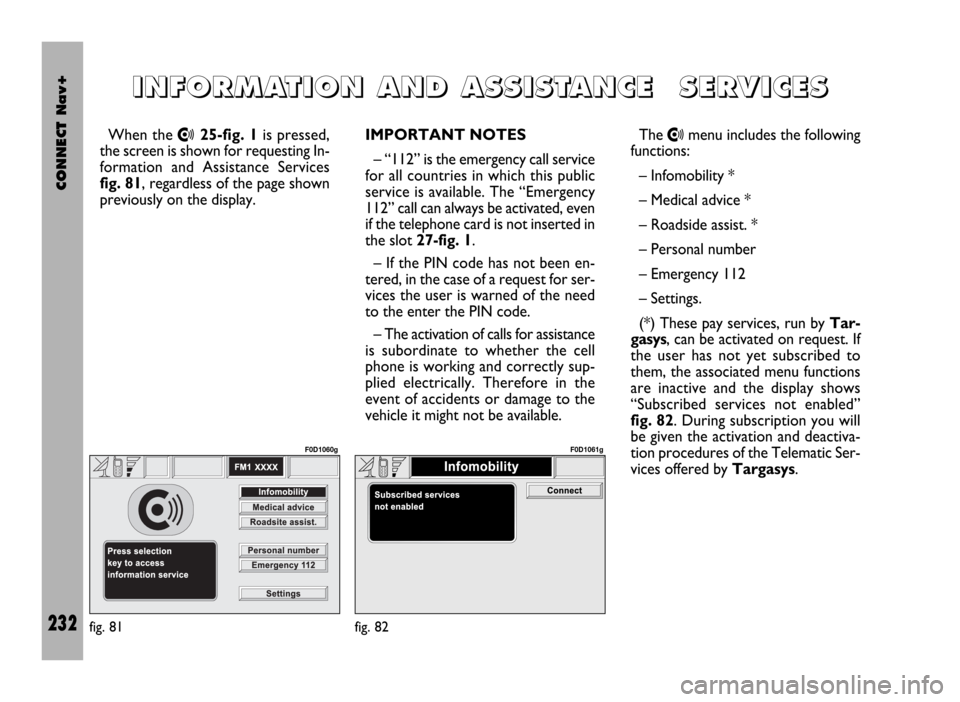
When the •25-fig. 1is pressed,
the screen is shown for requesting In-
formation and Assistance Services
fig. 81, regardless of the page shown
previously on the display.IMPORTANT NOTES
– “112” is the emergency call service
for all countries in which this public
service is available. The “Emergency
112” call can always be activated, even
if the telephone card is not inserted in
the slot 27-fig. 1.
– If the PIN code has not been en-
tered, in the case of a request for ser-
vices the user is warned of the need
to the enter the PIN code.
– The activation of calls for assistance
is subordinate to whether the cell
phone is working and correctly sup-
plied electrically. Therefore in the
event of accidents or damage to the
vehicle it might not be available.The •menu includes the following
functions:
– Infomobility *
– Medical advice *
– Roadside assist. *
– Personal number
– Emergency 112
– Settings.
(*) These pay services, run by Tar-
gasys, can be activated on request. If
the user has not yet subscribed to
them, the associated menu functions
are inactive and the display shows
“Subscribed services not enabled”
fig. 82. During subscription you will
be given the activation and deactiva-
tion procedures of the Telematic Ser-
vices offered by Targasys.
I I
N N
F F
O O
R R
M M
A A
T T
I I
O O
N N
A A
N N
D D
A A
S S
S S
I I
S S
T T
A A
N N
C C
E E
S S
E E
R R
V V
I I
C C
E E
S S
fig. 81
F0D1060g
fig. 82
F0D1061g
Page 234 of 246
CONNECT Nav+
233
“Infomobility” FUNCTION
“Connect”
Selecting “Infomobility” and con-
firming the “Connect” function fig. 85
with the knob 22-fig. 1, sends the re-
quest for information.
Upon receiving the request, Targasys
activates a telephone connection. When
the connection is activated the user can
ask an operator for the information re-
quired.
If it is not possible to activate the
telematic connection, the display will
show the corresponding warning mes-
sage. In any case the telematic system
will attempt again to connect with the
information service offered by Tar-
gasys.Some information will be given only
vocally by the operator, while others
may also be sent with SMS messages,
that will be received regardless of the
function active (MAIN, AUDIO, etc.).
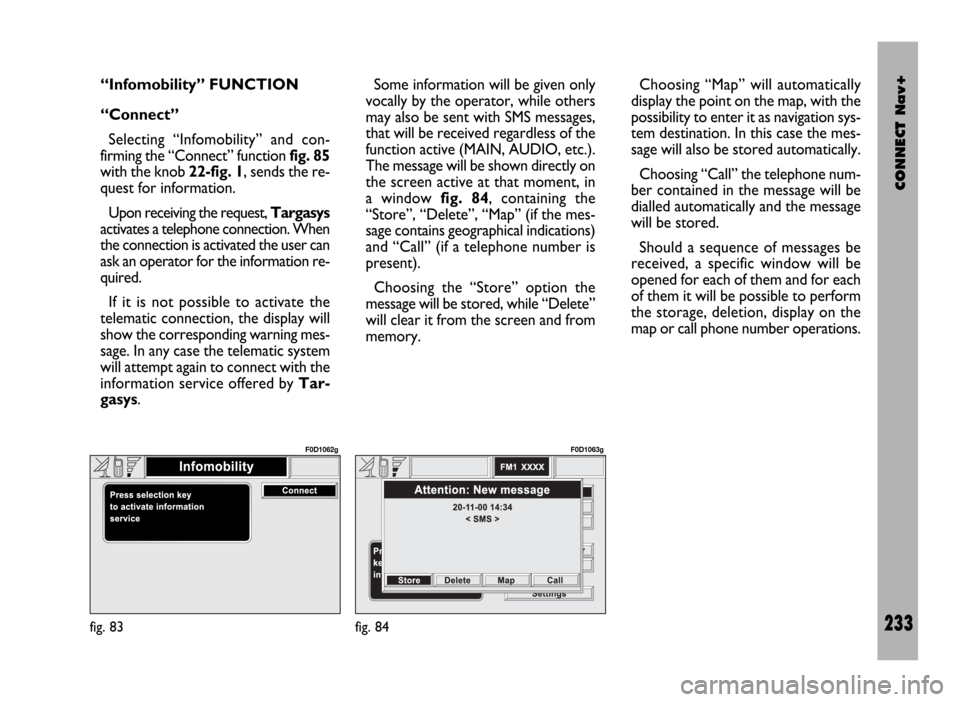
The message will be shown directly on
the screen active at that moment, in
a window fig. 84, containing the
“Store”, “Delete”, “Map” (if the mes-
sage contains geographical indications)
and “Call” (if a telephone number is
present).
Choosing the “Store” option the
message will be stored, while “Delete”
will clear it from the screen and from
memory.Choosing “Map” will automatically
display the point on the map, with the
possibility to enter it as navigation sys-
tem destination. In this case the mes-
sage will also be stored automatically.
Choosing “Call” the telephone num-
ber contained in the message will be
dialled automatically and the message
will be stored.
Should a sequence of messages be
received, a specific window will be
opened for each of them and for each
of them it will be possible to perform
the storage, deletion, display on the
map or call phone number operations.
fig. 83
F0D1062g
fig. 84
F0D1063g