2002 BMW 745LI SEDAN engine
[x] Cancel search: enginePage 78 of 208
At a glanceControlsDriving tipsCommunicationsNavigationEntertainmentMobilityReference
77
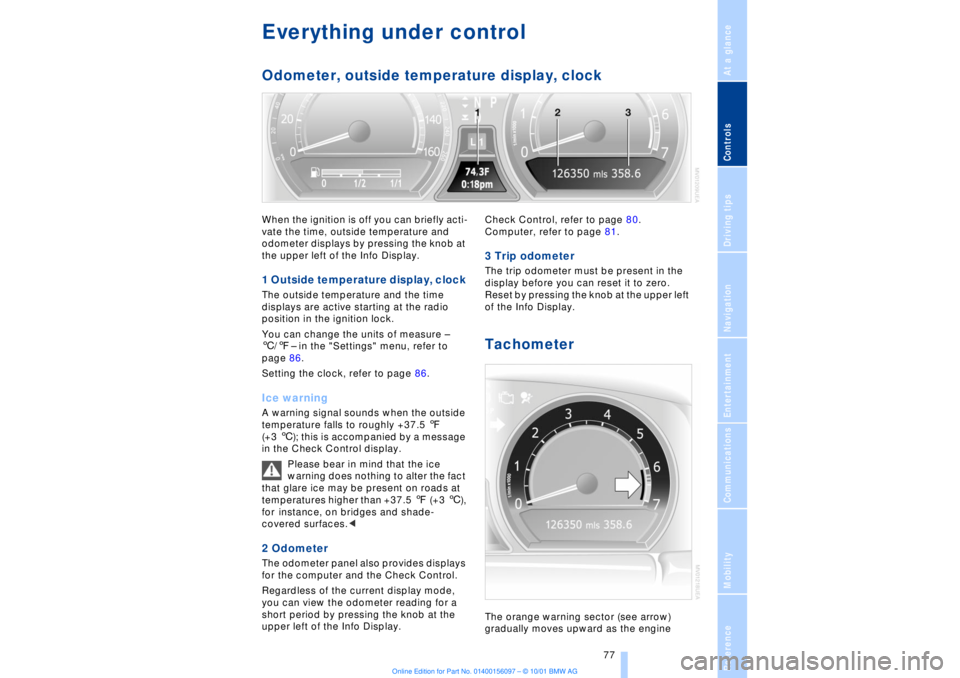
Everything under control Odometer, outside temperature display, clockWhen the ignition is off you can briefly acti-
vate the time, outside temperature and
odometer displays by pressing the knob at
the upper left of the Info Display. 1 Outside temperature display, clock The outside temperature and the time
displays are active starting at the radio
position in the ignition lock.
You can change the units of measure Ð
6/7Ð in the "Settings" menu, refer to
page 86.
Setting the clock, refer to page 86.Ice warning A warning signal sounds when the outside
temperature falls to roughly +37.5 7
(+3 6); this is accompanied by a message
in the Check Control display.
Please bear in mind that the ice
warning does nothing to alter the fact
that glare ice may be present on roads at
temperatures higher than +37.5 7 (+3 6),
for instance, on bridges and shade-
covered surfaces.< 2 Odometer The odometer panel also provides displays
for the computer and the Check Control.
Regardless of the current display mode,
you can view the odometer reading for a
short period by pressing the knob at the
upper left of the Info Display. Check Control, refer to page 80.
Computer, refer to page 81.
3 Trip odometer The trip odometer must be present in the
display before you can reset it to zero.
Reset by pressing the knob at the upper left
of the Info Display. Tachometer The orange warning sector (see arrow)
gradually moves upward as the engine
Page 79 of 208
Everything under control
78 warms to its normal operating temperature.
The segments disappear in sequence as
the engine warms to its normal operating
temperature.
Avoid allowing the engine speed to rise as
far as the orange warning sector whenever
possible.
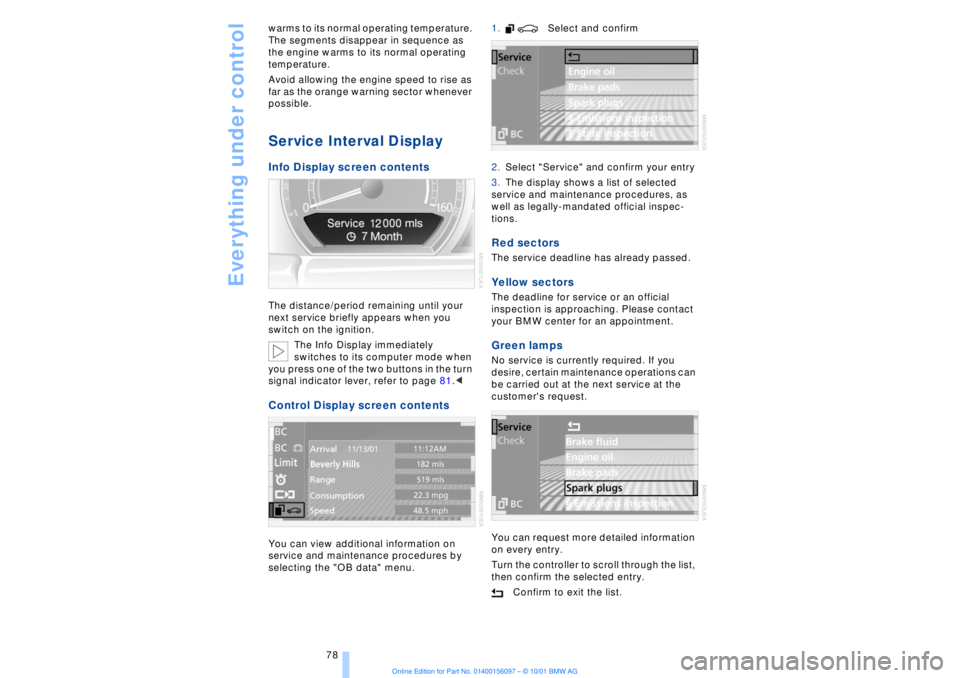
Service Interval Display Info Display screen contents The distance/period remaining until your
next service briefly appears when you
switch on the ignition.
The Info Display immediately
switches to its computer mode when
you press one of the two buttons in the turn
signal indicator lever, refer to page 81.< Control Display screen contents You can view additional information on
service and maintenance procedures by
selecting the "OB data" menu. 1. Select and confirm
2.Select "Service" and confirm your entry
3.The display shows a list of selected
service and maintenance procedures, as
well as legally-mandated official inspec-
tions.
Red sectors The service deadline has already passed. Yellow sectors The deadline for service or an official
inspection is approaching. Please contact
your BMW center for an appointment. Green lamps No service is currently required. If you
desire, certain maintenance operations can
be carried out at the next service at the
customer's request.
You can request more detailed information
on every entry.
Turn the controller to scroll through the list,
then confirm the selected entry.
Confirm to exit the list.
Page 83 of 208
Everything under control
82
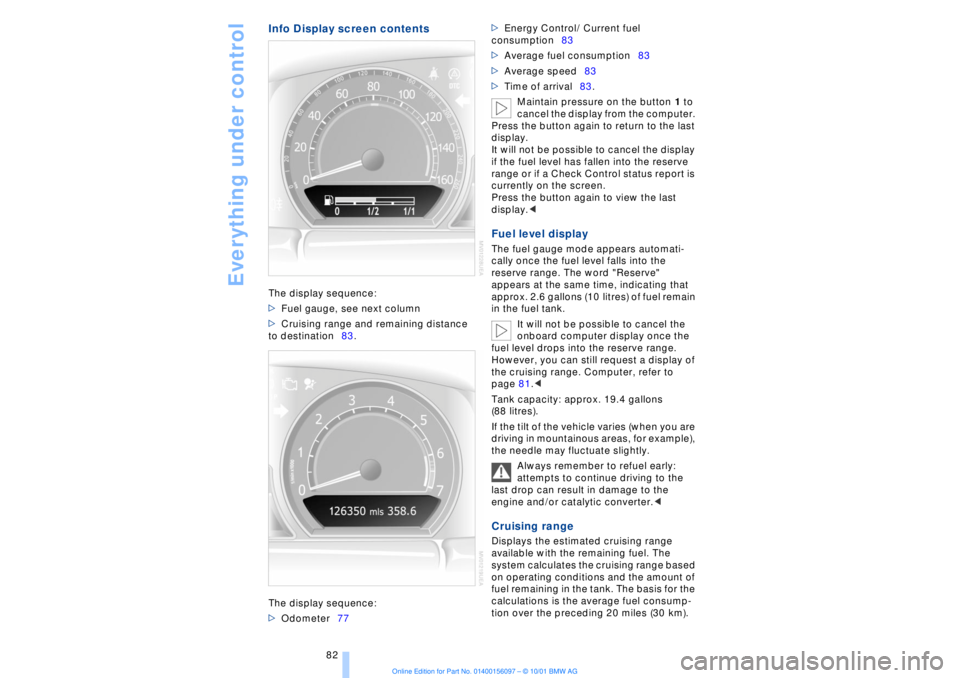
Info Display screen contentsThe display sequence:
>Fuel gauge, see next column
>Cruising range and remaining distance
to destination83.
The display sequence:
>Odometer77 >Energy Control/ Current fuel
consumption83
>Average fuel consumption83
>Average speed83
>Time of arrival83.
Maintain pressure on the button 1 to
cancel the display from the computer.
Press the button again to return to the last
display.
It will not be possible to cancel the display
if the fuel level has fallen into the reserve
range or if a Check Control status report is
currently on the screen.
Press the button again to view the last
display.<
Fuel level display The fuel gauge mode appears automati-
cally once the fuel level falls into the
reserve range. The word "Reserve"
appears at the same time, indicating that
approx. 2.6 gallons (10 litres) of fuel remain
in the fuel tank.
It will not be possible to cancel the
onboard computer display once the
fuel level drops into the reserve range.
However, you can still request a display of
the cruising range. Computer, refer to
page 81.<
Tank capacity: approx. 19.4 gallons
(88 litres).
If the tilt of the vehicle varies (when you are
driving in mountainous areas, for example),
the needle may fluctuate slightly.
Always remember to refuel early:
attempts to continue driving to the
last drop can result in damage to the
engine and/or catalytic converter.< Cruising range Displays the estimated cruising range
available with the remaining fuel. The
system calculates the cruising range based
on operating conditions and the amount of
fuel remaining in the tank. The basis for the
calculations is the average fuel consump-
tion over the preceding 20 miles (30 km).
Page 84 of 208
At a glanceControlsDriving tipsCommunicationsNavigationEntertainmentMobilityReference
83
To avoid serious damage to the engine or
catalytic converter, always refuel as soon
as possible once your cruising range falls
to below 30 miles (50 kilometers).
When refueling you must add at least
approx. 1 1/3 gallons (5 litres) before the
computer will register the additional fuel. Distance to destination When you enter a destination in the naviga-
tion system or manually enter a distance in
the computer prior to departure, the
system can also display the distance
remaining to your destination, refer to
pages 126 and 84.
The system automatically adopts the
distance to your destination using the route
recommended by the navigation system.
When you enter a destination in the
navigation system, any manual
entries will be overwritten no later than
once 1640 feet (500 meters) of the calcu-
lated distance have elapsed.< Energy Control/
Current fuel consumption Shows your current fuel consumption rate
in mpg Ð in litres/100 km on Canadian vehi-
cles. This allows you to see whether your
current driving style is conducive to fuel
economy with minimum exhaust emis-
sions.
When the vehicle is stationary the display
goes to the maximum reading Ð zero on
Canadian models. Average fuel consumption The average fuel consumption is calculated
for the time during which the engine is
running.
You can use the Control Display to view
your fuel consumption rate over two
different distances, refer to Computer or
Trip computer.
Average speed Periods with the vehicle parked and the
engine off are not included in the calcula-
tions of average speed. Time of arrival A display of your estimated time of arrival is
available whenever you enter a destination
in the navigation system, refer to page 126,
or enter the distance manually in the
computer, refer to page 84, prior to depar-
ture.
This function is only available if the
time in the Control Display has been
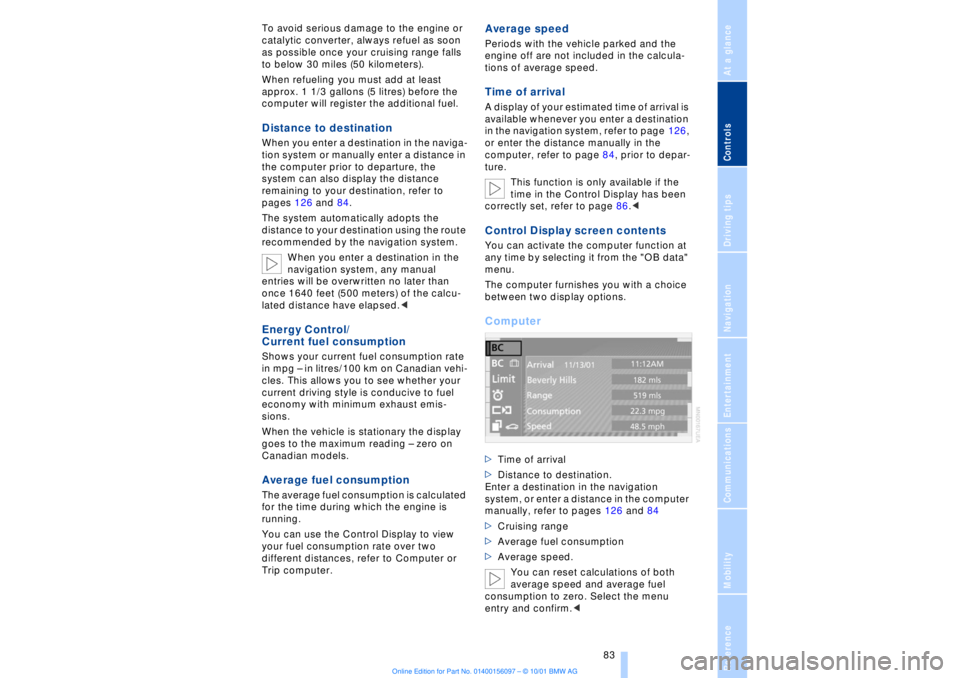
correctly set, refer to page 86.< Control Display screen contents You can activate the computer function at
any time by selecting it from the "OB data"
menu.
The computer furnishes you with a choice
between two display options.Computer >Time of arrival
>Distance to destination.
Enter a destination in the navigation
system, or enter a distance in the computer
manually, refer to pages 126 and 84
>Cruising range
>Average fuel consumption
>Average speed.
You can reset calculations of both
average speed and average fuel
consumption to zero. Select the menu
entry and confirm.<
Page 90 of 208

At a glanceControlsDriving tipsCommunicationsNavigationEntertainmentMobilityReference
89
You also enjoy the option of having the
system show distances to objects in the
Control Display. The Control Display will
also indicate the presence of objects in
green before they are close enough to
generate a signal tone.
Select "PDC pic." from the "Settings" menu
and confirm your selection. This activates
the PDC display.
The display then appears in the Control
Display whenever PDC is automatically or
manually activated.
The previous display automatically reap-
pears after the system is deactivated.
Confirm in the menu to return to
the previous display.<
Even with PDC, final responsibility for
estimating the distance between the
vehicle and any obstructions always
remains with the driver. Even when sensors
are involved, there is a blind spot in which
objects cannot be detected. The system is
also subject to the physical limits that apply
to all forms of ultrasonic measurement,
such as those encountered with tow bars
and trailer couplings, as well as thin and
wedge-shaped objects, etc. After initial
detection, low objects such as curbs, etc.,
may disappear again before the system
starts to generate a continuous warning
tone. Loud noises from outside and inside
the vehicle may prevent you from hearing
PDC's signal tone.<
Keep the sensors clean and free of ice
or snow in order to ensure that they
will continue to operate effectively.
Do not apply high pressure spray to the
sensors for a prolonged period of time. Keep the spray at least 4 in (10 cm) away
from the sensors.<
Driving stability control/
DSC Dynamic Stability
Control Your BMW is equipped with an extended
array of systems designed to enhance and
maintain vehicle stability under extreme
conditions. The following section describes
these functions based on DSC and ABS. The concept DSC maintains vehicle stability, even in
critical driving situations.
The system optimizes vehicle stability
during acceleration and when starting from
a full stop, as well as optimizing traction.
The system recognizes any tendency for
the vehicle to assume an unstable attitude
such as oversteer or understeer; it then
counteracts this tendency with a combina-
tion of graduated reductions in engine
torque and selective braking intervention at
individual wheels. DSC provides optimal
stability within the limits defined by the
laws of physics.
The DSC is operational every time you start
the engine. DSC includes the functionality
of the DTC Dynamic Traction Control and
DBC Dynamic Brake Control.
With its selective braking intervention at the
individual drive wheels, DTC fulfills the
same function as a conventional limited-
slip differential to enhance traction under
difficult driving conditions, such as on
snow, etc. Indicator lamps
The indicator lamp in the Info
Display goes out soon after you
start the engine.
If the indicator lamp flashes:
DSC controls the drive and braking forces.
The indicator lamp stays lit:
DSC has been switched off via the Control
Display.
Page 93 of 208
Technology for comfort, convenience and safety
92 Active stabilizers at the front and rear axles
form the basis for Dynamic Drive. Suspen-
sion compliance adapts to suit driving
conditions, varying from performance-
oriented during cornering to smooth and
comfort-oriented when the vehicle is
proceeding in a straight line.
The system assumes operational status
each time you start the engine.
Driving with Dynamic Drive During vehicle operation, the system
continuously runs through closed-loop
control cycles lasting only fractions of a
second. In case of malfunction
The symbol will light up, accompa-
nied by a status message in the
Check Control panel. Please take
note of the additional information in the
Control Display panel.
You can find more detailed information on
the Check Control starting on page 80.
If the Dynamic Drive system switches
off in response to malfunction, please
remember to adapt your speed accord-
ingly, especially in curves.
The suspension will be noticeably softer
and the vehicle will display a greater
tendency to tilt during cornering and in
crosswinds.
If a status message appears in the Check
Control panel, accompanied by a red
symbol, the hydraulic fluid in the reservoir
may have fallen to below the minimum
level, possibly owing to leakage in the
hydraulic system. Stop the vehicle and
switch off the engine immediately.
Please observe the additional instructions
provided in the Control Display panel.<
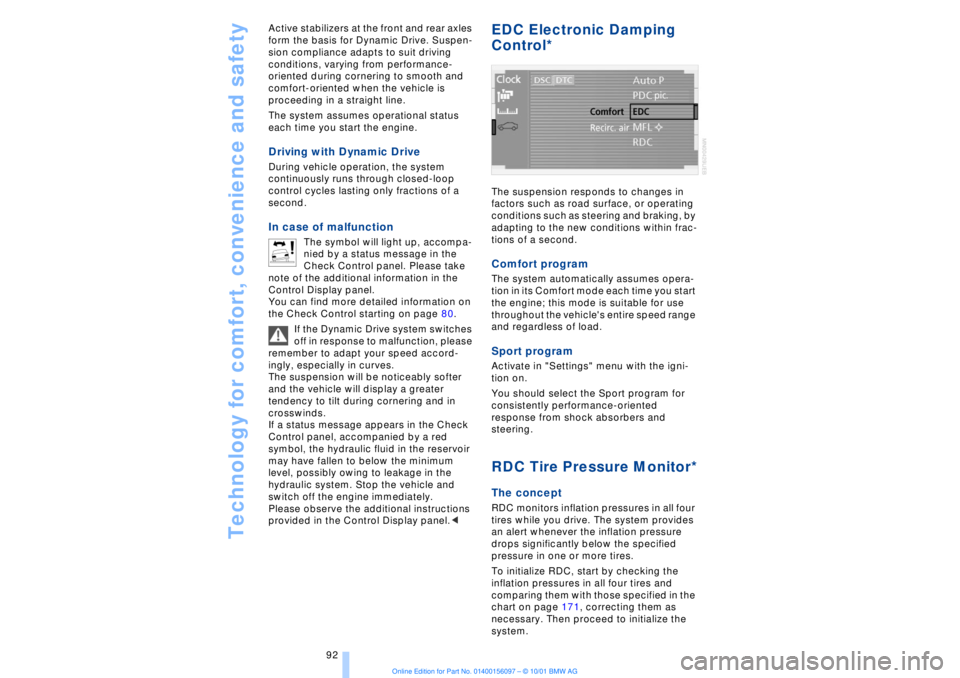
EDC Electronic Damping
Control*
The suspension responds to changes in
factors such as road surface, or operating
conditions such as steering and braking, by
adapting to the new conditions within frac-
tions of a second.Comfort program The system automatically assumes opera-
tion in its Comfort mode each time you start
the engine; this mode is suitable for use
throughout the vehicle's entire speed range
and regardless of load. Sport programActivate in "Settings" menu with the igni-
tion on.
You should select the Sport program for
consistently performance-oriented
response from shock absorbers and
steering. RDC Tire Pressure Monitor*The conceptRDC monitors inflation pressures in all four
tires while you drive. The system provides
an alert whenever the inflation pressure
drops significantly below the specified
pressure in one or more tires.
To initialize RDC, start by checking the
inflation pressures in all four tires and
comparing them with those specified in the
chart on page 171, correcting them as
necessary. Then proceed to initialize the
system.
Page 101 of 208
A congenial climate
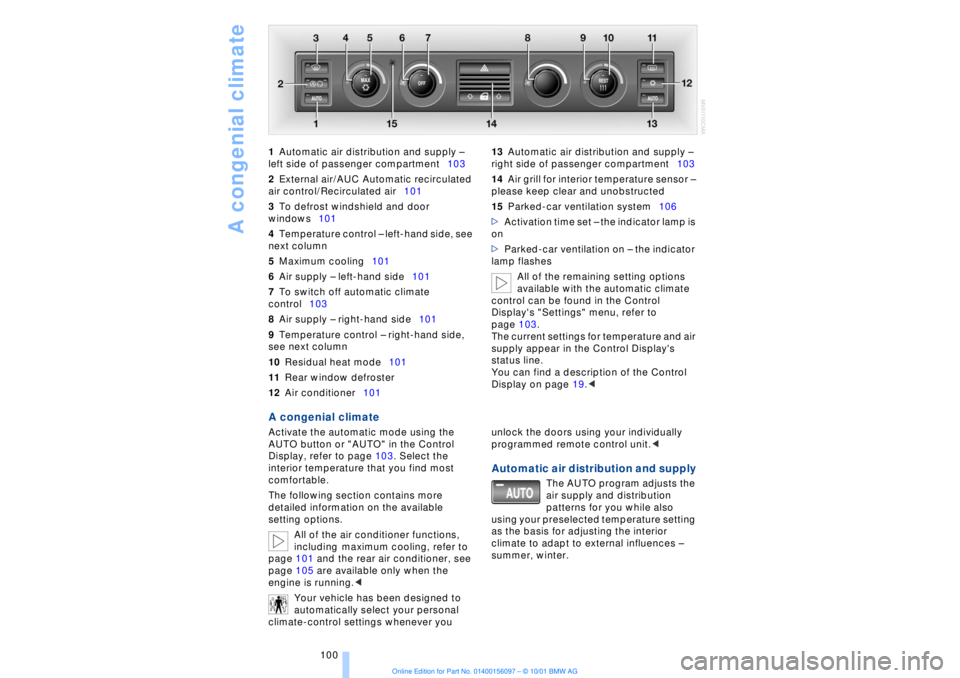
100 1Automatic air distribution and supply Ð
left side of passenger compartment103
2External air/AUC Automatic recirculated
air control/Recirculated air101
3To defrost windshield and door
windows101
4Temperature control Ð left-hand side, see
next column
5Maximum cooling101
6Air supply Ð left-hand side101
7To switch off automatic climate
control103
8Air supply Ð right-hand side101
9Temperature control Ð right-hand side,
see next column
10Residual heat mode101
11Rear window defroster
12Air conditioner101 13Automatic air distribution and supply Ð
right side of passenger compartment103
14Air grill for interior temperature sensor Ð
please keep clear and unobstructed
15Parked-car ventilation system106
>Activation time set Ð the indicator lamp is
on
>Parked-car ventilation on Ð the indicator
lamp flashes
All of the remaining setting options
available with the automatic climate
control can be found in the Control
Display's "Settings" menu, refer to
page 103.
The current settings for temperature and air
supply appear in the Control Display's
status line.
You can find a description of the Control
Display on page 19.<
A congenial climate Activate the automatic mode using the
AUTO button or "AUTO" in the Control
Display, refer to page 103. Select the
interior temperature that you find most
comfortable.
The following section contains more
detailed information on the available
setting options.
All of the air conditioner functions,
including maximum cooling, refer to
page 101 and the rear air conditioner, see
page 105 are available only when the
engine is running.<
Your vehicle has been designed to
automatically select your personal
climate-control settings whenever you unlock the doors using your individually
programmed remote control unit.<
Automatic air distribution and supply
The AUTO program adjusts the
air supply and distribution
patterns for you while also
using your preselected temperature setting
as the basis for adjusting the interior
climate to adapt to external influences Ð
summer, winter.
Page 102 of 208
At a glanceControlsDriving tipsCommunicationsNavigationEntertainmentMobilityReference
101
Temperature adjustment
You can turn to select the
desired temperatures for the
driver's and passenger sides.
Your settings appear in the
Control Display's status line.
The figures in the display provide a general
indication of interior temperature. When
you start the vehicle, this system ensures
that the selected temperature is achieved
as quickly as possible. It then maintains
this temperature, regardless of the season.
Defrost windows and clear them of
condensation
This program quickly removes
ice and condensation from the
windshield and door windows.
To adjust air supply manually
You can adjust the air supply by
turning. The automatic air
supply control is operational
whenever you see your selec-
tion represented by a bar in the
Control Display's status line. The automatic
air distribution remains in operation as
before. You can reactivate the automatic
air supply mode with the AUTO button.
Air conditioner operation
The air conditioner cools and
dehumidifies the incoming air
before also reheating it as
required, according to temperature setting.
Depending on the weather, the windshield
may fog over briefly when the engine is
started.
The air conditioner comes on automatically
when you select the AUTO program.
Maximum cooling
Select this program to obtain
maximum cooling as quickly as
possible.
The temperature display reverts
to 61 7 (16 6) while the system switches
to the recirculated-air mode and starts to
provide maximum air supply through the instrument panel outlets only. For this
reason you should ensure that these
outlets are open before selecting this
program.
Outside air/AUC Automatic recircu-
lated-air control/Recirculated air
You can respond to unpleasant
odors or pollutants in the imme-
diate environment by tempo-
rarily suspending the flow of outside air.
The system then recirculates the air
currently within the vehicle. AUC executes
this function automatically.
Press the button repeatedly to run through
the following control sequence:
>Indicator lamps off: outside air flows into
the vehicle
>Left-hand indicator lamp on Ð AUC
mode: the system detects pollutants in the
outside air and responds by deactivating
the outside air supply when required. The
system then recirculates the air currently
within the vehicle.
Depending upon air quality, in the auto-
matic mode the system may start to alter-
nate between its outside-air and
recirculated-air modes
>Right-hand indicator lamp on Ð Recircu-
lated-air mode: the supply of outside air
into the vehicle is permanently blocked.
The system then recirculates the air
currently within the vehicle.
If condensation starts to form on the
inside window surfaces during opera-
tion in the recirculated-air mode, you
should switch it off while also increasing air
supply as required.<
Residual heat mode
The system uses the warmth
stored in the engine to heat the
interior when the ignition is off,
for instance, while the vehicle is
stopped at a school to pick up a
child.
You can adjust the automatic climate
control's settings when the ignition lock is
in the radio mode. The system blows