2002 BMW 745LI SEDAN mirror
[x] Cancel search: mirrorPage 56 of 208
At a glanceControlsDriving tipsCommunicationsNavigationEntertainmentMobilityReference
55
1.Select the driver's door mirror with the
switch
2.When you tap the selector lever to select
reverse, the door mirror on the passenger
side tilts downward. This allows the driver
to see the area immediately adjacent to the
vehicle Ð such as a curb Ð when parking,
etc.
You can deactivate this automatic feature:
Slide the mirror selection switch to the
"passenger's side" position.
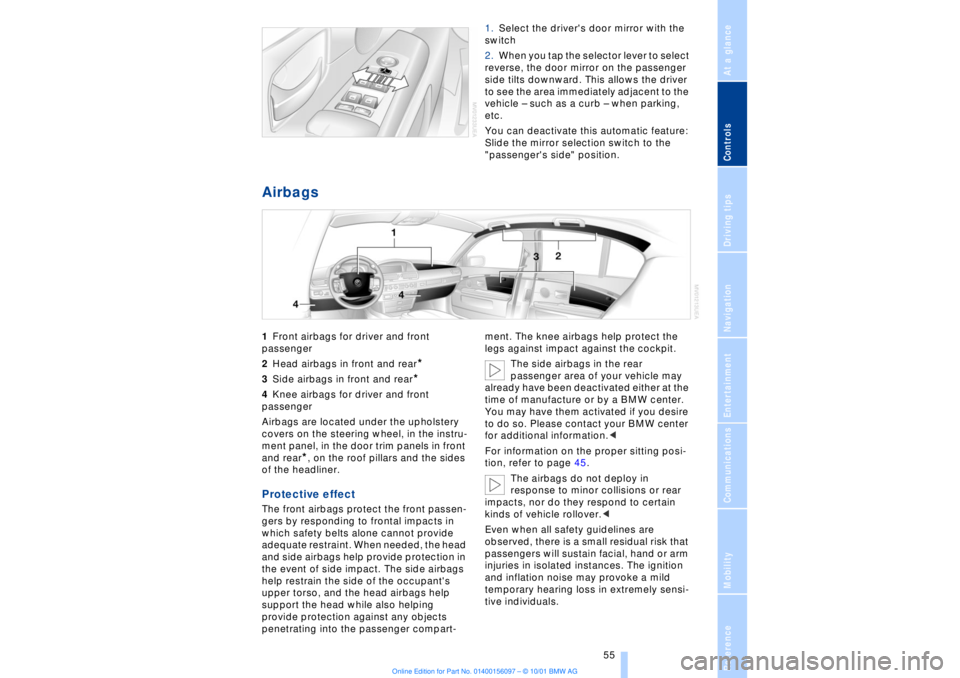
Airbags 1Front airbags for driver and front
passenger
2Head airbags in front and rear
*
3Side airbags in front and rear*
4Knee airbags for driver and front
passenger
Airbags are located under the upholstery
covers on the steering wheel, in the instru-
ment panel, in the door trim panels in front
and rear
*, on the roof pillars and the sides
of the headliner.
Protective effect The front airbags protect the front passen-
gers by responding to frontal impacts in
which safety belts alone cannot provide
adequate restraint. When needed, the head
and side airbags help provide protection in
the event of side impact. The side airbags
help restrain the side of the occupant's
upper torso, and the head airbags help
support the head while also helping
provide protection against any objects
penetrating into the passenger compart-ment. The knee airbags help protect the
legs against impact against the cockpit.
The side airbags in the rear
passenger area of your vehicle may
already have been deactivated either at the
time of manufacture or by a BMW center.
You may have them activated if you desire
to do so. Please contact your BMW center
for additional information.<
For information on the proper sitting posi-
tion, refer to page 45.
The airbags do not deploy in
response to minor collisions or rear
impacts, nor do they respond to certain
kinds of vehicle rollover.<
Even when all safety guidelines are
observed, there is a small residual risk that
passengers will sustain facial, hand or arm
injuries in isolated instances. The ignition
and inflation noise may provoke a mild
temporary hearing loss in extremely sensi-
tive individuals.
Page 73 of 208
Driving
72
1 Standard wiper speed The system automatically reverts to opera-
tion in the intermittent mode whenever the
vehicle stops. Fast wiper speed You can also select this position by
pressing the lever upward past the detent.
The system automatically reverts to opera-
tion in the standard wipe mode whenever
the vehicle stops. 4 Clean windshield The system sprays washer fluid against the
windshield and activates the wipers for a
brief period. Cleaning headlamps >Each fifth time you press into position 4
to wash the windshield while the head-
lamps are on.
Do not use the washers if there is any
danger that the fluid will freeze on the
windshield. If you do so, your vision could
be obscured. To avoid freezing, use a
washer fluid antifreeze, refer to page 73.
Avoid activating the washer when the
reservoir is empty, as damage to the pump
could result.< Windshield washer nozzles The windshield washer nozzles and the
windshield itself in the area around the
wipers are heated automatically when the
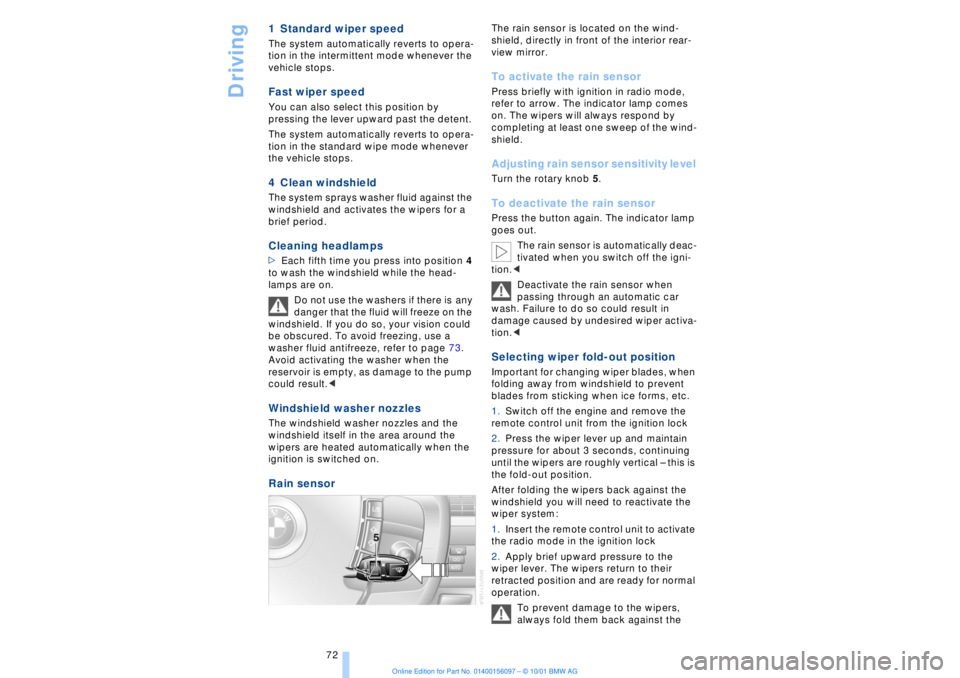
ignition is switched on. Rain sensor
The rain sensor is located on the wind-
shield, directly in front of the interior rear-
view mirror. To activate the rain sensor Press briefly with ignition in radio mode,
refer to arrow. The indicator lamp comes
on. The wipers will always respond by
completing at least one sweep of the wind-
shield. Adjusting rain sensor sensitivity level Turn the rotary knob 5. To deactivate the rain sensor Press the button again. The indicator lamp
goes out.
The rain sensor is automatically deac-
tivated when you switch off the igni-
tion.<
Deactivate the rain sensor when
passing through an automatic car
wash. Failure to do so could result in
damage caused by undesired wiper activa-
tion.< Selecting wiper fold-out position Important for changing wiper blades, when
folding away from windshield to prevent
blades from sticking when ice forms, etc.
1.Switch off the engine and remove the
remote control unit from the ignition lock
2.Press the wiper lever up and maintain
pressure for about 3 seconds, continuing
until the wipers are roughly vertical Ð this is
the fold-out position.
After folding the wipers back against the
windshield you will need to reactivate the
wiper system:
1.Insert the remote control unit to activate
the radio mode in the ignition lock
2.Apply brief upward pressure to the
wiper lever. The wipers return to their
retracted position and are ready for normal
operation.
To prevent damage to the wipers,
always fold them back against the
Page 149 of 208
CD changer
148
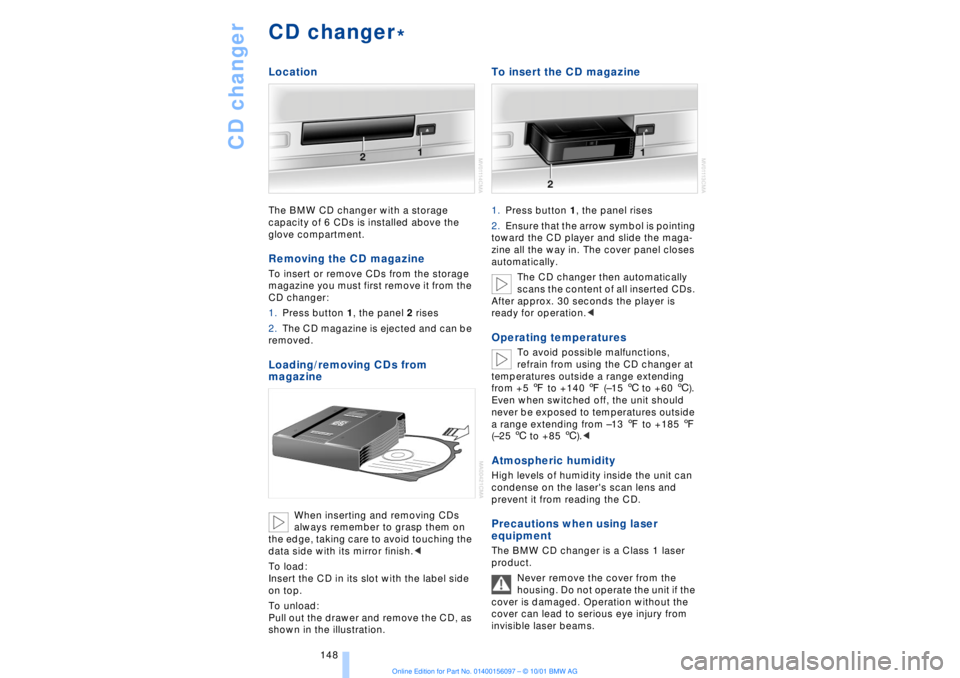
CD changerLocationThe BMW CD changer with a storage
capacity of 6 CDs is installed above the
glove compartment.Removing the CD magazineTo insert or remove CDs from the storage
magazine you must first remove it from the
CD changer:
1.Press button 1, the panel 2 rises
2.The CD magazine is ejected and can be
removed.Loading/removing CDs from
magazine
When inserting and removing CDs
always remember to grasp them on
the edge, taking care to avoid touching the
data side with its mirror finish.<
To load:
Insert the CD in its slot with the label side
on top.
To unload:
Pull out the drawer and remove the CD, as
shown in the illustration.
To insert the CD magazine1.Press button 1, the panel rises
2.Ensure that the arrow symbol is pointing
toward the CD player and slide the maga-
zine all the way in. The cover panel closes
automatically.
The CD changer then automatically
scans the content of all inserted CDs.
After approx. 30 seconds the player is
ready for operation.
refrain from using the CD changer at
temperatures outside a range extending
from +5 7 to +140 7 (Ð15 6 to +60 6).
Even when switched off, the unit should
never be exposed to temperatures outside
a range extending from Ð13 7 to +185 7
(Ð25 6 to +85 6).<
Atmospheric humidityHigh levels of humidity inside the unit can
condense on the laser's scan lens and
prevent it from reading the CD.Precautions when using laser
equipmentThe BMW CD changer is a Class 1 laser
product.
Never remove the cover from the
housing. Do not operate the unit if the
cover is damaged. Operation without the
cover can lead to serious eye injury from
invisible laser beams.
*
Page 198 of 208
197
At a glanceControlsDriving tipsCommunicationsNavigationEntertainmentMobilityReference
Computer 81
Ð automatic climate
control 103
Ð "BC" 84
Ð changing settings 86
Ð changing time and
date 86
Ð Control Display screen
contents 83
Ð displays, menus 22
Ð language selection 86
Ð status lines 24
Ð symbols 20
Computer, refer to Control
Center 19
Condition Based Service
(CBS) 179
Connecting car vacuum
cleaner 113
Consumption display 82
Control Center 19
Ð assistance window 23
Ð automatic climate
control 103
Ð changing menu page 20
Ð changing settings 86
Ð confirm selection or
entry 20
Ð display help texts 23
Ð displays, menus 22
Ð language selection 86
Ð lists 20
Ð menu entry selection 19
Ð selecting units of measure
and display format 86
Ð setting time and date 86
Ð status lines 24
Ð symbols 20
Ð symbols and lists 20
Control Display 19
Controller, refer to Control
Center 19
Convenience operation of
windows and sliding/tilt
sunroof 36, 37
Convenience starting
feature 62
"Coolant" 179
Coolant 176, 177
Cooler, refer to Rear
cooler 110Cooling adjustment
Ð rear air conditioner 105
Copyright 2
Cornering Brake Control
(CBC) 91
Courtesy lamps 98
Cruise control 73
Cruise control, see Pro-
grammable cruise
control 73
Cruising range 82
Cup holder, refer to Bever-
age holder 112
Curb lamp
Ð bulb replacement 182
Curb weight 194
Current fuel
consumption 83
D"Date" 86
Daytime driving lamp
mode 96
DBC (Dynamic Brake
Control) 91
Deactivating
Ð tilt alarm sensor 36, 41
Defrosting, windows 101
Defrost setting 101
"DELETE" for
navigation 130
Destination entry 126
Destination for navigation
system
Ð selecting in
"Information" 129
Destination memory 129
"Destinations" 126
"Dest. input" 126
Dialed numbers 164
Dimensions 193
Dimming mirrors 52
Dipstick, engine oil 176
Direction
Ð arrow 132
Ð to destination 131
Ð voice instructions 133
Directional indicators, see
Turn signal indicators 71Directory creation
Ð with navigation
system 134
"Dir. of travel" with naviga-
tion system 132
"Dir. to north" with naviga-
tion system 132
Disc brakes 119
Displacement 192
Display, refer to Control
Display 19
Display format and units of
measure in Control
Display, changing 86
Display illumination, refer to
Instrument lighting 97
Displays 14
Ð computer 22
Ð Control Center 22
Distance 83
Distance to destination 83
Distance warning 88
Door keys 34
Doors
Ð locking and unlocking 35
Ð manual operation 37
Ð remote control 35
DOT Quality Grades 172
Draft-free ventilation 102
Drink holders, refer to
Beverage holders 112
Driving stability control 89
Driving tips 118
"DSC" 90
DSC (Dynamic Stability
Control) 89
"DTC" 90
DTC (Dynamic Traction
Control) 15, 90
Dynamic Brake Control
(DBC) 91
Dynamic Drive 91
Dynamic Stability Control
(DSC) 89
Dynamic Traction Control
(DTC) 15, 90
EEBV (Electronic Brake-
force Distribution) 91
Page 199 of 208
Everything from A to Z
198 "EDC" 92
Ð "Comfort" 92
Ð "Sport" 92
EDC (Electronic Damping
Control) 92
Electrical malfunction
Ð automatic transmission
lockout 70
Ð fuel filler door 168
Ð parking brake, emergency
use 65
Ð sliding/tilt sunroof 44
Electric power seats 46
Electric power windows 42
Electric seats 46
Electric steering column
adjustment 53
Electronic Brake-force Dis-
tribution (EBV) 91
Electronic Damping Control
(EDC) 92
Elements of operation 12
Emergency operation
Ð doors 37
Ð fuel filler door 168
Ð luggage compartment
lid 40
Ð sliding/tilt sunroof 44
Ð transmission lockout
(automatic
transmission) 70
Emergency SOS call
Ð automatic activation 161
"Emissions inspection" 79
Energy Control 83
Engine compartment 176
Engine coolant 176, 177
"Engine oil" 179
Engine oil
Ð consumption 176
Ð grades 177
Engine oils 177
Engine output, data 192
Engine specifications 192
"Entertainment" 19, 22
Estimated time of arrival 83
Extended vehicle storage,
see supplemental Car
care manual
Exterior mirrors 52
Ð automatic dimming 52"Extra" in "Climate"
menu 103
"Extra" with rear air
conditioner 105
"Extra" with rear cooler 110
FFactory preparations for
phone installation 161
Fader 141
Failure of an electrical
accessory 186
"Fastest route" 131
Fastest route 131
Fault displays 80
Filling the washer
reservoir 73
Filling the windshield
washer reservoir 73
First-aid kit 187
Fittings, tow-starting and
towing 189
Flashlight 111
Flat tires 171
"FM..." 140, 143
FM waveband 143
Fog lamps 97
"Footwell" 103
Footwell lamps 98
Forward lamps 98
Front armrest 111
Front seat adjustment 45
Fuel 169
Fuel consumption
display 83
Fuel economy 83
Fuel filler cap cover 168
Fuel filler door
Ð releasing in the event of
electrical defect 168
Fuel gauge 82
Fuel level display 82, 83
Fuel specifications 169
Fuel tank capacity 168
Fuses 186
GGarage door opener, refer
to Universal garage door
opener 108
Gasoline 169
General operating
information 118
Glasses compartment 111
Glove compartment 110
GPS, refer to Navigation
system 124
GPS navigation system 124
Ð address book, refer to
Creating a directory 134
Ð current location 135
Ð destination entry 126
Ð destination guidance in
assistance window 125
Ð destination list 130
Ð digital coverage area 124
Ð directory 128
Ð manual entry of destina-
tion address 126
Ð map CD 124
Ð map-guided destination
selection 128
Ð new route 133
Ð recent destinations 130
Ð route display 132
Ð route list 132
Ð route selection 130
Ð safety 124
Ð selecting destination in
"Information" 129
Ð selecting points of
interest 129
Ð selection options 126
Ð start active guidance 131
Ð starting 125
Ð terminate/interrupt active
guidance 134
Ð voice guidance 133
Ð wordmatch principle 136
Guidance
Ð terminate 134
Guidance system
Ð interrupt 134
Ð starting 131
Page 200 of 208
199
At a glanceControlsDriving tipsCommunicationsNavigationEntertainmentMobilityReference
HHandbrake, refer to Parking
brake 62
Hand lamp 111
Hands-free
microphone 161
Hands-free system 161
Hazard warning flashers 16
Headlamp control 96
Headlamp flasher 71
Headlamps, low beam 96
Headlamp washers 72, 73
Head restraints 48
Ð front head restraints,
active 48
Heated steering wheel 53
Heating and ventilation 99
Heating while stopped 101
Height 193
Height adjustment
Ð seats 46
Ð steering column 53
"Help" 19, 22
Help texts in Control
Display 23
High beams 97
Ð bulb replacement 182
High-mount brake
lamp 183
Home address 135
Hood release 175
Horn 13
Hydraulic Brake Assistant,
refer to DBC 91IIce warning 77
Ignition key 34
Ignition lock 61
"Indep. ventil." 106
Indicator lamps 15
"Individual" 104
Individual button assign-
ments on steering
wheel 53
Inflation pressure 170
Inflation pressure control,
tires 92
Info Display 14"Information" for
navigation 129
Instrument cluster, refer to
Info Display 14
Instrument lighting 97
Instrument panel 12, 16
Instrument panel switch 71
Interior lamps 97
Ð remote control 36
Interior motion sensor 41
Interior protection
Ð deactivating 36, 41
Interior rearview mirror 52
Ð automatic dimming 52
Intermittent wipe 71
JJack 184
Jump-starting 187KKey Memory 59
Key Pad control
buttons 160
Key Pad digit buttons 160
Key Pad with mobile
phone 160
Keys 34
Ð adapter for spare key 34
Kickdown 68L"Last" 164
"Last destin." 130
LATCH, refer to LATCH
child-restraint system 58
"Left"
Ð for heated seats 51
Ð with automatic climate
control 103
Length 193
Level control system 94
License plate lamp, bulb
replacement 183
Lighter 113
Lights on warning 96
Light switch 96
"Limit" 84Limit selection,
adjustment 84
Litter container 111
L mode on automatic
transmission 66
Loading 120
Loading the vehicle 120
"LOCATION" 135
"Location" 129, 135
Lock Code 162
Locking
Ð from the outside 35
Louvers 99
Low beams
Ð automatic 96
Lower back support, refer
to lumbar support 46
Lug bolts 185
Luggage compartment
capacity 194
Luggage compartment lid
Ð emergency release 40
Ð locking separately 39
Ð opening from the
inside 39
Ð opening from the
outside 38
Ð operating via remote
control 36
Luggage compartment lid
operation,
automatic 36, 39
Luggage compartment
net 40
Luggage rack, refer to
Roof-mounted luggage
rack 120
Lug wrench 184
Lumbar support 46
MM+S tires 173
Maintenance 179
Make-up mirror 53
Malfunction displays 80
"M AM" 144, 145
Manually controlled recir-
culated air 101
Page 201 of 208
Everything from A to Z
200 Manual operation
Ð doors 37
Ð sliding/tilt sunroof 44
Manual release
Ð automatic transmission
lockout 70
Ð fuel filler door 168
Ð luggage compartment
lid 40
Manual station search 143
Map CD 124
"Map facing N." with navi-
gation system 132
Maximum axle loads 194
Maximum roof weight 194
Maximum speed, see
Limit 84
"MD" 140, 151
MD player 151
Ð fast forward 151
Ð random play 152
Ð reverse 151
Ð sampling 152
Ð scan function 152
Ð switching on 151
Ð track skip 151
"Memo" 86
"Memorize"
Ð "Individual" 104
Memory, refer to Seat, mir-
ror and steering wheel
memory 54
"Memory" for audio
system 140
"Menu name" 23
Menus
Ð computer 22
Ð Control Display 22
"MFL" 53
"M FM" 144, 145
"Microfilter" 179
Microfilter 104
Microphone for hands-free
system 161
MiniDisc, refer to MD 151
Mirrors 52
Ð mirror heaters 52
Ð mirror memory 54
"Missed" 164
Missed calls 164Mobile phone
Ð calling 162
Ð call termination 162
Ð controlling with the but-
tons on the steering
wheel 18
Ð emergency calls 161
Ð hands-free system 161
Ð missed calls 164
Ð operating using the
Control Display 159
Ð redialing 164
Ð selecting phone
numbers 162
Ð switching on and off 162
Ð Top 8 list 163
Ð using with Key Pad 160
Mobile phone, refer to
separate mobile phone
manual 158
Mobile phone battery 159
Mobile phone codes 162
Modifications,
technical 8, 98
Monitor, refer to Control
Center 19
Most frequently called
numbers 163
Most recent mobile phone
numbers 164
N"Navigation" 19, 22
Navigation computer
Ð installation location 124
Navigation destination
Ð manual entry 126
Ð selecting with map 128
Navigation system
Ð destination list 130
Ð digital coverage area 124
Ð town and city centers 136
Ð voice guidance 133
Navigation system
"ACCEPT" command 135
Navigation system "View"
function 132
Navigation target
cursor 128, 129
"Navi info" 54"New route" 133
"Next"
Ð map-guided destination
selection 129
Ð searching for points of
interest 130
Nozzles 99
O"OB data" 19, 22
OBD interface socket 180
Occupant-restraint
systems 50, 55
Odometer 77
Oil additives 177
Oil change intervals, refer
to Service Interval
Display 78
Oil consumption 176
Oil dipstick 176
Oil specifications 177
"ON / OFF" speed limit 84
Onboard Diagnostic (OBD)
system 180
Ð interface socket 180
Onboard tool kit 181
"On country" 130
"On current loc." 129
"1,2,3" 163
"On town/city" 130
Opening and closing
Ð from the inside 37
Ð from the outside 37
Oral note 27
Orientation
Ð changing the display 132
Orientation menu 19
Orientation to north 132
Outside temperature
display 77PPaint and finish care, refer
to Car care manual
Panic mode 36
Park Distance Control
(PDC) 88
Parked-car ventilation 106
Parking aid 88
Page 202 of 208
201
At a glanceControlsDriving tipsCommunicationsNavigationEntertainmentMobilityReference
Parking brake 62
Ð Automatic Hold 63
Ð manual operation 65
Parking brake lockout, refer
to Transmission
lockout 67, 70
Parking lamps 96
Ð bulb replacement 182
Parking with
Automatic Hold 64
Passenger-side mirror tilt
function 54
PDC (Park Distance
Control) 88
"PDC pic." 88
Phone directory 162
Ð deleting all entries 163
Ð dialing numbers using
voice command
system 163
Ð entering numbers in voice
command directory 163
Ð entry deletion 163
Ð viewing entries 163
Phone number, see Mobile
phone 162
Please fasten safety belts
warning lamp 50
Pollen 104
Power electric seat 47
Power rating 192
Power socket 113
Pressure, tires 170
Pressure control, tires 92
Programmable cruise
control 73
Programming settings,
refer to Car Memory, Key
Memory 59
Publishers 2
RRadio
Ð autostore 144
Ð memory locations 144
Ð search 144
Ð station search 144
Ð station selection 145
Ð switching on and off 140
Ð waveband selection 143
Ð Weather Band 145
Radio "Autostore"
feature 144
Radio mode 61
Radio "SCAN"
feature 143, 144
Rain sensor 72
"RDC" 93
RDC (Tire Pressure
Monitor) 92
Reading lamps 98
Rear air conditioner 105
Ð activation and deactiva-
tion in Control
Display 105
Ð air supply 105
Ð cooling adjustment 105
Ð deactivating 105
Rear armrest, see Center
armrest 113
Rear cooler 110
Rear seat heaters 51
Rear seats
Ð adjusting passenger seat
from the rear 47
Ð comfort seat
adjustments 47
Ð head restraint
adjustment 48
Rearview mirror 52
Rear window blind, see Sun
blind 109
Rear window defroster 16
Rear window safety
switch 13
"Recirc. air" 53
Reclining seat 45
Redialing with mobile
phone 164
Redial list 164Refrigerator box, refer to
Rear cooler 110
Refueling 168
Releasing the hood 175
Remaining distance 83
Remote control 34, 35
Remote-control unit 34
Removing condensation
from windows 101
Replacement fuses 186
Replacement keys 35
Replacing tires 172
Reserve warning 82
Reservoir, washer
system 73
Reset 141
Residual heat 101
"Right"
Ð for heated seats 51
Ð with automatic climate
control 103
"RND" with CD
changer 150
"RND" with CD player 147
"RND" with MD player 152
Roadside assistance calls
Ð manual activation 161
Roof-mounted luggage
rack 120
Route
Ð display 132
Ð list 132
Ð map cancelation 132
Ð map display 132
Ð selection 130
"Route guide" 131, 134
"Route select" 131
SSafety belts 50
Safety belt tensioners, see
Safety belts 50
Safety lock buttons 38
Safety precautions to
observe when using your
phone 158
Safety switch for rear
windows 42