2002 BMW 745LI SEDAN battery
[x] Cancel search: batteryPage 71 of 208
Driving
70 To obtain maximum acceleration (for
passing maneuvers, etc.) during
operation in the manual mode, use the
kickdown or downshift manually.<
Malfunctions A status message will appear in the Check
Control panel to alert you to any malfunc-
tions in the transmission-control system.
Please note any supplementary information
that appears in the Control Display. The
directional arrows also start to flash in the
Info Display.
While it will remain still possible to move
the selector lever to any desired position,
the transmission will revert to operation in
its default mode with only a limited number
of forward gears.
Some types of malfunction will make it
impossible to engage all gears.
The engine may respond with reduced
output when accelerating from a standing
start.
If this happens, avoid extreme engine loads
and consult the nearest BMW center.
If no status messages appear in the
Info Display you should accelerate
carefully to confirm that you are driving in
the desired direction.
Never work in the engine compartment
with any of the forward or reverse gears
engaged, as the vehicle could start to
move. Engage the parking brake, refer to
page 62.< Manual release of transmission
lockout You can respond to any interruptions in the
supply of electrical power, for instance, if
the battery is discharged or disconnected,
by releasing the transmission lockout
manually.
To prevent the drive wheels from
locking up and sliding, the transmis-
sion lockout must always be released
manually before the vehicle is towed.<
Press the brake pedal before
releasing the transmission lockout manually. If the brakes are not applied, the
vehicle could start to roll if parked on a
steep slope.
The transmission lockout should only be
released for towing. Remember to engage
the transmission lockout when you repark
the vehicle after moving it.
Should it also be necessary to release the
parking brake manually (owing to a
discharged battery, etc.), always adhere to
the following sequence:
1.Start by manually releasing the parking
brake, refer to page 65
2.Then proceed to manually release the
transmission lockout.<
Jump-starting and towing, refer to
pages 187 and 188.
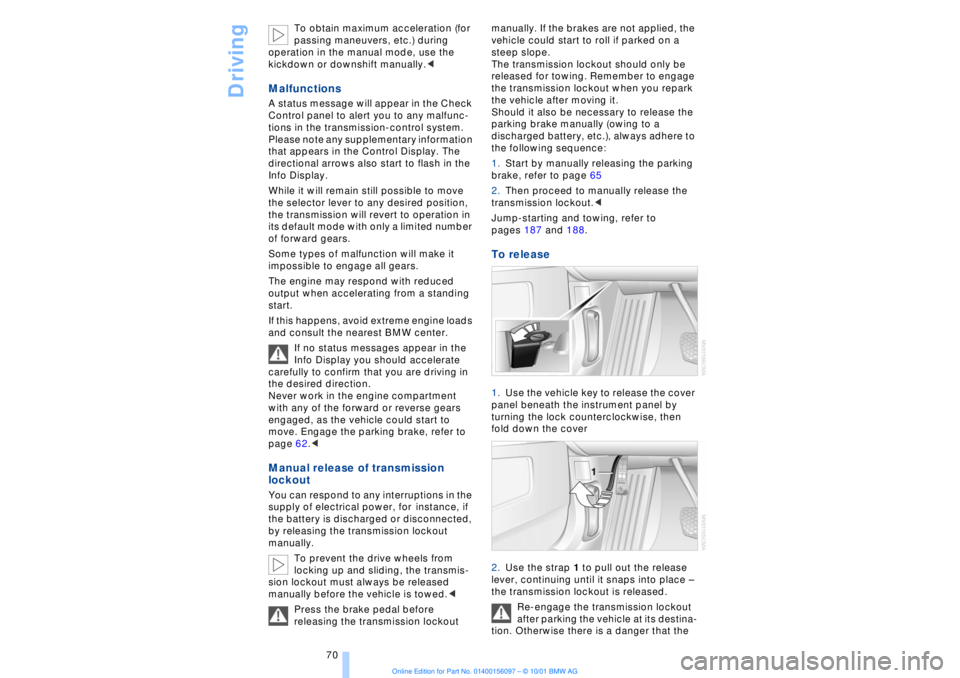
To release 1.Use the vehicle key to release the cover
panel beneath the instrument panel by
turning the lock counterclockwise, then
fold down the cover
2.Use the strap 1 to pull out the release
lever, continuing until it snaps into place Ð
the transmission lockout is released.
Re-engage the transmission lockout
after parking the vehicle at its destina-
tion. Otherwise there is a danger that the
Page 80 of 208
At a glanceControlsDriving tipsCommunicationsNavigationEntertainmentMobilityReference
79
The display will automatically go out after a
short period; you can also cancel the
display manually using the symbol.
The Service Interval Display does not
continue counting down to the next
service during periods when the vehicle is
stored with the battery disconnected or the
battery switch OFF.
Please remember that brake fluid should
be changed every two years at the latest,
even if the display does not yet indicate
that service is required, for additional infor-
mation refer to page 178.
This same precaution applies to all of the
other service and maintenance operations
scheduled according to periodic inter-
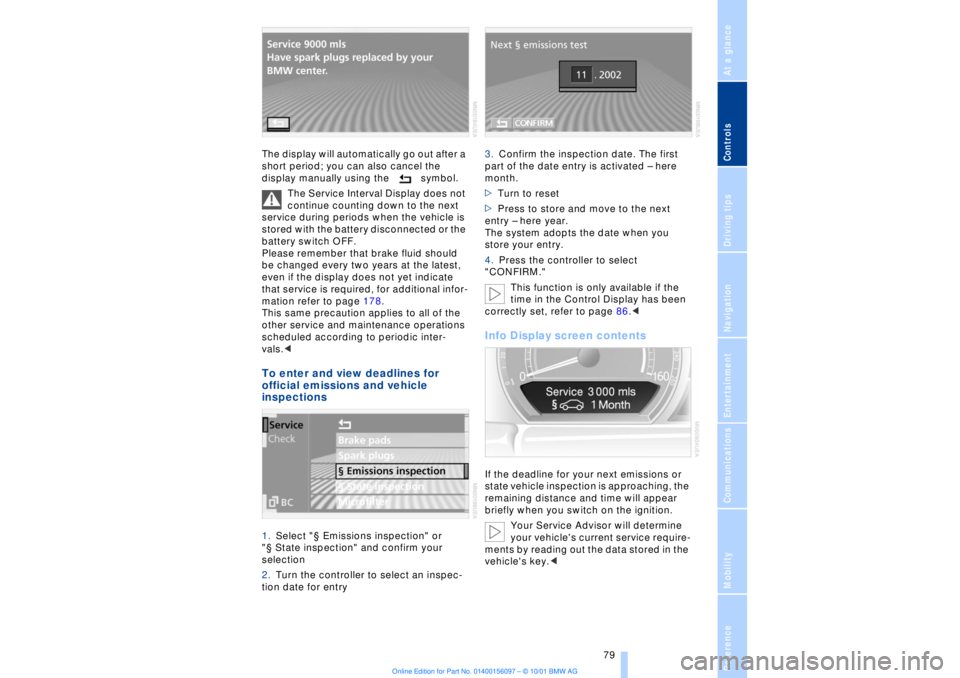
vals.< To enter and view deadlines for
official emissions and vehicle
inspections 1.Select "¤ Emissions inspection" or
"¤ State inspection" and confirm your
selection
2.Turn the controller to select an inspec-
tion date for entry 3.Confirm the inspection date. The first
part of the date entry is activated Ð here
month.
>Turn to reset
>Press to store and move to the next
entry Ð here year.
The system adopts the date when you
store your entry.
4.Press the controller to select
"CONFIRM."
This function is only available if the
time in the Control Display has been
correctly set, refer to page 86.<
Info Display screen contents If the deadline for your next emissions or
state vehicle inspection is approaching, the
remaining distance and time will appear
briefly when you switch on the ignition.
Your Service Advisor will determine
your vehicle's current service require-
ments by reading out the data stored in the
vehicle's key.<
Page 99 of 208
Lamps
98
Switching the interior lamps on and
off Briefly press button 1.
If you want the interior lamps to remain off
continuously, maintain pressure on the
button for approx. 3 seconds.
To revert to normal operation, press the
button briefly.
The button for the interior lamps in the rear
passenger area only switches these lamps
on and off.
The interior lamps come on briefly
whenever you use the parked-car
ventilation system. This feature confirms
that the system has been activated.<
Control of the footwell lamps, courtesy
lamps and ground lamps is also automatic. Reading lamps Reading lamps are provided in the front
and rear
* adjacent to the interior lamps.
You can switch them on and off using the
buttons 2 located next to the lamps.
To avoid discharging the battery, all of
the vehicle's interior lamps are auto-
matically switched off approx. 15 minutes
after the ignition is switched off.<
Light-emitting diodes Ð LEDs Light-emitting diodes installed behind
translucent lenses serve as the light source
for many of the controls and displays in
your vehicle. These light-emitting diodes,
which operate using a concept similar to
that applied in conventional lasers, are offi-
cially designated as Class 1 light-emitting
diodes.
Do not remove the covers, and never
stare into the unfiltered light for an
extended period (several hours), as irrita-
tion of the iris could result.<
Page 103 of 208
A congenial climate
102 heated air into the interior in accordance
with the selected distribution pattern while
the ignition is off.
Provided that the engine has warmed
to its normal operating temperature
and the battery is charged, you can use this
function for up to 15 minutes after
switching off the ignition. The LED within
the button lights up to confirm compliance
with both of these conditions.<
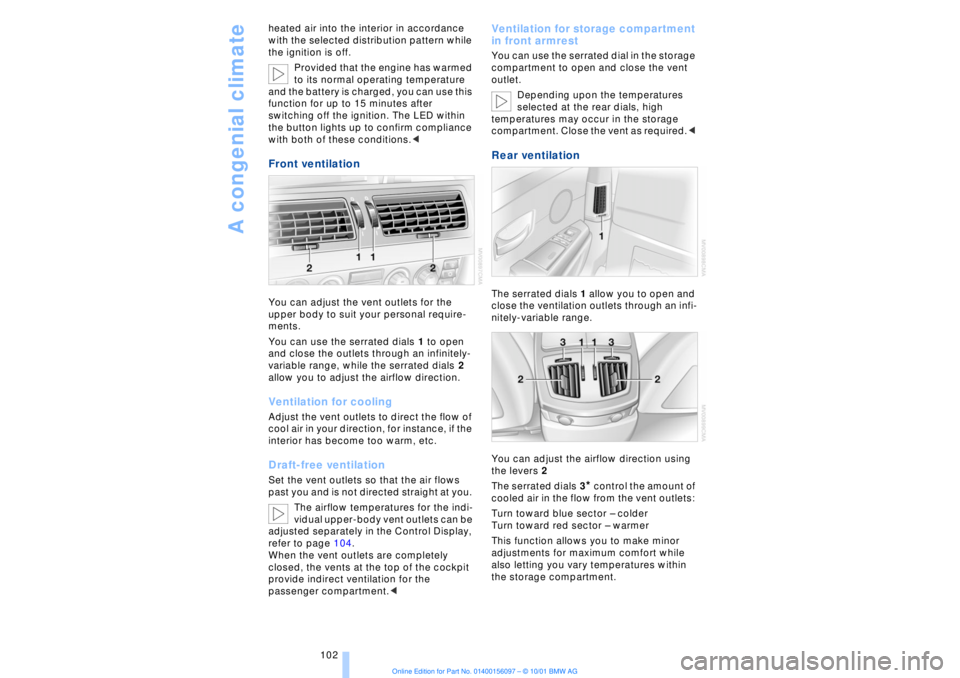
Front ventilation You can adjust the vent outlets for the
upper body to suit your personal require-
ments.
You can use the serrated dials 1 to open
and close the outlets through an infinitely-
variable range, while the serrated dials 2
allow you to adjust the airflow direction. Ventilation for cooling Adjust the vent outlets to direct the flow of
cool air in your direction, for instance, if the
interior has become too warm, etc.Draft-free ventilationSet the vent outlets so that the air flows
past you and is not directed straight at you.
The airflow temperatures for the indi-
vidual upper-body vent outlets can be
adjusted separately in the Control Display,
refer to page 104.
When the vent outlets are completely
closed, the vents at the top of the cockpit
provide indirect ventilation for the
passenger compartment.<
Ventilation for storage compartment
in front armrest You can use the serrated dial in the storage
compartment to open and close the vent
outlet.
Depending upon the temperatures
selected at the rear dials, high
temperatures may occur in the storage
compartment. Close the vent as required.< Rear ventilation The serrated dials 1 allow you to open and
close the ventilation outlets through an infi-
nitely-variable range.
You can adjust the airflow direction using
the levers 2
The serrated dials 3
* control the amount of
cooled air in the flow from the vent outlets:
Turn toward blue sector Ð colder
Turn toward red sector Ð warmer
This function allows you to make minor
adjustments for maximum comfort while
also letting you vary temperatures within
the storage compartment.
Page 107 of 208
A congenial climate
106
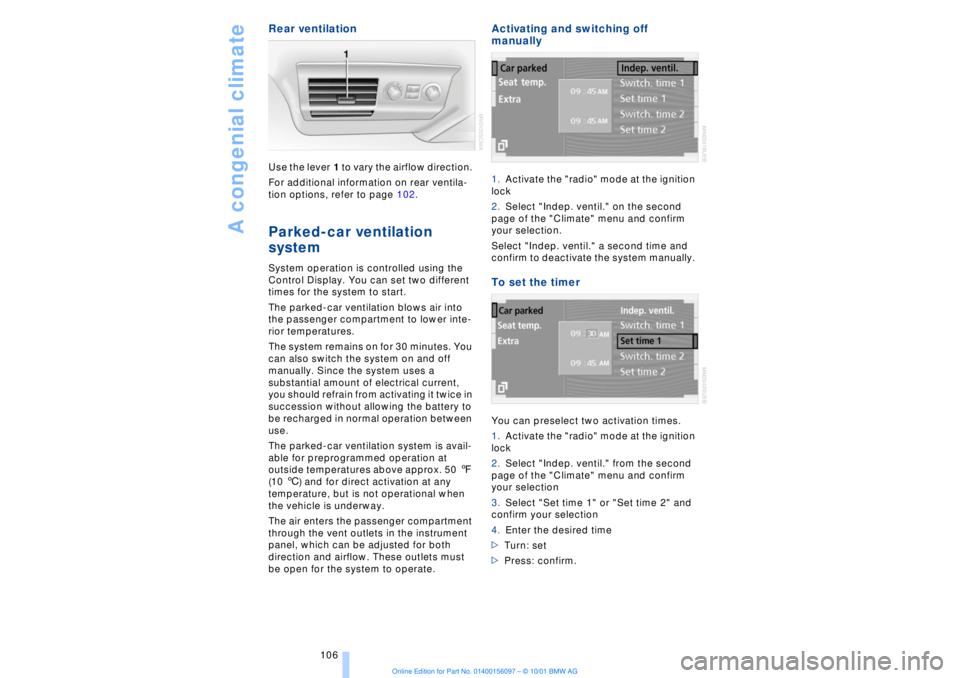
Rear ventilation Use the lever 1 to vary the airflow direction.
For additional information on rear ventila-
tion options, refer to page 102. Parked-car ventilation
system
System operation is controlled using the
Control Display. You can set two different
times for the system to start.
The parked-car ventilation blows air into
the passenger compartment to lower inte-
rior temperatures.
The system remains on for 30 minutes. You
can also switch the system on and off
manually. Since the system uses a
substantial amount of electrical current,
you should refrain from activating it twice in
succession without allowing the battery to
be recharged in normal operation between
use.
The parked-car ventilation system is avail-
able for preprogrammed operation at
outside temperatures above approx. 50 7
(10 6) and for direct activation at any
temperature, but is not operational when
the vehicle is underway.
The air enters the passenger compartment
through the vent outlets in the instrument
panel, which can be adjusted for both
direction and airflow. These outlets must
be open for the system to operate.
Activating and switching off
manually 1.Activate the "radio" mode at the ignition
lock
2.Select "Indep. ventil." on the second
page of the "Climate" menu and confirm
your selection.
Select "Indep. ventil." a second time and
confirm to deactivate the system manually. To set the timer You can preselect two activation times.
1.Activate the "radio" mode at the ignition
lock
2.Select "Indep. ventil." from the second
page of the "Climate" menu and confirm
your selection
3.Select "Set time 1" or "Set time 2" and
confirm your selection
4.Enter the desired time
>Turn: set
>Press: confirm.
Page 138 of 208
At a glanceControlsDriving tipsCommunicationsNavigationEntertainmentMobilityReference
137
or
you have left the recommended route and
the system requires a few seconds to
calculate a new recommended route.
>while the destination route map has
automatically been adopted for display?
You are driving in an area that has not yet
been recorded on the map CD. The guid-
ance system cannot operate under these
conditions. However, you will see the
current position of your BMW in the map
display to help you orient yourself.
>the battery has been disconnected?
It will take approx. 15 minutes for the
system to resume operation.
Page 142 of 208
At a glanceControlsDriving tipsCommunicationsNavigationEntertainmentMobilityReference
141
It is not possible to operate the
system using the control buttons in
the steering wheel when the ignition is off.
To avoid discharging the battery you
should always switch off the sound system
when leaving the vehicle.<
Volume adjustmentAdjusting volumeTurn adjust the desired volume level.
The sound system automatically
reverts to its mute mode whenever
you use your mobile phone.
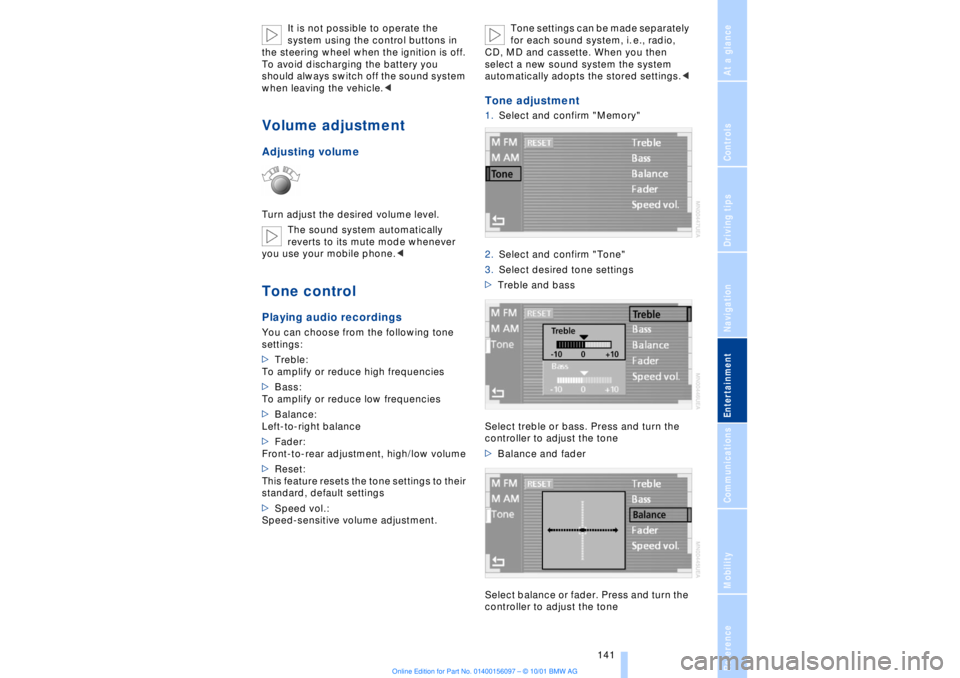
>Treble:
To amplify or reduce high frequencies
>Bass:
To amplify or reduce low frequencies
>Balance:
Left-to-right balance
>Fader:
Front-to-rear adjustment, high/low volume
>Reset:
This feature resets the tone settings to their
standard, default settings
>Speed vol.:
Speed-sensitive volume adjustment. Tone settings can be made separately
for each sound system, i. e., radio,
CD, MD and cassette. When you then
select a new sound system the system
automatically adopts the stored settings.<
Tone adjustment1.Select and confirm "Memory"
2.Select and confirm "Tone"
3.Select desired tone settings
>Treble and bass
Select treble or bass. Press and turn the
controller to adjust the tone
>Balance and fader
Select balance or fader. Press and turn the
controller to adjust the tone
Page 160 of 208
At a glanceControlsDriving tipsCommunicationsNavigationEntertainmentMobilityReference
159
Batteries
Never attempt to open your BMW
mobile phone or its battery. Use only
approved battery types Ð the wrong battery
can destroy your cell phone.
To avoid possible short circuits, after
removing a battery you should never allow
it to come into contact with metallic
surfaces of any kind.<
Disposing of used batteries
Return used batteries to a recycling
collection point or to your BMW
center.<
Care instructionsYou can find everything you need to know
about caring for your mobile phone in the
separate "Mobile Phone" manual and in our
supplementary publication on "Car care." Operation
For information on operating your
mobile phone please consult the
separate manual.<
You can also operate your BMW mobile
phone using the
>controls on the steering wheel, refer to
page 18
>Control Display
>Key Pad
>voice command system.
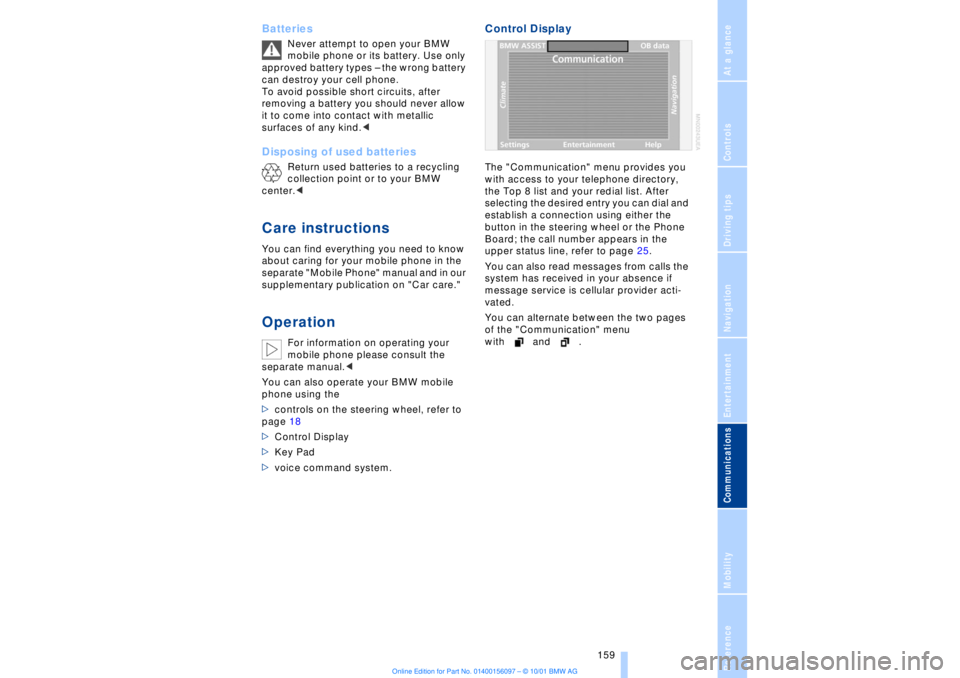
Control DisplayThe "Communication" menu provides you
with access to your telephone directory,
the Top 8 list and your redial list. After
selecting the desired entry you can dial and
establish a connection using either the
button in the steering wheel or the Phone
Board; the call number appears in the
upper status line, refer to page 25.
You can also read messages from calls the
system has received in your absence if
message service is cellular provider acti-
vated.
You can alternate between the two pages
of the "Communication" menu
with and .