2002 BMW 745LI SEDAN park assist
[x] Cancel search: park assistPage 3 of 208
Inhaltsverzeichnis
Contents
Notes
6Using this Owner's Manual
6Symbols used
7The individual vehicle
7Editorial notice
8For you own safety
9REPORTING SAFETY DEFECTS
Cockpit
12Driver's side Ð Controls and displays
16Comfort and convenience Ð Controls
and displays
18Buttons in steering wheel
Control Center
19The concept
19Controller
19Control Display
20Symbols and lists
22Menus in Control Display
23Assistance window*
Voice command
25Voice command system*
25Voice commands
27Notices
27The notebook
29Brief commands
Opening and closing
34Keys
35Central locking system
35Opening and closing Ð from outside
37Opening and closing Ð from inside
38Doors
38Luggage compartment lid 40Luggage compartment
40Alarm system
42Electric power windows
43Sliding/tilt sunroof*
Adjustments
45Correct sitting position
45Seats
48Head restraints
50Safety belts
50Heated seats*
51Active seat ventilation*
52Active seat*
52Mirror
53Steering wheel adjustment
54Seat, mirror and steering wheel
memory
55Airbags
57Transporting children safely
58LATCH child-restraint system
59Child-safety locks
59Car Memory, Key Memory
Driving
61Ignition lock
62Starting the engine
62Switching off engine
62Parking brake
66Automatic transmission with L mode
69Automatic transmission with
Steptronic
71Turn signal indicators/headlamp
flasher
71Wiper system
73Washer fluid
© 2001 Bayerische Motoren Werke
Aktiengesellschaft
Munich, Germany
Reprints, in whole or part, approved
exclusively with written permission of
BMW AG, Munich.
Order No. 01 40 0 156 097
US X/2001
Printed in Germany
Printed on environmentally friendly paper
(bleached without chlorine, suitable for
recycling).
Page 4 of 208
At a glanceControlsDriving tipsCommunicationsNavigationEntertainmentMobilityReference
73Programmable cruise control
Everything under control
77Odometer, outside temperature
display, clock
77Tachometer
78Service Interval Display
80Check Control
81Computer
86Changing settings
Technology for comfort,
convenience and safety
88PDC Park Distance Control*
89Driving stability control/
DSC Dynamic Stability Control
91Driving stability control/ABS Antilock
Brake System
91Dynamic Drive
92EDC Electronic Damping Control*
92RDC Tire Pressure Monitor*
94Self-leveling suspension*
94Adaptive brake lamp
Lamps
96Parking lamps/low beams
97Instrument lighting
97High beams/standing lamps
97Front fog lamps
97Interior lamps
A congenial climate
99Automatic climate control
105Rear air conditioner*
106Parked-car ventilation system
Practical interior accessories
108Universal Garage Door Opener*
109Sun blinds*
110Rear cooler*
110Glove compartment
111Storage compartments
112Beverage holders
112Ashtray, front
113Cigarette lighter, front
113Power socket
113Ashtray, rear
113Cigarette lighter, rear113Center armrest
114Ski bag*
Things to remember when driving
118Break-in procedures
118General driving notes
119Brake system
120Cargo loading
120Roof-mounted luggage rack*
Navigation
124Safety
124GPS
124Map CD
125Starting the navigation system
125Display in assistance window*
126Selection options
126Destination entry
126Manual entry of destination address
128Select the town or city and the street
from the directory
128Map-guided destination selection
129Selecting destination in Information
129Selecting interesting destinations
130Recent destinations
130Destination list
130Route selection
131Starting the destination guidance
system
132Displaying route
133Select new route
133Voice messages
134Terminate/interrupt active guidance
134Creating a directory
135Location
136Wordmatch principle
136What to do if É
Sound system
140Controls
140Care instructions
140To switch on/off
140Using with ignition off
141Volume adjustment
141Tone control
Page 23 of 208
Control Center
22
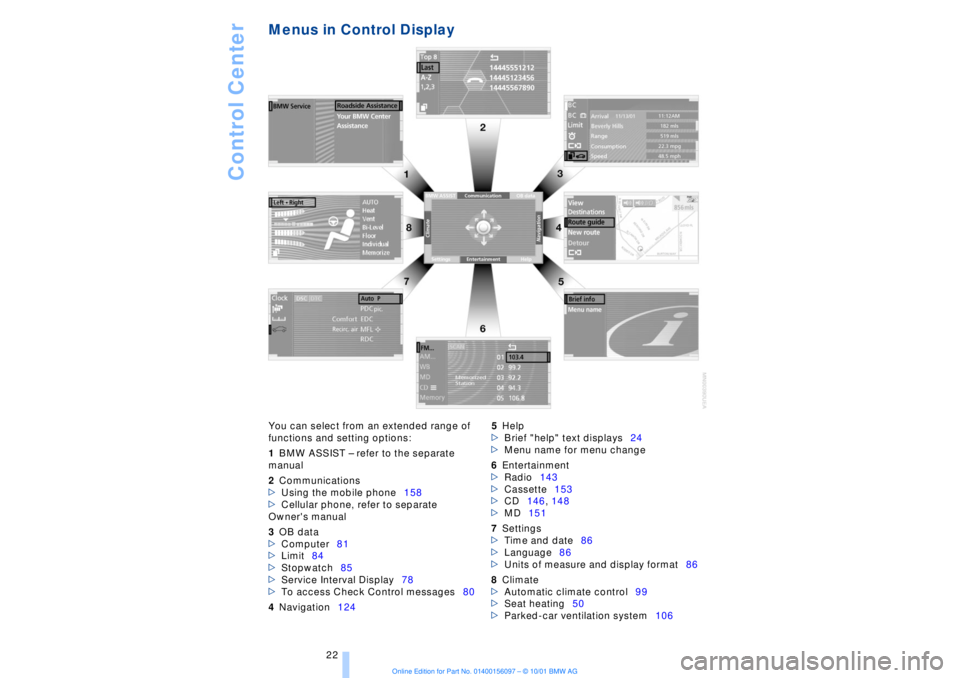
Menus in Control Display You can select from an extended range of
functions and setting options:
1BMW ASSIST Ð refer to the separate
manual
2Communications
>Using the mobile phone158
>Cellular phone, refer to separate
Owner's manual
3OB data
>Computer81
>Limit84
>Stopwatch85
>Service Interval Display78
>To access Check Control messages80
4Navigation1245Help
>Brief "help" text displays24
>Menu name for menu change
6Entertainment
>Radio143
>Cassette153
>CD146, 148
>MD151
7Settings
>Time and date86
>Language86
>Units of measure and display format86
8Climate
>Automatic climate control99
>Seat heating50
>Parked-car ventilation system106
Page 43 of 208
Opening and closing
42
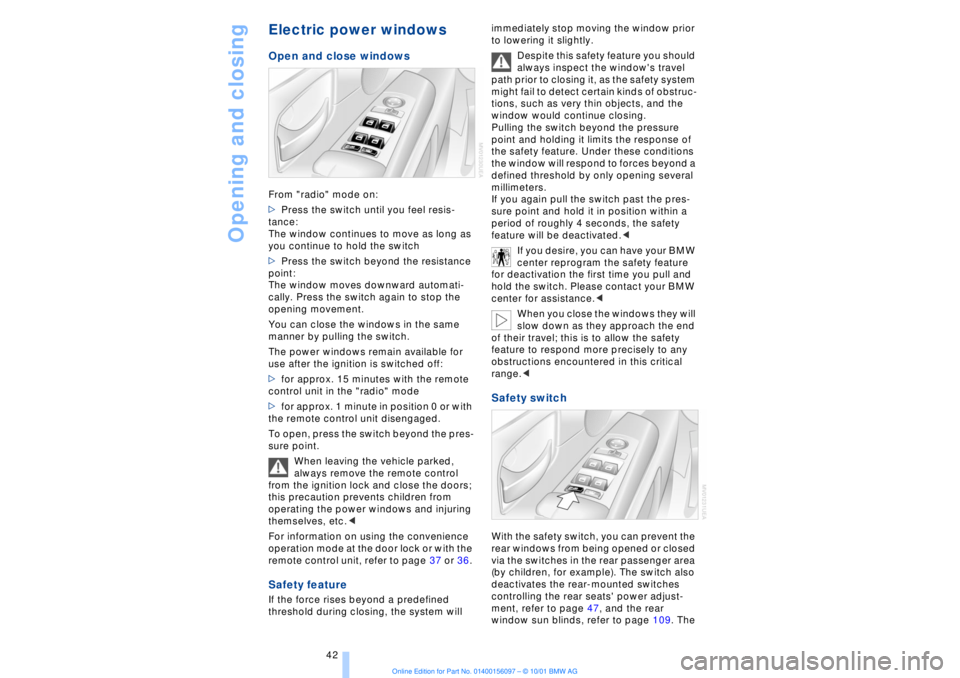
Electric power windows Open and close windowsFrom "radio" mode on:
>Press the switch until you feel resis-
tance:
The window continues to move as long as
you continue to hold the switch
>Press the switch beyond the resistance
point:
The window moves downward automati-
cally. Press the switch again to stop the
opening movement.
You can close the windows in the same
manner by pulling the switch.
The power windows remain available for
use after the ignition is switched off:
>for approx. 15 minutes with the remote
control unit in the "radio" mode
>for approx. 1 minute in position 0 or with
the remote control unit disengaged.
To open, press the switch beyond the pres-
sure point.
When leaving the vehicle parked,
always remove the remote control
from the ignition lock and close the doors;
this precaution prevents children from
operating the power windows and injuring
themselves, etc.<
For information on using the convenience
operation mode at the door lock or with the
remote control unit, refer to page 37 or 36. Safety featureIf the force rises beyond a predefined
threshold during closing, the system will immediately stop moving the window prior
to lowering it slightly.
Despite this safety feature you should
always inspect the window's travel
path prior to closing it, as the safety system
might fail to detect certain kinds of obstruc-
tions, such as very thin objects, and the
window would continue closing.
Pulling the switch beyond the pressure
point and holding it limits the response of
the safety feature. Under these conditions
the window will respond to forces beyond a
defined threshold by only opening several
millimeters.
If you again pull the switch past the pres-
sure point and hold it in position within a
period of roughly 4 seconds, the safety
feature will be deactivated.<
If you desire, you can have your BMW
center reprogram the safety feature
for deactivation the first time you pull and
hold the switch. Please contact your BMW
center for assistance.<
When you close the windows they will
slow down as they approach the end
of their travel; this is to allow the safety
feature to respond more precisely to any
obstructions encountered in this critical
range.<
Safety switch With the safety switch, you can prevent the
rear windows from being opened or closed
via the switches in the rear passenger area
(by children, for example). The switch also
deactivates the rear-mounted switches
controlling the rear seats' power adjust-
ment, refer to page 47, and the rear
window sun blinds, refer to page 109. The
Page 74 of 208
At a glanceControlsDriving tipsCommunicationsNavigationEntertainmentMobilityReference
73
windshield before switching on either the
radio mode or the ignition.< Washer fluid Windshield and headlamp washers Capacity: approx. 8.2 quarts (7.8 liters)
Fill with water and Ð if required Ð with a
washer antifreeze (according to manufac-
turer's recommendations).
We recommend that you mix the
washer fluid before adding it to the
reservoir.<
Windshield washer antifreeze is flam-
mable. Always keep it well away from
sparks and open flames, and store it in
tightly closed containers well out of the
reach of children. Always observe the
instructions for use provided on the
container.< Programmable cruise
control The concept The programmable cruise control is avail-
able for use at speeds of approx. 18 mph
(30 km/h) and higher. The vehicle maintains
and stores the speed that you set using the
lever mounted on the steering column.
You can also use the multilevel preset
mode to store 6 speeds for later selection
with the lever on the steering column, refer
to page 75. This feature assists you in quickly adapting
vehicle speed to specific road conditions,
for instance, changes in speed limits.
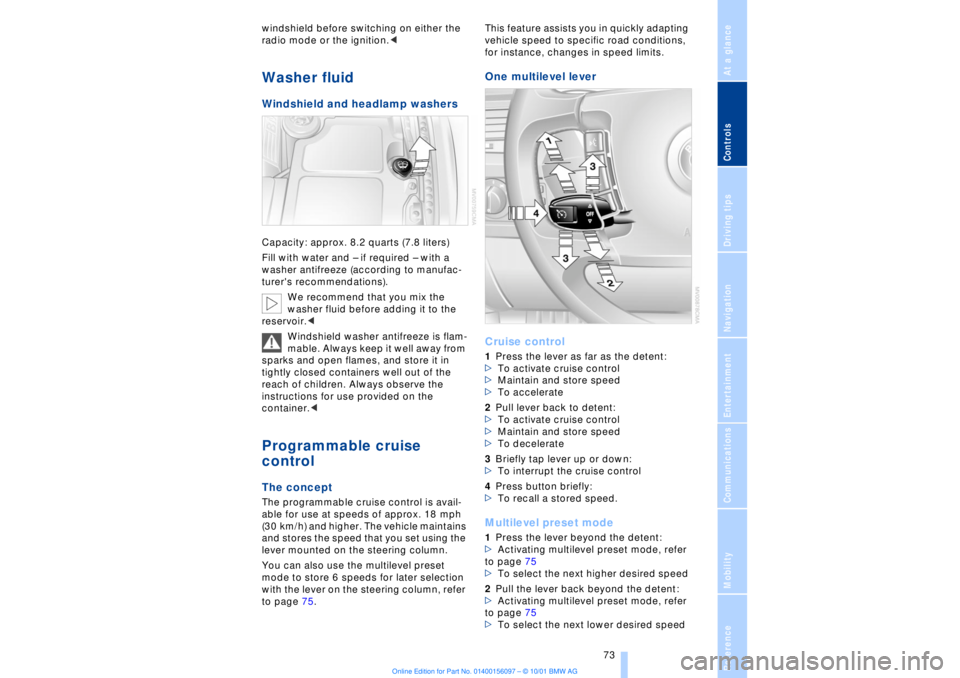
One multilevel lever
Cruise control 1Press the lever as far as the detent:
>To activate cruise control
>Maintain and store speed
>To accelerate
2Pull lever back to detent:
>To activate cruise control
>Maintain and store speed
>To decelerate
3Briefly tap lever up or down:
>To interrupt the cruise control
4Press button briefly:
>To recall a stored speed. Multilevel preset mode 1Press the lever beyond the detent:
>Activating multilevel preset mode, refer
to page 75
>To select the next higher desired speed
2Pull the lever back beyond the detent:
>Activating multilevel preset mode, refer
to page 75
>To select the next lower desired speed
Page 89 of 208

Technology for comfort, convenience and safety
88
Technology for comfort, convenience
and safetyPDC Park Distance Control*
The concept The PDC assists you when you are parking.
Acoustic signals inform you of the distance
to an obstacle. Four ultrasonic sensors in
both the front and rear bumpers monitor
the distance to the nearest object. The
monitoring range of the front and two rear
corner sensors extends outward roughly
2 ft (60 cm), while the rear bumper's two
centrally located sensors detect objects at
distances of up to approximately 4.9 ft
(1.50 m). Automatic function Whenever the ignition is on the system
automatically assumes operational status
each time the selector lever is pressed
briefly in R. Manual activationPress the button, the indicator lamp lights
up.
The system is automatically deactivated
once the vehicle travels approximately
165 ft (50 m) or exceeds a speed of roughly
18 mph (roughly 30 km/h); the indicator
lamp goes out. You can reactivate the
system manually as needed.
Manual deactivation Press the button again; the indicator lamp
goes out. Acoustic signals The signal indicating the distance to the
nearest obstacle is directional. Thus, an
object detected to the left rear of the
vehicle will be indicated by a signal tone
from the left rear speaker, etc. As the
distance between vehicle and object
decreases, the intervals between the tones
become shorter. The signal tone becomes
continuous once the distance to the
nearest object falls to below roughly 1 ft
(30 cm).
The warning signal is canceled after
approximately 3 seconds when the
distance to an object remains constant
during this time (if you are moving parallel
to a wall, for instance). Malfunctions The indicator lamp within the button
flashes and a status message appears in
the Check Control panel.
Please take note of the supplementary
information provided in the Control Display.
Switch the system off and have the cause
of the malfunction corrected by your BMW
center. PDC with visual alert
Page 126 of 208
At a glanceControlsDriving tipsCommunicationsNavigationEntertainmentMobilityReference
125
To change the map CD:
1.Press the button
The CD is ejected from the navigation
computer
2.Remove the CD
3.Insert the new CD with the labeled side
up
4.Allow eight seconds for the system to
scan the data from the new CD. Starting the navigation
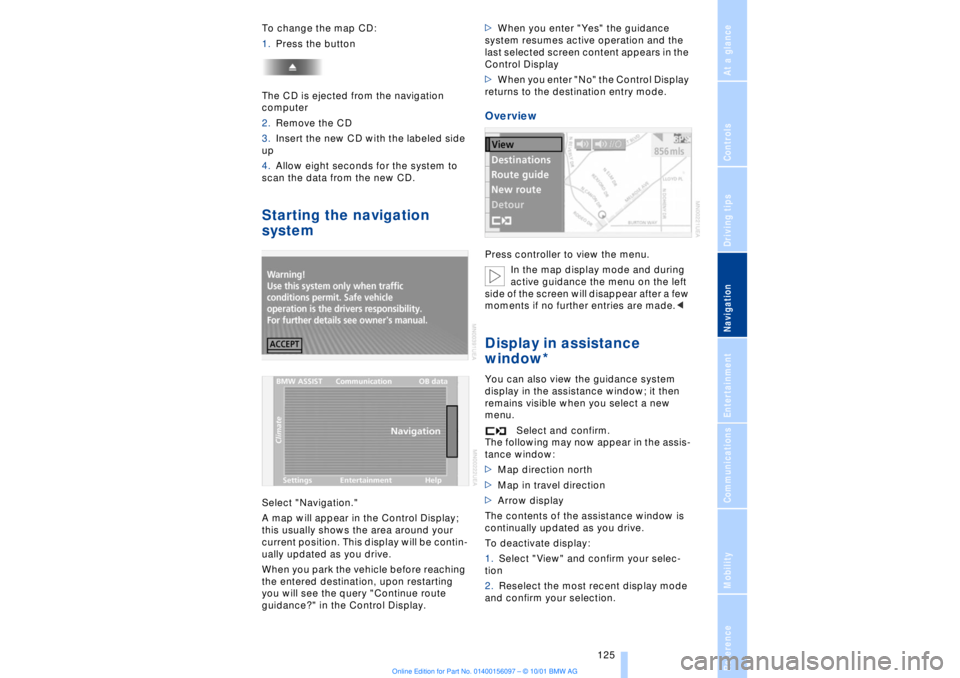
systemSelect "Navigation."
A map will appear in the Control Display;
this usually shows the area around your
current position. This display will be contin-
ually updated as you drive.
When you park the vehicle before reaching
the entered destination, upon restarting
you will see the query "Continue route
guidance?" in the Control Display.>When you enter "Yes" the guidance
system resumes active operation and the
last selected screen content appears in the
Control Display
>When you enter "No" the Control Display
returns to the destination entry mode.
OverviewPress controller to view the menu.
In the map display mode and during
active guidance the menu on the left
side of the screen will disappear after a few
moments if no further entries are made.
display in the assistance window; it then
remains visible when you select a new
menu.
Select and confirm.
The following may now appear in the assis-
tance window:
>Map direction north
>Map in travel direction
>Arrow display
The contents of the assistance window is
continually updated as you drive.
To deactivate display:
1.Select "View" and confirm your selec-
tion
2.Reselect the most recent display mode
and confirm your selection.
Page 190 of 208
At a glanceControlsDriving tipsCommunicationsNavigationEntertainmentMobilityReference
189
>Clearance and maneuvering capability
will be strictly limited in corners
>When mounted at an angle, the towbar
will exert lateral forces, tending to push the
vehicle sideways.
Never use a vehicle to tow another
vehicle that is heavier than itself, as
this could lead to a loss of control.< Towing
Do not tow the vehicle by the rear
axle; because the steering detent is
not operational, the wheels could turn to an
extreme angle during towing.<
1.Switch on the ignition to allow operation
of the brake lamps, turn signal indicators,
horn, parking brake and windshield wipers
2.Turn on the hazard warning flashers
where allowed by law
3.Manual release of the transmission
lockout, refer to page 70
4.Maximum towing speed:
maximum 43 mph (70 km/h)
5.Maximum towing distance:
maximum 93 miles (150 km).
If the electrical system in the towed vehicle
has failed, use an alternate means to iden-
tify the vehicle as being towed such as a
sign or warning triangle placed in the rear
window.
The steering and brakes are without
power assistance when the engine is
off. This means that higher levels of effort
will be required to operate the steering and
brakes.<
Tow-starting It is not possible to start the engine by tow-
starting the vehicle.
Jump starting, refer to page 187.
Have the source of the starting difficulties
diagnosed and repaired at your BMW
center.
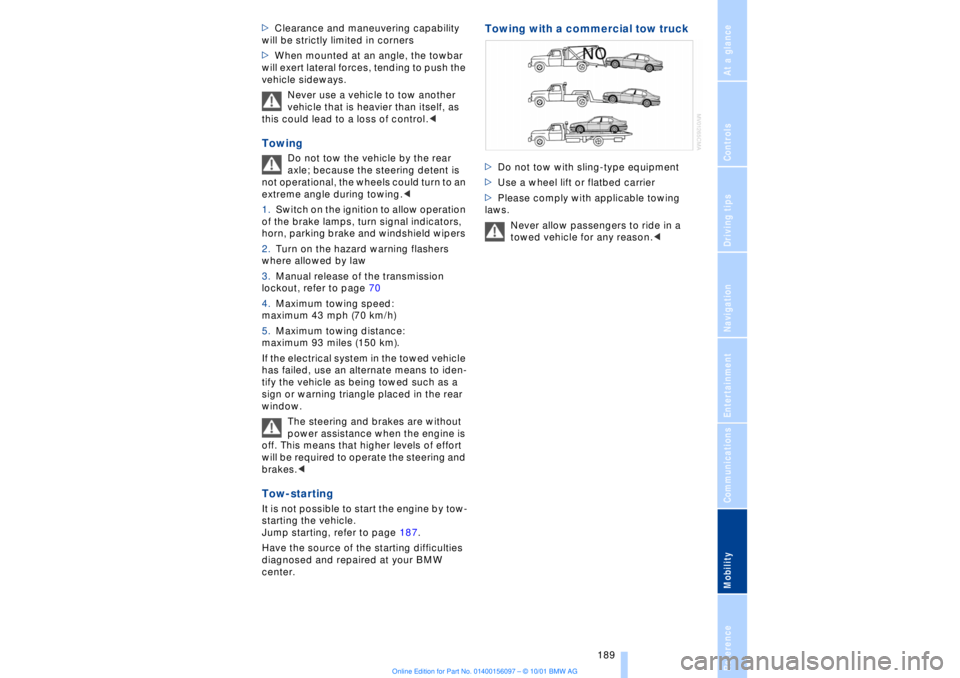
Towing with a commercial tow truck >Do not tow with sling-type equipment
>Use a wheel lift or flatbed carrier
>Please comply with applicable towing
laws.
Never allow passengers to ride in a
towed vehicle for any reason.<