Page 67 of 363
�µ
Ref er to the Maintenance Schedules
f or Normal and Severe Driving
Conditions on pages .
For the f irst 6,000 miles (9,600 km)
af ter the Maintenance Required
Indicator is reset, it will come on f or
two seconds when you turn the
ignition switch ON (II). Between 6,000 miles (9,600 km) and
7,500 miles (12,000 km) this
indicator will light f or two seconds
when you first turn the ignition
switch ON (II), and then f lash f or
ten seconds.
If you exceed 7,500 miles (12,000
km) without having the scheduled
maintenance perf ormed, this
indicator will remain on as a constant
reminder.Your dealer will reset this indicator
af ter completing the scheduled
maintenance. If this maintenance is
done by someone other than your
Honda dealer, reset the indicator as
f ollows.
Turn of f the engine.
This indicator reminds you that it is
time to take your vehicle in for sched-
uled maintenance. Press and hold the select/reset
buttonintheinstrumentpanel,
then turn the ignition switch ON
(II).
Hold the button until the indicator
resets (approximately ten
seconds).
1. 2. 3.
240 244
Gauges
Maintenance Required Indicator
Inst rument s and Cont rols
68
MMAAIINNTTEENNAANNCCEERREEQQUUIIRREEDDIINNDDIICCAATTOORRSSEELLEECCTT//RREESSEETTBBUUTTTTOONN
Page 80 of 363

CONT INUED
The Immobilizer System protects
your vehicle f rom thef t. A properly-
coded master or valet key must be
used in the ignition switch f or the
engine to start. If an improperly-
coded key (or other device) is used,
the engine’s f uel system is disabled.
When you turn the ignition switch to
ON (II), the Immobilizer System
indicator should come on f or a f ew
seconds, then go out. If the indicator
starts to blink, it means the system
does not recognize the coding of the
key. Turn the ignition switch to
LOCK (0), remove the key, reinsert
it, and turn the switch to ON (II)
again.
These keys contain electronic
circuits that are activated by the
Immobilizer System. They will not
work to start the engine if the
circuits are damaged.
Protect the keys f rom direct
sunlight, high temperature, and
high humidity.
Donotdropthekeysorsetheavy
objects on them.
Keep the keys away f rom liquids.
If they get wet, dry them immedi-
ately with a soft cloth.
The keys do not contain batteries.
Do not try to take them apart.
Some models also come with a
remote transmitter; see page for
an explanation of its operation. The system may not recognize your
key’s coding if another immobilizer
key or other metal object is near the
ignition switch when you insert the
key. To make sure the system
recognizes the key code: Do not keep other immobilizer
keys on the same key ring.
Use a plastic or leather key f ob,
not metal.
Keep other keys away f rom your
vehicle’s key and the ignition
switch while trying to start the
engine.
If you have lost your key and you
cannot start the engine, contact your
Honda dealer.
Do not attempt to alter this system
or add other devices to it. Electrical
problems could result that may make
your vehicle undriveable.
This indicator will also blink several
times when you turn the ignition
switch f rom ON (II) to ACCESSORY
(I) or LOCK (0).
If the system repeatedly does not
recognize the coding of your key,
contact your Honda dealer.
85 Immobilizer System
Inst rument s and Cont rols
Keys and Locks
Remote Transmitter
81
Page 82 of 363
�µ
�µ �µ
Use this position
only to start the engine. The switch
returns to ON (II) when you let go of
the key.
This is the normal key
position when driving. All f eatures
and accessories on the vehicle are
usable. Several of the lights on the
instrument panel come on as a test
when you turn the ignition switch
f rom ACCESSORY to ON. The engine will not start if the
Immobilizer System does not
recognize the key’s coding (see page
).
In this position,
you can operate the audio system
and the accessory power socket.
You will hear a reminder beeper if
you leave the key in the ignition
switch in the LOCK (0) or
ACCESSORY (I) position and open
thedriver’sdoor.Removethekeyto
turn of f the beeper.Each f ront door has a master door
lock switch. Either switch locks and
unlocks all doors and the tailgate.
Push the switch down to lock all
doors and the tailgate, and up to
unlock them.
81
CONT INUED
ST A RT (III) Power Door L ocks
ON (II)
A CCESSORY (I)
Keys and Locks
Inst rument s and Cont rols
83
MMAASSTTEERRDDOOOORRLLOOCCKKSSWWIITTCCHH
Page 121 of 363
Canadian Models
The outside mirrors are heated to re-
move fog and frost. With the ignition
switchON(II),turnontheheaters
by pressing the button. The light in
the button comes on as a reminder.
Press the button again to turn the
heaters off.To apply the parking brake, push the
parking brake pedal down with your
f oot. To release the parking brake,
push on the pedal again. The parking
brake light on the instrument panel
should go out when the parking
brake is f ully released with the
engine running. (see page .)
62
Mirrors, Parking Brake
Inst rument s and Cont rols Parking Brake
122
HHEEAATTEEDDMMIIRRRROORRBBUUTTTTOONNPPAARRKKIINNGGBBRRAAKKEEPPEEDDAALL Driving the vehicle with the parking
brake applied can damage the rear
brakes and axles.
Page 138 of 363
CONT INUED
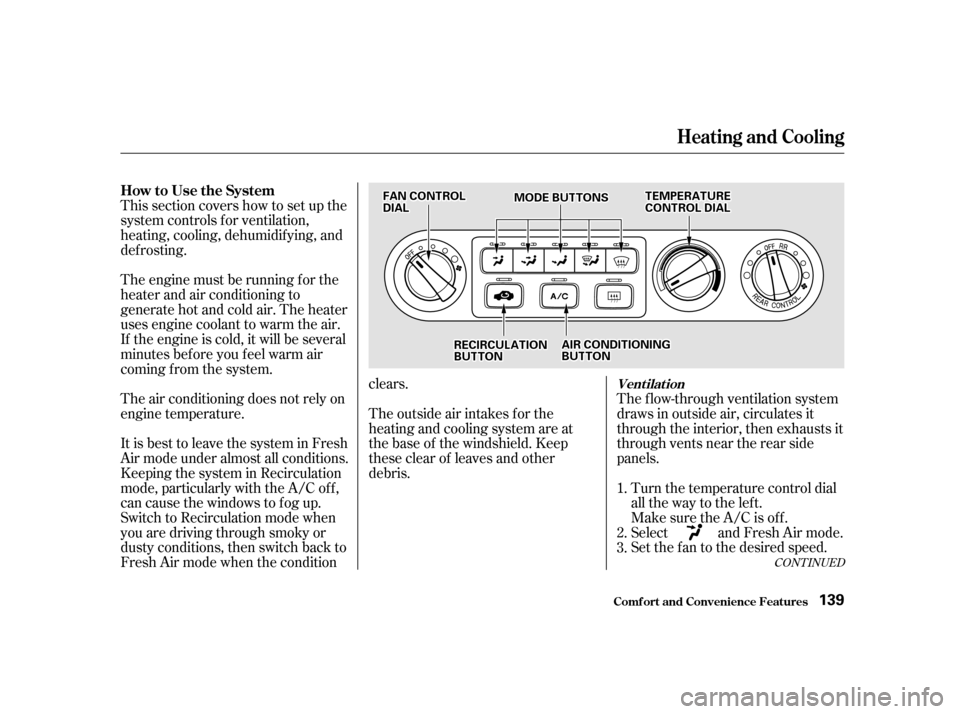
This section covers how to set up the
system controls f or ventilation,
heating, cooling, dehumidif ying, and
def rosting.
The engine must be running f or the
heater and air conditioning to
generate hot and cold air. The heater
uses engine coolant to warm the air.
If the engine is cold, it will be several
minutes bef ore you f eel warm air
coming from the system.
The air conditioning does not rely on
engine temperature. The outside air intakes f or theheating and cooling system are at
the base of the windshield. Keep
these clear of leaves and other
debris.
It is best to leave the system in Fresh
Air mode under almost all conditions.
Keeping the system in Recirculation
mode, particularly with the A/C of f ,
can cause the windows to fog up.
Switch to Recirculation mode when
you are driving through smoky or
dusty conditions, then switch back to
Fresh Air mode when the condition clears.
The f low-through ventilation system
draws in outside air, circulates it
through the interior, then exhausts it
through vents near the rear side
panels.
Turn the temperature control dial
all the way to the lef t.
Make sure the A/C is of f .
Select and Fresh Air mode.
Set the f an to the desired speed.
1. 2. 3.
Heating and Cooling
Comf ort and Convenience Feat ures
Vent ilat ion
How to Use the System
139FFAANNCCOONNTTRROOLLDDIIAALLMMOODDEEBBUUTTTTOONNSSTTEEMMPPEERRAATTUURREECCOONNTTRROOLLDDIIAALL
RREECCIIRRCCUULLAATTIIOONNBBUUTTTTOONNAAIIRRCCOONNDDIITTIIOONNIINNGGBBUUTTTTOONN
Page 139 of 363

When the interior has cooled down
to a more comf ortable temperature,
close the windows and set the
controls as described f or normal
cooling.Air conditioning places an extra load
on the engine. Watch the engine
coolant temperature gauge (see page
) when driving in stop-and-go
traf f ic or climbing a long, steep hill.
If it moves near the red zone, turn
of f the A/C until the gauge reads
normally.
If the interior is very warm f rom
beingparkedinthesun,youcancool
it down more rapidly by setting up
the controls this way:
Start the engine.
Turn on the A/C by pressing the
button. Make sure the tempera-
ture control dial is turned all the
way to the left.
Set the f an to maximum speed.
Open the windows partially. Select and Fresh Air mode.
Turn on the A/C by pressing the
button. The light above the button
comesonwhenafanspeedis
selected.
Make sure the temperature
control dial is all the way to the left.
Select .
If the outside air is humid, select
Recirculation mode. If the outside
air is dry, select Fresh Air mode.
Set the f an to the desired speed.
1.2. 3. 4.
1. 2. 3. 4. 5.
67
Comf ort and Convenience Feat ures
Heating and Cooling
T o Cool wit h A /C
140
FFAANNCCOONNTTRROOLLDDIIAALLMMOODDEEBBUUTTTTOONNSSTTEEMMPPEERRAATTUURREECCOONNTTRROOLLDDIIAALL
RREECCIIRRCCUULLAATTIIOONNBBUUTTTTOONNAAIIRRCCOONNDDIITTIIOONNIINNGGBBUUTTTTOONN
Page 140 of 363

To warm the interior:Air conditioning, as it cools, removes
moisture from the air. When used in
combination with the heater, it
makes the interior warm and dry.To remove f og f rom the inside of the
windows:
This setting is suitable f or all driving
conditions whenever the outside
temperature is above 32°F (0°C).
Start the engine.
Select and Fresh Air mode.
Set the f an to the desired speed.
Adjust the warmth of the air with
the temperature control dial. Switch the f an on.
Turn on the air conditioning.
Select and Fresh Air mode.
Adjust the temperature control
dial so the mixture of heated and
cooled air f eels comf ortable.Switch the f an on.
Select .
When you select , the
system automatically switches to
Fresh Air mode and turns on the
A/C.
Adjust the temperature control
dial so the air flow from the
def roster vents f eels warm.
Turn on the rear window def ogger
to help clear the rear window.
When you switch to another mode
f rom , the A/C stays on.
PresstheA/Cbuttontoturnitoff.
1.2.3.4.
1.2.3.4.1.2. 3. 4.
CONT INUED
Heating and Cooling
Comf ort and Convenience Feat ures
T o Heat T o Heat and Dehumidif y wit h A ir
Condit ioningT o Def og and Def rost
141
Page 141 of 363
To remove exterior f rost or ice f rom
the windshield and side windows
after the vehicle has been sitting out
in cold weather:Start the engine.
Select .
When you select , the
system automatically switches to
Fresh Air mode and turns on the
A/C.
Switch the fan and temperature
controls to maximum.
To rapidly remove exterior f rost or
ice f rom the windshield (on very cold
days), f irst select the Recirculation
mode. Once the windshield is clear,
select the Fresh Air mode to avoid
f ogging the windows.
1.2. 3.
Comf ort and Convenience Feat ures
Heating and Cooling
142
FFAANNCCOONNTTRROOLLDDIIAALLMMOODDEEBBUUTTTTOONNSSTTEEMMPPEERRAATTUURREECCOONNTTRROOLLDDIIAALL
AAIIRRCCOONNDDIITTIIOONNIINNGGBBUUTTTTOONNRREECCIIRRCCUULLAATTIIOONNBBUUTTTTOONN