Page 3333 of 4284
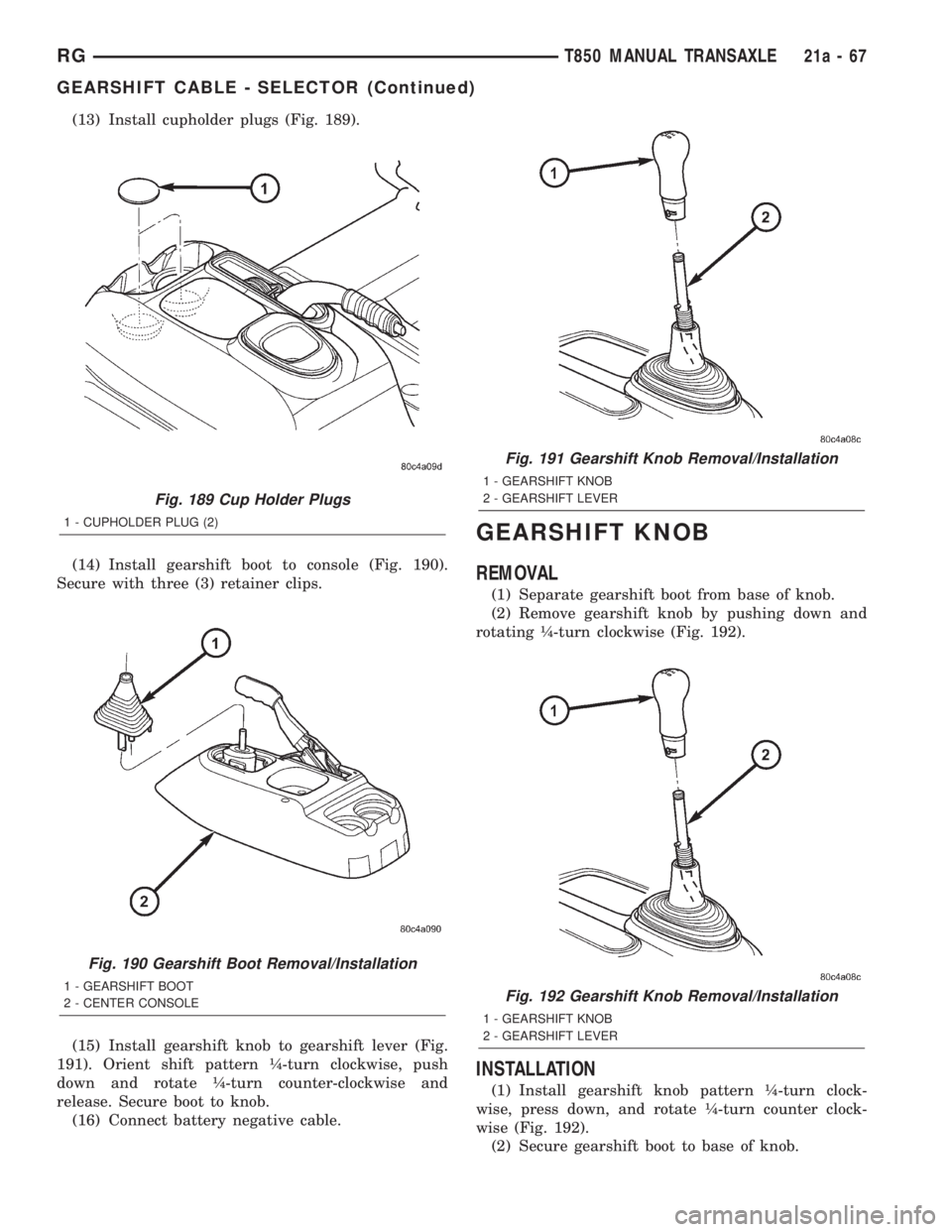
(13) Install cupholder plugs (Fig. 189).
(14) Install gearshift boot to console (Fig. 190).
Secure with three (3) retainer clips.
(15) Install gearshift knob to gearshift lever (Fig.
191). Orient shift pattern ò-turn clockwise, push
down and rotate ò-turn counter-clockwise and
release. Secure boot to knob.
(16) Connect battery negative cable.
GEARSHIFT KNOB
REMOVAL
(1) Separate gearshift boot from base of knob.
(2) Remove gearshift knob by pushing down and
rotating ò-turn clockwise (Fig. 192).
INSTALLATION
(1) Install gearshift knob pattern ò-turn clock-
wise, press down, and rotate ò-turn counter clock-
wise (Fig. 192).
(2) Secure gearshift boot to base of knob.
Fig. 189 Cup Holder Plugs
1 - CUPHOLDER PLUG (2)
Fig. 190 Gearshift Boot Removal/Installation
1 - GEARSHIFT BOOT
2 - CENTER CONSOLE
Fig. 191 Gearshift Knob Removal/Installation
1 - GEARSHIFT KNOB
2 - GEARSHIFT LEVER
Fig. 192 Gearshift Knob Removal/Installation
1 - GEARSHIFT KNOB
2 - GEARSHIFT LEVER
RGT850 MANUAL TRANSAXLE21a-67
GEARSHIFT CABLE - SELECTOR (Continued)
Page 3334 of 4284
GEARSHIFT MECHANISM
REMOVAL
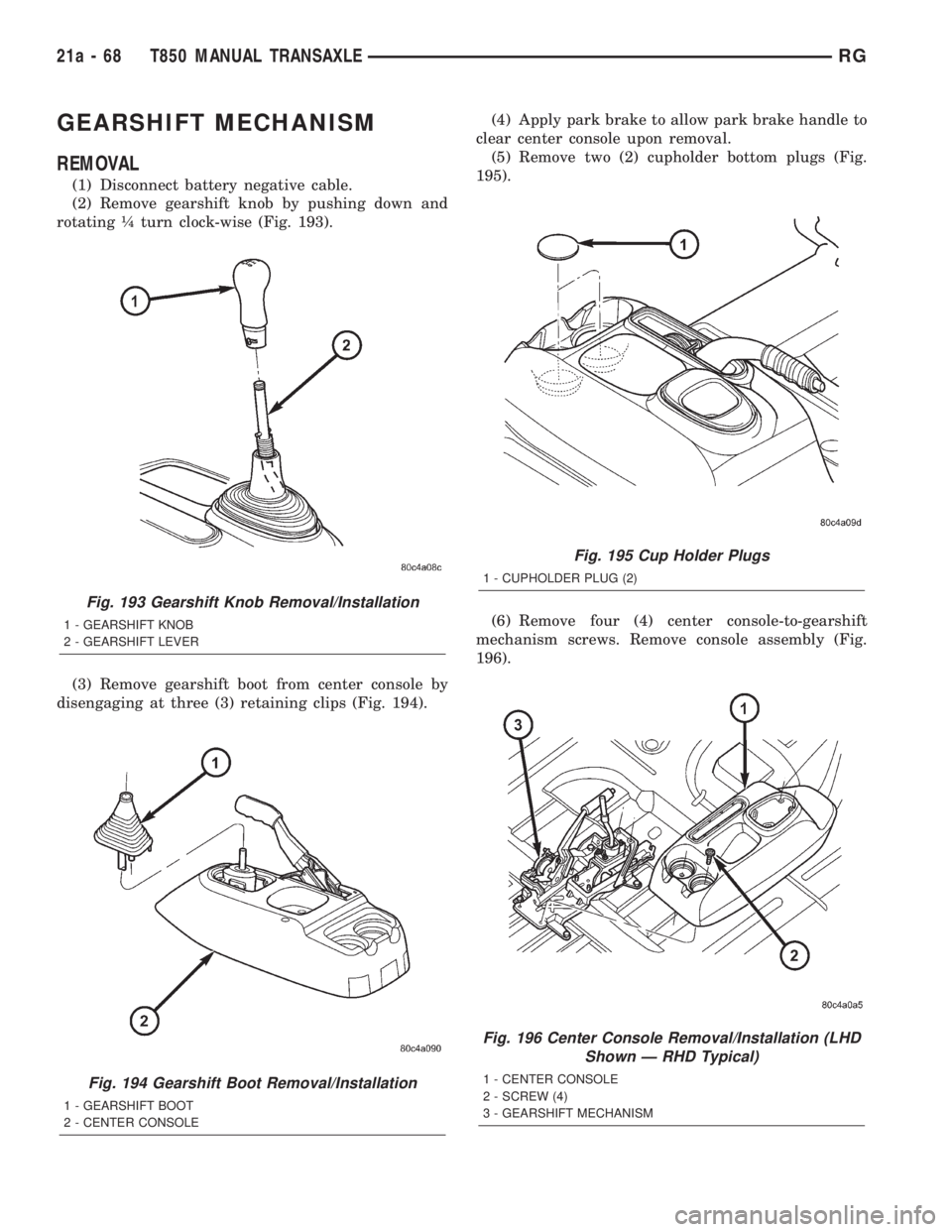
(1) Disconnect battery negative cable.
(2) Remove gearshift knob by pushing down and
rotating ò turn clock-wise (Fig. 193).
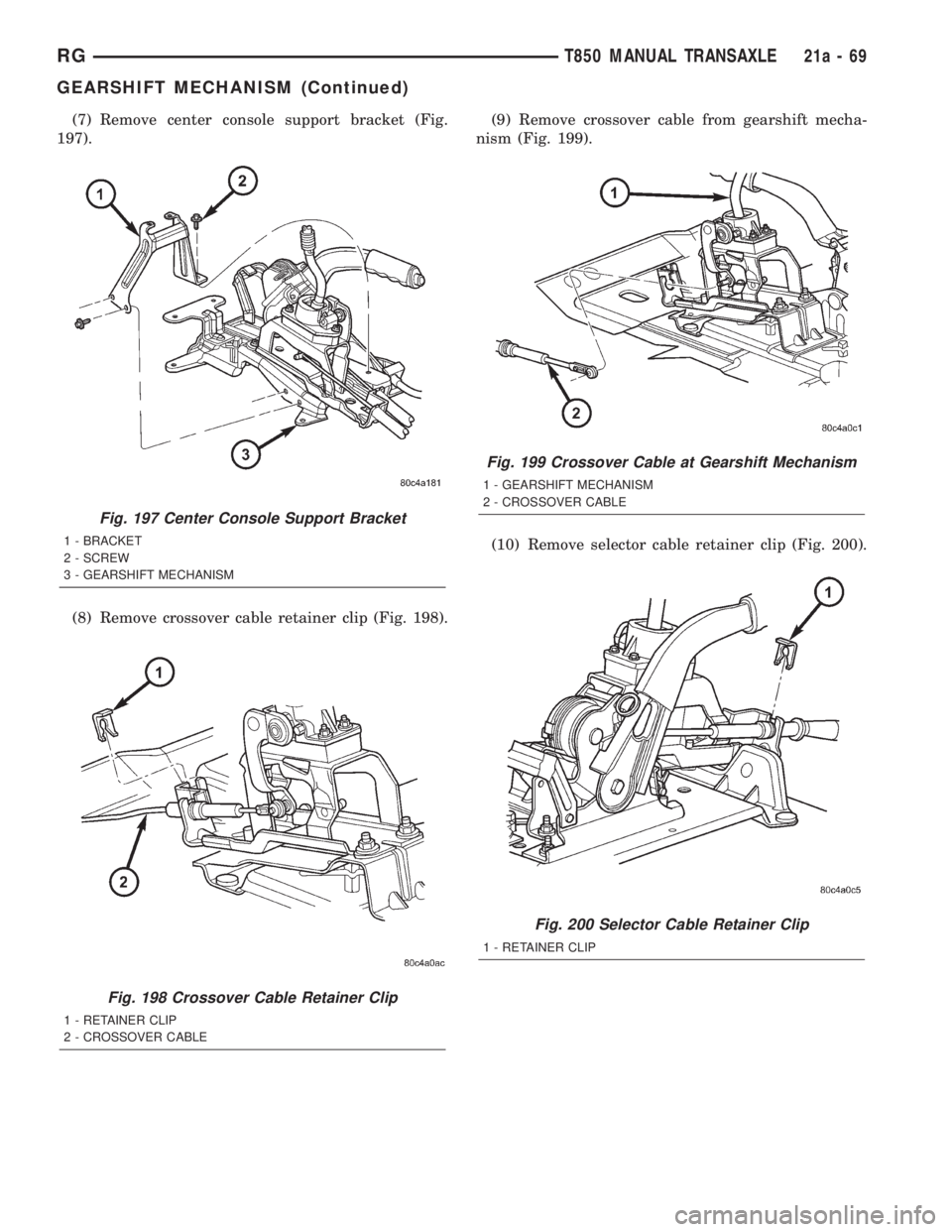
(3) Remove gearshift boot from center console by
disengaging at three (3) retaining clips (Fig. 194).(4) Apply park brake to allow park brake handle to
clear center console upon removal.
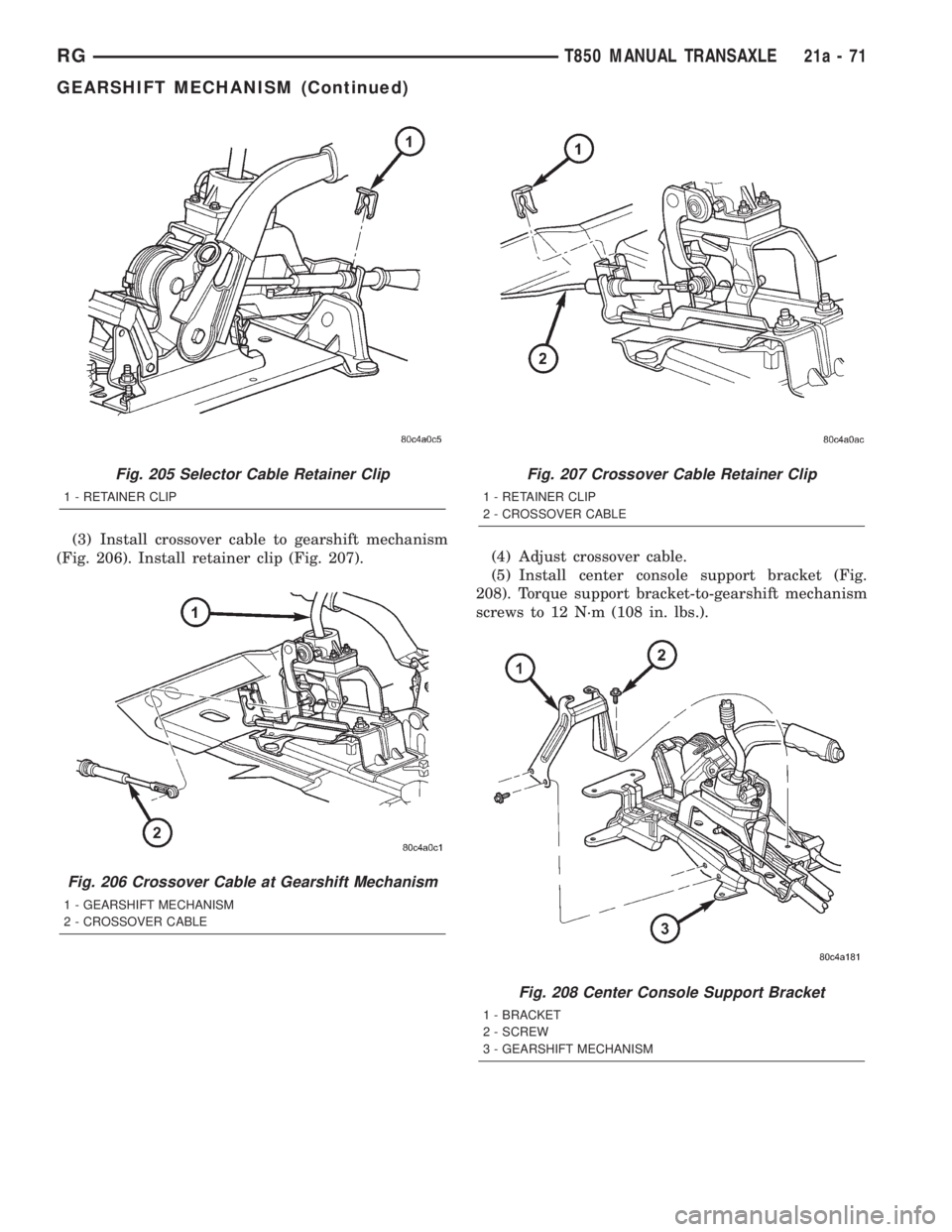
(5) Remove two (2) cupholder bottom plugs (Fig.
195).
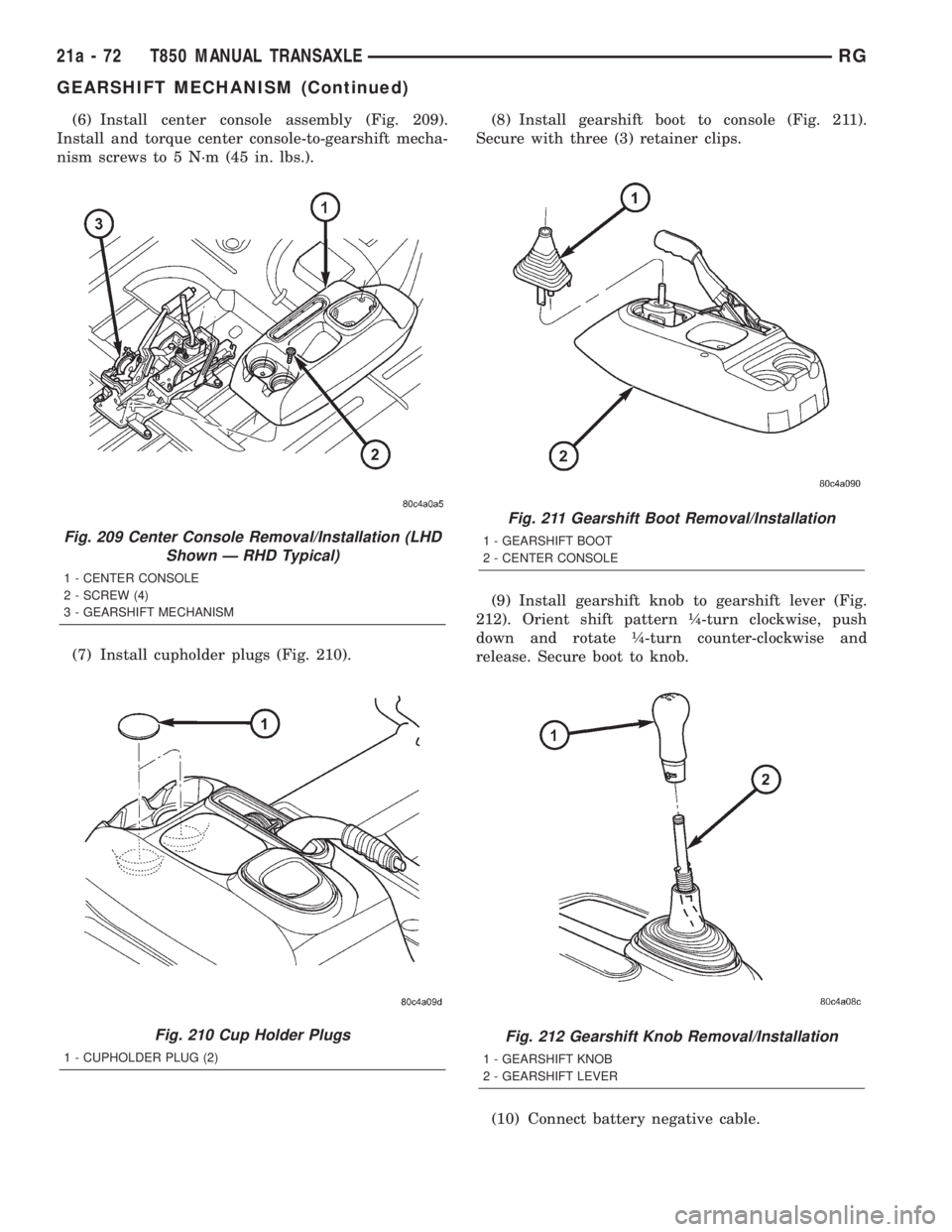
(6) Remove four (4) center console-to-gearshift
mechanism screws. Remove console assembly (Fig.
196).
Fig. 193 Gearshift Knob Removal/Installation
1 - GEARSHIFT KNOB
2 - GEARSHIFT LEVER
Fig. 194 Gearshift Boot Removal/Installation
1 - GEARSHIFT BOOT
2 - CENTER CONSOLE
Fig. 195 Cup Holder Plugs
1 - CUPHOLDER PLUG (2)
Fig. 196 Center Console Removal/Installation (LHD
Shown Ð RHD Typical)
1 - CENTER CONSOLE
2 - SCREW (4)
3 - GEARSHIFT MECHANISM
21a - 68 T850 MANUAL TRANSAXLERG
Page 3335 of 4284
(7) Remove center console support bracket (Fig.
197).
(8) Remove crossover cable retainer clip (Fig. 198).(9) Remove crossover cable from gearshift mecha-
nism (Fig. 199).
(10) Remove selector cable retainer clip (Fig. 200).
Fig. 197 Center Console Support Bracket
1 - BRACKET
2 - SCREW
3 - GEARSHIFT MECHANISM
Fig. 198 Crossover Cable Retainer Clip
1 - RETAINER CLIP
2 - CROSSOVER CABLE
Fig. 199 Crossover Cable at Gearshift Mechanism
1 - GEARSHIFT MECHANISM
2 - CROSSOVER CABLE
Fig. 200 Selector Cable Retainer Clip
1 - RETAINER CLIP
RGT850 MANUAL TRANSAXLE21a-69
GEARSHIFT MECHANISM (Continued)
Page 3337 of 4284
(3) Install crossover cable to gearshift mechanism
(Fig. 206). Install retainer clip (Fig. 207).(4) Adjust crossover cable.
(5) Install center console support bracket (Fig.
208). Torque support bracket-to-gearshift mechanism
screws to 12 N´m (108 in. lbs.).
Fig. 205 Selector Cable Retainer Clip
1 - RETAINER CLIP
Fig. 206 Crossover Cable at Gearshift Mechanism
1 - GEARSHIFT MECHANISM
2 - CROSSOVER CABLE
Fig. 207 Crossover Cable Retainer Clip
1 - RETAINER CLIP
2 - CROSSOVER CABLE
Fig. 208 Center Console Support Bracket
1 - BRACKET
2 - SCREW
3 - GEARSHIFT MECHANISM
RGT850 MANUAL TRANSAXLE21a-71
GEARSHIFT MECHANISM (Continued)
Page 3338 of 4284
(6) Install center console assembly (Fig. 209).
Install and torque center console-to-gearshift mecha-
nism screws to 5 N´m (45 in. lbs.).
(7) Install cupholder plugs (Fig. 210).(8) Install gearshift boot to console (Fig. 211).
Secure with three (3) retainer clips.
(9) Install gearshift knob to gearshift lever (Fig.
212). Orient shift pattern ò-turn clockwise, push
down and rotate ò-turn counter-clockwise and
release. Secure boot to knob.
(10) Connect battery negative cable.
Fig. 209 Center Console Removal/Installation (LHD
Shown Ð RHD Typical)
1 - CENTER CONSOLE
2 - SCREW (4)
3 - GEARSHIFT MECHANISM
Fig. 210 Cup Holder Plugs
1 - CUPHOLDER PLUG (2)
Fig. 211 Gearshift Boot Removal/Installation
1 - GEARSHIFT BOOT
2 - CENTER CONSOLE
Fig. 212 Gearshift Knob Removal/Installation
1 - GEARSHIFT KNOB
2 - GEARSHIFT LEVER
21a - 72 T850 MANUAL TRANSAXLERG
GEARSHIFT MECHANISM (Continued)
Page 3446 of 4284
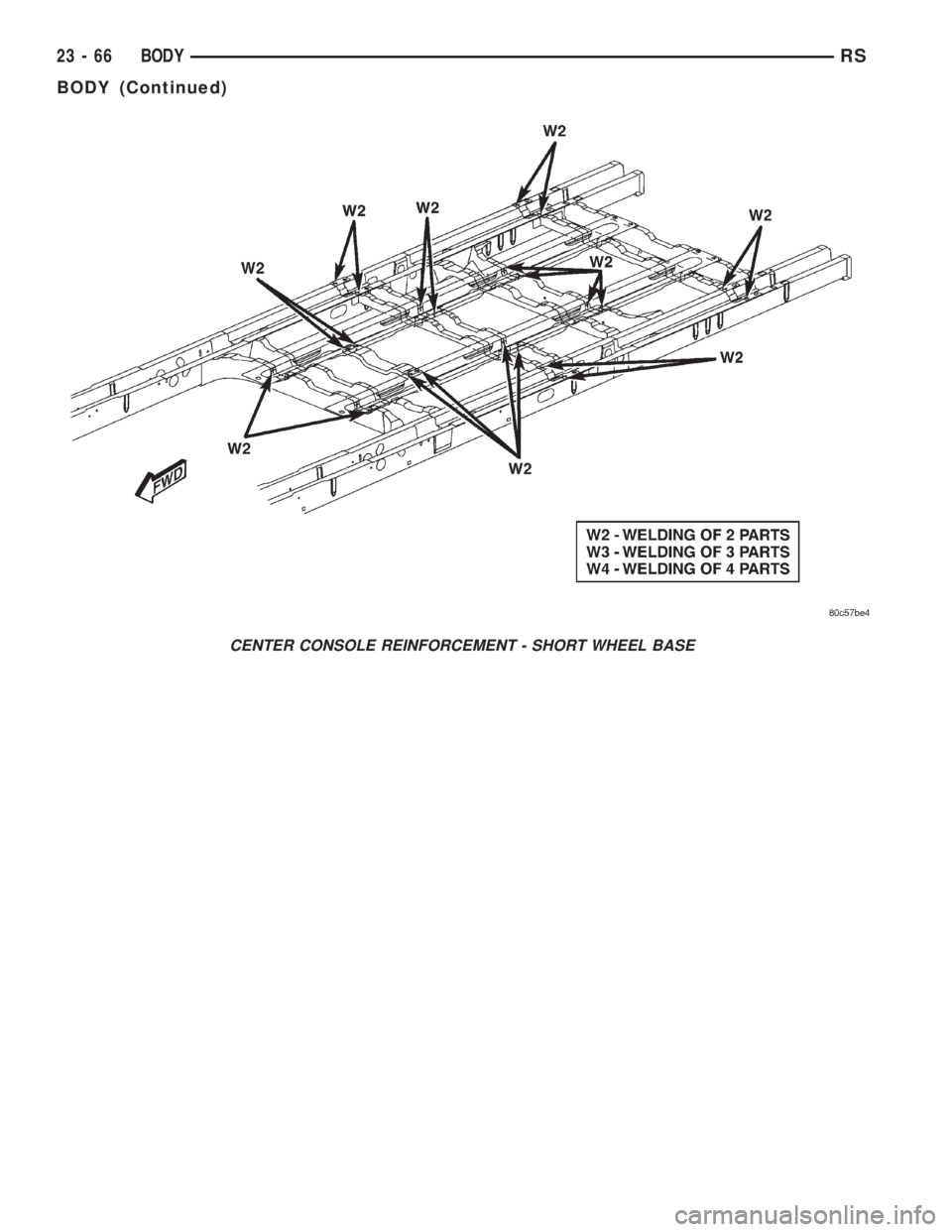
CENTER CONSOLE REINFORCEMENT - SHORT WHEEL BASE
23 - 66 BODYRS
BODY (Continued)
Page 3462 of 4284
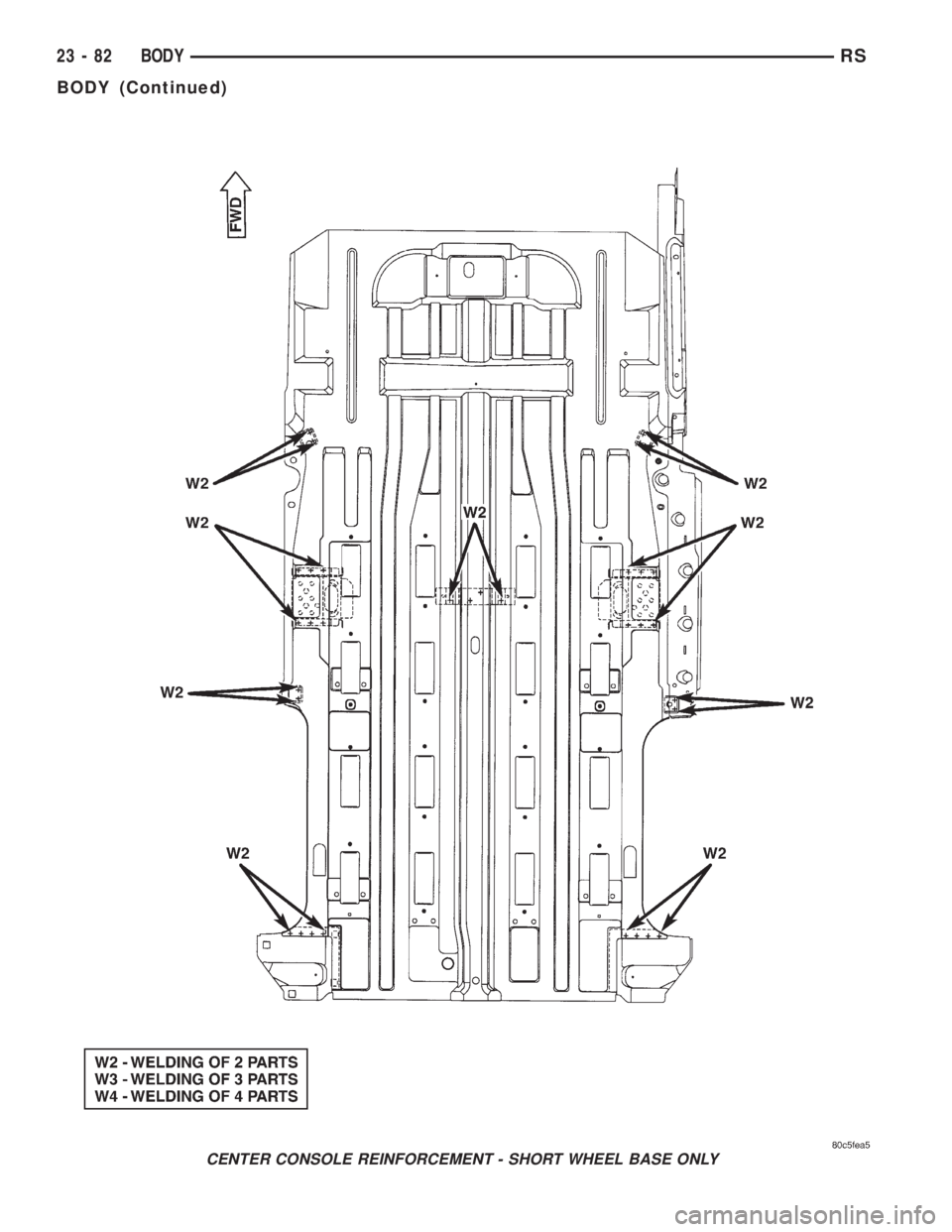
CENTER CONSOLE REINFORCEMENT - SHORT WHEEL BASE ONLY
23 - 82 BODYRS
BODY (Continued)
Page 3582 of 4284
INSTRUMENT PANEL
TABLE OF CONTENTS
page page
CLUSTER BEZEL
REMOVAL.............................202
INSTALLATION..........................202
CUP HOLDER
REMOVAL.............................202
INSTALLATION..........................202
GLOVE BOX
REMOVAL.............................203
INSTALLATION..........................203
GLOVE BOX LATCH
REMOVAL.............................203
INSTALLATION..........................203
GLOVE BOX LATCH STRIKER
REMOVAL.............................203
INSTALLATION..........................203
INSTRUMENT PANEL ASSEMBLY
REMOVAL.............................203
INSTALLATION..........................204
INSTRUMENT PANEL CENTER BEZEL
REMOVAL.............................205
INSTALLATION..........................205INSTRUMENT PANEL END COVER
REMOVAL.............................205
INSTALLATION..........................205
INSTRUMENT PANEL TOP COVER
REMOVAL.............................205
INSTALLATION..........................206
KNEE BLOCKER REINFORCEMENT
REMOVAL.............................206
INSTALLATION..........................206
LOWER CONSOLE
REMOVAL.............................206
INSTALLATION..........................206
LOWER INSTRUMENT PANEL
REMOVAL.............................206
INSTALLATION..........................206
LOWER STEERING COLUMN COVER
REMOVAL.............................206
INSTALLATION..........................206
OVER STEERING COLUMN COVER
REMOVAL.............................207
INSTALLATION..........................207
CLUSTER BEZEL
REMOVAL
(1) Disconnect and isolate the battery negative
cable.
(2) Remove Over Steering Column Bezel by lifting
it straight up with a firm pull.
(3) Remove the four bezel attaching screws.
(4) Tilt the steering column in the full down posi-
tion.
(5) Pull rearward on the cluster bezel and remove.
INSTALLATION
(1) Manuever cluster bezel over steering column
and into position.
(2) Install the four bezel attaching screws.
(3) Install the Over Steering Column Bezel by
positioning it over the retaining slots and firmly
snapping it into place.
(4) Connect the battery negative cable.
CUP HOLDER
REMOVAL
(1) Remove the cup holder. Pull the cup holder out
and depress the tang in the middle back and pull
rearward to release the cup holder.
(2) Remove the screw access cover from the bottom
of the center bezel.
(3) Using a trim stick (special tool #C-4755) or
equivalent, gently pry out on the edge of the instru-
ment panel center bezel. Hang off to the side leaving
the accessory switches connected.
(4) Remove the cup holder assembly attaching
screws and pull the assembly rearward to disengage
the rear guide studs from instrument panel.
(5) Remove the cup holder track assembly.
INSTALLATION
(1) Install the cup holder track assembly.
(2) Place the cup holder track assembly into posi-
tion and slide into opening in instrument panel until
the rear guide struts snap into place. Install the cup
holder assembly attaching screws.
(3) Install the center bezel.
(4) Install the screw access cover from the bottom
of the center bezel.
23 - 202 INSTRUMENT PANELRS