Page 19 of 121

INSTRUMENT AND CONTROL FUNCTIONS
3-5
3
EAU01775*
SpeedometerThis speedometer is equipped with:l
an odometer
l
two trip odometers
l
a fuel reserve trip meter
l
a clockOdometer and trip meter modes
Use the trip meters to estimate how far
you can ride on a tank of fuel.
Use the fuel reserve trip meter to see
the distance traveled from when the
fuel level dropped to the reserve level.
Selecting a mode
Push the “SELECT” button to change
between the odometer mode “ODO”
and the trip odometer modes “TRIP 1”
and “TRIP 2” in the following order:
“ODO”
® “TRIP 1”
® “TRIP 2”
®
“ODO”
If the fuel level indicator light comes on
(see page 3-4), the odometer display
will automatically change to the fuel re-
serve trip meter mode “TRIP F” and
start counting the distance traveled
from that point. Push the “SELECT”
button to change between the fuel re-
serve trip meter, trip odometers and
odometer modes in the following order:
“TRIP F”
® “TRIP 1”
® “TRIP 2”
®
“ODO”
® “TRIP F”Resetting a meter
To reset a trip odometer to 0.0, select it
by pushing the “SELECT” button and
push the “RESET” button. To reset the
fuel reserve trip meter, select it by
pushing the “SELECT” button and
push the “RESET” button. The display
will return to “TRIP 1”. If you do not re-
set the fuel reserve trip meter manual-
ly, it will automatically reset and return
to “TRIP 1” after refueling and traveling
5 km.NOTE:@ After resetting the fuel reserve trip
meter, the display always returns to the
“TRIP 1” mode, unless a different mode
had been previously selected; in that
case, the display automatically returns
to the prior mode. @
1. Speedometer
2. Odometer/tripmeter/clock
3. “RESET” button
4. “SELECT” buttonE_5jc_Functions.fm Page 5 Saturday, October 16, 1999 1:08 PM
Page 20 of 121
INSTRUMENT AND CONTROL FUNCTIONS
3-6
3 Clock mode
To change the display to the clock
mode, push the “SELECT” button for at
least two seconds.
To change the display back to the
odometer modes, push the “SELECT”
button.
To set the clock
1. Push both the “SELECT” and
“RESET” buttons for at least two
seconds.
2. When the hour digits start flashing,
push the “RESET” button to set
the hours.
3. Push the “SELECT” button and
the minute digits will start flashing.
4. Push the “RESET” button to set
the minutes.
5. Push the “SELECT” button to start
the clock.
NOTE:@ After setting the clock, be sure to push
the “SELECT” button before turning the
main switch to “OFF”, otherwise the
clock will not be set. @
E_5jc_Functions.fm Page 6 Saturday, October 16, 1999 1:08 PM
Page 97 of 121
PERIODIC MAINTENANCE AND MINOR REPAIR
7-31
7
EAU01801
Fuse replacementIf a fuse is blown, turn off the main
switch and the switch of the circuit in
question. Install a new fuse of proper
amperage. Turn on the switches and
see if the electrical device operates. If
the fuse immediately blows again, con-
sult a Yamaha dealer.
EC000103
CAUTION:@ Do not use fuses of higher amper-
age rating than those recommend-
ed. Substitution of a fuse of
improper rating can cause extensive
electrical system damage and pos-
sibly a fire. @
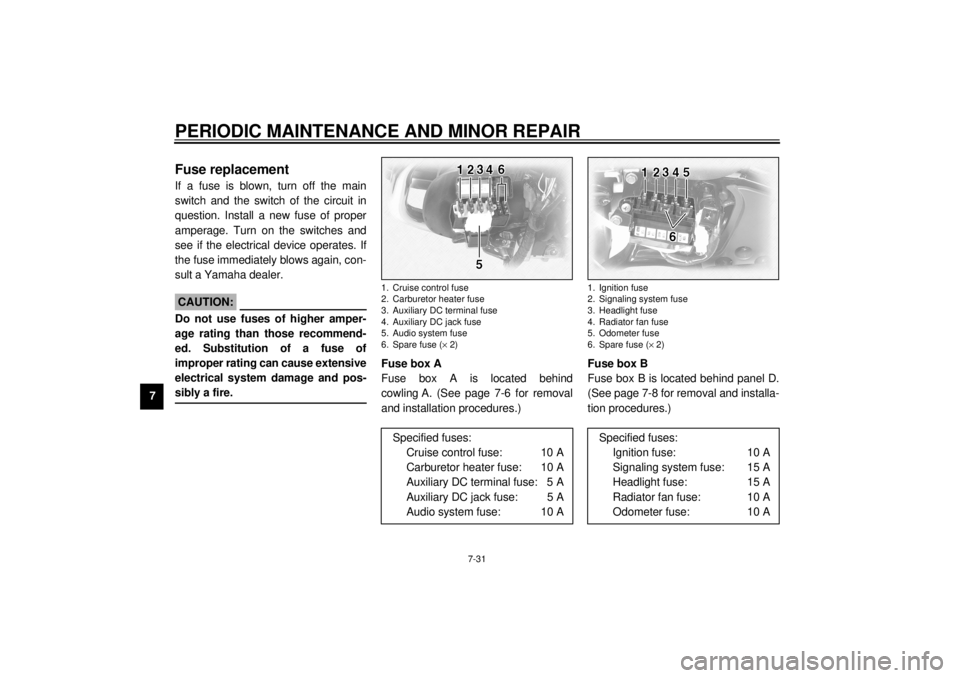
Fuse box A
Fuse box A is located behind
cowling A. (See page 7-6 for removal
and installation procedures.)Fuse box B
Fuse box B is located behind panel D.
(See page 7-8 for removal and installa-
tion procedures.)1. Cruise control fuse
2. Carburetor heater fuse
3. Auxiliary DC terminal fuse
4. Auxiliary DC jack fuse
5. Audio system fuse
6. Spare fuse (´ 2)
Specified fuses:
Cruise control fuse: 10 A
Carburetor heater fuse: 10 A
Auxiliary DC terminal fuse: 5 A
Auxiliary DC jack fuse: 5 A
Audio system fuse: 10 A
1. Ignition fuse
2. Signaling system fuse
3. Headlight fuse
4. Radiator fan fuse
5. Odometer fuse
6. Spare fuse (´ 2)
Specified fuses:
Ignition fuse: 10 A
Signaling system fuse: 15 A
Headlight fuse: 15 A
Radiator fan fuse: 10 A
Odometer fuse: 10 A
E_5jc_Periodic.fm Page 31 Saturday, October 16, 1999 1:10 PM
Page 114 of 121

SPECIFICATIONS
9-4
9
Headlight typeQuar tz bulb (halogen)
Bulb voltage, wattage ´ quantity
Headlight 12 V, 60/55 W ´ 1
Tail/brake light 12 V, 5/21 W ´ 1
Turn signal light 12 V, 21 W ´ 4
Auxiliary light 12 V, 4 W ´ 1
Licence light 12 V, 5 W ´ 2
Neutral indicator light 12 V, 1.7 W ´ 1
High beam indicator light 12 V, 1.7 W ´ 1
Oil level indicator light 12 V, 1.7 W ´ 1
Turn indicator light 12 V, 1.7 W ´ 2
Fuel level indicator light 14 V, 3 W ´ 1
Coolant temperature indicator
light 12 V, 1.7 W ´ 1
Engine trouble indicator light 12 V, 1.7 W ´ 1
Overdrive indicator light 12 V, 1.7 W ´ 1
Cruise control “SET” indicator
light 12 V, 1.7 W ´ 1
Cruise control “RES” indicator
light 12 V, 1.7 W ´ 1
Cruise control “ON” indicator
light 12 V, 1.7 W ´ 1Audio system amplifier
Output power
Speaker 14 W ´ 4
Headset 1 W ´ 2
Auto-volume range 5 steps
Output impedance
Speaker 4 W
Headset 8 W ~ 16 W
Fuses
Main fuse 30 A
Headlight fuse 15 A
Signaling system fuse 15 A
Ignition fuse 10 A
Radiator fan fuse 10 A
Odometer fuse 10 A
Cruise control fuse 10 A
Carburetor heater fuse 10 A
Audio system fuse 10 A
Auxiliary DC jack fuse 5 A
Auxiliary DC terminal fuse 5 A
E_5jc_Spec.fm Page 4 Saturday, October 16, 1999 1:12 PM
