Page 53 of 273
Controls Near the Steering Wheel I
The two levers on the steering
column contain controls for driving
features you use most often.
The left
lever controls the turn signals,
headlights, and high beams.
The
right lever controls the windshield
washers and wipers.
The engine start button and the
remote audio controls are under the
left air vent.
The instrument panel brightness
control is
in the lower left corner of
the speedometer.
The cruise control master switch is
to the left
of the steering column.
50 Instruments and Controls
Page 61 of 273

Keys and Locks
Keys
Your car comes with two master
keys and a valet key.
The master key fits all the locks on
your car:
• Ignition
• Doors
• Trunk
• Lower console compartment
58 Instruments and Controls
The valet key works only in the
ignition and the door locks. You can
keep the trunk and the lower console
compartment locked when you leave
your car and the valet key at a
parking facility.
You should have received a key
number plate with your keys. You
will need this key number if you ever
have to
get a lost key replaced. Keep
the plate stored
in a safe place. If you
need to replace a key, use only
Honda-approved key blanks.
These keys contain electronic
circuits that are activated by the
Immobilizer System.
They will not
work to start the engine if the
circuits are damaged.
• Protect the keys from direct
sunlight, high temperature, and
high humidity.
• Do not drop the keys or set heavy
objects on them.
• Keep the keys away from liquids.
If they get wet, dry them immedi
ately with a soft cloth.
The keys do not contain batteries.
Do not try to take them apart.
Remote Transmitter
Your car also comes with two remote
transmitters; see page
63 for an
explanation of the operation.
Page 62 of 273

Immobilizer System
The Immobilizer System protects
your car from theft. A properly
coded master or valet key must be
used
in the ignition switch for the
engine to start.
If an improperly
coded key (or other device) is used,
the engine's fuel system is disabled.
When you
turn the ignition switch to
ON (II), the Immobilizer System
indicator should come on for a few
seconds, then go out.
If the indicator
starts to blink, it means the system
does not recognize the coding of the
key.
Turn the ignition switch to
LOCK (O), remove the key, reinsert
it, and turn
the switch to ON (II)
a gam.
The system may not recognize your
key's coding
if another immobilizer
key or other metal object is near the
ignition switch when you insert the
key.
To make sure the system
recognizes
the key code:
• Do not keep other immobilizer
keys
on the same key ring.
• Use a plastic or leather key fob,
not metal.
• Keep other keys away from your
vehicle's key and
the ignition
switch while trying to start the
engine.
If the system repeatedly does not
recognize the coding of your key,
contact your Honda dealer.
This indicator will also blink several
times when you turn the ignition
switch from
ON (II) to ACCESSORY
(I) or LOCK (0).
Do not attempt to alter this system
or add other devices to
it. Electrical
problems could result
that may make
your car undriveable.
If you have lost your key and you
cannot start the engine, contact your
Honda dealer.
Keys and Locks
As required by the FCC:
This device complies with Part 15 of the
FCC rules. Operation is subject to the
following two conditions:
(1) This device
may not cause harmful interference, and
(2) this device must accept any
interference received, including
interference that
may cause undesired
operation.
Changes or modifications
not expressly
approved
by the party responsible for
compliance could void the user's
authority to operate the equipment.
This device complies with Indust1y
Canada Standard RSS-210.
Operation
is subject to the following two
conditions:
(1) this device may not cause
interference, and
(2) this device must
accept any interference that may cause
undesired operation
of the device.
Instruments and Controls 59
Page 64 of 273
ACCESSORY (I) -In this position,
you can operate
the audio system
and the accessory power socket.
ON (II) -This is the normal key
position when driving. All features
and accessories on
the car are usable.
Several of
the lights on the instru
ment panel come on as a test when
you
turn the ignition switch from
ACCESSORY to
ON.
The engine can be started with the
key in this position by pressing the
engine START button (see page
131 ).
The engine will not start if the
Immobilizer System does not
recognize the key's coding (see page
59).
You will hear a reminder beeper if
you leave
the key in the ignition
switch in
the LOCK (0) or
ACCESSORY (I) position and open
the driver's door. Remove the key to
turn off the beeper.
Keys and Locks
Instruments and Controls 61
Page 74 of 273
The convertible top on your Honda
lowers and raises electrically.
Before operating the convertible top,
make sure the car is parked on level
ground, and that there is enough
clearance above the top.
It is advisable to raise the top
whenever you park the car. This
helps to protect the car from
unexpected weather changes, and
from theft of your valuables.
NOTICE
• Do not operate the convertible top in
freezing weather. You can damage
the material and mechanism
of the
convertible top.
• Do not operate the top if it is wet,
dirty, or covered with ice or snow.
• Never drive the car with the
convertible top
half open.
• Do not lower or raise the top while
the engine
is running.
• Do not operate the convertible top if
the car is raised on the jack, a hoist,
or on jack stands.
Lowering the Convertible Top
Park your car in the shade whenever
possible. Extended exposure to sunlight can
cause the convertible top to
deteriorate.
1. Apply the parking brake. The
convertible top will not operate
unless
the parking brake is fully
engaged.
2. Turn the ignition switch to ON (II).
Convertible Top
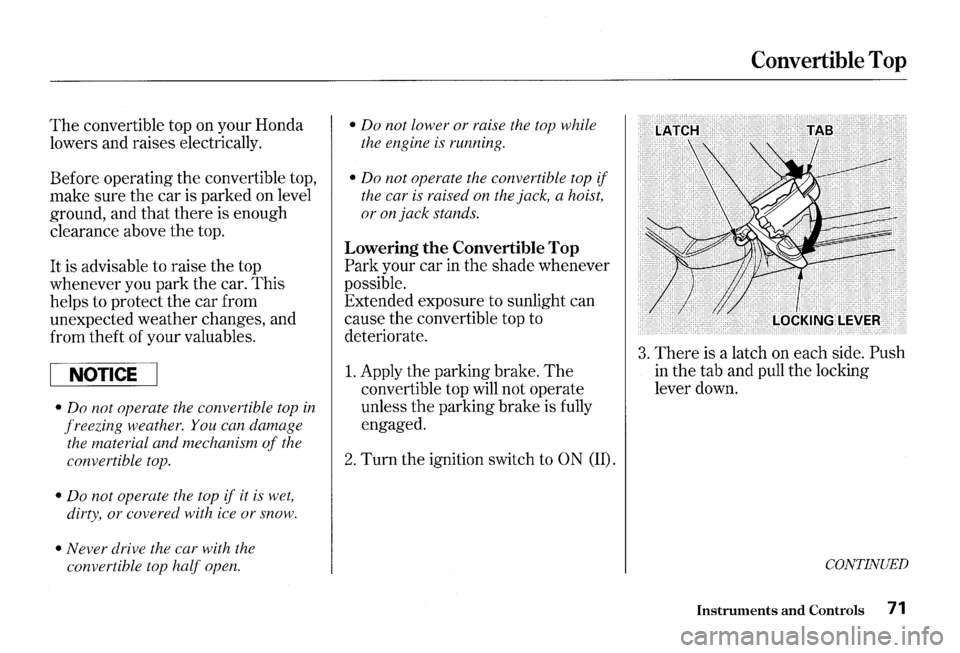
3. There is a latch on each side. Push
in the tab and pull the locking
lever down.
CONTINUED
Instruments and Controls 71
Page 91 of 273
Heating and Cooling
Vent Controls
You can adjust the direction of the
air coming from the vents on both
sides of the instrument panel and at
the corner of the dashboard on the
passenger's side.
To adjust the air
flow up and down, move the tab
in
the center of each vent up and down.
To adjust it left and right, turn the
dial under each vent left and right.
88 Comfort and Convenience Features
You can shut off the air flow from
each vent by turning the dial
all the
way toward the
t>UO mark until it
clicks. How
to Use the System
This
section covers how to set up the
system controls for ventilation,
heating, cooling, dehumidifying, and
defrosting.
The engine must be running for the
heater and air conditioning to
generate hot and cold air.
The heater
uses engine coolant to warm the air.
If the engine is cold, it will be several
minutes before you feel warm air
coming from the system.
The air conditioning does not rely on
engine temperature.
Page 93 of 273

Heating and Cooling
To Cool with A/C
1. Turn on the AI C by pressing the
button.
The light in the button
should come on when a fan speed
is selected.
2. Make sure the temperature
control dial is
all the way to the left.
3. Select ;,; .
4. If the outside air is humid, select
Recirculation mode.
If the outside
air is dry, select Fresh Air mode.
Set
the fan to the desired speed.
If the interior is very warm from
being parked
in the sun, you can cool
it down more rapidly by setting up
the controls this way:
1. Start the engine.
2. Turn on the A/C by pressing the
button. Make sure the tempera
ture control dial is
all the way to
the left.
3. Set the fan to maximum speed.
4. Open the windows partially. Select
;,; and Recirculation mode.
90 Comfort and Convenience Features
When the interior has cooled down
to a more comfortable temperature,
close the windows and set the
controls as described for normal
cooling. Air
conditioning places an extra load
on the engine. Watch the engine
coolant temperature gauge (see page
47) when driving in stop-and-go
traffic or climbing a long, steep hill.
If it moves near the red mark, turn
off the
A/ C until the reading returns
to normal.
Page 94 of 273

To Heat
To warm the interior:
1. Start the engine.
2. Select w and Fresh Air mode.
3. Set the fan to the desired speed.
4. Adjust the warmth of the air with
the temperature control dial.
To Heat and Dehumidify with Air
Conditioning
Air conditioning, as it cools, removes
moisture from the air. When used
in
combination with the heater, it
makes the interior warm and dry.
1. Switch the fan on.
2. Turn on the air conditioning.
3. Select w and Fresh Air mode.
4. Adjust the temperature control
dial so the mixture of heated and
cooled air feels comfortable.
This setting
is suitable for all driving
conditions whenever the outside
temperature is above
32°F (0°C).
Heating and Cooling
To Defog and Defrost
To remove fog from the inside of the
windows:
1. Switch the fan on.
2. Select @ .
When you select @ , the
system automatically switches to
Fresh Air mode and turns on the
A/C.
3. Adjust the temperature control
dial so the air flow from the
defroster vents feels warm.
When you switch to another mode
from
@ , the A/ C stays on.
Press the A/C button to turn if off.
CONTINUED
Comfort and Convenience Features 91


