Page 23 of 352
Protecting Adult s
Advice fo r Pregnan t Wome n
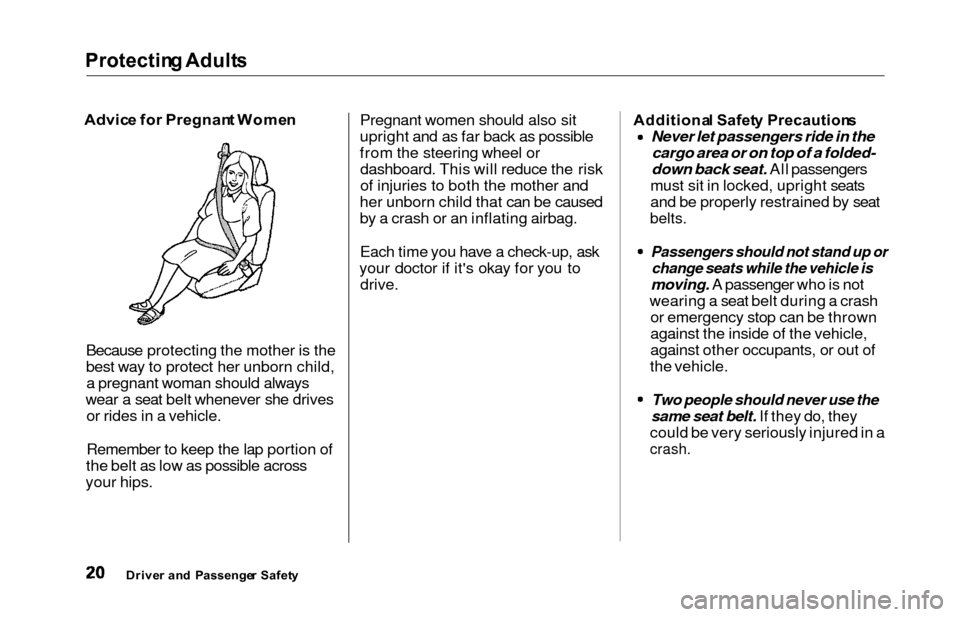
Because protecting the mother is the
best way to protect her unborn child, a pregnant woman should always
wear a seat belt whenever she drives or rides in a vehicle.
Remember to keep the lap portion of
the belt as low as possible across
your hips. Pregnant women should also sit
upright and as far back as possible
from the steering wheel or dashboard. This will reduce the risk
of injuries to both the mother and
her unborn child that can be caused
by a crash or an inflating airbag.
Each time you have a check-up, ask
your doctor if it's okay for you to drive.Additiona l Safet y Precaution s
Never let passengers ride in the
cargo area or on top of a folded-
down back seat. All passengers
must sit in locked, upright seats
and be properly restrained by seat
belts.
Passengers should not stand up or
change seats while the vehicle is
moving. A passenger who is not
wearing a seat belt during a crash or emergency stop can be thrown
against the inside of the vehicle,
against other occupants, or out of
the vehicle.
Two people should never use the
same seat belt. If they do, they
could be very seriously injured in a
crash.
Drive r an d Passenge r Safet y
Page 24 of 352

Protecting Adult s
Do not put any accessories on seat
belts. Devices intended to improve
occupant comfort or reposition the shoulder part of a seat belt can
severely compromise the
protective capability of the seat
belt and increase the chance of serious injury in a crash.
Do not place hard or sharp objects
between yourself and an airbag.
Carrying hard or sharp objects on
your lap, or driving with a pipe or other sharp object in your mouth,
can result in injuries if your
airbags inflate.
Keep your hands and arms away
from the airbag covers. If your
hands or arms are close to the airbag covers in the center of thesteering wheel and on top of the
dashboard, they could be injured if
the airbags inflate.
Do not attach or place objects on
the airbag covers. Any object
attached to or placed on the covers
marked "SRS AIRBAG," in the center of the steering wheel and
on top of the dashboard, could
interfere with the proper operation of the airbags. Or, if the airbags
inflate, the objects could be
propelled inside the car and hurt
someone.
Drive r an d Passenge r Safet y
Page 51 of 352
Additional Informatio n Abou t You r SR S
SRS Component s
Your Supplemental Restraint System
(SRS) includes:
Two front airbags. The driver'sairbag is stored in the center of
the steering wheel; the front
passenger's airbag is stored in the dashboard. Both are marked "SRS
AIRBAG."
Automatic seat belt tensioners that tighten the front seat beltsduring a moderate to severe
frontal collision.
Sensors that can detect a
moderate to severe frontal
collision.
A sophisticated electronic system that continually monitors and
records information about thesensors, the control unit, the
airbag activators, driver and
passenger seat belt use, and all
related wiring when the ignition is
ON (II).
An indicator light on the
instrument panel that alerts you to
a possible problem with the
system (see page 50 ).
Emergency backup power in case
your vehicle's electrical system is
disconnected in a crash.
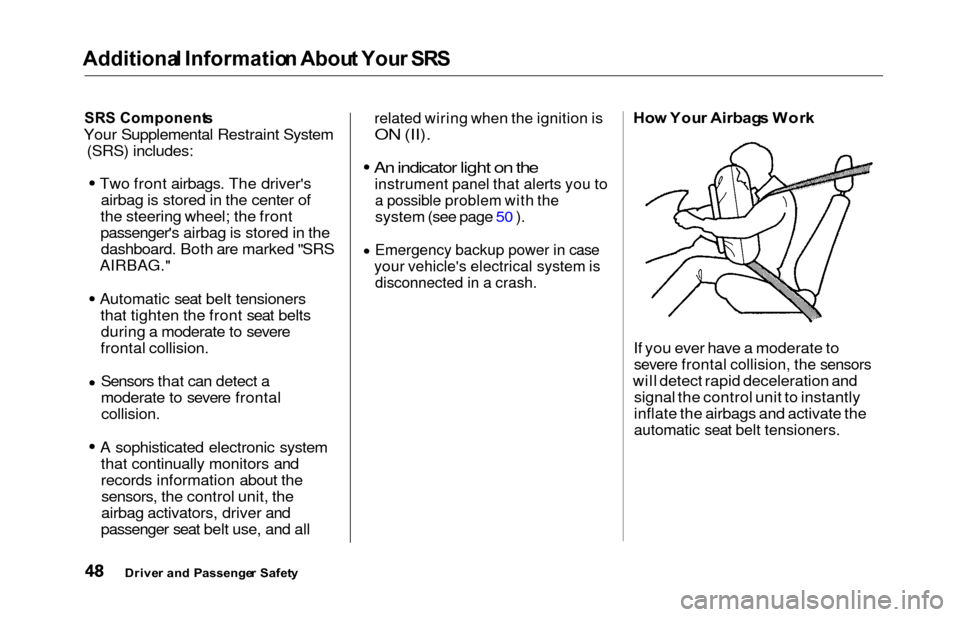
Ho w You r Airbag s Wor k
If you ever have a moderate to
severe frontal collision, the sensors
will detect rapid deceleration and signal the control unit to instantly
inflate the airbags and activate the
automatic seat belt tensioners.
Drive r an d Passenge r Safet y
Page 58 of 352

Instrument
s an d Control s
This section gives information about
the controls and displays that
contribute to the daily operation of
your Honda. All the essential
controls are within easy reach.
Control Locations............................
56
Indicator Lights...............................
. 57
Gauges.............................................. 62
Controls Near the Steering
Wheel........................................ 65
Headlights.................................... 66
Automatic Lighting Off
Feature......................................
67
Daytime Runnin
g Lights.............
67
Instrument
Pane
l Brightness.....
67
Turn
Signals................................
.
68
Windshield
Wipers.....................
. 68
Windshield Washers................... 70
Rear Window Wiper and Washer...................................... 70
Hazard Warning........................ 70
Rear Windo
w Defogger.............. 71
Steering Wheel Adjustment....... 72
Steering Wheel Controls................ 73
Cruise Control.............................. 73
Remote Audio Controls .............. 76
Keys and Locks................................ 76
Keys............................................... 76
Immobilizer System..................... 77
Ignition Switch............................. 78
Power Door Locks....................... 79
Remote Transmitter.................... 81
Childproof Door Locks............... 85
Tailgate......................................... 85
Glove Box..................................... 87
Manual Sliding Doors...................... 88
Power Sliding Doors........................ 89
HomeLink Universal Transmitter.................................. 95
Seats.................................................. 99
Passenger Seating....................... 99
Seat Adjustments....................... 100
Driver's Seat Power
Adjustments........................... 102
Armrests..................................... 103
Head Restraints......................... 104
Third Seat Access...................... 105 Moving the Second Row Bucket Seat............................ 106
Removing the Bucket Seats in the Second Row................. 108
Folding the Third Seat.............. 109
Power Windows............................. 112
Mirrors............................................ 115
Parking Brake................................ 116
Digital Clock................................... 117 Center Table................................... 117
Beverage Holder............................ 118
Sunglasses Holder......................... 120
Sun Visor......................................... 121
Vanity Mirror................................. 121 Rear Compartment........................ 122
Center Pocket................................ 122Coin Holder.................................... 122
Storage Box.................................... 123
Coat Hook....................................... 123
Accessory Power Sockets............. 124 Interior Lights................................ 125
Instrument s an d Control s
Page 62 of 352

Indicator Light s
U.S.
Anti-loc k Brak e Syste m
(ABS ) Indicato r
This light normally comes on for a few seconds when you turn theignition switch ON (II), and when
the ignition switch is turned toSTART (III). If this light comes on at
any other time, there is a problem in
the ABS. If this happens, take the
vehicle to your dealer to have it checked. With the light on, your
vehicle still has normal braking ability but no anti-lock. For complete
information, see page 211. Tractio
n Contro l Syste m
(TCS ) Indicato r
On EX model
This indicator has three functions:
1. It comes on as a reminder that you have turned off the Traction
Control System.
2. It flashes when the TCS is
regulating wheelspin.
3. If it comes on and stays on whenthe Traction Control System is on,it indicates that there is a problem
in the TCS.
This light also comes on when youturn the ignition ON (II) and goes offafter the engine starts. See page 213 for more information on the
TCS.
Immobilize r Syste m
Indicato r
This indicator comes on for a few seconds when you turn the ignition
switch ON (II). It will then go off if
you have inserted a properly-coded ignition key. If it is not a properly-
coded key, the indicator will blinkand the engine will not start (see
page 77 ).
This indicator also blinks several times when you turn the ignition switch from ON (II) to ACCESSORY (I) or LOCK (0).
Instrument s an d Control s
Canad
a
T C SA B S
Page 68 of 352
Controls Nea r th e Steerin g Whee l
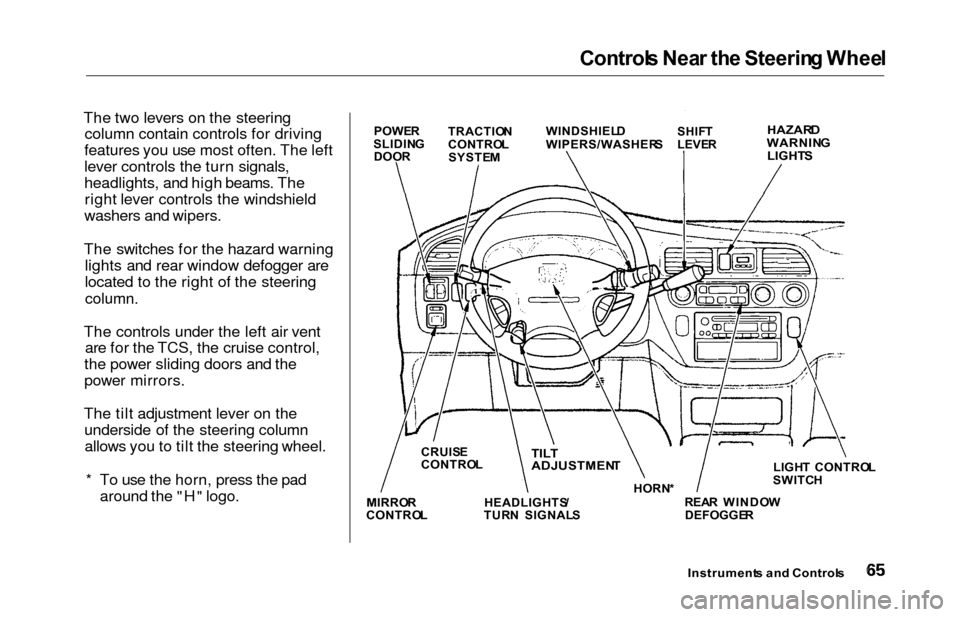
The two levers on the steering
column contain controls for driving
features you use most often. The left
lever controls the turn signals,
headlights, and high beams. The right lever controls the windshield
washers and wipers.
The switches for the hazard warning lights and rear window defogger are
located to the right of the steering
column.
The controls under the left air vent are for the TCS, the cruise control,
the power sliding doors and the
power mirrors.
The tilt adjustment lever on the underside of the steering columnallows you to tilt the steering wheel.
* To use the horn, press the pad around the "H" logo.
Instrument s an d Control s
POWER
SLIDIN G
DOO R TRACTIO
N
CONTRO L
SYSTE M WINDSHIEL
D
WIPERS/WASHER SSHIFT
LEVE RHAZAR DWARNIN G
LIGHT S
LIGHT CONTRO L
SWITC H
REA R WINDO W
DEFOGGE R
HORN
*TILT
ADJUSTMEN T
HEADLIGHTS /
TUR N SIGNAL S
CRUIS
E
CONTRO L
MIRRO R
CONTRO L
Page 75 of 352
Controls Nea r th e Steerin g Whee l
Steerin g Whee l Adjustmen t
See page 19 for important safety
information about how to properly
position the steering wheel.
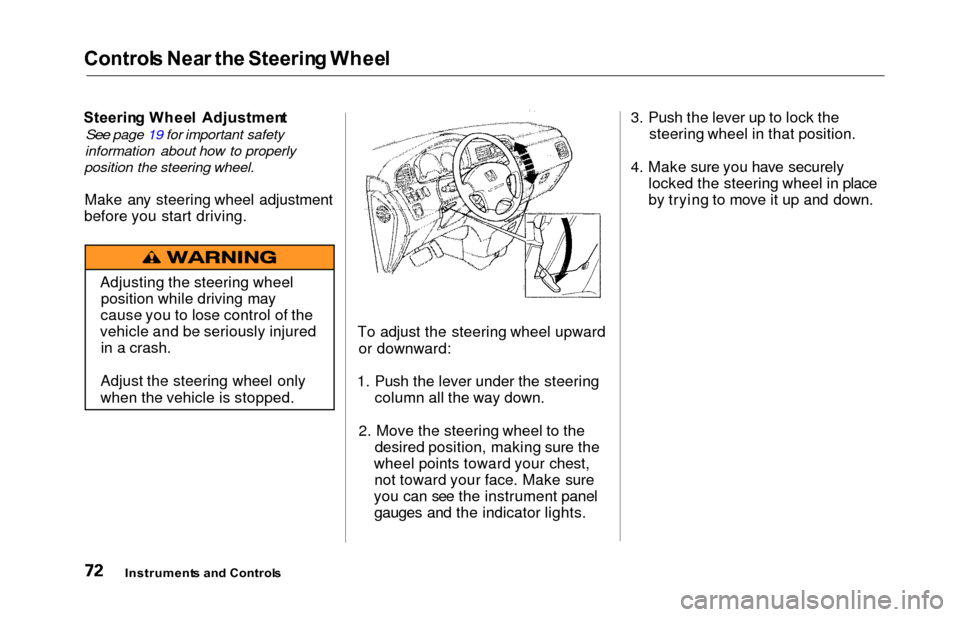
Make any steering wheel adjustment
before you start driving.
To adjust the steering wheel upwardor downward:
1. Push the lever under the steering column all the way down.
2. Move the steering wheel to the desired position, making sure the
wheel points toward your chest, not toward your face. Make sure
you can see the instrument panel gauges and the indicator lights. 3. Push the lever up to lock the
steering wheel in that position.
4. Make sure you have securely locked the steering wheel in place
by trying to move it up and down.
Instrument s an d Control s
Adjusting the steering wheel
position while driving may
cause you to lose control of the
vehicle and be seriously injured in a crash.
Adjust the steering wheel only
when the vehicle is stopped.
Page 76 of 352
Steering Whee l Control s
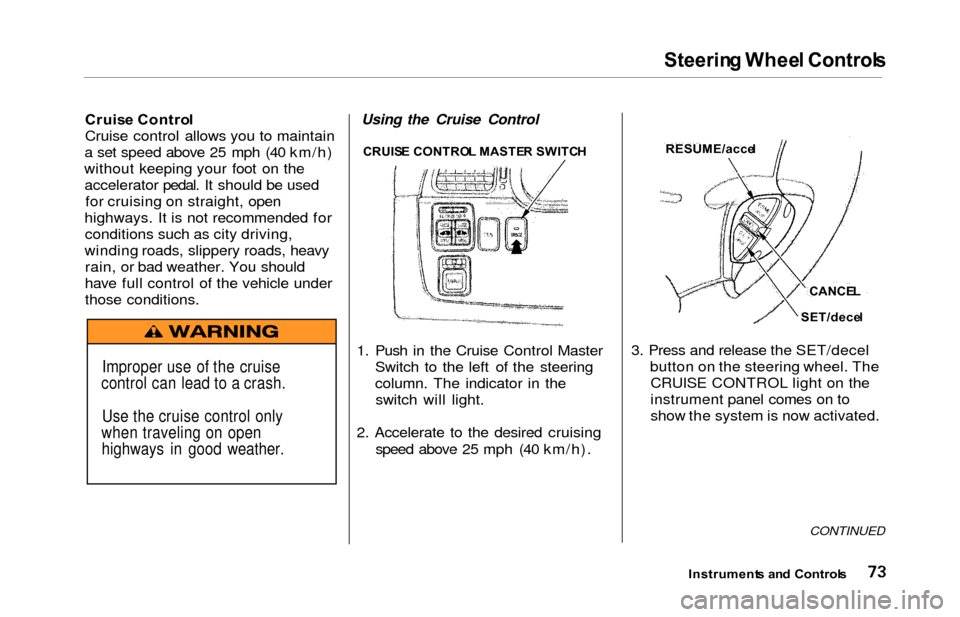
Cruise Contro l
Cruise control allows you to maintain
a set speed above 25 mph (40 km/h)
without keeping your foot on the accelerator pedal. It should be used for cruising on straight, open
highways. It is not recommended for conditions such as city driving,
winding roads, slippery roads, heavy rain, or bad weather. You should
have full control of the vehicle under
those conditions.Using the Cruise Control
1. Push in the Cruise Control Master Switch to the left of the steering
column. The indicator in theswitch will light.
2. Accelerate to the desired cruising speed above 25 mph (40 km/h). 3. Press and release the SET/decel
button on the steering wheel. TheCRUISE CONTROL light on the
instrument panel comes on to
show the system is now activated.
CONTINUED
Instrument s an d Control s
Improper use of the cruise
control can lead to a crash.
Use the cruise control only
when traveling on open highways in good weather.
CRUIS E CONTRO L MASTE R SWITC HRESUME/acce l
CANCEL
SET/dece l