Page 119 of 321
2-54
Assist Handles
A handle above each door can be used when getting out
of your vehicle.
Garment Hooks
For convenience, you will find garment hooks attached
to each assist handle.
Floor Mats
Your vehicle is equipped with rubber-backed front and
rear floor mats. Keep them clean by vacuuming and
using a spot cleaner, if necessary. Do not machine wash.
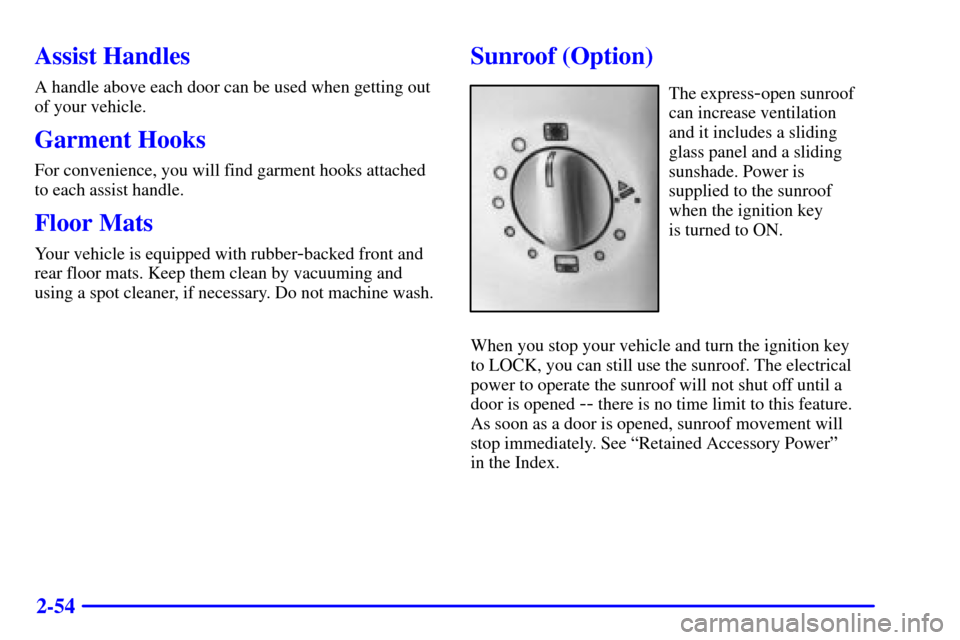
Sunroof (Option)
The express-open sunroof
can increase ventilation
and it includes a sliding
glass panel and a sliding
sunshade. Power is
supplied to the sunroof
when the ignition key
is turned to ON.
When you stop your vehicle and turn the ignition key
to LOCK, you can still use the sunroof. The electrical
power to operate the sunroof will not shut off until a
door is opened
-- there is no time limit to this feature.
As soon as a door is opened, sunroof movement will
stop immediately. See ªRetained Accessory Powerº
in the Index.
Page 120 of 321
2-55
A. Fully Open
B. About 80% Open
C. About 50% Open
D. About 25% OpenE. Fully Closed
F. About 40% Tilted
G. Fully TiltedTurning the control dial to position A fully opens the
glass panel and sunshade. The sunshade can also be
opened by hand. If you want to stop the roof in a
partially opened position, turn the control dial to any
position between A and E. The positions range from
about 25 percent open to approximately 80 percent
open. Turn the dial to position E to fully close the glass
panel. To close the sunshade, pull it forward manually.
To raise the glass panel, turn the control dial
counterclockwise to one of the three tilt positions.
The positions range from about 40 percent tilted (F)
to fully tilted (G). To close the vent, turn the dial
clockwise to position E.
Page 121 of 321
2-56 Anti-Pinch Feature
If a hand, an arm or another object is in the way of the
power sunroof closing, the glass panel will stop at the
obstruction and open to a preset factory position.
CAUTION:
Pressing and holding the power sunroof control
dial in the up position will turn off the anti
-pinch
feature. If this happens, the sunroof won't stop if
something gets in the way. You or others could
be injured, and your sunroof could be damaged.
Be careful not to press and hold the power
sunroof control dial in the up position.
Manual Operation
If a failure in the power supply system occurs, the
sunroof can be manually closed by inserting a
screwdriver into the slot as shown. Turning the
screwdriver counterclockwise will close the sunroof.
The screwdriver is provided in the tool kit in the
trunk (with the jack).
Page 133 of 321

2-68 Charging System Indicator Light
When you turn the key to
START, this light will come
on briefly to show that the
generator and battery
charging systems
are working.
If this light stays on, you need service and you should
take your vehicle to the dealer at once. To save the
battery until you get there, turn off all accessories.
Voltmeter
You can read battery
voltage on the voltmeter.
If it reads less than 12 volts
or more than 16 volts while
the engine is running, and it
stays there, you may have a
problem with the electrical
charging system.Have it checked right away. Driving with the voltmeter
reading in the lower warning zone could drain or
damage the battery. Driving with the voltmeter reading
in the upper warning zone could cause bulbs to burn out
(especially headlamp bulbs), various vehicle modules
to shut down (due to overload protection) and the
possibility of a battery acid leak.
If you idle the engine for a while, the voltmeter reading
might move into the red zone. If the reading stays in the
red zone while you are driving, you may have a problem
with the electrical charging system. Have it checked.
While the voltmeter reads in the red zone, the battery
may not be able to power certain electrical accessories,
like ABS. (If this happens, the ABS light will come on.
See ªAnti-Lock Brakes System Warning Lightº in
this section.)
If you must drive a short distance with the voltmeter
reading in a warning zone, turn off all the accessories,
including the comfort controls and the audio system.
Page 135 of 321

2-70 Anti-Lock Brake System Warning Light
With the anti-lock brake
system, the light(s) will
come on when you start
your engine and may stay
on for several seconds.
That's normal.
If the light stays on, turn the ignition to OFF. Or, if the
light comes on when you're driving, stop as soon as
possible and turn the ignition off. Then start the engine
again to reset the system. If the light still stays on, or
comes on again while you're driving, your vehicle needs
service. If the regular brake system warning light isn't
on, you still have brakes, but you don't have anti
-lock
brakes. If the regular brake system warning light is also
on, you don't have anti
-lock brakes and there's a
problem with your regular brakes. See ªBrake System
Warning Lightº earlier in this section.
The anti
-lock brake system warning light should come
on briefly when you turn the ignition key to ON. If the
light doesn't come on then, have it fixed so it will be
ready to warn you if there is a problem.
Traction Control System Warning Light
The warning light will flash
when the system senses a
traction change.
If it stays on, or comes on and stays on steady when
you're driving, there may be a problem with your
traction control system and your vehicle may need
service. When this warning light is on, the system will
not limit wheel spin. Adjust your driving accordingly.
The traction control system warning light may come on
for the following reasons:
�If there's a brake system problem that is specifically
related to traction control, the traction control system
will turn off and the warning light will come on.
�If the traction control system is affected by an
engine
-related problem, the system will turn off and
the warning light will come on.
If the traction control system warning light comes on
and stays on for an extended period of time when the
system is turned on, your vehicle needs service.
Page 145 of 321
3-
3-1
Section 3 Comfort Controls and Audio Systems
In this section, you'll find out how to operate the comfort control and audio systems offered with your vehicle.
Be sure to read about the particular systems supplied with your vehicle.
3
- 2 Comfort Controls
3
- 2 Electronic Climate Control (ECC)
3
- 3 Automatic Operation
3
- 4 Manual Operation
3
- 6 Air Conditioning
3
- 6 Heating
3
- 6 Defrosting
3
- 7 Rear Window Defogger
3
- 7 Ventilation System
3
- 8 Audio Systems
3
- 8 Setting the Clock
3
- 9AM-FM Stereo with Cassette Tape Player
3
- 13 AM-FM Stereo with Cassette Tape and
Compact Disc Player with Radio Data
Systems (RDS) (If Equipped)3
- 21 Radio Data Systems (RDS) Program
Type (PTY) Selections
3
- 22 CD Adapter Kits
3
- 22 Trunk-Mounted CD Changer (Option)
3
- 26 Theft-Deterrent Feature
3
- 27 Audio Steering Wheel Controls
3
- 27 Understanding Radio Reception
3
- 28 Tips About Your Audio System
3
- 29 Care of Your Cassette Tape Player
3
- 30 Care of Your Compact Discs
3
- 30 Care of Your Compact Disc Player
3
- 31 Heated Backlite Antenna
Page 146 of 321

3-2
Comfort Controls
This section tells you how to make your air system
work for you.
You can control the heating, cooling and ventilation
systems in your vehicle. Guidelines for using these
systems are found later in this section.
Electronic Climate Control (ECC)
Fan Button
The button with the fan symbol adjusts the fan speed.
Press the up arrow to increase fan speed and the down
arrow to decrease fan speed.Driver's Side Temperature Knob
The driver's side TEMP/AUTO knob adjusts the air
temperature coming through the system. Turn the
TEMP/AUTO knob clockwise to increase the
temperature and counterclockwise to decrease the
temperature. Pressing this knob puts the climate control
system in an automatic mode. For more information,
see ªAutomatic Operationº later in this section.
Passenger's Side Temperature Knob
The right front passenger can control the temperature
of heated air for their own zone, independent from
the driver's temperature setting. The passenger's
temperature can be set anywhere between 60�F (16�C)
and 90�F (32�C).
To turn the system on, press the passenger's side
TEMP/OFF knob. Turn the knob clockwise to increase
temperature and counterclockwise to decrease. Pressing
the knob again turns off the dual
-zone function and
returns the system to the one
-zone function, where the
driver controls the temperature.
Page 150 of 321

3-6 Air Conditioning
On hot days, open the windows long enough to let hot
inside air escape. This reduces the time it takes for your
vehicle to cool down. Then keep your windows closed
for the air conditioner to work its best.
The climate control system will cool and dehumidify the
air inside the vehicle. While in the automatic operation
mode, the system will use recirculation as necessary
to cool the air. You may also need to adjust the
interior temperature. Turn either the TEMP/AUTO or
TEMP/OFF knob clockwise to increase the temperature
or counterclockwise to decrease temperature. Adjust the
fan speed as needed.
In order to obtain the maximum cool setting, both
the driver's TEMP/AUTO knob and the passenger's
TEMP/OFF knob must be turned to 60�F (16�C).
Heating
Adjust the interior temperature to your comfort level by
turning the TEMP/AUTO knob or the TEMP/OFF knob
clockwise to increase the temperature or counterclockwise
to decrease the temperature. If the fan speed needs
adjusting, press the up or down arrow.Outside air will be brought in and sent through the floor
outlets. The heater works best if you keep the windows
closed while using it.
In order to obtain the maximum heat setting, both
the driver's TEMP/AUTO knob and the passenger's
TEMP/OFF knob must be turned to 90�F (32�C).
Defrosting
Use defrost to remove fog or ice from the windshield
quickly in extremely humid or cold conditions.
Pressing the defrost button on the control panel
(located above the rear window defogger button)
automatically turns the fan blower to high speed.
Make sure that the side air vents are opened.
Turn both the TEMP/AUTO knob and the
TEMP/OFF knob clockwise as needed to adjust the
temperature. To warm the foot area while in defrost,
press the MODE button until the heater/defrost
symbol appears (see ªManual Operationº earlier in
this section).
Recirculation is not available in the defrost mode.