Page 199 of 343
Automatic Transmission
Your Honda's transmission has fourforward speeds, and is electronicallycontrolled for smoother shifting. It
also has a "lock-up" torque converter
for better fuel economy. You may
feel what seems like another shift
when the converter locks. Shift Lever Position Indicator
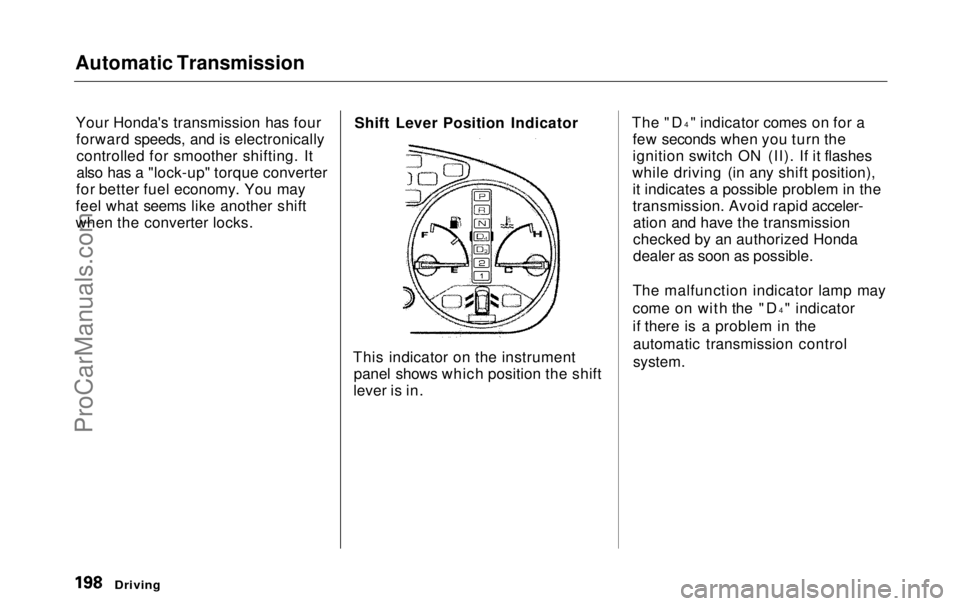
This indicator on the instrument panel shows which position the shift
lever is in. The "D
4
" indicator comes on for a
few seconds when you turn the
ignition switch ON (II). If it flashes
while driving (in any shift position), it indicates a possible problem in the
transmission. Avoid rapid acceler-ation and have the transmission
checked by an authorized Honda
dealer as soon as possible.
The malfunction indicator lamp may
come on with the "D 4
" indicator
if there is a problem in the automatic transmission control
system.
DrivingProCarManuals.comMain Menu Table of Contents s t
Page 200 of 343
Automatic Transmission
Shift Lever Positions
The shift lever has seven positions. It must be in Park or Neutral to start
the engine. When you are stopped in
D4, D3, 2,1, N or R, press firmly on
the brake pedal, and keep your foot
off
the accelerato
r pedal. Park (P) — This position mechani-
cally locks the transmission. Use Park whenever you are turning off or
starting the engine. To shift out ofPark, you must press on the brake
pedal and have your foot off the accelerator pedal. Pull the shift lever
towards you, then move it out of
Park.
If you have done all of the above and
still cannot move the lever out of
Park, see Shift Lock Release on page
201.
You must also pull the shift lever towards you to shift into Park. Toavoid transmission damage, come to
a complete stop before shifting into
Park. The shift lever must be in Park
before you can remove the key from
the ignition switch.
CONTINUED
Driving
SHIFT LEVERProCarManuals.comMain Menu Table of Contents s t
Page 202 of 343

Automatic Transmission
Second (2) — To shift to Second,
pull the shift lever towards you, then shift to the lower gear. This position
locks the transmission in second
gear. It does not downshift to first gear when you come to a stop.Second gives you more power when
climbing, and increased engine
braking when going down steep hills. Use second gear when starting out
on a slippery surface or in deep snow.
It will help reduce wheelspin.
When driving down hill with a trailer, use the Second position.
First (1) — To shift from Second toFirst, pull the shift lever towards you,
then shift to the lower gear. With the
lever in this position, the transmis- sion locks in First gear. By upshift-
ing and downshifting through 1, 2,
D3 and D4, you can operate this
transmission much like a manual
transmission without a clutch pedal. Engine Speed Limiter
If you exceed the maximum speed
for the gear you are in, the engine
speed will enter into the
tachometer's red zone. If this occurs,
you may feel the engine cut in and out. This is caused by a limiter
in the engine's computer controls.
The engine will run normally
when you reduce the RPM below the
red zone.
Shift Lock Release
This allows you to move the shift lever out of Park if the normal
method of pushing on the brakepedal and pulling the shift lever doesnot work.
1. Set the Parking brake.
2. Remove the key from the ignition
switch.
3. Place a cloth on the edge of the shift lock release slot cover on thesteering column. Remove the
cover by carefully prying on the
edge with a small flat-tipped screwdriver (not included in the
tool kit).
Driving
CONTINUEDProCarManuals.comMain Menu Table of Contents s t
Page 203 of 343
Automatic Transmission
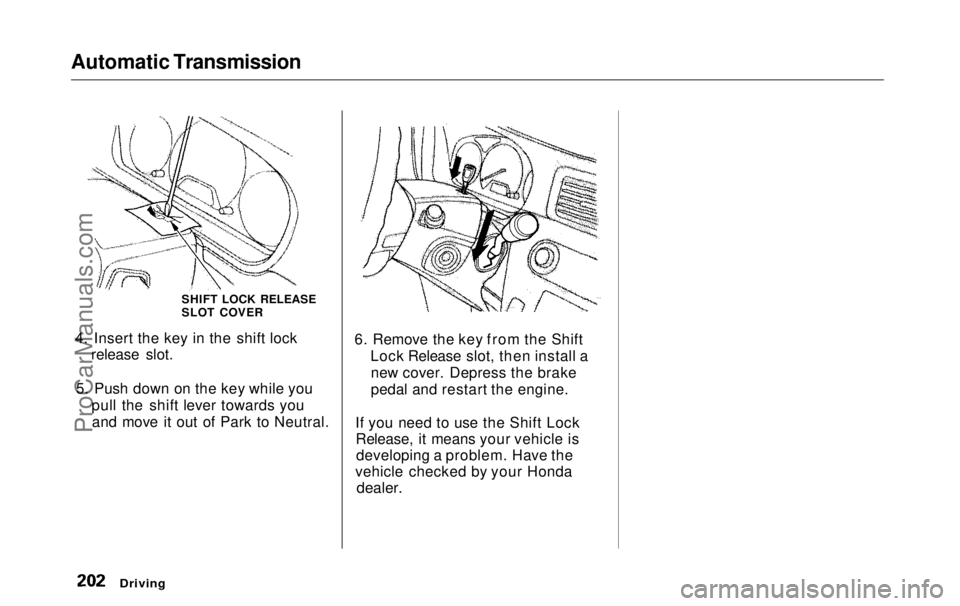
4. Insert the key in the shift lock release slot.
5. Push down on the key while you pull the shift lever towards youand move it out of Park to Neutral. 6. Remove the key from the Shift
Lock Release slot, then install anew cover. Depress the brake
pedal and restart the engine.
If you need to use the Shift Lock Release, it means your vehicle isdeveloping a problem. Have the
vehicle checked by your Honda
dealer.
Driving
SHIFT LOCK RELEASE
SLOT COVERProCarManuals.comMain Menu Table of Contents s t
Page 204 of 343

Parking
Always use the parking brake when you park your vehicle. The indicator on the instrument panel shows that
the parking brake is not fully released; it does not indicate that the
parking brake is firmly set. Make sure the parking brake is set firmly
or your vehicle may roll if it is
parked on an incline.
Set the parking brake before you put
the transmission in Park. This keeps
the vehicle from moving and putting
pressure on the parking mechanism
in the transmission — making it easier to move the shift lever out of
Park when you want to drive away. If the vehicle is facing uphill, turn
the front wheels away from the curb.
If the vehicle is facing downhill, turn
the front wheels toward the curb.
Make sure the parking brake is fully
released before driving away.
Driving with the parking brake
partially set can overheat or damage
the rear brakes. Parking Tips
Make sure the windows are closed.
Turn off the lights.
Place any packages, valuables, etc.,
in the cargo area or take them
with you.
Lock the doors with the key or the
remote transmitter.
Never park over dry leaves, tall
grass, or other flammable
materials. The three way catalytic
converter gets very hot, and could
cause these materials to catch on
fire.
DrivingProCarManuals.comMain Menu Table of Contents s t
Page 206 of 343
The Braking System
Brake System Design
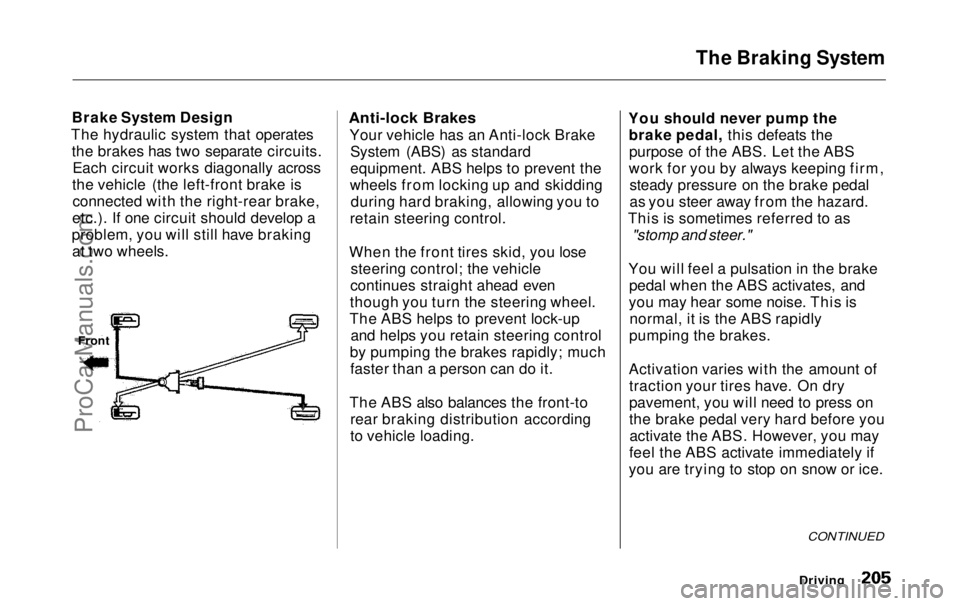
The hydraulic system that operates the brakes has two separate circuits.Each circuit works diagonally across
the vehicle (the left-front brake is connected with the right-rear brake,
etc.). If one circuit should develop a
problem, you will still have braking at two wheels.
Anti-lock Brakes
Your vehicle has an Anti-lock BrakeSystem (ABS) as standard
equipment. ABS helps to prevent the
wheels from locking up and skidding during hard braking, allowing you to
retain steering control.
When the front tires skid, you lose steering control; the vehicle
continues straight ahead even
though you turn the steering wheel.
The ABS helps to prevent lock-up and helps you retain steering control
by pumping the brakes rapidly; much faster than a person can do it.
The ABS also balances the front-to rear braking distribution according
to vehicle loading. You should never pump the
brake pedal, this defeats thepurpose of the ABS. Let the ABS
work for you by always keeping firm, steady pressure on the brake pedal
as you steer away from the hazard.
This is sometimes referred to as
"stomp and steer."
You will feel a pulsation in the brake pedal when the ABS activates, and
you may hear some noise. This is normal, it is the ABS rapidly
pumping the brakes.
Activation varies with the amount of traction your tires have. On dry
pavement, you will need to press on
the brake pedal very hard before youactivate the ABS. However, you may
feel the ABS activate immediately if
you are trying to stop on snow or ice.
Driving
Front
CONTINUEDProCarManuals.comMain Menu Table of Contents s t
Page 207 of 343

The Braking System
Important Safety Reminders
ABS does not reduce the time or distance it takes to stop the
vehicle, it only helps with steering control during braking. You should
always maintain a safe followingdistance from other vehicles.
ABS will not prevent a skid that results from changing direction
abruptly, such as trying to take a
corner too fast or making a sudden
lane change. Always drive at a safe, prudent speed for the road and
weather conditions.
ABS cannot prevent a loss of stability. Always steer moderately
when you are braking hard. Severe or sharp steering wheel movement
can still cause your vehicle to veer
into oncoming traffic or off the road. A vehicle with ABS may require a
longer distance to stop on loose or
uneven surfaces, such as gravel orsnow, than a vehicle without anti-
lock. Slow down and allow a greater distance between vehicles under
those conditions.
ABS Indicator
U.S. indicator shown
The ABS is self-checking. It does a self-check every time you start the
engine, and it also checks itself
whenever you use the brakes.
Driving
ABS INDICATOR*ProCarManuals.comMain Menu Table of Contents s t
Page 208 of 343
The Braking System, Traction Control System
If anything goes wrong, the ABS
indicator on the instrument panel
comes on (see page 59 ). This means
the anti-lock function of the braking system has shut down. The brakes
still work like a conventional system
without anti-lock, providing normal stopping ability. You should have the
dealer inspect your vehicle as soon
as possible.
If the ABS indicator and the brake
system indicator come on together,
and the parking brake is fully
released, the front-to-rear braking distribution system may also shut
down.
Test your brakes as instructed on page 304 . If the brakes feel normal,drive slowly and have your vehicle
repaired by your dealer as soon as
possible. Avoid sudden hard braking
which could cause the rear wheels to lock up and possibly lead to a loss of
control.
On EX model
The TCS indicator will come on along with the ABS indicator. Traction Control System
On EX model
Your Honda is equipped with a
Traction Control System (TCS) to assist you in maintaining traction
while driving slowly on loose or slippery surfaces. The TCS assists
only in low-speed, low-traction
conditions; up to approximately 18
mph (30km/h).
The TCS monitors the speed of all four wheels. When it senses a front
wheel losing traction, it applies
braking to that wheel. The TCSindicator flashes when this occurs.
Driving
CONTINUEDProCarManuals.comMain Menu Table of Contents s t