1999 DODGE NEON ECU
[x] Cancel search: ECUPage 69 of 1200
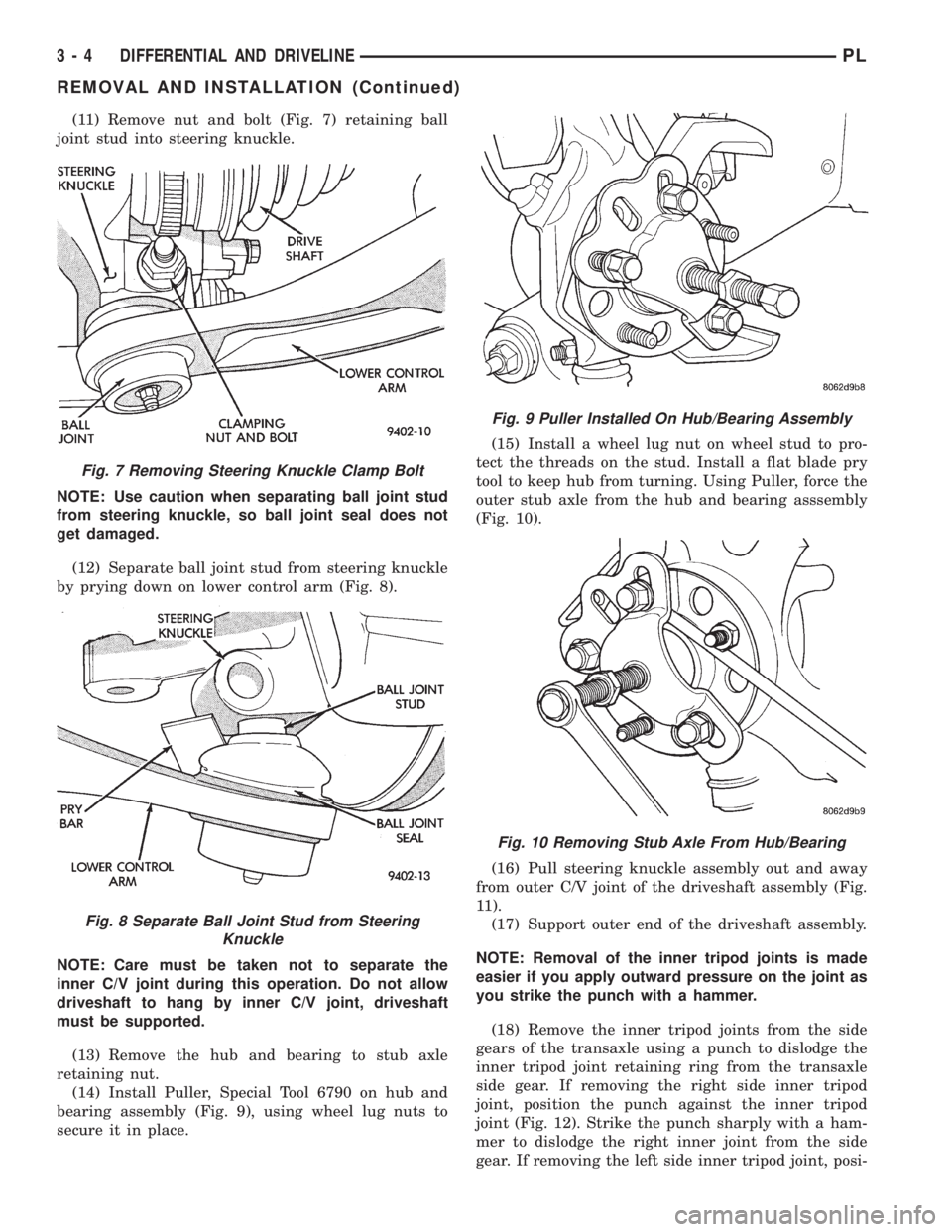
(11) Remove nut and bolt (Fig. 7) retaining ball
joint stud into steering knuckle.
NOTE: Use caution when separating ball joint stud
from steering knuckle, so ball joint seal does not
get damaged.
(12) Separate ball joint stud from steering knuckle
by prying down on lower control arm (Fig. 8).
NOTE: Care must be taken not to separate the
inner C/V joint during this operation. Do not allow
driveshaft to hang by inner C/V joint, driveshaft
must be supported.
(13) Remove the hub and bearing to stub axle
retaining nut.
(14) Install Puller, Special Tool 6790 on hub and
bearing assembly (Fig. 9), using wheel lug nuts to
secure it in place.(15) Install a wheel lug nut on wheel stud to pro-
tect the threads on the stud. Install a flat blade pry
tool to keep hub from turning. Using Puller, force the
outer stub axle from the hub and bearing asssembly
(Fig. 10).
(16) Pull steering knuckle assembly out and away
from outer C/V joint of the driveshaft assembly (Fig.
11).
(17) Support outer end of the driveshaft assembly.
NOTE: Removal of the inner tripod joints is made
easier if you apply outward pressure on the joint as
you strike the punch with a hammer.
(18) Remove the inner tripod joints from the side
gears of the transaxle using a punch to dislodge the
inner tripod joint retaining ring from the transaxle
side gear. If removing the right side inner tripod
joint, position the punch against the inner tripod
joint (Fig. 12). Strike the punch sharply with a ham-
mer to dislodge the right inner joint from the side
gear. If removing the left side inner tripod joint, posi-
Fig. 7 Removing Steering Knuckle Clamp Bolt
Fig. 8 Separate Ball Joint Stud from Steering
Knuckle
Fig. 9 Puller Installed On Hub/Bearing Assembly
Fig. 10 Removing Stub Axle From Hub/Bearing
3 - 4 DIFFERENTIAL AND DRIVELINEPL
REMOVAL AND INSTALLATION (Continued)
Page 70 of 1200
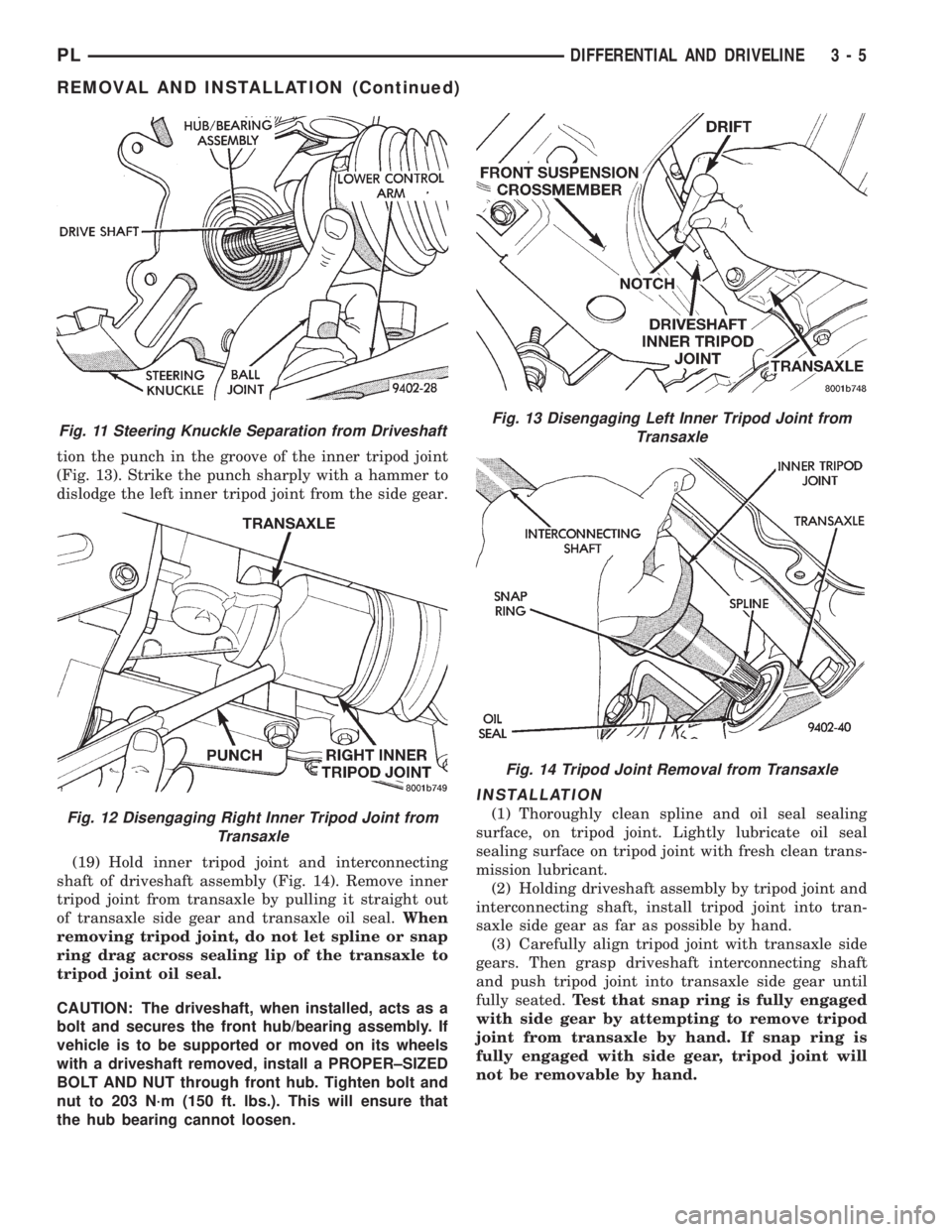
tion the punch in the groove of the inner tripod joint
(Fig. 13). Strike the punch sharply with a hammer to
dislodge the left inner tripod joint from the side gear.
(19) Hold inner tripod joint and interconnecting
shaft of driveshaft assembly (Fig. 14). Remove inner
tripod joint from transaxle by pulling it straight out
of transaxle side gear and transaxle oil seal.When
removing tripod joint, do not let spline or snap
ring drag across sealing lip of the transaxle to
tripod joint oil seal.
CAUTION: The driveshaft, when installed, acts as a
bolt and secures the front hub/bearing assembly. If
vehicle is to be supported or moved on its wheels
with a driveshaft removed, install a PROPER±SIZED
BOLT AND NUT through front hub. Tighten bolt and
nut to 203 N´m (150 ft. lbs.). This will ensure that
the hub bearing cannot loosen.
INSTALLATION
(1) Thoroughly clean spline and oil seal sealing
surface, on tripod joint. Lightly lubricate oil seal
sealing surface on tripod joint with fresh clean trans-
mission lubricant.
(2) Holding driveshaft assembly by tripod joint and
interconnecting shaft, install tripod joint into tran-
saxle side gear as far as possible by hand.
(3) Carefully align tripod joint with transaxle side
gears. Then grasp driveshaft interconnecting shaft
and push tripod joint into transaxle side gear until
fully seated.Test that snap ring is fully engaged
with side gear by attempting to remove tripod
joint from transaxle by hand. If snap ring is
fully engaged with side gear, tripod joint will
not be removable by hand.
Fig. 11 Steering Knuckle Separation from Driveshaft
Fig. 12 Disengaging Right Inner Tripod Joint from
Transaxle
Fig. 13 Disengaging Left Inner Tripod Joint from
Transaxle
Fig. 14 Tripod Joint Removal from Transaxle
PLDIFFERENTIAL AND DRIVELINE 3 - 5
REMOVAL AND INSTALLATION (Continued)
Page 130 of 1200
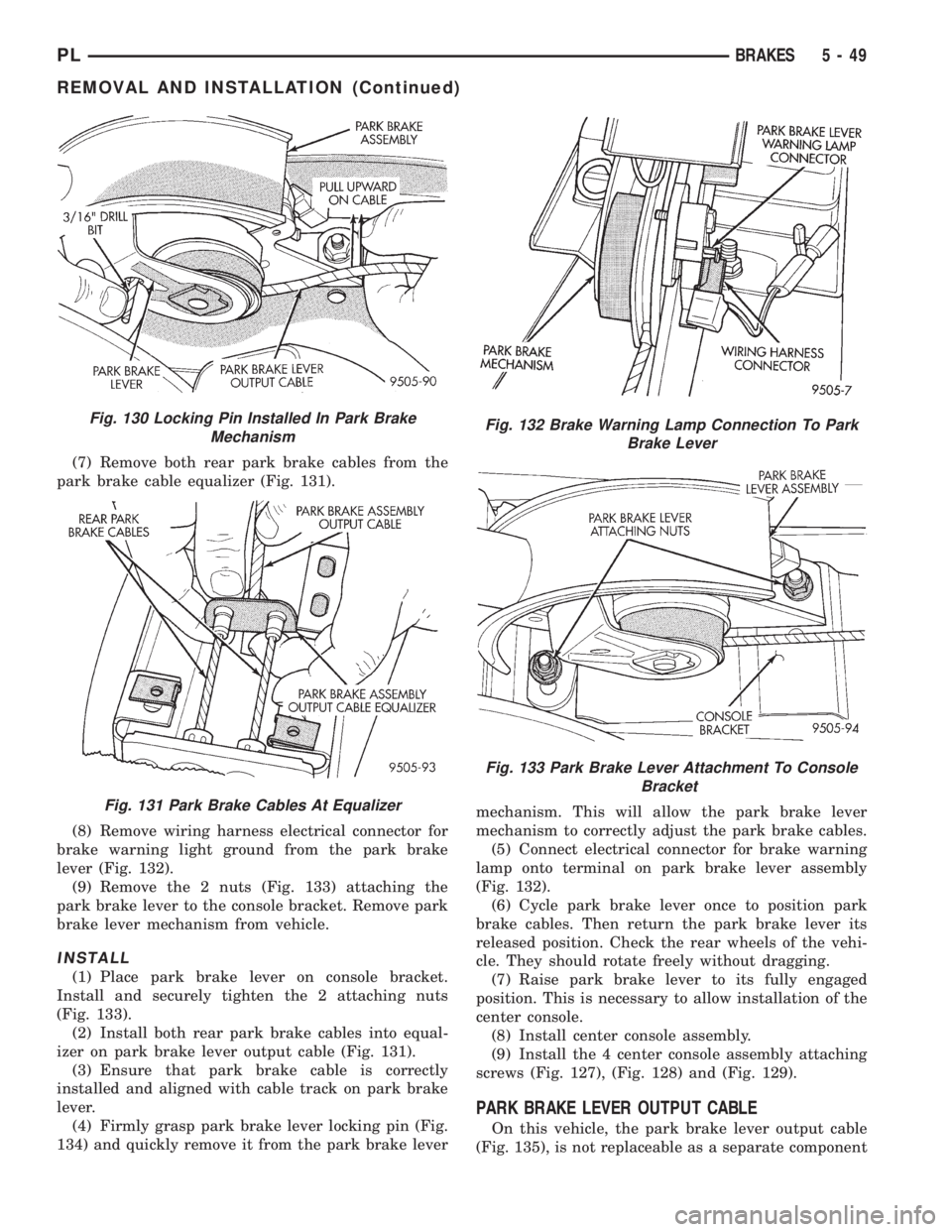
(7) Remove both rear park brake cables from the
park brake cable equalizer (Fig. 131).
(8) Remove wiring harness electrical connector for
brake warning light ground from the park brake
lever (Fig. 132).
(9) Remove the 2 nuts (Fig. 133) attaching the
park brake lever to the console bracket. Remove park
brake lever mechanism from vehicle.
INSTALL
(1) Place park brake lever on console bracket.
Install and securely tighten the 2 attaching nuts
(Fig. 133).
(2) Install both rear park brake cables into equal-
izer on park brake lever output cable (Fig. 131).
(3) Ensure that park brake cable is correctly
installed and aligned with cable track on park brake
lever.
(4) Firmly grasp park brake lever locking pin (Fig.
134) and quickly remove it from the park brake levermechanism. This will allow the park brake lever
mechanism to correctly adjust the park brake cables.
(5) Connect electrical connector for brake warning
lamp onto terminal on park brake lever assembly
(Fig. 132).
(6) Cycle park brake lever once to position park
brake cables. Then return the park brake lever its
released position. Check the rear wheels of the vehi-
cle. They should rotate freely without dragging.
(7) Raise park brake lever to its fully engaged
position. This is necessary to allow installation of the
center console.
(8) Install center console assembly.
(9) Install the 4 center console assembly attaching
screws (Fig. 127), (Fig. 128) and (Fig. 129).
PARK BRAKE LEVER OUTPUT CABLE
On this vehicle, the park brake lever output cable
(Fig. 135), is not replaceable as a separate component
Fig. 130 Locking Pin Installed In Park Brake
Mechanism
Fig. 131 Park Brake Cables At Equalizer
Fig. 132 Brake Warning Lamp Connection To Park
Brake Lever
Fig. 133 Park Brake Lever Attachment To Console
Bracket
PLBRAKES 5 - 49
REMOVAL AND INSTALLATION (Continued)
Page 135 of 1200
INSTALL
(1) Install park brake cable into floor pan of vehi-
cle making sure sealing grommet is installed in floor
pan as far as possible to insure proper seal.
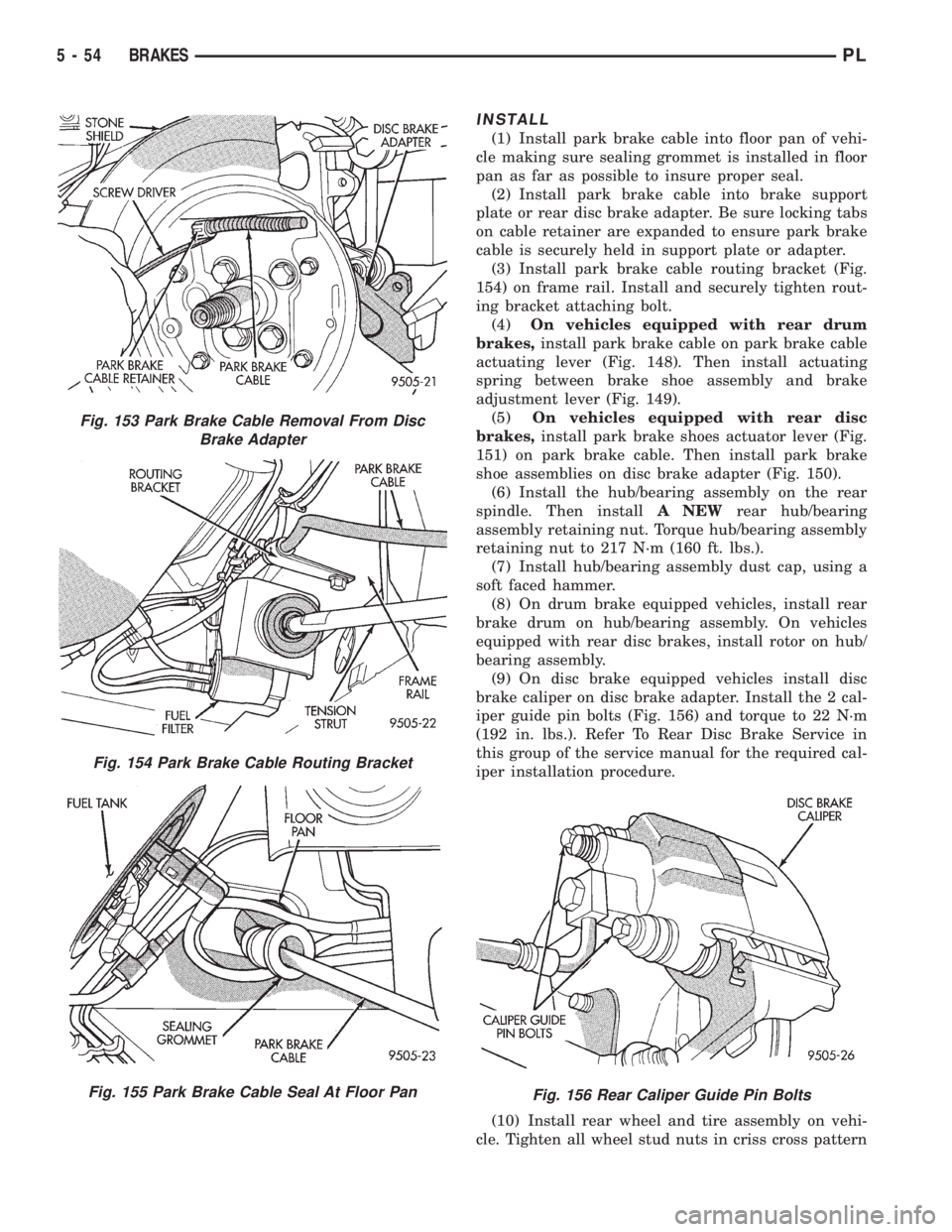
(2) Install park brake cable into brake support
plate or rear disc brake adapter. Be sure locking tabs
on cable retainer are expanded to ensure park brake
cable is securely held in support plate or adapter.
(3) Install park brake cable routing bracket (Fig.
154) on frame rail. Install and securely tighten rout-
ing bracket attaching bolt.
(4)On vehicles equipped with rear drum
brakes,install park brake cable on park brake cable
actuating lever (Fig. 148). Then install actuating
spring between brake shoe assembly and brake
adjustment lever (Fig. 149).
(5)On vehicles equipped with rear disc
brakes,install park brake shoes actuator lever (Fig.
151) on park brake cable. Then install park brake
shoe assemblies on disc brake adapter (Fig. 150).
(6) Install the hub/bearing assembly on the rear
spindle. Then installA NEWrear hub/bearing
assembly retaining nut. Torque hub/bearing assembly
retaining nut to 217 N´m (160 ft. lbs.).
(7) Install hub/bearing assembly dust cap, using a
soft faced hammer.
(8) On drum brake equipped vehicles, install rear
brake drum on hub/bearing assembly. On vehicles
equipped with rear disc brakes, install rotor on hub/
bearing assembly.
(9) On disc brake equipped vehicles install disc
brake caliper on disc brake adapter. Install the 2 cal-
iper guide pin bolts (Fig. 156) and torque to 22 N´m
(192 in. lbs.). Refer To Rear Disc Brake Service in
this group of the service manual for the required cal-
iper installation procedure.
(10) Install rear wheel and tire assembly on vehi-
cle. Tighten all wheel stud nuts in criss cross pattern
Fig. 153 Park Brake Cable Removal From Disc
Brake Adapter
Fig. 154 Park Brake Cable Routing Bracket
Fig. 155 Park Brake Cable Seal At Floor PanFig. 156 Rear Caliper Guide Pin Bolts
5 - 54 BRAKESPL
Page 160 of 1200
A visual inspection for loose, disconnected, or mis-
routed wires should be done before attempting to
diagnose or service the ITT Teves Mark 20 antilock
brake system. A visual inspection will eliminate
unnecessary testing and diagnostics time. A thorough
visual inspection will include the following compo-
nents and areas of the vehicle.
(1) Inspect fuses in the power distribution center
(PDC) and the wiring junction block. Verify that all
fuses are fully inserted into the PDC and wring junc-
tion block. A label on the underside of the PDC cover
identifies the locations of the ABS fuses in the PDC.
(2) Inspect the 25-way electrical connector at the
CAB for damage, spread or backed-out wiring termi-
nals. Verify that the 25-way connector is fully
inserted in the socket on the CAB. Be sure that wires
are not stretched tight or pulled out of the connector.
(3) Verify that all the wheel speed sensor connec-
tions are secure.
(4) Poor mating of connector halves or terminals
not fully seated in the connector body.
(5) Improperly formed or damaged terminals. All
connector terminals in a suspect circuit should be
carefully reformed to increase contact tension.
(6) Poor terminal to wire connection. This requires
removing the terminal from the connector body to
inspect.
(7) Pin presence in the connector assembly
(8) Proper ground connections. Check all ground
connections for signs of corrosion, tight fasteners, or
other potential defects. Refer to wiring diagram man-
ual for ground locations.
(9) Problems with main power sources of the vehi-
cle. Inspect battery, generator, ignition circuits and
other related relays and fuses.
(10) If a visual check does not find the cause of the
problem, operate the car in an attempt to duplicate
the condition and record the trouble code.
(11) Most failures of the ABS system will disable
ABS function for the entire ignition cycle even if the
fault clears before key-off. There are some failure
conditions, however, which will allow ABS operation
to resume during the ignition cycle in which a failure
occurred if the failure conditions are no longer
present. The following conditions may result in inter-
mittent illumination of the ABS Warning Lamp. All
other failures will cause the lamp to remain on until
the ignition switch is turned off. Circuits involving
these inputs to the CAB should be investigated if a
complaint of intermittent warning system operation
is encountered.
(12) Low system voltage. If Low System Voltage is
detected by the CAB, the CAB will turn on the ABS
Warning Lamp until normal system voltage is
achieved. Once normal voltage is seen at the CAB,
normal operation resumes.(13) High system voltage. If high system voltage is
detected by the CAB, the CAB will turn on the
Amber ABS Warning Lamp until normal system volt-
age is achieved. Once normal voltage is again
detected by the CAB, normal ABS operation resumes.
(14) Additionally, any condition which results in
interruption of electrical current to the CAB or mod-
ulator assembly may cause the ABS Warning Lamp
to turn on intermittently.
(15) The body controller can turn on the (yellow)
ABS warning lamp if CCD communication between
the body controller and the CAB is interupted.
TONEWHEEL INSPECTION
CAUTION: The tone wheels used on this vehicle
equipped with the Teves Mark 20 Antilock Brake
System are different then those used on past mod-
els of this vehicle equipped with antilock brakes.
Reduced braking performance will result if this part
is used on earlier model vehicles and an accident
could result. Do not use on pre-1998 model year
vehicles.
Carefully inspect tonewheel at the suspected faulty
wheel speed sensor for missing, chipped or broken
teeth, this can cause erratic speed sensor signals.
Tonewheels should show no evidence of contact
with the wheel speed sensors. If contact was made,
determine cause and correct before replacing the
wheel speed sensor.
Excessive runout of the tonewheel can cause
erratic wheel speed sensor signals. Refer to Tone-
wheel Runout in the Specification Section in this sec-
tion of the service manual for the tonewheel runout
specification. Replace drive shaft assembly or rear
hub/bearing assembly if tonewheel runout exceeds
the specification.
Inspect tonewheels for looseness on their mounting
surfaces. Tonewheels are pressed onto their mounting
surfaces and should not rotate independently from
the mounting surface.
Check the wheel speed sensor head alignment to
the tone wheel. Also check the gap between the speed
sensor head and the tone wheel to ensure it is at
specification. Refer to Wheel Speed Sensor Clearance
in the Specification Section in this section of the ser-
vice manual.
PROPORTIONING VALVE
CAUTION: Proportioning valves should never be
disassembled.
If premature rear wheel skid occurs on a hard
brake application, it could be an indication that a
PLBRAKES 5 - 79
DIAGNOSIS AND TESTING (Continued)
Page 167 of 1200
(18) Install the wiring harness connector (Fig. 19)
on the speed control servo. Then install the routing
clip for the speed control servo wiring harness on the
speed control servo mounting bracket.
Install speed control servo mounting bracket on
body.
(19) Install and securely tighten the 2 bolts (Fig.
18) mounting the bracket for the speed control servo
to the body.
(20) Install the vacuum supply hose on the speed
control servo (Fig. 18).
(21) Install the power distribution center (PDC)
(Fig. 17) on the battery thermogaurd. PDC is install
by pushing straight down on it until the two retain-
ing clips holding it to the thermogaurd are latched to
the thermogaurd.
(22) Connect the negative (ground) cable on the
battery.
(23) Bleed the base brakes and the ABS brakes
hydraulic systems. Refer to Bleeding Base Brake
Hydraulic System in Service Procedures of the Base
Brake Section and Antilock Brakes Hydraulic System
Bleeding Procedure in Service Procedures of the
Antilock Brake Section for the required procedures.
(24) Fill the master cylinder to the proper fill
level.
(25) Road test vehicle to ensure proper operation
of the base and ABS brake systems.
PROPORTIONING VALVES
CAUTION: Proportioning valves should never be
disassembled.
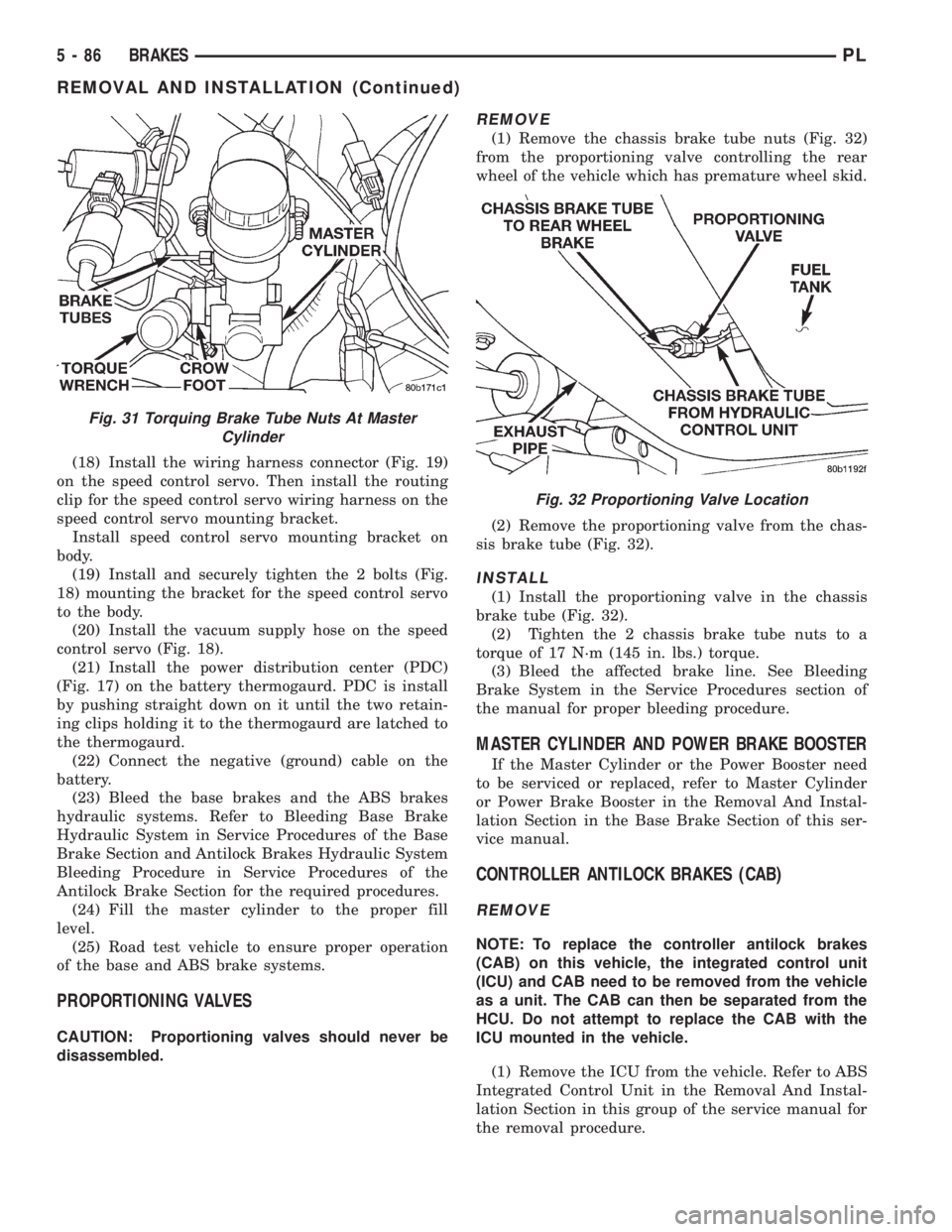
REMOVE
(1) Remove the chassis brake tube nuts (Fig. 32)
from the proportioning valve controlling the rear
wheel of the vehicle which has premature wheel skid.
(2) Remove the proportioning valve from the chas-
sis brake tube (Fig. 32).
INSTALL
(1) Install the proportioning valve in the chassis
brake tube (Fig. 32).
(2) Tighten the 2 chassis brake tube nuts to a
torque of 17 N´m (145 in. lbs.) torque.
(3) Bleed the affected brake line. See Bleeding
Brake System in the Service Procedures section of
the manual for proper bleeding procedure.
MASTER CYLINDER AND POWER BRAKE BOOSTER
If the Master Cylinder or the Power Booster need
to be serviced or replaced, refer to Master Cylinder
or Power Brake Booster in the Removal And Instal-
lation Section in the Base Brake Section of this ser-
vice manual.
CONTROLLER ANTILOCK BRAKES (CAB)
REMOVE
NOTE: To replace the controller antilock brakes
(CAB) on this vehicle, the integrated control unit
(ICU) and CAB need to be removed from the vehicle
as a unit. The CAB can then be separated from the
HCU. Do not attempt to replace the CAB with the
ICU mounted in the vehicle.
(1) Remove the ICU from the vehicle. Refer to ABS
Integrated Control Unit in the Removal And Instal-
lation Section in this group of the service manual for
the removal procedure.
Fig. 31 Torquing Brake Tube Nuts At Master
Cylinder
Fig. 32 Proportioning Valve Location
5 - 86 BRAKESPL
REMOVAL AND INSTALLATION (Continued)
Page 178 of 1200
(4) Guide cable through slot in transaxle and dis-
connect cable from release lever.
(5) Disconnect clutch cable up-stop/spacer with
cable strand from clutch pedal.
NOTE: Depressing the clutch pedal provides
access to the clutch cable strand. Disconnect the
cable up-stop/spacer from the pedal pivot pin by
removing the snap ring at the top of the clutch
pedal. Wedge a flat±blade pry tool between the pin
and the retaining tab. While holding the tab slightly
separated from the pin, pull the up-stop/spacer off
the pedal. Now remove the cable end from the up-
stop/spacer.
CAUTION: Do not pull on the clutch cable to
remove it from the dash panel. Damage to the cable
self-adjuster may occur.
(6) Remove the cable from the cable routing tube
and clutch bracket.
INSTALLATION
(1) Insert the self±adjuster mechanism end of the
clutch cable through the cable routing tube and into
the bracket.
(2) Be sure the self±adjuster is firmly seated
against the clutch bracket to ensure proper adjuster
mechanism function.
(3) Connect the clutch cable to the up-stop/spacer.
(4) Connect the up-stop/spacer to the clutch pedal.
(5) Install snap ring to hold up-stop spacer in
place.
(6) Perform the Adjuster Mechanism Function
Check before finishing installation.
ADJUSTER MECHANISM FUNCTION CHECK
(1) With slight pressure, pull the clutch release
lever end of the cable to draw the cable taut. Push
the clutch cable housing toward the dash panel (With
less than 25 lbs. of effort, the cable housing should
move 30-50mm.). This indicates proper adjuster
mechanism function. If the cable does not adjust,
determine if the mechanism is properly seated on the
bracket tube.
(2) If the adjust mechanism functions properly,
guide the cable through the slot in the transaxle
housing. Connect cable to release lever, seating the
cupped washer securely on lever tangs.
(3) Pull back on clutch cable housing and insert
into transaxle housing (Fig. 2).
(4) Reinstall cable inspection cover and PDC.
Check clutch pedal position switch operation.
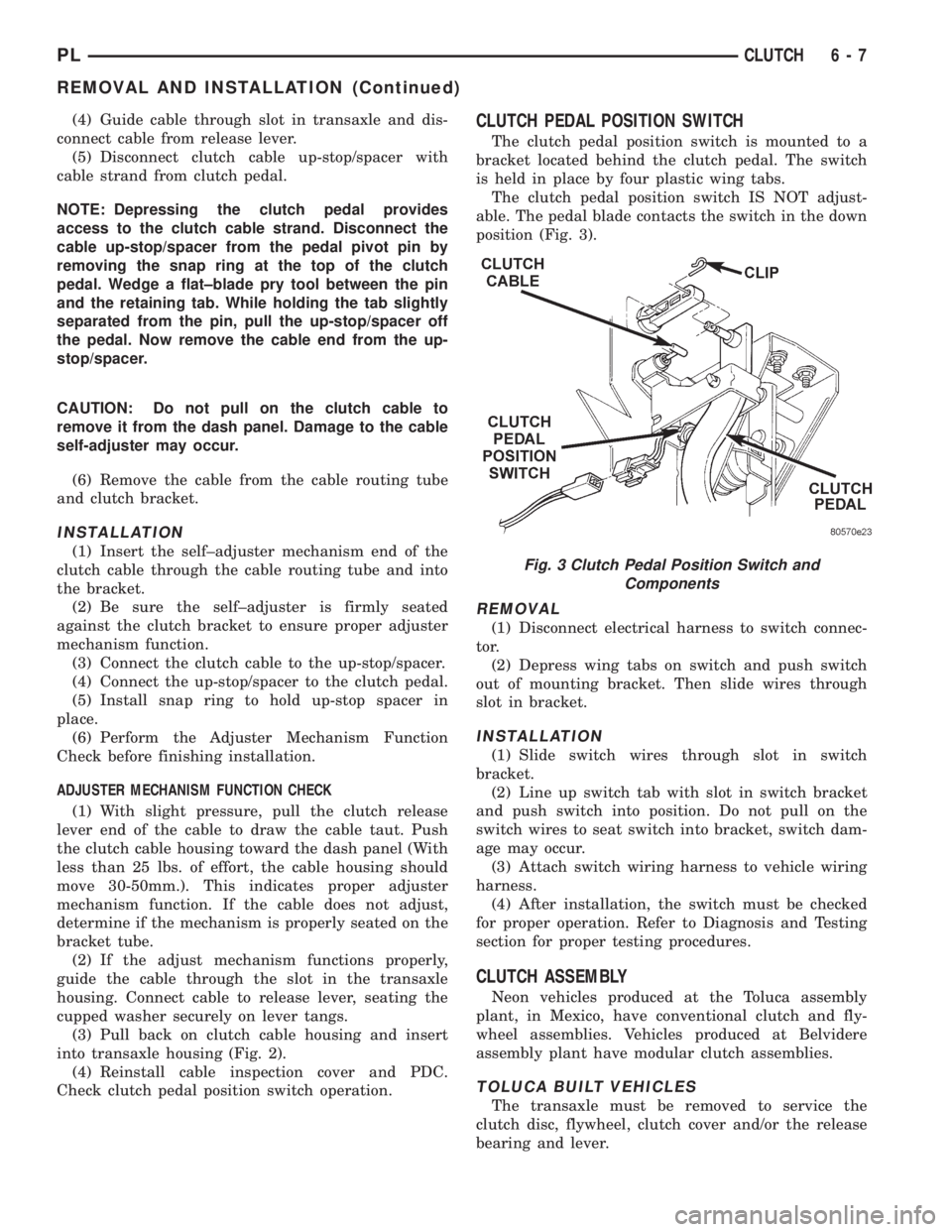
CLUTCH PEDAL POSITION SWITCH
The clutch pedal position switch is mounted to a
bracket located behind the clutch pedal. The switch
is held in place by four plastic wing tabs.
The clutch pedal position switch IS NOT adjust-
able. The pedal blade contacts the switch in the down
position (Fig. 3).
REMOVAL
(1) Disconnect electrical harness to switch connec-
tor.
(2) Depress wing tabs on switch and push switch
out of mounting bracket. Then slide wires through
slot in bracket.
INSTALLATION
(1) Slide switch wires through slot in switch
bracket.
(2) Line up switch tab with slot in switch bracket
and push switch into position. Do not pull on the
switch wires to seat switch into bracket, switch dam-
age may occur.
(3) Attach switch wiring harness to vehicle wiring
harness.
(4) After installation, the switch must be checked
for proper operation. Refer to Diagnosis and Testing
section for proper testing procedures.
CLUTCH ASSEMBLY
Neon vehicles produced at the Toluca assembly
plant, in Mexico, have conventional clutch and fly-
wheel assemblies. Vehicles produced at Belvidere
assembly plant have modular clutch assemblies.
TOLUCA BUILT VEHICLES
The transaxle must be removed to service the
clutch disc, flywheel, clutch cover and/or the release
bearing and lever.
Fig. 3 Clutch Pedal Position Switch and
Components
PLCLUTCH 6 - 7
REMOVAL AND INSTALLATION (Continued)
Page 181 of 1200
INSTALLATION
(1) The pivot ball pocket in the fork is Teflon
coated and should be installed WITHOUT any lubri-
cant such as grease. Using grease will break down
the Teflon coating. Be sure the ball stud and fork
pocket are clean of contamination and dirt.
(2) Assemble the fork to the bearing. The small
pegs on the bearing must go over the fork arms.
(3) Slide the bearing and fork assembly onto the
input shaft bearing retainer, as a unit.
(4) Snap the clutch fork onto the pivot ball.
(5) Reinstall transaxle assembly. Refer to Group
21, Transaxle for further information.
CLEANING AND INSPECTION
CLUTCH CONTAMINATION
Fluid contamination is a frequent cause of clutch
malfunctions. Oil, grease, water, or other fluids on
the clutch contact surfaces will cause faulty opera-
tion.
During inspection, note if any components are con-
taminated. Look for evidence of oil, grease, or water/
road splash on clutch components.
OIL CONTAMINATION
Oil contamination indicates a leak at the rear main
seal and/or transaxle input shaft. Oil leaks produce a
residue of oil on the transaxle housing interior, clutch
cover and flywheel. Heat buildup caused by slippage
can bake the oil residue onto the components. This
glaze-like residue ranges in color from amber to
black.
GREASE CONTAMINATION
Grease contamination is usually a product of over-
lubrication. During clutch service, apply only a small
amount of grease to the input shaft splines. Excess
grease may be thrown off during operation, contami-
nating the disc.
ROAD SPLASH/WATER CONTAMINATION
Road splash contamination is usually caused by
driving the vehicle through deep water puddles.
Water can be forced into the clutch housing, causing
clutch components to become contaminated. Facing of
disc will absorb moisture and bond to the flywheel
and/or, pressure plate, if vehicle is allowed to stand
for some time before use. If this condition occurs,
replacement of clutch assembly may be required.
Drive the vehicle until normal clutch operating tem-
perature has been obtained. This will dry off disc
assembly, pressure plate, and flywheel.
CLEANING PRECAUTIONS
Condensation from steam vapors tend to accumu-
late on the internal clutch mechanism when the vehi-
cle is steam cleaned. Facing of disc will absorb
moisture and will bond to flywheel and/or pressure
plate, if vehicle is allowed to stand for some time
before use. If this condition occurs, it may require
replacement of clutch assembly. After cleaning, drive
the vehicle to its normal clutch operating tempera-
ture. This will dry off disc assembly, pressure plate,
and flywheel.
ADJUSTMENTS
CLUTCH CABLE
The manual transaxle clutch release system has a
unique self-adjusting mechanism to compensate for
clutch disc wear. This adjuster mechanism is located
within the clutch cable assembly. The preload spring
maintains tension on the cable. This tension keeps
the clutch release bearing continuously loaded
against the fingers of the clutch cover assembly.
ADJUSTER MECHANISM FUNCTION CHECK
(1) With slight pressure, pull the clutch release
lever end of the cable to draw the cable taut. Push
the clutch cable housing toward the dash panel. With
less than 25 lbs. of effort the cable housing should
move 30-50mm. This indicates proper adjuster mech-
anism function. If the cable does not adjust, deter-
mine if the mechanism is properly seated on the
bracket.
(2) If the adjust mechanism functions properly,
guide the cable through the slot in the transaxle
housing. Connect cable to release lever, seating the
cupped washer securely on lever tangs.
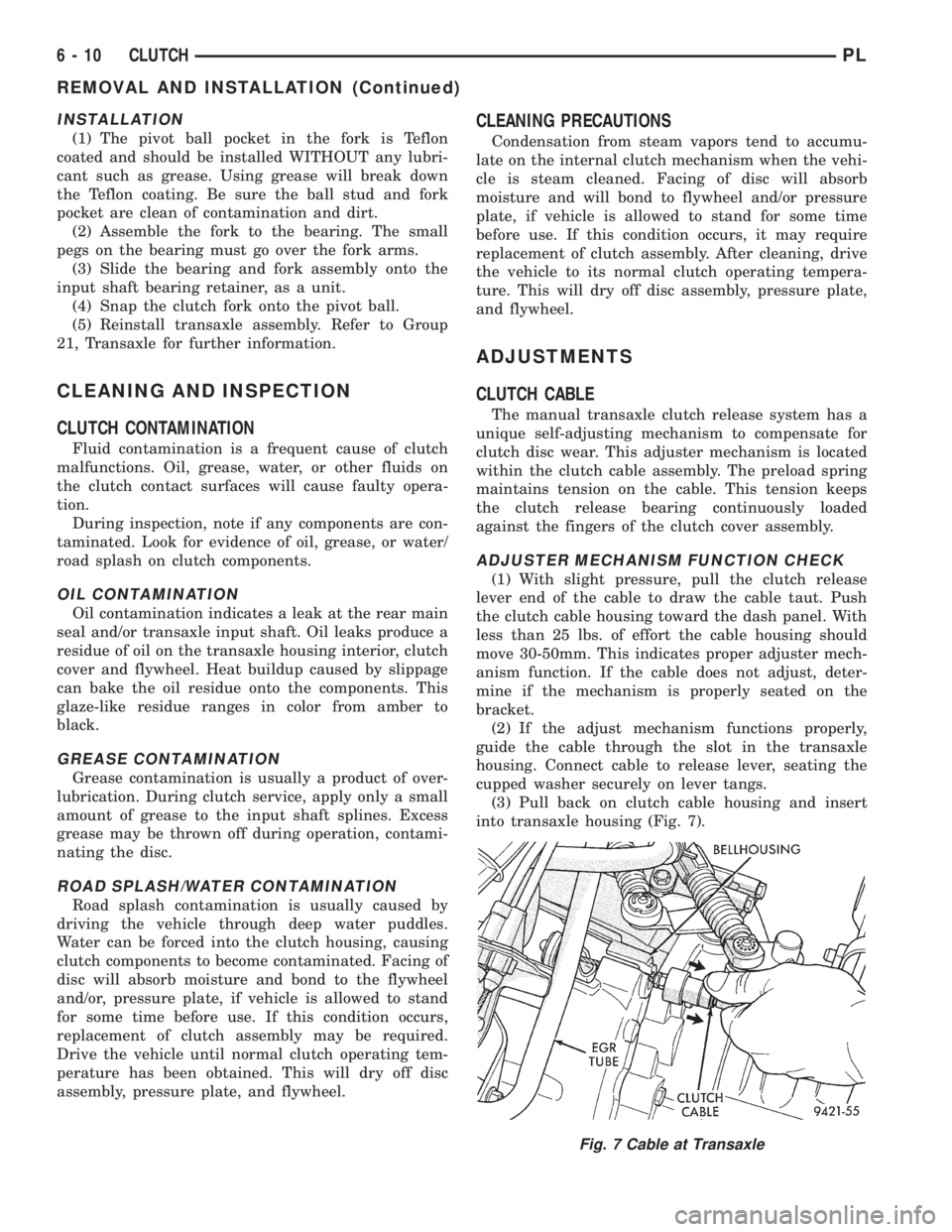
(3) Pull back on clutch cable housing and insert
into transaxle housing (Fig. 7).
Fig. 7 Cable at Transaxle
6 - 10 CLUTCHPL
REMOVAL AND INSTALLATION (Continued)